ECO mode CADILLAC ESCALADE 2017 4.G Owner's Manual
[x] Cancel search | Manufacturer: CADILLAC, Model Year: 2017, Model line: ESCALADE, Model: CADILLAC ESCALADE 2017 4.GPages: 354, PDF Size: 3.9 MB
Page 209 of 354
Cadillac Escalade Owner Manual (GMNA-Localizing-MidEast-10293077) -
2017 - crc - 8/24/16
208 DRIVING AND OPERATING
L2 using Range Selection Mode. This
will limit torque to the wheels and
help to prevent the tires from
spinning.
Tow/Haul Mode
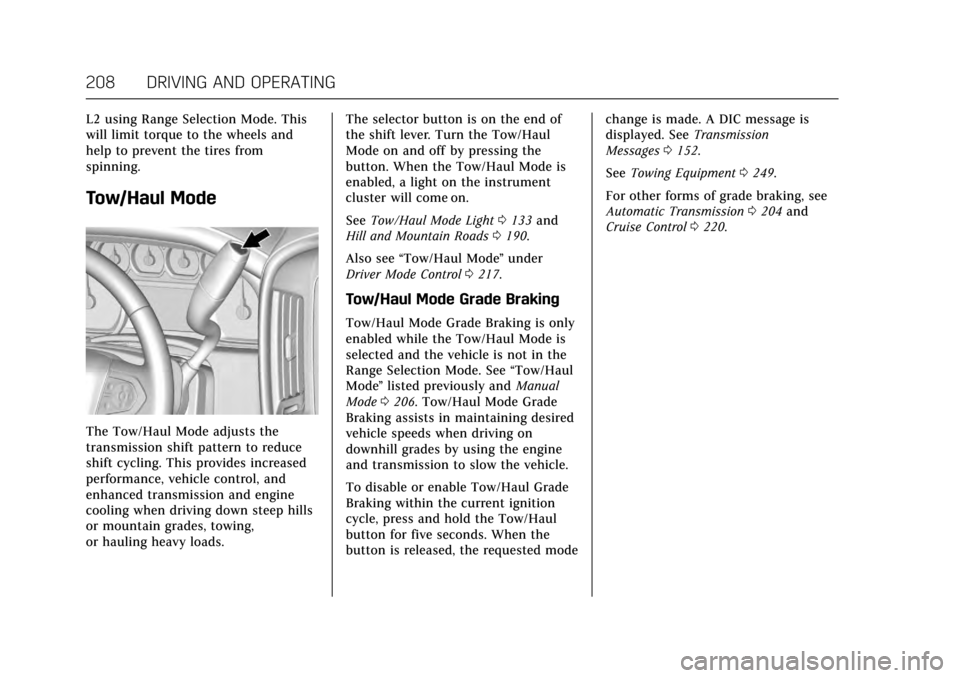
The Tow/Haul Mode adjusts the
transmission shift pattern to reduce
shift cycling. This provides increased
performance, vehicle control, and
enhanced transmission and engine
cooling when driving down steep hills
or mountain grades, towing,
or hauling heavy loads.The selector button is on the end of
the shift lever. Turn the Tow/Haul
Mode on and off by pressing the
button. When the Tow/Haul Mode is
enabled, a light on the instrument
cluster will come on.
See
Tow/Haul Mode Light 0133 and
Hill and Mountain Roads 0190.
Also see “Tow/Haul Mode ”under
Driver Mode Control 0217.
Tow/Haul Mode Grade Braking
Tow/Haul Mode Grade Braking is only
enabled while the Tow/Haul Mode is
selected and the vehicle is not in the
Range Selection Mode. See “Tow/Haul
Mode ”listed previously and Manual
Mode 0206. Tow/Haul Mode Grade
Braking assists in maintaining desired
vehicle speeds when driving on
downhill grades by using the engine
and transmission to slow the vehicle.
To disable or enable Tow/Haul Grade
Braking within the current ignition
cycle, press and hold the Tow/Haul
button for five seconds. When the
button is released, the requested mode change is made. A DIC message is
displayed. See
Transmission
Messages 0152.
See Towing Equipment 0249.
For other forms of grade braking, see
Automatic Transmission 0204 and
Cruise Control 0220.
Page 211 of 354
Cadillac Escalade Owner Manual (GMNA-Localizing-MidEast-10293077) -
2017 - crc - 8/24/16
210 DRIVING AND OPERATING
command a shift rotate the transfer
case switch to the new desired
position. The light will blink meaning
that the shift is in progress. When the
shift is completed the new position
will be illuminated. If the transfer case
can not complete a shift command, it
will go back to its last chosen setting.
The settings are:
N (Neutral) :Use only when the
vehicle needs to be towed. See
Recreational Vehicle Towing 0316 or
Towing the Vehicle 0315.
2
m(Two-Wheel Drive High) : Use for
driving on most streets and highways.
The front axle is not engaged. This
setting provides the best fuel
economy.
AUTO (Automatic Four-Wheel
Drive) : Use when road surface
traction conditions are variable. When
driving in AUTO, the front axle is
engaged, and the vehicle's power is
sent to the front and rear wheels
automatically based on driving
conditions. This setting provides
slightly lower fuel economy than 2
m. Do not use AUTO mode, if equipped,
to park on a steep grade with poor
traction such as ice, snow, mud,
or gravel. In AUTO mode only the rear
wheels will hold the vehicle from
sliding when parked. If parking on a
steep grade, use 4
mto keep all four
wheels engaged.
4
m(Four-Wheel Drive High) : Use
this position when extra traction is
needed, such as when driving on
snowy or icy roads, when off-roading,
or when plowing snow.
4
n(Four-Wheel Drive Low) : This
setting engages the front axle and
delivers extra torque. Choose 4
nwhen
driving off-road in deep sand, deep
mud, or deep snow, and while
climbing or descending steep hills.
Shifting into 4
nwill turn Traction
Control and StabiliTrak off. See
Traction Control/Electronic Stability
Control 0216. Shifting Into 4
mor AUTO
Turn the knob to the 4
mor AUTO
position at any speed, except from 4
n.
The indicator light will flash while
shifting and will remain on when the
shift is completed.
Shifting Into 2
m
Turn the knob to 2mat any speed,
except when shifting from 4
n. The
indicator light will flash while shifting
and will remain on when the shift is
completed.
Shifting Into 4
n
When 4nis engaged, keep vehicle
speed below 72 km/h (45 mph).
To shift:
1. The ignition must be in ON/RUN and the vehicle must be stopped
or moving less than
5 km/h (3 mph) with the
transmission in N (Neutral). It is
best for the vehicle to be moving
1.6 to 3.2 km/h (1 to 2 mph).
Page 212 of 354
Cadillac Escalade Owner Manual (GMNA-Localizing-MidEast-10293077) -
2017 - crc - 8/24/16
DRIVING AND OPERATING 211
2. Turn the knob to 4n. Wait for
the 4
nindicator light to stop
flashing before shifting the
transmission into gear.
Caution
Shifting the transmission into gear
before the requested mode indicator
light has stopped flashing could
damage the transfer case.
If the transmission is in gear and/or
moving more than 5 km/h (3 mph), the
4
nindicator light will flash for
30 seconds and not complete the shift.
After 30 seconds the transfer case will
shift to 4
m. Turn the knob to 4mto
display the indicator. With the vehicle
moving less than 5 km/h (3 mph), and
the transmission in N (Neutral),
attempt the shift again.
Shifting Out of 4
n
To shift:
1. The vehicle must be stopped or moving less than 5 km/h (3 mph)
with the transmission in N (Neutral) and the ignition in
ON/RUN. It is best for the
vehicle to be moving
1.6 to 3.2 km/h (1 to 2 mph).
2. Turn the knob to 4
m, AUTO,
or 2
m. Wait for the 4m, AUTO,
or 2
mindicator light to stop
flashing before shifting the
transmission into gear.
Caution
Shifting the transmission into gear
before the requested mode indicator
light has stopped flashing could
damage the transfer case.
If the transmission is in gear and/or
moving more than 5 km/h (3 mph), the
4
m, AUTO, or 2mindicator light will
flash for 30 seconds but will not
complete the shift. With the vehicle
moving less than 5 km/h (3 mph), and
the transmission in N (Neutral),
attempt the shift again. Shifting Into N (Neutral)
To shift into N (Neutral):
1. Park the vehicle on a level surface.
2. Set the parking brake and press and hold the brake pedal. See
Parking Brake 0213.
3. Start the vehicle or turn the ignition to ON/RUN.
4. Shift the transmission to N (Neutral).
5. Shift the transfer case to 2
m.
6. Turn the transfer case knob clockwise to N (Neutral) until it
stops and hold it there until the
N (Neutral) light starts blinking.
This will take at least 10 seconds.
Then slowly release the knob to
the 4
nposition. The N (Neutral)
light will come on when the
transfer case shift to N (Neutral)
is complete.
7. With the engine running, verify that the transfer case is in
N (Neutral) by shifting the
transmission to R (Reverse), then
shift the transmission to
Page 218 of 354
Cadillac Escalade Owner Manual (GMNA-Localizing-MidEast-10293077) -
2017 - crc - 8/24/16
DRIVING AND OPERATING 217
Ifdcomes on and stays on:
1. Stop the vehicle.
2. Turn the engine off and wait 15 seconds.
3. Start the engine.
Drive the vehicle. If
dcomes on and
stays on, the vehicle may need more
time to diagnose the problem. If the
condition persists, see your dealer.
Turning the Systems Off and On
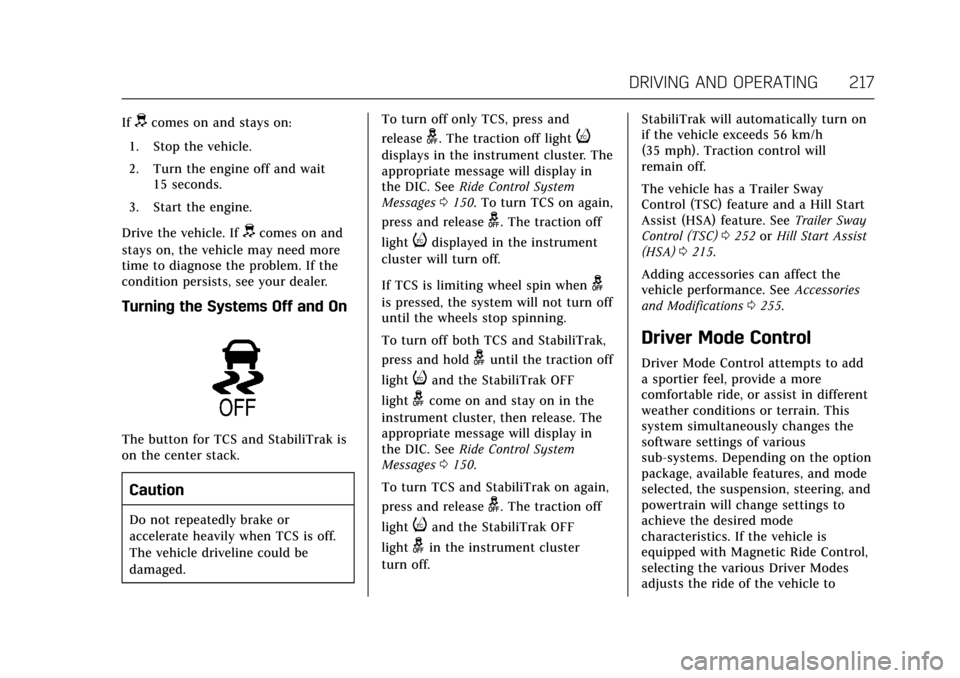
The button for TCS and StabiliTrak is
on the center stack.
Caution
Do not repeatedly brake or
accelerate heavily when TCS is off.
The vehicle driveline could be
damaged. To turn off only TCS, press and
release
g. The traction off lighti
displays in the instrument cluster. The
appropriate message will display in
the DIC. See
Ride Control System
Messages 0150. To turn TCS on again,
press and release
g. The traction off
light
idisplayed in the instrument
cluster will turn off.
If TCS is limiting wheel spin when
g
is pressed, the system will not turn off
until the wheels stop spinning.
To turn off both TCS and StabiliTrak,
press and hold
guntil the traction off
light
iand the StabiliTrak OFF
light
gcome on and stay on in the
instrument cluster, then release. The
appropriate message will display in
the DIC. See Ride Control System
Messages 0150.
To turn TCS and StabiliTrak on again,
press and release
g. The traction off
light
iand the StabiliTrak OFF
light
gin the instrument cluster
turn off. StabiliTrak will automatically turn on
if the vehicle exceeds 56 km/h
(35 mph). Traction control will
remain off.
The vehicle has a Trailer Sway
Control (TSC) feature and a Hill Start
Assist (HSA) feature. See
Trailer Sway
Control (TSC) 0252 orHill Start Assist
(HSA) 0215.
Adding accessories can affect the
vehicle performance. See Accessories
and Modifications 0255.
Driver Mode Control
Driver Mode Control attempts to add
a sportier feel, provide a more
comfortable ride, or assist in different
weather conditions or terrain. This
system simultaneously changes the
software settings of various
sub-systems. Depending on the option
package, available features, and mode
selected, the suspension, steering, and
powertrain will change settings to
achieve the desired mode
characteristics. If the vehicle is
equipped with Magnetic Ride Control,
selecting the various Driver Modes
adjusts the ride of the vehicle to
Page 219 of 354
Cadillac Escalade Owner Manual (GMNA-Localizing-MidEast-10293077) -
2017 - crc - 8/24/16
218 DRIVING AND OPERATING
enhance the ride performance for the
road conditions and the
selected mode.
The Driver Mode Control has four
modes: Tour, Sport, Snow/Ice, and
Tow/Haul.
Press the TOW/HAUL switch to
activate and deactivate the Tow/
Haul Mode.
Press the MODE switch on the center
console to select Tour, Sport, or Snow/
Ice. Pressing the switch will display a
graphic of all available ride modes and
change to the next mode. The Tour
and Sport Modes will feel similar on a
smooth road. Select a new setting
whenever driving conditions change.
Tour Mode
Use for normal city and highway
driving to provide a smooth, soft ride.
When selected, there will be no
indication in the DIC.
Sport Mode
Use where road conditions or personal
preference demand a more controlled
response.The steering will change to provide
more precise control. The Magnetic
Ride Control will change to provide
better cornering performance.
When selected, the Sport Mode
indicator will display in the DIC.
Snow/Ice Mode
Use when more traction is needed
during slippery conditions.
The vehicle will upshift normally
when the vehicle is moving. The
acceleration will adjust to help provide
a smoother launch.
When selected, the Snow/Ice Mode
indicator will display in the DIC.
Tow/Haul Mode
Tow/Haul is a feature that assists
when pulling a heavy trailer or a large
or heavy load. See .Tow/Haul
Mode
0208
Tow/Haul is designed to be most
effective when the vehicle and trailer
combined weight is at least 75 percent
of the vehicle’s Gross Combined
Weight Rating (GCWR)l See “Weight
of the Trailer” underTrailer
Towing 0247. Tow/Haul is most useful under the
following conditions:
.
When pulling a heavy trailer or a
large or heavy load through rolling
terrain.
. When pulling a heavy trailer or a
large or heavy load in stop-and-go
traffic.
. When pulling a heavy trailer or a
large or heavy load in busy
parking lots where improved low
speed control of the vehicle is
desired.
Operating the vehicle in Tow/Haul
when lightly loaded or with no trailer
at all will not cause damage. However,
there is no benefit to the selection of
Tow/Haul when the vehicle is
unloaded. Such a selection when
unloaded may result in unpleasant
engine and transmission driving
characteristics and reduced fuel
economy. Tow/Haul is recommended
only when pulling a heavy trailer or a
large or heavy load.
When selected, the Tow/Haul
indicator will display in the
instrument cluster.
Page 220 of 354
Cadillac Escalade Owner Manual (GMNA-Localizing-MidEast-10293077) -
2017 - crc - 8/24/16
DRIVING AND OPERATING 219
Magnetic Ride Control
The Magnetic Ride Control monitors
the suspension system.
Based on road conditions, steering
wheel angle, and vehicle speed, the
system automatically adjusts to
provide the best handling while
providing a smooth ride. The Tour and
Sport Modes will feel similar on a
smooth road.
Tour :Use for normal city and
highway driving. This setting provides
a smooth, soft ride.
8Sport : Use where road conditions
or personal preference demand more
control. This setting provides more
“feel,” or response to road conditions.
6Snow/Ice : Use when more
traction is needed during slippery
conditions.
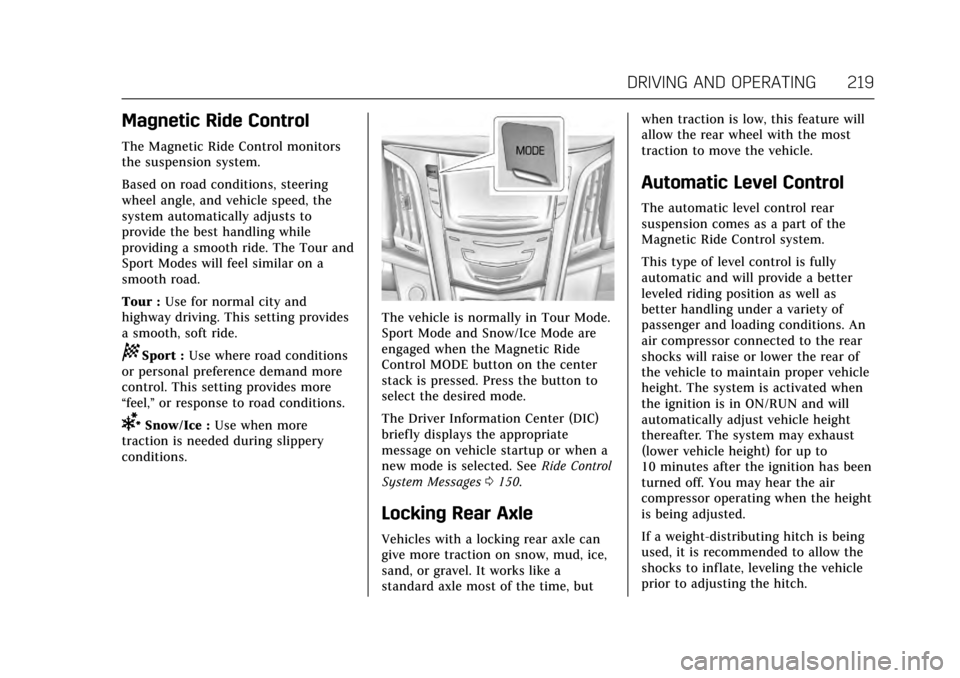
The vehicle is normally in Tour Mode.
Sport Mode and Snow/Ice Mode are
engaged when the Magnetic Ride
Control MODE button on the center
stack is pressed. Press the button to
select the desired mode.
The Driver Information Center (DIC)
briefly displays the appropriate
message on vehicle startup or when a
new mode is selected. See Ride Control
System Messages 0150.
Locking Rear Axle
Vehicles with a locking rear axle can
give more traction on snow, mud, ice,
sand, or gravel. It works like a
standard axle most of the time, but when traction is low, this feature will
allow the rear wheel with the most
traction to move the vehicle.
Automatic Level Control
The automatic level control rear
suspension comes as a part of the
Magnetic Ride Control system.
This type of level control is fully
automatic and will provide a better
leveled riding position as well as
better handling under a variety of
passenger and loading conditions. An
air compressor connected to the rear
shocks will raise or lower the rear of
the vehicle to maintain proper vehicle
height. The system is activated when
the ignition is in ON/RUN and will
automatically adjust vehicle height
thereafter. The system may exhaust
(lower vehicle height) for up to
10 minutes after the ignition has been
turned off. You may hear the air
compressor operating when the height
is being adjusted.
If a weight-distributing hitch is being
used, it is recommended to allow the
shocks to inflate, leveling the vehicle
prior to adjusting the hitch.
Page 223 of 354
Cadillac Escalade Owner Manual (GMNA-Localizing-MidEast-10293077) -
2017 - crc - 8/24/16
222 DRIVING AND OPERATING
when driving on downhill grades by
using the engine and transmission to
slow the vehicle.
To disable and enable Cruise Grade
Braking for the current ignition cycle,
press and hold the Tow/Haul button
for five seconds. A Driver Information
Center (DIC) message displays. See
Transmission Messages0152.
For other forms of Grade Braking, see
Automatic Transmission 0204, and
Tow/Haul Mode 0208.
Ending Cruise Control
There are four ways to end cruise
control:
. Step lightly on the brake pedal.
. Press
*.
. Shift the transmission to
N (Neutral).
. To turn off cruise control,
press
J.
Erasing Speed Memory
The cruise control set speed is erased
from memory if
Jis pressed or if
the ignition is turned off.
Adaptive Cruise Control
If equipped with Adaptive Cruise
Control (ACC), it allows for selecting
the cruise control set speed and
following gap. Read this entire section
before using this system. ACC uses a
camera and radar sensors to detect
other vehicles. The following gap is
the following time (or distance)
between your vehicle and a vehicle
detected directly ahead in your path,
moving in the same direction. If no
vehicle is detected in your path, ACC
works like regular cruise control.
If a vehicle is detected in your path,
ACC can speed up the vehicle or apply
limited, moderate braking to maintain
the selected following gap. To
disengage ACC, apply the brake. If the
Traction Control System (TCS) or
electronic stability control system
activates while ACC is engaged, ACC
may automatically disengage. See
Traction Control/Electronic Stability
Control 0216. When road conditions
allow ACC to be safely used, the ACC
can be turned back on. ACC will not engage if the TCS or
StabiliTrak electronic stability control
system is disabled.
{Warning
ACC has limited braking ability and
may not have time to slow the
vehicle down enough to avoid a
collision with another vehicle you
are following. This can occur when
vehicles suddenly slow or stop
ahead, or enter your lane. Also see
“Alerting the Driver”
in this section.
Complete attention is always
required while driving and you
should be ready to take action and
apply the brakes. See Defensive
Driving 0183.
Page 297 of 354
Cadillac Escalade Owner Manual (GMNA-Localizing-MidEast-10293077) -
2017 - crc - 8/24/16
296 VEHICLE CARE
The TPMS sensor matching process is:1. Set the parking brake.
2. Place the vehicle power mode in ON/RUN/START. See Ignition
Positions 0197.
3. Make sure the Tire Pressure info display option is turned on. The
info displays on the DIC can be
turned on and off through the
Settings menu. See Driver
Information Center (DIC) 0138.
4. Use the five-way DIC control on the right side of the steering
wheel to scroll to the Tire
Pressure screen under the DIC
info page. See Driver Information
Center (DIC) 0138.
5. Press and hold SEL in the center of the five-way DIC control.
The horn sounds twice to signal
the receiver is in relearn mode
and the TIRE LEARNING ACTIVE
message displays on the DIC
screen.
6. Start with the driver side front tire. 7. Place the relearn tool against the
tire sidewall, near the valve stem.
Then press the button to activate
the TPMS sensor. A horn chirp
confirms that the sensor
identification code has been
matched to this tire and wheel
position.
8. Proceed to the passenger side front tire, and repeat the
procedure in Step 7.
9. Proceed to the passenger side rear tire, and repeat the
procedure in Step 7.
10. Proceed to the driver side rear tire, and repeat the procedure in
Step 7. The horn sounds two
times to indicate the sensor
identification code has been
matched to the driver side rear
tire, and the TPMS sensor
matching process is no longer
active. The TIRE LEARNING
ACTIVE message on the DIC
display screen goes off.
11. Press ENGINE START/STOP to turn the ignition off. 12. Set all four tires to the
recommended air pressure level
as indicated on the Tire and
Loading Information label.
Tire Inspection
We recommend that the tires,
including the spare tire, if the
vehicle has one, be inspected for
signs of wear or damage at least
once a month.
Replace the tire if:
.The indicators at three or more
places around the tire can
be seen.
.There is cord or fabric showing
through the tire's rubber.
.The tread or sidewall is
cracked, cut, or snagged deep
enough to show cord or fabric.
.The tire has a bump, bulge,
or split.
Page 347 of 354

Cadillac Escalade Owner Manual (GMNA-Localizing-MidEast-10293077) -
2017 - crc - 8/24/16
346 INDEX
Coolant (cont'd)Engine Temperature Gauge . . . . . . 127
Engine Temperature Warning
Light . . . . . . . . . . . . . . . . . . . . . . . . . . . . . 135
Cooling . . . . . . . . . . . . . . . . . . . . . . . . .173, 177
Cooling System . . . . . . . . . . . . . . . . . . . . . 263 Engine Messages . . . . . . . . . . . . . . . . . . 146
Cornering Lamps . . . . . . . . . . . . . . . . . . . 169
Cruise Control . . . . . . . . . . . . . . . . . . . . . . . 220 Light . . . . . . . . . . . . . . . . . . . . . . . . . . . . . . . 137
Messages . . . . . . . . . . . . . . . . . . . . . . . . . . 145
Cruise Control, Adaptive . . . . . . . . . . . 222
Cupholders . . . . . . . . . . . . . . . . . . . . . . . . . . 110
D
Danger, Warning, and Caution . . . . . . . . 2
Data Collection Infotainment System . . . . . . . . . . . . . 343
Data Recorders, Event . . . . . . . . . . . . . . 342
Daytime Running Lamps (DRL) . . . 166
Defensive Driving . . . . . . . . . . . . . . . . . . . 183
Delayed Locking . . . . . . . . . . . . . . . . . . . . . 36
Distracted Driving . . . . . . . . . . . . . . . . . . 182
Dome Lamps . . . . . . . . . . . . . . . . . . . . . . . . 169
Door
Ajar Light . . . . . . . . . . . . . . . . . . . . . . . . . 138
Ajar Messages . . . . . . . . . . . . . . . . . . . . . 145
Delayed Locking . . . . . . . . . . . . . . . . . . . . 36
Locks . . . . . . . . . . . . . . . . . . . . . . . . . . . . . . . . 34 Door (cont'd)
Power Locks . . . . . . . . . . . . . . . . . . . . . . . . . 36
Drive Belt Routing, Engine . . . . . . . . . 341
Driver Assistance Systems . . . . . . . . . 229
Driver Information Center (DIC) . . . . . . . . . . . . . . . . . . . . . . . 138
Driver Mode Control . . . . . . . . . . . . . . . . 217
Driving Assistance Systems . . . . . . . . . . . . . . . 234
Characteristics and
Towing Tips . . . . . . . . . . . . . . . . . . . . . 245
Defensive . . . . . . . . . . . . . . . . . . . . . . . . . . 183
For Better Fuel Economy . . . . . . . . . . . 26
Hill and Mountain Roads . . . . . . . . 190
If the Vehicle is Stuck . . . . . . . . . . . . 191
Loss of Control . . . . . . . . . . . . . . . . . . . . 184
Off-Road . . . . . . . . . . . . . . . . . . . . . . . . . . . 185
Off-Road Recovery . . . . . . . . . . . . . . . . 184
Vehicle Load Limits . . . . . . . . . . . . . . 192
Wet Roads . . . . . . . . . . . . . . . . . . . . . . . . . 189
Winter . . . . . . . . . . . . . . . . . . . . . . . . . . . . . 190
Winter Mode Light . . . . . . . . . . . . . . . 134
Dual Automatic Climate
Control System . . . . . . . . . . . . . . . . . . . . 173
E
Electric Parking Brake . . . . . . . . . . . . . . 213
Electric Parking Brake Light . . . . . . . 132
Electrical Equipment, Add-On . . . . . 252
Electrical SystemEngine Compartment FuseBlock . . . . . . . . . . . . . . . . . . . . . . . . . . . . . 278
Fuses . . . . . . . . . . . . . . . . . . . . . . . . . . . . . . 278
Instrument Panel Fuse Block . . . . . . . . . . . . . . . . . . . . . . . . 283, 286
Overload . . . . . . . . . . . . . . . . . . . . . . . . . . . 278
Rear Compartment Fuse Block . . . . . . . . . . . . . . . . . . . . . . . . . . . . . 288
Engine
Air Cleaner/Filter . . . . . . . . . . . . . . . . . 262
Check and Service EngineSoon Light . . . . . . . . . . . . . . . . . . . . . . . 130
Compartment Overview . . . . . . . . . . 257
Coolant . . . . . . . . . . . . . . . . . . . . . . . . . . . . 264
Coolant Temperature Gauge . . . . . 127
Coolant Temperature Warning Light . . . . . . . . . . . . . . . . . . . 135
Cooling System . . . . . . . . . . . . . . . . . . . 263
Cooling System Messages . . . . . . . . 146
Drive Belt Routing . . . . . . . . . . . . . . . . 341
Exhaust . . . . . . . . . . . . . . . . . . . . . . . . . . . . 203
Fan . . . . . . . . . . . . . . . . . . . . . . . . . . . . . . . . . 267
Oil Life System . . . . . . . . . . . . . . . . . . . . 260
Page 350 of 354

Cadillac Escalade Owner Manual (GMNA-Localizing-MidEast-10293077) -
2017 - crc - 8/24/16
INDEX 349
Lights . . . . . . . . . . . . . . . . . . . . . . . . . . . . . . . . 134Airbag Readiness . . . . . . . . . . . . . . . . . 129
Antilock Brake System (ABS)
Warning . . . . . . . . . . . . . . . . . . . . . . . . . 133
Brake System Warning . . . . . . . . . . . 132
Charging System . . . . . . . . . . . . . . . . . . 130
Cruise Control . . . . . . . . . . . . . . . . . . . . . 137
Door Ajar . . . . . . . . . . . . . . . . . . . . . . . . . . 138
Electric Parking Brake . . . . . . . . . . . . 132
Engine Coolant Temperature Warning . . . . . . . . . . . . . . . . . . . . . . . . . 135
Engine Oil Pressure . . . . . . . . . . . . . . . 136
Flash-to-Pass . . . . . . . . . . . . . . . . . . . . . . 166
High-Beam On . . . . . . . . . . . . . . . . . . . . 137
High/Low Beam Changer . . . . . . . . . 166
Low Fuel Warning . . . . . . . . . . . . . . . . 137
Safety Belt Reminders . . . . . . . . . . . . 128
Security . . . . . . . . . . . . . . . . . . . . . . . . . . . . 137
Service Electric Parking Brake . . . 133
Sport Mode . . . . . . . . . . . . . . . . . . . . . . . . 133
StabiliTrak
®OFF . . . . . . . . . . . . . . . . . . 135
Tire Pressure . . . . . . . . . . . . . . . . . . . . . . 136
Tow/Haul Mode . . . . . . . . . . . . . . . . . . . 133
Traction Control System (TCS)/StabiliTrak
®. . . . . . . . . . . . . . 135
Traction Off . . . . . . . . . . . . . . . . . . . . . . . 134
Winter Driving Mode . . . . . . . . . . . . . 134
Locking Rear Axle . . . . . . . . . . . . . . . . . . 219 Locks
Automatic Door . . . . . . . . . . . . . . . . . . . . . 36
Delayed Locking . . . . . . . . . . . . . . . . . . . . 36
Door . . . . . . . . . . . . . . . . . . . . . . . . . . . . . . . . . 34
Lockout Protection . . . . . . . . . . . . . . . . . 37
Power Door . . . . . . . . . . . . . . . . . . . . . . . . . . 36
Safety . . . . . . . . . . . . . . . . . . . . . . . . . . . . . . . . 37
Loss of Control . . . . . . . . . . . . . . . . . . . . . . 184
Low Fuel Warning Light . . . . . . . . . . . 137
Low-Profile Tires . . . . . . . . . . . . . . . . . . . . 291
Lower Anchors and Tethers for Children (LATCH System) . . . . . . . . . 96
Lumbar Adjustment . . . . . . . . . . . . . . . . . 57 Front Seats . . . . . . . . . . . . . . . . . . . . . . . . . . 57
M
Magnetic Ride Control . . . . . . . . . . . . . 219
MaintenanceRecords . . . . . . . . . . . . . . . . . . . . . . . . . . . . 338
Maintenance Schedule . . . . . . . . . . . . . 329 Recommended Fluids and
Lubricants . . . . . . . . . . . . . . . . . . . . . . . 336
Transfer Case . . . . . . . . . . . . . . . . . . . . . 209
Malfunction Indicator Lamp . . . . . . . 130
Manual Mode . . . . . . . . . . . . . . . . . . . . . . . 206
Massage . . . . . . . . . . . . . . . . . . . . . . . . . . . . . . 61
Memory Features . . . . . . . . . . . . . . . . . . . . 13
Memory Seats . . . . . . . . . . . . . . . . . . . . . . . . 59 Messages
Airbag System . . . . . . . . . . . . . . . . . . . . . 151
Battery Voltage and Charging . . . . 144
Brake System . . . . . . . . . . . . . . . . . . . . . . 144
Compass . . . . . . . . . . . . . . . . . . . . . . . . . . . 145
Door Ajar . . . . . . . . . . . . . . . . . . . . . . . . . . 145
Engine Cooling System . . . . . . . . . . . 146
Engine Oil . . . . . . . . . . . . . . . . . . . . . . . . . 146
Engine Power . . . . . . . . . . . . . . . . . . . . . 147
Fuel System . . . . . . . . . . . . . . . . . . . . . . . 147
Key and Lock . . . . . . . . . . . . . . . . . . . . . . 147
Lamp . . . . . . . . . . . . . . . . . . . . . . . . . . . . . . 148
Object Detection System . . . . . . . . . 148
Ride Control System . . . . . . . . . . . . . . 150
Safety Belt . . . . . . . . . . . . . . . . . . . . . . . . . 151
Security . . . . . . . . . . . . . . . . . . . . . . . . . . . . 151
Service Vehicle . . . . . . . . . . . . . . . . . . . . 151
Starting the Vehicle . . . . . . . . . . . . . . 151
Steering System . . . . . . . . . . . . . . . . . . . 151
Tire . . . . . . . . . . . . . . . . . . . . . . . . . . . . . . . . 152
Transmission . . . . . . . . . . . . . . . . . . . . . . 152
Vehicle . . . . . . . . . . . . . . . . . . . . . . . . . . . . . 144
Vehicle Reminder . . . . . . . . . . . . . . . . . 153
Vehicle Speed . . . . . . . . . . . . . . . . . . . . . 153
Washer Fluid . . . . . . . . . . . . . . . . . . . . . . 153
Window . . . . . . . . . . . . . . . . . . . . . . . . . . . 153
Mirror Child-View . . . . . . . . . . . . . . . . . . . . . . . . . . . 49