change time CADILLAC ESCALADE 2017 4.G Owner's Manual
[x] Cancel search | Manufacturer: CADILLAC, Model Year: 2017, Model line: ESCALADE, Model: CADILLAC ESCALADE 2017 4.GPages: 354, PDF Size: 3.9 MB
Page 207 of 354
Cadillac Escalade Owner Manual (GMNA-Localizing-MidEast-10293077) -
2017 - crc - 8/24/16
206 DRIVING AND OPERATING
When temperatures are very cold, the
transmission's gear shifting could be
delayed providing more stable shifts
until the engine warms up. Shifts
could be more noticeable with a cold
transmission. This difference in
shifting is normal.
L :This position allows selection of a
range of gears appropriate for current
driving conditions. If equipped, see
“Range Selection Mode ”under Manual
Mode 0206.
Caution
Spinning the tires or holding the
vehicle in one place on a hill using
only the accelerator pedal may
damage the transmission. The
repair will not be covered by the
vehicle warranty. If you are stuck,
do not spin the tires. When
stopping on a hill, use the brakes to
hold the vehicle in place.
Normal Mode Grade Braking
This mode is enabled when the
vehicle is started, but is not enabled
in Range Selection Mode. It assists in maintaining desired vehicle speeds
when driving on downhill grades by
using the engine and transmission to
slow the vehicle. The first time the
system engages for each ignition
cycle, a DIC message will be displayed.
See
Transmission Messages 0152.
To disable or enable Normal Mode
Grade Braking within the current
ignition cycle, press and hold the
Tow/Haul button for five seconds.
When the button is released, the
requested mode change is made.
A DIC message displays. See
Transmission Messages 0152.
For other forms of grade braking, see
Tow/Haul Mode 0208 and Cruise
Control 0220.
Kickdown Mode
The accelerator pedal provides an
additional downshift after pressing
through the kickdown feature.
It requires extra pedal pressure near
the end of its travel to engage.
Manual Mode
Range Selection Mode
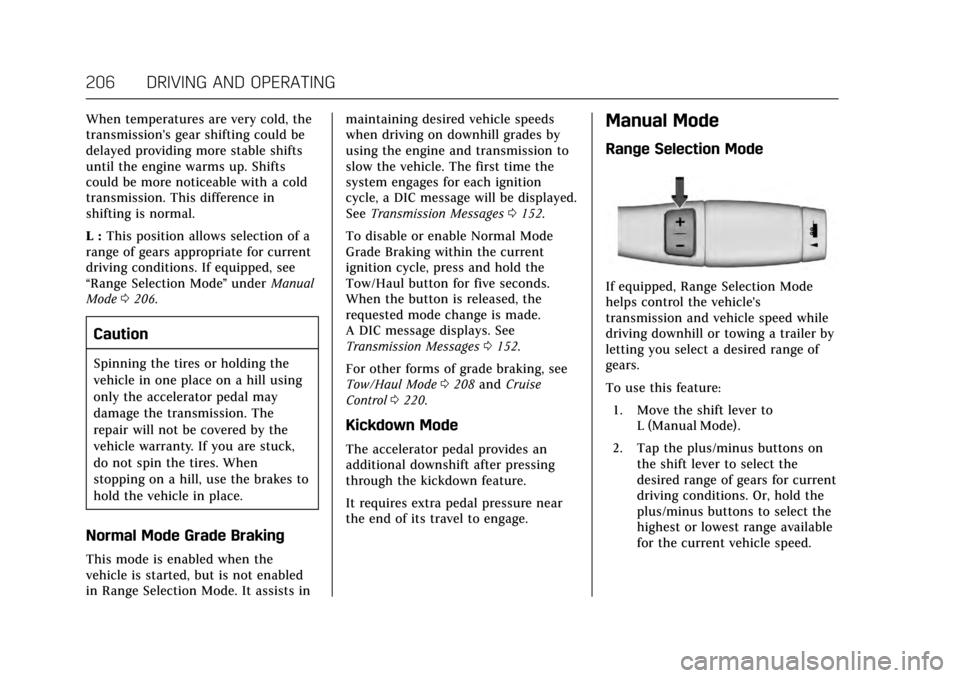
If equipped, Range Selection Mode
helps control the vehicle's
transmission and vehicle speed while
driving downhill or towing a trailer by
letting you select a desired range of
gears.
To use this feature:
1. Move the shift lever to L (Manual Mode).
2. Tap the plus/minus buttons on the shift lever to select the
desired range of gears for current
driving conditions. Or, hold the
plus/minus buttons to select the
highest or lowest range available
for the current vehicle speed.
Page 213 of 354
Cadillac Escalade Owner Manual (GMNA-Localizing-MidEast-10293077) -
2017 - crc - 8/24/16
212 DRIVING AND OPERATING
D (Drive). There should be no
movement of the vehicle while
shifting the transmission.
8. Turn the engine off, and the ignition to ACC/ACCESSORY.
9. Place the transmission shift lever in P (Park). See Recreational
Vehicle Towing 0316.
10. Turn the ignition to LOCK/OFF.
Shifting Out of N (Neutral)
To shift out of N (Neutral):
1. Set the parking brake and apply the brake pedal.
2. Turn the ignition to ON/RUN with the engine off.
3. Shift the transmission to N (Neutral).
4. Turn the transfer case knob to the desired setting.
After the transfer case has
shifted out of N (Neutral), the
N (Neutral) light will go out.
5. Release the parking brake.
6. Start the engine and shift the transmission to the desired gear.Brakes
Antilock Brake
System (ABS)
This vehicle has an Antilock Brake
System (ABS), an advanced electronic
braking system that helps prevent a
braking skid.
When the vehicle begins to drive
away, ABS checks itself. A momentary
motor or clicking noise may be heard
while this test is going on, and it may
even be noticed that the brake pedal
moves a little. This is normal.
If there is a problem with ABS, this
warning light stays on. See Antilock
Brake System (ABS) Warning
Light 0133.
If driving safely on a wet road and it
becomes necessary to slam on the
brakes and continue braking to avoid a sudden obstacle, a computer senses
the wheels are slowing down. If one of
the wheels is about to stop rolling, the
computer will separately work the
brakes at each wheel.
ABS can change the brake pressure to
each wheel, as required, faster than
any driver could. This can help you
steer around the obstacle while
braking hard.
As the brakes are applied, the
computer keeps receiving updates on
wheel speed and controls braking
pressure accordingly.
Remember: ABS does not change the
time needed to get a foot up to the
brake pedal or always decrease
stopping distance. If you get too close
to the vehicle in front of you, there
will not be enough time to apply the
brakes if that vehicle suddenly slows
or stops. Always leave enough room
up ahead to stop, even with ABS.
Page 218 of 354
Cadillac Escalade Owner Manual (GMNA-Localizing-MidEast-10293077) -
2017 - crc - 8/24/16
DRIVING AND OPERATING 217
Ifdcomes on and stays on:
1. Stop the vehicle.
2. Turn the engine off and wait 15 seconds.
3. Start the engine.
Drive the vehicle. If
dcomes on and
stays on, the vehicle may need more
time to diagnose the problem. If the
condition persists, see your dealer.
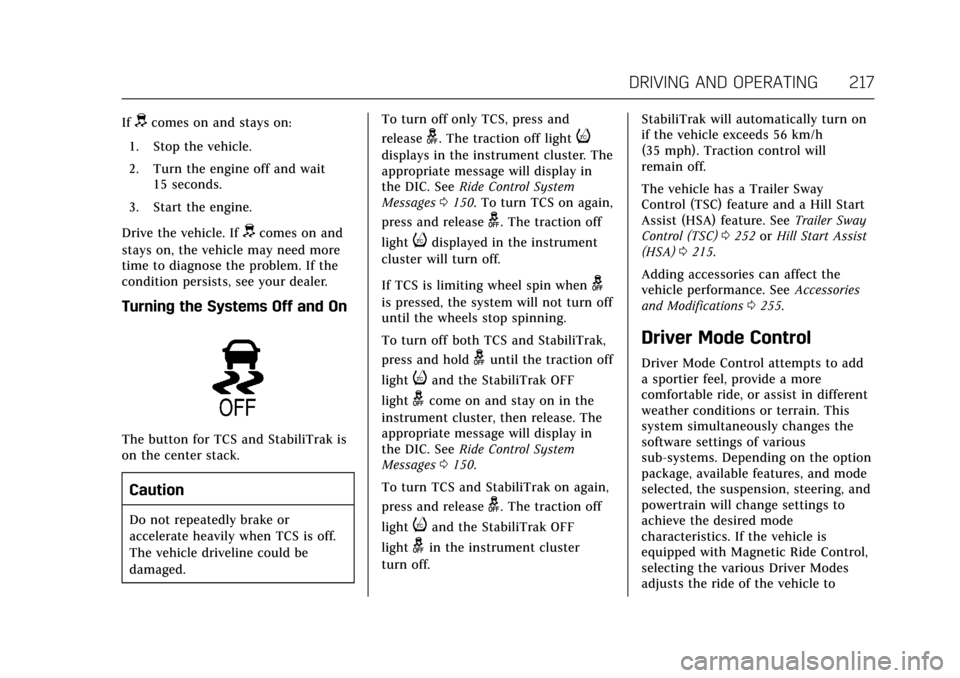
Turning the Systems Off and On
The button for TCS and StabiliTrak is
on the center stack.
Caution
Do not repeatedly brake or
accelerate heavily when TCS is off.
The vehicle driveline could be
damaged. To turn off only TCS, press and
release
g. The traction off lighti
displays in the instrument cluster. The
appropriate message will display in
the DIC. See
Ride Control System
Messages 0150. To turn TCS on again,
press and release
g. The traction off
light
idisplayed in the instrument
cluster will turn off.
If TCS is limiting wheel spin when
g
is pressed, the system will not turn off
until the wheels stop spinning.
To turn off both TCS and StabiliTrak,
press and hold
guntil the traction off
light
iand the StabiliTrak OFF
light
gcome on and stay on in the
instrument cluster, then release. The
appropriate message will display in
the DIC. See Ride Control System
Messages 0150.
To turn TCS and StabiliTrak on again,
press and release
g. The traction off
light
iand the StabiliTrak OFF
light
gin the instrument cluster
turn off. StabiliTrak will automatically turn on
if the vehicle exceeds 56 km/h
(35 mph). Traction control will
remain off.
The vehicle has a Trailer Sway
Control (TSC) feature and a Hill Start
Assist (HSA) feature. See
Trailer Sway
Control (TSC) 0252 orHill Start Assist
(HSA) 0215.
Adding accessories can affect the
vehicle performance. See Accessories
and Modifications 0255.
Driver Mode Control
Driver Mode Control attempts to add
a sportier feel, provide a more
comfortable ride, or assist in different
weather conditions or terrain. This
system simultaneously changes the
software settings of various
sub-systems. Depending on the option
package, available features, and mode
selected, the suspension, steering, and
powertrain will change settings to
achieve the desired mode
characteristics. If the vehicle is
equipped with Magnetic Ride Control,
selecting the various Driver Modes
adjusts the ride of the vehicle to
Page 224 of 354
Cadillac Escalade Owner Manual (GMNA-Localizing-MidEast-10293077) -
2017 - crc - 8/24/16
DRIVING AND OPERATING 223
{Warning
ACC will not detect or brake for
children, pedestrians, animals,
or other objects.
Do not use ACC when:. On winding and hilly roads or
when the sensors are blocked
by snow, ice, or dirt. The
system may not detect a
vehicle ahead. Keep the entire
front of the vehicle clean.
. Visibility is low, such as in
fog, rain, or snow conditions.
ACC performance is limited
under these conditions.
. On slippery roads where fast
changes in tire traction can
cause excessive wheel slip.
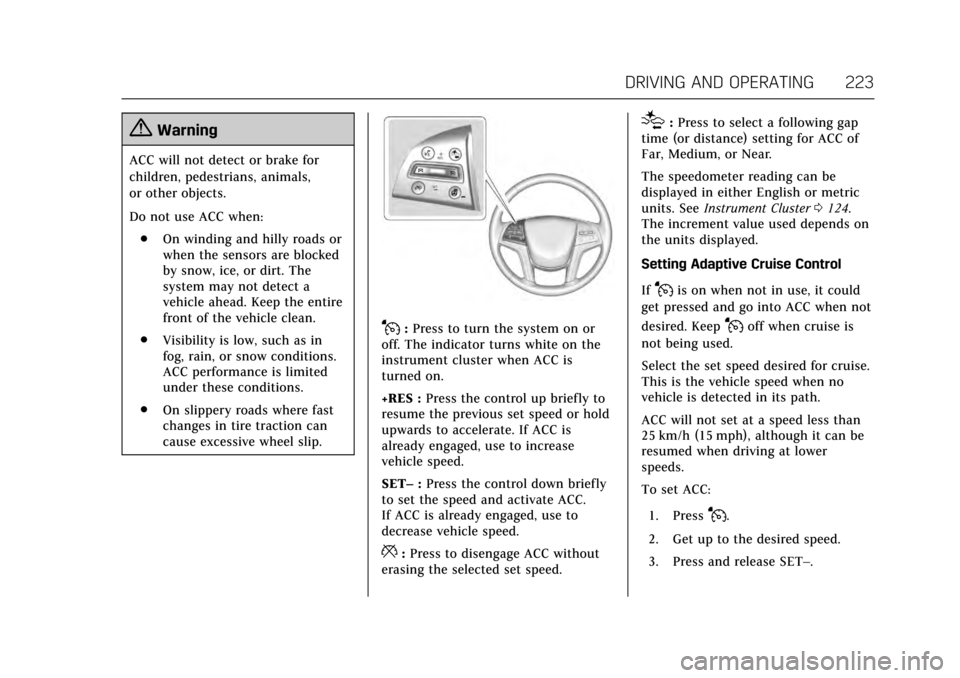
J:Press to turn the system on or
off. The indicator turns white on the
instrument cluster when ACC is
turned on.
+RES : Press the control up briefly to
resume the previous set speed or hold
upwards to accelerate. If ACC is
already engaged, use to increase
vehicle speed.
SET– :Press the control down briefly
to set the speed and activate ACC.
If ACC is already engaged, use to
decrease vehicle speed.
*: Press to disengage ACC without
erasing the selected set speed.
[: Press to select a following gap
time (or distance) setting for ACC of
Far, Medium, or Near.
The speedometer reading can be
displayed in either English or metric
units. See Instrument Cluster 0124.
The increment value used depends on
the units displayed.
Setting Adaptive Cruise Control
If
Jis on when not in use, it could
get pressed and go into ACC when not
desired. Keep
Joff when cruise is
not being used.
Select the set speed desired for cruise.
This is the vehicle speed when no
vehicle is detected in its path.
ACC will not set at a speed less than
25 km/h (15 mph), although it can be
resumed when driving at lower
speeds.
To set ACC:
1. Press
J.
2. Get up to the desired speed.
3. Press and release SET–.
Page 226 of 354
Cadillac Escalade Owner Manual (GMNA-Localizing-MidEast-10293077) -
2017 - crc - 8/24/16
DRIVING AND OPERATING 225
.To decrease speed in larger
increments, press and briefly hold
SET− down. For each press, the
vehicle speed decreases by
5 km/h (5 mph).
Selecting the Follow Distance Gap
When a slower moving vehicle is
detected ahead within the selected
following gap, ACC will adjust the
vehicle's speed and attempt to
maintain the follow distance gap
selected.
Press
[on the steering wheel to
adjust the following gap. Each press
cycles the gap button through three
settings: Far, Medium, or Near.
When pressed, the current gap setting
displays briefly on the DIC and HUD.
The gap setting will be maintained
until it is changed.
Since each gap setting corresponds to
a following time (Far, Medium,
or Near), the following distance will
vary based on vehicle speed. The
faster the vehicle speed, the further
back your vehicle will follow a vehicle
detected ahead. Consider traffic and
weather conditions when selecting the following gap. The range of selectable
gaps may not be appropriate for all
drivers and driving conditions.
Changing the gap setting
automatically changes the alert timing
sensitivity (Far, Medium, or Near) for
the Forward Collision Alert (FCA)
feature. See
Forward Collision Alert
(FCA) System 0234.
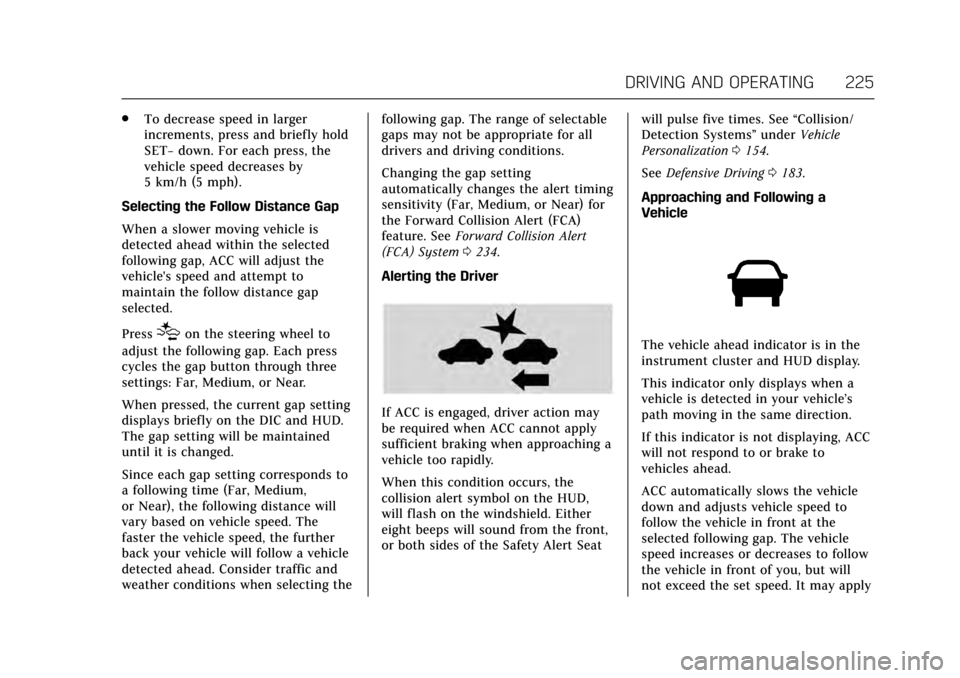
Alerting the Driver
If ACC is engaged, driver action may
be required when ACC cannot apply
sufficient braking when approaching a
vehicle too rapidly.
When this condition occurs, the
collision alert symbol on the HUD,
will flash on the windshield. Either
eight beeps will sound from the front,
or both sides of the Safety Alert Seat will pulse five times. See
“Collision/
Detection Systems” underVehicle
Personalization 0154.
See Defensive Driving 0183.
Approaching and Following a
Vehicle
The vehicle ahead indicator is in the
instrument cluster and HUD display.
This indicator only displays when a
vehicle is detected in your vehicle’s
path moving in the same direction.
If this indicator is not displaying, ACC
will not respond to or brake to
vehicles ahead.
ACC automatically slows the vehicle
down and adjusts vehicle speed to
follow the vehicle in front at the
selected following gap. The vehicle
speed increases or decreases to follow
the vehicle in front of you, but will
not exceed the set speed. It may apply
Page 233 of 354
Cadillac Escalade Owner Manual (GMNA-Localizing-MidEast-10293077) -
2017 - crc - 8/24/16
232 DRIVING AND OPERATING
Parking Assist
With Front and Rear Parking Assist,
as the vehicle moves at speeds of less
than 8 km/h (5 mph) the sensors on
the bumpers may detect objects up to
1.2 m (4 ft) in front and 2.5 m (8 ft)
behind the vehicle within a zone
25 cm (10 in) high off the ground and
below bumper level. These detection
distances may be shorter during
warmer or humid weather. Blocked
sensors will not detect objects and
can also cause false detections. Keep
the sensors clean of mud, dirt, snow,
ice, and slush; and clean sensors after
a car wash in freezing temperatures.
{Warning
The Parking Assist system does not
detect children, pedestrians,
bicyclists, animals, or objects
located below the bumper or that
are too close or too far from the
vehicle. It is not available at speeds
greater than 8 km/h (5 mph). To
prevent injury, death, or vehicle
damage, even with Parking Assist,(Continued)
Warning (Continued)
always check the area around the
vehicle and check all mirrors before
moving forward or backing.
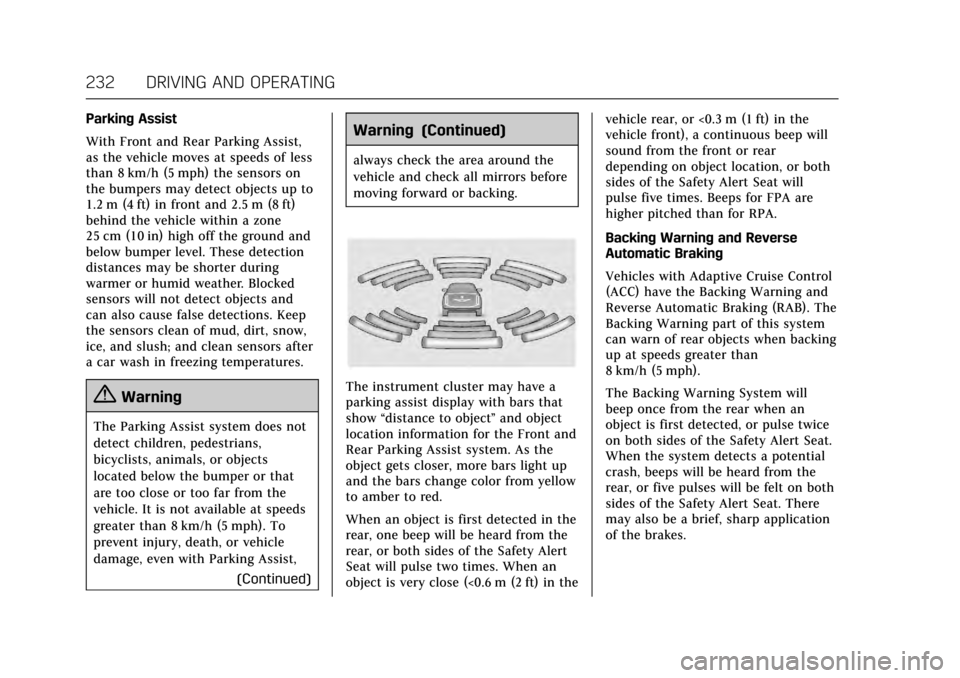
The instrument cluster may have a
parking assist display with bars that
show“distance to object ”and object
location information for the Front and
Rear Parking Assist system. As the
object gets closer, more bars light up
and the bars change color from yellow
to amber to red.
When an object is first detected in the
rear, one beep will be heard from the
rear, or both sides of the Safety Alert
Seat will pulse two times. When an
object is very close (<0.6 m (2 ft) in the vehicle rear, or <0.3 m (1 ft) in the
vehicle front), a continuous beep will
sound from the front or rear
depending on object location, or both
sides of the Safety Alert Seat will
pulse five times. Beeps for FPA are
higher pitched than for RPA.
Backing Warning and Reverse
Automatic Braking
Vehicles with Adaptive Cruise Control
(ACC) have the Backing Warning and
Reverse Automatic Braking (RAB). The
Backing Warning part of this system
can warn of rear objects when backing
up at speeds greater than
8 km/h (5 mph).
The Backing Warning System will
beep once from the rear when an
object is first detected, or pulse twice
on both sides of the Safety Alert Seat.
When the system detects a potential
crash, beeps will be heard from the
rear, or five pulses will be felt on both
sides of the Safety Alert Seat. There
may also be a brief, sharp application
of the brakes.
Page 235 of 354
Cadillac Escalade Owner Manual (GMNA-Localizing-MidEast-10293077) -
2017 - crc - 8/24/16
234 DRIVING AND OPERATING
Use caution while backing up when
towing a trailer, as the RCTA
detection zones that extend out from
the back of the vehicle do not move
further back when a trailer is towed.
Turning the Features On or Off
PressXon the center stack to turn
on or off the Front and Rear Parking
Assist, Rear Cross Traffic Alert,
Reverse Automatic Braking, and
Backing Warning System at the same
time. The indicator light next to the
button comes on when the features
are on and turns off when the features
have been disabled.
Front and Rear Parking Assist can be
turned off, on, or on with towbar
through vehicle personalization. See
“Park Assist ”under Vehicle
Personalization 0154. If the parking
assist is turned off through vehicle
personalization, the park assist button will be disabled. To turn the parking
assist on again, select On in the
vehicle personalization menu. The On
with Towbar setting allows for the
parking assist to work properly with a
small item attached to the trailer
hitch.
Turn off parking assist and Reverse
Automatic Braking when towing a
trailer.
To turn the RPA symbols, guidance
lines (on some models), or Rear Cross
Traffic Alert on or off, see
“Rear
Camera ”under Vehicle
Personalization 0154.
On some vehicles RCTA setting can be
turned off through “Collision/
Detection Systems” underVehicle
Personalization 0154
Assistance Systems for
Driving
If equipped, when driving the vehicle
in a forward gear, Forward Collision
Alert (FCA), Lane Departure Warning
(LDW), Lane Keep Assist (LKA), Side
Blind Zone Alert (SBZA), Lane Change Alert (LCA), and/or Forward
Automatic Braking (FAB) can help to
avoid a crash or reduce crash damage.
Forward Collision Alert
(FCA) System
If equipped, the FCA system may help
to avoid or reduce the harm caused by
front-end crashes. When approaching
a vehicle ahead too quickly, FCA
provides a red flashing alert on the
windshield and rapidly beeps or pulses
the driver seat. FCA also lights an
amber visual alert if following another
vehicle much too closely.
FCA detects vehicles within a distance
of approximately 60 m (197 ft) and
operates at speeds above 40 km/h
(25 mph). If the vehicle has Adaptive
Cruise Control (ACC), it can detect
vehicles to distances of approximately
110 m (360 ft) and operates at all
speeds. See
Adaptive Cruise
Control 0222.
Page 242 of 354

Cadillac Escalade Owner Manual (GMNA-Localizing-MidEast-10293077) -
2017 - crc - 8/24/16
DRIVING AND OPERATING 241
Warning (Continued)
.Detect lanes on winding or
hilly roads.
If LKA only detects lane markings
on one side of the road, it will only
assist or provide an LDW alert
when approaching the lane on the
side where it has detected a lane
marking. Even with LKA and LDW,
you must steer the vehicle. Always
keep your attention on the road and
maintain proper vehicle position
within the lane, or vehicle damage,
injury, or death could occur. Always
keep the windshield, headlamps,
and camera sensors clean and in
good repair. Do not use LKA in bad
weather conditions.
{Warning
Using LKA while towing a trailer or
on slippery roads could cause loss
of control of the vehicle and a
crash. Turn the system off.
How the System Works
The LKA camera sensor is on the
windshield ahead of the rearview
mirror.
To turn LKA on and off, press
A
on the center stack.
When on,
Ais green if LKA is
available to assist and provide LDW
alerts. It may assist by gently turning
the steering wheel and display
A
as amber if the vehicle approaches a
detected lane marking without using a
turn signal in that direction. It may
also provide an LDW alert by
flashing
Aamber as the lane
marking is crossed. Additionally, there
will be three beeps, or the driver seat
will pulse three times, on the right or
left, depending on the lane departure
direction.
The LKA system does not
continuously steer the vehicle. If LKA
does not detect active driver steering,
an alert and chime may be provided.
Move the steering wheel to dismiss.
When the System Does Not
Seem to Work Properly
The system performance may be
affected by:
. Close vehicles ahead.
. Sudden lighting changes, such as
when driving through tunnels.
. Banked roads.
. Roads with poor lane markings,
such as two-lane roads.
If the LKA system is not functioning
properly when lane markings are
clearly visible, cleaning the windshield
may help.
LKA assistance and/or LDW alerts
may occur due to tar marks, shadows,
cracks in the road, temporary or
construction lane markings, or other
road imperfections. This is normal
system operation; the vehicle does not
need service. Turn LKA off if these
conditions continue.
Page 249 of 354
Cadillac Escalade Owner Manual (GMNA-Localizing-MidEast-10293077) -
2017 - crc - 8/24/16
248 DRIVING AND OPERATING
Warning (Continued)
vehicle is not driven properly. For
example, if the trailer is too heavy
or the trailer brakes are inadequate
for the load, the vehicle may not
stop as expected. The driver and
passengers could be seriously
injured. The vehicle may also be
damaged; the resulting repairs
would not be covered by the vehicle
warranty. Pull a trailer only if all the
steps in this section have been
followed. Ask your dealer for advice
and information about towing a
trailer with the vehicle.
Caution
Pulling a trailer improperly can
damage the vehicle and result in
costly repairs not covered by the
vehicle warranty. To pull a trailer
correctly, follow the advice in this
section and see your dealer for
important information about
towing a trailer with the vehicle.To identify the trailering capacity of
the vehicle, see
“Weight of the Trailer”
following.
Trailering is different than just driving
the vehicle by itself. Trailering means
changes in handling, acceleration,
braking, durability and fuel economy.
Successful, safe trailering takes correct
equipment, and it has to be used
properly.
The following information has many
time-tested, important trailering tips
and safety rules. Many of these are
important for your safety and that of
your passengers. Read this section
carefully before pulling a trailer.
Weight of the Trailer
Safe trailering requires monitoring the
weight, speed, altitude, road grades,
outside temperature, and how
frequently the vehicle is used to pull a
trailer. Take into consideration any
special equipment on the vehicle, and
the amount of tongue weight the
vehicle can carry. See “Weight of the
Trailer Tongue ”later in this section
for more information. Trailer Weight Rating (TWR) is
calculated assuming the tow vehicle
has not only the driver, but all
required trailering equipment. Weight
of additional optional equipment,
passengers, and cargo in the tow
vehicle must be subtracted from
the TWR.
Ask your dealer for trailering
information or advice.
Weight of the Trailer Tongue
The tongue load of any trailer is very
important because it is also part of
the vehicle weight. The Gross Vehicle
Weight (GVW) includes the curb
weight of the vehicle, any cargo
carried in it, and the people who will
be riding in the vehicle as well as
trailer tongue weight. Vehicle options,
equipment, passengers, and cargo in
the vehicle reduce the amount of
tongue weight the vehicle can carry,
which will also reduce the trailer
weight the vehicle can tow. See
Vehicle
Load Limits 0192 for more
information about the vehicle's
maximum load capacity.
Page 259 of 354
Cadillac Escalade Owner Manual (GMNA-Localizing-MidEast-10293077) -
2017 - crc - 8/24/16
258 VEHICLE CARE
1. Positive (+) Terminal. SeeJump
Starting 0312.
2. Battery 0271.
3. Coolant Surge Tank and Pressure Cap. See Cooling System 0263.
4. Engine Air Cleaner/Filter 0262.
5. Remote Negative (-) Location. See Jump Starting 0312.
6. Engine Cooling Fans (Out of View). See Cooling System 0263.
7. Engine Oil Fill Cap. See “When to
Add Engine Oil” underEngine
Oil 0258.
8. Engine Oil Dipstick. See “Checking Engine Oil” under
Engine Oil 0258.
9. Windshield Washer Fluid Reservoir. See “Adding Washer
Fluid ”under Washer Fluid 0268.
10. Brake Fluid Reservoir. See Brake
Fluid 0269.
11. Engine Compartment Fuse
Block 0278.Engine Oil
To ensure proper engine performance
and long life, careful attention must
be paid to engine oil. Following these
simple, but important steps will help
protect your investment:
.
Use engine oil approved to the
proper specification and of the
proper viscosity grade. See
“Selecting the Right Engine Oil” in
this section.
. Check the engine oil level regularly
and maintain the proper oil level.
See “Checking Engine Oil” and
“When to Add Engine Oil” in this
section.
. Change the engine oil at the
appropriate time. See Engine Oil
Life System 0260.
. Always dispose of engine oil
properly. See “What to Do with
Used Oil” in this section.
Checking Engine Oil
If equipped, the ENGINE OIL LOW
ADD OIL message displays when the
engine oil level may be too low. See
Engine Oil Messages 0146. Check the oil level before filling to the
recommended level. If the oil is not
low and this message remains on, see
your dealer.
Check the engine oil level regularly,
every 650 km (400 mi), especially prior
to a long trip. The engine oil dipstick
handle is a loop. See
Engine
Compartment Overview 0257 for the
location.
{Warning
The engine oil dipstick handle may
be hot; it could burn you. Use a
towel or glove to touch the dipstick
handle.
If a low oil Driver Information Center
(DIC) message displays, check the oil
level.
Follow these guidelines:
. To get an accurate reading, park
the vehicle on level ground. Check
the engine oil level after the
engine has been off for at least
two hours. Checking the engine oil
level on steep grades or too soon
after engine shutoff can result in