traction control CADILLAC ESCALADE 2017 4.G Owner's Manual
[x] Cancel search | Manufacturer: CADILLAC, Model Year: 2017, Model line: ESCALADE, Model: CADILLAC ESCALADE 2017 4.GPages: 354, PDF Size: 3.9 MB
Page 191 of 354
Cadillac Escalade Owner Manual (GMNA-Localizing-MidEast-10293077) -
2017 - crc - 8/24/16
190 DRIVING AND OPERATING
.Keep the windshield washer fluid
reservoir filled.
. Have good tires with proper tread
depth. See Tires0289.
. Turn off cruise control.
Hill and Mountain Roads
Driving on steep hills or through
mountains is different than driving on
flat or rolling terrain. Tips include:
.Keep the vehicle serviced and in
good shape.
. Check all fluid levels and brakes,
tires, cooling system, and
transmission.
. Shift to a lower gear when going
down steep or long hills.
{Warning
Using the brakes to slow the vehicle
on a long downhill slope can cause
brake overheating, can reduce brake
performance, and could result in a
loss of braking. Shift the
(Continued)
Warning (Continued)
transmission to a lower gear to let
the engine assist the brakes on a
steep downhill slope.
{Warning
Coasting downhill in N (Neutral) or
with the ignition off is dangerous.
This can cause overheating of the
brakes and loss of steering. Always
have the engine running and the
vehicle in gear.
. Drive at speeds that keep the
vehicle in its own lane. Do not
swing wide or cross the
center line.
. Be alert on top of hills; something
could be in your lane (e.g., stalled
car, accident).
. Pay attention to special road signs
(e.g., falling rocks area, winding
roads, long grades, passing or
no-passing zones) and take
appropriate action.
Winter Driving
Driving on Snow or Ice
Snow or ice between the tires and the
road creates less traction or grip, so
drive carefully. Wet ice can occur at
about 0 °C (32 °F) when freezing rain
begins to fall. Avoid driving on wet ice
or in freezing rain until roads can be
treated.
For Slippery Road Driving:
.Accelerate gently. Accelerating too
quickly causes the wheels to spin
and makes the surface under the
tires slick.
. Turn on Traction Control. See
Traction Control/Electronic Stability
Control 0216.
. Antilock Brake System (ABS)
improves vehicle stability during
hard stops, but the brakes should
be applied sooner than when on
dry pavement. See Antilock Brake
System (ABS) 0212.
. Allow greater following distance
and watch for slippery spots. Icy
patches can occur on otherwise
clear roads in shaded areas. The
Page 192 of 354

Cadillac Escalade Owner Manual (GMNA-Localizing-MidEast-10293077) -
2017 - crc - 8/24/16
DRIVING AND OPERATING 191
surface of a curve or an overpass
can remain icy when the
surrounding roads are clear. Avoid
sudden steering maneuvers and
braking while on ice.
. Turn off cruise control.
Blizzard Conditions
Stop the vehicle in a safe place and
signal for help. Stay with the vehicle
unless there is help nearby. To get
help and keep everyone in the
vehicle safe:
.Turn on the hazard warning
flashers.
. Tie a red cloth to an outside
mirror.
{Warning
Snow can trap engine exhaust
under the vehicle. This may cause
exhaust gases to get inside. Engine
exhaust contains carbon monoxide
(CO), which cannot be seen or
smelled. It can cause
unconsciousness and even death.
(Continued)
Warning (Continued)
If the vehicle is stuck in snow:
. Clear snow from the base of
the vehicle, especially any
blocking the exhaust pipe.
. Open a window about 5 cm
(2 in) on the vehicle side that
is away from the wind, to
bring in fresh air.
. Fully open the air outlets on
or under the instrument
panel.
. Adjust the climate control
system to circulate the air
inside the vehicle and set the
fan speed to the highest
setting. See “Climate Control
Systems.”
For more information about CO, see
Engine Exhaust 0203.
To save fuel, run the engine for short
periods to warm the vehicle and then
shut the engine off and partially close
the window. Moving about to keep
warm also helps. If it takes time for help to arrive,
when running the engine, push the
accelerator pedal slightly so the
engine runs faster than the idle speed.
This keeps the battery charged to
restart the vehicle and to signal for
help with the headlamps. Do this as
little as possible, to save fuel.
If the Vehicle Is Stuck
Slowly and cautiously spin the wheels
to free the vehicle when stuck in sand,
mud, ice, or snow. See
“Rocking the
Vehicle to Get It Out ”later in this
section.
The Traction Control System (TCS)
can often help to free a stuck vehicle.
See Traction Control/Electronic Stability
Control 0216. If TCS cannot free the
vehicle, see “Rocking the Vehicle to
Get it Out ”following.
{Warning
If the vehicle's tires spin at high
speed, they can explode, and you or
others could be injured. The vehicle
can overheat, causing an engine
(Continued)
Page 208 of 354
Cadillac Escalade Owner Manual (GMNA-Localizing-MidEast-10293077) -
2017 - crc - 8/24/16
DRIVING AND OPERATING 207
When the shift lever is moved from
D (Drive) to L (Manual Mode), a
number displays next to the L,
indicating the current transmission
range.
This number is the highest gear that
the transmission will command while
operating in L (Manual Mode). All
gears below that number are available.
As driving conditions change, the
transmission can automatically shift
to lower gears. For example, when
5 (Fifth) is selected, 1 (First) through
5 (Fifth) gears are automatically
shifted by the transmission, but
6 (Sixth) cannot be used until the
plus/minus button on the shift lever is
used to change to the range.
In vehicles with gasoline engines,
when the shift lever is moved from
D (Drive) to L (Manual Mode), a
downshift may occur. The gear that
the transmission is operating in when
the shift lever is moved from D (Drive)
to L (Manual Mode) determines if a
downshift occurs. See the following
chart.Gear before shifting
from D (Drive) to
L (Manual Mode)
8th 7th 6th 5th 4th 3rd 2nd 1st
Range after shifting
from D (Drive) to
L (Manual Mode) –
Tow/Haul not
engaged L6 L6 L5 L4 L3 L3 L2 L1
Range after shifting
from D (Drive) to
L (Manual Mode) –
Tow/Haul engaged L6 L5 L4 L3 L3 L3 L2 L1
Grade Braking is not available when
Range Selection Mode is active. See
Tow/Haul Mode 0208.
While using Range Selection Mode,
cruise control and the Tow/Haul Mode
can be used.
Caution
Spinning the tires or holding the
vehicle in one place on a hill using
only the accelerator pedal may
damage the transmission. The (Continued)
Caution (Continued)
repair will not be covered by the
vehicle warranty. If you are stuck,
do not spin the tires. When
stopping on a hill, use the brakes to
hold the vehicle in place.
Low Traction Mode
Low Traction Mode assists in vehicle
acceleration when road conditions are
slippery, such as with ice or snow.
While the vehicle is at a stop, select
Page 210 of 354
Cadillac Escalade Owner Manual (GMNA-Localizing-MidEast-10293077) -
2017 - crc - 8/24/16
DRIVING AND OPERATING 209
Drive Systems
Four-Wheel Drive
If equipped, four-wheel drive engages
the front axle for extra traction.
Caution
Do not drive on clean, dry
pavement in 4
mand 4n(if
equipped) for an extended period of
time. These conditions may cause
premature wear on the vehicle’s
powertrain.
Driving on clean, dry pavement in 4HI
or 4LO may:
. Cause a vibration to be felt in the
steering system.
. Cause tires to wear faster.
. Make the transfer case harder to
shift, and cause it to run noisier.
{Warning
Shifting the transfer case to
N (Neutral) can cause the vehicle to
roll even if the transmission is in
P (Park). You or someone else could
be seriously injured. Be sure to set
the parking brake before placing the
transfer case in N (Neutral). See
Parking Brake 0213.
Caution
Extended high-speed operation in 4
nmay damage or shorten the life of
the drivetrain.
Engagement noise and bump when
shifting between 4
nand 4mor from
N (Neutral), with the engine running,
is normal.
Shifting into 4
nwill turn Traction
Control and StabiliTrak®off. See
Traction Control/Electronic Stability
Control 0216.
Automatic Transfer Case
If equipped, use the transfer case knob
next to the steering wheel to shift into
and out of four-wheel drive.
All of the lights will blink on then off
momentarily when the ignition is
moved to the ON/RUN position. The
light that remains on will indicate the
state of the Transfer Case.
If the indicator mark on the switch
does not match up with the light then
that likely means the switch was
moved when the ignition was off.
The indicator mark on the switch
must line up with the indicator light
before a shift can be commanded. To
Page 211 of 354
Cadillac Escalade Owner Manual (GMNA-Localizing-MidEast-10293077) -
2017 - crc - 8/24/16
210 DRIVING AND OPERATING
command a shift rotate the transfer
case switch to the new desired
position. The light will blink meaning
that the shift is in progress. When the
shift is completed the new position
will be illuminated. If the transfer case
can not complete a shift command, it
will go back to its last chosen setting.
The settings are:
N (Neutral) :Use only when the
vehicle needs to be towed. See
Recreational Vehicle Towing 0316 or
Towing the Vehicle 0315.
2
m(Two-Wheel Drive High) : Use for
driving on most streets and highways.
The front axle is not engaged. This
setting provides the best fuel
economy.
AUTO (Automatic Four-Wheel
Drive) : Use when road surface
traction conditions are variable. When
driving in AUTO, the front axle is
engaged, and the vehicle's power is
sent to the front and rear wheels
automatically based on driving
conditions. This setting provides
slightly lower fuel economy than 2
m. Do not use AUTO mode, if equipped,
to park on a steep grade with poor
traction such as ice, snow, mud,
or gravel. In AUTO mode only the rear
wheels will hold the vehicle from
sliding when parked. If parking on a
steep grade, use 4
mto keep all four
wheels engaged.
4
m(Four-Wheel Drive High) : Use
this position when extra traction is
needed, such as when driving on
snowy or icy roads, when off-roading,
or when plowing snow.
4
n(Four-Wheel Drive Low) : This
setting engages the front axle and
delivers extra torque. Choose 4
nwhen
driving off-road in deep sand, deep
mud, or deep snow, and while
climbing or descending steep hills.
Shifting into 4
nwill turn Traction
Control and StabiliTrak off. See
Traction Control/Electronic Stability
Control 0216. Shifting Into 4
mor AUTO
Turn the knob to the 4
mor AUTO
position at any speed, except from 4
n.
The indicator light will flash while
shifting and will remain on when the
shift is completed.
Shifting Into 2
m
Turn the knob to 2mat any speed,
except when shifting from 4
n. The
indicator light will flash while shifting
and will remain on when the shift is
completed.
Shifting Into 4
n
When 4nis engaged, keep vehicle
speed below 72 km/h (45 mph).
To shift:
1. The ignition must be in ON/RUN and the vehicle must be stopped
or moving less than
5 km/h (3 mph) with the
transmission in N (Neutral). It is
best for the vehicle to be moving
1.6 to 3.2 km/h (1 to 2 mph).
Page 217 of 354
Cadillac Escalade Owner Manual (GMNA-Localizing-MidEast-10293077) -
2017 - crc - 8/24/16
216 DRIVING AND OPERATING
Ride Control Systems
Traction Control/Electronic
Stability Control
System Operation
The vehicle has a Traction Control
System (TCS) and StabiliTrak®, an
electronic stability control system.
These systems help limit wheel spin
and assist the driver in maintaining
control, especially on slippery road
conditions.
TCS activates if it senses any of the
drive wheels are spinning or beginning
to lose traction. When this happens,
TCS applies the brakes to the spinning
wheels and reduces engine power to
limit wheel spin.
StabiliTrak activates when the vehicle
senses a difference between the
intended path and the direction the
vehicle is actually traveling.
StabiliTrak selectively applies braking
pressure to any one of the vehicle
wheel brakes to assist the driver in
keeping the vehicle on the intended
path. Trailer Sway Control (TSC) is also on automatically when the
vehicle is started. See
Trailer Sway
Control (TSC) 0252.
If cruise control is being used and
traction control or StabiliTrak begins
to limit wheel spin, cruise control will
disengage. Cruise control may be
turned back on when road conditions
allow.
Both systems come on automatically
when the vehicle is started and begins
to move. The systems may be heard or
felt while they are operating or while
performing diagnostic checks. This is
normal and does not mean there is a
problem with the vehicle.
It is recommended to leave both
systems on for normal driving
conditions, but it may be necessary to
turn TCS off if the vehicle gets stuck
in sand, mud, ice, or snow. See If the
Vehicle Is Stuck 0191 and “Turning
the Systems Off and On ”later in this
section.
When the transfer case (if equipped)
is in Four-Wheel Drive Low, the
stability system is automatically
disabled,
gcomes on, and the
appropriate message will appear on the DIC. Both traction control and
StabiliTrak are automatically disabled
in this condition.
The indicator light for both systems is
in the instrument cluster. This
light will:
.
Flash when TCS is limiting
wheel spin.
. Flash when StabiliTrak is
activated.
. Turn on and stay on when either
system is not working.
If either system fails to turn on or to
activate, a message displays in the
Driver Information Center (DIC), and
dcomes on and stays on to indicate
that the system is inactive and is not
assisting the driver in maintaining
control. The vehicle is safe to drive,
but driving should be adjusted
accordingly.
Page 218 of 354
Cadillac Escalade Owner Manual (GMNA-Localizing-MidEast-10293077) -
2017 - crc - 8/24/16
DRIVING AND OPERATING 217
Ifdcomes on and stays on:
1. Stop the vehicle.
2. Turn the engine off and wait 15 seconds.
3. Start the engine.
Drive the vehicle. If
dcomes on and
stays on, the vehicle may need more
time to diagnose the problem. If the
condition persists, see your dealer.
Turning the Systems Off and On
The button for TCS and StabiliTrak is
on the center stack.
Caution
Do not repeatedly brake or
accelerate heavily when TCS is off.
The vehicle driveline could be
damaged. To turn off only TCS, press and
release
g. The traction off lighti
displays in the instrument cluster. The
appropriate message will display in
the DIC. See
Ride Control System
Messages 0150. To turn TCS on again,
press and release
g. The traction off
light
idisplayed in the instrument
cluster will turn off.
If TCS is limiting wheel spin when
g
is pressed, the system will not turn off
until the wheels stop spinning.
To turn off both TCS and StabiliTrak,
press and hold
guntil the traction off
light
iand the StabiliTrak OFF
light
gcome on and stay on in the
instrument cluster, then release. The
appropriate message will display in
the DIC. See Ride Control System
Messages 0150.
To turn TCS and StabiliTrak on again,
press and release
g. The traction off
light
iand the StabiliTrak OFF
light
gin the instrument cluster
turn off. StabiliTrak will automatically turn on
if the vehicle exceeds 56 km/h
(35 mph). Traction control will
remain off.
The vehicle has a Trailer Sway
Control (TSC) feature and a Hill Start
Assist (HSA) feature. See
Trailer Sway
Control (TSC) 0252 orHill Start Assist
(HSA) 0215.
Adding accessories can affect the
vehicle performance. See Accessories
and Modifications 0255.
Driver Mode Control
Driver Mode Control attempts to add
a sportier feel, provide a more
comfortable ride, or assist in different
weather conditions or terrain. This
system simultaneously changes the
software settings of various
sub-systems. Depending on the option
package, available features, and mode
selected, the suspension, steering, and
powertrain will change settings to
achieve the desired mode
characteristics. If the vehicle is
equipped with Magnetic Ride Control,
selecting the various Driver Modes
adjusts the ride of the vehicle to
Page 219 of 354
Cadillac Escalade Owner Manual (GMNA-Localizing-MidEast-10293077) -
2017 - crc - 8/24/16
218 DRIVING AND OPERATING
enhance the ride performance for the
road conditions and the
selected mode.
The Driver Mode Control has four
modes: Tour, Sport, Snow/Ice, and
Tow/Haul.
Press the TOW/HAUL switch to
activate and deactivate the Tow/
Haul Mode.
Press the MODE switch on the center
console to select Tour, Sport, or Snow/
Ice. Pressing the switch will display a
graphic of all available ride modes and
change to the next mode. The Tour
and Sport Modes will feel similar on a
smooth road. Select a new setting
whenever driving conditions change.
Tour Mode
Use for normal city and highway
driving to provide a smooth, soft ride.
When selected, there will be no
indication in the DIC.
Sport Mode
Use where road conditions or personal
preference demand a more controlled
response.The steering will change to provide
more precise control. The Magnetic
Ride Control will change to provide
better cornering performance.
When selected, the Sport Mode
indicator will display in the DIC.
Snow/Ice Mode
Use when more traction is needed
during slippery conditions.
The vehicle will upshift normally
when the vehicle is moving. The
acceleration will adjust to help provide
a smoother launch.
When selected, the Snow/Ice Mode
indicator will display in the DIC.
Tow/Haul Mode
Tow/Haul is a feature that assists
when pulling a heavy trailer or a large
or heavy load. See .Tow/Haul
Mode
0208
Tow/Haul is designed to be most
effective when the vehicle and trailer
combined weight is at least 75 percent
of the vehicle’s Gross Combined
Weight Rating (GCWR)l See “Weight
of the Trailer” underTrailer
Towing 0247. Tow/Haul is most useful under the
following conditions:
.
When pulling a heavy trailer or a
large or heavy load through rolling
terrain.
. When pulling a heavy trailer or a
large or heavy load in stop-and-go
traffic.
. When pulling a heavy trailer or a
large or heavy load in busy
parking lots where improved low
speed control of the vehicle is
desired.
Operating the vehicle in Tow/Haul
when lightly loaded or with no trailer
at all will not cause damage. However,
there is no benefit to the selection of
Tow/Haul when the vehicle is
unloaded. Such a selection when
unloaded may result in unpleasant
engine and transmission driving
characteristics and reduced fuel
economy. Tow/Haul is recommended
only when pulling a heavy trailer or a
large or heavy load.
When selected, the Tow/Haul
indicator will display in the
instrument cluster.
Page 220 of 354
Cadillac Escalade Owner Manual (GMNA-Localizing-MidEast-10293077) -
2017 - crc - 8/24/16
DRIVING AND OPERATING 219
Magnetic Ride Control
The Magnetic Ride Control monitors
the suspension system.
Based on road conditions, steering
wheel angle, and vehicle speed, the
system automatically adjusts to
provide the best handling while
providing a smooth ride. The Tour and
Sport Modes will feel similar on a
smooth road.
Tour :Use for normal city and
highway driving. This setting provides
a smooth, soft ride.
8Sport : Use where road conditions
or personal preference demand more
control. This setting provides more
“feel,” or response to road conditions.
6Snow/Ice : Use when more
traction is needed during slippery
conditions.
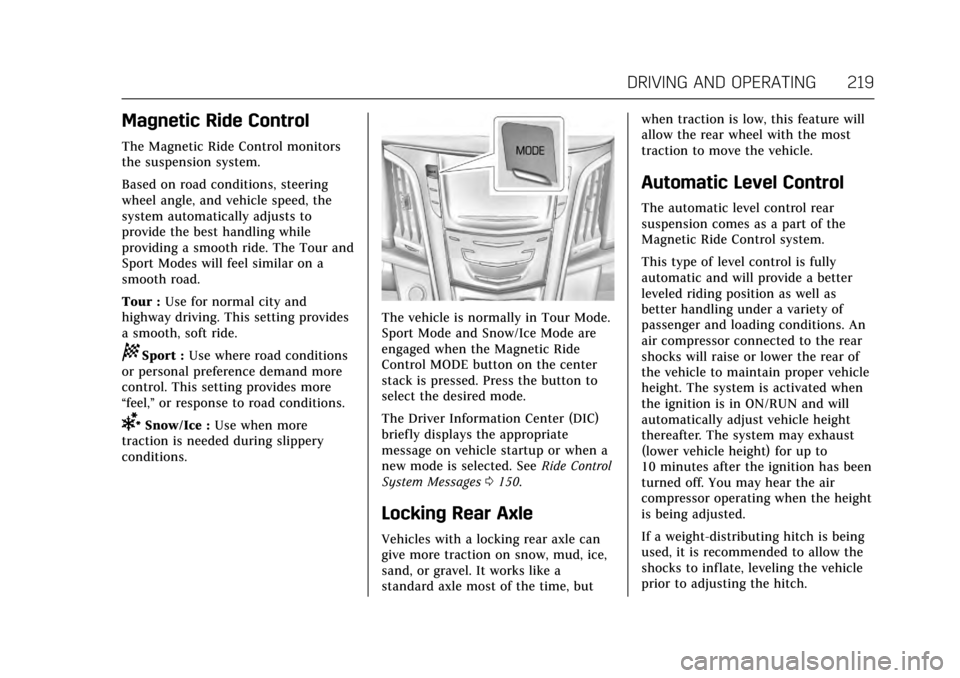
The vehicle is normally in Tour Mode.
Sport Mode and Snow/Ice Mode are
engaged when the Magnetic Ride
Control MODE button on the center
stack is pressed. Press the button to
select the desired mode.
The Driver Information Center (DIC)
briefly displays the appropriate
message on vehicle startup or when a
new mode is selected. See Ride Control
System Messages 0150.
Locking Rear Axle
Vehicles with a locking rear axle can
give more traction on snow, mud, ice,
sand, or gravel. It works like a
standard axle most of the time, but when traction is low, this feature will
allow the rear wheel with the most
traction to move the vehicle.
Automatic Level Control
The automatic level control rear
suspension comes as a part of the
Magnetic Ride Control system.
This type of level control is fully
automatic and will provide a better
leveled riding position as well as
better handling under a variety of
passenger and loading conditions. An
air compressor connected to the rear
shocks will raise or lower the rear of
the vehicle to maintain proper vehicle
height. The system is activated when
the ignition is in ON/RUN and will
automatically adjust vehicle height
thereafter. The system may exhaust
(lower vehicle height) for up to
10 minutes after the ignition has been
turned off. You may hear the air
compressor operating when the height
is being adjusted.
If a weight-distributing hitch is being
used, it is recommended to allow the
shocks to inflate, leveling the vehicle
prior to adjusting the hitch.
Page 221 of 354
Cadillac Escalade Owner Manual (GMNA-Localizing-MidEast-10293077) -
2017 - crc - 8/24/16
220 DRIVING AND OPERATING
Cruise Control
{Warning
Cruise control can be dangerous
where you cannot drive safely at a
steady speed. Do not use cruise
control on winding roads or in
heavy traffic.
Cruise control can be dangerous on
slippery roads. On such roads, fast
changes in tire traction can cause
excessive wheel slip, and you could
lose control. Do not use cruise
control on slippery roads.
If equipped with cruise control, a
speed of about 40 km/h (25 mph) or
more can be maintained without
keeping your foot on the accelerator.
Cruise control does not work at speeds
below about 40 km/h (25 mph).
If the Traction Control/Electronic
Stability Control system begins to
limit wheel spin while using cruise
control, the cruise control automatically disengages. See
Traction
Control/Electronic Stability Control
0 216. If a collision alert occurs when
cruise control is activated, cruise
control is disengaged. See Forward
Collision Alert (FCA) System 0234.
When road conditions allow you to
safely use it again, the cruise control
can be turned back on.
If the brakes are applied, cruise
control disengages.
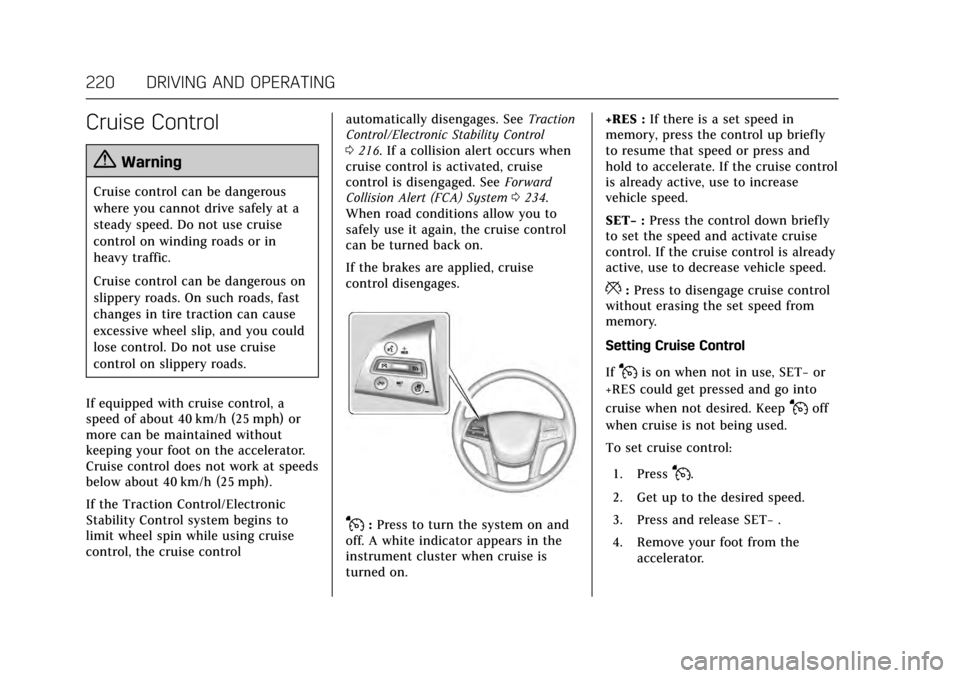
J: Press to turn the system on and
off. A white indicator appears in the
instrument cluster when cruise is
turned on. +RES :
If there is a set speed in
memory, press the control up briefly
to resume that speed or press and
hold to accelerate. If the cruise control
is already active, use to increase
vehicle speed.
SET− :Press the control down briefly
to set the speed and activate cruise
control. If the cruise control is already
active, use to decrease vehicle speed.
*: Press to disengage cruise control
without erasing the set speed from
memory.
Setting Cruise Control
If
Jis on when not in use, SET− or
+RES could get pressed and go into
cruise when not desired. Keep
Joff
when cruise is not being used.
To set cruise control:
1. Press
J.
2. Get up to the desired speed.
3. Press and release SET− .
4. Remove your foot from the accelerator.