steering CADILLAC ESCALADE 2017 4.G Workshop Manual
[x] Cancel search | Manufacturer: CADILLAC, Model Year: 2017, Model line: ESCALADE, Model: CADILLAC ESCALADE 2017 4.GPages: 354, PDF Size: 3.9 MB
Page 236 of 354

Cadillac Escalade Owner Manual (GMNA-Localizing-MidEast-10293077) -
2017 - crc - 8/24/16
DRIVING AND OPERATING 235
{Warning
FCA is a warning system and does
not apply the brakes. When
approaching a slower-moving or
stopped vehicle ahead too rapidly,
or when following a vehicle too
closely, FCA may not provide a
warning with enough time to help
avoid a crash. It also may not
provide any warning at all. FCA
does not warn of pedestrians,
animals, signs, guardrails, bridges,
construction barrels, or other
objects. Be ready to take action and
apply the brakes. SeeDefensive
Driving 0183.
FCA can be disabled with the FCA
steering wheel control, or if your
vehicle is equipped with Adaptive
Cruise Control (ACC), through vehicle
personalization. See “Collision/
Detection Systems” underVehicle
Personalization 0154.
Detecting the Vehicle Ahead
FCA warnings will not occur unless
the FCA system detects a vehicle
ahead. When a vehicle is detected, the
vehicle ahead indicator will display
green. Vehicles may not be detected
on curves, highway exit ramps,
or hills, due to poor visibility; or if a
vehicle ahead is partially blocked by
pedestrians or other objects. FCA will
not detect another vehicle ahead until
it is completely in the driving lane.
{Warning
FCA does not provide a warning to
help avoid a crash, unless it detects
a vehicle. FCA may not detect a
vehicle ahead if the FCA sensor is
blocked by dirt, snow, or ice, or if
the windshield is damaged. It may
(Continued)
Warning (Continued)
also not detect a vehicle on winding
or hilly roads, or in conditions that
can limit visibility such as fog, rain,
or snow, or if the headlamps or
windshield are not cleaned or in
proper condition. Keep the
windshield, headlamps, and FCA
sensors clean and in good repair.
Collision Alert
When your vehicle approaches
another detected vehicle too rapidly,
the red FCA display will flash on the
windshield. Also, eight rapid
high-pitched beeps will sound from
the front, or both sides of the Safety
Alert Seat will pulse five times. When
this Collision Alert occurs, the brake
system may prepare for driver braking
to occur more rapidly which can cause
Page 237 of 354

Cadillac Escalade Owner Manual (GMNA-Localizing-MidEast-10293077) -
2017 - crc - 8/24/16
236 DRIVING AND OPERATING
a brief, mild deceleration. Continue to
apply the brake pedal as needed.
Cruise control may be disengaged
when the Collision Alert occurs.
Tailgating Alert
The vehicle ahead indicator will
display amber when you are following
a vehicle ahead much too closely.
Selecting the Alert Timing
The Collision Alert control is on the
steering wheel. Press
[to set the
FCA timing to Far, Medium, Near,
or on some vehicles, Off. The first
button press shows the current setting
on the Driver Information Center
(DIC). Additional button presses will
change this setting. The chosen
setting will remain until it is changed
and will affect the timing of both the
Collision Alert and the Tailgating
Alert features. The timing of both
alerts will vary based on vehicle speed.
The faster the vehicle speed, the
farther away the alert will occur.
Consider traffic and weather
conditions when selecting the alert
timing. The range of selectable alert
timing may not be appropriate for all
drivers and driving conditions.
If your vehicle is equipped with
Adaptive Cruise Control (ACC),
changing the FCA timing setting
automatically changes the ACC
following gap setting (Far, Medium,
or Near).
Unnecessary Alerts
FCA may provide unnecessary alerts
for turning vehicles, vehicles in other
lanes, objects that are not vehicles,
or shadows. These alerts are normal
operation and the vehicle does not
need service.
Cleaning the System
If the FCA system does not seem to
operate properly, cleaning the outside
of the windshield in front of the
camera sensor on the windshield
behind the rearview mirror, and
cleaning the front of the vehicle where
radar sensors and headlamps are
located, may correct the issue.
For cleaning instructions, see
“Washing the Vehicle ”under Exterior
Care 0320.
System operation may also be limited
under snow, heavy rain, or road spray
conditions.
Page 241 of 354

Cadillac Escalade Owner Manual (GMNA-Localizing-MidEast-10293077) -
2017 - crc - 8/24/16
240 DRIVING AND OPERATING
does not need to be serviced. The
system may light up due to guardrails,
signs, trees, shrubs, and other
non-moving objects. This is normal
system operation; the vehicle does not
need service.
LCA may not operate when the LCA
sensors in the left or right corners of
the rear bumper are covered with
mud, dirt, snow, ice, or slush, or in
heavy rainstorms. For cleaning
instructions, see "Washing the
Vehicle" underExterior Care0320.
If the DIC still displays the system
unavailable message after cleaning
both sides of the vehicle toward the
rear corners of the vehicle, see your
dealer.
If the LCA displays do not light up
when moving vehicles are in the blind
zone or are rapidly approaching that
zone and the system is clean, the
system may need service. Take the
vehicle to your dealer.Lane Departure
Warning (LDW)
If equipped, LDW may help avoid
crashes due to unintentional lane
departures. It may provide a warning
if the vehicle is crossing a detected
lane marking without using a turn
signal in the lane departure direction.
Since this system is part of the Lane
Keep Assist (LKA) system, read the
entire LKA section before using this
feature.
Lane Keep Assist (LKA)
If equipped, LKA may help avoid
crashes due to unintentional lane
departures. It may assist by gently
turning the steering wheel if the
vehicle approaches a detected lane
marking without using a turn signal in
that direction. It may also provide a
Lane Departure Warning (LDW)
system alert as the lane marking is
crossed. The LKA system will not
assist or provide an LDW alert if it
detects that you are actively steering.
Override LKA by turning the steering wheel. LKA uses a camera to detect
lane markings between 60 km/h (37
mph) and 180 km/h (112 mph).
{Warning
The LKA system does not
continuously steer the vehicle.
It may not keep the vehicle in the
lane or give a Lane Departure
Warning (LDW) alert, even if a lane
marking is detected.
The LKA and LDW systems
may not:
. Provide an alert or enough
steering assist to avoid a lane
departure or crash.
. Detect lane markings under
poor weather or visibility
conditions. This can occur if
the windshield or headlamps
are blocked by dirt, snow,
or ice, if they are not in
proper condition, or if the sun
shines directly into the
camera.
. Detect road edges.
(Continued)
Page 242 of 354

Cadillac Escalade Owner Manual (GMNA-Localizing-MidEast-10293077) -
2017 - crc - 8/24/16
DRIVING AND OPERATING 241
Warning (Continued)
.Detect lanes on winding or
hilly roads.
If LKA only detects lane markings
on one side of the road, it will only
assist or provide an LDW alert
when approaching the lane on the
side where it has detected a lane
marking. Even with LKA and LDW,
you must steer the vehicle. Always
keep your attention on the road and
maintain proper vehicle position
within the lane, or vehicle damage,
injury, or death could occur. Always
keep the windshield, headlamps,
and camera sensors clean and in
good repair. Do not use LKA in bad
weather conditions.
{Warning
Using LKA while towing a trailer or
on slippery roads could cause loss
of control of the vehicle and a
crash. Turn the system off.
How the System Works
The LKA camera sensor is on the
windshield ahead of the rearview
mirror.
To turn LKA on and off, press
A
on the center stack.
When on,
Ais green if LKA is
available to assist and provide LDW
alerts. It may assist by gently turning
the steering wheel and display
A
as amber if the vehicle approaches a
detected lane marking without using a
turn signal in that direction. It may
also provide an LDW alert by
flashing
Aamber as the lane
marking is crossed. Additionally, there
will be three beeps, or the driver seat
will pulse three times, on the right or
left, depending on the lane departure
direction.
The LKA system does not
continuously steer the vehicle. If LKA
does not detect active driver steering,
an alert and chime may be provided.
Move the steering wheel to dismiss.
When the System Does Not
Seem to Work Properly
The system performance may be
affected by:
. Close vehicles ahead.
. Sudden lighting changes, such as
when driving through tunnels.
. Banked roads.
. Roads with poor lane markings,
such as two-lane roads.
If the LKA system is not functioning
properly when lane markings are
clearly visible, cleaning the windshield
may help.
LKA assistance and/or LDW alerts
may occur due to tar marks, shadows,
cracks in the road, temporary or
construction lane markings, or other
road imperfections. This is normal
system operation; the vehicle does not
need service. Turn LKA off if these
conditions continue.
Page 247 of 354
Cadillac Escalade Owner Manual (GMNA-Localizing-MidEast-10293077) -
2017 - crc - 8/24/16
246 DRIVING AND OPERATING
itself. Get acquainted with the
handling and braking of the rig before
setting out for the open road.
The structure, tires, and brakes of the
trailer must be rated to carry the load.
Inadequate trailer equipment can
cause the combination to operate in
an unexpected or unsafe manner.
Before starting, check all trailer hitch
parts and attachments, safety chains,
electrical connectors, lamps, tires, and
mirrors. Get familiar with the
handling and braking of the rig. If the
trailer has electric brakes, start the
combination moving and then apply
the trailer brake controller by hand to
be sure the brakes work.
During the trip, check occasionally to
be sure that the load is secure and the
lamps and any trailer brakes
still work.
Following Distance
Stay at least twice as far behind the
vehicle ahead as you would when
driving the vehicle without a trailer.
This can help to avoid heavy braking
and sudden turns.
Passing
More passing distance is needed when
towing a trailer. The combination will
not accelerate as quickly and is longer
so it is necessary to go much farther
beyond the passed vehicle before
returning to the lane.
Backing Up
Hold the bottom of the steering wheel
with one hand. To move the trailer to
the left, move that hand to the left. To
move the trailer to the right, move
your hand to the right. Always back
up slowly and, if possible, have
someone guide you.
Making TurnsCaution
Making very sharp turns while
trailering could cause the trailer to
come in contact with the vehicle.
The vehicle could be damaged.
Avoid making very sharp turns
while trailering. When turning with a trailer, make
wider turns than normal. Do this so
the trailer will not strike soft
shoulders, curbs, road signs, trees,
or other objects. Avoid jerky or sudden
maneuvers. Signal well in advance.
If the trailer turn signal bulbs burn
out, the arrows on the instrument
cluster will still flash for turns. It is
important to check occasionally to be
sure the trailer bulbs are still working.
Driving on Grades
Reduce speed and shift to a lower gear
before
starting down a long or steep
downgrade. If the transmission is not
shifted down, the brakes might get hot
and no longer work well.
Vehicles can tow in D (Drive). Shift
the transmission to a lower gear if the
transmission shifts too often under
heavy loads and/or hilly conditions.
When towing, use the Tow/Haul Mode
to prevent damage to the engine or
transmission. See Tow/Haul
Mode 0208.
When towing at high altitude on steep
uphill grades, consider the following:
Engine coolant will boil at a lower
Page 257 of 354
Cadillac Escalade Owner Manual (GMNA-Localizing-MidEast-10293077) -
2017 - crc - 8/24/16
256 VEHICLE CARE
Vehicle Checks
Doing Your Own
Service Work
{Warning
It can be dangerous to work on
your vehicle if you do not have the
proper knowledge, service manual,
tools, or parts. Always follow
owner’s manual procedures and
consult the service manual for your
vehicle before doing any
service work.
If doing some of your own service
work, use the proper service manual.
It tells you much more about how to
service the vehicle than this
manual can.
This vehicle has an airbag system.
Before attempting to do your own
service work, see Servicing the
Airbag-Equipped Vehicle 088.
Keep a record with all parts receipts
and list the mileage and the date of
any service work performed.
Caution
Even small amounts of
contamination can cause damage to
vehicle systems. Do not allow
contaminants to contact the fluids,
reservoir caps, or dipsticks.
Hood
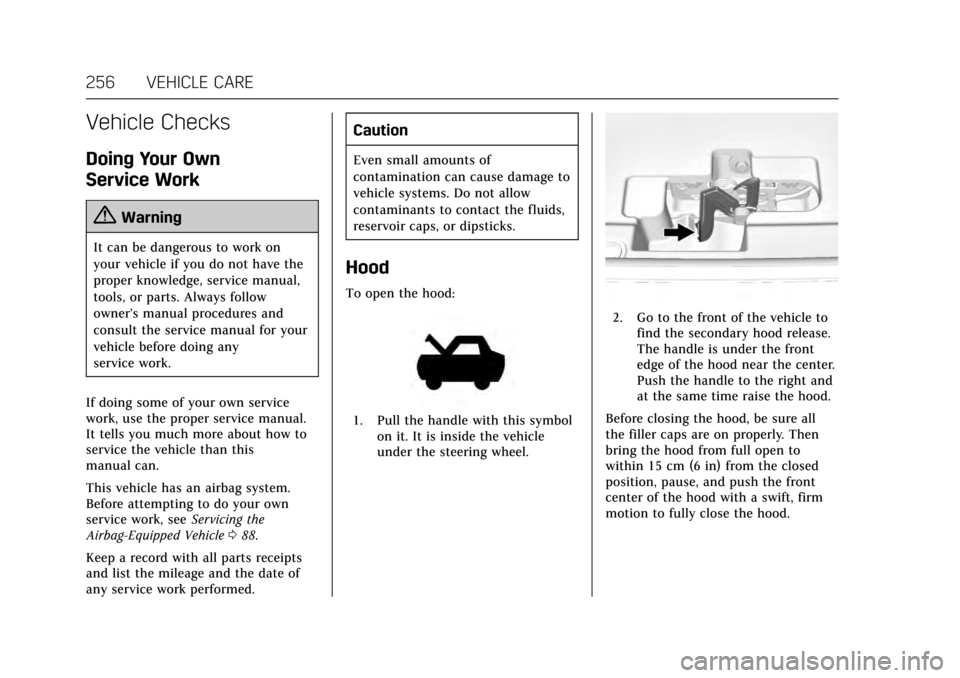
To open the hood:
1. Pull the handle with this symbol on it. It is inside the vehicle
under the steering wheel.
2. Go to the front of the vehicle tofind the secondary hood release.
The handle is under the front
edge of the hood near the center.
Push the handle to the right and
at the same time raise the hood.
Before closing the hood, be sure all
the filler caps are on properly. Then
bring the hood from full open to
within 15 cm (6 in) from the closed
position, pause, and push the front
center of the hood with a swift, firm
motion to fully close the hood.
Page 262 of 354
Cadillac Escalade Owner Manual (GMNA-Localizing-MidEast-10293077) -
2017 - crc - 8/24/16
VEHICLE CARE 261
If the system is ever reset accidentally,
the oil must be changed at 5 000 km
(3,000 mi) since the last oil change.
Remember to reset the oil life system
whenever the oil is changed.
How to Reset the Engine Oil Life
System
Reset the system whenever the engine
oil is changed so that the system can
calculate the next engine oil change.
To reset the system:1. Using the DIC controls on the right side of the steering wheel,
display OIL LIFE on the DIC. See
Driver Information Center (DIC)
0138. When remaining oil life is
low, the CHANGE ENGINE OIL
SOON message will appear on
the display. See Engine Oil
Messages 0146.
2. Press and hold SEL on the DIC controls for a few seconds to
clear the CHANGE ENGINE OIL
SOON message and reset the oil
life at 100%.
Be careful not to reset the oil life
display accidentally at any time
other than after the oil is changed. It cannot be reset
accurately until the next oil
change.
The oil life system can also be reset as
follows: 1. Display OIL LIFE on the DIC. See Driver Information Center
(DIC) 0138.
2. Fully press and release the accelerator pedal three times
within five seconds.
If the CHANGE ENGINE OIL
SOON message is not on, the
system is reset.
The system is reset when the
CHANGE ENGINE OIL SOON message
is off.
If the CHANGE ENGINE OIL SOON
message comes back on when the
vehicle is started, the engine oil life
system has not been reset. Repeat the
procedure.
Automatic Transmission
Fluid
When to Check and Change
Automatic Transmission Fluid
It is usually not necessary to check
the transmission fluid level. The only
reason for fluid loss is a transmission
leak or overheated transmission. This
vehicle is not equipped with a
transmission fluid level dipstick.
There is a special procedure for
checking and changing the
transmission fluid in these vehicles.
Because this procedure is difficult,
this should be done at the dealer.
Contact the dealer for additional
information.
Caution
Use of the incorrect automatic
transmission fluid may damage the
vehicle, and the damage may not be
covered by the vehicle warranty.
Always use the automatic
transmission fluid listed in
Recommended Fluids and
Lubricants 0336.
Page 285 of 354
Cadillac Escalade Owner Manual (GMNA-Localizing-MidEast-10293077) -
2017 - crc - 8/24/16
284 VEHICLE CARE
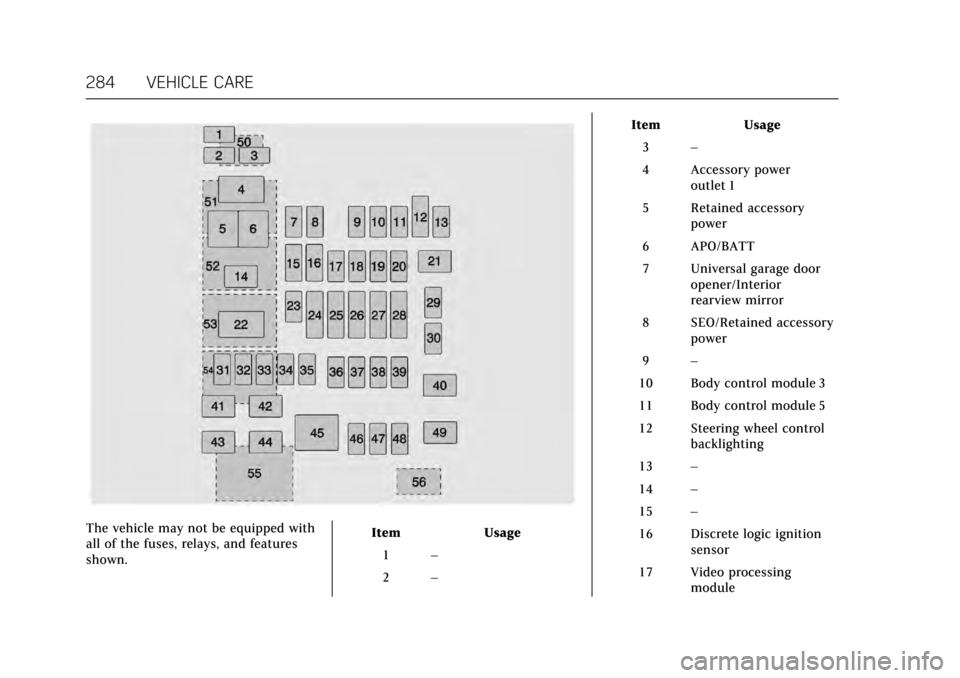
The vehicle may not be equipped with
all of the fuses, relays, and features
shown.Item Usage
1 –
2 – Item Usage
3 –
4 Accessory power outlet 1
5 Retained accessory power
6 APO/BATT
7 Universal garage door opener/Interior
rearview mirror
8 SEO/Retained accessory power
9 –
10 Body control module 3
11 Body control module 5
12 Steering wheel control backlighting
13 –
14 –
15 –
16 Discrete logic ignition sensor
17 Video processing module
Page 286 of 354
Cadillac Escalade Owner Manual (GMNA-Localizing-MidEast-10293077) -
2017 - crc - 8/24/16
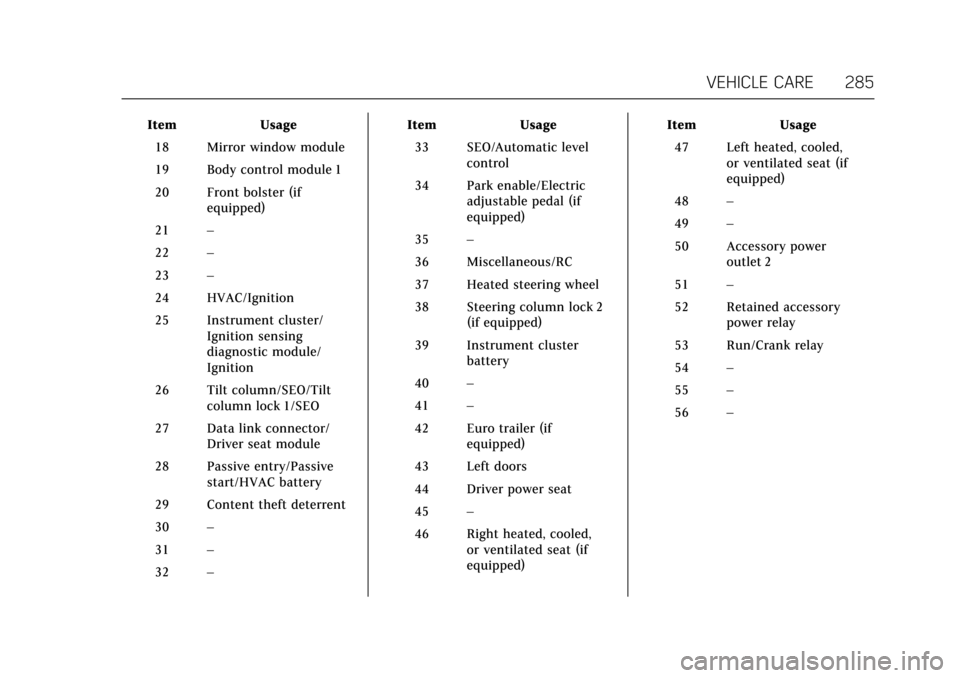
VEHICLE CARE 285
ItemUsage
18 Mirror window module
19 Body control module 1
20 Front bolster (if equipped)
21 –
22 –
23 –
24 HVAC/Ignition
25 Instrument cluster/ Ignition sensing
diagnostic module/
Ignition
26 Tilt column/SEO/Tilt column lock 1/SEO
27 Data link connector/ Driver seat module
28 Passive entry/Passive start/HVAC battery
29 Content theft deterrent
30 –
31 –
32 – Item
Usage
33 SEO/Automatic level control
34 Park enable/Electric adjustable pedal (if
equipped)
35 –
36 Miscellaneous/RC
37 Heated steering wheel
38 Steering column lock 2 (if equipped)
39 Instrument cluster battery
40 –
41 –
42 Euro trailer (if equipped)
43 Left doors
44 Driver power seat
45 –
46 Right heated, cooled, or ventilated seat (if
equipped) Item
Usage
47 Left heated, cooled, or ventilated seat (if
equipped)
48 –
49 –
50 Accessory power outlet 2
51 –
52 Retained accessory power relay
53 Run/Crank relay
54 –
55 –
56 –
Page 288 of 354
Cadillac Escalade Owner Manual (GMNA-Localizing-MidEast-10293077) -
2017 - crc - 8/24/16
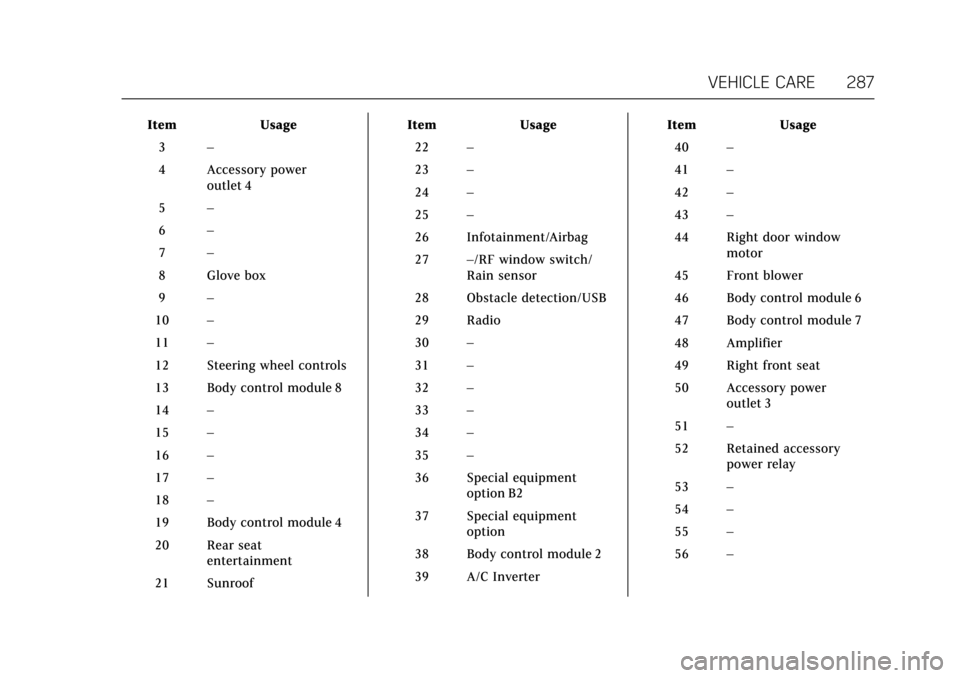
VEHICLE CARE 287
ItemUsage
3 –
4 Accessory power outlet 4
5 –
6 –
7 –
8 Glove box
9 –
10 –
11 –
12 Steering wheel controls
13 Body control module 8
14 –
15 –
16 –
17 –
18 –
19 Body control module 4
20 Rear seat entertainment
21 Sunroof Item
Usage
22 –
23 –
24 –
25 –
26 Infotainment/Airbag
27 –/RF window switch/
Rain sensor
28 Obstacle detection/USB
29 Radio
30 –
31 –
32 –
33 –
34 –
35 –
36 Special equipment option B2
37 Special equipment option
38 Body control module 2
39 A/C Inverter Item
Usage
40 –
41 –
42 –
43 –
44 Right door window motor
45 Front blower
46 Body control module 6
47 Body control module 7
48 Amplifier
49 Right front seat
50 Accessory power outlet 3
51 –
52 Retained accessory power relay
53 –
54 –
55 –
56 –