brake CADILLAC ESCALADE 2017 4.G Owners Manual
[x] Cancel search | Manufacturer: CADILLAC, Model Year: 2017, Model line: ESCALADE, Model: CADILLAC ESCALADE 2017 4.GPages: 354, PDF Size: 3.9 MB
Page 4 of 354
Cadillac Escalade Owner Manual (GMNA-Localizing-MidEast-10293077) -
2017 - crc - 8/24/16
INTRODUCTION 3
M:Shown when the owner manual
has additional instructions or
information.
*: Shown when the service manual
has additional instructions or
information.
0: Shown when there is more
information on another page —
“see page.”
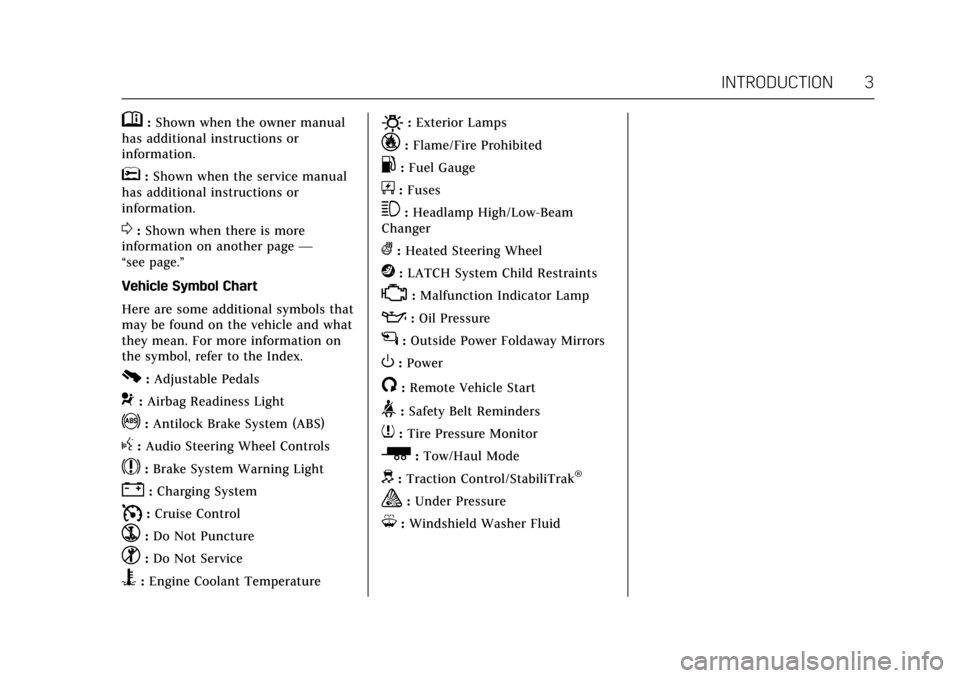
Vehicle Symbol Chart
Here are some additional symbols that
may be found on the vehicle and what
they mean. For more information on
the symbol, refer to the Index.
0: Adjustable Pedals
9:Airbag Readiness Light
!:Antilock Brake System (ABS)
g: Audio Steering Wheel Controls
$:Brake System Warning Light
":Charging System
I: Cruise Control
`:Do Not Puncture
^:Do Not Service
B:Engine Coolant Temperature
O:Exterior Lamps
_:Flame/Fire Prohibited
.:Fuel Gauge
+: Fuses
3:Headlamp High/Low-Beam
Changer
(: Heated Steering Wheel
j:LATCH System Child Restraints
*:Malfunction Indicator Lamp
::Oil Pressure
g:Outside Power Foldaway Mirrors
O:Power
/:Remote Vehicle Start
>:Safety Belt Reminders
7: Tire Pressure Monitor
_:Tow/Haul Mode
d: Traction Control/StabiliTrak®
a:Under Pressure
M: Windshield Washer Fluid
Page 6 of 354
Cadillac Escalade Owner Manual (GMNA-Localizing-MidEast-10293077) -
2017 - crc - 8/24/16
IN BRIEF 5
In Brief
Instrument Panel
Instrument Panel . . . . . . . . . . . . . . . . . . . 6
Initial Drive Information
Initial Drive Information . . . . . . . . . . . 8
Remote Keyless Entry (RKE)System . . . . . . . . . . . . . . . . . . . . . . . . . . . . . 8
Remote Vehicle Start . . . . . . . . . . . . . . . 8
Door Locks . . . . . . . . . . . . . . . . . . . . . . . . . . 9
Liftgate . . . . . . . . . . . . . . . . . . . . . . . . . . . . . . 9
Windows . . . . . . . . . . . . . . . . . . . . . . . . . . . 10
Seat Adjustment . . . . . . . . . . . . . . . . . . . 10
Memory Features . . . . . . . . . . . . . . . . . . 13
Second Row Seats . . . . . . . . . . . . . . . . . 13
Third Row Seats . . . . . . . . . . . . . . . . . . . 13
Heated and Cooled Front Seats . . . 14
Head Restraint Adjustment . . . . . . . 14
Safety Belts . . . . . . . . . . . . . . . . . . . . . . . . . 14
Passenger Sensing System . . . . . . . . 14
Mirror Adjustment . . . . . . . . . . . . . . . . 15
Steering Wheel Adjustment . . . . . . . 16
Throttle and Brake Pedal Adjustment . . . . . . . . . . . . . . . . . . . . . . . 16
Interior Lighting . . . . . . . . . . . . . . . . . . . 16
Exterior Lighting . . . . . . . . . . . . . . . . . . . 17
Windshield Wiper/Washer . . . . . . . . 17
Climate Controls . . . . . . . . . . . . . . . . . . . 18
Transmission . . . . . . . . . . . . . . . . . . . . . . . 19 Four-Wheel Drive . . . . . . . . . . . . . . . . . . 19
Vehicle Features
Infotainment System . . . . . . . . . . . . . . 20
Steering Wheel Controls . . . . . . . . . . 20
Cruise Control . . . . . . . . . . . . . . . . . . . . . 20
Driver Information
Center (DIC) . . . . . . . . . . . . . . . . . . . . . . 21
Forward Collision Alert (FCA) System . . . . . . . . . . . . . . . . . . . . . . . . . . . . 21
Forward Automatic Braking (FAB) . . . . . . . . . . . . . . . . . . . . 21
Lane Keep Assist (LKA) . . . . . . . . . . . 21
Lane Change Alert (LCA) . . . . . . . . . . 22
Surround Vision . . . . . . . . . . . . . . . . . . . 22
Rear Vision Camera (RVC) . . . . . . . . 22
Rear Cross Traffic Alert (RCTA) System . . . . . . . . . . . . . . . . . . . . . . . . . . . . 22
Parking Assist . . . . . . . . . . . . . . . . . . . . . . 22
Reverse Automatic Braking (RAB) . . . . . . . . . . . . . . . . . . . . 23
Power Outlets . . . . . . . . . . . . . . . . . . . . . . 23
Universal Remote System . . . . . . . . . 23
Sunroof . . . . . . . . . . . . . . . . . . . . . . . . . . . . . 24
Performance and Maintenance
Traction Control/Electronic Stability Control . . . . . . . . . . . . . . . . . . 24
Tire Pressure Monitor . . . . . . . . . . . . . 25
Fuel . . . . . . . . . . . . . . . . . . . . . . . . . . . . . . . . . 25
Engine Oil Life System . . . . . . . . . . . . 25 Driving for Better Fuel
Economy . . . . . . . . . . . . . . . . . . . . . . . . . . 26
Page 8 of 354

Cadillac Escalade Owner Manual (GMNA-Localizing-MidEast-10293077) -
2017 - crc - 8/24/16
IN BRIEF 7
1.Air Vents 0179.
2. Head-Up Display (HUD) 0141 (If
Equipped).
3. Turn Signal Lever. See Turn and
Lane-Change Signals 0168.
Windshield Wiper/Washer 0116.
Rear Window Wiper/
Washer 0117.
4. Hazard Warning Flashers 0168.
5. Instrument Cluster 0124.
6. Shift Lever. See Automatic
Transmission 0204.
Tow/Haul Mode Selector Button.
See Tow/Haul Mode 0208.
Range Selection Mode Buttons (If
Equipped). See Manual
Mode 0206.
7. Magnetic Ride Control Button. See Magnetic Ride Control 0219.
Pedal Adjust Switch (If
Equipped). See Adjustable Throttle
and Brake Pedal 0197.
Traction Control/Electronic
Stability Control 0216. 8. Light Sensor. See
Automatic
Headlamp System 0167.
9. Infotainment 0172.
10. Glove Box Button. See Glove
Box 0109.
Lane Keep Assist (LKA) 0240 (If
Equipped).
Parking Assist Button. See
Assistance Systems for Parking or
Backing 0230.
11. Dual Automatic Climate Control
System 0173.
Instrument Panel Storage 0109.
12. CD Player. See the infotainment manual.
13. ENGINE START/STOP Button. SeeIgnition Positions 0197.
14. Steering Wheel Controls 0115.
Driver Information Center (DIC)
Controls. See Driver Information
Center (DIC) 0138.
15. Horn 0115.
16. Steering Wheel Adjustment 0115.
17. Hood Release. See Hood0256. 18.
Cruise Control 0220 (If
Equipped).
Adaptive Cruise Control 0222 (If
Equipped).
Forward Collision Alert (FCA)
System 0234 (If Equipped).
Heated Steering Wheel 0115 (If
Equipped).
Phone Button. See the
infotainment manual.
19. Automatic Transfer Case Knob (If Equipped). See Four-Wheel
Drive 0209.
20. Data Link Connector (DLC) (Out of View). See Malfunction
Indicator Lamp (Check Engine
Light) 0130.
21. Electric Parking Brake 0213 (If
Equipped).
22. Exterior Lamp Controls 0164.
23. Instrument Panel Illumination
Control 0169 .
Page 17 of 354
Cadillac Escalade Owner Manual (GMNA-Localizing-MidEast-10293077) -
2017 - crc - 8/24/16
16 IN BRIEF
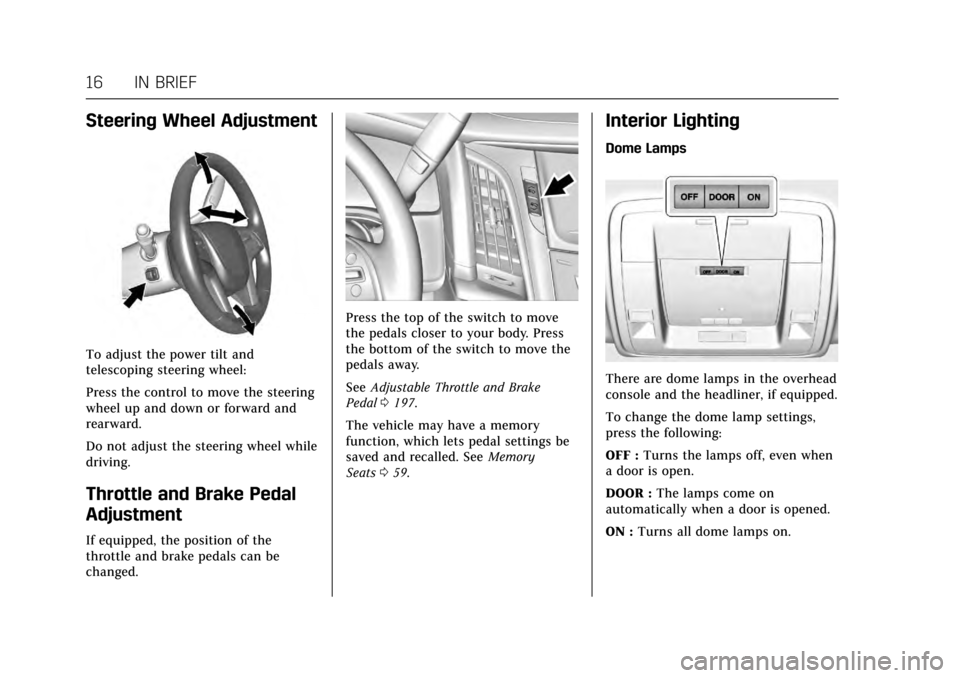
Steering Wheel Adjustment
To adjust the power tilt and
telescoping steering wheel:
Press the control to move the steering
wheel up and down or forward and
rearward.
Do not adjust the steering wheel while
driving.
Throttle and Brake Pedal
Adjustment
If equipped, the position of the
throttle and brake pedals can be
changed.
Press the top of the switch to move
the pedals closer to your body. Press
the bottom of the switch to move the
pedals away.
SeeAdjustable Throttle and Brake
Pedal 0197.
The vehicle may have a memory
function, which lets pedal settings be
saved and recalled. See Memory
Seats 059.
Interior Lighting
Dome Lamps
There are dome lamps in the overhead
console and the headliner, if equipped.
To change the dome lamp settings,
press the following:
OFF : Turns the lamps off, even when
a door is open.
DOOR : The lamps come on
automatically when a door is opened.
ON : Turns all dome lamps on.
Page 22 of 354
Cadillac Escalade Owner Manual (GMNA-Localizing-MidEast-10293077) -
2017 - crc - 8/24/16
IN BRIEF 21
*:Press to disengage cruise control
without erasing the set speed from
memory.
See Cruise Control 0220 orAdaptive
Cruise Control 0222 (if equipped).
Driver Information
Center (DIC)
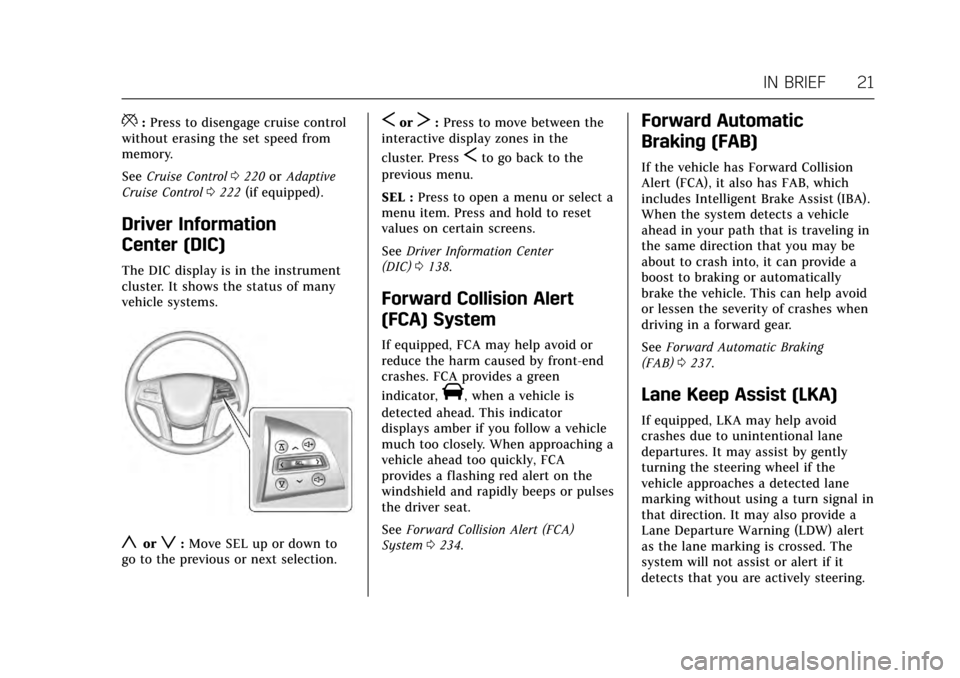
The DIC display is in the instrument
cluster. It shows the status of many
vehicle systems.
yorz:Move SEL up or down to
go to the previous or next selection.
SorT: Press to move between the
interactive display zones in the
cluster. Press
Sto go back to the
previous menu.
SEL : Press to open a menu or select a
menu item. Press and hold to reset
values on certain screens.
See Driver Information Center
(DIC) 0138.
Forward Collision Alert
(FCA) System
If equipped, FCA may help avoid or
reduce the harm caused by front-end
crashes. FCA provides a green
indicator,
V, when a vehicle is
detected ahead. This indicator
displays amber if you follow a vehicle
much too closely. When approaching a
vehicle ahead too quickly, FCA
provides a flashing red alert on the
windshield and rapidly beeps or pulses
the driver seat.
See Forward Collision Alert (FCA)
System 0234.
Forward Automatic
Braking (FAB)
If the vehicle has Forward Collision
Alert (FCA), it also has FAB, which
includes Intelligent Brake Assist (IBA).
When the system detects a vehicle
ahead in your path that is traveling in
the same direction that you may be
about to crash into, it can provide a
boost to braking or automatically
brake the vehicle. This can help avoid
or lessen the severity of crashes when
driving in a forward gear.
See Forward Automatic Braking
(FAB) 0237.
Lane Keep Assist (LKA)
If equipped, LKA may help avoid
crashes due to unintentional lane
departures. It may assist by gently
turning the steering wheel if the
vehicle approaches a detected lane
marking without using a turn signal in
that direction. It may also provide a
Lane Departure Warning (LDW) alert
as the lane marking is crossed. The
system will not assist or alert if it
detects that you are actively steering.
Page 24 of 354
Cadillac Escalade Owner Manual (GMNA-Localizing-MidEast-10293077) -
2017 - crc - 8/24/16
IN BRIEF 23
The vehicle may also have a higher
speed Backing Warning System and
the Reverse Automatic Braking
system.
SeeDriver Assistance Systems 0229.
Reverse Automatic
Braking (RAB)
If the vehicle has Adaptive Cruise
Control (ACC) it also has the RAB
system, which is designed to help
avoid or reduce the harm caused by
backing crashes when the vehicle is
shifted into R (Reverse). If the system
detects the vehicle is backing too fast
to avoid a crash with a detected object
behind your vehicle in your path, it
may automatically brake hard to
a stop.
See Assistance Systems for Parking or
Backing 0230.
Power Outlets
Power Outlets 12 Volt Direct
Current
Accessory power outlets can be used
to plug in electrical equipment, such
as a cell phone, MP3 player, etc.
The vehicle has five accessory power
outlets:
.
One near the cupholders on the
center console.
. One inside the center console.
. One on the rear of the center
console.
. One in the third row seat on the
driver side.
. One in the rear cargo area on the
passenger side.
Lift the cover to access and replace
when not in use.
See Power Outlets 0119.
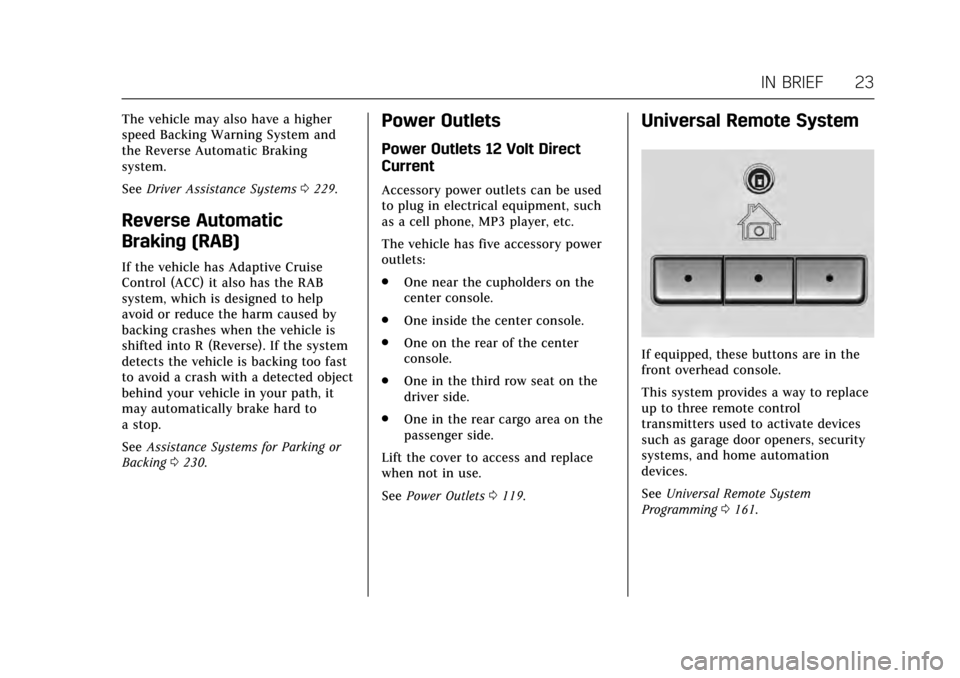
Universal Remote System
If equipped, these buttons are in the
front overhead console.
This system provides a way to replace
up to three remote control
transmitters used to activate devices
such as garage door openers, security
systems, and home automation
devices.
See Universal Remote System
Programming 0161.
Page 27 of 354
Cadillac Escalade Owner Manual (GMNA-Localizing-MidEast-10293077) -
2017 - crc - 8/24/16
26 IN BRIEF
2. Press and hold SEL on the DICcontrols for a few seconds to
clear the CHANGE ENGINE OIL
SOON message and reset the oil
life at 100%.
Be careful not to reset the oil life
display accidentally at any time
other than after the oil is
changed. It cannot be reset
accurately until the next oil
change.
The oil life system can also be reset as
follows: 1. Display OIL LIFE on the DIC. See Driver Information Center
(DIC) 0138.
2. Fully press and release the accelerator pedal three times
within five seconds.
If the CHANGE ENGINE OIL
SOON message is not on, the
system is reset.
See Engine Oil Life System 0260.Driving for Better Fuel
Economy
Driving habits can affect fuel mileage.
Here are some driving tips to get the
best fuel economy possible.
.
Avoid fast starts and accelerate
smoothly.
. Brake gradually and avoid abrupt
stops.
. Avoid idling the engine for long
periods of time.
. When road and weather
conditions are appropriate, use
cruise control.
. Always follow posted speed limits
or drive more slowly when
conditions require.
. Keep vehicle tires properly
inflated.
. Combine several trips into a
single trip.
. Replace the vehicle's tires with the
same TPC Spec number molded
into the tire's sidewall near
the size. .
Follow recommended scheduled
maintenance.
Page 33 of 354
Cadillac Escalade Owner Manual (GMNA-Localizing-MidEast-10293077) -
2017 - crc - 8/24/16
32 KEYS, DOORS, AND WINDOWS
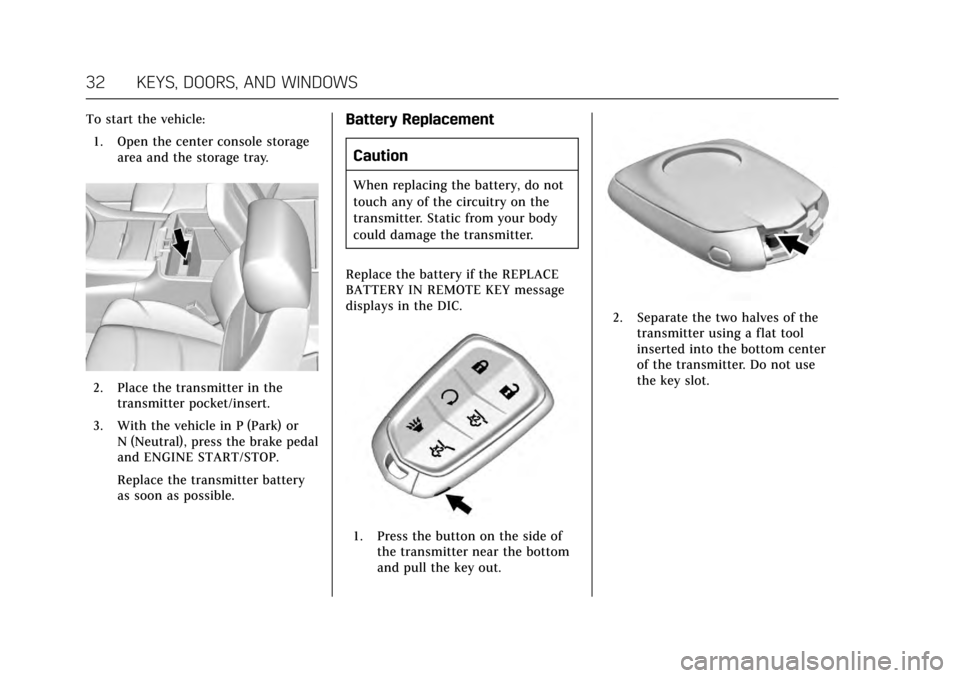
To start the vehicle:1. Open the center console storage area and the storage tray.
2. Place the transmitter in thetransmitter pocket/insert.
3. With the vehicle in P (Park) or N (Neutral), press the brake pedal
and ENGINE START/STOP.
Replace the transmitter battery
as soon as possible.
Battery Replacement
Caution
When replacing the battery, do not
touch any of the circuitry on the
transmitter. Static from your body
could damage the transmitter.
Replace the battery if the REPLACE
BATTERY IN REMOTE KEY message
displays in the DIC.
1. Press the button on the side of the transmitter near the bottom
and pull the key out.
2. Separate the two halves of thetransmitter using a flat tool
inserted into the bottom center
of the transmitter. Do not use
the key slot.
Page 84 of 354
Cadillac Escalade Owner Manual (GMNA-Localizing-MidEast-10293077) -
2017 - crc - 8/24/16
SEATS AND RESTRAINTS 83
ejection in rollover events, although
no system can prevent all such
ejections.
But airbags would not help in many
types of collisions, primarily because
the occupant's motion is not toward
those airbags. SeeWhen Should an
Airbag Inflate? 081.
Airbags should never be regarded as
anything more than a supplement to
safety belts.
What Will You See after an
Airbag Inflates?
After frontal airbags and
seat-mounted side impact airbags
inflate, they quickly deflate, so quickly
that some people may not even realize
an airbag inflated. The front center
airbag and roof-rail airbags may still
be at least partially inflated for some
time after they inflate. Some
components of the airbag module may
be hot for several minutes. For
location of the airbags, see Where Are
the Airbags? 080. The parts of the airbag that come into
contact with you may be warm, but
not too hot to touch. There may be
some smoke and dust coming from
the vents in the deflated airbags.
Airbag inflation does not prevent the
driver from seeing out of the
windshield or being able to steer the
vehicle, nor does it prevent people
from leaving the vehicle.
{Warning
When an airbag inflates, there may
be dust in the air. This dust could
cause breathing problems for
people with a history of asthma or
other breathing trouble. To avoid
this, everyone in the vehicle should
get out as soon as it is safe to do
so. If you have breathing problems
but cannot get out of the vehicle
after an airbag inflates, then get
fresh air by opening a window or a
door. If you experience breathing
problems following an airbag
deployment, you should seek
medical attention. The vehicle has a feature that may
automatically unlock the doors, turn
on the interior lamps and hazard
warning flashers, and shut off the fuel
system after the airbags inflate. The
feature may also activate, without
airbag inflation, after an event that
exceeds a predetermined threshold.
You can lock the doors, turn off the
interior lamps, and turn off the hazard
warning flashers by using the controls
for those features.{Warning
A crash severe enough to inflate the
airbags may have also damaged
important functions in the vehicle,
such as the fuel system, brake and
steering systems, etc. Even if the
vehicle appears to be drivable after
a moderate crash, there may be
concealed damage that could make
it difficult to safely operate the
vehicle.
Use caution if you should attempt
to restart the engine after a crash
has occurred.
Page 115 of 354
Cadillac Escalade Owner Manual (GMNA-Localizing-MidEast-10293077) -
2017 - crc - 8/24/16
114 INSTRUMENTS AND CONTROLS
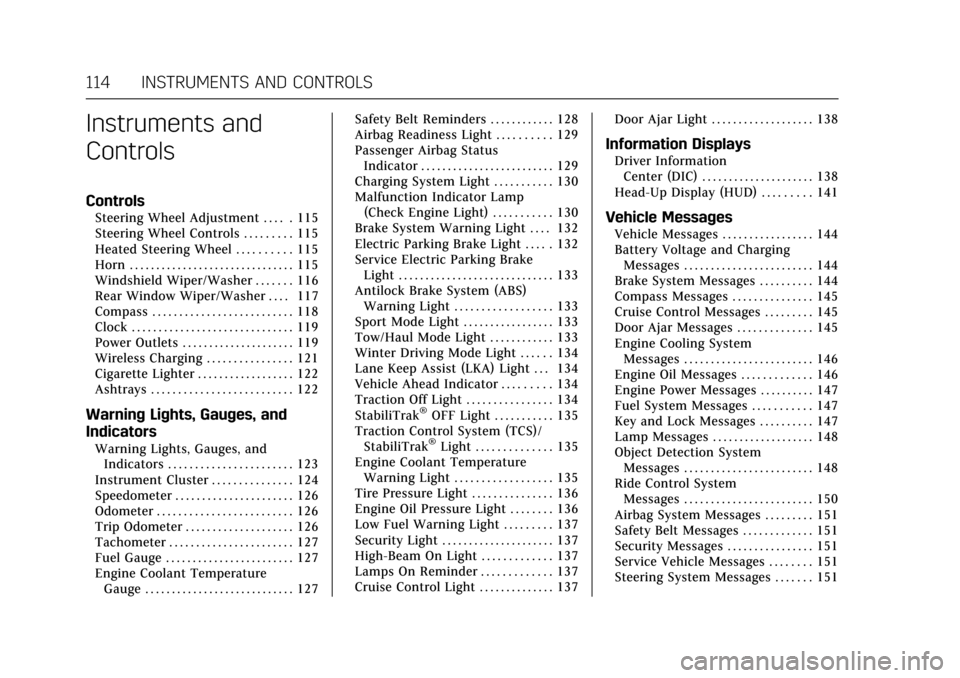
Instruments and
Controls
Controls
Steering Wheel Adjustment . . . . . 115
Steering Wheel Controls . . . . . . . . . 115
Heated Steering Wheel . . . . . . . . . . 115
Horn . . . . . . . . . . . . . . . . . . . . . . . . . . . . . . . 115
Windshield Wiper/Washer . . . . . . . 116
Rear Window Wiper/Washer . . . . 117
Compass . . . . . . . . . . . . . . . . . . . . . . . . . . 118
Clock . . . . . . . . . . . . . . . . . . . . . . . . . . . . . . 119
Power Outlets . . . . . . . . . . . . . . . . . . . . . 119
Wireless Charging . . . . . . . . . . . . . . . . 121
Cigarette Lighter . . . . . . . . . . . . . . . . . . 122
Ashtrays . . . . . . . . . . . . . . . . . . . . . . . . . . 122
Warning Lights, Gauges, and
Indicators
Warning Lights, Gauges, andIndicators . . . . . . . . . . . . . . . . . . . . . . . 123
Instrument Cluster . . . . . . . . . . . . . . . 124
Speedometer . . . . . . . . . . . . . . . . . . . . . . 126
Odometer . . . . . . . . . . . . . . . . . . . . . . . . . 126
Trip Odometer . . . . . . . . . . . . . . . . . . . . 126
Tachometer . . . . . . . . . . . . . . . . . . . . . . . 127
Fuel Gauge . . . . . . . . . . . . . . . . . . . . . . . . 127
Engine Coolant Temperature Gauge . . . . . . . . . . . . . . . . . . . . . . . . . . . . 127 Safety Belt Reminders . . . . . . . . . . . . 128
Airbag Readiness Light . . . . . . . . . . 129
Passenger Airbag Status
Indicator . . . . . . . . . . . . . . . . . . . . . . . . . 129
Charging System Light . . . . . . . . . . . 130
Malfunction Indicator Lamp
(Check Engine Light) . . . . . . . . . . . 130
Brake System Warning Light . . . . 132
Electric Parking Brake Light . . . . . 132
Service Electric Parking Brake Light . . . . . . . . . . . . . . . . . . . . . . . . . . . . . 133
Antilock Brake System (ABS) Warning Light . . . . . . . . . . . . . . . . . . 133
Sport Mode Light . . . . . . . . . . . . . . . . . 133
Tow/Haul Mode Light . . . . . . . . . . . . 133
Winter Driving Mode Light . . . . . . 134
Lane Keep Assist (LKA) Light . . . 134
Vehicle Ahead Indicator . . . . . . . . . 134
Traction Off Light . . . . . . . . . . . . . . . . 134
StabiliTrak
®OFF Light . . . . . . . . . . . 135
Traction Control System (TCS)/ StabiliTrak
®Light . . . . . . . . . . . . . . 135
Engine Coolant Temperature Warning Light . . . . . . . . . . . . . . . . . . 135
Tire Pressure Light . . . . . . . . . . . . . . . 136
Engine Oil Pressure Light . . . . . . . . 136
Low Fuel Warning Light . . . . . . . . . 137
Security Light . . . . . . . . . . . . . . . . . . . . . 137
High-Beam On Light . . . . . . . . . . . . . 137
Lamps On Reminder . . . . . . . . . . . . . 137
Cruise Control Light . . . . . . . . . . . . . . 137 Door Ajar Light . . . . . . . . . . . . . . . . . . . 138
Information Displays
Driver Information
Center (DIC) . . . . . . . . . . . . . . . . . . . . . 138
Head-Up Display (HUD) . . . . . . . . . 141
Vehicle Messages
Vehicle Messages . . . . . . . . . . . . . . . . . 144
Battery Voltage and Charging Messages . . . . . . . . . . . . . . . . . . . . . . . . 144
Brake System Messages . . . . . . . . . . 144
Compass Messages . . . . . . . . . . . . . . . 145
Cruise Control Messages . . . . . . . . . 145
Door Ajar Messages . . . . . . . . . . . . . . 145
Engine Cooling System Messages . . . . . . . . . . . . . . . . . . . . . . . . 146
Engine Oil Messages . . . . . . . . . . . . . 146
Engine Power Messages . . . . . . . . . . 147
Fuel System Messages . . . . . . . . . . . 147
Key and Lock Messages . . . . . . . . . . 147
Lamp Messages . . . . . . . . . . . . . . . . . . . 148
Object Detection System Messages . . . . . . . . . . . . . . . . . . . . . . . . 148
Ride Control System Messages . . . . . . . . . . . . . . . . . . . . . . . . 150
Airbag System Messages . . . . . . . . . 151
Safety Belt Messages . . . . . . . . . . . . . 151
Security Messages . . . . . . . . . . . . . . . . 151
Service Vehicle Messages . . . . . . . . 151
Steering System Messages . . . . . . . 151