car play CADILLAC ESCALADE 2017 4.G Owners Manual
[x] Cancel search | Manufacturer: CADILLAC, Model Year: 2017, Model line: ESCALADE, Model: CADILLAC ESCALADE 2017 4.GPages: 354, PDF Size: 3.9 MB
Page 14 of 354

Cadillac Escalade Owner Manual (GMNA-Localizing-MidEast-10293077) -
2017 - crc - 8/24/16
IN BRIEF 13
Massage
Driver Seat Shown, Passenger SeatSimilar
If equipped, the ignition must be on
to use the massage feature.
To activate and adjust massage: 1. Turn the selection control (1) to view massage options on the
infotainment display.
2. Select massage feature.
3. Press up or down to select massage type.
See Massage 061.
Memory Features
The SET, 1, 2, andB(Exit) buttons
on the driver door are used to
manually store and recall memory
settings for the driver seat, outside
mirrors, power tilt and telescoping
steering column, adjustable pedals (if
equipped), and massage settings (if
equipped).
Automatic Memory Recall and/or Easy
Exit Recall features may be enabled in
the personalization menus to
automatically recall positions stored
to the 1, 2, and
Bbuttons. See
Memory Seats 059 and Vehicle
Personalization 0154.
Second Row Seats
The second row seatbacks can be
folded for additional cargo space,
or the seats can be folded and
tumbled for easy entry/exit to the
third row seats. The seatbacks also
recline.
See Second Row Seats 063.
Third Row Seats
Third row seatbacks can be folded. See
Third Row Seats 068.
Page 24 of 354
Cadillac Escalade Owner Manual (GMNA-Localizing-MidEast-10293077) -
2017 - crc - 8/24/16
IN BRIEF 23
The vehicle may also have a higher
speed Backing Warning System and
the Reverse Automatic Braking
system.
SeeDriver Assistance Systems 0229.
Reverse Automatic
Braking (RAB)
If the vehicle has Adaptive Cruise
Control (ACC) it also has the RAB
system, which is designed to help
avoid or reduce the harm caused by
backing crashes when the vehicle is
shifted into R (Reverse). If the system
detects the vehicle is backing too fast
to avoid a crash with a detected object
behind your vehicle in your path, it
may automatically brake hard to
a stop.
See Assistance Systems for Parking or
Backing 0230.
Power Outlets
Power Outlets 12 Volt Direct
Current
Accessory power outlets can be used
to plug in electrical equipment, such
as a cell phone, MP3 player, etc.
The vehicle has five accessory power
outlets:
.
One near the cupholders on the
center console.
. One inside the center console.
. One on the rear of the center
console.
. One in the third row seat on the
driver side.
. One in the rear cargo area on the
passenger side.
Lift the cover to access and replace
when not in use.
See Power Outlets 0119.
Universal Remote System
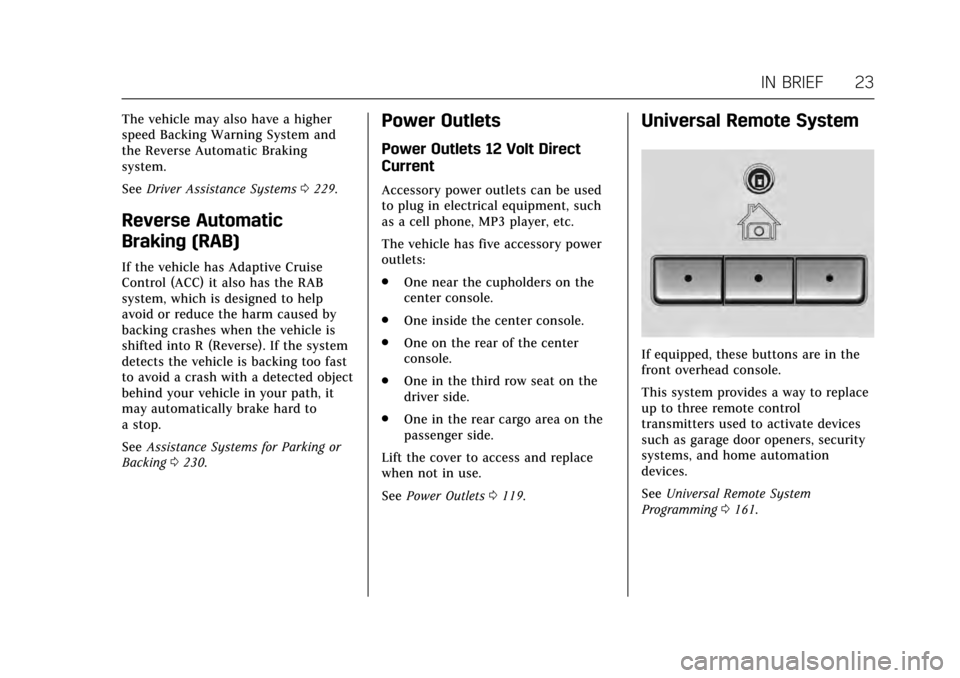
If equipped, these buttons are in the
front overhead console.
This system provides a way to replace
up to three remote control
transmitters used to activate devices
such as garage door openers, security
systems, and home automation
devices.
See Universal Remote System
Programming 0161.
Page 27 of 354
Cadillac Escalade Owner Manual (GMNA-Localizing-MidEast-10293077) -
2017 - crc - 8/24/16
26 IN BRIEF
2. Press and hold SEL on the DICcontrols for a few seconds to
clear the CHANGE ENGINE OIL
SOON message and reset the oil
life at 100%.
Be careful not to reset the oil life
display accidentally at any time
other than after the oil is
changed. It cannot be reset
accurately until the next oil
change.
The oil life system can also be reset as
follows: 1. Display OIL LIFE on the DIC. See Driver Information Center
(DIC) 0138.
2. Fully press and release the accelerator pedal three times
within five seconds.
If the CHANGE ENGINE OIL
SOON message is not on, the
system is reset.
See Engine Oil Life System 0260.Driving for Better Fuel
Economy
Driving habits can affect fuel mileage.
Here are some driving tips to get the
best fuel economy possible.
.
Avoid fast starts and accelerate
smoothly.
. Brake gradually and avoid abrupt
stops.
. Avoid idling the engine for long
periods of time.
. When road and weather
conditions are appropriate, use
cruise control.
. Always follow posted speed limits
or drive more slowly when
conditions require.
. Keep vehicle tires properly
inflated.
. Combine several trips into a
single trip.
. Replace the vehicle's tires with the
same TPC Spec number molded
into the tire's sidewall near
the size. .
Follow recommended scheduled
maintenance.
Page 50 of 354
Cadillac Escalade Owner Manual (GMNA-Localizing-MidEast-10293077) -
2017 - crc - 8/24/16
KEYS, DOORS, AND WINDOWS 49
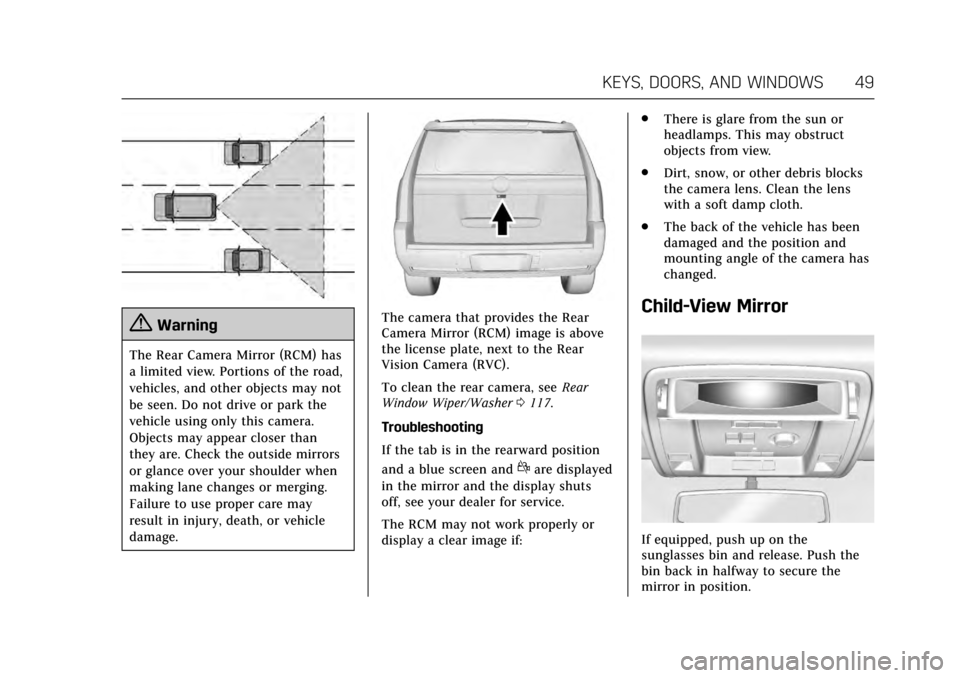
{Warning
The Rear Camera Mirror (RCM) has
a limited view. Portions of the road,
vehicles, and other objects may not
be seen. Do not drive or park the
vehicle using only this camera.
Objects may appear closer than
they are. Check the outside mirrors
or glance over your shoulder when
making lane changes or merging.
Failure to use proper care may
result in injury, death, or vehicle
damage.
The camera that provides the Rear
Camera Mirror (RCM) image is above
the license plate, next to the Rear
Vision Camera (RVC).
To clean the rear camera, seeRear
Window Wiper/Washer 0117.
Troubleshooting
If the tab is in the rearward position
and a blue screen and
dare displayed
in the mirror and the display shuts
off, see your dealer for service.
The RCM may not work properly or
display a clear image if: .
There is glare from the sun or
headlamps. This may obstruct
objects from view.
. Dirt, snow, or other debris blocks
the camera lens. Clean the lens
with a soft damp cloth.
. The back of the vehicle has been
damaged and the position and
mounting angle of the camera has
changed.
Child-View Mirror
If equipped, push up on the
sunglasses bin and release. Push the
bin back in halfway to secure the
mirror in position.
Page 64 of 354
Cadillac Escalade Owner Manual (GMNA-Localizing-MidEast-10293077) -
2017 - crc - 8/24/16
SEATS AND RESTRAINTS 63
the vehicle is started. SeeRemote
Vehicle Start 033 and Vehicle
Personalization 0154.
The heated or cooled seat indicator
lights do not turn on during a remote
start.
The temperature performance of an
unoccupied seat may be reduced. This
is normal.
Auto Heated and Cooled Seats
When the ignition is on, the auto
heated or cooled seats will
automatically activate at the level
determined by the vehicle's interior
temperature, if enabled in vehicle
personalization. See Vehicle
Personalization 0154. The indicator
lights next to the buttons indicate the
level of operation. Use the heated or
cooled seat buttons to turn off auto
heated or cooled seats. If the
passenger seat is unoccupied, this
feature will not activate that seat.
Rear Seats
Heated Rear Seats
{Warning
If you cannot feel temperature
change or pain to the skin, the seat
heater may cause burns. See the
Warning under Heated and Cooled
Front Seats 062.
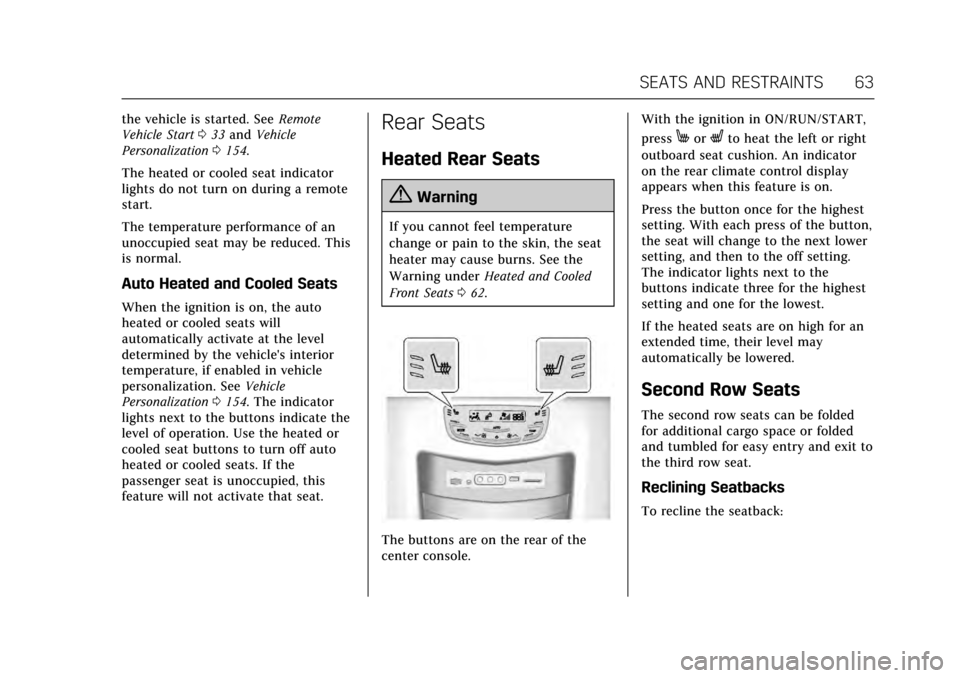
The buttons are on the rear of the
center console. With the ignition in ON/RUN/START,
press
MorLto heat the left or right
outboard seat cushion. An indicator
on the rear climate control display
appears when this feature is on.
Press the button once for the highest
setting. With each press of the button,
the seat will change to the next lower
setting, and then to the off setting.
The indicator lights next to the
buttons indicate three for the highest
setting and one for the lowest.
If the heated seats are on high for an
extended time, their level may
automatically be lowered.
Second Row Seats
The second row seats can be folded
for additional cargo space or folded
and tumbled for easy entry and exit to
the third row seat.
Reclining Seatbacks
To recline the seatback:
Page 118 of 354
Cadillac Escalade Owner Manual (GMNA-Localizing-MidEast-10293077) -
2017 - crc - 8/24/16
INSTRUMENTS AND CONTROLS 117
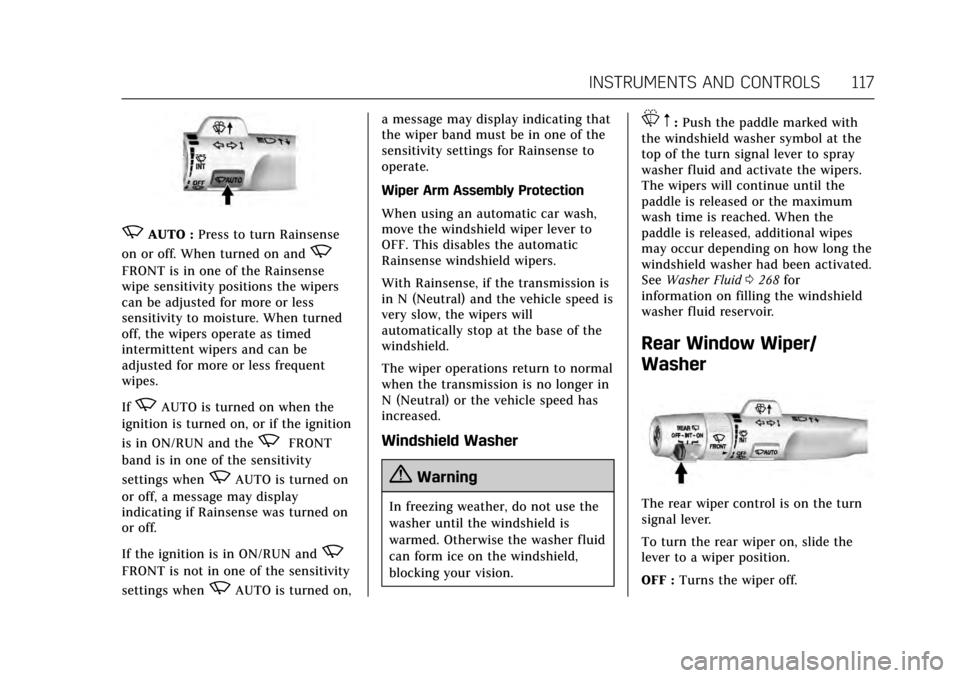
zAUTO :Press to turn Rainsense
on or off. When turned on and
z
FRONT is in one of the Rainsense
wipe sensitivity positions the wipers
can be adjusted for more or less
sensitivity to moisture. When turned
off, the wipers operate as timed
intermittent wipers and can be
adjusted for more or less frequent
wipes.
If
zAUTO is turned on when the
ignition is turned on, or if the ignition
is in ON/RUN and the
zFRONT
band is in one of the sensitivity
settings when
zAUTO is turned on
or off, a message may display
indicating if Rainsense was turned on
or off.
If the ignition is in ON/RUN and
z
FRONT is not in one of the sensitivity
settings when
zAUTO is turned on, a message may display indicating that
the wiper band must be in one of the
sensitivity settings for Rainsense to
operate.
Wiper Arm Assembly Protection
When using an automatic car wash,
move the windshield wiper lever to
OFF. This disables the automatic
Rainsense windshield wipers.
With Rainsense, if the transmission is
in N (Neutral) and the vehicle speed is
very slow, the wipers will
automatically stop at the base of the
windshield.
The wiper operations return to normal
when the transmission is no longer in
N (Neutral) or the vehicle speed has
increased.
Windshield Washer
{Warning
In freezing weather, do not use the
washer until the windshield is
warmed. Otherwise the washer fluid
can form ice on the windshield,
blocking your vision.
L
m:Push the paddle marked with
the windshield washer symbol at the
top of the turn signal lever to spray
washer fluid and activate the wipers.
The wipers will continue until the
paddle is released or the maximum
wash time is reached. When the
paddle is released, additional wipes
may occur depending on how long the
windshield washer had been activated.
See Washer Fluid 0268 for
information on filling the windshield
washer fluid reservoir.
Rear Window Wiper/
Washer
The rear wiper control is on the turn
signal lever.
To turn the rear wiper on, slide the
lever to a wiper position.
OFF : Turns the wiper off.
Page 119 of 354
Cadillac Escalade Owner Manual (GMNA-Localizing-MidEast-10293077) -
2017 - crc - 8/24/16
118 INSTRUMENTS AND CONTROLS
INT :Turns on the rear wiper with a
delay between wipes.
ON : Turns on the rear wiper.
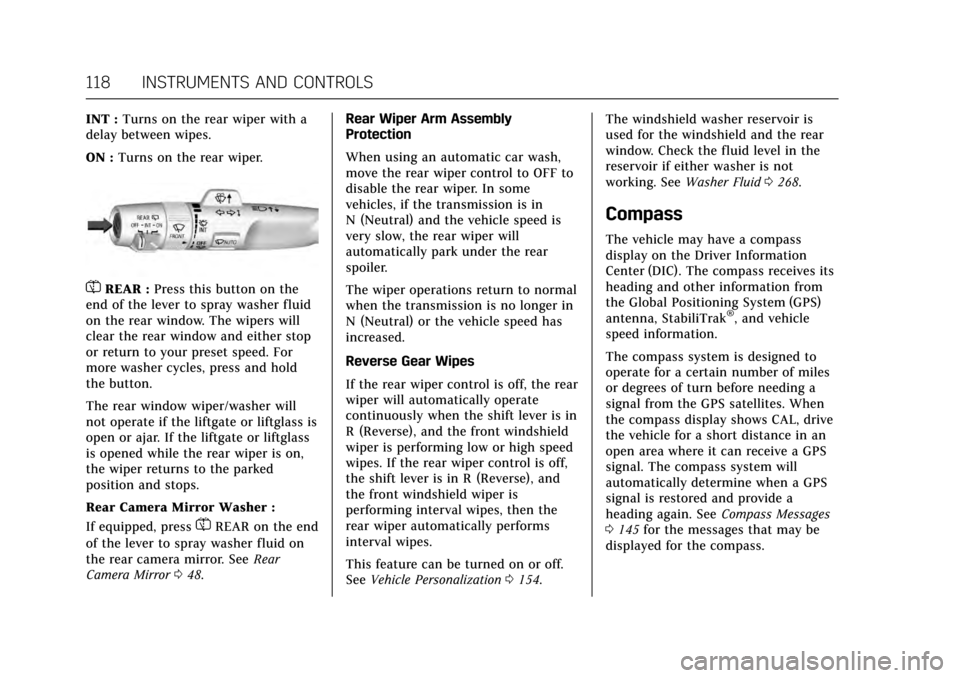
=REAR : Press this button on the
end of the lever to spray washer fluid
on the rear window. The wipers will
clear the rear window and either stop
or return to your preset speed. For
more washer cycles, press and hold
the button.
The rear window wiper/washer will
not operate if the liftgate or liftglass is
open or ajar. If the liftgate or liftglass
is opened while the rear wiper is on,
the wiper returns to the parked
position and stops.
Rear Camera Mirror Washer :
If equipped, press
=REAR on the end
of the lever to spray washer fluid on
the rear camera mirror. See Rear
Camera Mirror 048. Rear Wiper Arm Assembly
Protection
When using an automatic car wash,
move the rear wiper control to OFF to
disable the rear wiper. In some
vehicles, if the transmission is in
N (Neutral) and the vehicle speed is
very slow, the rear wiper will
automatically park under the rear
spoiler.
The wiper operations return to normal
when the transmission is no longer in
N (Neutral) or the vehicle speed has
increased.
Reverse Gear Wipes
If the rear wiper control is off, the rear
wiper will automatically operate
continuously when the shift lever is in
R (Reverse), and the front windshield
wiper is performing low or high speed
wipes. If the rear wiper control is off,
the shift lever is in R (Reverse), and
the front windshield wiper is
performing interval wipes, then the
rear wiper automatically performs
interval wipes.
This feature can be turned on or off.
See
Vehicle Personalization 0154. The windshield washer reservoir is
used for the windshield and the rear
window. Check the fluid level in the
reservoir if either washer is not
working. See
Washer Fluid 0268.
Compass
The vehicle may have a compass
display on the Driver Information
Center (DIC). The compass receives its
heading and other information from
the Global Positioning System (GPS)
antenna, StabiliTrak
®, and vehicle
speed information.
The compass system is designed to
operate for a certain number of miles
or degrees of turn before needing a
signal from the GPS satellites. When
the compass display shows CAL, drive
the vehicle for a short distance in an
open area where it can receive a GPS
signal. The compass system will
automatically determine when a GPS
signal is restored and provide a
heading again. See Compass Messages
0 145 for the messages that may be
displayed for the compass.
Page 144 of 354
Cadillac Escalade Owner Manual (GMNA-Localizing-MidEast-10293077) -
2017 - crc - 8/24/16
INSTRUMENTS AND CONTROLS 143
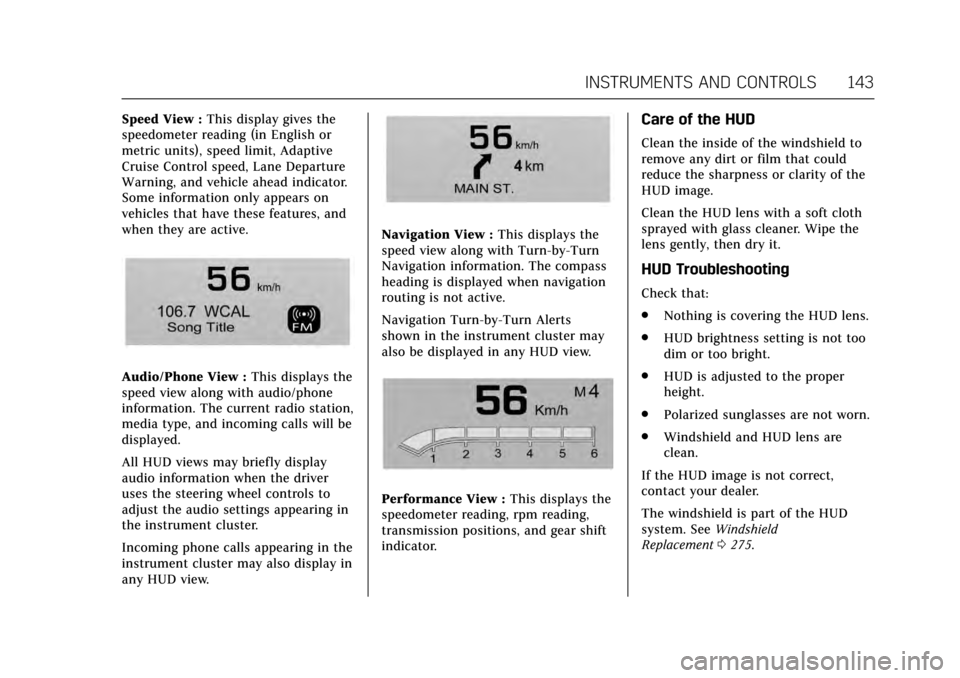
Speed View :This display gives the
speedometer reading (in English or
metric units), speed limit, Adaptive
Cruise Control speed, Lane Departure
Warning, and vehicle ahead indicator.
Some information only appears on
vehicles that have these features, and
when they are active.
Audio/Phone View : This displays the
speed view along with audio/phone
information. The current radio station,
media type, and incoming calls will be
displayed.
All HUD views may briefly display
audio information when the driver
uses the steering wheel controls to
adjust the audio settings appearing in
the instrument cluster.
Incoming phone calls appearing in the
instrument cluster may also display in
any HUD view.
Navigation View : This displays the
speed view along with Turn-by-Turn
Navigation information. The compass
heading is displayed when navigation
routing is not active.
Navigation Turn-by-Turn Alerts
shown in the instrument cluster may
also be displayed in any HUD view.
Performance View : This displays the
speedometer reading, rpm reading,
transmission positions, and gear shift
indicator.
Care of the HUD
Clean the inside of the windshield to
remove any dirt or film that could
reduce the sharpness or clarity of the
HUD image.
Clean the HUD lens with a soft cloth
sprayed with glass cleaner. Wipe the
lens gently, then dry it.
HUD Troubleshooting
Check that:
. Nothing is covering the HUD lens.
. HUD brightness setting is not too
dim or too bright.
. HUD is adjusted to the proper
height.
. Polarized sunglasses are not worn.
. Windshield and HUD lens are
clean.
If the HUD image is not correct,
contact your dealer.
The windshield is part of the HUD
system. See Windshield
Replacement 0275.
Page 146 of 354
Cadillac Escalade Owner Manual (GMNA-Localizing-MidEast-10293077) -
2017 - crc - 8/24/16
INSTRUMENTS AND CONTROLS 145
assist motor may be heard and brake
pedal pulsation may be felt. This is
normal under these conditions. Take
the vehicle to your dealer for service.
SERVICE PARKING BRAKE
This message is displayed when there
is a problem with the parking brake.
Take the vehicle to your dealer for
service.
Compass Messages
The compass display will be blank if
the vehicle temporarily loses
communication with the Global
Positioning System (GPS).
Cruise Control Messages
ADAPTIVE CRUISE SET TO XXX
This message displays when the
Adaptive Cruise Control (ACC) speed is
set. SeeAdaptive Cruise Control 0222.
ADAPTIVE CRUISE TEMPORARILY
UNAVAILABLE
This message displays when
attempting to activate Adaptive Cruise
Control (ACC) when it is temporarily
unavailable. The ACC system does not
need service.
This can occur under the following
conditions:
.
The radar is not clean. Keep the
radar sensors free of mud, dirt,
snow, ice, and slush. Clean the
entire front and/or rear of the
vehicle. For cleaning instructions,
see Exterior Care 0320.
. Heavy rain or snow is interfering
with the radar object detection or
camera performance.
CRUISE SET TO XXX
This message displays when the cruise
control speed is set. See Cruise
Control 0220.
NO CRUISE BRAKING GAS PEDAL
APPLIED
This message displays when Adaptive
Cruise Control (ACC) is active and the
driver is pressing the gas pedal. When
this occurs, ACC will not brake. See
Adaptive Cruise Control 0222.
SERVICE ADAPTIVE CRUISE
CONTROL
This message displays when the
Adaptive Cruise Control (ACC) needs
service. Take the vehicle to your
dealer.
SHIFT TO PARK BEFORE EXITING
This message may display if Adaptive
Cruise Control (ACC) is engaged
holding the vehicle at a stop, and the
driver attempts to exit the vehicle. Put
the vehicle in P (Park) before exiting.
Door Ajar Messages
DOOR OPEN
A door open symbol will be displayed
on the DIC showing which door is
open. If the vehicle has been shifted
out of P (Park), a DOOR OPEN
Page 149 of 354
Cadillac Escalade Owner Manual (GMNA-Localizing-MidEast-10293077) -
2017 - crc - 8/24/16
148 INSTRUMENTS AND CONTROLS
Lamp Messages
AUTOMATIC LIGHT CONTROL
ON/OFF
This message is displayed when the
exterior lamp control is in AUTO and
the lights have turned on or off. See
Automatic Headlamp System0167.
XXX TURN INDICATOR FAILURE
When one of the turn signals is out,
this message displays to show which
bulb needs to be replaced. See Bulb
Replacement 0276 and Replacement
Bulbs 0277.
TURN SIGNAL ON
This message is displayed if the turn
signal has been left on. Turn off the
turn signal.
Object Detection System
Messages
24 GHz RADARS OFF
This message displays when driving in
certain areas where there may be
radar interference. Adaptive Cruise
Control (ACC), Forward Collision Alert (FCA), and Forward Automatic
Braking (FAB) may not work or may
not work as well. The vehicle does not
need service.
FORWARD COLLISION
SYSTEM OFF
This message displays when Forward
Automatic Braking (FAB) has been
turned off. See
Forward Automatic
Braking (FAB) 0237.
FORWARD COLLISION SYSTEM
REDUCED
This message displays when Forward
Automatic Braking (FAB) has been set
to the Alert setting. This setting
disables most FAB functions. See
Forward Automatic Braking
(FAB) 0237.
FORWARD COLLISION SYSTEM
UNAVAILABLE
This message displays when Forward
Automatic Braking (FAB) has been
unavailable for some time. The FAB
System does not need service. This
message can display under the
following conditions: .
The front of the vehicle or
windshield is not clean. Keep
these areas clean and free of mud,
dirt, snow, ice, and slush. For
cleaning instructions, see Exterior
Care 0320.
. Heavy rain or snow is interfering
with the object detection
performance.
This message may also be displayed if
there is a problem with the StabiliTrak
system. See Traction Control/Electronic
Stability Control 0216.
FORWARD COLLISION ALERT OFF
This message displays when the
Forward Collision Alert (FCA) has
been turned off.
FRONT CAMERA BLOCKED CLEAN
WINDSHIELD
This message displays when the
camera is blocked. Cleaning the
outside of the windshield behind the
rearview mirror may correct the issue.
The Lane Keep Assist (LKA) and the
Lane Departure Warning (LDW)