steering wheel CADILLAC ESCALADE 2018 User Guide
[x] Cancel search | Manufacturer: CADILLAC, Model Year: 2018, Model line: ESCALADE, Model: CADILLAC ESCALADE 2018Pages: 399, PDF Size: 6.23 MB
Page 66 of 399
Cadillac Escalade Owner Manual (GMNA-Localizing-U.S./Canada/Mexico-
11349344) - 2018 - crc - 11/7/17
SEATS AND RESTRAINTS 65
2. Adjust all available memoryfeatures to the desired driving
position.
3. Press and release SET; a beep will sound.
4. Immediately press and hold the 1 or 2 memory button matching
the above DIC welcome message
until two beeps sound.
If too much time passes between
releasing SET and pressing 1, the
memory position will not be
saved and two beeps will not
sound. Repeat Steps 3 and 4.
1 or 2 corresponds to the driver
number. See “Identifying Driver
Number” in this section.
5. Repeat Steps 1–4 for a second driver using 1 or 2.
To save positions for
Band easy exit
features, repeat Steps 1–4 using
B.
This stores the positions for getting
out of the vehicle.
Save preferred memory feature
positions to both 1 and 2 if you are
the only driver. Manually Recalling Memory
Positions
Press and hold 1, 2, or
Bto recall
the previously stored memory
positions.
To stop manual recall movement,
release 1, 2, or B. Recall can also be
stopped by pressing a power seat, SET,
power mirror control, power steering
wheel control, or adjustable pedal
control, if memory equipped. The
driver or passenger side mirror must
be selected.
Auto Memory Recall
The vehicle identifies the number of
the current driver’s RKE transmitter
(1–8). See Remote Keyless Entry (RKE)
System Operation 029. If the RKE
transmitter is 1 or 2, and Auto
Memory Recall is programmed on in
vehicle personalization, the positions
saved to the same memory button
number 1 or 2 are automatically
recalled when the ignition is turned
on, or turned from off to ACC/
ACCESSORY. RKE transmitters 3–8
will not provide automatic memory
recalls. To turn Auto Memory Recall on or off,
see "Vehicle Personalization Settings"
previously in this section and
Vehicle
Personalization 0152.
The transmission must be in P (Park)
to initiate Auto Memory Recall. Auto
Memory Recall will complete if the
vehicle is shifted out of P (Park) prior
to reaching the stored memory
position.
To stop Auto Memory Recall
movement, turn the ignition off or
press any of the following memory
controls:
. Power seat
. Memory SET, 1, 2, or
B
.Power mirror, with the driver or
passenger side mirror selected
. Power steering wheel, if equipped
. Adjustable pedals, if equipped
If the stored memory seat position
does not automatically recall or recalls
to the wrong positions, the driver’s
RKE transmitter number (1 or 2) may
not match the memory button
number that positions were saved to.
Page 67 of 399
Cadillac Escalade Owner Manual (GMNA-Localizing-U.S./Canada/Mexico-
11349344) - 2018 - crc - 11/7/17
66 SEATS AND RESTRAINTS
Try storing the position to the other
memory button or try the other RKE
transmitter.
Easy Exit Recall
Easy Exit Recall is not linked to an
RKE transmitter. The position stored
to
Bis used for all drivers. To turn
Easy Exit Recall on or off, see "Vehicle
Personalization Settings" previously in
this section and Vehicle Personalization
0 152.
If turned on, the positions saved to
Bare automatically recalled when
one of the following occurs:
. The vehicle is turned off and the
driver door is opened within a
short time.
. The vehicle is turned off with the
driver door open.
To stop Easy Exit Recall movement,
press any of the following memory
controls:
. Power seat
. Memory SET, 1, 2, or
B
.Power mirror, with the driver or
passenger side mirror selected
. Power steering wheel, if equipped
. Adjustable pedals, if equipped
Obstructions
If something has blocked the driver
seat and/or power steering wheel
while recalling a memory position, the
recall may stop. Remove the
obstruction and try the recall again.
If the memory position still does not
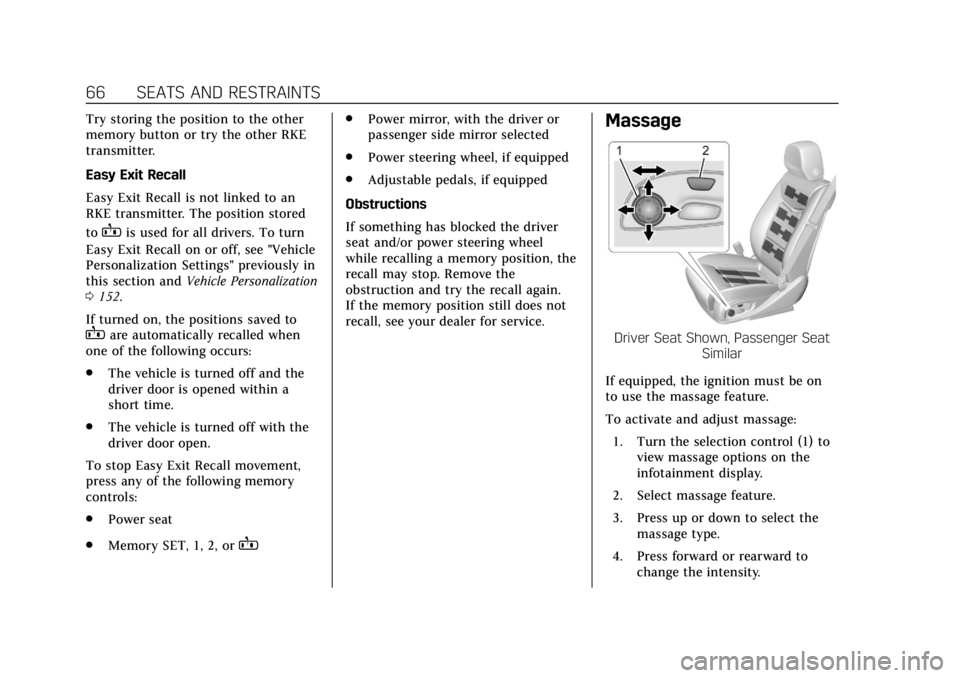
recall, see your dealer for service.Massage
Driver Seat Shown, Passenger Seat Similar
If equipped, the ignition must be on
to use the massage feature.
To activate and adjust massage: 1. Turn the selection control (1) to view massage options on the
infotainment display.
2. Select massage feature.
3. Press up or down to select the massage type.
4. Press forward or rearward to change the intensity.
Page 85 of 399
Cadillac Escalade Owner Manual (GMNA-Localizing-U.S./Canada/Mexico-
11349344) - 2018 - crc - 11/7/17
84 SEATS AND RESTRAINTS
Have the seat belt pretensioners
checked if the vehicle has been in a
crash, or if the airbag readiness light
stays on after you start the vehicle or
while you are driving. SeeAirbag
Readiness Light 0135.Airbag System
The vehicle has the following airbags:
.
A frontal airbag for the driver
. A frontal airbag for the front
outboard passenger
. A front center airbag for the driver
and front outboard passenger
. A seat-mounted side impact airbag
for the driver
. A seat-mounted side impact airbag
for the front outboard passenger
. A roof-rail airbag for the driver
and for the second and third row
passengers seated directly behind
the driver
. A roof-rail airbag for the front
outboard passenger and the
second and third row passengers
seated directly behind the front
outboard passenger
All vehicle airbags have the word
AIRBAG on the trim or on a label near
the deployment opening. For frontal airbags, the word AIRBAG
is on the center of the steering wheel
for the driver and on the instrument
panel for the front outboard
passenger.
For the front center airbag, the word
AIRBAG is on the inboard side of the
driver seatback.
For seat-mounted side impact airbags,
the word AIRBAG is on the side of the
seat closest to the door.
For roof-rail airbags, the word AIRBAG
is on the ceiling or trim.
Airbags are designed to supplement
the protection provided by seat belts.
Even though today's airbags are also
designed to help reduce the risk of
injury from the force of an inflating
bag, all airbags must inflate very
quickly to do their job.
Here are the most important things to
know about the airbag system:
Page 87 of 399
Cadillac Escalade Owner Manual (GMNA-Localizing-U.S./Canada/Mexico-
11349344) - 2018 - crc - 11/7/17
86 SEATS AND RESTRAINTS
There is an airbag readiness light on
the instrument cluster, which shows
the airbag symbol.
The system checks the airbag
electrical system for malfunctions.
The light tells you if there is an
electrical problem. SeeAirbag
Readiness Light 0135.
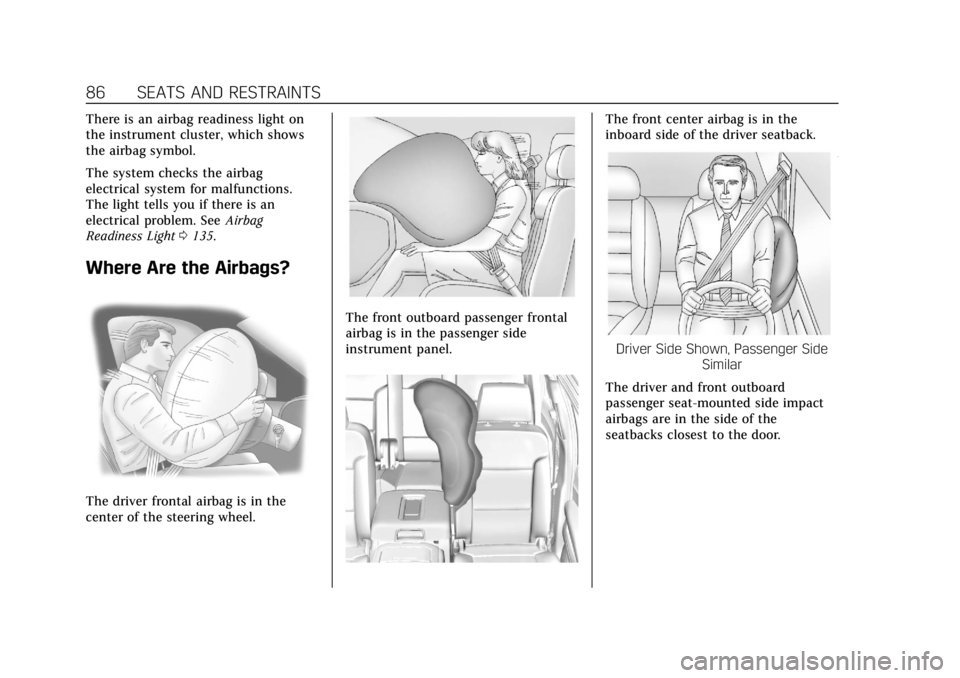
Where Are the Airbags?
The driver frontal airbag is in the
center of the steering wheel.
The front outboard passenger frontal
airbag is in the passenger side
instrument panel.
The front center airbag is in the
inboard side of the driver seatback.
Driver Side Shown, Passenger Side
Similar
The driver and front outboard
passenger seat-mounted side impact
airbags are in the side of the
seatbacks closest to the door.
Page 88 of 399
Cadillac Escalade Owner Manual (GMNA-Localizing-U.S./Canada/Mexico-
11349344) - 2018 - crc - 11/7/17
SEATS AND RESTRAINTS 87
Driver Side Shown, Passenger SideSimilar
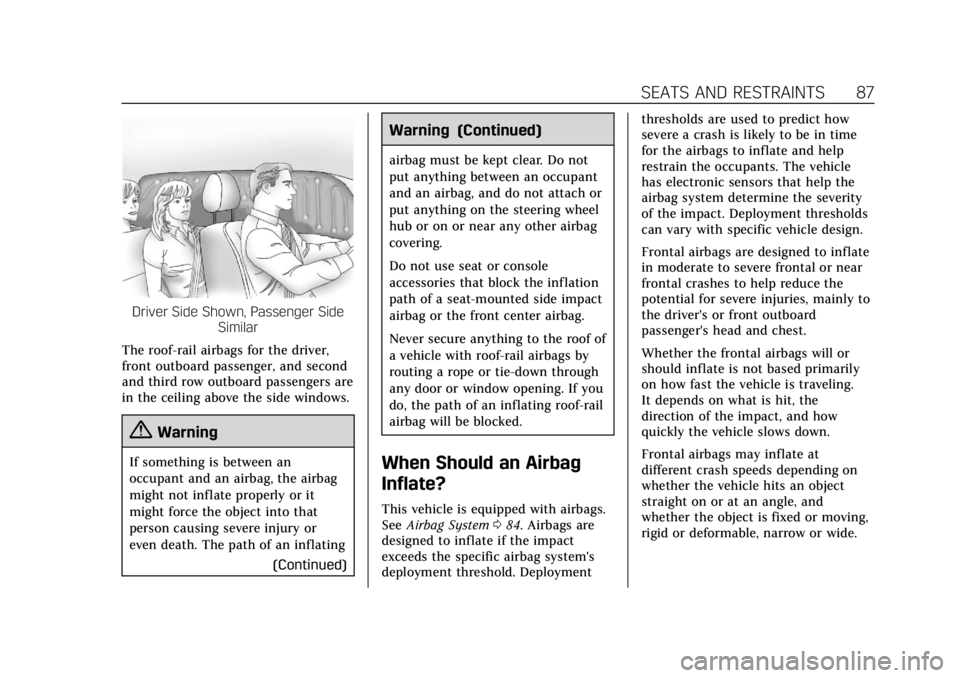
The roof-rail airbags for the driver,
front outboard passenger, and second
and third row outboard passengers are
in the ceiling above the side windows.
{Warning
If something is between an
occupant and an airbag, the airbag
might not inflate properly or it
might force the object into that
person causing severe injury or
even death. The path of an inflating (Continued)
Warning (Continued)
airbag must be kept clear. Do not
put anything between an occupant
and an airbag, and do not attach or
put anything on the steering wheel
hub or on or near any other airbag
covering.
Do not use seat or console
accessories that block the inflation
path of a seat-mounted side impact
airbag or the front center airbag.
Never secure anything to the roof of
a vehicle with roof-rail airbags by
routing a rope or tie-down through
any door or window opening. If you
do, the path of an inflating roof-rail
airbag will be blocked.
When Should an Airbag
Inflate?
This vehicle is equipped with airbags.
SeeAirbag System 084. Airbags are
designed to inflate if the impact
exceeds the specific airbag system's
deployment threshold. Deployment thresholds are used to predict how
severe a crash is likely to be in time
for the airbags to inflate and help
restrain the occupants. The vehicle
has electronic sensors that help the
airbag system determine the severity
of the impact. Deployment thresholds
can vary with specific vehicle design.
Frontal airbags are designed to inflate
in moderate to severe frontal or near
frontal crashes to help reduce the
potential for severe injuries, mainly to
the driver's or front outboard
passenger's head and chest.
Whether the frontal airbags will or
should inflate is not based primarily
on how fast the vehicle is traveling.
It depends on what is hit, the
direction of the impact, and how
quickly the vehicle slows down.
Frontal airbags may inflate at
different crash speeds depending on
whether the vehicle hits an object
straight on or at an angle, and
whether the object is fixed or moving,
rigid or deformable, narrow or wide.
Page 89 of 399
Cadillac Escalade Owner Manual (GMNA-Localizing-U.S./Canada/Mexico-
11349344) - 2018 - crc - 11/7/17
88 SEATS AND RESTRAINTS
Frontal airbags are not intended to
inflate during vehicle rollovers, rear
impacts, or many side impacts.
In addition, the vehicle has advanced
technology frontal airbags. Advanced
technology frontal airbags adjust the
restraint according to crash severity.
The vehicle also has a seat position
sensor that enables the sensing
system to monitor the position of the
driver seat. The seat position sensor
provides information that is used to
adjust the deployment of the driver
frontal airbag.
The front center airbag is designed to
inflate in moderate to severe side
crashes depending upon the location
of the impact, when either side of the
vehicle is struck. In addition, the front
center airbag is designed to inflate
when the sensing system predicts that
the vehicle is about to roll over on its
side. The front center airbag is not
designed to inflate in frontal impacts,
near frontal impacts, or rear impacts.
Seat-mounted side impact airbags are
designed to inflate in moderate to
severe side crashes depending on thelocation of the impact. Seat-mounted
side impact airbags are not designed
to inflate in frontal impacts, near
frontal impacts, rollovers, or rear
impacts. A seat-mounted side impact
airbag is designed to inflate on the
side of the vehicle that is struck.
Roof-rail airbags are designed to
inflate in moderate to severe side
crashes depending on the location of
the impact. In addition, these roof-rail
airbags are designed to inflate during
a rollover or in a severe frontal
impact. Roof-rail airbags are not
designed to inflate in rear impacts.
Both roof-rail airbags will inflate when
either side of the vehicle is struck,
if the sensing system predicts that the
vehicle is about to roll over on its
side, or in a severe frontal impact.
In any particular crash, no one can
say whether an airbag should have
inflated simply because of the vehicle
damage or the repair costs.What Makes an Airbag
Inflate?
In a deployment event, the sensing
system sends an electrical signal
triggering a release of gas from the
inflator. Gas from the inflator fills the
airbag causing the bag to break out of
the cover. The inflator, the airbag, and
related hardware are all part of the
airbag module.
For airbag locations, see
Where Are the
Airbags? 086.
How Does an Airbag
Restrain?
In moderate to severe frontal or near
frontal collisions, even belted
occupants can contact the steering
wheel or the instrument panel. In
moderate to severe side collisions,
even belted occupants can contact the
inside of the vehicle.
Airbags supplement the protection
provided by seat belts by distributing
the force of the impact more evenly
over the occupant's body.
Page 95 of 399
Cadillac Escalade Owner Manual (GMNA-Localizing-U.S./Canada/Mexico-
11349344) - 2018 - crc - 11/7/17
94 SEATS AND RESTRAINTS
in the Index for additional
information about the importance of
proper restraint use.
A thick layer of additional material,
such as a blanket or cushion,
or aftermarket equipment such as seat
covers, seat heaters, and seat
massagers can affect how well the
passenger sensing system operates.
We recommend that you not use seat
covers or other aftermarket equipment
except when approved by GM for your
specific vehicle. SeeAdding Equipment
to the Airbag-Equipped Vehicle 094 for
more information about modifications
that can affect how the system
operates.
The on indicator may be lit if an
object, such as a briefcase, handbag,
grocery bag, laptop, or other electronic
device, is put on an unoccupied seat.
If this is not desired, remove the
object from the seat.{Warning
Stowing articles under the
passenger seat or between the
passenger seat cushion and
seatback may interfere with the
proper operation of the passenger
sensing system.
Servicing the
Airbag-Equipped Vehicle
Airbags affect how the vehicle should
be serviced. There are parts of the
airbag system in several places around
the vehicle. Your dealer and the
service manual have information
about servicing the vehicle and the
airbag system. To purchase a service
manual, see Service Publications
Ordering Information 0371.
{Warning
For up to 10 seconds after the
vehicle is turned off and the battery
is disconnected, an airbag can still
(Continued)
Warning (Continued)
inflate during improper service. You
can be injured if you are close to an
airbag when it inflates. Avoid
yellow connectors. They are
probably part of the airbag system.
Be sure to follow proper service
procedures, and make sure the
person performing work for you is
qualified to do so.
Adding Equipment to the
Airbag-Equipped Vehicle
Adding accessories that change the
vehicle's frame, bumper system,
height, front end, or side sheet metal
may keep the airbag system from
working properly.
The operation of the airbag system
can also be affected by changing any
parts of the front seats, seat belts,
airbag sensing and diagnostic module,
steering wheel, instrument panel,
inner door seals including the
speakers, any of the airbag modules,
ceiling or pillar garnish trim, overhead
Page 121 of 399
Cadillac Escalade Owner Manual (GMNA-Localizing-U.S./Canada/Mexico-
11349344) - 2018 - crc - 11/7/17
120 INSTRUMENTS AND CONTROLS
Instruments and
Controls
Controls
Steering Wheel Adjustment . . . . . 121
Steering Wheel Controls . . . . . . . . . 121
Heated Steering Wheel . . . . . . . . . . 121
Horn . . . . . . . . . . . . . . . . . . . . . . . . . . . . . . . 121
Windshield Wiper/Washer . . . . . . . 121
Rear Window Wiper/Washer . . . . 123
Compass . . . . . . . . . . . . . . . . . . . . . . . . . . 124
Clock . . . . . . . . . . . . . . . . . . . . . . . . . . . . . . 124
Power Outlets . . . . . . . . . . . . . . . . . . . . . 125
Wireless Charging . . . . . . . . . . . . . . . . 127
Cigarette Lighter . . . . . . . . . . . . . . . . . . 129
Ashtrays . . . . . . . . . . . . . . . . . . . . . . . . . . 129
Warning Lights, Gauges, and
Indicators
Warning Lights, Gauges, andIndicators . . . . . . . . . . . . . . . . . . . . . . . 129
Instrument Cluster . . . . . . . . . . . . . . . 130
Speedometer . . . . . . . . . . . . . . . . . . . . . . 132
Odometer . . . . . . . . . . . . . . . . . . . . . . . . . 132
Trip Odometer . . . . . . . . . . . . . . . . . . . . 133
Tachometer . . . . . . . . . . . . . . . . . . . . . . . 133
Fuel Gauge . . . . . . . . . . . . . . . . . . . . . . . . 133 Engine Coolant Temperature
Gauge . . . . . . . . . . . . . . . . . . . . . . . . . . . . 134
Seat Belt Reminders . . . . . . . . . . . . . . 134
Airbag Readiness Light . . . . . . . . . . 135
Passenger Airbag Status Indicator . . . . . . . . . . . . . . . . . . . . . . . . . 135
Charging System Light . . . . . . . . . . . 136
Malfunction Indicator Lamp (Check Engine Light) . . . . . . . . . . . 137
Brake System Warning Light . . . . 138
Electric Parking Brake Light . . . . . 139
Service Electric Parking Brake Light . . . . . . . . . . . . . . . . . . . . . . . . . . . . . 139
Antilock Brake System (ABS) Warning Light . . . . . . . . . . . . . . . . . . 140
Sport Mode Light . . . . . . . . . . . . . . . . . 140
Tow/Haul Mode Light . . . . . . . . . . . . 140
Winter Driving Mode Light . . . . . . 140
Lane Keep Assist (LKA) Light . . . 140
Vehicle Ahead Indicator . . . . . . . . . 141
Traction Off Light . . . . . . . . . . . . . . . . 141
StabiliTrak OFF Light . . . . . . . . . . . . 141
Traction Control System (TCS)/ StabiliTrak Light . . . . . . . . . . . . . . . . 142
Engine Coolant Temperature Warning Light . . . . . . . . . . . . . . . . . . 142
Tire Pressure Light . . . . . . . . . . . . . . . 142
Engine Oil Pressure Light . . . . . . . . 143
Low Fuel Warning Light . . . . . . . . . 143
Security Light . . . . . . . . . . . . . . . . . . . . . 143 High-Beam On Light . . . . . . . . . . . . . 144
Lamps On Reminder . . . . . . . . . . . . . 144
Cruise Control Light . . . . . . . . . . . . . . 144
Door Ajar Light . . . . . . . . . . . . . . . . . . . 145
Information Displays
Driver Information
Center (DIC) . . . . . . . . . . . . . . . . . . . . . 145
Head-Up Display (HUD) . . . . . . . . . 147
Vehicle Messages
Vehicle Messages . . . . . . . . . . . . . . . . . 151
Engine Power Messages . . . . . . . . . . 151
Vehicle Speed Messages . . . . . . . . . 152
Vehicle Personalization
Vehicle Personalization . . . . . . . . . . 152
Universal Remote System
Universal Remote System . . . . . . . . 160
Universal Remote System Programming . . . . . . . . . . . . . . . . . . . 160
Universal Remote System Operation . . . . . . . . . . . . . . . . . . . . . . . . 163
Page 122 of 399
Cadillac Escalade Owner Manual (GMNA-Localizing-U.S./Canada/Mexico-
11349344) - 2018 - crc - 11/7/17
INSTRUMENTS AND CONTROLS 121
Controls
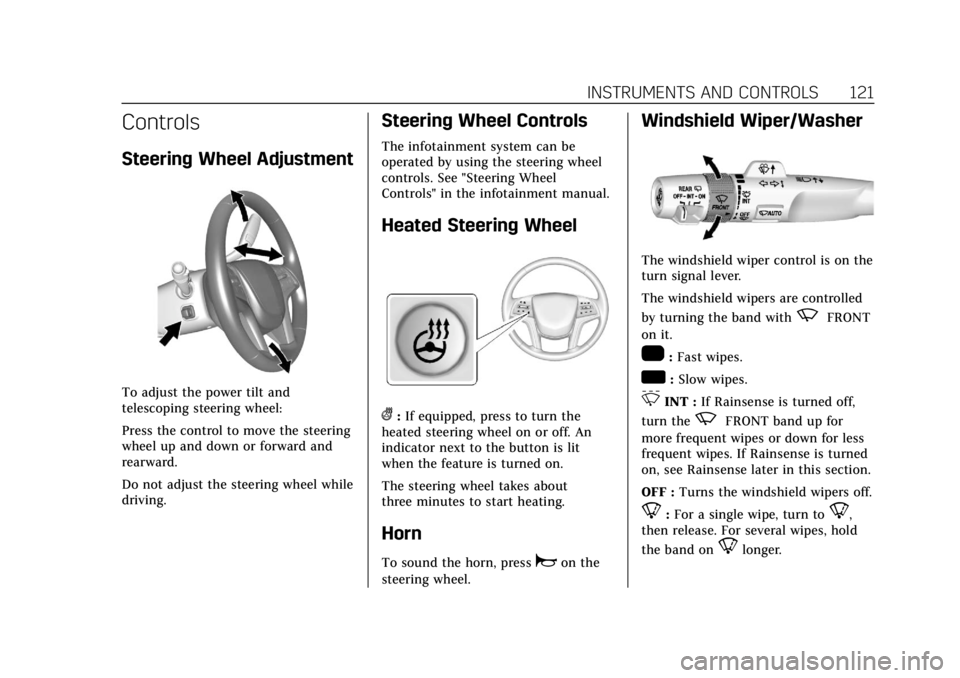
Steering Wheel Adjustment
To adjust the power tilt and
telescoping steering wheel:
Press the control to move the steering
wheel up and down or forward and
rearward.
Do not adjust the steering wheel while
driving.
Steering Wheel Controls
The infotainment system can be
operated by using the steering wheel
controls. See "Steering Wheel
Controls" in the infotainment manual.
Heated Steering Wheel
(:If equipped, press to turn the
heated steering wheel on or off. An
indicator next to the button is lit
when the feature is turned on.
The steering wheel takes about
three minutes to start heating.
Horn
To sound the horn, pressaon the
steering wheel.
Windshield Wiper/Washer
The windshield wiper control is on the
turn signal lever.
The windshield wipers are controlled
by turning the band with
zFRONT
on it.
1: Fast wipes.
w: Slow wipes.
3INT : If Rainsense is turned off,
turn the
zFRONT band up for
more frequent wipes or down for less
frequent wipes. If Rainsense is turned
on, see Rainsense later in this section.
OFF : Turns the windshield wipers off.
8:For a single wipe, turn to8,
then release. For several wipes, hold
the band on
8longer.
Page 132 of 399
Cadillac Escalade Owner Manual (GMNA-Localizing-U.S./Canada/Mexico-
11349344) - 2018 - crc - 11/7/17
INSTRUMENTS AND CONTROLS 131
Reconfigurable Instrument
Cluster
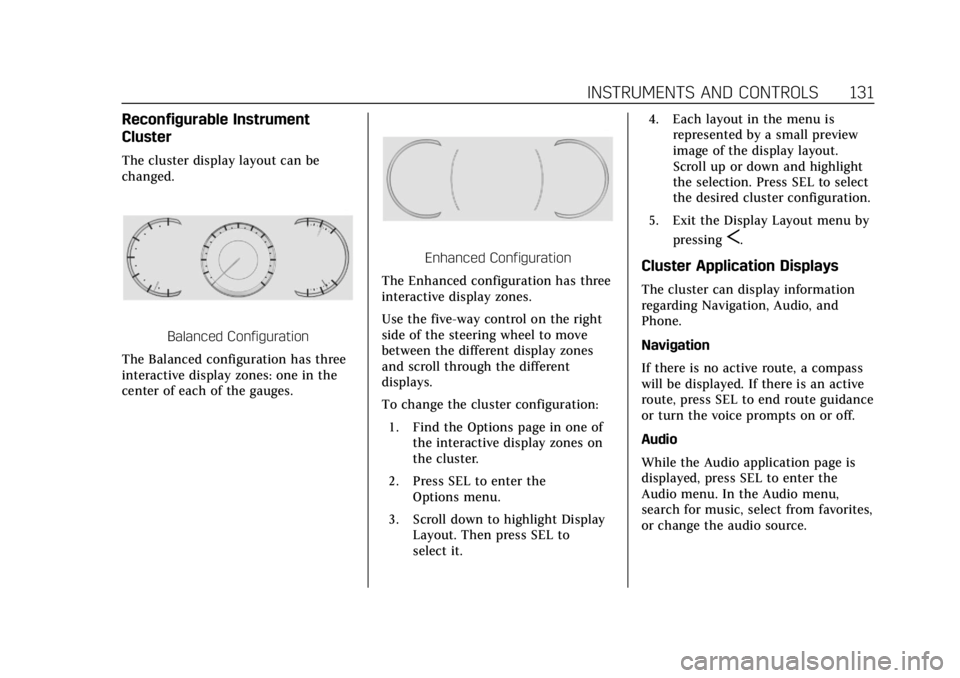
The cluster display layout can be
changed.
Balanced Configuration
The Balanced configuration has three
interactive display zones: one in the
center of each of the gauges.
Enhanced Configuration
The Enhanced configuration has three
interactive display zones.
Use the five-way control on the right
side of the steering wheel to move
between the different display zones
and scroll through the different
displays.
To change the cluster configuration:
1. Find the Options page in one of the interactive display zones on
the cluster.
2. Press SEL to enter the Options menu.
3. Scroll down to highlight Display Layout. Then press SEL to
select it. 4. Each layout in the menu is
represented by a small preview
image of the display layout.
Scroll up or down and highlight
the selection. Press SEL to select
the desired cluster configuration.
5. Exit the Display Layout menu by pressing
S.
Cluster Application Displays
The cluster can display information
regarding Navigation, Audio, and
Phone.
Navigation
If there is no active route, a compass
will be displayed. If there is an active
route, press SEL to end route guidance
or turn the voice prompts on or off.
Audio
While the Audio application page is
displayed, press SEL to enter the
Audio menu. In the Audio menu,
search for music, select from favorites,
or change the audio source.