transmission CADILLAC ESCALADE 2018 User Guide
[x] Cancel search | Manufacturer: CADILLAC, Model Year: 2018, Model line: ESCALADE, Model: CADILLAC ESCALADE 2018Pages: 399, PDF Size: 6.23 MB
Page 148 of 399
Cadillac Escalade Owner Manual (GMNA-Localizing-U.S./Canada/Mexico-
11349344) - 2018 - crc - 11/7/17
INSTRUMENTS AND CONTROLS 147
speed limit is exceeded, a pop-up
warning is displayed and a chime may
sound.
Cruise Set Speed :Shows the speed
the cruise control or Adaptive Cruise
Control is set to.
Follow Distance Indicator : When
Adaptive Cruise Control (ACC) is not
engaged, the current follow time to
the vehicle ahead is displayed as a
time value on this page. When ACC
has been engaged, the display
switches to the gap setting page. This
page shows the current gap setting
along with the vehicle ahead indicator.
Battery Voltage : Shows the current
battery voltage.
Oil Life : Shows an estimate of the
oil's remaining useful life.
If REMAINING OIL LIFE 99% is
displayed, that means 99% of the
current oil life remains.
When the remaining oil life is low, the
CHANGE ENGINE OIL SOON message
will appear on the display. The oil
should be changed as soon as
possible. See Engine Oil0268. In
addition to the engine oil life system monitoring the oil life, additional
maintenance is recommended. See
Maintenance Schedule
0347.
The Oil Life display must be reset
after each oil change. It will not reset
itself. Do not reset the Oil Life display
accidentally at any time other than
when the oil has just been changed.
It cannot be reset accurately until the
next oil change. To reset the engine
oil life system, press and hold SEL for
several seconds while the Oil Life
display is active. See Engine Oil Life
System 0270.
Oil Pressure : Shows the engine oil
pressure in kPa (kilopascals)
or psi (pounds per square inch).
Engine Hours : Shows the total
number of hours the engine has run.
Transmission Fluid Temperature :
Shows the temperature of the
automatic transmission fluid in either
degrees Celsius (°C) or degrees
Fahrenheit (°F).
Tire Pressure : Shows the
approximate pressures of all four tires.
Tire pressure is displayed in either
kilopascal (kPa) or in pounds per square inch (psi). If the pressure is
low, the value for that tire is shown in
amber.
See
Tire Pressure Monitor System 0307
and Tire Pressure Monitor Operation
0 308.
Blank Page : Allows for no
information to be displayed in the
cluster info display areas.
Head-Up Display (HUD)
{Warning
If the HUD image is too bright or
too high in your field of view, it
may take you more time to see
things you need to see when it is
dark outside. Be sure to keep the
HUD image dim and placed low in
your field of view.
If equipped with HUD, some
information concerning the operation
of the vehicle is projected onto the
windshield. The image is projected
through the HUD lens on top of the
Page 151 of 399
Cadillac Escalade Owner Manual (GMNA-Localizing-U.S./Canada/Mexico-
11349344) - 2018 - crc - 11/7/17
150 INSTRUMENTS AND CONTROLS
Metric
English
Audio/Phone View : This displays the
speed view along with audio/phone
information. The current radio station,
media type, and incoming calls will be
displayed.
All HUD views may briefly display
audio information when the driver
uses the steering wheel controls to
adjust the audio settings appearing in
the instrument cluster.
Incoming phone calls appearing in the
instrument cluster may also display in
any HUD view.
Metric
English
Navigation View : This displays the
speed view along with Turn-by-Turn
Navigation information. The compass
heading is displayed when navigation
routing is not active.
Navigation Turn-by-Turn Alerts
shown in the instrument cluster may
also be displayed in any HUD view.
Metric
English
Performance View : This displays the
speedometer reading, rpm reading,
transmission positions, and gear shift
indicator.
Care of the HUD
Clean the inside of the windshield to
remove any dirt or film that could
reduce the sharpness or clarity of the
HUD image.
Clean the HUD lens with a soft cloth
sprayed with glass cleaner. Wipe the
lens gently, then dry it.
Page 152 of 399
Cadillac Escalade Owner Manual (GMNA-Localizing-U.S./Canada/Mexico-
11349344) - 2018 - crc - 11/7/17
INSTRUMENTS AND CONTROLS 151
HUD Troubleshooting
Check that:
.Nothing is covering the HUD lens.
. HUD brightness setting is not too
dim or too bright.
. HUD is adjusted to the proper
height.
. Polarized sunglasses are not worn.
. Windshield and HUD lens are
clean.
If the HUD image is not correct,
contact your dealer.
The windshield is part of the HUD
system. See Windshield Replacement
0 285.
Vehicle Messages
Messages displayed on the DIC
indicate the status of the vehicle or
some action that may be needed to
correct a condition. Multiple messages
may appear one after another.
The messages that do not require
immediate action can be
acknowledged and cleared by pressing
SEL. The messages that require
immediate action cannot be cleared
until that action is performed.
All messages should be taken
seriously; clearing the message does
not correct the problem.
If a SERVICE message appears, see
your dealer.
Follow the instructions given in the
messages. The system displays
messages regarding the following
topics:
.
Service Messages
. Fluid Levels
. Vehicle Security
. Brakes .
Ride Control Systems
. Driver Assistance Systems
. Cruise Control
. Lighting and Bulb Replacement
. Wiper/Washer Systems
. Doors and Windows
. Seat Belts
. Airbag Systems
. Engine and Transmission
. Tire Pressure
. Battery
Engine Power Messages
ENGINE POWER IS REDUCED
This message displays when the
vehicle's propulsion power is reduced.
Reduced propulsion power can affect
the vehicle's ability to accelerate.
If this message is on, but there is no
observed reduction in performance,
proceed to your destination. The
performance may be reduced the next
time the vehicle is driven. The vehicle
may be driven while this message is
Page 162 of 399
Cadillac Escalade Owner Manual (GMNA-Localizing-U.S./Canada/Mexico-
11349344) - 2018 - crc - 11/7/17
INSTRUMENTS AND CONTROLS 161
instructions refer to a garage door
opener, but can be used for other
devices.
Do not use the Universal Remote
system with any garage door opener
that does not have the stop and
reverse feature. This includes any
garage door opener model
manufactured before April 1, 1982.
Read the instructions completely
before programming the Universal
Remote system. It may help to have
another person assist with the
programming process.
Keep the original hand-held
transmitter for use in other vehicles
as well as for future programming.
Erase the programming when vehicle
ownership is terminated. See“Erasing
Universal Remote System Buttons”
later in this section.
To program a garage door opener,
park outside directly in line with and
facing the garage door opener receiver.
Clear all people and objects near the
garage door. Make sure the hand-held transmitter
has a new battery for quick and
accurate transmission of the
radio-frequency signal.
Programming the Universal
Remote System
For questions or programming help,
see www.homelink.com/gm or call
1-800-355-3515.
Programming involves time-sensitive
actions, and may time out causing the
procedure to be repeated.
To program up to three devices:
1. Hold the end of the hand-held transmitter about 3 to 8 cm (1 to
3 in) away from the Universal
Remote system buttons with the
indicator light in view. The
hand-held transmitter was
supplied by the manufacturer of
the garage door opener receiver.
2. At the same time, press and hold both the hand-held transmitter
button and one of the three
Universal Remote system
buttons to be used to operate the
garage door. Do not release either button until the indicator light
goes from a slow to a rapid
flashing light. Then release both
buttons.
Some garage door openers may
require substitution of Step 2
with the procedure under
“Radio
Signals for Canada and Some
Gate Operators” later in this
section.
3. Press and hold the newly programmed Universal Remote
system button for five seconds
while watching the indicator
light and garage door activation.
.If the indicator light stays on
continuously or the garage
door moves when the button
is pressed, then programming
is complete. There is no need
to complete Steps 4–6.
. If the indicator light does not
come on or the garage door
does not move, a second
button press may be
required. For a second time,
press and hold the newly
programmed button for
Page 163 of 399
Cadillac Escalade Owner Manual (GMNA-Localizing-U.S./Canada/Mexico-
11349344) - 2018 - crc - 11/7/17
162 INSTRUMENTS AND CONTROLS
five seconds. If the light stays
on or the garage door moves,
programming is complete.
. If the indicator light blinks
rapidly for two seconds, then
changes to a solid light and
the garage door does not
move, continue with
programming Steps 4–6.
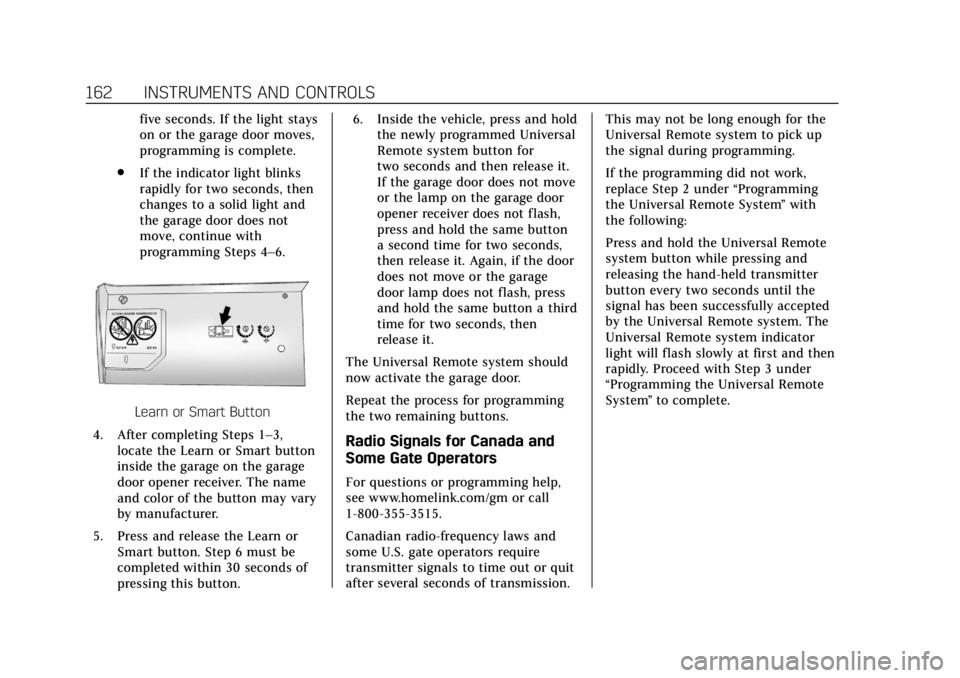
Learn or Smart Button
4. After completing Steps 1–3, locate the Learn or Smart button
inside the garage on the garage
door opener receiver. The name
and color of the button may vary
by manufacturer.
5. Press and release the Learn or Smart button. Step 6 must be
completed within 30 seconds of
pressing this button. 6. Inside the vehicle, press and hold
the newly programmed Universal
Remote system button for
two seconds and then release it.
If the garage door does not move
or the lamp on the garage door
opener receiver does not flash,
press and hold the same button
a second time for two seconds,
then release it. Again, if the door
does not move or the garage
door lamp does not flash, press
and hold the same button a third
time for two seconds, then
release it.
The Universal Remote system should
now activate the garage door.
Repeat the process for programming
the two remaining buttons.
Radio Signals for Canada and
Some Gate Operators
For questions or programming help,
see www.homelink.com/gm or call
1-800-355-3515.
Canadian radio-frequency laws and
some U.S. gate operators require
transmitter signals to time out or quit
after several seconds of transmission. This may not be long enough for the
Universal Remote system to pick up
the signal during programming.
If the programming did not work,
replace Step 2 under
“Programming
the Universal Remote System ”with
the following:
Press and hold the Universal Remote
system button while pressing and
releasing the hand-held transmitter
button every two seconds until the
signal has been successfully accepted
by the Universal Remote system. The
Universal Remote system indicator
light will flash slowly at first and then
rapidly. Proceed with Step 3 under
“Programming the Universal Remote
System ”to complete.
Page 167 of 399
Cadillac Escalade Owner Manual (GMNA-Localizing-U.S./Canada/Mexico-
11349344) - 2018 - crc - 11/7/17
166 LIGHTING
.The vehicle is being driven on
winding or hilly roads.
The automatic high-beam headlamps
may need to be disabled if any of the
above conditions exist.
Exterior Lamps Off
Reminder
If a door is open, a reminder chime
sounds when the headlamps or
parking lamps are manually turned on
and the ignition is off. To turn off the
chime, turn the exterior lamp control
to off or AUTO and then back on,
or close and re-open the door. In the
AUTO mode, the headlamps turn off
once the ignition is off or remain on
until the headlamp delay ends (if
enabled in the DIC). See “Exit
Lighting” underVehicle Personalization
0 152.
Headlamp High/Low-Beam
Changer
Push the turn signal lever toward the
instrument panel to change the
headlamps from low to high beam. Pull the turn signal lever toward you
and release it to return to low-beam
headlamps.
When the high-beam headlamps are
on, this indicator light on the
instrument cluster will also be on.
Flash-to-Pass
This feature lets you use the
high-beam headlamps to signal a
driver in front of you that you want to
pass. It works even if the headlamps
are in the automatic position.
To use it, pull the turn signal lever
toward you, then release it.
If the headlamps are in the automatic
position or on low beam, the
high-beam headlamps will turn on.
They will stay on as long as you hold
the lever toward you. The high-beam
indicator on the instrument cluster
will come on. Release the lever to
return to normal operation.
Daytime Running
Lamps (DRL)
DRL can make it easier for others to
see the front of the vehicle during the
day. Fully functional DRL are required
on all vehicles first sold in Canada.
The DRL system comes on when the
following conditions are met:
.
The ignition is on.
. The exterior lamp control is
in AUTO.
. The transmission is not in
P (Park).
. The light sensor determines it is
daytime.
When the DRL system is on, only the
DRL are on. The taillamps, sidemarker
lamps, instrument panel lights, and
other lamps will not be on.
When it begins to get dark, the
automatic headlamp system switches
from DRL to the headlamps.
Page 183 of 399
Cadillac Escalade Owner Manual (GMNA-Localizing-U.S./Canada/Mexico-
11349344) - 2018 - crc - 11/7/17
182 DRIVING AND OPERATING
Driving and
Operating
Driving Information
Distracted Driving . . . . . . . . . . . . . . . . 183
Defensive Driving . . . . . . . . . . . . . . . . 184
Drunk Driving . . . . . . . . . . . . . . . . . . . . 184
Control of a Vehicle . . . . . . . . . . . . . . 184
Braking . . . . . . . . . . . . . . . . . . . . . . . . . . . . 184
Steering . . . . . . . . . . . . . . . . . . . . . . . . . . . 185
Off-Road Recovery . . . . . . . . . . . . . . . . 185
Loss of Control . . . . . . . . . . . . . . . . . . . 186
Off-Road Driving . . . . . . . . . . . . . . . . . 186
Driving on Wet Roads . . . . . . . . . . . 190
Hill and Mountain Roads . . . . . . . . 191
Winter Driving . . . . . . . . . . . . . . . . . . . . 192
If the Vehicle Is Stuck . . . . . . . . . . . 193
Vehicle Load Limits . . . . . . . . . . . . . . 193
Starting and Operating
New Vehicle Break-In . . . . . . . . . . . . 198
Adjustable Throttle and BrakePedal . . . . . . . . . . . . . . . . . . . . . . . . . . . . 198
Ignition Positions . . . . . . . . . . . . . . . . 199
Starting the Engine . . . . . . . . . . . . . . 200
Engine Heater . . . . . . . . . . . . . . . . . . . . 201
Retained Accessory Power (RAP) . . . . . . . . . . . . . . . . . . . . 203 Shifting Into Park . . . . . . . . . . . . . . . . 203
Shifting out of Park . . . . . . . . . . . . . . 204
Parking over Things
That Burn . . . . . . . . . . . . . . . . . . . . . . . 205
Active Fuel Management . . . . . . . . 205
Extended Parking . . . . . . . . . . . . . . . . . 205
Engine Exhaust
Engine Exhaust . . . . . . . . . . . . . . . . . . . 205
Running the Vehicle While
Parked . . . . . . . . . . . . . . . . . . . . . . . . . . . 206
Automatic Transmission
Automatic Transmission . . . . . . . . . 206
Manual Mode . . . . . . . . . . . . . . . . . . . . . 209
Tow/Haul Mode . . . . . . . . . . . . . . . . . . 210
Drive Systems
Four-Wheel Drive . . . . . . . . . . . . . . . . 211
Brakes
Antilock Brake System (ABS) . . . . 215
Parking Brake . . . . . . . . . . . . . . . . . . . . . 215
Electric Parking Brake . . . . . . . . . . . . 216
Brake Assist . . . . . . . . . . . . . . . . . . . . . . . 217
Hill Start Assist (HSA) . . . . . . . . . . . 218
Ride Control Systems
Traction Control/ElectronicStability Control . . . . . . . . . . . . . . . . 218
Driver Mode Control . . . . . . . . . . . . . 220
Magnetic Ride Control . . . . . . . . . . . 221 Locking Rear Axle . . . . . . . . . . . . . . . . 222
Automatic Level Control . . . . . . . . . 222
Cruise Control
Cruise Control . . . . . . . . . . . . . . . . . . . . 222
Adaptive Cruise Control . . . . . . . . . 225
Driver Assistance Systems
Driver Assistance Systems . . . . . . . 233
Assistance Systems for Parking
or Backing . . . . . . . . . . . . . . . . . . . . . . . 233
Assistance Systems for Driving . . . . . . . . . . . . . . . . . . . . . . . . . . 240
Forward Collision Alert (FCA) System . . . . . . . . . . . . . . . . . . . . . . . . . . 240
Forward Automatic Braking (FAB) . . . . . . . . . . . . . . . . . . . 242
Side Blind Zone Alert (SBZA) . . . . 244
Lane Change Alert (LCA) . . . . . . . . 244
Lane Departure Warning (LDW) . . . . . . . . . . . . . . . . . 246
Lane Keep Assist (LKA) . . . . . . . . . . 246
Fuel
Fuel . . . . . . . . . . . . . . . . . . . . . . . . . . . . . . . 248
California Fuel Requirements . . . . 249
Fuels in Foreign Countries . . . . . . . 249
Fuel Additives . . . . . . . . . . . . . . . . . . . . 249
Filling the Tank . . . . . . . . . . . . . . . . . . 249
Filling a Portable Fuel Container . . . . . . . . . . . . . . . . . . . . . . . . 251
Page 189 of 399
Cadillac Escalade Owner Manual (GMNA-Localizing-U.S./Canada/Mexico-
11349344) - 2018 - crc - 11/7/17
188 DRIVING AND OPERATING
Before driving on a hill, assess the
steepness, traction, and obstructions.
If the terrain ahead cannot be seen,
get out of the vehicle and walk the hill
before driving further.
When driving on hills:
.Use a low gear and keep a firm
grip on the steering wheel.
. Maintain a slow speed.
. When possible, drive straight up
or down the hill.
. Slow down when approaching the
top of the hill.
. Use headlamps even during the
day to make the vehicle more
visible.
{Warning
Driving to the top of a hill at high
speed can cause an accident. There
could be a drop-off, embankment,
cliff, or even another vehicle. You
could be seriously injured or killed.
As you near the top of a hill, slow
down and stay alert. .
Never go downhill forward or
backward with either the
transmission or transfer case in
N (Neutral). The brakes could
overheat and you could lose
control.
{Warning
If the vehicle has the two-speed
automatic or electronic transfer
case, shifting the transfer case to
N (Neutral) can cause your vehicle
to roll even if the transmission is in
P (Park). This is because the
N (Neutral) position on the transfer
case overrides the transmission.
You or someone else could be
injured. If leaving the vehicle, set
the parking brake and shift the
transmission to P (Park). Shift the
transfer case to any position but
N (Neutral).
. When driving down a hill, keep
the vehicle headed straight down.
Use a low gear because the engine will work with the brakes to slow
the vehicle and help keep the
vehicle under control.
{Warning
Heavy braking when going down a
hill can cause your brakes to
overheat and fade. This could cause
loss of control and you or others
could be injured or killed. Apply the
brakes lightly when descending a
hill and use a low gear to keep
vehicle speed under control.
If the vehicle stalls on a hill: 1. Apply the brakes to stop the vehicle, and then apply the
parking brake.
2. Shift into P (Park) and then restart the engine.
.If driving uphill when the
vehicle stalls, shift to
R (Reverse), release the
parking brake, and back
straight down.
Page 192 of 399
Cadillac Escalade Owner Manual (GMNA-Localizing-U.S./Canada/Mexico-
11349344) - 2018 - crc - 11/7/17
DRIVING AND OPERATING 191
{Warning
Wet brakes can cause crashes. They
might not work as well in a quick
stop and could cause pulling to one
side. You could lose control of the
vehicle.
After driving through a large puddle
of water or a car/vehicle wash,
lightly apply the brake pedal until
the brakes work normally.
Flowing or rushing water creates
strong forces. Driving through
flowing water could cause the
vehicle to be carried away. If this
happens, you and other vehicle
occupants could drown. Do not
ignore police warnings and be very
cautious about trying to drive
through flowing water.
Hydroplaning
Hydroplaning is dangerous. Water can
build up under the vehicle's tires so
they actually ride on the water. This
can happen if the road is wet enoughand you are going fast enough. When
the vehicle is hydroplaning, it has
little or no contact with the road.
There is no hard and fast rule about
hydroplaning. The best advice is to
slow down when the road is wet.
Other Rainy Weather Tips
Besides slowing down, other wet
weather driving tips include:
.
Allow extra following distance.
. Pass with caution.
. Keep windshield wiping equipment
in good shape.
. Keep the windshield washer fluid
reservoir filled.
. Have good tires with proper tread
depth. See Tires0299.
. Turn off cruise control.
Hill and Mountain Roads
Driving on steep hills or through
mountains is different than driving on
flat or rolling terrain. Tips include:
.Keep the vehicle serviced and in
good shape. .
Check all fluid levels and brakes,
tires, cooling system, and
transmission.
. Shift to a lower gear when going
down steep or long hills.
{Warning
Using the brakes to slow the vehicle
on a long downhill slope can cause
brake overheating, can reduce brake
performance, and could result in a
loss of braking. Shift the
transmission to a lower gear to let
the engine assist the brakes on a
steep downhill slope.
{Warning
Coasting downhill in N (Neutral) or
with the ignition off is dangerous.
This can cause overheating of the
brakes and loss of steering assist.
Always have the engine running
and the vehicle in gear.
Page 194 of 399
Cadillac Escalade Owner Manual (GMNA-Localizing-U.S./Canada/Mexico-
11349344) - 2018 - crc - 11/7/17
DRIVING AND OPERATING 193
Warning (Continued)
fan speed to the highest
setting. See“Climate Control
Systems.”
For more information about CO, see
Engine Exhaust 0205.
To save fuel, run the engine for short
periods to warm the vehicle and then
shut the engine off and partially close
the window. Moving about to keep
warm also helps.
If it takes time for help to arrive,
when running the engine, push the
accelerator pedal slightly so the
engine runs faster than the idle speed.
This keeps the battery charged to
restart the vehicle and to signal for
help with the headlamps. Do this as
little as possible, to save fuel.
If the Vehicle Is Stuck
Slowly and cautiously spin the wheels
to free the vehicle when stuck in sand,
mud, ice, or snow. If stuck too severely for the traction
system to free the vehicle, turn the
traction system off and use the
rocking method. See
Traction Control/
Electronic Stability Control 0218.
{Warning
If the vehicle's tires spin at high
speed, they can explode, and you or
others could be injured. The vehicle
can overheat, causing an engine
compartment fire or other damage.
Spin the wheels as little as possible
and avoid going above 56 km/h
(35 mph).
Rocking the Vehicle to Get it Out
Turn the steering wheel left and right
to clear the area around the front
wheels. Turn off any traction system.
Shift back and forth between
R (Reverse) and a low forward gear,
spinning the wheels as little as
possible. To prevent transmission
wear, wait until the wheels stop
spinning before shifting gears. Release
the accelerator pedal while shifting,
and press lightly on the accelerator pedal when the transmission is in
gear. Slowly spinning the wheels in
the forward and reverse directions
causes a rocking motion that could
free the vehicle. If that does not get
the vehicle out after a few tries, it
might need to be towed out. If the
vehicle does need to be towed out, see
Towing the Vehicle
0332.
Vehicle Load Limits
It is very important to know how
much weight the vehicle can carry.
This weight is called the vehicle
capacity weight and includes the
weight of all occupants, cargo, and
all nonfactory-installed options.
Two labels on the vehicle may
show how much weight it was
designed to carry, the Tire and
Loading Information label and the
Certification/Tire label.