remote start CADILLAC ESCALADE 2018 Owner's Guide
[x] Cancel search | Manufacturer: CADILLAC, Model Year: 2018, Model line: ESCALADE, Model: CADILLAC ESCALADE 2018Pages: 399, PDF Size: 6.23 MB
Page 200 of 399
Cadillac Escalade Owner Manual (GMNA-Localizing-U.S./Canada/Mexico-
11349344) - 2018 - crc - 11/7/17
DRIVING AND OPERATING 199
Ignition Positions
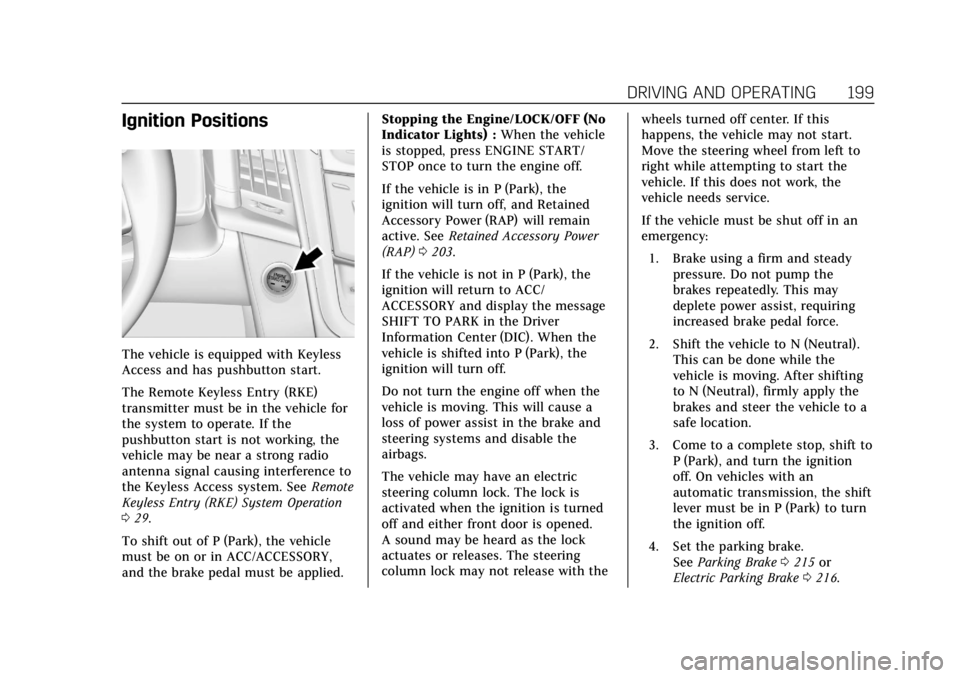
The vehicle is equipped with Keyless
Access and has pushbutton start.
The Remote Keyless Entry (RKE)
transmitter must be in the vehicle for
the system to operate. If the
pushbutton start is not working, the
vehicle may be near a strong radio
antenna signal causing interference to
the Keyless Access system. SeeRemote
Keyless Entry (RKE) System Operation
0 29.
To shift out of P (Park), the vehicle
must be on or in ACC/ACCESSORY,
and the brake pedal must be applied. Stopping the Engine/LOCK/OFF (No
Indicator Lights) :
When the vehicle
is stopped, press ENGINE START/
STOP once to turn the engine off.
If the vehicle is in P (Park), the
ignition will turn off, and Retained
Accessory Power (RAP) will remain
active. See Retained Accessory Power
(RAP) 0203.
If the vehicle is not in P (Park), the
ignition will return to ACC/
ACCESSORY and display the message
SHIFT TO PARK in the Driver
Information Center (DIC). When the
vehicle is shifted into P (Park), the
ignition will turn off.
Do not turn the engine off when the
vehicle is moving. This will cause a
loss of power assist in the brake and
steering systems and disable the
airbags.
The vehicle may have an electric
steering column lock. The lock is
activated when the ignition is turned
off and either front door is opened.
A sound may be heard as the lock
actuates or releases. The steering
column lock may not release with the wheels turned off center. If this
happens, the vehicle may not start.
Move the steering wheel from left to
right while attempting to start the
vehicle. If this does not work, the
vehicle needs service.
If the vehicle must be shut off in an
emergency:
1. Brake using a firm and steady pressure. Do not pump the
brakes repeatedly. This may
deplete power assist, requiring
increased brake pedal force.
2. Shift the vehicle to N (Neutral). This can be done while the
vehicle is moving. After shifting
to N (Neutral), firmly apply the
brakes and steer the vehicle to a
safe location.
3. Come to a complete stop, shift to P (Park), and turn the ignition
off. On vehicles with an
automatic transmission, the shift
lever must be in P (Park) to turn
the ignition off.
4. Set the parking brake. See Parking Brake 0215 or
Electric Parking Brake 0216.
Page 269 of 399
Cadillac Escalade Owner Manual (GMNA-Localizing-U.S./Canada/Mexico-
11349344) - 2018 - crc - 11/7/17
268 VEHICLE CARE
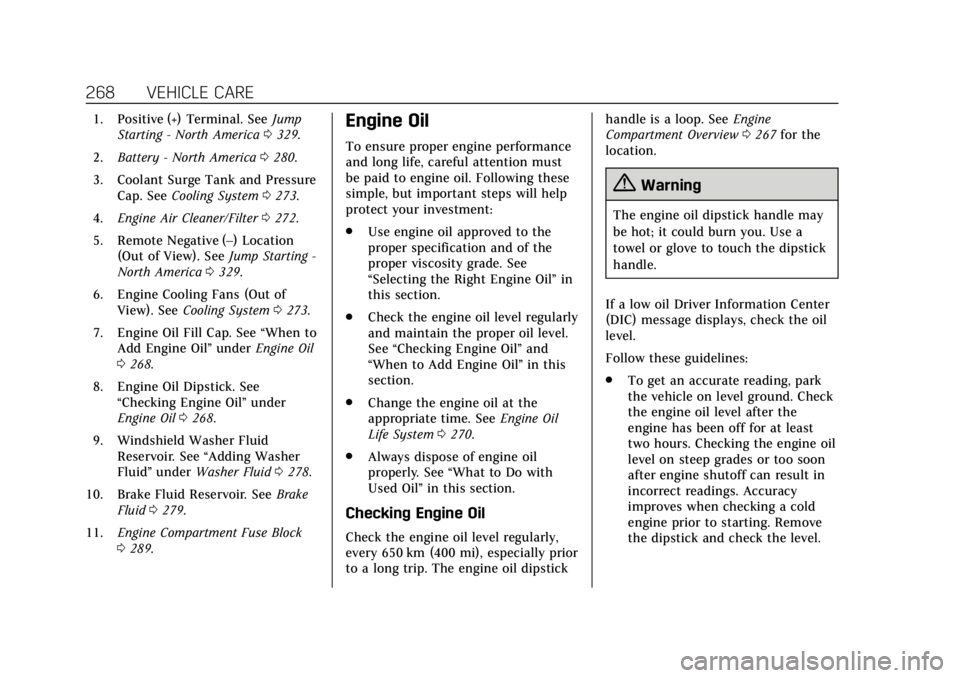
1. Positive (+) Terminal. SeeJump
Starting - North America 0329.
2. Battery - North America 0280.
3. Coolant Surge Tank and Pressure Cap. See Cooling System 0273.
4. Engine Air Cleaner/Filter 0272.
5. Remote Negative (–) Location (Out of View). See Jump Starting -
North America 0329.
6. Engine Cooling Fans (Out of View). See Cooling System 0273.
7. Engine Oil Fill Cap. See “When to
Add Engine Oil” underEngine Oil
0 268.
8. Engine Oil Dipstick. See “Checking Engine Oil” under
Engine Oil 0268.
9. Windshield Washer Fluid Reservoir. See “Adding Washer
Fluid ”under Washer Fluid 0278.
10. Brake Fluid Reservoir. See Brake
Fluid 0279.
11. Engine Compartment Fuse Block
0289.Engine Oil
To ensure proper engine performance
and long life, careful attention must
be paid to engine oil. Following these
simple, but important steps will help
protect your investment:
.
Use engine oil approved to the
proper specification and of the
proper viscosity grade. See
“Selecting the Right Engine Oil” in
this section.
. Check the engine oil level regularly
and maintain the proper oil level.
See “Checking Engine Oil” and
“When to Add Engine Oil” in this
section.
. Change the engine oil at the
appropriate time. See Engine Oil
Life System 0270.
. Always dispose of engine oil
properly. See “What to Do with
Used Oil” in this section.
Checking Engine Oil
Check the engine oil level regularly,
every 650 km (400 mi), especially prior
to a long trip. The engine oil dipstick handle is a loop. See
Engine
Compartment Overview 0267 for the
location.
{Warning
The engine oil dipstick handle may
be hot; it could burn you. Use a
towel or glove to touch the dipstick
handle.
If a low oil Driver Information Center
(DIC) message displays, check the oil
level.
Follow these guidelines:
. To get an accurate reading, park
the vehicle on level ground. Check
the engine oil level after the
engine has been off for at least
two hours. Checking the engine oil
level on steep grades or too soon
after engine shutoff can result in
incorrect readings. Accuracy
improves when checking a cold
engine prior to starting. Remove
the dipstick and check the level.
Page 331 of 399
Cadillac Escalade Owner Manual (GMNA-Localizing-U.S./Canada/Mexico-
11349344) - 2018 - crc - 11/7/17
330 VEHICLE CARE
ground connection. You would
not be able to start your vehicle,
and the bad grounding could
damage the electrical systems.
To avoid the possibility of the
vehicles rolling, set the parking
brake firmly on both vehicles
involved in the jump start
procedure. Put the automatic
transmission in P (Park) or a
manual transmission in Neutral
before setting the parking brake.
For vehicles with
four-wheel-drive with a
N (Neutral) transfer case
position, be sure the transfer
case is in a drive gear—not
N (Neutral).
Caution
If any accessories are left on or
plugged in during the jump starting
procedure, they could be damaged.
The repairs would not be covered
by the vehicle warranty. Whenever
possible, turn off or unplug all
accessories on either vehicle when
jump starting. 3. Turn the ignition off on both
vehicles. Unplug unnecessary
accessories plugged into the
accessory power outlets. Turn off
the radio and all the lamps that
are not needed. This will avoid
sparks and help save both
batteries. And it could save the
radio!
4. Open the hood on the other vehicle and locate the positive (+)
and negative (−) terminal
locations on that vehicle.
The positive (+) terminal is under
a red plastic cover at the positive
battery post. To uncover the
positive (+) terminal, open the
red plastic cover.
For more information on the
location of the remote
positive (+) and remote negative
(−) terminals, see Engine
Compartment Overview 0267.
{Warning
An electric fan can start up even
when the engine is not running and
can injure you. Keep hands,
clothing, and tools away from any
underhood electric fan.
{Warning
Using a match near a battery can
cause battery gas to explode. People
have been hurt doing this, and
some have been blinded. Use a
flashlight if you need more light.
Battery fluid contains acid that can
burn you. Do not get it on you.
If you accidentally get it in your
eyes or on your skin, flush the place
with water and get medical help
immediately.
Page 332 of 399
Cadillac Escalade Owner Manual (GMNA-Localizing-U.S./Canada/Mexico-
11349344) - 2018 - crc - 11/7/17
VEHICLE CARE 331
{Warning
Fans or other moving engine parts
can injure you badly. Keep your
hands away from moving parts
once the engine is running.
5. Check that the jumper cables do not have loose or missing
insulation. If they do, you could
get a shock. The vehicles could
be damaged too.
Before you connect the cables,
here are some basic things you
should know. Positive (+) will go
to positive (+) or to a remote
positive (+) terminal if the
vehicle has one. Negative (−) will
go to a heavy, unpainted metal
engine part or to a remote
negative (−) terminal if the
vehicle has one.
Do not connect positive (+) to
negative (−) or you will get a
short that would damage the
battery and maybe other parts
too. And do not connect the negative (−) cable to the negative
(−) terminal on the dead battery
because this can cause sparks.
6. Connect the red positive (+) cable
to the positive (+) terminal of the
vehicle with the dead battery.
7. Do not let the other end touch metal. Connect it to the
positive (+) terminal of the good
battery. Use a remote positive (+)
terminal if the vehicle has one.
8. Connect the black negative (−) cable to the negative (−) terminal
of the good battery. Use a remote
negative (−) terminal if the
vehicle has one. Do not let the other end touch
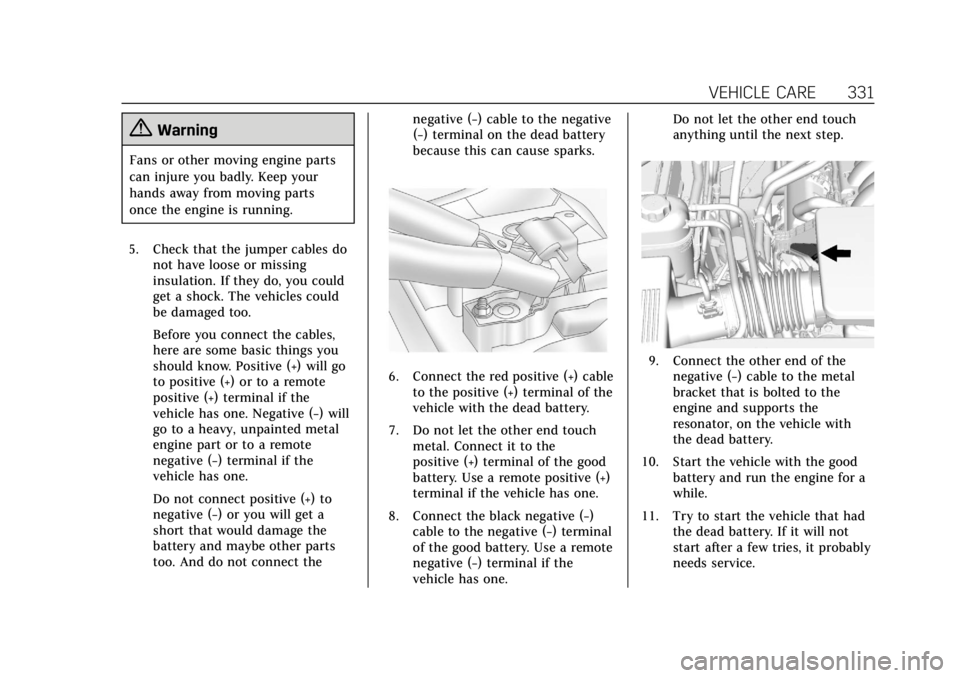
anything until the next step.9. Connect the other end of the
negative (−) cable to the metal
bracket that is bolted to the
engine and supports the
resonator, on the vehicle with
the dead battery.
10. Start the vehicle with the good battery and run the engine for a
while.
11. Try to start the vehicle that had the dead battery. If it will not
start after a few tries, it probably
needs service.
Page 379 of 399
Cadillac Escalade Owner Manual (GMNA-Localizing-U.S./Canada/Mexico-
11349344) - 2018 - crc - 11/7/17
378 ONSTAR
Security
If equipped, OnStar provides these
services:
.With Stolen Vehicle Assistance,
OnStar Advisors can use GPS to
pinpoint the vehicle and help
authorities quickly recover it.
. With Remote Ignition Block,
if equipped, OnStar can block the
engine from being restarted.
. With Stolen Vehicle Slowdown,
if equipped, OnStar can work with
law enforcement to gradually slow
the vehicle down.
Theft Alarm Notification
If equipped, if the doors are locked
and the vehicle alarm sounds, a
notification by text, e-mail, or phone
call will be sent. If the vehicle is
stolen, an OnStar Advisor can work
with authorities to recover the vehicle.
Navigation
OnStar navigation requires a specific
OnStar service plan. Press
Qto receive Turn-by-Turn
directions or have them sent to the
vehicle’s navigation screen,
if equipped.
Turn-by-Turn Navigation
1. PressQto connect to an
Advisor.
2. Request directions to be downloaded to the vehicle.
3. Follow the voice-guided commands.
Using Voice Commands During a
Planned Route
Functionality of the Voice Command
button may vary by vehicle and
region. For some vehicles, press
=to
open the OnStar app on the
infotainment display. For other
vehicles press
=as follows.
Cancel Route
1. Press
=. System responds:
“OnStar ready,” then a tone. 2. Say
“Cancel route.” System
responds: “Do you want to cancel
directions?”
3. Say “Yes.”System responds: “OK,
request completed, thank you,
goodbye.”
Route Preview
1. Press
=. System responds:
“OnStar ready,” then a tone.
2. Say “Route preview.” System
responds with the next three
maneuvers.
Repeat
1. Press
=. System responds:
“OnStar ready,” then a tone.
2. Say “Repeat.” System responds
with the last direction given,
then responds with “OnStar
ready,” then a tone.
Get My Destination
1. Press
=. System responds:
“OnStar ready,” then a tone.
Page 381 of 399

Cadillac Escalade Owner Manual (GMNA-Localizing-U.S./Canada/Mexico-
11349344) - 2018 - crc - 11/7/17
380 ONSTAR
MyCadillac Mobile App (If Available)
Download the myCadillac mobile app
to compatible Apple and Android
smartphones. Cadillac users can
access the following services from a
smartphone:
.Remotely start/stop the vehicle,
if factory-equipped.
. Lock/unlock doors, if equipped
with automatic locks.
. Activate the horn and lamps.
. Check the vehicle’s fuel level, oil
life, or tire pressure,
if factory-equipped with the Tire
Pressure Monitor System.
. Send destinations to the vehicle.
. Locate the vehicle on a map (U.S.
market only).
. Turn the vehicle's Wi-Fi hotspot
on/off, manage settings, and
monitor data consumption,
if equipped.
. Locate a dealer and schedule
service.
. Request roadside assistance. .
Set a parking reminder with pin
drop, take a photo, make a note,
and set a timer.
. Connect with Cadillac on social
media.
For myCadillac mobile app
information and compatibility, see
www.my.cadillac.com.
An active OnStar service, compatible
device, factory-installed remote start,
and power locks are required. Data
rates apply. See www.onstar.com for
details and system limitations.
Remote Services
Contact an OnStar Advisor to unlock
the doors or sound the horn and flash
the lamps.
OnStar AtYourService
OnStar Advisors can provide offers
from restaurants and retailers on your
route, help locate hotels, or book a
room. These services vary by market.
OnStar Hands-Free Calling
Make and receive calls with the
built-in wireless calling service, which
requires available minutes.
Functionality of the Voice Command
button may vary by vehicle and
region. For some vehicles, press
=to
open the OnStar app on the
infotainment display, then select
Hands-Free calling. For other vehicles
press
=as follows.
Make a Call
1. Press
=. System responds:
“OnStar ready.”
2. Say “Call.”System responds: “Call.
Please say the name or number
to call.”
3. Say the entire number without pausing, including a “1”and the
area code. System responds: “OK,
calling.”
Calling 911 Emergency
1. Press=. System responds:
“OnStar ready.”
Page 382 of 399
Cadillac Escalade Owner Manual (GMNA-Localizing-U.S./Canada/Mexico-
11349344) - 2018 - crc - 11/7/17
ONSTAR 381
2. Say“Call.”System responds: “Call.
Please say the name or number
to call.”
3. Say “911”without pausing.
System responds: “911.”
4. Say “Call.”System responds: “OK,
dialing 911.”
Retrieve My Number
1. Press=. System responds:
“OnStar ready.”
2. Say “My number.” System
responds: “Your OnStar
Hands-Free Calling number is,”
then says the number.
End a Call
Press=. System responds: “Call
ended.”
Verify Minutes and Expiration
Press=and say “Minutes” then
“Verify” to check how many minutes
remain and their expiration date.
Diagnostics
By monitoring and reporting on the
vehicle’s key systems, OnStar
Advanced Diagnostics provides a way
to keep up on maintenance.
Capabilities vary by model. See
www.onstar.com for details and
system limitations. Message and data
rates may apply.
Advanced Diagnostics requires an
active OnStar paid service plan, e-mail
address on file, and enrollment in
Advanced Diagnostics.
Includes:
. Diagnostic Alerts: Set preferences
to receive real-time e-mails, texts,
or monthly reports of the vehicle’s
health. Or press
Qto have an
Advisor initiate a remote
diagnostic report.
. Proactive Alerts: Receive a
real-time e-mail or text message
regarding potential issues with key
vehicle components, such as the
battery, fuel system, or starter
system. Alerts for potential issues
appear on the infotainment display. Proactive Alerts are
designed to help predict specific
types of issues based on
information collected from the
vehicle. Other factors may affect
vehicle performance. Not all issues
will deliver alerts. In some cases, a
dealer service check may be
required to confirm the accuracy
of the alerts.
. Dealer Maintenance Notification:
Have the vehicle notify your
preferred dealer when it is time for
maintenance. Your dealer will then
contact you to set up an
appointment.
To begin, press
Qto speak to an
Advisor, or see www.onstar.com.
Page 384 of 399
Cadillac Escalade Owner Manual (GMNA-Localizing-U.S./Canada/Mexico-
11349344) - 2018 - crc - 11/7/17
ONSTAR 383
may not work if the OnStar equipment
is not properly installed or it has not
been properly maintained.
If equipment or software is added,
connected, or modified, OnStar
services may not work. Other
problems beyond the control of
OnStar—such as hills, tall buildings,
tunnels, weather, electrical system
design and architecture of the vehicle,
damage to the vehicle in a crash,
or wireless phone network congestion
or jamming —may prevent service.
See Radio Frequency Statement 0372.
Services for People with
Disabilities
Advisors provide services to help with
physical disabilities and medical
conditions.
Press
Qto help:
. Locate a gas station with an
attendant to pump gas.
. Find a hotel, restaurant, etc., that
meets accessibility needs. .
Provide directions to the closest
hospital or pharmacy in urgent
situations.
TTY Users
OnStar has the ability to communicate
to deaf, hard-of-hearing,
or speech-impaired customers while in
the vehicle. The available
dealer-installed TTY system can
provide in-vehicle access to all OnStar
services, except Virtual Advisor and
OnStar Turn-by-Turn Navigation.
OnStar Personal Identification
Number (PIN)
A PIN is needed to access some
OnStar services. The PIN will need to
be changed the first time when
speaking with an Advisor. To change
the OnStar PIN, contact an OnStar
Advisor by pressing
Qor calling
1-888-4ONSTAR.
Warranty
OnStar equipment may be warranted
as part of the vehicle warranty.
Languages
The vehicle can be programmed to
respond in multiple languages.
Press
Qand ask for an Advisor.
Advisors are available in English,
Spanish, and French. Available
languages may vary by country.
Potential Issues
OnStar cannot perform Remote Door
Unlock or Stolen Vehicle Assistance
after the vehicle has been off
continuously for 10 days without an
ignition cycle. If the vehicle has not
been started for 10 days, OnStar can
contact Roadside Assistance or a
locksmith to help gain access to the
vehicle.
Global Positioning System (GPS)
. Obstruction of the GPS can occur
in a large city with tall buildings;
in parking garages; around
airports; in tunnels and
underpasses; or in an area with
very dense trees. If GPS signals are
not available, the OnStar system
should still operate to call OnStar.
Page 392 of 399

Cadillac Escalade Owner Manual (GMNA-Localizing-U.S./Canada/Mexico-
11349344) - 2018 - crc - 11/7/17
INDEX 391
Full-Size Spare Tire . . . . . . . . . . . . . . . . . 328
FusesEngine Compartment FuseBlock . . . . . . . . . . . . . . . . . . . . . . . . . . . . . 289
Fuses and Circuit Breakers . . . . . . . 288
Instrument Panel Fuse Block . . . . . . . . . . . . . . . . . . . . . . . . 293, 296
Rear Compartment Fuse Block . . . . . . . . . . . . . . . . . . . . . . . . . . . . . 298
G
Garage Door Opener . . . . . . . . . . . . . . . . 160Programming . . . . . . . . . . . . . . . . . . . . . . 160
Gas Strut(s) . . . . . . . . . . . . . . . . . . . . . . . . . 285
Gauges Engine Coolant Temperature . . . . 134
Fuel . . . . . . . . . . . . . . . . . . . . . . . . . . . . . . . . 133
Odometer . . . . . . . . . . . . . . . . . . . . . . . . . . 132
Speedometer . . . . . . . . . . . . . . . . . . . . . . 132
Tachometer . . . . . . . . . . . . . . . . . . . . . . . 133
Trip Odometer . . . . . . . . . . . . . . . . . . . . 133
Warning Lights andIndicators . . . . . . . . . . . . . . . . . . . . . . . . 129
General Information Service and Maintenance . . . . . . . . 345
Towing . . . . . . . . . . . . . . . . . . . . . . . . . . . . 252
Vehicle Care . . . . . . . . . . . . . . . . . . . . . . . 264
Glass Replacement . . . . . . . . . . . . . . . . . 285 Glove Box . . . . . . . . . . . . . . . . . . . . . . . . . . . 116
GM Mobility Reimbursement
Program . . . . . . . . . . . . . . . . . . . . . . . . . . . . 365
H
Hazard Warning Flashers . . . . . . . . . . 168
Head Restraints . . . . . . . . . . . . . . . . . . . . . . 59
Head-up Display . . . . . . . . . . . . . . . . . . . . 147
HeadlampsAiming . . . . . . . . . . . . . . . . . . . . . . . . . . . . . 287
Automatic . . . . . . . . . . . . . . . . . . . . . . . . . 167
Bulb Replacement . . . . . . . . . . . . . . . . 287
Daytime RunningLamps (DRL) . . . . . . . . . . . . . . . . . . . . 166
Flash-to-Pass . . . . . . . . . . . . . . . . . . . . . . 166
High-Beam On Light . . . . . . . . . . . . . . 144
High/Low Beam Changer . . . . . . . . . 166
Lamps On Reminder . . . . . . . . . . . . . . 144
Heated Rear Seats . . . . . . . . . . . . . . . . . . . . . . . . . . . 68
Steering Wheel . . . . . . . . . . . . . . . . . . . . 121
Heated and Cooled Front Seats . . . . . 67
Heated Mirrors . . . . . . . . . . . . . . . . . . . . . . . 51
Heater Engine . . . . . . . . . . . . . . . . . . . . . . . . . . . . . 201
Heating . . . . . . . . . . . . . . . . . . . . . . . . .173, 178
High-Beam On Light . . . . . . . . . . . . . . . . 144
High-Speed Operation . . . . . . . . . . . . . . 307 Hill and Mountain Roads . . . . . . . . . . 191
Hill Start Assist (HSA) . . . . . . . . . . . . . 218
Hood . . . . . . . . . . . . . . . . . . . . . . . . . . . . . . . . . 266
Horn . . . . . . . . . . . . . . . . . . . . . . . . . . . . . . . . . 121
How to Wear Seat Belts Properly . . . 76
HVAC . . . . . . . . . . . . . . . . . . . . . . . . . . .173, 178
I
Ignition Positions . . . . . . . . . . . . . . . . . . . 199
Immobilizer . . . . . . . . . . . . . . . . . . . . . . . . . . 48
Indicator
Vehicle Ahead . . . . . . . . . . . . . . . . . . . . . 141
Infants and Young Children, Restraints . . . . . . . . . . . . . . . . . . . . . . . . . . . 98
Infotainment . . . . . . . . . . . . . . . . . . . . . . . . 172
Infotainment System . . . . . . . . . . . . . . . 375
Instrument Cluster . . . . . . . . . . . . . . . . . 130
Instrument Panel Storage Area . . . . . . . . . . . . . . . . . . . . . . 116
Interior Rearview Mirrors . . . . . . . . . . . 51
Introduction . . . . . . . . . . . . . . . . . . . . . . . . . . . . 2
J
Jump Starting - North America . . . . 329
K
Keyless Entry Remote (RKE) System . . . . . . . . . . . . . . 29
Keys . . . . . . . . . . . . . . . . . . . . . . . . . . . . . . . . . . 28
Page 395 of 399

Cadillac Escalade Owner Manual (GMNA-Localizing-U.S./Canada/Mexico-
11349344) - 2018 - crc - 11/7/17
394 INDEX
PersonalizationVehicle . . . . . . . . . . . . . . . . . . . . . . . . . . . . . 152
Power Door Locks . . . . . . . . . . . . . . . . . . . . . . . . . . 39
Mirrors . . . . . . . . . . . . . . . . . . . . . . . . . . . . . . 50
Outlets . . . . . . . . . . . . . . . . . . . . . . . . . . . . . 125
Protection, Battery . . . . . . . . . . . . . . . . 171
Retained Accessory (RAP) . . . . . . . . 203
Seat Adjustment . . . . . . . . . . . . . . . . . . . . 60
Windows . . . . . . . . . . . . . . . . . . . . . . . . . . . . 54
Power Assist Steps . . . . . . . . . . . . . . . . . . . 45
Pregnancy, Using Seat Belts . . . . . . . . . 82
Premium Care Maintenance
Cadillac . . . . . . . . . . . . . . . . . . . . . . . . . . . . 347
Privacy Vehicle Data Recording . . . . . . . . . . 374
Program Courtesy Transportation . . . . . . . . . 368
Proposition 65 Warning,
California . . . . . . . . . . . . . . .264, 280, 329, Back Cover
R
Radio Frequency Statement . . . . . . . . 372
Reading Lamps . . . . . . . . . . . . . . . . . . . . . 170
Rear Axle . . . . . . . . . . . . . . . . . . . . . . . . . . . . 282 Rear Axle (cont'd)
Locking . . . . . . . . . . . . . . . . . . . . . . . . . . . . 222
Rear Camera Mirror . . . . . . . . . . . . . . . . . 52
Rear Climate Control System . . . . . . 178
Rear Seats . . . . . . . . . . . . . . . . . . . . . . . . . . . . 68 Heated . . . . . . . . . . . . . . . . . . . . . . . . . . . . . . . 68
Rear Storage . . . . . . . . . . . . . . . . . . . . . . . . 117
Rear Vision Camera (RVC) . . . . . . . . . 233
Rear Window Washer/Wiper . . . . . . . 123
Rearview Mirrors Automatic Dimming . . . . . . . . . . . . . . . . 51
Reclining Seatbacks . . . . . . . . . . . . . . . . . 63
Recommended Fluids and Lubricants . . . . . . . . . . . . . . . . . . . . . . . . . 355
Records Maintenance . . . . . . . . . . . . . . . . . . . . . . 357
Recreational Vehicle Towing . . . . . . . 333
Reimbursement Program, GM Mobility . . . . . . . . . . . . . . . . . . . . . . . . . . . . 365
Remote Keyless Entry (RKE) System . . . . . . . . . . . . . . . . . . . . . . . . . . . . . . 29
Remote Vehicle Start . . . . . . . . . . . . . . . . 36
Replacement Glass . . . . . . . . . . . . . . . . . . . . . . . . . . . . . . . 285
Replacement Parts Airbags . . . . . . . . . . . . . . . . . . . . . . . . . . . . . . 95
Maintenance . . . . . . . . . . . . . . . . . . . . . . 356
Replacing Airbag System . . . . . . . . . . . . 95 Replacing LATCH System Parts
after a Crash . . . . . . . . . . . . . . . . . . . . . . . 110
Replacing Seat Belt System Parts after a Crash . . . . . . . . . . . . . . . . . 83
Reporting Safety Defects Canadian Government . . . . . . . . . . . . 373
General Motors . . . . . . . . . . . . . . . . . . . 373
U.S. Government . . . . . . . . . . . . . . . . . . 372
Restraints Where to Put . . . . . . . . . . . . . . . . . . . . . . 102
Retained Accessory
Power (RAP) . . . . . . . . . . . . . . . . . . . . . . . 203
Reverse Tilt Mirrors . . . . . . . . . . . . . . . . . 51
Ride Control Systems Magnetic . . . . . . . . . . . . . . . . . . . . . . . . . . 221
Roads
Driving, Wet . . . . . . . . . . . . . . . . . . . . . . . 190
Roadside Service . . . . . . . . . . . . . . . . . . . . 366
Roof Sunroof . . . . . . . . . . . . . . . . . . . . . . . . . . . . . . 56
Roof Rack System . . . . . . . . . . . . . . . . . . 119
Rotation, Tires . . . . . . . . . . . . . . . . . . . . . . 312
Routing, Engine Drive Belt . . . . . . . . . 361
Running the Vehicle While Parked . . . . . . . . . . . . . . . . . . . . . . . . . . . . . 206