ECU CADILLAC ESCALADE 2018 Workshop Manual
[x] Cancel search | Manufacturer: CADILLAC, Model Year: 2018, Model line: ESCALADE, Model: CADILLAC ESCALADE 2018Pages: 399, PDF Size: 6.23 MB
Page 328 of 399
Cadillac Escalade Owner Manual (GMNA-Localizing-U.S./Canada/Mexico-
11349344) - 2018 - crc - 11/7/17
VEHICLE CARE 327
10. Tire/Wheel Retainer
11. Hoist Cable
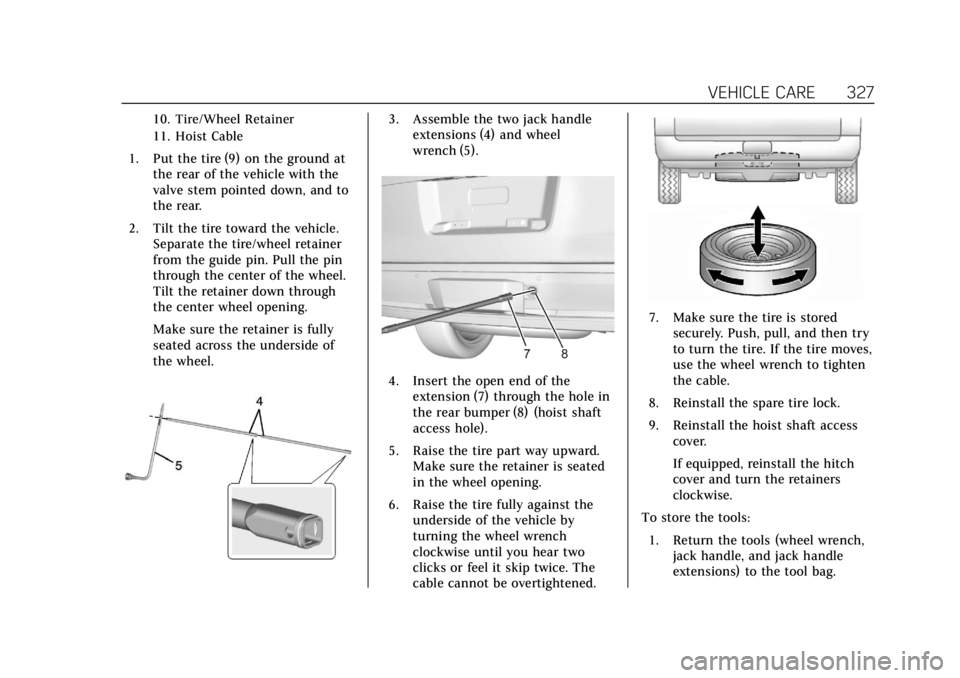
1. Put the tire (9) on the ground atthe rear of the vehicle with the
valve stem pointed down, and to
the rear.
2. Tilt the tire toward the vehicle. Separate the tire/wheel retainer
from the guide pin. Pull the pin
through the center of the wheel.
Tilt the retainer down through
the center wheel opening.
Make sure the retainer is fully
seated across the underside of
the wheel.
3. Assemble the two jack handleextensions (4) and wheel
wrench (5).
4. Insert the open end of the
extension (7) through the hole in
the rear bumper (8) (hoist shaft
access hole).
5. Raise the tire part way upward. Make sure the retainer is seated
in the wheel opening.
6. Raise the tire fully against the underside of the vehicle by
turning the wheel wrench
clockwise until you hear two
clicks or feel it skip twice. The
cable cannot be overtightened.
7. Make sure the tire is stored
securely. Push, pull, and then try
to turn the tire. If the tire moves,
use the wheel wrench to tighten
the cable.
8. Reinstall the spare tire lock.
9. Reinstall the hoist shaft access cover.
If equipped, reinstall the hitch
cover and turn the retainers
clockwise.
To store the tools: 1. Return the tools (wheel wrench, jack handle, and jack handle
extensions) to the tool bag.
Page 329 of 399
Cadillac Escalade Owner Manual (GMNA-Localizing-U.S./Canada/Mexico-
11349344) - 2018 - crc - 11/7/17
328 VEHICLE CARE
2. Assemble the wheel blocks andjack together with the wing nut.
3. Position the jack and wheel blocks in the driver side trim
panel over the wheelhouse.
4. Turn the jack knob clockwise until the jack is secured tight in
the mounting bracket. Be sure to
position the holes in the base of
the jack onto the pin in the
mounting bracket.
5. Use the retaining bracket to fasten the tool bag on the stud
and turn the wing nut clockwise
to secure.
6. Close the trim panel door.
Full-Size Spare Tire
If this vehicle came with a full-size
spare tire, it was fully inflated when
new, however, it can lose air over
time. Check the inflation pressure
regularly.
See Tire Pressure 0305 and Vehicle
Load Limits 0193. For instructions on
how to remove, install, or store a
spare tire, see Tire Changing0320. If equipped with a temporary use
full-size spare tire, it is indicated on
the tire sidewall. See
Tire Sidewall
Labeling 0301. This spare tire should
not be driven on over 112 km/h
(70 mph), or 88 km/h (55 mph) when
pulling a trailer, at the proper
inflation pressure. Repair and replace
the road tire as soon as it is
convenient, and stow the spare tire for
future use.
Caution
If the vehicle has four-wheel drive
and a different size spare tire is
installed, do not drive in four-wheel
drive until the flat tire is repaired
and/or replaced. The vehicle could
be damaged and the repairs would
not be covered by the warranty.
Never use four-wheel drive when a
different size spare tire is installed
on the vehicle.
The vehicle may have a different size
spare tire than the road tires originally
installed on the vehicle. This spare tire
was developed for use on this vehicle, so it is all right to drive on it. If the
vehicle has four-wheel drive and a
different size spare tire is installed,
drive only in two-wheel drive.
After installing the spare tire on the
vehicle, stop as soon as possible and
check that the spare tire is correctly
inflated.
Have the damaged or flat road tire
repaired or replaced and installed
back onto the vehicle as soon as
possible so the spare tire will be
available in case it is needed again.
Do not mix tires and wheels of
different sizes, because they will not
fit. Keep your spare tire and its wheel
together. If the vehicle has a spare tire
that does not match the original road
tires and wheels in size and type, do
not include the spare in the tire
rotation.
Page 333 of 399
Cadillac Escalade Owner Manual (GMNA-Localizing-U.S./Canada/Mexico-
11349344) - 2018 - crc - 11/7/17
332 VEHICLE CARE
Caution
If the jumper cables are connected
or removed in the wrong order,
electrical shorting may occur and
damage the vehicle. The repairs
would not be covered by the vehicle
warranty. Always connect and
remove the jumper cables in the
correct order, making sure that the
cables do not touch each other or
other metal.
Jumper Cable Removal
Reverse the sequence exactly when
removing the jumper cables.
After starting the disabled vehicle and
removing the jumper cables, allow it
to idle for several minutes.
Towing the Vehicle
Caution
Incorrectly towing a disabled
vehicle may cause damage. The
damage would not be covered by
the vehicle warranty.
Do not lash or hook to suspension
components. Use the proper straps
around the tires to secure the
vehicle.
Use only a flatbed tow truck for
towing a disabled vehicle. Never use a
sling type lift or damage will occur.
Use ramps to help reduce approach
angles if necessary. A towed vehicle
should have its drive wheels off the
ground.
Consult a professional towing service
if the disabled vehicle must be towed.
Front Attachment Points
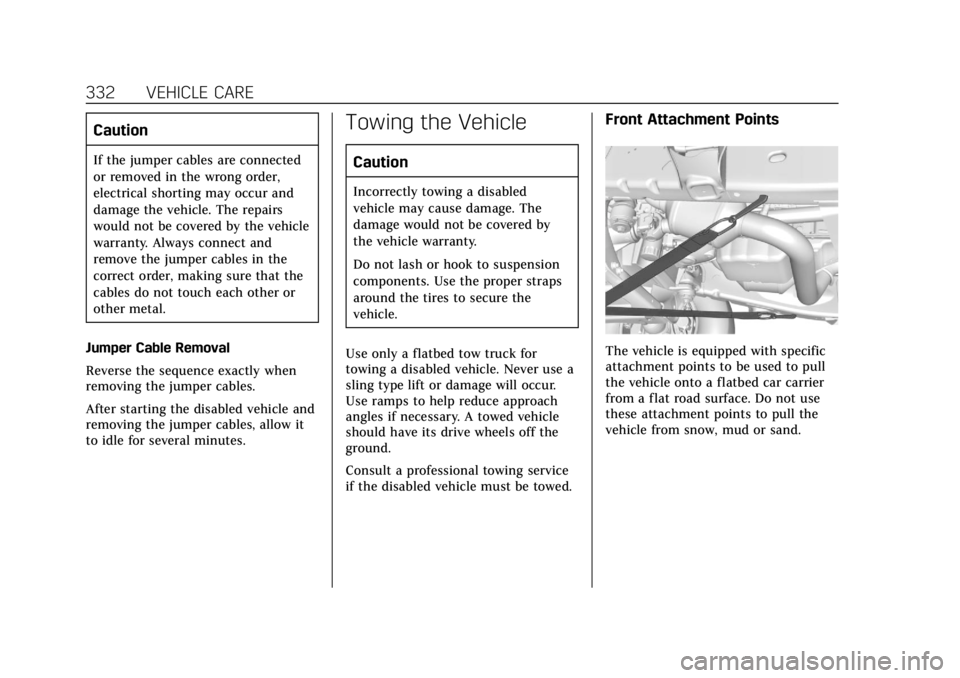
The vehicle is equipped with specific
attachment points to be used to pull
the vehicle onto a flatbed car carrier
from a flat road surface. Do not use
these attachment points to pull the
vehicle from snow, mud or sand.
Page 335 of 399

Cadillac Escalade Owner Manual (GMNA-Localizing-U.S./Canada/Mexico-
11349344) - 2018 - crc - 11/7/17
334 VEHICLE CARE
To dinghy tow:1. Position the vehicle being towed behind the tow vehicle, facing
forward and on a level surface.
2. Securely attach the vehicle being towed to the tow vehicle.
3. Apply the parking brake and start the engine.
For vehicles with Electric Parking
Brakes (EPB), the EPB cannot be
applied and the tires must be
chocked.
4. Shift the transfer case to N (Neutral). See “Shifting into
N (Neutral)” underFour-Wheel
Drive 0211. Check that the
vehicle is in N (Neutral) by
shifting the transmission to
R (Reverse) and then to D
(Drive). There should be no
movement of the vehicle while
shifting.
5. Shift the transmission into D (Drive). Turn the engine off.Caution
Failure to disconnect the negative
battery cable or to have it contact
the terminals can cause damage to
the vehicle.
6. Disconnect the negative battery cable at the battery and secure
the nut and bolt. Cover the
negative battery post with a
non-conductive material to
prevent any contact with the
negative battery terminal.
7. Shift the transmission to P (Park).
Caution
If the steering column is locked,
vehicle damage may occur.
8. Move the steering wheel to make sure the steering column is
unlocked. 9. With a foot on the brake pedal,
release the parking brake.
10. If equipped with Keyless Access, keep the RKE transmitter outside
of the vehicle, and manually lock
the doors. Access the vehicle as
if it has a dead RKE transmitter
battery, by using the key in the
door lock.
Disconnecting the Towed Vehicle
Before disconnecting the towed
vehicle: 1. Park on a level surface.
2. Set the parking brake, then shift the transmission to P (Park).
3. Connect the battery.
4. Apply the brake pedal.
5. Turn the ignition to ON/RUN with the engine off. Shift the
transfer case out of N (Neutral)
to 2
m. See “Shifting out of
N (Neutral)” underFour-Wheel
Drive 0211. See your dealer if
the transfer case cannot be
shifted out of N (Neutral).
Page 337 of 399
Cadillac Escalade Owner Manual (GMNA-Localizing-U.S./Canada/Mexico-
11349344) - 2018 - crc - 11/7/17
336 VEHICLE CARE
Dolly Towing–Rear Towing
(Rear Wheels Off the Ground) –
Four-Wheel-Drive Vehicles
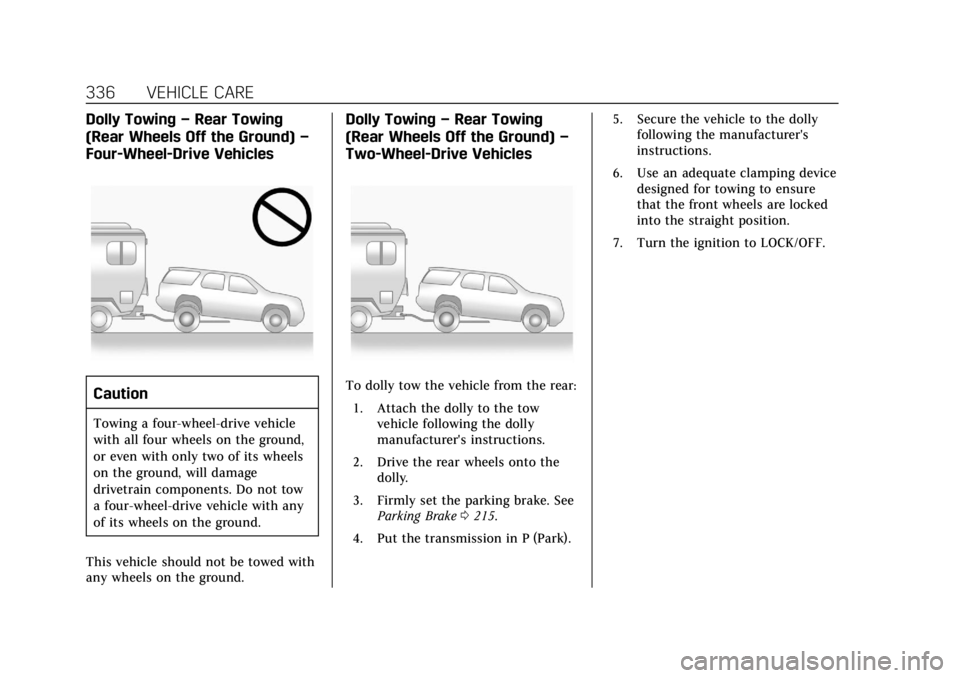
Caution
Towing a four-wheel-drive vehicle
with all four wheels on the ground,
or even with only two of its wheels
on the ground, will damage
drivetrain components. Do not tow
a four-wheel-drive vehicle with any
of its wheels on the ground.
This vehicle should not be towed with
any wheels on the ground.
Dolly Towing –Rear Towing
(Rear Wheels Off the Ground) –
Two-Wheel-Drive Vehicles
To dolly tow the vehicle from the rear:
1. Attach the dolly to the tow vehicle following the dolly
manufacturer's instructions.
2. Drive the rear wheels onto the dolly.
3. Firmly set the parking brake. See Parking Brake 0215.
4. Put the transmission in P (Park). 5. Secure the vehicle to the dolly
following the manufacturer's
instructions.
6. Use an adequate clamping device designed for towing to ensure
that the front wheels are locked
into the straight position.
7. Turn the ignition to LOCK/OFF.
Page 345 of 399
Cadillac Escalade Owner Manual (GMNA-Localizing-U.S./Canada/Mexico-
11349344) - 2018 - crc - 11/7/17
344 VEHICLE CARE
Care of Seat Belts
Keep belts clean and dry.
{Warning
Do not bleach or dye seat belt
webbing. It may severely weaken
the webbing. In a crash, they might
not be able to provide adequate
protection. Clean and rinse seat belt
webbing only with mild soap and
lukewarm water. Allow the webbing
to dry.
Floor Mats
{Warning
If a floor mat is the wrong size or is
not properly installed, it can
interfere with the pedals.
Interference with the pedals can
cause unintended acceleration and/
or increased stopping distance
which can cause a crash and injury.
Make sure the floor mat does not
interfere with the pedals.Use the following guidelines for
proper floor mat usage:
.
The original equipment floor mats
were designed for your vehicle.
If the floor mats need replacing, it
is recommended that GM certified
floor mats be purchased. Non-GM
floor mats may not fit properly
and may interfere with the pedals.
Always check that the floor mats
do not interfere with the pedals.
. Do not use a floor mat if the
vehicle is not equipped with a
floor mat retainer on the driver
side floor.
. Use the floor mat with the correct
side up. Do not turn it over.
. Do not place anything on top of
the driver side floor mat.
. Use only a single floor mat on the
driver side.
. Do not place one floor mat on top
of another.
Removing and Replacing the
Floor Mats
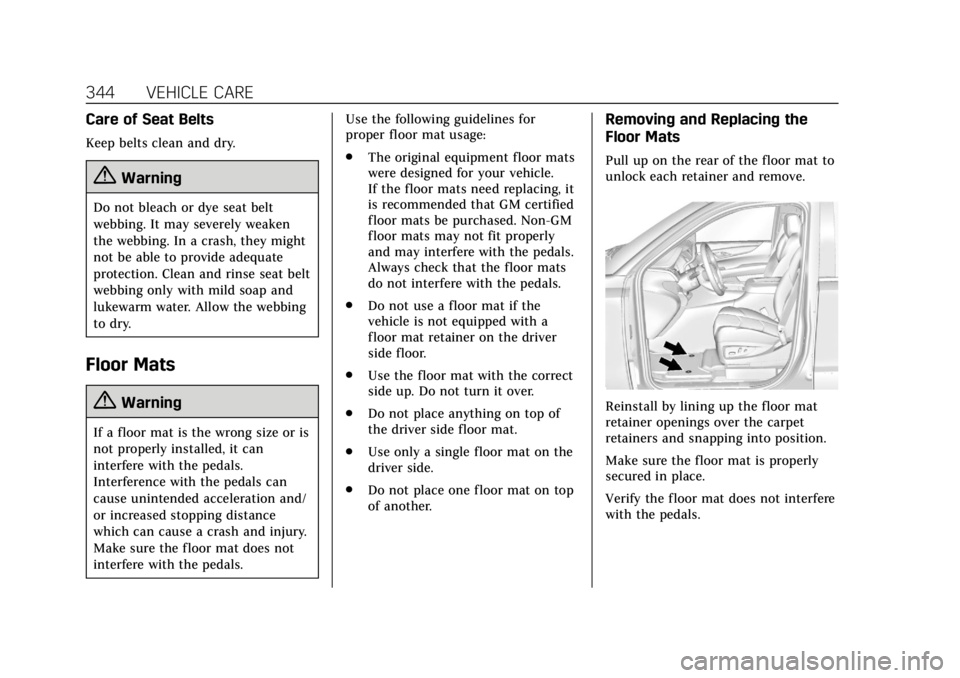
Pull up on the rear of the floor mat to
unlock each retainer and remove.
Reinstall by lining up the floor mat
retainer openings over the carpet
retainers and snapping into position.
Make sure the floor mat is properly
secured in place.
Verify the floor mat does not interfere
with the pedals.
Page 367 of 399
Cadillac Escalade Owner Manual (GMNA-Localizing-U.S./Canada/Mexico-
11349344) - 2018 - crc - 11/7/17
366 CUSTOMER INFORMATION
This program is available to qualified
applicants for cost reimbursement, up
to certain limits, of eligible
aftermarket adaptive equipment
required for the vehicle, such as hand
controls or a wheelchair/scooter lift
for the vehicle.
To learn about the GM Mobility
program, see www.gmmobility.com or
call the GM Mobility Assistance
Center at 1-800-323-9935. Text
Telephone (TTY) users, call
1-800-833-9935.
General Motors of Canada also has a
Mobility program. See www.gm.ca or
call 1-800-GM-DRIVE (800-463-7483)
for details. TTY users call
1-800-263-3830.
Roadside Service
U.S.: 1-800-224-1400.
Canada: 1-800-882-1112.
Text Telephone (TTY) Users (U.S.
Only): 1-888-889-2438.
Service is available 24 hours a day,
365 days a year.
Calling for Service
When calling Roadside Service, have
the following information ready:
.Your name, home address, and
home telephone number
. Telephone number of your
location
. Location of the vehicle
. Model, year, color, and license
plate number of the vehicle
. Odometer reading, Vehicle
Identification Number (VIN), and
delivery date of the vehicle
. Description of the problem
Coverage
Services are provided for the duration
of the vehicle’s powertrain warranty.
In the U.S., anyone driving the vehicle
is covered. In Canada, a person driving
the vehicle without permission from
the owner is not covered.
Roadside Service is not a part of the
New Vehicle Limited Warranty.
General Motors North America and
Cadillac reserve the right to make any changes or discontinue the Roadside
Service program at any time without
notification.
General Motors North America and
Cadillac reserve the right to limit
services or payment to an owner or
driver if they decide the claims are
made too often, or the same type of
claim is made many times.
Cadillac Owner Privileges
™
.
Emergency Fuel Delivery:
Delivery of enough fuel for the
vehicle to get to the nearest
service station.
. Lock-Out Service: Service to
unlock the vehicle if you are
locked out. A remote unlock may
be available if you have OnStar.
For security reasons, the driver
must present identification before
this service is given.
. Emergency Tow from a Public
Road or Highway: Tow to the
nearest Cadillac dealer for
warranty service, or if the vehicle
was in a crash and cannot be
Page 377 of 399
Cadillac Escalade Owner Manual (GMNA-Localizing-U.S./Canada/Mexico-
11349344) - 2018 - crc - 11/7/17
376 ONSTAR
OnStar
OnStar Overview
OnStar Overview . . . . . . . . . . . . . . . . . . 376
OnStar Services
Emergency . . . . . . . . . . . . . . . . . . . . . . . . 377
Security . . . . . . . . . . . . . . . . . . . . . . . . . . . 378
Navigation . . . . . . . . . . . . . . . . . . . . . . . . 378
Connections . . . . . . . . . . . . . . . . . . . . . . 379
Diagnostics . . . . . . . . . . . . . . . . . . . . . . . 381
OnStar Additional Information
OnStar AdditionalInformation . . . . . . . . . . . . . . . . . . . . . 382
OnStar Overview
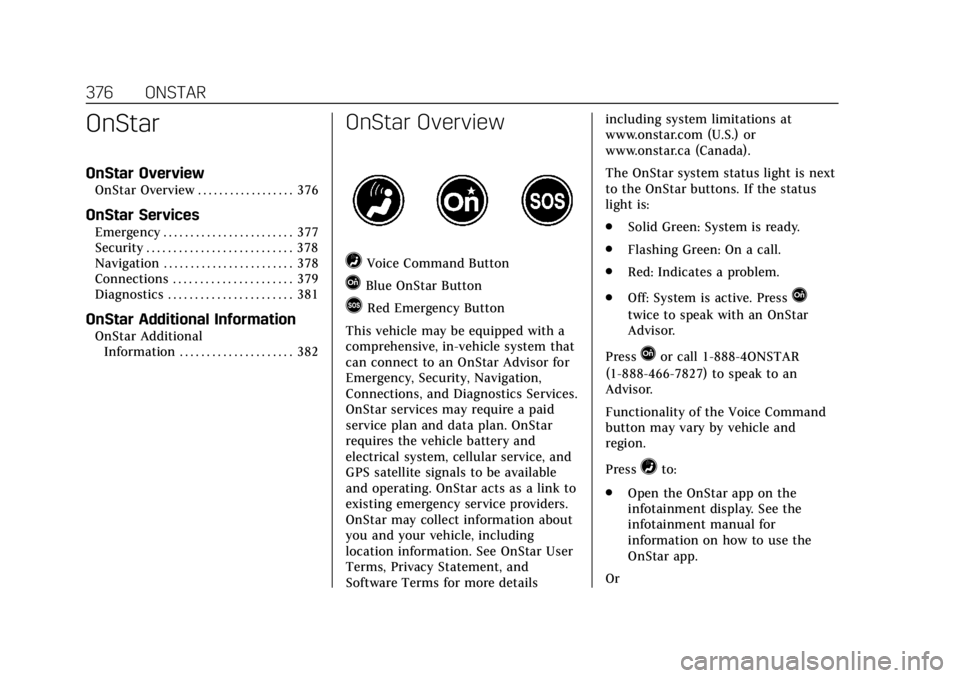
=Voice Command Button
QBlue OnStar Button
>Red Emergency Button
This vehicle may be equipped with a
comprehensive, in-vehicle system that
can connect to an OnStar Advisor for
Emergency, Security, Navigation,
Connections, and Diagnostics Services.
OnStar services may require a paid
service plan and data plan. OnStar
requires the vehicle battery and
electrical system, cellular service, and
GPS satellite signals to be available
and operating. OnStar acts as a link to
existing emergency service providers.
OnStar may collect information about
you and your vehicle, including
location information. See OnStar User
Terms, Privacy Statement, and
Software Terms for more details including system limitations at
www.onstar.com (U.S.) or
www.onstar.ca (Canada).
The OnStar system status light is next
to the OnStar buttons. If the status
light is:
.
Solid Green: System is ready.
. Flashing Green: On a call.
. Red: Indicates a problem.
. Off: System is active. PressQ
twice to speak with an OnStar
Advisor.
Press
Qor call 1-888-4ONSTAR
(1-888-466-7827) to speak to an
Advisor.
Functionality of the Voice Command
button may vary by vehicle and
region.
Press
=to:
. Open the OnStar app on the
infotainment display. See the
infotainment manual for
information on how to use the
OnStar app.
Or
Page 379 of 399
Cadillac Escalade Owner Manual (GMNA-Localizing-U.S./Canada/Mexico-
11349344) - 2018 - crc - 11/7/17
378 ONSTAR
Security
If equipped, OnStar provides these
services:
.With Stolen Vehicle Assistance,
OnStar Advisors can use GPS to
pinpoint the vehicle and help
authorities quickly recover it.
. With Remote Ignition Block,
if equipped, OnStar can block the
engine from being restarted.
. With Stolen Vehicle Slowdown,
if equipped, OnStar can work with
law enforcement to gradually slow
the vehicle down.
Theft Alarm Notification
If equipped, if the doors are locked
and the vehicle alarm sounds, a
notification by text, e-mail, or phone
call will be sent. If the vehicle is
stolen, an OnStar Advisor can work
with authorities to recover the vehicle.
Navigation
OnStar navigation requires a specific
OnStar service plan. Press
Qto receive Turn-by-Turn
directions or have them sent to the
vehicle’s navigation screen,
if equipped.
Turn-by-Turn Navigation
1. PressQto connect to an
Advisor.
2. Request directions to be downloaded to the vehicle.
3. Follow the voice-guided commands.
Using Voice Commands During a
Planned Route
Functionality of the Voice Command
button may vary by vehicle and
region. For some vehicles, press
=to
open the OnStar app on the
infotainment display. For other
vehicles press
=as follows.
Cancel Route
1. Press
=. System responds:
“OnStar ready,” then a tone. 2. Say
“Cancel route.” System
responds: “Do you want to cancel
directions?”
3. Say “Yes.”System responds: “OK,
request completed, thank you,
goodbye.”
Route Preview
1. Press
=. System responds:
“OnStar ready,” then a tone.
2. Say “Route preview.” System
responds with the next three
maneuvers.
Repeat
1. Press
=. System responds:
“OnStar ready,” then a tone.
2. Say “Repeat.” System responds
with the last direction given,
then responds with “OnStar
ready,” then a tone.
Get My Destination
1. Press
=. System responds:
“OnStar ready,” then a tone.
Page 380 of 399
Cadillac Escalade Owner Manual (GMNA-Localizing-U.S./Canada/Mexico-
11349344) - 2018 - crc - 11/7/17
ONSTAR 379
2. Say“Get my destination.” System
responds with the address and
distance to the destination, then
responds with “OnStar ready,”
then a tone.
Send Destination to Vehicle
Directions can be sent to the vehicle’s
navigation screen, if equipped.
Press
Q, then ask the Advisor to
download directions to the vehicle’s
navigation system, if equipped. After
the call ends, the navigation screen
will provide prompts to begin driving
directions. Routes that are sent to the
navigation screen can only be
canceled through the navigation
system.
See www.onstar.com (U.S.) or
www.onstar.ca (Canada).
Connections
The following OnStar services help
with staying connected.
For coverage maps, see
www.onstar.com (U.S.) or
www.onstar.ca (Canada). Ensuring Security
.
Change the default passwords for
the Wi-Fi hotspot and myCadillac
mobile app. Make these passwords
different from each other and use
a combination of letters, numbers,
and symbols to increase the
security.
. Change the default name of the
SSID (Service Set Identifier). This
is your network’s name that is
visible to other wireless devices.
Choose a unique name and avoid
family names or vehicle
descriptions.
OnStar Wi-Fi Hotspot (If Equipped)
The vehicle may have a built-in Wi-Fi
hotspot that provides access to the
Internet and web content at 4G LTE
speed. Up to seven mobile devices can
be connected. A data plan is required.
Use the in-vehicle controls only when
it is safe to do so. 1. To retrieve Wi-Fi hotspot information, press
=to open
the OnStar app on the
infotainment display, then select Wi-Fi Hotspot. On some vehicles,
touch Wi-Fi or Wi-Fi Settings on
the screen.
2. The Wi-Fi settings will display the Wi-Fi hotspot name (SSID),
password, and on some vehicles,
the connection type (no Internet
connection, 3G, 4G, 4G LTE), and
signal quality (poor, good,
excellent).
3. To change the SSID or password, press
Qor call 1-888-4ONSTAR
to connect with an Advisor. On
some vehicles, the SSID and
password can be changed in the
Wi-Fi Hotspot menu.
After initial set-up, your vehicle’s
Wi-Fi hotspot will connect
automatically to your mobile devices.
Manage data usage by turning Wi-Fi
on or off on your mobile device, by
using the myCadillac mobile app,
or by contacting an OnStar Advisor.
On some vehicles, Wi-Fi can also be
managed from the Wi-Fi
Hotspot menu.