Rearview Mirror CADILLAC ESCALADE 2018 Owner's Manual
[x] Cancel search | Manufacturer: CADILLAC, Model Year: 2018, Model line: ESCALADE, Model: CADILLAC ESCALADE 2018Pages: 399, PDF Size: 6.23 MB
Page 16 of 399
Cadillac Escalade Owner Manual (GMNA-Localizing-U.S./Canada/Mexico-
11349344) - 2018 - crc - 11/7/17
IN BRIEF 15
Refer to the following sections for
important information on how to use
seat belts properly:
.Seat Belts 075.
. How to Wear Seat Belts Properly
076.
. Lap-Shoulder Belt 077.
. Lower Anchors and Tethers for
Children (LATCH System) 0103.
Passenger Sensing System
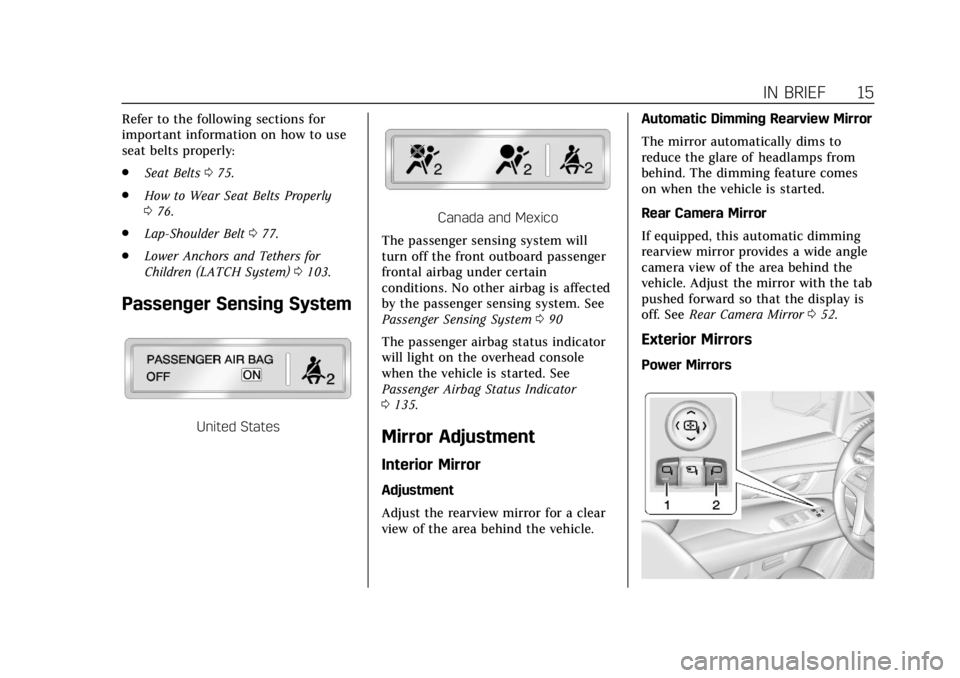
United States
Canada and Mexico
The passenger sensing system will
turn off the front outboard passenger
frontal airbag under certain
conditions. No other airbag is affected
by the passenger sensing system. See
Passenger Sensing System 090
The passenger airbag status indicator
will light on the overhead console
when the vehicle is started. See
Passenger Airbag Status Indicator
0 135.
Mirror Adjustment
Interior Mirror
Adjustment
Adjust the rearview mirror for a clear
view of the area behind the vehicle. Automatic Dimming Rearview Mirror
The mirror automatically dims to
reduce the glare of headlamps from
behind. The dimming feature comes
on when the vehicle is started.
Rear Camera Mirror
If equipped, this automatic dimming
rearview mirror provides a wide angle
camera view of the area behind the
vehicle. Adjust the mirror with the tab
pushed forward so that the display is
off. See
Rear Camera Mirror 052.
Exterior Mirrors
Power Mirrors
Page 29 of 399
Cadillac Escalade Owner Manual (GMNA-Localizing-U.S./Canada/Mexico-
11349344) - 2018 - crc - 11/7/17
28 KEYS, DOORS, AND WINDOWS
Keys, Doors, and
Windows
Keys and Locks
Keys . . . . . . . . . . . . . . . . . . . . . . . . . . . . . . . . 28
Remote Keyless Entry (RKE)System . . . . . . . . . . . . . . . . . . . . . . . . . . . . 29
Remote Keyless Entry (RKE) System Operation . . . . . . . . . . . . . . . . 29
Remote Vehicle Start . . . . . . . . . . . . . . 36
Door Locks . . . . . . . . . . . . . . . . . . . . . . . . . 37
Power Door Locks . . . . . . . . . . . . . . . . . 39
Delayed Locking . . . . . . . . . . . . . . . . . . . 39
Automatic Door Locks . . . . . . . . . . . . 39
Lockout Protection . . . . . . . . . . . . . . . . 40
Safety Locks . . . . . . . . . . . . . . . . . . . . . . . . 40
Doors
Liftgate . . . . . . . . . . . . . . . . . . . . . . . . . . . . . 41
Power Assist Steps . . . . . . . . . . . . . . . . . 45
Vehicle Security
Vehicle Security . . . . . . . . . . . . . . . . . . . . 46
Vehicle Alarm System . . . . . . . . . . . . . 46
Immobilizer . . . . . . . . . . . . . . . . . . . . . . . . 48
Immobilizer Operation . . . . . . . . . . . . 48
Exterior Mirrors
Convex Mirrors . . . . . . . . . . . . . . . . . . . . 49
Power Mirrors . . . . . . . . . . . . . . . . . . . . . . 50
Folding Mirrors . . . . . . . . . . . . . . . . . . . . 50
Heated Mirrors . . . . . . . . . . . . . . . . . . . . . 51
Reverse Tilt Mirrors . . . . . . . . . . . . . . . 51
Interior Mirrors
Interior Rearview Mirrors . . . . . . . . . 51
Automatic Dimming Rearview Mirror . . . . . . . . . . . . . . . . . . . . . . . . . . . . . 51
Rear Camera Mirror . . . . . . . . . . . . . . . 52
Child-View Mirror . . . . . . . . . . . . . . . . . . 53
Windows
Windows . . . . . . . . . . . . . . . . . . . . . . . . . . . 54
Power Windows . . . . . . . . . . . . . . . . . . . . 54
Sun Visors . . . . . . . . . . . . . . . . . . . . . . . . . . 56
Roof
Sunroof . . . . . . . . . . . . . . . . . . . . . . . . . . . . . 56
Keys and Locks
Keys
{Warning
Leaving children in a vehicle with a
Remote Keyless Entry (RKE)
transmitter is dangerous and
children or others could be
seriously injured or killed. They
could operate the power windows
or other controls or make the
vehicle move. The windows will
function with the RKE transmitter
in the vehicle, and children or
others could be caught in the path
of a closing window. Do not leave
children in a vehicle with an RKE
transmitter.
Page 51 of 399
Cadillac Escalade Owner Manual (GMNA-Localizing-U.S./Canada/Mexico-
11349344) - 2018 - crc - 11/7/17
50 KEYS, DOORS, AND WINDOWS
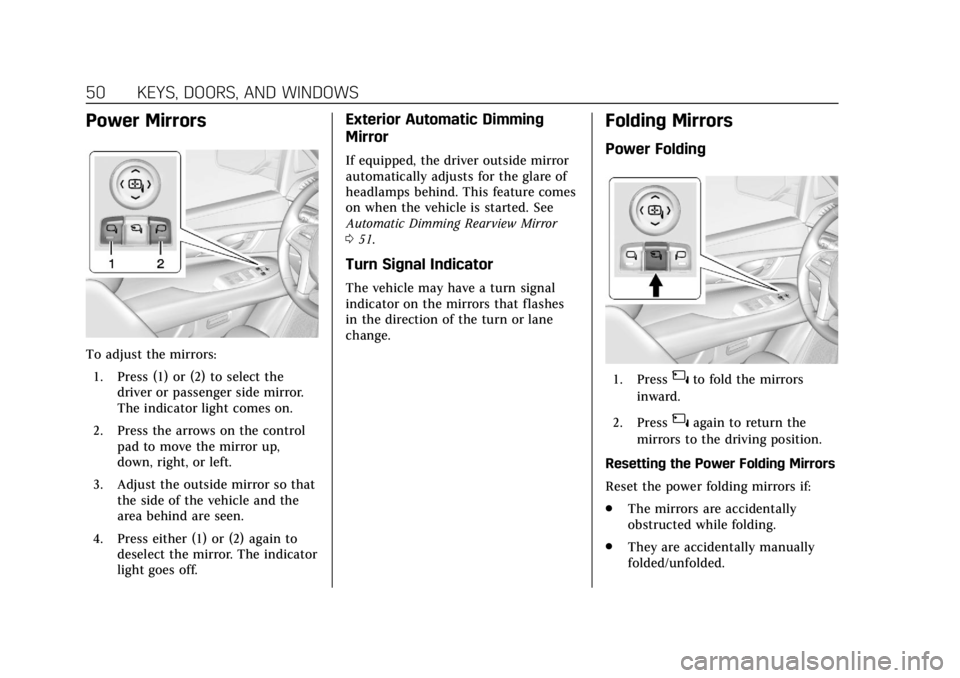
Power Mirrors
To adjust the mirrors:1. Press (1) or (2) to select the driver or passenger side mirror.
The indicator light comes on.
2. Press the arrows on the control pad to move the mirror up,
down, right, or left.
3. Adjust the outside mirror so that the side of the vehicle and the
area behind are seen.
4. Press either (1) or (2) again to deselect the mirror. The indicator
light goes off.
Exterior Automatic Dimming
Mirror
If equipped, the driver outside mirror
automatically adjusts for the glare of
headlamps behind. This feature comes
on when the vehicle is started. See
Automatic Dimming Rearview Mirror
051.
Turn Signal Indicator
The vehicle may have a turn signal
indicator on the mirrors that flashes
in the direction of the turn or lane
change.
Folding Mirrors
Power Folding
1. Press{to fold the mirrors
inward.
2. Press
{again to return the
mirrors to the driving position.
Resetting the Power Folding Mirrors
Reset the power folding mirrors if:
. The mirrors are accidentally
obstructed while folding.
. They are accidentally manually
folded/unfolded.
Page 52 of 399
Cadillac Escalade Owner Manual (GMNA-Localizing-U.S./Canada/Mexico-
11349344) - 2018 - crc - 11/7/17
KEYS, DOORS, AND WINDOWS 51
.The mirrors will not stay in the
unfolded position.
. The mirrors vibrate at normal
driving speeds.
Fold and unfold the mirrors one time
using the mirror controls to reset
them to their normal position.
A popping noise may be heard during
the resetting of the power folding
mirrors. This sound is normal after a
manual folding operation.
Auto Mirror Folding
If equipped, with the ignition off,
press and hold
Qon the RKE
transmitter for approximately
one second to automatically fold the
exterior mirrors. Press and hold
Kon
the RKE transmitter for approximately
one second to unfold. See Remote
Keyless Entry (RKE) System Operation
0 29.
This feature is turned on or off
through vehicle personalization. See
Vehicle Personalization 0152.
Heated Mirrors
K
:Press to heat the outside mirrors.
See “Rear Window Defogger” under
Dual Automatic Climate Control System
0 173.
Reverse Tilt Mirrors
If equipped with memory seats, the
passenger and/or driver mirror tilts to
a preselected position when the
vehicle is in R (Reverse). This allows
the curb to be seen when parallel
parking.
The mirror(s) return to the original
position when:
.
The vehicle is shifted out of
R (Reverse), or remains in
R (Reverse) for about 30 seconds.
. The ignition is turned off.
. The vehicle is driven in
R (Reverse) above a set speed.
To turn this feature on or off, see
Vehicle Personalization 0152.
Interior Mirrors
Interior Rearview Mirrors
Adjust the rearview mirror for a clear
view of the area behind your vehicle.
If equipped with OnStar, there may be
three buttons at the bottom of the
mirror. See your dealer for more
information on the system and how to
subscribe to OnStar. See OnStar
Overview 0376.
To avoid accidental OnStar calls, clean
the mirror with the ignition off. Do
not spray glass cleaner directly on the
mirror. Use a soft towel dampened
with water.
Automatic Dimming
Rearview Mirror
The rearview mirror automatically
dims to reduce the glare of the
headlamps from behind. This feature
comes on when the vehicle is started.
Page 53 of 399
Cadillac Escalade Owner Manual (GMNA-Localizing-U.S./Canada/Mexico-
11349344) - 2018 - crc - 11/7/17
52 KEYS, DOORS, AND WINDOWS
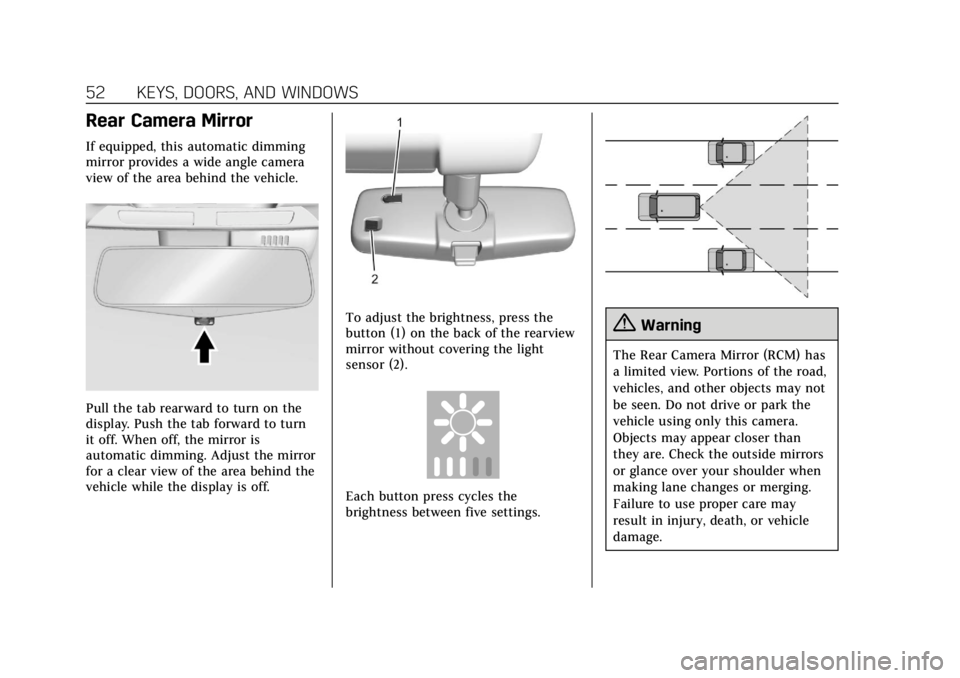
Rear Camera Mirror
If equipped, this automatic dimming
mirror provides a wide angle camera
view of the area behind the vehicle.
Pull the tab rearward to turn on the
display. Push the tab forward to turn
it off. When off, the mirror is
automatic dimming. Adjust the mirror
for a clear view of the area behind the
vehicle while the display is off.
To adjust the brightness, press the
button (1) on the back of the rearview
mirror without covering the light
sensor (2).
Each button press cycles the
brightness between five settings.
{Warning
The Rear Camera Mirror (RCM) has
a limited view. Portions of the road,
vehicles, and other objects may not
be seen. Do not drive or park the
vehicle using only this camera.
Objects may appear closer than
they are. Check the outside mirrors
or glance over your shoulder when
making lane changes or merging.
Failure to use proper care may
result in injury, death, or vehicle
damage.
Page 233 of 399
Cadillac Escalade Owner Manual (GMNA-Localizing-U.S./Canada/Mexico-
11349344) - 2018 - crc - 11/7/17
232 DRIVING AND OPERATING
ACC may occasionally provide an alert
and/or braking that is considered
unnecessary. It could respond to
vehicles in different lanes, signs,
guardrails, and other stationary
objects when entering or exiting a
curve. This is normal operation. The
vehicle does not need service.
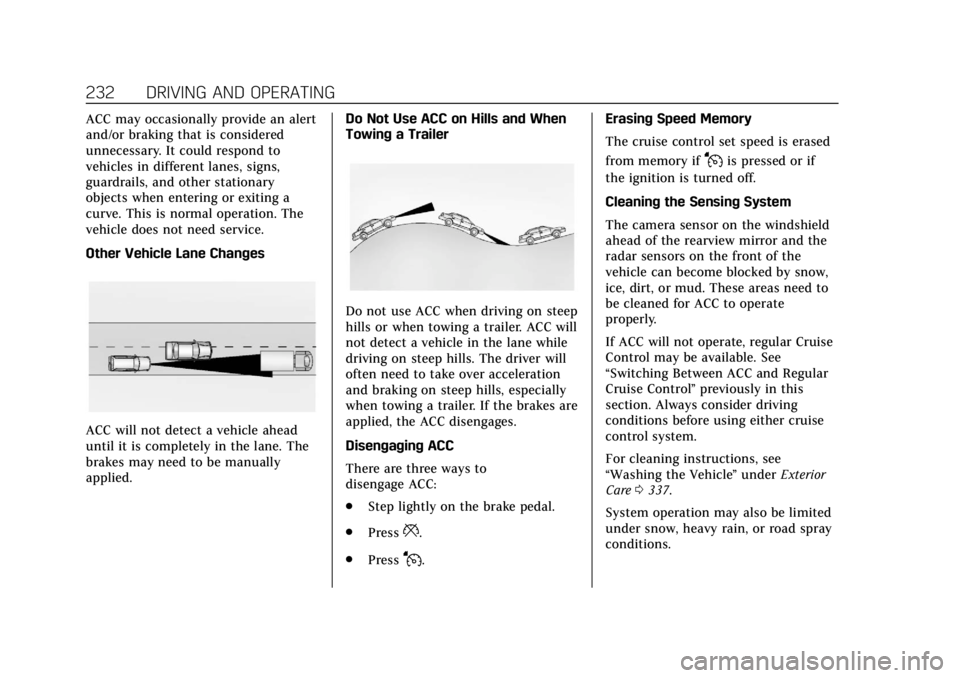
Other Vehicle Lane Changes
ACC will not detect a vehicle ahead
until it is completely in the lane. The
brakes may need to be manually
applied.Do Not Use ACC on Hills and When
Towing a Trailer
Do not use ACC when driving on steep
hills or when towing a trailer. ACC will
not detect a vehicle in the lane while
driving on steep hills. The driver will
often need to take over acceleration
and braking on steep hills, especially
when towing a trailer. If the brakes are
applied, the ACC disengages.
Disengaging ACC
There are three ways to
disengage ACC:
.
Step lightly on the brake pedal.
. Press
*.
. Press
J. Erasing Speed Memory
The cruise control set speed is erased
from memory if
Jis pressed or if
the ignition is turned off.
Cleaning the Sensing System
The camera sensor on the windshield
ahead of the rearview mirror and the
radar sensors on the front of the
vehicle can become blocked by snow,
ice, dirt, or mud. These areas need to
be cleaned for ACC to operate
properly.
If ACC will not operate, regular Cruise
Control may be available. See
“Switching Between ACC and Regular
Cruise Control ”previously in this
section. Always consider driving
conditions before using either cruise
control system.
For cleaning instructions, see
“Washing the Vehicle ”under Exterior
Care 0337.
System operation may also be limited
under snow, heavy rain, or road spray
conditions.
Page 235 of 399
Cadillac Escalade Owner Manual (GMNA-Localizing-U.S./Canada/Mexico-
11349344) - 2018 - crc - 11/7/17
234 DRIVING AND OPERATING
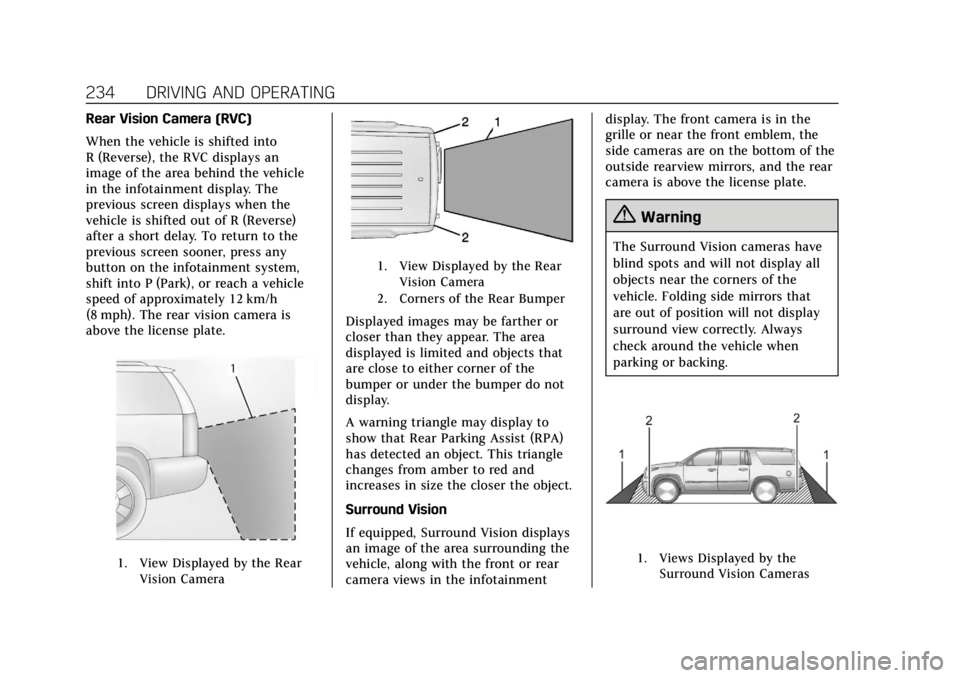
Rear Vision Camera (RVC)
When the vehicle is shifted into
R (Reverse), the RVC displays an
image of the area behind the vehicle
in the infotainment display. The
previous screen displays when the
vehicle is shifted out of R (Reverse)
after a short delay. To return to the
previous screen sooner, press any
button on the infotainment system,
shift into P (Park), or reach a vehicle
speed of approximately 12 km/h
(8 mph). The rear vision camera is
above the license plate.
1. View Displayed by the RearVision Camera
1. View Displayed by the RearVision Camera
2. Corners of the Rear Bumper
Displayed images may be farther or
closer than they appear. The area
displayed is limited and objects that
are close to either corner of the
bumper or under the bumper do not
display.
A warning triangle may display to
show that Rear Parking Assist (RPA)
has detected an object. This triangle
changes from amber to red and
increases in size the closer the object.
Surround Vision
If equipped, Surround Vision displays
an image of the area surrounding the
vehicle, along with the front or rear
camera views in the infotainment display. The front camera is in the
grille or near the front emblem, the
side cameras are on the bottom of the
outside rearview mirrors, and the rear
camera is above the license plate.
{Warning
The Surround Vision cameras have
blind spots and will not display all
objects near the corners of the
vehicle. Folding side mirrors that
are out of position will not display
surround view correctly. Always
check around the vehicle when
parking or backing.
1. Views Displayed by the
Surround Vision Cameras
Page 243 of 399
Cadillac Escalade Owner Manual (GMNA-Localizing-U.S./Canada/Mexico-
11349344) - 2018 - crc - 11/7/17
242 DRIVING AND OPERATING
Consider traffic and weather
conditions when selecting the alert
timing. The range of selectable alert
timing may not be appropriate for all
drivers and driving conditions.
If your vehicle is equipped with
Adaptive Cruise Control (ACC),
changing the FCA timing setting
automatically changes the ACC
following gap setting (Far, Medium,
or Near).
Unnecessary Alerts
FCA may provide unnecessary alerts
for turning vehicles, vehicles in other
lanes, objects that are not vehicles,
or shadows. These alerts are normal
operation and the vehicle does not
need service.
Cleaning the System
If the FCA system does not seem to
operate properly, this may correct the
issue:
.Clean the outside of the
windshield in front of the rearview
mirror.
. Clean the entire front of the
vehicle. .
Clean the headlamps.
For cleaning instructions, see
“Washing the Vehicle ”under Exterior
Care 0337.
System operation may also be limited
under snow, heavy rain, or road spray
conditions.
Forward Automatic
Braking (FAB)
If the vehicle has Forward Collision
Alert (FCA), it also has FAB, which
includes Intelligent Brake Assist (IBA).
When the system detects a vehicle
ahead in your path that is traveling in
the same direction that you may be
about to crash into, it can provide a
boost to braking or automatically
brake the vehicle. This can help avoid
or lessen the severity of crashes when
driving in a forward gear. Depending
on the situation, the vehicle may
automatically brake moderately or
hard. This forward automatic braking
can only occur if a vehicle is detected.
This is shown by the FCA vehicle
ahead indicator being lit. See Forward
Collision Alert (FCA) System 0240. The system works when driving in a
forward gear between 8 km/h (5 mph)
and 80 km/h (50 mph), or on vehicles
with Adaptive Cruise Control (ACC),
above 4 km/h (2 mph). It can detect
vehicles up to approximately 60 m
(197 ft).
{Warning
FAB is an emergency crash
preparation feature and is not
designed to avoid crashes. Do not
rely on FAB to brake the vehicle.
FAB will not brake outside of its
operating speed range and only
responds to detected vehicles.
FAB may not:
. Detect a vehicle ahead on
winding or hilly roads.
. Detect all vehicles, especially
vehicles with a trailer,
tractors, muddy vehicles, etc.
. Detect a vehicle when
weather limits visibility, such
as in fog, rain, or snow.
(Continued)
Page 248 of 399
Cadillac Escalade Owner Manual (GMNA-Localizing-U.S./Canada/Mexico-
11349344) - 2018 - crc - 11/7/17
DRIVING AND OPERATING 247
Warning (Continued)
and camera sensors clean and in
good repair. Do not use LKA in bad
weather conditions.
{Warning
Using LKA while towing a trailer or
on slippery roads could cause loss
of control of the vehicle and a
crash. Turn the system off.
How the System Works
The LKA camera sensor is on the
windshield ahead of the rearview
mirror.
To turn LKA on and off, press
A
on the center stack.
LKA Indicator Light
When on, the LKA indicator is green if
LKA is available to assist and provide
LDW alerts. It may assist by gently
turning the steering wheel and display
amber if the vehicle approaches a
detected lane marking without using a
turn signal in that direction. It may
also provide an LDW alert by flashing
amber as the lane marking is crossed.
Additionally, there may be three
beeps, or the driver seat may pulse
three times, on the right or left,
depending on the lane departure
direction.
Take Steering
The LKA system does not
continuously steer the vehicle. If LKA
does not detect active driver steering,
an alert, chime, or DIC message may
be provided. Steer the vehicle to
dismiss.
When the System Does Not
Seem to Work Properly
The system performance may be
affected by:
. Close vehicles ahead.
. Sudden lighting changes, such as
when driving through tunnels.
. Banked roads.
. Roads with poor lane markings,
such as two-lane roads.
If the LKA system is not functioning
properly when lane markings are
clearly visible, cleaning the windshield
may help.
A camera blocked message may
display if the camera is blocked.
Cleaning the outside of the windshield
behind the rearview mirror may
correct the issue. Some driver
assistance systems may have reduced
performance or not work at all. An
LKA or LDW unavailable message may
display if the systems are temporarily
unavailable. This message could be
due to a blocked camera. The LKA
Page 249 of 399
Cadillac Escalade Owner Manual (GMNA-Localizing-U.S./Canada/Mexico-
11349344) - 2018 - crc - 11/7/17
248 DRIVING AND OPERATING
system does not need service. Clean
the outside of the windshield behind
the rearview mirror.
LKA assistance and/or LDW alerts
may occur due to tar marks, shadows,
cracks in the road, temporary or
construction lane markings, or other
road imperfections. This is normal
system operation; the vehicle does not
need service. Turn LKA off if these
conditions continue.Fuel
GM recommends the use of TOP
TIER®detergent gasoline to keep the
engine cleaner and reduce engine
deposits. See www.toptiergas.com for a
list of TOP TIER detergent gasoline
marketers and applicable countries.
Do not use any fuel labeled E85 or
FlexFuel. Do not use gasoline with
ethanol levels greater than 15% by
volume.
Premium unleaded gasoline meeting
ASTM specification D4814 with a
posted octane rating of 93 is highly
recommended for best performance and fuel economy. Unleaded gasoline
with an octane rated as low as 87 can
be used. Using unleaded gasoline
rated below 93 octane, however, will
lead to reduced acceleration and fuel
economy. If knocking occurs, use a
gasoline rated at 93 octane as soon as
possible, otherwise, the engine could
be damaged. If heavy knocking is
heard when using gasoline with a
93 octane rating, the engine needs
service.
Prohibited Fuels
Caution
Do not use fuels with any of the
following conditions; doing so may
damage the vehicle and void its
warranty:
. For vehicles which are not
FlexFuel, fuel labeled greater
than 15% ethanol by volume,
such as mid-level ethanol
blends (16 –50% ethanol),
E85, or FlexFuel.
(Continued)