instrument panel CADILLAC ESCALADE 2021 Owner's Guide
[x] Cancel search | Manufacturer: CADILLAC, Model Year: 2021, Model line: ESCALADE, Model: CADILLAC ESCALADE 2021Pages: 492, PDF Size: 7.92 MB
Page 321 of 492
Cadillac Escalade Owner Manual (GMNA-Localizing-U.S./Canada/Mexico-
13690472) - 2021 - CRC - 8/10/21
320 DRIVING AND OPERATING
By selecting a view on the instrument
cluster, the Night Vision image can be
displayed. SeeInstrument Cluster 0114
. The Night Vision system can operate
only if:
.The ignition is on.
.The vehicle is in P (Park) or a
forward gear.
.It is dark enough outside.
.The headlamps are on, except when
parked.
Adjust the instrument panel
brightness to make the image no
brighter than necessary. Turn the
image off by selecting another view
on the instrument cluster. The night
vision image brightness and contrast
can be adjusted individually using the
touchscreen to the left of the
instrument cluster.
Warm objects, such as pedestrians,
animals, and other moving vehicles,
should appear whiter on the Night
Vision display. Cold objects, such as
the sky, signs, and parked vehicles,
should appear darker. Night Vision
only shows objects that are warmer or
colder than the surroundings. It does not detect brake lamps, turn signals,
emergency flashers, traffic lights,
or sign information.
Use this system as an aid by
occasionally glancing at the image. Do
not stare at the image or use the
image under well-lit conditions.
{Warning
Do not stare at the image while
driving as this might cause
important objects ahead not to be
seen. You could crash, and you or
others could be injured.
When a pedestrian or large animal is
detected, a yellow box will be drawn
around it. With the vehicle moving
when the pedestrian or animal may be
in the vehicle path, an amber box
displays around the pedestrian or
animal on the Night Vision display
and an amber pedestrian icon,
~,
or animal icon,
!, displays on the
instrument cluster. This pedestrian
icon is also shown on the Head-Up
Display (HUD). When the system
detects the vehicle is approaching a
pedestrian or large animal too quickly, the amber pedestrian icon or animal
icon and amber box turns red, and a
red flashing icon,
~or!, displays on
the HUD with rapid beeping or
pulsing of the Safety Alert Seat,
if equipped.
System pedestrian icons, beeps, and
(if equipped) Safety Alert Seat pulses
can be set to Off through vehicle
personalization by turning off the
Front Pedestrian Braking system. See
“Front Pedestrian Detection ”in
“Collision/Detection Systems” under
Vehicle Personalization 0138.
{Warning
The Night Vision system does not
automatically brake the vehicle.
It does not provide alerts unless it
detects a pedestrian or large
animal. The system may not detect
pedestrians, including children,
or animals:
.If they are less than 25 m
(82 ft) away.
(Continued)
Page 332 of 492

Cadillac Escalade Owner Manual (GMNA-Localizing-U.S./Canada/Mexico-
13690472) - 2021 - CRC - 8/10/21
DRIVING AND OPERATING 331
.Reverse Automatic Braking (RAB)
If equipped, the following driver
assistance features should be turned
to alert or off when towing a trailer:
.Automatic Emergency
Braking (AEB)
.Intelligent Brake Assist (IBA)
.Front Pedestrian Braking (FPB)
If equipped with Lane Change Alert
(LCA), the LCA detection zones that
extend back from the side of the
vehicle do not move further back
when a trailer is towed. Use caution
while changing lanes when towing a
trailer.
If equipped with Rear Cross Traffic
Alert (RCTA), use caution while
backing up when towing a trailer, as
the RCTA detection zones that extend
out from the back of the vehicle do
not move further back when a trailer
is towed.
{Warning
When towing a trailer, exhaust
gases may collect at the rear of the
vehicle and enter if the liftgate,
trunk/hatch, or rear-most window
is open.
When towing a trailer:
.Do not drive with the liftgate,
trunk/hatch, or rear-most
window open.
.Fully open the air outlets on or
under the instrument panel.
.Also adjust the climate control
system to a setting that brings in
only outside air. See “Climate
Control Systems” in the Index.
For more information about carbon
monoxide, see Engine Exhaust
0 250.
Towing a trailer requires experience.
The combination of the vehicle and
trailer is longer and not as responsive
as the vehicle itself. Get used to the
handling and braking of the
combination by driving on a level road
surface before driving on public roads. The trailer structure, the tires, and the
brakes must be all be rated to carry
the intended cargo. Inadequate trailer
equipment can cause the combination
to operate in an unexpected or unsafe
manner. Before driving, inspect all
trailer hitch parts and attachments,
safety chains, electrical connectors,
lamps, tires, and mirrors. See
Towing
Equipment 0338. If the trailer has
electric brakes, start the combination
moving and then manually apply the
trailer brake controller to check the
trailer brakes work. During the trip,
occasionally check that the cargo and
trailer are secure and that the lamps
and any trailer brakes are working.
Towing with a Stability Control
System
When towing, the stability control
system might be heard. The system
reacts to vehicle movement caused by
the trailer, which mainly occurs
during cornering. This is normal when
towing heavier trailers.
Page 345 of 492
Cadillac Escalade Owner Manual (GMNA-Localizing-U.S./Canada/Mexico-
13690472) - 2021 - CRC - 8/10/21
344 DRIVING AND OPERATING
Turn Signals When Towing a
Trailer
When properly connected, the trailer
turn signals should will illuminate to
indicate the vehicle is turning,
changing lanes, or stopping. When
towing a trailer, the arrows on the
instrument cluster will illuminate
even if the trailer is not properly
connected or the bulbs are
burned out.
Tow/Haul Mode
For instructions on how to enter Tow/
Haul mode, seeTow/Haul Mode0256.
Tow/Haul assists when pulling a
heavy trailer or a large or heavy load.
Tow/Haul Mode is designed to be
most effective when the vehicle and
trailer combined weight is at least
75% of the vehicle's Gross Combined
Weight Rating (GCWR). See
“Maximum Trailer Weight ”under
Trailer Towing 0334.
Tow/Haul Mode is most useful when
towing a heavy trailer or carrying a
large or heavy load:
.through rolling terrain
.in stop-and-go traffic
.in busy parking lots
Operating the vehicle in Tow/Haul
Mode when lightly loaded or not
towing will not cause damage;
however, it is not recommended and
may result in unpleasant engine and
transmission driving characteristics
and reduced fuel economy.
Integrated Trailer Brake Control
System
The vehicle may have an Integrated
Trailer Brake Control (ITBC) system
for use with electric trailer brakes or
most electric over hydraulic trailer
brake systems. These instructions
apply to both types of electric trailer
brakes.
This symbol is on the Trailer Brake
Control Panel on vehicles with an
ITBC system. The power output to the
trailer brakes is proportional to the amount of vehicle braking. This
available power output to the trailer
brakes can be adjusted to a wide
range of trailering situations.
The ITBC system is integrated with
the vehicle’s brake, anti-lock brake,
and StabiliTrak/Electronic Stability
Control (ESC) systems. In trailering
conditions that cause the vehicle’s
anti-lock brake or StabiliTrak/ESC
systems to activate, power sent to the
trailer's brakes will be automatically
adjusted to minimize trailer wheel
lock-up. This does not imply that the
trailer has StabiliTrak/ESC.
If the vehicle’s brake, anti-lock brake,
or StabiliTrak systems are not
functioning properly, the ITBC system
may not function fully or at all. Make
sure all of these systems are fully
operational to allow the ITBC system
to function properly.
The ITBC system is powered through
the vehicle's electrical system. Turning
the ignition off will also turn off the
ITBC system. The ITBC system is fully
functional only when the ignition is in
ON/RUN.
Page 346 of 492
Cadillac Escalade Owner Manual (GMNA-Localizing-U.S./Canada/Mexico-
13690472) - 2021 - CRC - 8/10/21
DRIVING AND OPERATING 345
{Warning
Connecting a trailer that has an air
brake system may result in reduced
or complete loss of trailer braking,
including increased stopping
distance or trailer instability which
could result in serious injury, death,
or property damage. Only use the
ITBC system with electric or electric
over hydraulic trailer brake systems.
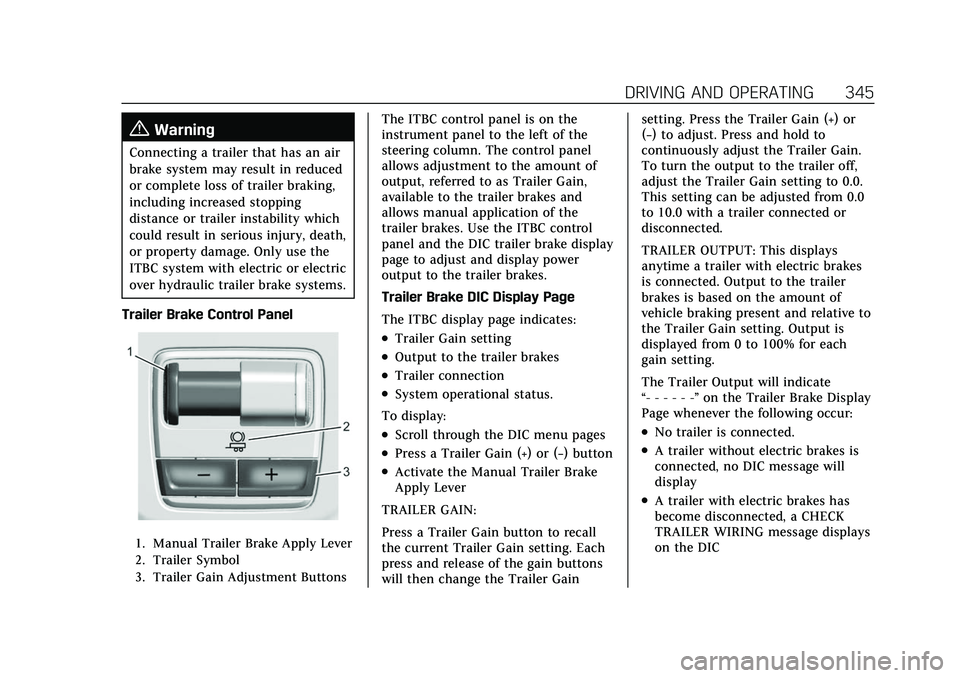
Trailer Brake Control Panel
1. Manual Trailer Brake Apply Lever
2. Trailer Symbol
3. Trailer Gain Adjustment Buttons
The ITBC control panel is on the
instrument panel to the left of the
steering column. The control panel
allows adjustment to the amount of
output, referred to as Trailer Gain,
available to the trailer brakes and
allows manual application of the
trailer brakes. Use the ITBC control
panel and the DIC trailer brake display
page to adjust and display power
output to the trailer brakes.
Trailer Brake DIC Display Page
The ITBC display page indicates:
.Trailer Gain setting
.Output to the trailer brakes
.Trailer connection
.System operational status.
To display:
.Scroll through the DIC menu pages
.Press a Trailer Gain (+) or (−) button
.Activate the Manual Trailer Brake
Apply Lever
TRAILER GAIN:
Press a Trailer Gain button to recall
the current Trailer Gain setting. Each
press and release of the gain buttons
will then change the Trailer Gain setting. Press the Trailer Gain (+) or
(−) to adjust. Press and hold to
continuously adjust the Trailer Gain.
To turn the output to the trailer off,
adjust the Trailer Gain setting to 0.0.
This setting can be adjusted from 0.0
to 10.0 with a trailer connected or
disconnected.
TRAILER OUTPUT: This displays
anytime a trailer with electric brakes
is connected. Output to the trailer
brakes is based on the amount of
vehicle braking present and relative to
the Trailer Gain setting. Output is
displayed from 0 to 100% for each
gain setting.
The Trailer Output will indicate
“- - - - - -”
on the Trailer Brake Display
Page whenever the following occur:
.No trailer is connected.
.A trailer without electric brakes is
connected, no DIC message will
display
.A trailer with electric brakes has
become disconnected, a CHECK
TRAILER WIRING message displays
on the DIC
Page 363 of 492
Cadillac Escalade Owner Manual (GMNA-Localizing-U.S./Canada/Mexico-
13690472) - 2021 - CRC - 8/10/21
362 VEHICLE CARE
Vehicle Care
General Information
General Information . . . . . . . . . . . . . 363
California Proposition65 Warning . . . . . . . . . . . . . . . . . . . . . 363
California Perchlorate Materials Requirements . . . . . . . . . . . . . . . . . . . 363
Accessories and Modifications . . . . . . . . . . . . . . . . . . . 364
Vehicle Checks
Doing Your OwnService Work . . . . . . . . . . . . . . . . . . . . 364
Hood . . . . . . . . . . . . . . . . . . . . . . . . . . . . . . 365
Engine Compartment Overview . . . . . . . . . . . . . . . . . . . . . . . . . 366
Engine Oil . . . . . . . . . . . . . . . . . . . . . . . . . 367
Engine Oil Life System . . . . . . . . . . . 369
Automatic Transmission Fluid . . . . . . . . . . . . . . . . . . . . . . . . . . . . . 370
Engine Air Filter Life System . . . . 371
Engine Air Cleaner/Filter . . . . . . . . . 371
Cooling System . . . . . . . . . . . . . . . . . . . 372
Engine Overheating . . . . . . . . . . . . . . 375
Engine Fan . . . . . . . . . . . . . . . . . . . . . . . . 376
Washer Fluid . . . . . . . . . . . . . . . . . . . . . 377
Brakes . . . . . . . . . . . . . . . . . . . . . . . . . . . . . 377
Brake Pad Life System . . . . . . . . . . . 378
Brake Fluid . . . . . . . . . . . . . . . . . . . . . . . 379 Battery - North America . . . . . . . . . 380
Four-Wheel Drive . . . . . . . . . . . . . . . . 380
Front Axle . . . . . . . . . . . . . . . . . . . . . . . . 381
Rear Axle . . . . . . . . . . . . . . . . . . . . . . . . . 381
Park Brake and P (Park)
Mechanism Check . . . . . . . . . . . . . . 381
Wiper Blade Replacement . . . . . . . 382
Glass Replacement . . . . . . . . . . . . . . . 383
Windshield Replacement . . . . . . . . 383
Gas Strut(s) . . . . . . . . . . . . . . . . . . . . . . . 383
Headlamp Aiming
Front Headlamp Aiming . . . . . . . . . 384
Bulb Replacement
Bulb Replacement . . . . . . . . . . . . . . . . 384
LED Lighting . . . . . . . . . . . . . . . . . . . . . 384
Electrical System
Electrical System Overload . . . . . . 385
Fuses and Circuit Breakers . . . . . . 385
Engine Compartment Fuse Block . . . . . . . . . . . . . . . . . . . . . . . . . . . . 386
Instrument Panel Fuse Block . . . . 389
Rear Compartment Fuse Block . . . . . . . . . . . . . . . . . . . . . . . . . . . . 391
Wheels and Tires
Tires . . . . . . . . . . . . . . . . . . . . . . . . . . . . . . . 393
All-Season Tires . . . . . . . . . . . . . . . . . . 394
Winter Tires . . . . . . . . . . . . . . . . . . . . . . 394
Low-Profile Tires . . . . . . . . . . . . . . . . . 395 All-Terrain Tires . . . . . . . . . . . . . . . . . . 395
Tire Sidewall Labeling . . . . . . . . . . . 395
Tire Designations . . . . . . . . . . . . . . . . . 397
Tire Terminology and
Definitions . . . . . . . . . . . . . . . . . . . . . . 397
Tire Pressure . . . . . . . . . . . . . . . . . . . . . . 400
Tire Pressure for High-Speed Operation . . . . . . . . . . . . . . . . . . . . . . . . 401
Tire Pressure Monitor System . . . 402
Tire Pressure Monitor Operation . . . . . . . . . . . . . . . . . . . . . . . . 403
Tire Inspection . . . . . . . . . . . . . . . . . . . 406
Tire Rotation . . . . . . . . . . . . . . . . . . . . . 406
When It Is Time for New Tires . . . . . . . . . . . . . . . . . . . . . . . . . . . . . 407
Buying New Tires . . . . . . . . . . . . . . . . 408
Different Size Tires and Wheels . . . . . . . . . . . . . . . . . . . . . . . . . . 409
Uniform Tire Quality Grading . . . 410
Wheel Alignment and Tire Balance . . . . . . . . . . . . . . . . . . . . . . . . . . 411
Wheel Replacement . . . . . . . . . . . . . . 411
Tire Chains . . . . . . . . . . . . . . . . . . . . . . . 412
If a Tire Goes Flat . . . . . . . . . . . . . . . . 412
Tire Changing . . . . . . . . . . . . . . . . . . . . . 413
Full-Size Spare Tire . . . . . . . . . . . . . . 424Jump Starting
Jump Starting - North America . . . . . . . . . . . . . . . . . . . . . . . . . 425
Page 366 of 492

Cadillac Escalade Owner Manual (GMNA-Localizing-U.S./Canada/Mexico-
13690472) - 2021 - CRC - 8/10/21
VEHICLE CARE 365
Hood
{Warning
For vehicles with auto engine stop/
start, turn the vehicle off before
opening the hood. If the vehicle is
on, the engine will start when the
hood is opened. You or others could
be injured.
{Warning
Components under the hood can
get hot from running the engine. To
help avoid the risk of burning
unprotected skin, never touch these
components until they have cooled,
and always use a glove or towel to
avoid direct skin contact.
Clear any snow from the hood before
opening.
To open the hood: 1. Pull the hood release lever with the
isymbol. It is on the lower left
side of the instrument panel.
2. Go to the front of the vehicle and locate the secondary release lever
under the front center of the hood.
Push the secondary hood release
lever to the right to release.
3. After you have partially lifted the hood, the gas strut system will
automatically lift the hood and
hold it in the fully open position.
To close the hood: 1. Before closing the hood, be sure all filler caps are on properly, and all
tools are removed.
2. Pull the hood down until the strut system is no longer holding up
the hood. 3. Allow the hood to fall. Check to
make sure the hood is latched
completely. Repeat this process
with additional force if necessary.
{Warning
Do not drive the vehicle if the hood
is not latched completely. The hood
could open fully, block your vision,
and cause a crash. You or others
could be injured. Always close the
hood completely before driving.
The Driver Information Center (DIC)
will display a message if the hood is
not fully closed, and the vehicle is
moving. Stop and turn off the vehicle,
check the hood for obstructions, and
close the hood again. Check to see if
the message still appears on the DIC.
Page 386 of 492

Cadillac Escalade Owner Manual (GMNA-Localizing-U.S./Canada/Mexico-
13690472) - 2021 - CRC - 8/10/21
VEHICLE CARE 385
Electrical System
Electrical System Overload
The vehicle has fuses to protect
against an electrical system overload.
Fuses also protect power devices in
the vehicle.
Replace a bad fuse with a new one of
the identical size and rating.
If there is a problem on the road and
a fuse needs to be replaced, there are
some spare fuses and a fuse puller in
the left instrument panel fuse block.
The same amperage fuse can also be
borrowed. Choose some feature of the
vehicle that is not needed to use and
replace it as soon as possible.
Headlamp Wiring
An electrical overload may cause the
lamps to go on and off, or in some
cases to remain off. Have the
headlamp wiring checked right away if
the lamps go on and off or remain off.
Windshield Wipers
If the wiper motor overheats due to
heavy snow or ice, the windshield
wipers will stop until the motor cools
and will then restart.
Although the circuit is protected from
electrical overload, overload due to
heavy snow or ice may cause wiper
linkage damage. Always clear ice and
heavy snow from the windshield
before using the windshield wipers.
If the overload is caused by an
electrical problem and not snow or
ice, be sure to get it fixed.
Fuses and Circuit Breakers
The wiring circuits in the vehicle are
protected from short circuits by a
combination of fuses and circuit
breakers. This greatly reduces the
chance of damage caused by electrical
problems.
{Danger
Fuses and circuit breakers are
marked with their ampere rating.
Do not exceed the
specified amperage rating when
replacing fuses and circuit breakers.
Use of an oversized fuse or circuit
breaker can result in a vehicle fire.
You and others could be seriously
injured or killed.
{Warning
Installation or use of fuses that do
not meet GM’s original fuse
specifications is dangerous. The
fuses could fail, and result in a fire.
You or others could be injured or
killed, and the vehicle could be
damaged.
Page 387 of 492

Cadillac Escalade Owner Manual (GMNA-Localizing-U.S./Canada/Mexico-
13690472) - 2021 - CRC - 8/10/21
386 VEHICLE CARE
SeeAccessories and Modifications
0 364 and
General Information 0363.
To check a fuse, look at the
silver-colored band inside the fuse.
If the band is broken or melted,
replace the fuse. Be sure to replace a
bad fuse with a new one of the
identical size and rating.
Fuses of the same amperage can be
temporarily borrowed from another
fuse location, if a fuse goes out.
Replace the fuse as soon as possible.Engine Compartment Fuse
Block
If the vehicle has a diesel engine, see
the Duramax diesel supplement.
The engine compartment fuse block is
in the engine compartment, on the
driver side of the vehicle.
The vehicle may not be equipped with
all of the fuses, relays, and features
shown.
Lift the cover to access the fuse block.
Caution
Spilling liquid on any electrical
component on the vehicle may
damage it. Always keep the covers
on any electrical component.
A fuse puller is available in the left
instrument panel fuse block.
Page 390 of 492

Cadillac Escalade Owner Manual (GMNA-Localizing-U.S./Canada/Mexico-
13690472) - 2021 - CRC - 8/10/21
VEHICLE CARE 389
FusesUsage
73 Left trailer stop turn lamp
74 TIM 2
75 DEFC
76 ELEC RNG BDS
78 ECM
79 –
80 Cabin cool pump 17W
81 Right trailer stop turn lamp
82 TIM 1
83 FTZM
84 Trailer battery
85 Engine
86 ECM
87 Injector B even
88 02 B sensor
89 02 A sensor
90 Injector A odd
91 ECM throttle control Fuses
Usage
92 Cool fan clutch AERO shutter
Relays Usage
5 –
18 DC/AC inverter
23 –
35 Park lamp
36 Run/Crank
43 Secondary axle motor
59 A/C clutch
64 Starter motor
70 Starter pinion
77 PowertrainInstrument Panel Fuse
Block
The right instrument panel fuse block
access door is on the passenger side
edge of the instrument panel.
Pull off the cover to access the fuse
block.
Page 440 of 492
Cadillac Escalade Owner Manual (GMNA-Localizing-U.S./Canada/Mexico-
13690472) - 2021 - CRC - 8/10/21
VEHICLE CARE 439
can scratch the surface. Then gently
clean by rubbing with a microfiber
cloth. Never use window cleaners or
solvents. Periodically hand wash the
microfiber cloth separately, using mild
soap. Do not use bleach or fabric
softener. Rinse thoroughly and air dry
before next use.
Caution
Do not attach a device with a
suction cup to the display. This may
cause damage and would not be
covered by the vehicle warranty.
Instrument Panel, Leather, Vinyl,
Other Plastic Surfaces, Low
Gloss Paint Surfaces, and
Natural Open Pore Wood
Surfaces
Use a soft microfiber cloth dampened
with water to remove dust and loose
dirt. For a more thorough cleaning,
use a soft microfiber cloth dampened
with a mild soap solution.
Caution
Soaking or saturating leather,
especially perforated leather, as well
as other interior surfaces, may
cause permanent damage. Wipe
excess moisture from these surfaces
after cleaning and allow them to
dry naturally. Never use heat,
steam, or spot removers. Do not use
cleaners that contain silicone or
wax-based products. Cleaners
containing these solvents can
permanently change the appearance
and feel of leather or soft trim, and
are not recommended.
Do not use cleaners that increase
gloss, especially on the instrument
panel. Reflected glare can decrease
visibility through the windshield
under certain conditions.
Caution
Use of air fresheners may cause
permanent damage to plastics and
painted surfaces. If an air freshener
comes in contact with any plastic (Continued)
Caution (Continued)
or painted surface in the vehicle,
blot immediately and clean with a
soft cloth dampened with a mild
soap solution. Damage caused by
air fresheners would not be covered
by the vehicle warranty.
Cargo Cover and
Convenience Net
If equipped, wash with warm water
and mild detergent. Do not use
chlorine bleach. Rinse with cold water,
and then dry completely.
Care of Seat Belts
Keep belts clean and dry.
{Warning
Do not bleach or dye seat belt
webbing. It may severely weaken
the webbing. In a crash, they might
not be able to provide adequate
protection. Clean and rinse seat belt
webbing only with mild soap and
lukewarm water. Allow the webbing
to dry.