service reset CADILLAC ESCALADE 2021 Owner's Manual
[x] Cancel search | Manufacturer: CADILLAC, Model Year: 2021, Model line: ESCALADE, Model: CADILLAC ESCALADE 2021Pages: 492, PDF Size: 7.92 MB
Page 31 of 492
Cadillac Escalade Owner Manual (GMNA-Localizing-U.S./Canada/Mexico-
13690472) - 2021 - CRC - 8/10/21
30 KEYS, DOORS, AND WINDOWS
.Make sure all doors and windows
are completely closed.
.Secure any loose items such as a
sunshades.
.Make sure there are no obstructions
blocking the sensors in the front
overhead console.
.Close DVD screens before leaving
the vehicle.
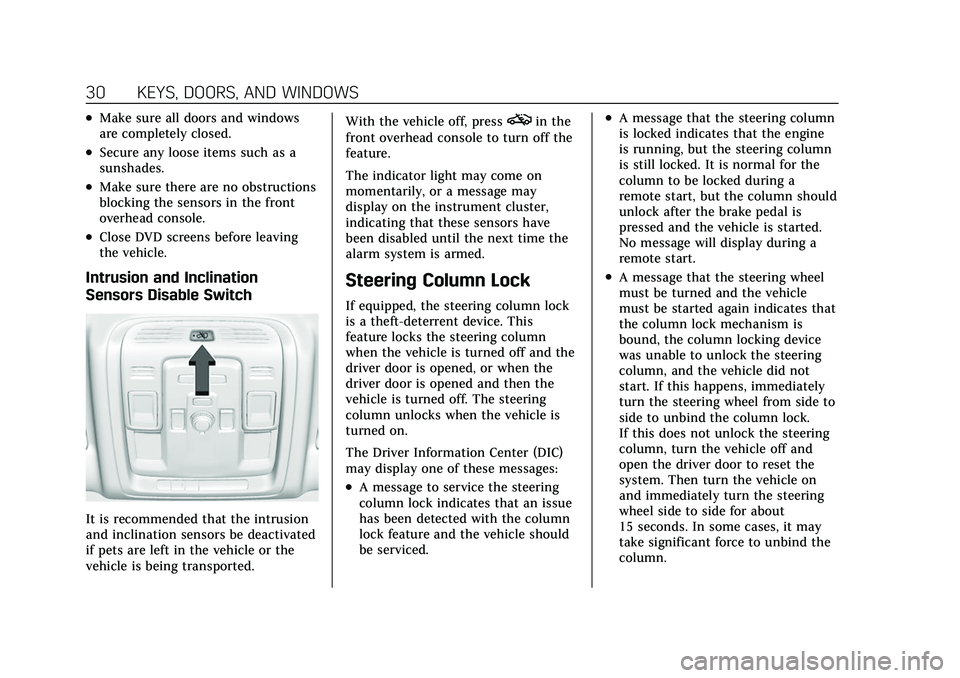
Intrusion and Inclination
Sensors Disable Switch
It is recommended that the intrusion
and inclination sensors be deactivated
if pets are left in the vehicle or the
vehicle is being transported.With the vehicle off, press
oin the
front overhead console to turn off the
feature.
The indicator light may come on
momentarily, or a message may
display on the instrument cluster,
indicating that these sensors have
been disabled until the next time the
alarm system is armed.
Steering Column Lock
If equipped, the steering column lock
is a theft-deterrent device. This
feature locks the steering column
when the vehicle is turned off and the
driver door is opened, or when the
driver door is opened and then the
vehicle is turned off. The steering
column unlocks when the vehicle is
turned on.
The Driver Information Center (DIC)
may display one of these messages:
.A message to service the steering
column lock indicates that an issue
has been detected with the column
lock feature and the vehicle should
be serviced.
.A message that the steering column
is locked indicates that the engine
is running, but the steering column
is still locked. It is normal for the
column to be locked during a
remote start, but the column should
unlock after the brake pedal is
pressed and the vehicle is started.
No message will display during a
remote start.
.A message that the steering wheel
must be turned and the vehicle
must be started again indicates that
the column lock mechanism is
bound, the column locking device
was unable to unlock the steering
column, and the vehicle did not
start. If this happens, immediately
turn the steering wheel from side to
side to unbind the column lock.
If this does not unlock the steering
column, turn the vehicle off and
open the driver door to reset the
system. Then turn the vehicle on
and immediately turn the steering
wheel side to side for about
15 seconds. In some cases, it may
take significant force to unbind the
column.
Page 126 of 492
Cadillac Escalade Owner Manual (GMNA-Localizing-U.S./Canada/Mexico-
13690472) - 2021 - CRC - 8/10/21
INSTRUMENTS AND CONTROLS 125
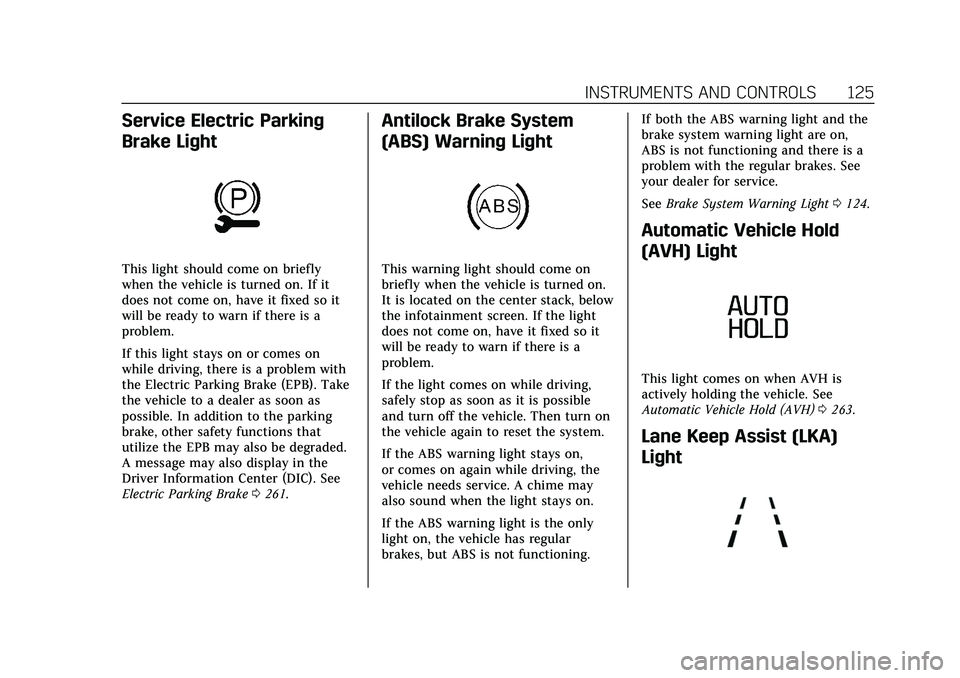
Service Electric Parking
Brake Light
This light should come on briefly
when the vehicle is turned on. If it
does not come on, have it fixed so it
will be ready to warn if there is a
problem.
If this light stays on or comes on
while driving, there is a problem with
the Electric Parking Brake (EPB). Take
the vehicle to a dealer as soon as
possible. In addition to the parking
brake, other safety functions that
utilize the EPB may also be degraded.
A message may also display in the
Driver Information Center (DIC). See
Electric Parking Brake0261.
Antilock Brake System
(ABS) Warning Light
This warning light should come on
briefly when the vehicle is turned on.
It is located on the center stack, below
the infotainment screen. If the light
does not come on, have it fixed so it
will be ready to warn if there is a
problem.
If the light comes on while driving,
safely stop as soon as it is possible
and turn off the vehicle. Then turn on
the vehicle again to reset the system.
If the ABS warning light stays on,
or comes on again while driving, the
vehicle needs service. A chime may
also sound when the light stays on.
If the ABS warning light is the only
light on, the vehicle has regular
brakes, but ABS is not functioning. If both the ABS warning light and the
brake system warning light are on,
ABS is not functioning and there is a
problem with the regular brakes. See
your dealer for service.
See
Brake System Warning Light 0124.
Automatic Vehicle Hold
(AVH) Light
This light comes on when AVH is
actively holding the vehicle. See
Automatic Vehicle Hold (AVH) 0263.
Lane Keep Assist (LKA)
Light
Page 166 of 492
Cadillac Escalade Owner Manual (GMNA-Localizing-U.S./Canada/Mexico-
13690472) - 2021 - CRC - 8/10/21
INFOTAINMENT SYSTEM 165
Fade/Balance :Touch to adjust by
using the controls on the
infotainment display.
Sound Mode : Touch to select Front
or Rear and to adjust Surround or
Surround 3D.
Adaptive Volume
This feature will automatically adjust
the audio volume based on vehicle
speed and road noise.
Touch Off or On.
HD Radio
Enhances AM and FM radio with
digital channels for better sound
quality and information.
Touch Off or On.
RDS
Radio Data System (RDS) displays
information about the currently
playing radio content such as song or
program name.
Touch Off or On. Manage Phones
Select to manage the vehicles phone
connections such as Near Field
Communication (NFC) pairing or
Bluetooth pairing.
Metadata Corrector
This feature, when on, will add and
correct information associated with
the media files on connected devices.
Touch Off or On.
Reset Music Index
Select to clear the metadata from the
connected USB devices.
Lighting Effect
This feature animates the radio
background in the color associated
with the currently playing content.
Touch Off or On.
Favorites
From the active audio source page,
choose
qFavorites from the list at
the left side to display a list of audio
favorites. Favorites are stored by touching
H.
This will highlight indicating that it is
now saved as a favorite.
HD Radio Technology
If equipped, HD Radio is a free service
with features such as digital quality
sound, more stations available on a
single frequency such as HD2 and
HD3, and display information such as
artist and song title.
From the Now Playing display, touch
the HD Radio icon to turn HD on
or off.
Station Access
To access HD Radio stations:
1. Tune the radio to the station. If HD Radio is turned on and the station
is broadcasting in HD Radio, the
radio will automatically tune to the
HD version of the current channel
(HD1) after several seconds. The
radio will also display icons
representing additional channels
(HD2, ...HD8), that may be
available. When the radio
Page 169 of 492
Cadillac Escalade Owner Manual (GMNA-Localizing-U.S./Canada/Mexico-
13690472) - 2021 - CRC - 8/10/21
168 INFOTAINMENT SYSTEM
Favorites are stored by touchingH.
This will highlight indicating that it is
now saved as a favorite.
User Settings
From the SiriusXM source main page,
touch
%to display the following:
.Audio Settings
.Listener Options
.Account Information
Audio Settings
Touch
*to display the Audio
Settings menu. See “Audio Settings”in
AM-FM Radio 0163.
Listener Options
Select and the following may display:
SiriusXM Favorites : Touch to show
XM favorite channels.
History : Touch to show history of
channels.
Listener Settings : Touch to hide
explicit language channels and
content, start songs at the beginning
when tuning a music channel, or reset
the listening history. Account Information
Select to show the XM account
information.
Radio Reception
Unplug electronic devices from the
accessory power outlets if there is
interference or static in the radio.
FM
FM signals only reach about 16 to
65 km (10 to 40 mi). Although the
radio has a built-in electronic circuit
that automatically works to reduce
interference, some static can occur,
especially around tall buildings or
hills, causing the sound to fade in
and out.
AM
The range for most AM stations is
greater than for FM, especially at
night. The longer range can cause
station frequencies to interfere with
each other. Static can also occur when
things like storms and power lines
interfere with radio reception. When
this happens, try reducing the treble
on the radio.
SiriusXM Satellite Radio Service
If equipped, SiriusXM Satellite Radio
Service provides digital radio
reception. Tall buildings or hills can
interfere with satellite radio signals,
causing the sound to fade in and out.
In addition, traveling or standing
under heavy foliage, bridges, garages,
or tunnels may cause loss of the
SiriusXM signal for a period of time.
Some cellular services may interfere
with SXM reception causing loss of
signal.
Mobile Device Usage
Mobile device usage, such as making
or receiving calls, charging, or just
having the mobile device on may
cause static interference in the radio.
Unplug the mobile device or turn it
off if this happens.
Multi-Band Antenna
The roof antenna may be used for
radio, navigation, and OnStar,
depending on the equipped options.
Keep clear of obstructions for clear
Page 356 of 492
Cadillac Escalade Owner Manual (GMNA-Localizing-U.S./Canada/Mexico-
13690472) - 2021 - CRC - 8/10/21
DRIVING AND OPERATING 355
Maintenance Notifications
.Touch Service Complete to reset the
maintenance reminder.
.Touch Remind Me Later to delay
the reminder.
.Touch X next to Upcoming Alerts
(90%) to dismiss the alert. It will
not appear again.
.Touch X next to Maintenance Due
(100%) to delay the alert to the next
ignition cycle.
Always follow all of the maintenance
instructions that came with your
trailer.
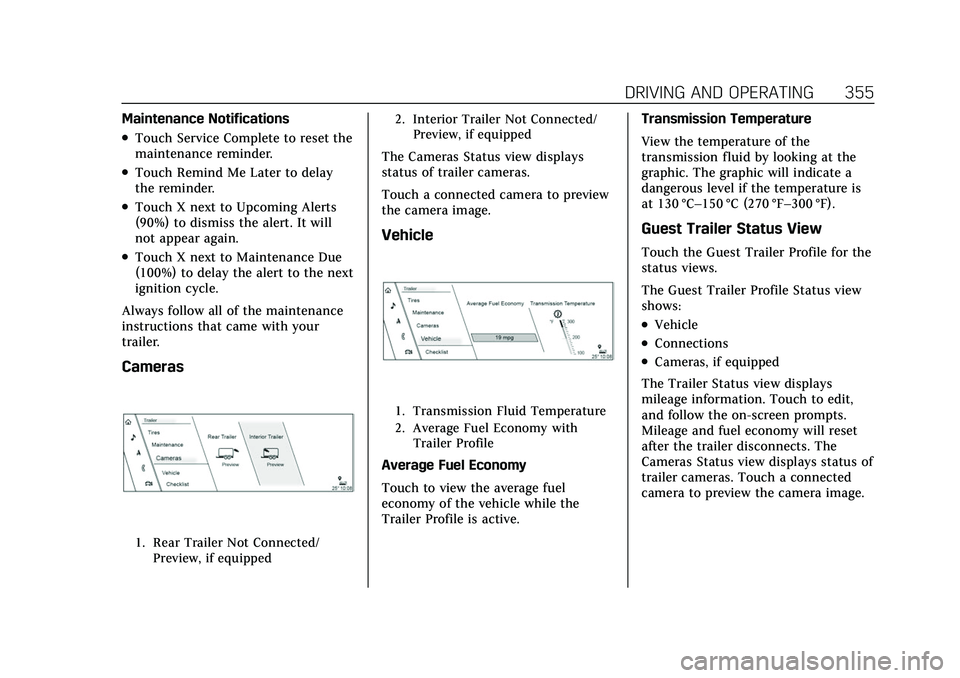
Cameras
1. Rear Trailer Not Connected/ Preview, if equipped 2. Interior Trailer Not Connected/
Preview, if equipped
The Cameras Status view displays
status of trailer cameras.
Touch a connected camera to preview
the camera image.
Vehicle
1. Transmission Fluid Temperature
2. Average Fuel Economy withTrailer Profile
Average Fuel Economy
Touch to view the average fuel
economy of the vehicle while the
Trailer Profile is active. Transmission Temperature
View the temperature of the
transmission fluid by looking at the
graphic. The graphic will indicate a
dangerous level if the temperature is
at 130 °C–150 °C (270 °F–300 °F).
Guest Trailer Status View
Touch the Guest Trailer Profile for the
status views.
The Guest Trailer Profile Status view
shows:
.Vehicle
.Connections
.Cameras, if equipped
The Trailer Status view displays
mileage information. Touch to edit,
and follow the on-screen prompts.
Mileage and fuel economy will reset
after the trailer disconnects. The
Cameras Status view displays status of
trailer cameras. Touch a connected
camera to preview the camera image.
Page 370 of 492
Cadillac Escalade Owner Manual (GMNA-Localizing-U.S./Canada/Mexico-
13690472) - 2021 - CRC - 8/10/21
VEHICLE CARE 369
Viscosity Grade
Use SAE 0W-20 viscosity grade
engine oil.
When selecting an oil of the
appropriate viscosity grade, it is
recommended to select an oil of the
correct specification. See
“Specification”earlier in this section.
Engine Oil Additives/Engine Oil
Flushes
Do not add anything to the oil. The
recommended oils meeting the dexos1
specification are all that is needed for
good performance and engine
protection.
Engine oil system flushes are not
recommended and could cause engine
damage not covered by the vehicle
warranty.
What to Do with Used Oil
Used engine oil contains certain
elements that can be unhealthy for
your skin and could even cause
cancer. Do not let used oil stay on
your skin for very long. Clean your
skin and nails with soap and water,
or a good hand cleaner. Wash or properly dispose of clothing or rags
containing used engine oil. See the
manufacturer's warnings about the
use and disposal of oil products.
Used oil can be a threat to the
environment. If you change your own
oil, be sure to drain all the oil from
the filter before disposal. Never
dispose of oil by putting it in the trash
or pouring it on the ground, into
sewers, or into streams or bodies of
water. Recycle it by taking it to a place
that collects used oil.
Engine Oil Life System
When to Change Engine Oil
This vehicle has a computer system
that indicates when to change the
engine oil and filter. This is based on a
combination of factors which include
engine revolutions, engine
temperature, and miles driven. Based
on driving conditions, the mileage at
which an oil change is indicated can
vary considerably. For the oil life
system to work properly, the system
must be reset every time the oil is
changed.
When the system has calculated that
oil life has been diminished, it
indicates that an oil change is
necessary. A CHANGE ENGINE OIL
SOON message comes on. Change the
oil as soon as possible within the next
1 000 km (600 mi). It is possible that,
if driving under the best conditions,
the oil life system might indicate that
an oil change is not necessary for up
to a year. The engine oil and filter
must be changed at least once a year
and at this time the system must be
reset. Your dealer has trained service
people who will perform this work and
reset the system. It is also important
to check the oil regularly over the
course of an oil drain interval and
keep it at the proper level.
If the system is ever reset accidentally,
the oil must be changed at 5 000 km
(3,000 mi) since the last oil change.
Remember to reset the oil life system
whenever the oil is changed.
Page 371 of 492
Cadillac Escalade Owner Manual (GMNA-Localizing-U.S./Canada/Mexico-
13690472) - 2021 - CRC - 8/10/21
370 VEHICLE CARE
How to Reset the Engine Oil Life
System
Reset the system whenever the engine
oil is changed so that the system can
calculate the next engine oil change.
To reset the system:1. Using the vehicle information screen controls on the right side of
the instrument cluster, display OIL
LIFE on the screen. See Vehicle
Information 0134. When remaining
oil life is low, the CHANGE
ENGINE OIL SOON message will
appear on the display.
2. Touch RESET on the screen to clear the CHANGE ENGINE OIL
SOON message and reset the oil life
at 100%.
Be careful not to reset the oil life
display accidentally at any time
other than after the oil is changed.
It cannot be reset accurately until
the next oil change.
The oil life system can also be reset as
follows: 1. Display OIL LIFE on the vehicle information screen. See Vehicle
Information 0134. 2. Fully press and release the
accelerator pedal three times
within five seconds.
If the CHANGE ENGINE OIL SOON
message is not on, the system is
reset.
The system is reset when the
CHANGE ENGINE OIL SOON message
is off.
If the CHANGE ENGINE OIL SOON
message comes back on when the
vehicle is started, the engine oil life
system has not been reset. Repeat the
procedure.
Automatic Transmission
Fluid
When to Check and Change
Automatic Transmission Fluid
If the vehicle has a diesel engine, see
the Duramax diesel supplement.
It is usually not necessary to check
the transmission fluid level. The only
reason for fluid loss is a transmission
leak or overheated transmission. This
vehicle is not equipped with a
transmission fluid level dipstick. There is a special procedure for
checking and changing the
transmission fluid in these vehicles.
Because this procedure is difficult,
this should be done at the dealer.
Contact the dealer for additional
information or the procedure can be
found in the service manual. See
Publication Ordering Information
0467.
Caution
Use of the incorrect automatic
transmission fluid may damage the
vehicle, and the damage may not be
covered by the vehicle warranty.
Always use the correct automatic
transmission fluid. See
Recommended Fluids and Lubricants
0451.
Change the fluid and filter at the
scheduled maintenance intervals
listed in Maintenance Schedule 0442.
Be sure to use the transmission fluid
listed in Recommended Fluids and
Lubricants 0451.
Page 379 of 492

Cadillac Escalade Owner Manual (GMNA-Localizing-U.S./Canada/Mexico-
13690472) - 2021 - CRC - 8/10/21
378 VEHICLE CARE
heard all the time when the vehicle is
moving, except when applying the
brake pedal firmly.
{Warning
The brake wear warning sound
means that soon the brakes will not
work well. That could lead to a
crash. When the brake wear
warning sound is heard, have the
vehicle serviced.
Caution
Continuing to drive with worn-out
brake pads could result in costly
brake repair.
Some driving conditions or climates
can cause a brake squeal when the
brakes are first applied or lightly
applied. This does not mean
something is wrong with the brakes.
Properly torqued wheel nuts are
necessary to help prevent brake
pulsation. When tires are rotated,
inspect brake pads for wear and
evenly tighten wheel nuts in the proper sequence to torque
specifications. See
Capacities and
Specifications 0455.
Brake pads should be replaced as
complete sets.
Brake Pedal Travel
See your dealer if the brake pedal does
not return to normal height, or if
there is a rapid increase in pedal
travel. This could be a sign that brake
service may be required.
Replacing Brake System Parts
Always replace brake system parts
with new, approved replacement parts.
If this is not done, the brakes may not
work properly. The braking
performance expected can change in
many other ways if the wrong
replacement brake parts are installed
or if parts are improperly installed.
Brake Pad Life System
When to Change Brake Pads
If equipped, this system estimates the
remaining life of the front and rear
brake pads. Brake pad life is displayed
in the vehicle information screen, along with a percentage for each axle.
The system must be reset every time
the brake pads are changed.
When the system has determined that
the brake pads need to be replaced, a
message will display, which may
include mileage remaining.
Brake pads should always be replaced
as complete axle sets.
How to Reset the Brake Pad Life
System
The system will automatically detect
when significantly worn brake pads
are replaced. When the ignition is
turned on after new pads and wear
sensors are installed, a message will
display. Follow the prompts to reset
the system.
The brake pad life system can also be
manually reset:
1. Using the vehicle information screen controls on the right side of
the instrument cluster, display
Brake Pad Life on the screen. See
Vehicle Information 0134.
2. Touch RESET on the screen. Select front or rear pads as appropriate.
Page 444 of 492
Cadillac Escalade Owner Manual (GMNA-Localizing-U.S./Canada/Mexico-
13690472) - 2021 - CRC - 8/10/21
SERVICE AND MAINTENANCE 443
Engine Oil Change
When the CHANGE ENGINE OIL
SOON message displays, have the
engine oil and filter changed within
the next 1 000 km/600 mi. If driven
under the best conditions, the engine
oil life system may not indicate the
need for vehicle service for up to a
year. The engine oil and filter must be
changed at least once a year and the
oil life system must be reset. Your
trained dealer technician can perform
this work. If the engine oil life system
is reset accidentally, service the
vehicle within 5 000 km/3,000 mi since
the last service. Reset the oil life
system when the oil is changed. See
Engine Oil Life System0369.
Extended Idle Use
When the vehicle is used in a way
that requires extended idle time,
one hour of use shall be deemed the
same as 53 km (33 mi). See Driver
Information Center (DIC) 0132 for
hourmeter.
Air Conditioning Desiccant
(Replace Every Seven Years)
The air conditioning system requires
maintenance every seven years. This
service requires replacement of the
desiccant to help the longevity and
efficient operation of the air
conditioning system. This service can
be complex. See your dealer.
Tire Rotation and Required
Services Every 12 000 km/
7,500 mi
Rotate the tires, if recommended for
the vehicle, and perform the following
services. See Tire Rotation0406.
.Check engine oil level and oil
life percentage. If needed, change
engine oil and filter, and reset oil
life system. See Engine Oil0367 and
Engine Oil Life System 0369.
.Check engine coolant level. See
Cooling System 0372.
.Check windshield washer fluid level.
See Washer Fluid 0377.
.Check tire inflation pressures,
including the spare. See Tire
Pressure 0400.
.Inspect tire wear. See Tire Inspection
0 406.
.Visually check for fluid leaks.
.Inspect engine air cleaner filter. See
Engine Air Cleaner/Filter 0371.
.Inspect brake system. See Exterior
Care 0432.
.Visually inspect steering,
suspension, and chassis
components for damage, including
cracks or tears in the rubber boots,
loose or missing parts, or signs of
wear at least once a year. See
Exterior Care 0432. Lubricate the
suspension and steering
components at least every other oil
change (if equipped with grease
fittings).
Page 470 of 492
Cadillac Escalade Owner Manual (GMNA-Localizing-U.S./Canada/Mexico-
13690472) - 2021 - CRC - 8/10/21
CUSTOMER INFORMATION 469
In other Central America and
Caribbean Countries, call
52-555-901-2369.
Vehicle Data Recording
and Privacy
The vehicle has a number of
computers that record information
about the vehicle’s performance and
how it is driven or used. For example,
the vehicle uses computer modules to
monitor and control engine and
transmission performance, to monitor
the conditions for airbag deployment
and deploy them in a crash, and,
if equipped, to provide antilock
braking to help the driver control the
vehicle. These modules may store data
to help the dealer technician service
the vehicle or to help GM improve
safety or features. Some modules may
also store data about how the vehicle
is operated, such as rate of fuel
consumption or average speed. These
modules may retain personal
preferences, such as radio presets, seat
positions, and temperature settings.
Cybersecurity
GM collects information about the use
of your vehicle including operational
and safety related information. We
collect this information to provide,
evaluate, improve, and troubleshoot
our products and services and to
develop new products and services.
The protection of vehicle electronics
systems and customer data from
unauthorized outside electronic access
or control is important to GM. GM
maintains appropriate security
standards, practices, guidelines and
controls aimed at defending the
vehicle and the vehicle service
ecosystem against unauthorized
electronic access, detecting possible
malicious activity in related networks,
and responding to suspected
cybersecurity incidents in a timely,
coordinated and effective manner.
Security incidents could impact your
safety or compromise your private
data. To minimize security risks,
please do not connect your vehicle
electronic systems to unauthorized
devices or connect your vehicle to any
unknown or untrusted networks (such
as Bluetooth, WIFI or similartechnology). In the event you suspect
any security incident impacting your
data or the safe operation of your
vehicle, please stop operating your
vehicle and contact your dealer.
Event Data Recorders
This vehicle is equipped with an event
data recorder (EDR). The main
purpose of an EDR is to record, in
certain crash or near crash-like
situations, such as an air bag
deployment or hitting a road obstacle,
data that will assist in understanding
how a vehicle’s systems performed.
The EDR is designed to record data
related to vehicle dynamics and safety
systems for a short period of time,
typically 30 seconds or less. The EDR
in this vehicle is designed to record
such data as:
.How various systems in your
vehicle were operating;
.Whether or not the driver and
passenger safety belts were buckled/
fastened;
.How far (if at all) the driver was
depressing the accelerator and/or
brake pedal; and,