air condition CADILLAC ESCALADE 2022 User Guide
[x] Cancel search | Manufacturer: CADILLAC, Model Year: 2022, Model line: ESCALADE, Model: CADILLAC ESCALADE 2022Pages: 508, PDF Size: 9.18 MB
Page 152 of 508

Cadillac Escalade Owner Manual (GMNA-Localizing-U.S./Canada/Mexico-
15567102) - 2022 - CRC - 11/17/21
LIGHTING 151
;:Turns on all lamps, except the
headlamps.
2: Turns on the headlamps together
with the parking lamps and
instrument panel lights.
IntelliBeam System
If equipped, this system turns the
vehicle's high-beam headlamps on and
off according to surrounding traffic
conditions.
The system turns the high-beam
headlamps on when it is dark enough
and there is no other traffic present.
This light
bcomes on in the
instrument cluster when the
IntelliBeam system is enabled.
Turning On and Enabling IntelliBeam
To enable the IntelliBeam system,
press
bon the turn signal lever
when it is dark outside and the
exterior lamp control is in AUTO
or
2.
Driving with IntelliBeam
The system only activates the high
beams when driving over 40 km/h
(25 mph).
The blue high-beam on light appears
on the instrument cluster when the
high beams are on.
There is a sensor near the top center
of the windshield that automatically
controls the system. Keep this area of
the windshield clear of debris to allow
for best system performance.
The high-beam headlamps remain on,
under the automatic control, until one
of the following situations occurs:
.The system detects an approaching
vehicle's headlamps.
.The system detects a preceding
vehicle's taillamps.
.The outside light is bright enough
that high-beam headlamps are not
required.
.The vehicle's speed drops below
20 km/h (12 mph).
.The IntelliBeam system is disabled
by the button on the turn signal
lever. If this happens, press
bon
the turn signal lever when the
exterior lamp control is in the
AUTO or
2position to reactivate
the IntelliBeam system. The
instrument cluster light will come
on to indicate the IntelliBeam
system is reactivated.
The high beams may not turn off
automatically if the system cannot
detect another vehicle's lamps because
of any of the following:
.The other vehicle's lamps are
missing, damaged, obstructed from
view, or otherwise undetected.
.The other vehicle's lamps are
covered with dirt, snow, and/or road
spray.
.The other vehicle's lamps cannot be
detected due to dense exhaust,
smoke, fog, snow, road spray, mist,
or other airborne obstructions.
Page 154 of 508

Cadillac Escalade Owner Manual (GMNA-Localizing-U.S./Canada/Mexico-
15567102) - 2022 - CRC - 11/17/21
LIGHTING 153
The high beams may not turn off
automatically if the system cannot
detect another vehicle lamps because
of any of the following:
.The other vehicle lamps are
missing, damaged, obstructed from
view, or otherwise undetected.
.The other vehicle lamps are covered
with dirt, snow, and/or road spray.
.The other vehicle lamps cannot be
detected due to dense exhaust,
smoke, fog, snow, road spray, mist,
or other airborne obstructions.
.The vehicle windshield is dirty,
cracked, or obstructed by something
that blocks the view of the light
sensor.
.The vehicle is loaded in a way that
the front end points upward,
causing the light sensor to aim high
and not detect headlamps and
taillamps.
.The vehicle is being driven on
winding or hilly roads.
The Adaptive Headlight system may
need to be disabled if any of the above
conditions exist.
Exterior Lamps Off
Reminder
If a door is open, a reminder chime
sounds when the headlamps or
parking lamps are manually turned on
and the ignition is off. To turn off the
chime, turn the exterior lamp control
to off or AUTO and then back on,
or close and re-open the door. In the
AUTO mode, the headlamps turn off
once the ignition is off or remain on
until the headlamp delay ends (if
enabled in the DIC). See “Exit
Lighting” underVehicle Personalization
0 140.
Headlamp High/Low-Beam
Changer
Push the turn signal lever away from
you and release to turn the high
beams on.
To return to low beams, push the
lever again or pull it toward you and
release.
When the high-beam headlamps are
on, this indicator light on the
instrument cluster will also be on.
Flash-to-Pass
This feature lets you use the
high-beam headlamps to signal a
driver in front of you that you want to
pass. It works even if the headlamps
are in the automatic position.
To use it, pull the turn signal lever
toward you, then release it.
The high beam headlamps will stay on
as long as you hold the lever toward
you. The high-beam indicator on the
instrument cluster will come on.
Release the lever to return to normal
operation.
Page 182 of 508
Cadillac Escalade Owner Manual (GMNA-Localizing-U.S./Canada/Mexico-
15567102) - 2022 - CRC - 11/17/21
INFOTAINMENT SYSTEM 181
Rear Media Settings
From the Rear Media page, touch
Settings to access the settings menu.
The menu may contain the following:
Remember Screen Power Status
Select to have rear screens
automatically power on when the
vehicle is started.
Rear Screen Voice-Over
Select to have Video Voice Over for
the individual rear screens.
Allowed Applications
Select to choose which applications
are visible.
Account
Select to show the vehicle data plan.
Reset Rear Media
Select to reset the applications.
Rear MediaTerms of Use
Select to view the terms of use.
Privacy Statement
Select to view the Privacy statement.RSI Troubleshooting
No power :
The ignition might not be
on or in ACC/ACCESSORY.
There is no sound from the
headphones with the indicator light
on : Make sure the headphones have
sufficient charge. Plug the headphones
to a USB-C port to charge.
Check to see if headphones are paired
to the screens. Make sure that you are
listening in to the correct screen by
pressing the channel select button.
If the steps above do not work, then
unpair the headphones from the RSI
screens, turn the headphones off, turn
them back on and attempt to pair
them. See pairing procedures for the
Bluetooth headphone previously in
this section.
Video Distortion
Video distortion can occur when
operating cellular phones, scanners,
CB radios, Global Positioning Systems
(GPS), two-way radios, mobile faxes,
or walkie talkies. It might be necessary to turn off the
video player when operating one of
these devices in or near the vehicle.
Navigation
Using the Navigation
System
If equipped, launch the Nav
application by touching the Nav icon
on the Home Page or on the shortcut
tray near the left side of the
infotainment display.
When the Nav application is launched
for the first time, a product
walkthrough is available. Use of the
feature requires the Terms and
Conditions and the Privacy statement
to be confirmed. If available and
signed into a profile, it is also
suggested to enable and confirm
Personalized Navigation.
Personalized Navigation (If
Equipped)
If Personalized Navigation is available
and confirmed, this feature learns
preferences by remembering where
Page 191 of 508
Cadillac Escalade Owner Manual (GMNA-Localizing-U.S./Canada/Mexico-
15567102) - 2022 - CRC - 11/17/21
190 INFOTAINMENT SYSTEM
Smart POI Icons on Map (If
Equipped)
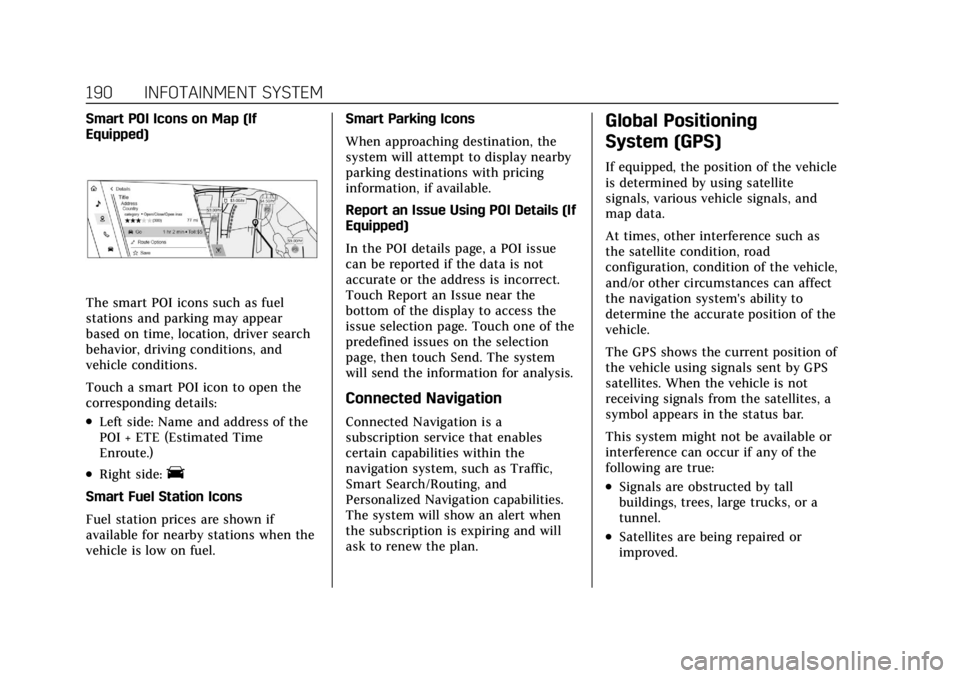
The smart POI icons such as fuel
stations and parking may appear
based on time, location, driver search
behavior, driving conditions, and
vehicle conditions.
Touch a smart POI icon to open the
corresponding details:
.Left side: Name and address of the
POI + ETE (Estimated Time
Enroute.)
.Right side:E
Smart Fuel Station Icons
Fuel station prices are shown if
available for nearby stations when the
vehicle is low on fuel.Smart Parking Icons
When approaching destination, the
system will attempt to display nearby
parking destinations with pricing
information, if available.
Report an Issue Using POI Details (If
Equipped)
In the POI details page, a POI issue
can be reported if the data is not
accurate or the address is incorrect.
Touch Report an Issue near the
bottom of the display to access the
issue selection page. Touch one of the
predefined issues on the selection
page, then touch Send. The system
will send the information for analysis.
Connected Navigation
Connected Navigation is a
subscription service that enables
certain capabilities within the
navigation system, such as Traffic,
Smart Search/Routing, and
Personalized Navigation capabilities.
The system will show an alert when
the subscription is expiring and will
ask to renew the plan.
Global Positioning
System (GPS)
If equipped, the position of the vehicle
is determined by using satellite
signals, various vehicle signals, and
map data.
At times, other interference such as
the satellite condition, road
configuration, condition of the vehicle,
and/or other circumstances can affect
the navigation system's ability to
determine the accurate position of the
vehicle.
The GPS shows the current position of
the vehicle using signals sent by GPS
satellites. When the vehicle is not
receiving signals from the satellites, a
symbol appears in the status bar.
This system might not be available or
interference can occur if any of the
following are true:
.Signals are obstructed by tall
buildings, trees, large trucks, or a
tunnel.
.Satellites are being repaired or
improved.
Page 205 of 508
Cadillac Escalade Owner Manual (GMNA-Localizing-U.S./Canada/Mexico-
15567102) - 2022 - CRC - 11/17/21
204 INFOTAINMENT SYSTEM
2. For first time connection, there aretwo ways to set up wireless
projection:
.Connect your Android phone or
Apple iPhone by using the
factory-provided phone USB
cable and plugging into a USB
data port. For best performance,
it is highly recommended to use
the device’s factory-provided
USB cable, which should be
replaced after significant wear
to maintain connection quality.
Aftermarket or third-party
cables may not work.
.Connecting the phone over
Bluetooth. See Bluetooth
(Overview) 0198 or
Bluetooth (Pairing and Using a
Phone) 0199.
3. Make sure wireless is turned on the phone for wireless projection
to work.
4. When the phone is first connected to activate Apple CarPlay or
Android Auto, agree to the terms
and conditions on both the infotainment system and the
phone. Touch Continue to launch
Apple CarPlay or Android Auto.
5. Follow the instructions on the phone.
The Android Auto and Apple CarPlay
icons on the Home Page will
illuminate depending on the
smartphone. Android Auto and/or
Apple CarPlay may automatically
launch. If not, touch the Android Auto
or Apple CarPlay icon on the Home
Page to launch.
To disconnect the phones wireless
projection: 1. Select Settings from the Home Page.
2. Select Phones
3. Touch the device name on the Apple CarPlay or Android Auto
sub-menu.
4. Turn off Apple CarPlay or Android Auto.
Press
{on the center stack to return
to the Home Page. Features are subject to change. For
further information on how to set up
Android Auto and Apple CarPlay in
the vehicle, see my.cadillac.com.
Android Auto is provided by
Google and is subject to Google’s
terms and privacy policy. Apple
CarPlay is provided by Apple and is
subject to Apple’s terms and privacy
policy. Data plan rates apply. For
Android Auto support see
https://support.google.com/
androidauto. For Apple CarPlay
support see www.apple.com/ios/
carplay/. Apple or Google may change
or suspend availability at any time.
Android Auto, Android, Google, Google
Play, and other marks are trademarks
of Google Inc.; Apple CarPlay is a
trademark of Apple Inc.
Press
{on the center stack to exit
Android Auto or Apple CarPlay. To
enter back into Android Auto or Apple
CarPlay, press and hold
{on the
center stack.
Apple CarPlay and Android Auto can
be disabled from the infotainment
system. To do this, touch Home,
Page 222 of 508
Cadillac Escalade Owner Manual (GMNA-Localizing-U.S./Canada/Mexico-
15567102) - 2022 - CRC - 11/17/21
CLIMATE CONTROLS 221
Climate Controls
Climate Control Systems
Dual Automatic Climate ControlSystem . . . . . . . . . . . . . . . . . . . . . . . . . . 221
Rear Climate Control System . . . . 225
Air Vents
Air Vents . . . . . . . . . . . . . . . . . . . . . . . . . . 227
Maintenance
Passenger Compartment Air Filter . . . . . . . . . . . . . . . . . . . . . . . . . . . . . 228
Service . . . . . . . . . . . . . . . . . . . . . . . . . . . . 229
Climate Control Systems
Dual Automatic Climate Control System
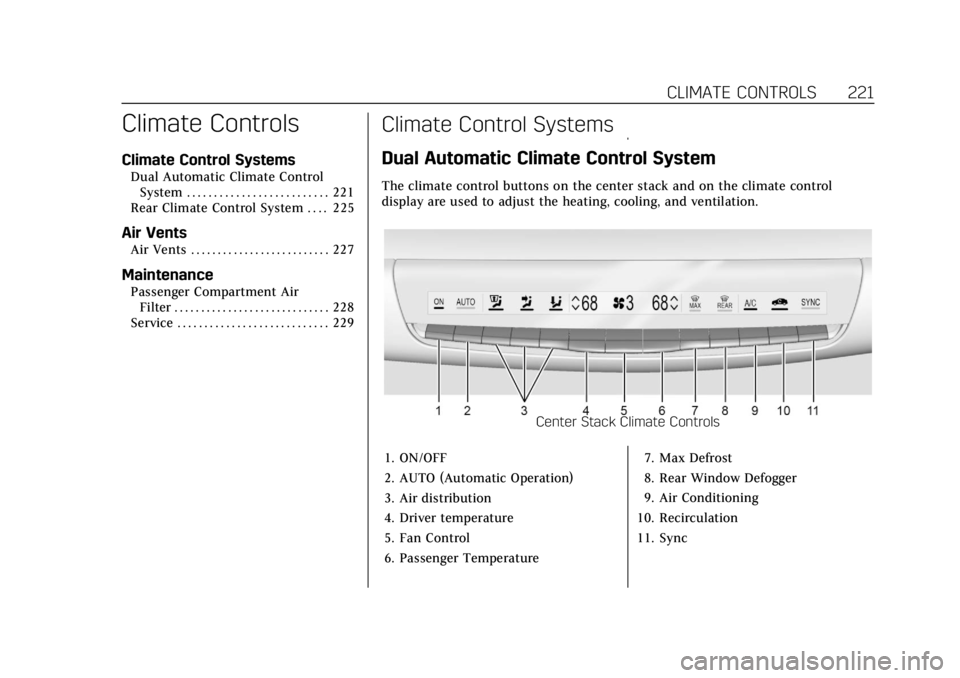
The climate control buttons on the center stack and on the climate control
display are used to adjust the heating, cooling, and ventilation.
Center Stack Climate Controls
1. ON/OFF
2. AUTO (Automatic Operation)
3. Air distribution
4. Driver temperature
5. Fan Control
6. Passenger Temperature 7. Max Defrost
8. Rear Window Defogger
9. Air Conditioning
10. Recirculation
11. Sync
Page 223 of 508
Cadillac Escalade Owner Manual (GMNA-Localizing-U.S./Canada/Mexico-
15567102) - 2022 - CRC - 11/17/21
222 CLIMATE CONTROLS
Automatic Operation
The system automatically controls the
fan speed, air delivery, air
conditioning, and recirculation in
order to heat or cool the vehicle to the
desired temperature.
When AUTO is underlined, the system
is in full automatic operation. If the
air delivery mode or fan setting is
manually adjusted, the auto indicator
turns off and the display will show the
selected settings. Auto operation can
be turned off individually for climate
settings.
For automatic operation:1. Press AUTO.
2. Set the temperature. Allow the system time to stabilize. Then
adjust the temperature as needed
for best comfort.
To improve fuel efficiency and to cool
the vehicle faster, recirculation may be
automatically selected in warm
weather. The recirculation light will
not come on. Press
@to select
recirculation; press it again to select
outside air. English units can be changed to
metric units through the instrument
cluster. See
“Cluster Options Menu ”
under Instrument Cluster 0115.
OFF : Press OFF to turn the fan on or
off. When off is selected, the system
will stop air from flowing into the
cabin. If on is selected or any other
buttons are pressed, the climate
control system will turn on and
operate at the current setting.
y/z: The temperature can be
adjusted separately for the driver and
the passenger. Press to decrease or lift
to increase the temperature. Press or
lift and hold to rapidly increase or
decrease the temperature.
SYNC : Touch SYNC on the climate
control display to link all climate zone
settings to the driver settings. Adjust
the driver side temperature control to
change the linked temperature. When
the passenger setting is adjusted, the
SYNC underline turns off. Rear :
Touch Rear on the
infotainment screen to open the rear
climate control screen. The rear
climate control settings can now be
adjusted from the front
passenger area.
Manual Operation
z 9 y: Press to decrease or lift to
increase the fan speed. Press or lift
and hold the fan controls to adjust
speed more quickly. The fan speed
setting displays. Any adjustment of
the fan speed cancels automatic fan
control and the fan can be controlled
manually. Press AUTO to return to
automatic operation.
To turn off the fan and climate
control system, press OFF on the
center stack climate controls. The
airf low will be blocked from entering
in all air delivery modes, except
defrost.
The maximum automatic fan speed
can be set to low, medium, or high. To
adjust Auto Fan Speed, see “Climate
and Air Quality” underVehicle
Personalization 0140.
Page 224 of 508

Cadillac Escalade Owner Manual (GMNA-Localizing-U.S./Canada/Mexico-
15567102) - 2022 - CRC - 11/17/21
CLIMATE CONTROLS 223
Air Delivery Mode Control :When
the climate information is displayed,
press the desired air delivery mode on
the climate control display to change
the direction of the airf low. The
selected air delivery mode button is
lit. Pressing any of the air delivery
buttons cancels automatic air delivery
control and the direction of the
airf low can be controlled manually.
Press AUTO to return to automatic
operation.
To change the current mode, select
one of the following:
z: Air is directed to the windshield,
outboard a/c outlets, and side window
outlets.
Y: Air is directed to the instrument
panel outlets.
[: Air is primarily directed to the
floor outlets, with some air directed to
the windshield, outboard a/c outlets,
and side window outlets.
d: Clears the windshield of fog or
frost more quickly. Air is directed to
the windshield. Press
dto turn on or
off. Changing the air delivery mode
also turns the defrost off.
A/C : Touch AC on the climate control
display to turn the automatic air
conditioning on or off. If the fan is
turned off or the outside temperature
falls below freezing, the air
conditioner will not run.
Press AUTO to return to automatic
operation and the air conditioner runs
as needed.
Automatic Air Recirculation : When
the AUTO indicator light is on, the air
is automatically recirculated as
needed to help quickly cool the inside
of the vehicle.
@: Press to alternate between
recirculating air inside the vehicle or
pulling in outside air. The indicator
light on the button is lit when
recirculation mode is active. This
helps to quickly cool the air inside the
vehicle and reduce the entry of
outside air and odors. Pressing this button cancels automatic
recirculation. Press AUTO to return to
automatic operation; recirculation
runs automatically as needed.
Manual recirculation mode is not
available when in Defrost or some air
distribution modes with air to the
windshield.
Auto Defog :
The climate control
system uses a sensor to automatically
detect high humidity inside the
vehicle. When high humidity is
detected, the climate control system
may adjust to outside air supply, turn
on the air conditioner, and direct
more air to the windshield. If the
climate control system does not
detect possible window fogging, it
returns to normal operation. To turn
Auto Defog off or on, see “Climate and
Air Quality” underVehicle
Personalization 0140.
Page 225 of 508

Cadillac Escalade Owner Manual (GMNA-Localizing-U.S./Canada/Mexico-
15567102) - 2022 - CRC - 11/17/21
224 CLIMATE CONTROLS
Rear Window Defogger
K:Press to turn the rear window
defogger on or off. An indicator light
on the button comes on to show that
the rear window defogger is on.
The rear window defogger only works
when the ignition is on. The defogger
turns off if the ignition is turned off
or to ACC/ACCESSORY.
The rear window defogger can be set
to automatic operation. When Auto
Rear Defog is selected, the rear
window defogger turns on
automatically when the vehicle is first
started in cold weather and turns off
when the vehicle is warmed. To turn
Auto Rear Defog on or off, see
“Climate and Air Quality” under
Vehicle Personalization 0140.
The heated outside rearview mirrors
turn on when the rear window
defogger button is on and help to
clear fog or frost from the surface of
the mirrors.
Caution
Do not try to clear frost or other
material from the inside of the
front windshield and rear window
with a razor blade or anything else
that is sharp. This may damage the
rear window defogger grid and
affect the radio's ability to pick up
stations clearly. The repairs would
not be covered by the vehicle
warranty.
Driver and Passenger Heated and
Cooled Seats : Press
Ior+to heat
the driver or passenger seatback only.
Press
Jorzto heat the driver or
passenger seat cushion and seatback.
Press
Cor{to cool the driver or
passenger seat.
There are also auto heated and cooled
seats, for more information see Heated
and Ventilated Front Seats 048. Remote Start Climate Control
Operation :
The climate control
system may run when the vehicle is
started remotely. The rear defog may
come on during remote start based on
cold ambient conditions. The rear
defog indicator light does not come on
during a remote start. If equipped
with heated or cooled seats, they may
come on during a remote start. See
Remote Vehicle Start 013 and
Heated and Ventilated Front Seats 048.
Sensor
Page 226 of 508

Cadillac Escalade Owner Manual (GMNA-Localizing-U.S./Canada/Mexico-
15567102) - 2022 - CRC - 11/17/21
CLIMATE CONTROLS 225
The solar sensor, on top of the
instrument panel near the windshield,
monitors the solar heat.
The climate control system uses the
sensor information to adjust the
temperature, fan speed, recirculation,
and air delivery mode for best
comfort.
If the sensor is covered, the automatic
climate control system may not work
properly.
Afterblow Feature
If equipped, under certain conditions,
the fan may stay on or may turn on
and off several times after you turn
off and lock the vehicle. This is
normal.Rear Climate Control System
The rear climate control system is on the rear of the center console. The settings
can be adjusted with the rear climate controls and the rear climate display.
Rear Climate Controls
1. Heated Rear Seats
2. Air Delivery Mode Control
3. Fan Control 4. Temperature Control
5. AUTO (Automatic Operation)
O
(On/Off)