center console CADILLAC ESCALADE 2022 User Guide
[x] Cancel search | Manufacturer: CADILLAC, Model Year: 2022, Model line: ESCALADE, Model: CADILLAC ESCALADE 2022Pages: 508, PDF Size: 9.18 MB
Page 111 of 508
Cadillac Escalade Owner Manual (GMNA-Localizing-U.S./Canada/Mexico-
15567102) - 2022 - CRC - 11/18/21
110 INSTRUMENTS AND CONTROLS
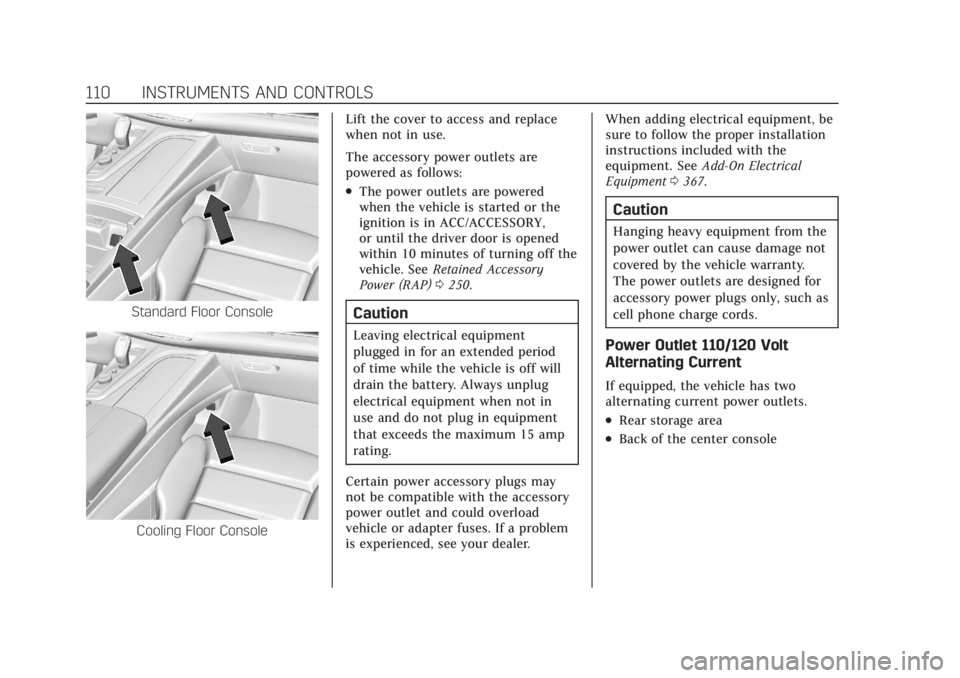
Standard Floor Console
Cooling Floor ConsoleLift the cover to access and replace
when not in use.
The accessory power outlets are
powered as follows:
.The power outlets are powered
when the vehicle is started or the
ignition is in ACC/ACCESSORY,
or until the driver door is opened
within 10 minutes of turning off the
vehicle. See
Retained Accessory
Power (RAP) 0250.
Caution
Leaving electrical equipment
plugged in for an extended period
of time while the vehicle is off will
drain the battery. Always unplug
electrical equipment when not in
use and do not plug in equipment
that exceeds the maximum 15 amp
rating.
Certain power accessory plugs may
not be compatible with the accessory
power outlet and could overload
vehicle or adapter fuses. If a problem
is experienced, see your dealer. When adding electrical equipment, be
sure to follow the proper installation
instructions included with the
equipment. See
Add-On Electrical
Equipment 0367.
Caution
Hanging heavy equipment from the
power outlet can cause damage not
covered by the vehicle warranty.
The power outlets are designed for
accessory power plugs only, such as
cell phone charge cords.
Power Outlet 110/120 Volt
Alternating Current
If equipped, the vehicle has two
alternating current power outlets.
.Rear storage area
.Back of the center console
Page 113 of 508

Cadillac Escalade Owner Manual (GMNA-Localizing-U.S./Canada/Mexico-
15567102) - 2022 - CRC - 11/18/21
112 INSTRUMENTS AND CONTROLS
Wireless Charging
If equipped and enabled, the vehicle
has wireless charging in the center
console in front of the storage bin.
The system operates at 145 kHz and
wirelessly charges one Qi compatible
smartphone. The power output of the
system is capable of charging at a rate
up to 3 amp (15 W), as requested by
the compatible smartphone. SeeRadio
Frequency Statement 0481.
{Warning
Wireless charging may affect the
operation of an implanted
pacemaker or other medical devices.
If you have one, it is recommended
to consult with your doctor before
using the wireless charging system.
The vehicle must be on, in ACC/
ACCESSORY, or Retained Accessory
Power (RAP) must be active. The
wireless charging feature may not
correctly indicate charging when the
vehicle is in RAP, during a Bluetooth
phone call, or when phone projection (e.g. Apple CarPlay / Android Auto) is
active. See
Retained Accessory Power
(RAP) 0250.
The operating temperature is −40 °C
(−40 °F) to 85 °C (185 °F) for the
charging system and 0 °C (32 °F) to
35 °C (95 °F) for the phone. A charging
stopped alert may be displayed on the
infotainment screen, if the wireless
charger or smartphone are outside of
normal operating temperature.
Charging will automatically resume
when a normal operating temperature
is reached.
{Warning
Remove all objects from the charger
before charging your compatible
smartphone. Objects, such as coins,
keys, rings, paper clips, or cards,
between the smartphone and
charger may become very hot.
On the rare occasion that the
charging system does not detect an
object, and the object gets wedged
between the smartphone and
charger, remove the smartphone
(Continued)
Warning (Continued)
and allow the object to cool before
removing it from the charger, to
prevent burns.
To charge a compatible smartphone:
1. Confirm the smartphone is capable of wireless charging.
2. Remove all objects from the charging pocket. The system may
not charge if there are any objects
between the smartphone and
charger.
Page 123 of 508

Cadillac Escalade Owner Manual (GMNA-Localizing-U.S./Canada/Mexico-
15567102) - 2022 - CRC - 11/18/21
122 INSTRUMENTS AND CONTROLS
sensing and diagnostic module. For
more information on the airbag
system, seeAirbag System 066.
The airbag readiness light comes on
for several seconds when the vehicle is
started. If the light does not come on
then, have it fixed immediately.
{Warning
If the airbag readiness light stays
on after the vehicle is started or
comes on while driving, it means
the airbag system might not be
working properly. The airbags in the
vehicle might not inflate in a crash,
or they could even inflate without a
crash. To help avoid injury, have
the vehicle serviced right away.
If there is a problem with the airbag
system, a Driver Information Center
(DIC) message may also come on.
Passenger Airbag Status
Indicator
The vehicle has a passenger sensing
system. See Passenger Sensing System
0 72 for important safety information.
The overhead console has a passenger
airbag status indicator.
United States and Canada
When the vehicle is started, the
passenger airbag status indicator will
light ON and OFF, and the symbols for
on and off, for several seconds as a
system check. Then, after several more
seconds, the status indicator will light
either ON or OFF, and the symbol for
on or off, to let you know the status of
the front outboard passenger frontal
airbag. If the word ON, and the on symbol,
are lit on the passenger airbag status
indicator, it means that the front
outboard passenger frontal airbag is
allowed to inflate.
If the word OFF, and the off symbol,
are lit on the passenger airbag status
indicator, it means that the passenger
sensing system has turned off the
front outboard passenger frontal
airbag.
If, after several seconds, both status
indicator lights remain on, if there are
no lights at all, or if the airbag
readiness light is on, there may be a
problem with the lights or the
passenger sensing system. See your
dealer for service right away.
{Warning
If the airbag readiness light ever
comes on and stays on, it means
that something may be wrong with
the airbag system. To help avoid
injury to yourself or others, have
(Continued)
Page 162 of 508
Cadillac Escalade Owner Manual (GMNA-Localizing-U.S./Canada/Mexico-
15567102) - 2022 - CRC - 11/17/21
INFOTAINMENT SYSTEM 161
Before driving:
.Become familiar with the operation,
center stack controls, steering wheel
controls, and infotainment display.
.Set up the audio by presetting
favorite stations, setting the tone,
and adjusting the speakers.
.Set up phone numbers in advance
so they can be called easily by
pressing a single control or by using
a single voice command.
See Distracted Driving 0231.
Overview
Infotainment System
The infotainment system is controlled
by using the infotainment display,
controls on the center console,
steering wheel controls, and voice
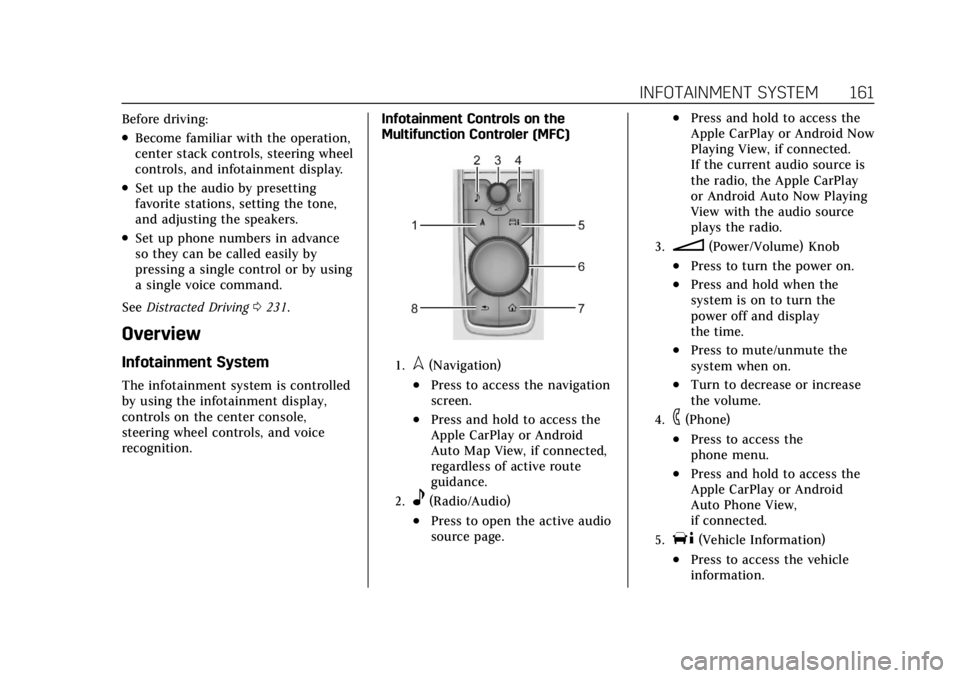
recognition. Infotainment Controls on the
Multifunction Controler (MFC)
1.l(Navigation)
.Press to access the navigation
screen.
.Press and hold to access the
Apple CarPlay or Android
Auto Map View, if connected,
regardless of active route
guidance.
2.e(Radio/Audio)
.Press to open the active audio
source page.
.Press and hold to access the
Apple CarPlay or Android Now
Playing View, if connected.
If the current audio source is
the radio, the Apple CarPlay
or Android Auto Now Playing
View with the audio source
plays the radio.
3.n(Power/Volume) Knob
.Press to turn the power on.
.Press and hold when the
system is on to turn the
power off and display
the time.
.Press to mute/unmute the
system when on.
.Turn to decrease or increase
the volume.
4.6(Phone)
.Press to access the
phone menu.
.Press and hold to access the
Apple CarPlay or Android
Auto Phone View,
if connected.
5.T(Vehicle Information)
.Press to access the vehicle
information.
Page 172 of 508
Cadillac Escalade Owner Manual (GMNA-Localizing-U.S./Canada/Mexico-
15567102) - 2022 - CRC - 11/17/21
INFOTAINMENT SYSTEM 171
especially around tall buildings or
hills, causing the sound to fade in
and out.
AM
The range for most AM stations is
greater than for FM, especially at
night. The longer range can cause
station frequencies to interfere with
each other. Static can also occur when
things like storms and power lines
interfere with radio reception. When
this happens, try reducing the treble
on the radio.
SiriusXM Satellite Radio Service
If equipped, SiriusXM Satellite Radio
Service provides digital radio
reception. Tall buildings or hills can
interfere with satellite radio signals,
causing the sound to fade in and out.
In addition, traveling or standing
under heavy foliage, bridges, garages,
or tunnels may cause loss of the
SiriusXM signal for a period of time.
Some cellular services may interfere
with SXM reception causing loss of
signal.
Mobile Device Usage
Mobile device usage, such as making
or receiving calls, charging, or just
having the mobile device on may
cause static interference in the radio.
Unplug the mobile device or turn it
off if this happens.
Multi-Band Antenna
The roof antenna may be used for
radio, navigation, and OnStar,
depending on the equipped options.
Keep clear of obstructions for clear
reception. If the vehicle has a sunroof,
and it is open, reception can also be
affected.
Audio Players
Avoiding Untrusted Media
Devices
When using media devices such as SD
cards, USB devices, and mobile
devices, consider the source.
Untrusted media devices could
contain files that affect systemoperation or performance. Avoid use if
the content or origin cannot be
trusted.
USB Port
Audio stored on a USB device may be
listened to.
The vehicle may be equipped with two
USB ports in the center console under
the armrest and another two on the
center stack. These ports are for data
and charging. There may also be two
USB ports at the rear of the center
console and a USB port on each side
of the third row seats for
charging only.
Caution
To avoid vehicle damage, unplug all
accessories and disconnect all
accessory cables from the vehicle
when not in use. Accessory cables
left plugged into the vehicle,
unconnected to a device, could be
damaged or cause an electrical
short if the unconnected end comes
(Continued)
Page 179 of 508

Cadillac Escalade Owner Manual (GMNA-Localizing-U.S./Canada/Mexico-
15567102) - 2022 - CRC - 11/17/21
178 INFOTAINMENT SYSTEM
4. Once recognized by the system, theBluetooth headphone is displayed
on the list of Available
Headphones.
5. Select the Bluetooth headphone from the list. Once connected,
touch OK at the Pairing Successful
pop-up.
6. Touch OK.
Voice Over
If equipped, the RSI system has a
Voice Over feature to benefit the
visually and hearing impaired.
When activated, Voice Over provides
audible feedback to the user about
which area on the screen they are
touching, identifying active buttons,
as well as providing information
feedback of screen identification,
current status, list content, metadata,
and pop-up information. It allows for
the user to activate features through a
double tap anywhere on the screen
which relates to the last single
touched and audibly announced
actionable button. To turn Voice Over on or off, touch
*, touch the toggle, and then press
OK to confirm. Voice Over turns off
every time the vehicle is turned off.
Reset Rear Media
Select to reset the Apps and log out
users.
Open Source License
Select to show the license
information.
Rear Consumer Ports (RCP)
If equipped with RSI, the RCP are in
the rear of the center console. These
include two HDMI ports and two
USB-C charge only ports.
HDMI
The HDMI input allows an HDMI A/V
cable to be connected from an
auxiliary device such as a camcorder,
video game system, or Apple device.
A cable from Apple is required for
Apple devices.
Touch the HDMI port that the
external device was connected to on
the home screen.
For certain HDMI devices that support
USB charging, the USB ports can be
used as a power source.
Content from these HDMI ports are
NOT accessible through the
infotainment display.
To use the HDMI input of the RSI
system:
1. Connect the auxiliary device with an HDMI cable.
2. Power on both the auxiliary device and the RSI video screen.
3. Touch
{(Home) on the desired
display and select HDMI as the
source.
Page 226 of 508

Cadillac Escalade Owner Manual (GMNA-Localizing-U.S./Canada/Mexico-
15567102) - 2022 - CRC - 11/17/21
CLIMATE CONTROLS 225
The solar sensor, on top of the
instrument panel near the windshield,
monitors the solar heat.
The climate control system uses the
sensor information to adjust the
temperature, fan speed, recirculation,
and air delivery mode for best
comfort.
If the sensor is covered, the automatic
climate control system may not work
properly.
Afterblow Feature
If equipped, under certain conditions,
the fan may stay on or may turn on
and off several times after you turn
off and lock the vehicle. This is
normal.Rear Climate Control System
The rear climate control system is on the rear of the center console. The settings
can be adjusted with the rear climate controls and the rear climate display.
Rear Climate Controls
1. Heated Rear Seats
2. Air Delivery Mode Control
3. Fan Control 4. Temperature Control
5. AUTO (Automatic Operation)
O
(On/Off)
Page 227 of 508
Cadillac Escalade Owner Manual (GMNA-Localizing-U.S./Canada/Mexico-
15567102) - 2022 - CRC - 11/17/21
226 CLIMATE CONTROLS
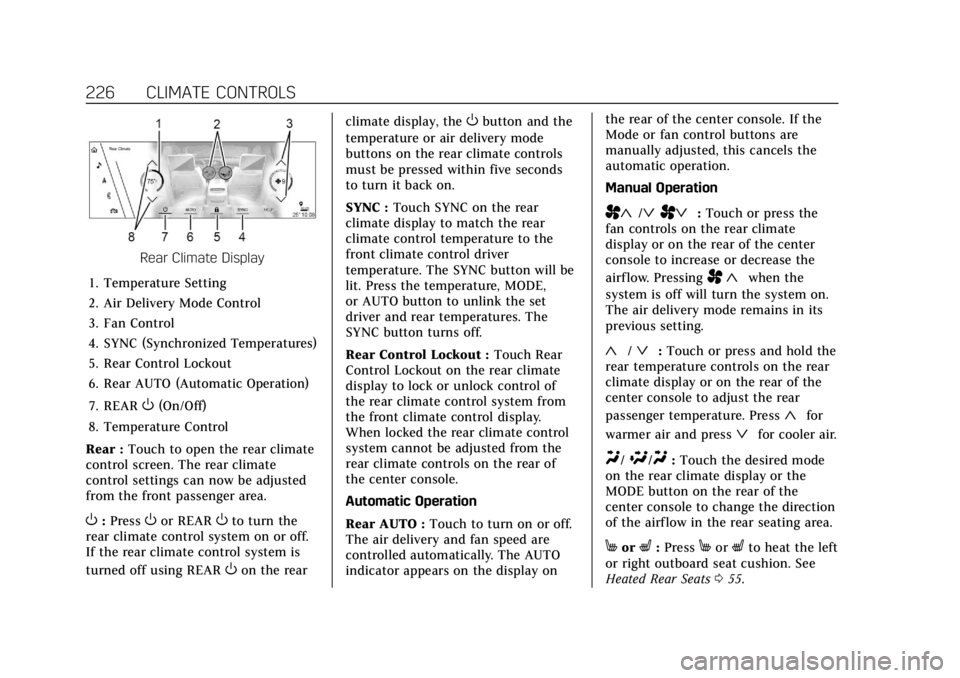
Rear Climate Display
1. Temperature Setting
2. Air Delivery Mode Control
3. Fan Control
4. SYNC (Synchronized Temperatures)
5. Rear Control Lockout
6. Rear AUTO (Automatic Operation)
7. REAR
O(On/Off)
8. Temperature Control
Rear : Touch to open the rear climate
control screen. The rear climate
control settings can now be adjusted
from the front passenger area.
O: PressOor REAROto turn the
rear climate control system on or off.
If the rear climate control system is
turned off using REAR
Oon the rear climate display, the
Obutton and the
temperature or air delivery mode
buttons on the rear climate controls
must be pressed within five seconds
to turn it back on.
SYNC : Touch SYNC on the rear
climate display to match the rear
climate control temperature to the
front climate control driver
temperature. The SYNC button will be
lit. Press the temperature, MODE,
or AUTO button to unlink the set
driver and rear temperatures. The
SYNC button turns off.
Rear Control Lockout : Touch Rear
Control Lockout on the rear climate
display to lock or unlock control of
the rear climate control system from
the front climate control display.
When locked the rear climate control
system cannot be adjusted from the
rear climate controls on the rear of
the center console.
Automatic Operation
Rear AUTO : Touch to turn on or off.
The air delivery and fan speed are
controlled automatically. The AUTO
indicator appears on the display on the rear of the center console. If the
Mode or fan control buttons are
manually adjusted, this cancels the
automatic operation.
Manual Operation
A«/ªAª:
Touch or press the
fan controls on the rear climate
display or on the rear of the center
console to increase or decrease the
airf low. Pressing
A «when the
system is off will turn the system on.
The air delivery mode remains in its
previous setting.
«/ª: Touch or press and hold the
rear temperature controls on the rear
climate display or on the rear of the
center console to adjust the rear
passenger temperature. Press
«for
warmer air and press
ªfor cooler air.
Y/\/Y: Touch the desired mode
on the rear climate display or the
MODE button on the rear of the
center console to change the direction
of the airflow in the rear seating area.
MorL: PressMorLto heat the left
or right outboard seat cushion. See
Heated Rear Seats 055.
Page 332 of 508

Cadillac Escalade Owner Manual (GMNA-Localizing-U.S./Canada/Mexico-
15567102) - 2022 - CRC - 11/17/21
DRIVING AND OPERATING 331
{Warning
The LKA system does not
continuously steer the vehicle.
It may not keep the vehicle in the
lane or give a Lane Departure
Warning (LDW) alert, even if a lane
marking is detected.
The LKA and LDW systems
may not:
.Provide an alert or enough
steering assist to avoid a lane
departure or crash.
.Detect lane markings under poor
weather or visibility conditions.
This can occur if the windshield
or headlamps are blocked by dirt,
snow, or ice; if they are not in
proper condition; or if the sun
shines directly into the camera.
.Detect road edges.
.Detect lanes on winding or hilly
roads.
If LKA only detects lane markings
on one side of the road, it will only
assist or provide an LDW alert (Continued)
Warning (Continued)
when approaching the lane on the
side where it has detected a lane
marking. Even with LKA and LDW,
you must steer the vehicle. Always
keep your attention on the road and
maintain proper vehicle position
within the lane, or vehicle damage,
injury, or death could occur. Always
keep the windshield, headlamps,
and camera sensors clean and in
good repair. Do not use LKA in bad
weather conditions or on roads with
unclear lane markings, such as
construction zones.
{Warning
Using LKA on slippery roads could
cause loss of control of the vehicle
and a crash. Turn the system off.
{Warning
LKA will not alert the driver if a
towed trailer crosses into an
adjacent lane of travel. Serious
injury or property damage may
occur if the trailer moves into
another lane. Always monitor the
trailer position while towing to
make sure it is within the same
lane as the tow vehicle.
How the System Works
LKA uses a camera sensor installed on
the windshield ahead of the rearview
mirror to detect lane markings. It may
provide brief steering assist if it
detects an unintended lane departure.
It may further provide an audible alert
or the driver seat may pulse indicating
that a lane marking has been crossed.
The system does not provide a Lane
Departure Warning (LDW) when
intentionally steering across a lane
marker.
To turn LKA on and off, press
Aon
the center console. If equipped, the
indicator light on the button comes
on when LKA is on and turns off
Page 497 of 508

Cadillac Escalade Owner Manual (GMNA-Localizing-U.S./Canada/Mexico-
15567102) - 2022 - CRC - 11/17/21
496 INDEX
Caution, Danger, and Warning . . . . . . . . 2
Center Console Storage . . . . . . . . . . . . . 100
Chains, Tire . . . . . . . . . . . . . . . . . . . . . . . . . 422
ChargingWireless . . . . . . . . . . . . . . . . . . . . . . . . . . . 112
Charging System Light . . . . . . . . . . . . . 123
Check Engine Light (MalfunctionIndicator) . . . . . . . . . . . . . . . . . . . . . . . . 123
Child Restraints Infants and Young Children . . . . . . . 79
Lower Anchors and Tethers
for Children . . . . . . . . . . . . . . . . . . . . . . . 85
Older Children . . . . . . . . . . . . . . . . . . . . . 78
Securing . . . . . . . . . . . . . . . . . . . . . . . . 92, 95
Systems . . . . . . . . . . . . . . . . . . . . . . . . . . . . 81
Circuit Breakers . . . . . . . . . . . . . . . . . . . . . 392
Cleaning Exterior Care . . . . . . . . . . . . . . . . . . . . . . 444
Interior Care . . . . . . . . . . . . . . . . . . . . . . 449
Climate Control Systems
Dual Automatic . . . . . . . . . . . . . . . . . . . 221
Rear . . . . . . . . . . . . . . . . . . . . . . . . . . . . . . . . 225
Clock . . . . . . . . . . . . . . . . . . . . . . . . . . . . . . . . . 109
Cluster, Instrument . . . . . . . . . . . . . . . . . 115
Collision Damage Repair . . . . . . . . . . . 478 Compartments
Storage . . . . . . . . . . . . . . . . . . . . . . . . . . . . . 98
Compass . . . . . . . . . . . . . . . . . . . . . . . . . . . . . 109
Connected Services Connections . . . . . . . . . . . . . . . . . . . . . . . 492
Diagnostics . . . . . . . . . . . . . . . . . . . . . . . . 493
Navigation . . . . . . . . . . . . . . . . . . . . . . . . . 491
Connections Connected Services . . . . . . . . . . . . . . . 492
Control Traction and Electronic
Stability . . . . . . . . . . . . . . . . . . . . . . . . . . 265
Control of a Vehicle . . . . . . . . . . . . . . . . 232
Controls Steering Wheel . . . . . . . . . . . . . . . . . . . . 162
Convenience Net . . . . . . . . . . . . . . . . . . . . 102
Convex Mirrors . . . . . . . . . . . . . . . . . . . . . . 31
Coolant
Engine Temperature Gauge . . . . . . 118
Engine Temperature WarningLight . . . . . . . . . . . . . . . . . . . . . . . . . . . . . 129
Cooling . . . . . . . . . . . . . . . . . . . . . . . . .221, 225
Cooling System . . . . . . . . . . . . . . . . . . . . . 378
Cornering Lamps . . . . . . . . . . . . . . . . . . . 156
Courtesy Transportation Program . . . . . . . . . . . . . . . . . . . . . . . . . . . . 477
Coverage Explanations . . . . . . . . . . . . . 192 Cruise Control . . . . . . . . . . . . . . . . . . . . . . . 273
Light . . . . . . . . . . . . . . . . . . . . . . . . . . . . . . . 132
Cruise Control, Adaptive . . . . . . . . . . . 275
Cruise Control, Super . . . . . . . . . . . . . . . 286
Cupholders . . . . . . . . . . . . . . . . . . . . . . . . . . . 98
Customer Assistance . . . . . . . . . . . . . . . 474 Offices . . . . . . . . . . . . . . . . . . . . . . . . . . . . . 473
Text Telephone (TTY) Users . . . . . 474
Customer Information Publications OrderingInformation . . . . . . . . . . . . . . . . . . . . . . 480
Customer Satisfaction Procedure . . . . . . . . . . . . . . . . . . . . . . . . . . 471
Cybersecurity . . . . . . . . . . . . . . . . . . . . . . . . 482
D
Damage Repair, Collision . . . . . . . . . . . 478
Danger, Warning, and Caution . . . . . . . . 2
Data Collection Infotainment System . . . . . . . . . . . . . 484
OnStar . . . . . . . . . . . . . . . . . . . . . . . . . . . . . 483
Data Recorders, Event . . . . . . . . . . . . . . 483
Database Coverage Explanations . . . . . . . . . . . . . . . . . . . . . . 192
Daytime Running Lamps (DRL) . . . 154
Defensive Driving . . . . . . . . . . . . . . . . . . . 232
Delayed Locking . . . . . . . . . . . . . . . . . . . . . 18
Destination . . . . . . . . . . . . . . . . . . . . . . . . . . 185