lights CADILLAC ESCALADE 2022 User Guide
[x] Cancel search | Manufacturer: CADILLAC, Model Year: 2022, Model line: ESCALADE, Model: CADILLAC ESCALADE 2022Pages: 508, PDF Size: 9.18 MB
Page 146 of 508

Cadillac Escalade Owner Manual (GMNA-Localizing-U.S./Canada/Mexico-
15567102) - 2022 - CRC - 11/18/21
INSTRUMENTS AND CONTROLS 145
Auto Door Unlock
This setting allows selection of which
doors will automatically unlock when
the vehicle is shifted into P (Park).
Touch Off, All Doors, or Driver Door.
Delayed Door Lock
This setting will lock the vehicle a
short time after all the doors are
closed.
Touch Off or On.
Remote Lock, Unlock, and Start
Touch and the following may display:
.Remote Unlock Light Feedback
.Remote Lock Feedback
.Remote Door Unlock
.Relock Remotely Unlocked Doors
.Remote Start Auto Cool Seats
.Remote Start Auto Heat Seats
.Remote Window Operation
.Passive Door Unlock
.Passive Door Lock
.Remote Left in Vehicle Alert
.Remote Removed From Vehicle
AlertRemote Unlock Light Feedback
This setting will flash the exterior
lamps when unlocking the vehicle
with the remote key.
Touch Off or Flash Lights.
Remote Lock Feedback
This setting provides what type of
feedback is given when locking the
vehicle with the remote key.
Touch Off, Lights and Horn, Lights
Only, or Horn Only.
Remote Door Unlock
This setting allows selection of which
doors will unlock when pressing
Kon
the remote key.
Touch All Doors or Driver Door.
Relock Remotely Unlocked Doors
This setting secures the vehicle if
doors are not opened within
30 seconds of using the remote key to
unlock doors.
Touch Off or On. Remote Start Auto Cool Seats
This setting will automatically turn on
the cooled seats when using remote
start on warm days. See
Heated and
Ventilated Front Seats 048 and
Remote Vehicle Start 013.
Touch Off or On.
Remote Start Auto Heat Seats
This setting will automatically turn on
the heated seats when using remote
start on cold days. See Heated and
Ventilated Front Seats 048 and
Remote Vehicle Start 013.
If equipped with Auto Heated Steering
Wheel, this feature will turn on when
the Remote Start Auto Heated Seats
turn on.
Touch Off or On.
Remote Window Operation
This setting enables remote operation
of the windows with the remote key.
See Remote Keyless Entry (RKE) System
Operation 07.
Touch Off or On.
Page 152 of 508

Cadillac Escalade Owner Manual (GMNA-Localizing-U.S./Canada/Mexico-
15567102) - 2022 - CRC - 11/17/21
LIGHTING 151
;:Turns on all lamps, except the
headlamps.
2: Turns on the headlamps together
with the parking lamps and
instrument panel lights.
IntelliBeam System
If equipped, this system turns the
vehicle's high-beam headlamps on and
off according to surrounding traffic
conditions.
The system turns the high-beam
headlamps on when it is dark enough
and there is no other traffic present.
This light
bcomes on in the
instrument cluster when the
IntelliBeam system is enabled.
Turning On and Enabling IntelliBeam
To enable the IntelliBeam system,
press
bon the turn signal lever
when it is dark outside and the
exterior lamp control is in AUTO
or
2.
Driving with IntelliBeam
The system only activates the high
beams when driving over 40 km/h
(25 mph).
The blue high-beam on light appears
on the instrument cluster when the
high beams are on.
There is a sensor near the top center
of the windshield that automatically
controls the system. Keep this area of
the windshield clear of debris to allow
for best system performance.
The high-beam headlamps remain on,
under the automatic control, until one
of the following situations occurs:
.The system detects an approaching
vehicle's headlamps.
.The system detects a preceding
vehicle's taillamps.
.The outside light is bright enough
that high-beam headlamps are not
required.
.The vehicle's speed drops below
20 km/h (12 mph).
.The IntelliBeam system is disabled
by the button on the turn signal
lever. If this happens, press
bon
the turn signal lever when the
exterior lamp control is in the
AUTO or
2position to reactivate
the IntelliBeam system. The
instrument cluster light will come
on to indicate the IntelliBeam
system is reactivated.
The high beams may not turn off
automatically if the system cannot
detect another vehicle's lamps because
of any of the following:
.The other vehicle's lamps are
missing, damaged, obstructed from
view, or otherwise undetected.
.The other vehicle's lamps are
covered with dirt, snow, and/or road
spray.
.The other vehicle's lamps cannot be
detected due to dense exhaust,
smoke, fog, snow, road spray, mist,
or other airborne obstructions.
Page 153 of 508

Cadillac Escalade Owner Manual (GMNA-Localizing-U.S./Canada/Mexico-
15567102) - 2022 - CRC - 11/17/21
152 LIGHTING
.The vehicle's windshield is dirty,
cracked, or obstructed by something
that blocks the view of the light
sensor.
.The vehicle is loaded such that the
front end points upward, causing
the light sensor to aim high and not
detect headlamps and taillamps.
.The vehicle is being driven on
winding or hilly roads.
The automatic high-beam headlamps
may need to be disabled if any of the
above conditions exist.
Adaptive Headlight System
If equipped, the Adaptive Headlight
system allows the high beam to
function as the main driving light at
night. There is a sensor near the top
center of the windshield that
automatically detects the lights of
oncoming and preceding vehicles.
Keep this area of the windshield clear
of debris to allow for best system
performance.
The system turns on all the
high-beam headlamp LED segments
when it is dark enough and there is no
other traffic present. This light
bdisplays on the
instrument cluster when the Adaptive
Headlight system is enabled.
Turning On and Enabling Adaptive
Headlight System
To enable the Adaptive Headlight
system, press
bon the turn signal
lever when it is dark outside and the
exterior lamp control is in AUTO
or
2.
Driving with Adaptive Headlight
System
The system only activates the high
beams when driving over 40 km/h
(25 mph). Individual segments of the headlamp
high beam are faded out according to
the traffic situation, preventing high
beam light from glaring oncoming or
preceding traffic. This gives the best
light distribution without glaring
other road users.
The Adaptive Headlight System
remains on until one of the following
situations occurs:
.The fog lamps are turned on.
.The outside light is bright enough
that high-beam headlamps are not
required.
.The vehicle speed drops below
approximately 20 km/h (12 mph).
.The Adaptive Headlight system is
disabled by the button on the turn
signal lever. To reactivate the
system, press
bon the turn
signal lever when the exterior lamp
control is in the AUTO or
2
position. The instrument cluster
light will appear to indicate the
Adaptive Headlight system is
reactivated.
Page 155 of 508

Cadillac Escalade Owner Manual (GMNA-Localizing-U.S./Canada/Mexico-
15567102) - 2022 - CRC - 11/17/21
154 LIGHTING
Daytime Running
Lamps (DRL)
DRL can make it easier for others to
see the front of the vehicle during the
day. Fully functional DRL are required
on all vehicles first sold in Canada.
The DRL system comes on when the
following conditions are met:
.The ignition is on.
.The exterior lamp control is
in AUTO.
.The light sensor determines it is
daytime.
When the DRL system is on, only the
DRL are on. The taillamps, sidemarker
lamps, instrument panel lights, and
other lamps will not be on.
When it begins to get dark, the
automatic headlamp system switches
from DRL to the headlamps.
To turn off the DRL, turn the exterior
lamp control to
Oand then release.
For vehicles first sold in Canada, off
will only work when the vehicle is
parked.
Automatic Headlamp
System
When it is dark enough outside, the
automatic headlamp system turns on
the headlamps at the normal
brightness, along with the taillamps,
sidemarker, parking lamps, and the
instrument panel lights. The radio
lights will also be dim.
To turn off the automatic headlamp
system, turn the exterior lamp control
to
Pand then release it.
The vehicle has a light sensor on the
top of the instrument panel that
controls the automatic headlamp system. Do not cover the sensor,
otherwise the headlamps may come
on when they are not needed.
The system may also turn on the
headlamps when driving through a
parking garage, heavy overcast
weather, or a tunnel. This is normal.
There is a delay in the transition
between the daytime and nighttime
operation of the automatic headlamp
system so that driving under bridges
or bright overhead street lights does
not affect the system. The automatic
headlamp system is only affected
when the light sensor detects a
change in lighting lasting longer than
the delay.
If the vehicle is started in a dark
garage, the automatic headlamp
system will come on immediately.
Once the vehicle leaves the garage,
there is a slight delay for the
automatic headlamp system to change
if it is bright enough outside. During
that delay, the instrument cluster may
not be as bright as usual. Make sure
the instrument panel brightness
Page 156 of 508
Cadillac Escalade Owner Manual (GMNA-Localizing-U.S./Canada/Mexico-
15567102) - 2022 - CRC - 11/17/21
LIGHTING 155
control is in the full bright position.
SeeInstrument Panel Illumination
Control 0156.
To idle the vehicle with the automatic
headlamp system off, turn the control
to the off position.
The headlamps will also stay on after
you exit the vehicle.
The regular headlamp system can be
turned on when needed.
Lights On with Wipers
If the windshield wipers are activated
in daylight with the engine on, and
the exterior lamp control is in AUTO,
the headlamps, parking lamps, and
other exterior lamps come on. The
transition time for the lamps coming
on varies based on wiper speed. When
the wipers are not operating, these
lamps turn off. Move the exterior
lamp control to
Por;to disable
this feature.
Headlamp Leveling Control
Automatic Headlamp Leveling
Control
If equipped, the inclination of the
headlamps are adjusted automatically
based on vehicle load.
Hazard Warning Flashers
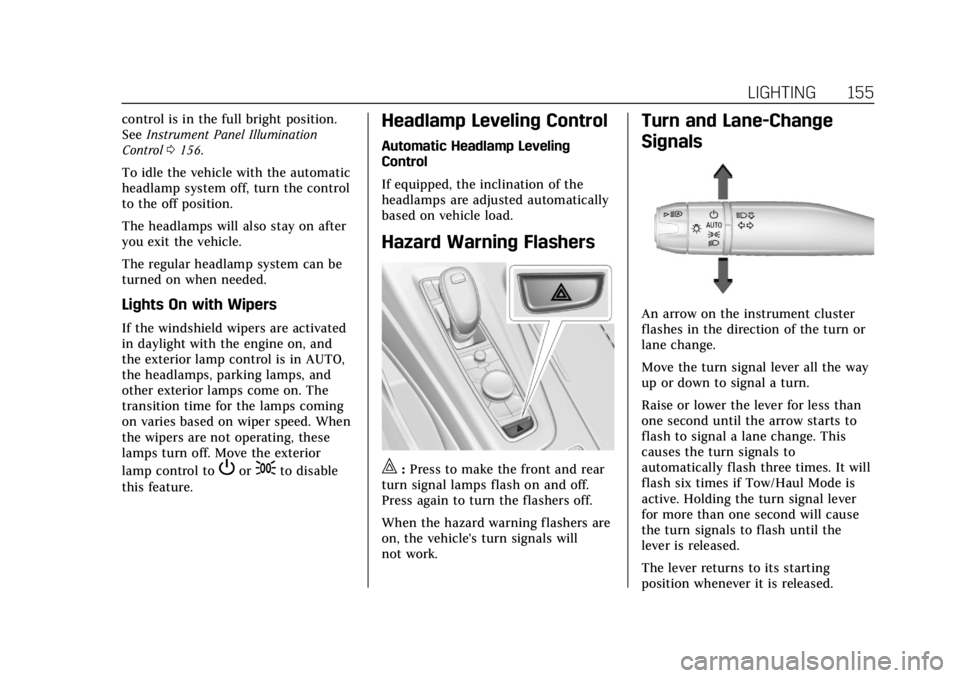
|: Press to make the front and rear
turn signal lamps flash on and off.
Press again to turn the flashers off.
When the hazard warning flashers are
on, the vehicle's turn signals will
not work.
Turn and Lane-Change
Signals
An arrow on the instrument cluster
flashes in the direction of the turn or
lane change.
Move the turn signal lever all the way
up or down to signal a turn.
Raise or lower the lever for less than
one second until the arrow starts to
flash to signal a lane change. This
causes the turn signals to
automatically flash three times. It will
flash six times if Tow/Haul Mode is
active. Holding the turn signal lever
for more than one second will cause
the turn signals to flash until the
lever is released.
The lever returns to its starting
position whenever it is released.
Page 157 of 508

Cadillac Escalade Owner Manual (GMNA-Localizing-U.S./Canada/Mexico-
15567102) - 2022 - CRC - 11/17/21
156 LIGHTING
If after signaling a turn or a lane
change the arrows flash rapidly or do
not come on, a signal bulb could be
burned out.
Replace any burned out bulbs. If a
bulb is not burned out, check the fuse.
SeeFuses and Circuit Breakers 0392.
Turn Signal On Chime
If the turn signal is left on for more
than 1.2 km (0.75 mi), a chime sounds
at each flash of the turn signal. The
message TURN SIGNAL ON will also
appear in the Driver Information
Center (DIC). To turn the chime and
message off, move the turn signal
lever to the off position.
Cornering Lamps
If equipped with cornering lamps, they
automatically come on when all of the
following occur:
.The low-beam headlamps are on.
.The turn signals are activated or the
steering wheel is at a turning angle.
.The vehicle speed is below 40 km/h
(25 mph).
Interior Lighting
Instrument Panel
Illumination Control
This feature adjusts the brightness of
all illuminated controls.
The display brightness automatically
adjusts based on outdoor lighting.
D: Move the thumbwheel up or
down to brighten or dim the lights.
The thumbwheel is functional at
night, or when the headlamps or
parking lamps are on.
Interior Lamps
Interior Ambient Lighting
If equipped, this feature allows the
color of the interior lighting in the
vehicle to be chosen.
To access, press
{on the
infotainment controls, then touch
AMBIENT LIGHTING to display the
settings screen.
Touch to select from the following:
OFF : Turns the feature off.
ON : Turns the feature on. Ambient
lighting provides the ability to
customize the color and intensity of
the interior accent lighting. Chose the
color on the display screen to make
change to interior lighting color.
DEMO MODE : When the shift lever
is in P (Park), touch to turn the
feature on in colors chosen by the
vehicle. When the shift lever is not in
P (Park) , the interior color will default
to the last active color selected.
LINK TO DRIVE MODE : The light
color is matched to the color being
used for the drive mode.
Page 159 of 508
Cadillac Escalade Owner Manual (GMNA-Localizing-U.S./Canada/Mexico-
15567102) - 2022 - CRC - 11/17/21
158 LIGHTING
All lamps will gradually fade out after
about 30 seconds.
Entry lighting can be disabled
manually by closing all doors, pressing
Qon the remote key, or starting the
vehicle.
This feature can be changed. See
“Vehicle Locator Lights” underVehicle
Personalization 0140.
Exit Lighting
Some exterior lamps and interior
lamps turn on when the driver door is
opened after the ignition is turned off.
The interior lights turn on when the
ignition is turned off.
The exterior and interior lamps
remain on for a set amount of time,
then automatically turn off.
The exterior lamps turn off
immediately by turning the exterior
lamp control off.
This feature can be changed. See
Vehicle Personalization 0140.
Battery Load Management
The vehicle has Electric Power
Management (EPM), which estimates
the battery's temperature and state of
charge. It then adjusts the voltage for
best performance and extended life of
the battery.
When the battery's state of charge is
low, the voltage is raised slightly to
quickly bring the charge back up.
When the state of charge is high, the
voltage is lowered slightly to prevent
overcharging. The voltmeter gauge or
the voltage display on the Driver
Information Center (DIC), if equipped,
may show the voltage moving up or
down. This is normal. If there is a
problem, an alert will be displayed.
The battery can be discharged at idle
if the electrical loads are very high.
This is true for all vehicles. This is
because the generator (alternator)
may not be spinning fast enough at
idle to produce all the power that is
needed for very high electrical loads.
A high electrical load occurs when
several of the following are on, such
as: headlamps, high beams, fog lamps, rear window defogger, climate control
fan at high speed, heated seats, engine
cooling fans, trailer loads, and loads
plugged into accessory power outlets.
EPM works to prevent excessive
discharge of the battery. It does this
by balancing the generator's output
and the vehicle's electrical needs.
It can increase engine idle speed to
generate more power, whenever
needed. It can temporarily reduce the
power demands of some accessories.
Normally, these actions occur in steps
or levels, without being noticeable. In
rare cases at the highest levels of
corrective action, this action may be
noticeable to the driver. If so, a DIC
message might be displayed and it is
recommended that the driver reduce
the electrical loads as much as
possible.
Battery Power Protection
This feature helps prevent the battery
from being drained, if the interior
courtesy lamps or reading lamps are
accidentally left on. If any of these
lamps are left on, they automatically
turn off after 10 minutes, if the
Page 247 of 508

Cadillac Escalade Owner Manual (GMNA-Localizing-U.S./Canada/Mexico-
15567102) - 2022 - CRC - 11/17/21
246 DRIVING AND OPERATING
Caution (Continued)
.Do not tow a trailer during
break-in. SeeTrailer Towing 0340
for the trailer towing capabilities
of the vehicle and more
information.
Following break-in, engine speed
and load can be gradually
increased.
On new vehicles, the various
mechanical and electrical systems
experience a “break-in”period during
the first 6 400 km (4,000 mi) of
routine driving. As the vehicle is
driven, the mechanical systems adjust
to provide optimal fuel economy and
transmission shift performance.
Electrical systems will adapt and
calibrate during the break-in period.
A one-time occurrence of clicks and
similar vehicle noises is normal during
this process.
Normal driving charges the vehicle’s
battery to achieve the best operation
of the vehicle, including fuel economy
and the Stop/Start System. See Stop/
Start System 0249.
Ignition Positions
Vehicles equipped with Keyless Access
have pushbutton starting.
The Remote Key must be in the
vehicle for the system to operate.
If the pushbutton start is not working,
the vehicle may be near a strong radio
antenna signal causing interference to
the Keyless Access system. See Remote
Keyless Entry (RKE) System Operation
0 7.
To shift out of P (Park), the ignition
must be on or in Service Mode, and
the brake pedal must be applied.
{Warning
Turning off the vehicle while
moving may cause loss of power
assist in the brake and steering
systems and disable the airbags.
While driving, only shut the vehicle
off in an emergency.
Stopping the Engine/LOCK/OFF (No
Indicator Lights) : When the vehicle
is stopped, press ENGINE START/
STOP once to turn the engine off.
If the vehicle is in P (Park), the
ignition will turn off, and Retained
Accessory Power (RAP) will remain
active. See Retained Accessory Power
(RAP) 0250.
If the vehicle is not in P (Park),
the ignition will return to
ACC/ACCESSORY and display the
message SHIFT TO PARK in the Driver
Information Center (DIC). When the
vehicle is shifted into P (Park), the
ignition system will turn off.
The vehicle may have an electric
steering column lock. The lock is
activated when the ignition is turned
off and either front door is opened.
Page 288 of 508
Cadillac Escalade Owner Manual (GMNA-Localizing-U.S./Canada/Mexico-
15567102) - 2022 - CRC - 11/17/21
DRIVING AND OPERATING 287
Warning (Continued)
events by steering, braking,
or accelerating. See Defensive
Driving.
Super Cruise is:
.Not a self-driving system
.Not a crash avoidance or warning
system
.Not a substitute for proper
supervision of the driving task.
Super Cruise uses the following to
detect the current lane position and
lane markings ahead on compatible
roads under certain conditions:
.Cameras
.Global Positioning System (GPS)
sensing
.A high-precision map
.GPS-enhancement data downloaded
through OnStar
Super Cruise works with Adaptive
Cruise Control (ACC), which controls
acceleration and braking while Super
Cruise is enabled and operating.
Review and understand both this section and the ACC section before
using Super Cruise. See
Adaptive
Cruise Control (Advanced) 0275.
An active Connected Service plan that
includes Super Cruise Services is
required to use Super Cruise.
{Warning
Super Cruise does not perform all
aspects of driving, nor does it do
everything a driver can do. Super
Cruise only steers to maintain
vehicle position in the current lane
or, under some circumstances, to
change lanes. Super Cruise can only
be used with Adaptive Cruise
Control.
Super Cruise does:
.Not prevent crashes or warn of
possible crashes.
.Not steer to avoid stopped or
slow-moving vehicles,
cross-traffic, construction
barriers or cones, motorcycles,
children, pedestrians, animals,
or other objects on the road. (Continued)
Warning (Continued)
.Not steer in response to vehicles
or objects next to your vehicle,
including vehicles attempting to
enter your lane.
.Not respond to traffic lights, stop
signs, or other traffic control
devices.
.Not respond to crossing traffic.
.Not make turns.
.Not steer to merge onto or to
exit highways.
.Not steer to avoid, or steer
through construction zones.
.Not function on surface streets.
.Not respond to oncoming traffic.
.Not function in city driving
conditions.
{Warning
Some state and local laws may
require hands to be kept on the
steering wheel at all times. Only
remove your hands from the
(Continued)
Page 320 of 508
Cadillac Escalade Owner Manual (GMNA-Localizing-U.S./Canada/Mexico-
15567102) - 2022 - CRC - 11/17/21
DRIVING AND OPERATING 319
Rear Pedestrian Alert can be set to Off
or Alert. See“Rear Pedestrian
Detection ”in “Collision/Detection
Systems” underVehicle Personalization
0 140. If equipped, alerts can be set to
beeps or seat pulses. See “Alert Type”
in “Collision/Detection Systems” under
Vehicle Personalization 0140.
Rear Cross Traffic Alert
(RCTA) System
If equipped, Rear Cross Traffic Alert
(RCTA) displays a red warning triangle
with a left or right pointing arrow on
the infotainment display to warn of
traffic coming from the left or right.
This system detects objects coming
from up to 20 m (65 ft) from the left
or right side of the vehicle. When an
object is detected, either three beeps
sound from the left or right or three
Safety Alert Seat pulses occur on the
left or right side, depending on the
direction of the detected vehicle.
Driving With a Trailer
Use caution while backing up when
towing a trailer. The RCTA feature is
automatically disabled when a trailer
is attached to the vehicle. Turning the Features On or Off
RCTA can be turned on or off using
the infotainment system. See
“Collision/Detection Systems”
under
Vehicle Personalization 0140.
Assistance Systems for
Driving
If equipped, when driving the vehicle
in a forward gear, Forward Collision
Alert (FCA), Front Pedestrian Braking
(FPB), Lane Keep Assist (LKA), Side
Blind Zone Alert (SBZA), Night Vision
System, Lane Change Alert (LCA),
and/or Automatic Emergency Braking
(AEB) can help to avoid a crash or
reduce crash damage.
Forward Collision Alert
(FCA) System
The FCA system may help to avoid or
reduce the harm caused by front-end
crashes. When approaching a vehicle
ahead too quickly, FCA provides a red
flashing alert on the windshield and
rapidly beeps or pulses the driver seat.
FCA also lights an amber visual alert
if following another vehicle much too
closely. FCA detects vehicles within a distance
of approximately 60 m (197 ft) and
operates at speeds above 8 km/h
(5 mph). If the vehicle has Adaptive
Cruise Control (ACC), it can detect
vehicles to distances of approximately
110 m (360 ft) and operates at all
speeds. See
Adaptive Cruise Control
(Advanced) 0275.
{Warning
FCA is a warning system and does
not apply the brakes. When
approaching a slower-moving or
stopped vehicle ahead too rapidly,
or when following a vehicle too
closely, FCA may not provide a
warning with enough time to help
avoid a crash. It also may not
provide any warning at all. FCA
does not warn of pedestrians,
animals, signs, guardrails, bridges,
construction barrels, or other
objects. Be ready to take action and
apply the brakes. See Defensive
Driving 0232.