remove seats CADILLAC ESCALADE 2022 User Guide
[x] Cancel search | Manufacturer: CADILLAC, Model Year: 2022, Model line: ESCALADE, Model: CADILLAC ESCALADE 2022Pages: 508, PDF Size: 9.18 MB
Page 98 of 508
Cadillac Escalade Owner Manual (GMNA-Localizing-U.S./Canada/Mexico-
15567102) - 2022 - CRC - 11/17/21
SEATS AND RESTRAINTS 97
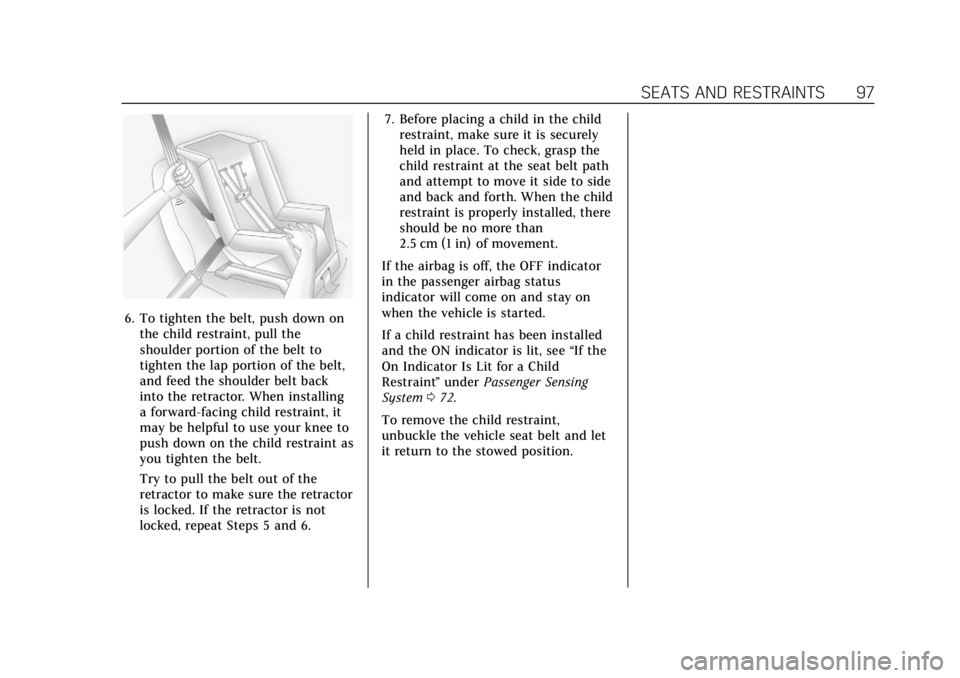
6. To tighten the belt, push down onthe child restraint, pull the
shoulder portion of the belt to
tighten the lap portion of the belt,
and feed the shoulder belt back
into the retractor. When installing
a forward-facing child restraint, it
may be helpful to use your knee to
push down on the child restraint as
you tighten the belt.
Try to pull the belt out of the
retractor to make sure the retractor
is locked. If the retractor is not
locked, repeat Steps 5 and 6. 7. Before placing a child in the child
restraint, make sure it is securely
held in place. To check, grasp the
child restraint at the seat belt path
and attempt to move it side to side
and back and forth. When the child
restraint is properly installed, there
should be no more than
2.5 cm (1 in) of movement.
If the airbag is off, the OFF indicator
in the passenger airbag status
indicator will come on and stay on
when the vehicle is started.
If a child restraint has been installed
and the ON indicator is lit, see “If the
On Indicator Is Lit for a Child
Restraint ”under Passenger Sensing
System 072.
To remove the child restraint,
unbuckle the vehicle seat belt and let
it return to the stowed position.
Page 146 of 508

Cadillac Escalade Owner Manual (GMNA-Localizing-U.S./Canada/Mexico-
15567102) - 2022 - CRC - 11/18/21
INSTRUMENTS AND CONTROLS 145
Auto Door Unlock
This setting allows selection of which
doors will automatically unlock when
the vehicle is shifted into P (Park).
Touch Off, All Doors, or Driver Door.
Delayed Door Lock
This setting will lock the vehicle a
short time after all the doors are
closed.
Touch Off or On.
Remote Lock, Unlock, and Start
Touch and the following may display:
.Remote Unlock Light Feedback
.Remote Lock Feedback
.Remote Door Unlock
.Relock Remotely Unlocked Doors
.Remote Start Auto Cool Seats
.Remote Start Auto Heat Seats
.Remote Window Operation
.Passive Door Unlock
.Passive Door Lock
.Remote Left in Vehicle Alert
.Remote Removed From Vehicle
AlertRemote Unlock Light Feedback
This setting will flash the exterior
lamps when unlocking the vehicle
with the remote key.
Touch Off or Flash Lights.
Remote Lock Feedback
This setting provides what type of
feedback is given when locking the
vehicle with the remote key.
Touch Off, Lights and Horn, Lights
Only, or Horn Only.
Remote Door Unlock
This setting allows selection of which
doors will unlock when pressing
Kon
the remote key.
Touch All Doors or Driver Door.
Relock Remotely Unlocked Doors
This setting secures the vehicle if
doors are not opened within
30 seconds of using the remote key to
unlock doors.
Touch Off or On. Remote Start Auto Cool Seats
This setting will automatically turn on
the cooled seats when using remote
start on warm days. See
Heated and
Ventilated Front Seats 048 and
Remote Vehicle Start 013.
Touch Off or On.
Remote Start Auto Heat Seats
This setting will automatically turn on
the heated seats when using remote
start on cold days. See Heated and
Ventilated Front Seats 048 and
Remote Vehicle Start 013.
If equipped with Auto Heated Steering
Wheel, this feature will turn on when
the Remote Start Auto Heated Seats
turn on.
Touch Off or On.
Remote Window Operation
This setting enables remote operation
of the windows with the remote key.
See Remote Keyless Entry (RKE) System
Operation 07.
Touch Off or On.
Page 147 of 508

Cadillac Escalade Owner Manual (GMNA-Localizing-U.S./Canada/Mexico-
15567102) - 2022 - CRC - 11/18/21
146 INSTRUMENTS AND CONTROLS
Passive Door Unlock
This setting specifies which doors will
unlock when using the button on the
driver door handle to unlock the
vehicle.
Touch Off, All Doors, or Driver
Door Only.
Passive Door Lock
This setting specifies if the vehicle will
automatically lock or lock and provide
an alert after all the doors are closed
while walking away from the vehicle
with the remote key. SeeRemote
Keyless Entry (RKE) System Operation
0 7.
Touch Off, On with Horn Chirp, or On.
Remote Left in Vehicle Alert
This setting sounds an alert when the
remote key is left in the vehicle that is
not running.
Touch Off or On. Remote Removed From Vehicle
Alert
This setting beeps the horn three
times if exiting a running vehicle with
the remote key.
Touch Off or On.
Ride Height
Touch and the following may display:
.Automatic Entry/Egress
Automatic Entry/Egress
This feature specifies if the vehicle
will automatically lower to make it
easier to enter or exit the vehicle.
Touch Off or On.
Running Boards
Touch and the following may display:
.Automatic Running Boards
.Deploy Running Boards
Automatic Running Boards
This feature specifies the position and
use of the running boards.
Touch Off or On. Deploy Running Boards
This feature moves the running
boards to a deployed position so they
can be used with the doors closed.
Touch Off or Deploy.
Seating Position
Touch and the following may display:
.Seat Entry Memory
.Seat Exit Memory
Seat Entry Memory
This feature automatically recalls the
previously stored 1 or 2 button
positions when the ignition is changed
from off to on or ACC/ACCESSORY.
See Memory Seats 046.
Touch Off or On.
Seat Exit Memory
This feature automatically recalls the
previously stored exit button position
when the ignition is changed from on
or ACC/ACCESSORY to off and the
driver door is open. See Memory Seats
0 46.
Touch Off or On.
Page 452 of 508
Cadillac Escalade Owner Manual (GMNA-Localizing-U.S./Canada/Mexico-
15567102) - 2022 - CRC - 11/17/21
VEHICLE CARE 451
4. Continue gently rubbing the soiledarea until there is no longer any
color transfer from the soil to the
cleaning cloth.
5. If the soil is not completely removed, use a mild soap solution
followed only by plain water.
If the soil is not completely removed,
it may be necessary to use a
commercial upholstery cleaner or spot
lifter. Test a small hidden area for
colorfastness before using a
commercial upholstery cleaner or spot
lifter. If ring formation occurs, clean
the entire fabric or carpet.
After cleaning, use a paper towel to
blot excess moisture.
Cleaning High Gloss Surfaces
and Vehicle Information and
Radio Displays
Use a microfiber cloth on high gloss
surfaces or vehicle displays. First, use
a soft bristle brush to remove dirt that
can scratch the surface. Then gently
clean by rubbing with a microfiber
cloth. Never use window cleaners or
solvents. Periodically hand wash the
microfiber cloth separately, using mild soap. Do not use bleach or fabric
softener. Rinse thoroughly and air dry
before next use.
Caution
Do not attach a device with a
suction cup to the display. This may
cause damage and would not be
covered by the vehicle warranty.
Instrument Panel, Leather, Vinyl,
Other Plastic Surfaces, Low
Gloss Paint Surfaces, and
Natural Open Pore Wood
Surfaces
Use a soft bristle brush to remove
dust from knobs and crevices on the
instrument cluster. Use a soft
microfiber cloth dampened with water
to remove dust and loose dirt. For a
more thorough cleaning, use a soft
microfiber cloth dampened with a
mild soap and water solution.
Caution
Soaking or saturating leather,
especially perforated leather, as well
as other interior surfaces, may
cause permanent damage. Wipe
excess moisture from these surfaces
after cleaning and allow them to
dry naturally. Never use heat,
steam, or spot removers. Do not use
liquids that contain alcohol or
solvents on leather seats. Do not
use cleaners that contain silicone or
wax-based products. Cleaners
containing these solvents can
permanently change the appearance
and feel of leather or soft trim, and
are not recommended.
Do not use cleaners that increase
gloss, especially on the instrument
panel. Reflected glare can decrease
visibility through the windshield
under certain conditions.