tires CADILLAC ESCALADE 2022 Owner's Manual
[x] Cancel search | Manufacturer: CADILLAC, Model Year: 2022, Model line: ESCALADE, Model: CADILLAC ESCALADE 2022Pages: 508, PDF Size: 9.18 MB
Page 349 of 508
Cadillac Escalade Owner Manual (GMNA-Localizing-U.S./Canada/Mexico-
15567102) - 2022 - CRC - 11/17/21
348 DRIVING AND OPERATING
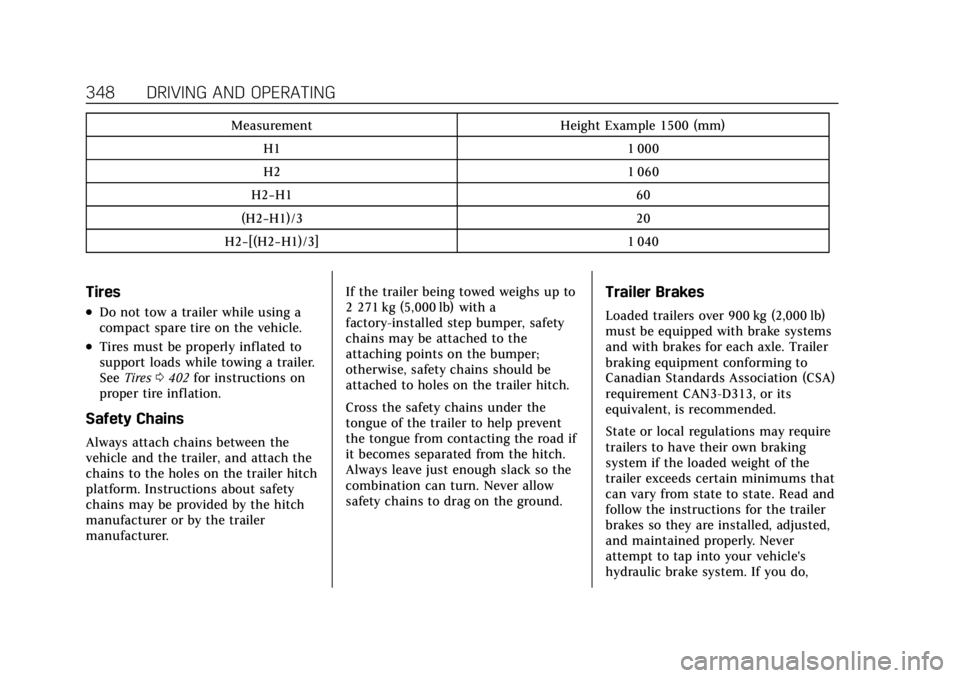
MeasurementHeight Example 1500 (mm)
H1 1 000
H2 1 060
H2−H1 60
(H2−H1)/3 20
H2−[(H2−H1)/3] 1 040
Tires
.Do not tow a trailer while using a
compact spare tire on the vehicle.
.Tires must be properly inflated to
support loads while towing a trailer.
SeeTires 0402 for instructions on
proper tire inflation.
Safety Chains
Always attach chains between the
vehicle and the trailer, and attach the
chains to the holes on the trailer hitch
platform. Instructions about safety
chains may be provided by the hitch
manufacturer or by the trailer
manufacturer. If the trailer being towed weighs up to
2 271 kg (5,000 lb) with a
factory-installed step bumper, safety
chains may be attached to the
attaching points on the bumper;
otherwise, safety chains should be
attached to holes on the trailer hitch.
Cross the safety chains under the
tongue of the trailer to help prevent
the tongue from contacting the road if
it becomes separated from the hitch.
Always leave just enough slack so the
combination can turn. Never allow
safety chains to drag on the ground.
Trailer Brakes
Loaded trailers over 900 kg (2,000 lb)
must be equipped with brake systems
and with brakes for each axle. Trailer
braking equipment conforming to
Canadian Standards Association (CSA)
requirement CAN3-D313, or its
equivalent, is recommended.
State or local regulations may require
trailers to have their own braking
system if the loaded weight of the
trailer exceeds certain minimums that
can vary from state to state. Read and
follow the instructions for the trailer
brakes so they are installed, adjusted,
and maintained properly. Never
attempt to tap into your vehicle's
hydraulic brake system. If you do,
Page 355 of 508
Cadillac Escalade Owner Manual (GMNA-Localizing-U.S./Canada/Mexico-
15567102) - 2022 - CRC - 11/17/21
354 DRIVING AND OPERATING
vehicle warranty. Contact your trailer
dealer for assistance with trailer
repairs and trailer warranty
information.
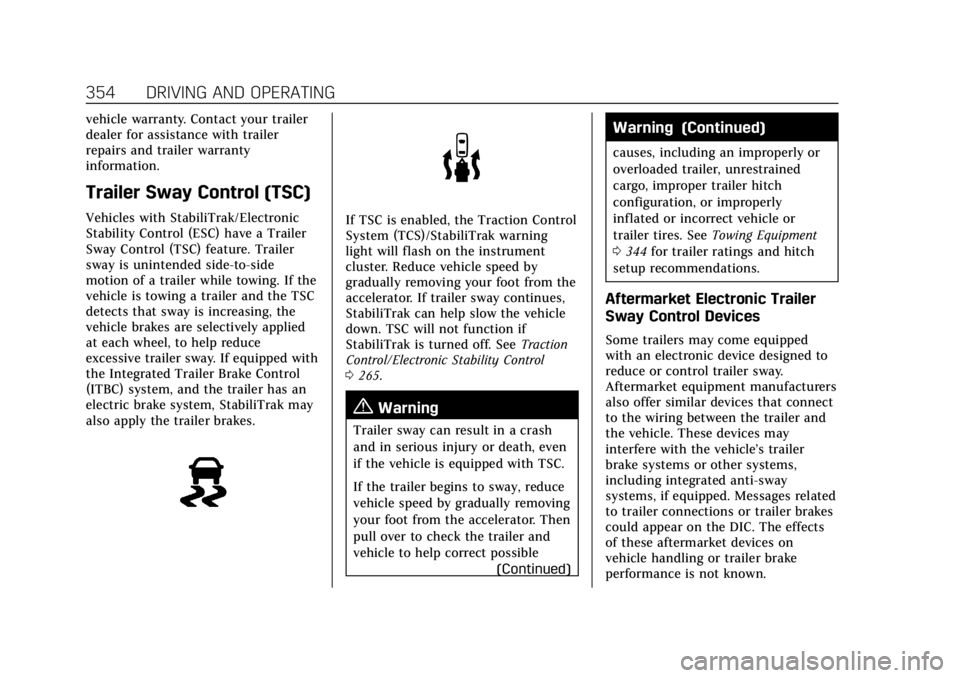
Trailer Sway Control (TSC)
Vehicles with StabiliTrak/Electronic
Stability Control (ESC) have a Trailer
Sway Control (TSC) feature. Trailer
sway is unintended side-to-side
motion of a trailer while towing. If the
vehicle is towing a trailer and the TSC
detects that sway is increasing, the
vehicle brakes are selectively applied
at each wheel, to help reduce
excessive trailer sway. If equipped with
the Integrated Trailer Brake Control
(ITBC) system, and the trailer has an
electric brake system, StabiliTrak may
also apply the trailer brakes.If TSC is enabled, the Traction Control
System (TCS)/StabiliTrak warning
light will flash on the instrument
cluster. Reduce vehicle speed by
gradually removing your foot from the
accelerator. If trailer sway continues,
StabiliTrak can help slow the vehicle
down. TSC will not function if
StabiliTrak is turned off. SeeTraction
Control/Electronic Stability Control
0 265.
{Warning
Trailer sway can result in a crash
and in serious injury or death, even
if the vehicle is equipped with TSC.
If the trailer begins to sway, reduce
vehicle speed by gradually removing
your foot from the accelerator. Then
pull over to check the trailer and
vehicle to help correct possible
(Continued)
Warning (Continued)
causes, including an improperly or
overloaded trailer, unrestrained
cargo, improper trailer hitch
configuration, or improperly
inflated or incorrect vehicle or
trailer tires. SeeTowing Equipment
0 344 for trailer ratings and hitch
setup recommendations.
Aftermarket Electronic Trailer
Sway Control Devices
Some trailers may come equipped
with an electronic device designed to
reduce or control trailer sway.
Aftermarket equipment manufacturers
also offer similar devices that connect
to the wiring between the trailer and
the vehicle. These devices may
interfere with the vehicle’s trailer
brake systems or other systems,
including integrated anti-sway
systems, if equipped. Messages related
to trailer connections or trailer brakes
could appear on the DIC. The effects
of these aftermarket devices on
vehicle handling or trailer brake
performance is not known.
Page 356 of 508
Cadillac Escalade Owner Manual (GMNA-Localizing-U.S./Canada/Mexico-
15567102) - 2022 - CRC - 11/17/21
DRIVING AND OPERATING 355
{Warning
Use of aftermarket electronic trailer
sway control devices could result in
reduced trailer brake performance,
loss of trailer brakes, or other
malfunctions, and result in a crash.
You or others could be seriously
injured or killed. Before using one
of these devices:
.Ask the device or trailer
manufacturer if the device has
been thoroughly tested for
compatibility with the make,
model, and year of your vehicle
and any optional equipment
installed on your vehicle.
.Before driving, check the trailer
brakes are working properly,
if equipped. Drive the vehicle
with the trailer attached on a
level road surface that is free of
traffic at about 32-40 km/h
(20-25 mph) and fully apply the
manual trailer brake apply lever.
Also, check the trailer brake
lamps and other lamps are
functioning correctly.(Continued)
Warning (Continued)
.If the trailer brakes are not
operating properly at any time,
or if a DIC message indicates
problems with the trailer
connections or trailer brakes,
carefully pull the vehicle over to
the side of the road when traffic
conditions allow.
Trailer Tires
Special Trailer (ST) tires differ from
vehicle tires. Trailer tires are designed
with stiff sidewalls to help prevent
sway and to support heavy loads.
These features can make it difficult to
determine if the trailer tire pressures
are low only based on a visual
inspection.
Always check all trailer tire pressures
before each trip when the tires are
cool. Low trailer tire pressure is a
leading cause of trailer tire blow-outs.
If the vehicle is equipped with a trailer
tire pressure monitoring system, see
the trailer tire pressure monitoring
system description and the
trailering app. Trailer tires deteriorate over time. The
trailer tire sidewall will show the week
and year the tire was manufactured.
Many trailer tire manufacturers
recommend replacing tires more than
six years old.
Overloading is another leading cause
of trailer tire blow-outs. Never load
your trailer with more weight than the
tires are designed to support. The load
rating is located on the trailer tire
sidewall.
Always know the maximum speed
rating for the trailer tires before
driving. This may be significantly
lower than the vehicle tire speed
rating. The speed rating may be on
the trailer tire sidewall. If the speed
rating is not shown, the default trailer
tire speed rating is 105 km/h (65 mph).
Trailering App
Trailer Lights App
If equipped, the Trailer Lights App is
on the Home Page of the infotainment
display.
Page 358 of 508

Cadillac Escalade Owner Manual (GMNA-Localizing-U.S./Canada/Mexico-
15567102) - 2022 - CRC - 11/17/21
DRIVING AND OPERATING 357
Pressure Monitoring System,
if equipped, maintenance reminders,
or towing assistance, if equipped.
Import a Trailer Profile
A trailer profile saved to an OnStar
account can be imported to the
vehicle.1. Touch + Add Trailer Profile in the Trailering App
2. Touch Import Profile on the pop-up.
3. Select a trailer profile from the list.
4. Touch IMPORT.
A pop-up will indicate the import was
successful. Touch OK to return to the
trailer list and select the trailer profile.
The Tow/Haul Mode reminder, Brake
Gain Setting and Trailer Tire Pressure
sensor learning, if equipped, do not
import.
Trailer Feature Setup
Tow/Haul Mode Reminder
To turn the Tow/Haul Mode Reminder
setting on, touch Yes. To turn it off,
touch No. Trailer Tire Pressure Setup
If the Trailer Tire Pressure Monitoring
System (TTPMS) is detected, touch
the Tire Pressure Monitoring icon to
set up tire pressure monitoring. Touch
Yes to set up the sensors or touch No
to return to the previous screen.
The trailer tire pressure sensors can
transmit up to 7 m (23 ft) from the
hitch receiver of the vehicle.
A trailer must be electrically
connected to the vehicle before
starting the sensor-to-vehicle learn
process.
After selecting Start from the Learn
Sensors screen, use the Tool Method
or the Manual Method (described
below) to learn each tire sensor,
during which the current tire number
will be highlighted.
Each sensor has a minimum of
two minutes to learn, shown by a
timer. After a sensor is learned, a
checkmark appears next to the tire,
the vehicle horn will sound, the
vehicle’s brake lamps will flash, and
all working trailer lamps will flash.
It then moves to the next sensor.To cancel the process touch Stop.
The recommended tire pressure must
be entered for the trailer tires. This
allows the vehicle to alert when the
tire pressure is high or low.
TTPMS must learn the location of the
installed tire sensors to show correct
air pressure and temperature for each
tire. To set up, use one of the
following options or see a tire or
trailer dealer for service. The learning
process must be repeated when the
trailer tires are rotated or replaced.
See
“Editing a Trailer Profile ”later in
this section for tire pressure sensor
relearn information.
Tool Method: A TTPMS activation tool
can be purchased separately to learn
the sensor locations.
Manual Method: Without the tool, the
air pressure can be increased or
decreased in each tire for 10 seconds.
Do not exceed the maximum inflation
pressure found on the tire sidewalls.
Make sure to re-adjust tire pressure to
the recommended level when the
process is complete.
Page 360 of 508

Cadillac Escalade Owner Manual (GMNA-Localizing-U.S./Canada/Mexico-
15567102) - 2022 - CRC - 11/17/21
DRIVING AND OPERATING 359
Status View
The Status view shows:
.Vehicle
.Connections
.Tires
.Maintenance
.Cameras
Upon entry, the most recent items will
be shown.
Connections
1. Trailer Electrical Diagnostics
2. Light Test Start Button
Connections: OK
If a trailer connection is detected
without any faults, the view will
display NO FAULTS DETECTED.
Trailer Connections Status
When a trailer is connected, the
Trailering App System detects the
trailer connection using the Stop/Turn
Signal lighting circuits and alerts the
driver by requesting a trailer profile
setup through the Trailering App
System on the infotainment screen.
The Trailer Detection Alert setting
must be enabled for the alert to
display when a trailer is connected.
When a trailer is connected and the
ignition is off, the Trailering App
System will periodically pulse the
lighting circuits of the trailer to verify
it is still connected. The trailer lights
may periodically flash as a result of
this trailer connection detection.
These flashes may be more visible in
dark ambient light environments. The
flashing or flickering lights are a
normal condition and the Trailering
App System has built-in protections to
prevent the battery from draining. When Theft Alert is also enabled the
frequency and pattern of this flashing
will change.
If a connected trailer becomes
disconnected, a message about the
trailer disconnect will appear on the
DIC immediately (if vehicle is on) or
upon next ignition cycle (if trailer was
disconnected while vehicle is off).
Check your trailer connection if
needed.
Connection Problem
If any of the trailer connections are
lost, a message about the connection
issue will appear on the Driver
Information Center (DIC). The
infotainment display will also show
the connection issue in the
Connection Status view.
If a trailer connection is not detected,
the Trailering App will not display the
Connection Status screen.
Page 361 of 508

Cadillac Escalade Owner Manual (GMNA-Localizing-U.S./Canada/Mexico-
15567102) - 2022 - CRC - 11/17/21
360 DRIVING AND OPERATING
Connection Trailer Lighting Faults
Detected
The Trailering App System monitors
for electrical faults on the trailer
lights. A message about the lighting
issue will appear on the DIC. The
infotainment display will also show
the lighting issue in the Connection
Status view. Repair your trailer lights
if needed. A trailer lighting issue is
not covered by your GM warranty.
Diagnose View
Touch Diagnose to see more
information about the connection
problem.
This view will display the names of
the trailer connector pins, a graphic of
the trailer connector, and a graphic of
the back of the trailer.
Any connector pin that failed will be
amber color, and the location of the
corresponding connection will be
highlighted on the graphic of the back
of the trailer.
The Running Lights connection may
not detect partial outages. Activate
the light test to check all trailer
lamps. See“Light Test”following. Light Test
Touch Start Light Test to cycle the
trailer lights on and off to determine if
they are working. The test follows this
sequence:
1. The running lights turn on first and remain on throughout the
sequence.
2. The brake lights turn on for about two seconds.
3. The left turn signal light flashes three times.
4. The right turn signal light flashes three times.
5. The reverse lights turn on for about two seconds.
6. Steps 2–5 repeat for approximately one minute and 45 seconds,
or until the test deactivates.
Touch Stop to stop the test. The test
will automatically end after
one minute and 45 seconds.
The sequence also deactivates when
any of the following occur:
.The ignition is turned off.
.The transmission is shifted out of
P (Park).
.The brake pedal is pressed.
.The turn signal is activated.
.The hazard warning lights are
activated.
Tires
1. Trailer Tire Pressure/Temperature
Tire Pressure and Temperature
If the TTPMS sensor-to-vehicle learn
process was completed, the status
view will display the current tire
pressure and temperature of the
trailer tires related to the active
Trailer Profile. If a tire’s pressure is
low or high, the color of the pressure
value will be amber. If a sensor
malfunctions, the values are dashed
lines. If the screen displays “Service
Page 365 of 508

Cadillac Escalade Owner Manual (GMNA-Localizing-U.S./Canada/Mexico-
15567102) - 2022 - CRC - 11/17/21
364 DRIVING AND OPERATING
Towing Assistance Setup
A trailer should be connected to
complete this portion of profile setup.
Touch to set up towing assistance
features for the Trailer Profile. See
"Towing Assistance" for details on the
setup.
Tire Pressure Setup
Touch to set up the Trailer Tire
Pressure Monitoring System (TTPMS)
for the Trailer Profile. See“Trailer Tire
Pressure Setup ”previously in this
section for details on the setup. Also,
touch Tire Pressure Setup if the trailer
tires were rotated or if the tire
pressure sensors in the tires were
replaced for this Trailer Profile. The
vehicle will need to relearn the tire
sensors and their locations.
If TTPMS had been set up previously,
the Select Number of Sensors screen
will appear after touching Tire
Pressure Setup. If the number of
sensors has changed, select the
number and touch Next. If a new number of sensors is selected,
the Relearn Sensors pop-up will
appear. Touch Cancel to go back or
touch Relearn to overwrite the current
sensors and begin the relearning
process. See
“Trailer Tire Pressure
Setup ”previously in this section.
If number of sensors has not changed,
touch Next and the Learn sensors
screen will appear.
On the Learn Sensors screen. Touch
Relearn to overwrite the current
sensors and begin the relearning
process. See “Trailer Tire Pressure
Setup ”previously in this section.
On the Learn Sensors screen, touch
Next to go to the Edit Recommended
Tire Pressure screen.
On the Edit Recommended Tire
Pressure screen, touch a number on
the keypad to change the
recommended tire pressure for the
trailer’s tires. This will change the
number at which the vehicle displays
alerts related to trailer tire pressure.
Touch Done to return to the Trailer
Profile view.Trailer Maintenance
Touch to view a list of maintenance
reminders for the Trailer Profile.
Touch a reminder to view, reset,
delete, or edit it.
Reset Reminder
Touch Maintenance Complete in the
reminder view to reset the reminder.
On the pop-up, touch Reset to reset
the time and mileage values for the
reminder. Touch Cancel to return to
the previous view and nothing will
change.
Edit Reminder
Touch to edit the mileage or time
settings for the reminder. Touch Save
to save the new settings to the Trailer
Profile.
Delete Reminder
Touch to delete the maintenance
reminder. On the pop-up, touch Delete
to delete the reminder or touch Cancel
to return to the previous view and
nothing will change.
Page 369 of 508
Cadillac Escalade Owner Manual (GMNA-Localizing-U.S./Canada/Mexico-
15567102) - 2022 - CRC - 11/17/21
368 VEHICLE CARE
Vehicle Care
General Information
General Information . . . . . . . . . . . . . 369
California Perchlorate MaterialsRequirements . . . . . . . . . . . . . . . . . . . 369
Accessories and Modifications . . . . . . . . . . . . . . . . . . . 369
Vehicle Checks
Doing Your OwnService Work . . . . . . . . . . . . . . . . . . . . 370
Hood . . . . . . . . . . . . . . . . . . . . . . . . . . . . . . 371
Engine Compartment Overview . . . . . . . . . . . . . . . . . . . . . . . . . 372
Engine Oil . . . . . . . . . . . . . . . . . . . . . . . . . 373
Engine Oil Life System . . . . . . . . . . . 375
Automatic Transmission Fluid . . . . . . . . . . . . . . . . . . . . . . . . . . . . . 376
Engine Air Filter Life System . . . . 377
Engine Air Cleaner/Filter . . . . . . . . . 377
Cooling System . . . . . . . . . . . . . . . . . . . 378
Engine Overheating . . . . . . . . . . . . . . 381
Engine Fan . . . . . . . . . . . . . . . . . . . . . . . . 382
Washer Fluid . . . . . . . . . . . . . . . . . . . . . 383
Brakes . . . . . . . . . . . . . . . . . . . . . . . . . . . . . 383
Brake Pad Life System . . . . . . . . . . . 384
Brake Fluid . . . . . . . . . . . . . . . . . . . . . . . 385
Battery - North America . . . . . . . . . 386 Four-Wheel Drive . . . . . . . . . . . . . . . . 386
Front Axle . . . . . . . . . . . . . . . . . . . . . . . . 387
Rear Axle . . . . . . . . . . . . . . . . . . . . . . . . . 387
Park Brake and P (Park)
Mechanism Check . . . . . . . . . . . . . . 387
Wiper Blade Replacement . . . . . . . 388
Glass Replacement . . . . . . . . . . . . . . . 389
Windshield Replacement . . . . . . . . 389
Gas Strut(s) . . . . . . . . . . . . . . . . . . . . . . . 389Headlamp Aiming
Front Headlamp Aiming . . . . . . . . . 390
Bulb Replacement
Bulb Replacement . . . . . . . . . . . . . . . . 390
LED Lighting . . . . . . . . . . . . . . . . . . . . . 390
Electrical System
Electrical System Overload . . . . . . 390
Fuses and Circuit Breakers . . . . . . 392
Engine Compartment Fuse Block . . . . . . . . . . . . . . . . . . . . . . . . . . . . 393
Instrument Panel Fuse Block . . . . 397
Rear Compartment Fuse Block . . . . . . . . . . . . . . . . . . . . . . . . . . . . 400
Wheels and Tires
Tires . . . . . . . . . . . . . . . . . . . . . . . . . . . . . . . 402
All-Season Tires . . . . . . . . . . . . . . . . . . 403
Winter Tires . . . . . . . . . . . . . . . . . . . . . . 403 Low-Profile Tires . . . . . . . . . . . . . . . . . 403
Tire Sidewall Labeling . . . . . . . . . . . 404
Tire Designations . . . . . . . . . . . . . . . . . 405
Tire Terminology and
Definitions . . . . . . . . . . . . . . . . . . . . . . 406
Tire Pressure . . . . . . . . . . . . . . . . . . . . . . 409
Tire Pressure for High-Speed Operation . . . . . . . . . . . . . . . . . . . . . . . . 410
Tire Pressure Monitor System . . . 411
Tire Pressure Monitor Operation . . . . . . . . . . . . . . . . . . . . . . . . 412
Tire Inspection . . . . . . . . . . . . . . . . . . . 416
Tire Rotation . . . . . . . . . . . . . . . . . . . . . 417
When It Is Time for New Tires . . . . . . . . . . . . . . . . . . . . . . . . . . . . . 418
Buying New Tires . . . . . . . . . . . . . . . . 419
Different Size Tires and Wheels . . . . . . . . . . . . . . . . . . . . . . . . . . 420
Uniform Tire Quality Grading . . . 420
Wheel Alignment and Tire Balance . . . . . . . . . . . . . . . . . . . . . . . . . . 422
Wheel Replacement . . . . . . . . . . . . . . 422
Tire Chains . . . . . . . . . . . . . . . . . . . . . . . 422
If a Tire Goes Flat . . . . . . . . . . . . . . . . 423
Tire Changing . . . . . . . . . . . . . . . . . . . . . 424
Full-Size Spare Tire . . . . . . . . . . . . . . 435
Page 385 of 508
Cadillac Escalade Owner Manual (GMNA-Localizing-U.S./Canada/Mexico-
15567102) - 2022 - CRC - 11/17/21
384 VEHICLE CARE
heard all the time when the vehicle is
moving, except when applying the
brake pedal firmly.
{Warning
The brake wear warning sound
means that soon the brakes will not
work well. That could lead to a
crash. When the brake wear
warning sound is heard, have the
vehicle serviced.
Caution
Continuing to drive with worn-out
brake linings could result in costly
brake repairs.
Some driving conditions or climates
can cause a brake squeal when the
brakes are first applied, clearing up
following several applications. This
does not mean something is wrong
with the brakes.
Properly torqued wheel nuts are
necessary to help prevent brake
pulsation. When tires are rotated,
inspect brake linings for wear and
evenly tighten wheel nuts in the proper sequence to torque
specifications. See
Capacities and
Specifications 0468.
Brake pads should be replaced as
complete axle sets.
Brake Pedal Travel
See your dealer if the brake pedal does
not return to normal height, or if
there is a rapid increase in pedal
travel. This could be a sign that brake
service may be required.
Replacing Brake System Parts
Always replace brake system parts
with new, approved replacement parts.
If this is not done, the brakes may not
work properly. The braking
performance can change in many
ways if the wrong brake parts are
installed or if parts are improperly
installed.
Brake Pad Life System
When to Change Brake Pads
This vehicle has a system that
estimates the remaining life of the
front and rear brake pads. Brake pad
life is displayed in the Driver Information Center (DIC), along with
a percentage for each axle. The system
must be reset every time the brake
pads are changed.
When the system has determined that
the brake pads need to be replaced, a
message will display, which may
include mileage remaining.
Brake pads should always be replaced
as complete axle sets.
How to Reset the Brake Pad Life
System
The system will automatically detect
when significantly worn brake pads
are replaced. When the ignition is
turned on after new pads and wear
sensors are installed, a message will
display. Follow the prompts to reset
the system.
The brake pad life system can also be
manually reset:
1. Display Brake Pad Life on the DIC. See Driver Information Center (DIC)
0 133.
2. Select the Brake Pad Life menu.
3. Select front or rear pads as appropriate.
Page 403 of 508

Cadillac Escalade Owner Manual (GMNA-Localizing-U.S./Canada/Mexico-
15567102) - 2022 - CRC - 11/17/21
402 VEHICLE CARE
FusesUsage
F43 UPA –Universal Park
Assist
F44 –
F45 AFL AHL –Adaptive
Forward Lighting/
Automatic Headlamp
Leveling
F46 Rear HVAC Blower Motor
F47 LH CINCH Latch –Left
Hand Cinch Latch
F48 Power Seat Recline Module
F49 Lift Glass
F50 Driver Power Seat
F51 Power Liftgate Module
F52 Passenger Power Seat
Relays Usage
K53 –
K54 –
K55 L/GLASSWheels and Tires
Tires
Every new GM vehicle has
high-quality tires made by a
leading tire manufacturer. See the
warranty manual for information
regarding the tire warranty and
where to get service. For
additional information refer to the
tire manufacturer.
{Warning
.Poorly maintained and
improperly used tires are
dangerous.
.Overloading the tires can
cause overheating as a result
of too much flexing. There
could be a blowout and a
serious crash. See Vehicle
Load Limits 0241.
.Underinflated tires pose the
same danger as overloaded
tires. The resulting crash
(Continued)
Warning (Continued)
could cause serious injury.
Check all tires frequently to
maintain the recommended
pressure. Tire pressure should
be checked when the tires
are cold.
.Overinflated tires are more
likely to be cut, punctured,
or broken by a sudden
impact —such as when
hitting a pothole. Keep tires
at the recommended pressure.
.Worn or old tires can cause a
crash. If the tread is badly
worn, replace them.
.Replace any tires that have
been damaged by impacts
with potholes, curbs, etc.
.Improperly repaired tires can
cause a crash. Only your
dealer or an authorized tire
(Continued)