warning CADILLAC ESCALADE 2022 Workshop Manual
[x] Cancel search | Manufacturer: CADILLAC, Model Year: 2022, Model line: ESCALADE, Model: CADILLAC ESCALADE 2022Pages: 508, PDF Size: 9.18 MB
Page 99 of 508

Cadillac Escalade Owner Manual (GMNA-Localizing-U.S./Canada/Mexico-
15567102) - 2022 - CRC - 11/17/21
98 STORAGE
Storage
Storage Compartments
Storage Compartments . . . . . . . . . . . . 98
Glove Box . . . . . . . . . . . . . . . . . . . . . . . . . . 98
Cupholders . . . . . . . . . . . . . . . . . . . . . . . . . 98
Armrest Storage . . . . . . . . . . . . . . . . . . . 99
Rear Storage . . . . . . . . . . . . . . . . . . . . . . . 99
Center Console Storage . . . . . . . . . . 100
Additional Storage Features
Cargo Tie-Downs . . . . . . . . . . . . . . . . . 101
Convenience Net . . . . . . . . . . . . . . . . . 102
Roof Rack System
Roof Rack System . . . . . . . . . . . . . . . . 102
Storage Compartments{
Warning
Do not store heavy or sharp objects
in storage compartments. In a
crash, these objects may cause the
cover to open and could result in
injury.
Glove Box
To open, pull the handle to the left.
To close, push the glove box up until
it latches. Use the vehicle key to lock
or unlock.
Cupholders
To access the cupholders, press the
cover and release.
There is storage in front of the
cupholders.
Page 101 of 508
Cadillac Escalade Owner Manual (GMNA-Localizing-U.S./Canada/Mexico-
15567102) - 2022 - CRC - 11/17/21
100 STORAGE
Center Console Storage
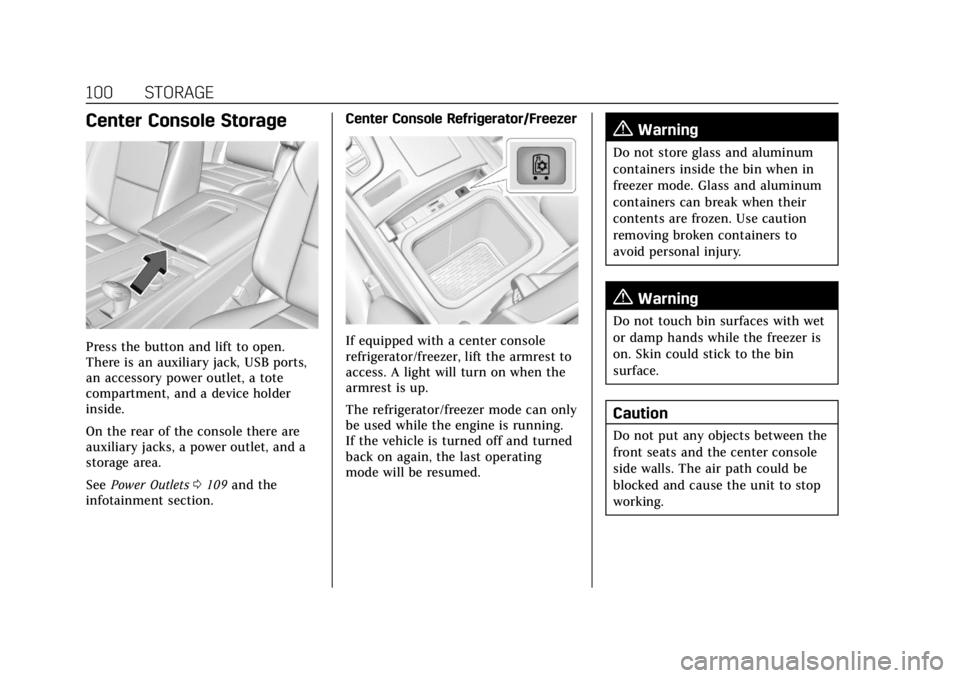
Press the button and lift to open.
There is an auxiliary jack, USB ports,
an accessory power outlet, a tote
compartment, and a device holder
inside.
On the rear of the console there are
auxiliary jacks, a power outlet, and a
storage area.
SeePower Outlets 0109 and the
infotainment section. Center Console Refrigerator/FreezerIf equipped with a center console
refrigerator/freezer, lift the armrest to
access. A light will turn on when the
armrest is up.
The refrigerator/freezer mode can only
be used while the engine is running.
If the vehicle is turned off and turned
back on again, the last operating
mode will be resumed.
{Warning
Do not store glass and aluminum
containers inside the bin when in
freezer mode. Glass and aluminum
containers can break when their
contents are frozen. Use caution
removing broken containers to
avoid personal injury.
{Warning
Do not touch bin surfaces with wet
or damp hands while the freezer is
on. Skin could stick to the bin
surface.
Caution
Do not put any objects between the
front seats and the center console
side walls. The air path could be
blocked and cause the unit to stop
working.
Page 103 of 508
Cadillac Escalade Owner Manual (GMNA-Localizing-U.S./Canada/Mexico-
15567102) - 2022 - CRC - 11/17/21
102 STORAGE
Convenience Net
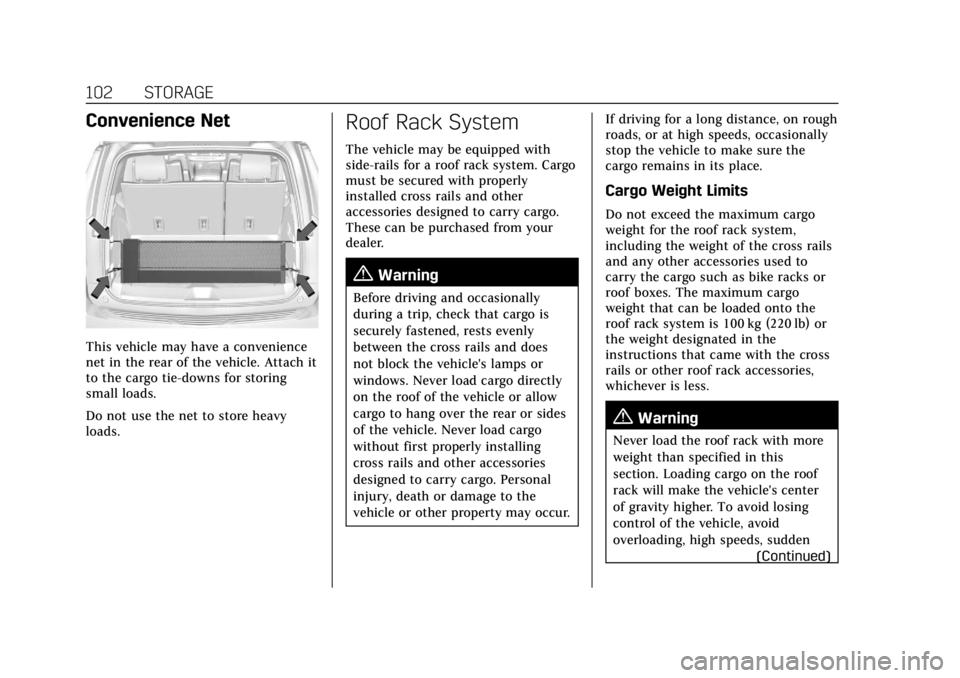
This vehicle may have a convenience
net in the rear of the vehicle. Attach it
to the cargo tie-downs for storing
small loads.
Do not use the net to store heavy
loads.
Roof Rack System
The vehicle may be equipped with
side-rails for a roof rack system. Cargo
must be secured with properly
installed cross rails and other
accessories designed to carry cargo.
These can be purchased from your
dealer.
{Warning
Before driving and occasionally
during a trip, check that cargo is
securely fastened, rests evenly
between the cross rails and does
not block the vehicle's lamps or
windows. Never load cargo directly
on the roof of the vehicle or allow
cargo to hang over the rear or sides
of the vehicle. Never load cargo
without first properly installing
cross rails and other accessories
designed to carry cargo. Personal
injury, death or damage to the
vehicle or other property may occur.If driving for a long distance, on rough
roads, or at high speeds, occasionally
stop the vehicle to make sure the
cargo remains in its place.
Cargo Weight Limits
Do not exceed the maximum cargo
weight for the roof rack system,
including the weight of the cross rails
and any other accessories used to
carry the cargo such as bike racks or
roof boxes. The maximum cargo
weight that can be loaded onto the
roof rack system is 100 kg (220 lb) or
the weight designated in the
instructions that came with the cross
rails or other roof rack accessories,
whichever is less.
{Warning
Never load the roof rack with more
weight than specified in this
section. Loading cargo on the roof
rack will make the vehicle's center
of gravity higher. To avoid losing
control of the vehicle, avoid
overloading, high speeds, sudden
(Continued)
Page 104 of 508

Cadillac Escalade Owner Manual (GMNA-Localizing-U.S./Canada/Mexico-
15567102) - 2022 - CRC - 11/17/21
STORAGE 103
Warning (Continued)
starts, sharp turns, sudden braking,
or abrupt maneuvers when carrying
cargo on the roof rack.
The weight of any cargo carried on the
roof rack system must be included in
calculating the loaded weight of the
vehicle. Do not exceed the maximum
vehicle capacity when loading the
vehicle, including cargo carried on the
roof rack system and passengers and
cargo carried in the vehicle. For more
information on vehicle capacity and
loading, see Vehicle Load Limits 0241.
Page 105 of 508
Cadillac Escalade Owner Manual (GMNA-Localizing-U.S./Canada/Mexico-
15567102) - 2022 - CRC - 11/18/21
104 INSTRUMENTS AND CONTROLS
Instruments and
Controls
Controls
Steering Wheel Adjustment . . . . . 105
Steering Wheel Controls . . . . . . . . . 105
Heated Steering Wheel . . . . . . . . . . 105
Horn . . . . . . . . . . . . . . . . . . . . . . . . . . . . . . . 105
Windshield Wiper/Washer . . . . . . . 106
Rear Window Wiper/Washer . . . . 108
Compass . . . . . . . . . . . . . . . . . . . . . . . . . . 109
Clock . . . . . . . . . . . . . . . . . . . . . . . . . . . . . . 109
Power Outlets . . . . . . . . . . . . . . . . . . . . . 109
Wireless Charging . . . . . . . . . . . . . . . . 112
Warning Lights, Gauges, and
Indicators
Warning Lights, Gauges, andIndicators . . . . . . . . . . . . . . . . . . . . . . . 114
Instrument Cluster . . . . . . . . . . . . . . . 115
Speedometer . . . . . . . . . . . . . . . . . . . . . . 116
Odometer . . . . . . . . . . . . . . . . . . . . . . . . . 117
Trip Odometer . . . . . . . . . . . . . . . . . . . . 117
Tachometer . . . . . . . . . . . . . . . . . . . . . . . 117
Fuel Gauge . . . . . . . . . . . . . . . . . . . . . . . . 117
Engine Oil Pressure Gauge . . . . . . . 117
Engine Coolant Temperature Gauge . . . . . . . . . . . . . . . . . . . . . . . . . . . . 118 Transmission Temperature
Gauge . . . . . . . . . . . . . . . . . . . . . . . . . . . . 119
Voltmeter Gauge . . . . . . . . . . . . . . . . . 120
Seat Belt Reminders . . . . . . . . . . . . . . 120
Airbag Readiness Light . . . . . . . . . . 121
Passenger Airbag Status Indicator . . . . . . . . . . . . . . . . . . . . . . . . . 122
Charging System Light . . . . . . . . . . . 123
Malfunction Indicator Lamp (Check Engine Light) . . . . . . . . . . . 123
Brake System Warning Light . . . . 125
Electric Parking Brake Light . . . . . 125
Service Electric Parking Brake Light . . . . . . . . . . . . . . . . . . . . . . . . . . . . . 126
Antilock Brake System (ABS) Warning Light . . . . . . . . . . . . . . . . . . 126
Automatic Vehicle Hold (AVH) Light . . . . . . . . . . . . . . . . . . . . . . . . . . . . . 126
Lane Keep Assist (LKA) Light . . . 127
Automatic Emergency Braking (AEB) Disabled Light . . . . . . . . . . . 127
Vehicle Ahead Indicator . . . . . . . . . 127
Pedestrian Ahead Indicator . . . . . . 127
Traction Off Light . . . . . . . . . . . . . . . . 128
StabiliTrak OFF Light . . . . . . . . . . . . 128
Traction Control System (TCS)/ StabiliTrak Light . . . . . . . . . . . . . . . . 128
Engine Coolant Temperature Warning Light . . . . . . . . . . . . . . . . . . 129
Driver Mode Control Light . . . . . . . 129 Four Corner Air Suspension
Light . . . . . . . . . . . . . . . . . . . . . . . . . . . . . 130
Tire Pressure Light . . . . . . . . . . . . . . . 130
Engine Oil Pressure Light . . . . . . . . 131
Low Fuel Warning Light . . . . . . . . . 131
Security Light . . . . . . . . . . . . . . . . . . . . . 132
High-Beam On Light . . . . . . . . . . . . . 132
Lamps On Reminder . . . . . . . . . . . . . 132
Cruise Control Light . . . . . . . . . . . . . . 132
Door Ajar Light . . . . . . . . . . . . . . . . . . . 133
Information Displays
Driver Information Center (DIC) . . . . . . . . . . . . . . . . . . . . . 133
Vehicle Information . . . . . . . . . . . . . . 136
Head-Up Display (HUD) . . . . . . . . . 136
Vehicle Messages
Vehicle Messages . . . . . . . . . . . . . . . . . 139
Engine Power Messages . . . . . . . . . . 139
Vehicle Speed Messages . . . . . . . . . 140
Vehicle Personalization
Vehicle Personalization . . . . . . . . . . 140
Universal Remote System
Universal Remote System . . . . . . . . 147
Universal Remote System Programming . . . . . . . . . . . . . . . . . . . 147
Universal Remote System Operation . . . . . . . . . . . . . . . . . . . . . . . . 149
Page 108 of 508

Cadillac Escalade Owner Manual (GMNA-Localizing-U.S./Canada/Mexico-
15567102) - 2022 - CRC - 11/18/21
INSTRUMENTS AND CONTROLS 107
has been activated. SeeWasher Fluid
0 383 for information on filling the
windshield washer fluid reservoir.
{Warning
In freezing weather, do not use the
washer until the windshield is
warmed. Otherwise the washer fluid
can form ice on the windshield,
blocking your vision.
{Warning
Before driving the vehicle, always
clear snow and ice from the hood,
windshield, washer nozzles, roof,
and rear of the vehicle, including all
lamps and windows. Reduced
visibility from snow and ice buildup
could lead to a crash.
Clear snow and ice from the wiper
blades and windshield before using
them. If frozen to the windshield,
carefully loosen or thaw them.
Damaged blades should be replaced.
See Wiper Blade Replacement 0388. Heavy snow or ice can overload the
wiper motor. See
Electrical System
Overload 0390.
Night Vision Camera Washer
When it is dark enough for the night
vision system to operate, activate the
front windshield washer five times to
clean the camera sensor.
See Night Vision System 0325 for
information on using the night vision
system.
Wiper Parking
If the ignition is turned off while the
wipers are on LO, HI, or AUTO with
Rainsense turned off, they will
immediately stop.
If the windshield wiper lever is then
moved to OFF before the driver door is
opened or within 10 minutes, the
wipers will restart and move to the
base of the windshield.
If the ignition is turned off while the
wipers are performing wipes due to
windshield washing or Rainsense, the
wipers continue to run until they
reach the base of the windshield.
Rainsense
If equipped with Rainsense and the
feature is turned on, a sensor near the
top center of the windshield detects
the amount of water on the
windshield and controls the frequency
of the windshield wiper based on the
current sensitivity setting.
Keep this area of the windshield clear
of debris to allow for best system
performance.
AUTO : Move the windshield wiper
lever to AUTO. Turn the band on the
wiper lever to adjust the sensitivity.
.Turn the band up for more
sensitivity to moisture.
.Turn the band down for less
sensitivity to moisture.
Page 113 of 508

Cadillac Escalade Owner Manual (GMNA-Localizing-U.S./Canada/Mexico-
15567102) - 2022 - CRC - 11/18/21
112 INSTRUMENTS AND CONTROLS
Wireless Charging
If equipped and enabled, the vehicle
has wireless charging in the center
console in front of the storage bin.
The system operates at 145 kHz and
wirelessly charges one Qi compatible
smartphone. The power output of the
system is capable of charging at a rate
up to 3 amp (15 W), as requested by
the compatible smartphone. SeeRadio
Frequency Statement 0481.
{Warning
Wireless charging may affect the
operation of an implanted
pacemaker or other medical devices.
If you have one, it is recommended
to consult with your doctor before
using the wireless charging system.
The vehicle must be on, in ACC/
ACCESSORY, or Retained Accessory
Power (RAP) must be active. The
wireless charging feature may not
correctly indicate charging when the
vehicle is in RAP, during a Bluetooth
phone call, or when phone projection (e.g. Apple CarPlay / Android Auto) is
active. See
Retained Accessory Power
(RAP) 0250.
The operating temperature is −40 °C
(−40 °F) to 85 °C (185 °F) for the
charging system and 0 °C (32 °F) to
35 °C (95 °F) for the phone. A charging
stopped alert may be displayed on the
infotainment screen, if the wireless
charger or smartphone are outside of
normal operating temperature.
Charging will automatically resume
when a normal operating temperature
is reached.
{Warning
Remove all objects from the charger
before charging your compatible
smartphone. Objects, such as coins,
keys, rings, paper clips, or cards,
between the smartphone and
charger may become very hot.
On the rare occasion that the
charging system does not detect an
object, and the object gets wedged
between the smartphone and
charger, remove the smartphone
(Continued)
Warning (Continued)
and allow the object to cool before
removing it from the charger, to
prevent burns.
To charge a compatible smartphone:
1. Confirm the smartphone is capable of wireless charging.
2. Remove all objects from the charging pocket. The system may
not charge if there are any objects
between the smartphone and
charger.
Page 115 of 508

Cadillac Escalade Owner Manual (GMNA-Localizing-U.S./Canada/Mexico-
15567102) - 2022 - CRC - 11/18/21
114 INSTRUMENTS AND CONTROLS
Freescale-WCT library
Copyright (c) 2012-2014 Freescale
Semiconductor, Inc.. All rights
reserved.
Redistribution and use in source and
binary forms, with or without
modification, are permitted provided
that the following conditions are met:1. Redistributions of source code must retain the above copyright
notice, this list of conditions and
the following disclaimer.
2. Redistributions in binary form must reproduce the above
copyright notice, this list of
conditions and the following
disclaimer in the documentation
and/or other materials provided
with the distribution.
3. Neither the name of the copyright holder nor the names of its
contributors may be used to
endorse or promote products
derived from this software without
specific prior written permission. THIS SOFTWARE IS PROVIDED BY
THE COPYRIGHT HOLDERS AND
CONTRIBUTORS "AS IS" AND ANY
EXPRESS OR IMPLIED WARRANTIES,
INCLUDING, BUT NOT LIMITED TO,
THE IMPLIED WARRANTIES OF
MERCHANTABILITY AND FITNESS
FOR A PARTICULAR PURPOSE ARE
DISCLAIMED. IN NO EVENT SHALL
THE COPYRIGHT HOLDER OR
CONTRIBUTORS BE LIABLE FOR ANY
DIRECT, INDIRECT, INCIDENTAL,
SPECIAL, EXEMPLARY, OR
CONSEQUENTIAL DAMAGES
(INCLUDING, BUT NOT LIMITED TO,
PROCUREMENT OF SUBSTITUTE
GOODS OR SERVICES; LOSS OF USE,
DATA, OR PROFITS; OR BUSINESS
INTERRUPTION) HOWEVER CAUSED
AND ON ANY THEORY OF LIABILITY,
WHETHER IN CONTRACT, STRICT
LIABILITY, OR TORT (INCLUDING
NEGLIGENCE OR OTHERWISE)
ARISING IN ANY WAY OUT OF THE
USE OF THIS SOFTWARE, EVEN IF
ADVISED OF THE POSSIBILITY OF
SUCH DAMAGE.Warning Lights, Gauges,
and Indicators
Warning lights and gauges can signal
that something is wrong before it
becomes serious enough to cause an
expensive repair or replacement.
Paying attention to the warning lights
and gauges could prevent injury.
Some warning lights come on briefly
when the engine is started to indicate
they are working. When one of the
warning lights comes on and stays on
while driving, or when one of the
gauges shows there may be a problem,
check the section that explains what
to do. Waiting to do repairs can be
costly and even dangerous.
Page 117 of 508
Cadillac Escalade Owner Manual (GMNA-Localizing-U.S./Canada/Mexico-
15567102) - 2022 - CRC - 11/18/21
116 INSTRUMENTS AND CONTROLS
Touchscreen Display
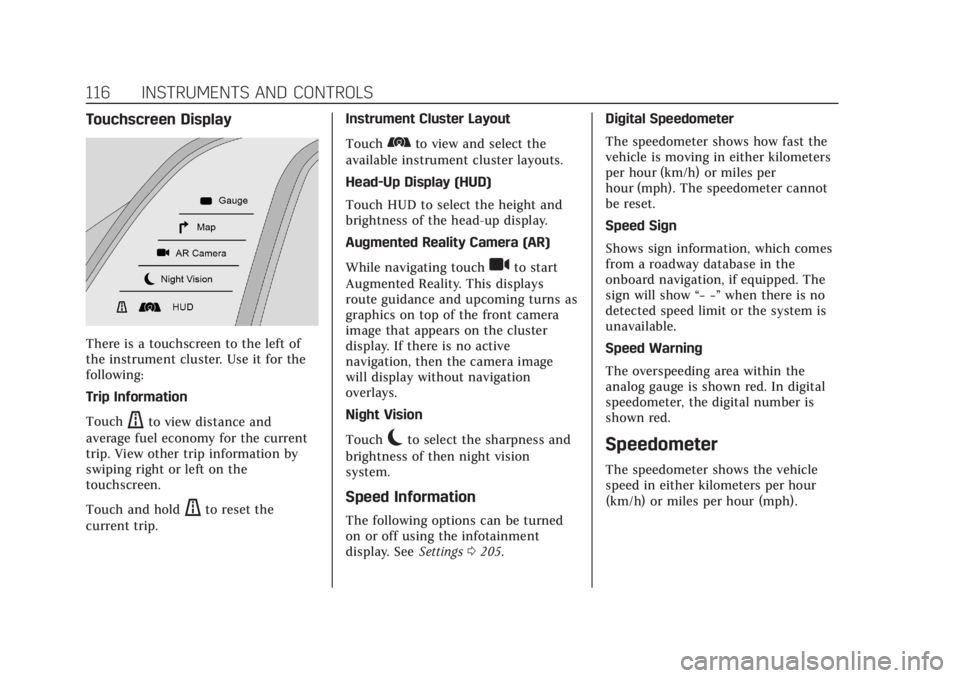
There is a touchscreen to the left of
the instrument cluster. Use it for the
following:
Trip Information
Touch
ato view distance and
average fuel economy for the current
trip. View other trip information by
swiping right or left on the
touchscreen.
Touch and hold
ato reset the
current trip. Instrument Cluster Layout
Touch
bto view and select the
available instrument cluster layouts.
Head-Up Display (HUD)
Touch HUD to select the height and
brightness of the head-up display.
Augmented Reality Camera (AR)
While navigating touch
ito start
Augmented Reality. This displays
route guidance and upcoming turns as
graphics on top of the front camera
image that appears on the cluster
display. If there is no active
navigation, then the camera image
will display without navigation
overlays.
Night Vision
Touch
cto select the sharpness and
brightness of then night vision
system.
Speed Information
The following options can be turned
on or off using the infotainment
display. See Settings0205. Digital Speedometer
The speedometer shows how fast the
vehicle is moving in either kilometers
per hour (km/h) or miles per
hour (mph). The speedometer cannot
be reset.
Speed Sign
Shows sign information, which comes
from a roadway database in the
onboard navigation, if equipped. The
sign will show
“− −”when there is no
detected speed limit or the system is
unavailable.
Speed Warning
The overspeeding area within the
analog gauge is shown red. In digital
speedometer, the digital number is
shown red.
Speedometer
The speedometer shows the vehicle
speed in either kilometers per hour
(km/h) or miles per hour (mph).
Page 119 of 508

Cadillac Escalade Owner Manual (GMNA-Localizing-U.S./Canada/Mexico-
15567102) - 2022 - CRC - 11/18/21
118 INSTRUMENTS AND CONTROLS
The engine oil pressure gauge shows
the engine oil pressure
in kPa (kilopascals) or psi (pounds per
square inch) when the engine is
running.
This gauge displays on the
infotainment display. If show in
cluster is selected a digital value is
shown on the instrument cluster in
the left zone.
Oil pressure can vary with engine
speed, outside temperature, coolant
temperature, and oil viscosity.
On some models, the oil pump will
vary engine oil pressure according to
engine needs. Oil pressure may change
quickly as the engine speed or load
varies. This is normal. If the oil
pressure warning light or Driver
Information Center (DIC) message
indicates oil pressure outside the
normal operating range, check the
vehicle's oil as soon as possible.
SeeEngine Oil 0373.Caution
Lack of proper engine oil
maintenance can damage the
engine. Driving with the engine oil
low can also damage the engine.
The repairs would not be covered
by the vehicle warranty. Check the
oil level as soon as possible. Add oil
if required, but if the oil level is
within the operating range and the
oil pressure is still low, have the
vehicle serviced. Always follow the
maintenance schedule for changing
engine oil.
Engine Coolant
Temperature Gauge
Metric
English