fuel pressure CADILLAC ESCALADE 2022 Owners Manual
[x] Cancel search | Manufacturer: CADILLAC, Model Year: 2022, Model line: ESCALADE, Model: CADILLAC ESCALADE 2022Pages: 508, PDF Size: 9.18 MB
Page 105 of 508
Cadillac Escalade Owner Manual (GMNA-Localizing-U.S./Canada/Mexico-
15567102) - 2022 - CRC - 11/18/21
104 INSTRUMENTS AND CONTROLS
Instruments and
Controls
Controls
Steering Wheel Adjustment . . . . . 105
Steering Wheel Controls . . . . . . . . . 105
Heated Steering Wheel . . . . . . . . . . 105
Horn . . . . . . . . . . . . . . . . . . . . . . . . . . . . . . . 105
Windshield Wiper/Washer . . . . . . . 106
Rear Window Wiper/Washer . . . . 108
Compass . . . . . . . . . . . . . . . . . . . . . . . . . . 109
Clock . . . . . . . . . . . . . . . . . . . . . . . . . . . . . . 109
Power Outlets . . . . . . . . . . . . . . . . . . . . . 109
Wireless Charging . . . . . . . . . . . . . . . . 112
Warning Lights, Gauges, and
Indicators
Warning Lights, Gauges, andIndicators . . . . . . . . . . . . . . . . . . . . . . . 114
Instrument Cluster . . . . . . . . . . . . . . . 115
Speedometer . . . . . . . . . . . . . . . . . . . . . . 116
Odometer . . . . . . . . . . . . . . . . . . . . . . . . . 117
Trip Odometer . . . . . . . . . . . . . . . . . . . . 117
Tachometer . . . . . . . . . . . . . . . . . . . . . . . 117
Fuel Gauge . . . . . . . . . . . . . . . . . . . . . . . . 117
Engine Oil Pressure Gauge . . . . . . . 117
Engine Coolant Temperature Gauge . . . . . . . . . . . . . . . . . . . . . . . . . . . . 118 Transmission Temperature
Gauge . . . . . . . . . . . . . . . . . . . . . . . . . . . . 119
Voltmeter Gauge . . . . . . . . . . . . . . . . . 120
Seat Belt Reminders . . . . . . . . . . . . . . 120
Airbag Readiness Light . . . . . . . . . . 121
Passenger Airbag Status Indicator . . . . . . . . . . . . . . . . . . . . . . . . . 122
Charging System Light . . . . . . . . . . . 123
Malfunction Indicator Lamp (Check Engine Light) . . . . . . . . . . . 123
Brake System Warning Light . . . . 125
Electric Parking Brake Light . . . . . 125
Service Electric Parking Brake Light . . . . . . . . . . . . . . . . . . . . . . . . . . . . . 126
Antilock Brake System (ABS) Warning Light . . . . . . . . . . . . . . . . . . 126
Automatic Vehicle Hold (AVH) Light . . . . . . . . . . . . . . . . . . . . . . . . . . . . . 126
Lane Keep Assist (LKA) Light . . . 127
Automatic Emergency Braking (AEB) Disabled Light . . . . . . . . . . . 127
Vehicle Ahead Indicator . . . . . . . . . 127
Pedestrian Ahead Indicator . . . . . . 127
Traction Off Light . . . . . . . . . . . . . . . . 128
StabiliTrak OFF Light . . . . . . . . . . . . 128
Traction Control System (TCS)/ StabiliTrak Light . . . . . . . . . . . . . . . . 128
Engine Coolant Temperature Warning Light . . . . . . . . . . . . . . . . . . 129
Driver Mode Control Light . . . . . . . 129 Four Corner Air Suspension
Light . . . . . . . . . . . . . . . . . . . . . . . . . . . . . 130
Tire Pressure Light . . . . . . . . . . . . . . . 130
Engine Oil Pressure Light . . . . . . . . 131
Low Fuel Warning Light . . . . . . . . . 131
Security Light . . . . . . . . . . . . . . . . . . . . . 132
High-Beam On Light . . . . . . . . . . . . . 132
Lamps On Reminder . . . . . . . . . . . . . 132
Cruise Control Light . . . . . . . . . . . . . . 132
Door Ajar Light . . . . . . . . . . . . . . . . . . . 133
Information Displays
Driver Information Center (DIC) . . . . . . . . . . . . . . . . . . . . . 133
Vehicle Information . . . . . . . . . . . . . . 136
Head-Up Display (HUD) . . . . . . . . . 136
Vehicle Messages
Vehicle Messages . . . . . . . . . . . . . . . . . 139
Engine Power Messages . . . . . . . . . . 139
Vehicle Speed Messages . . . . . . . . . 140
Vehicle Personalization
Vehicle Personalization . . . . . . . . . . 140
Universal Remote System
Universal Remote System . . . . . . . . 147
Universal Remote System Programming . . . . . . . . . . . . . . . . . . . 147
Universal Remote System Operation . . . . . . . . . . . . . . . . . . . . . . . . 149
Page 118 of 508
Cadillac Escalade Owner Manual (GMNA-Localizing-U.S./Canada/Mexico-
15567102) - 2022 - CRC - 11/18/21
INSTRUMENTS AND CONTROLS 117
Odometer
The odometer shows how far the
vehicle has been driven, in either
kilometers or miles.
Trip Odometer
The trip odometer shows how far the
vehicle has been driven since the trip
odometer was last reset.
The trip odometer is accessed and
reset through the Driver Information
Center (DIC). SeeDriver Information
Center (DIC) 0133.
Tachometer
The tachometer displays the engine
speed in revolutions per minute (rpm).
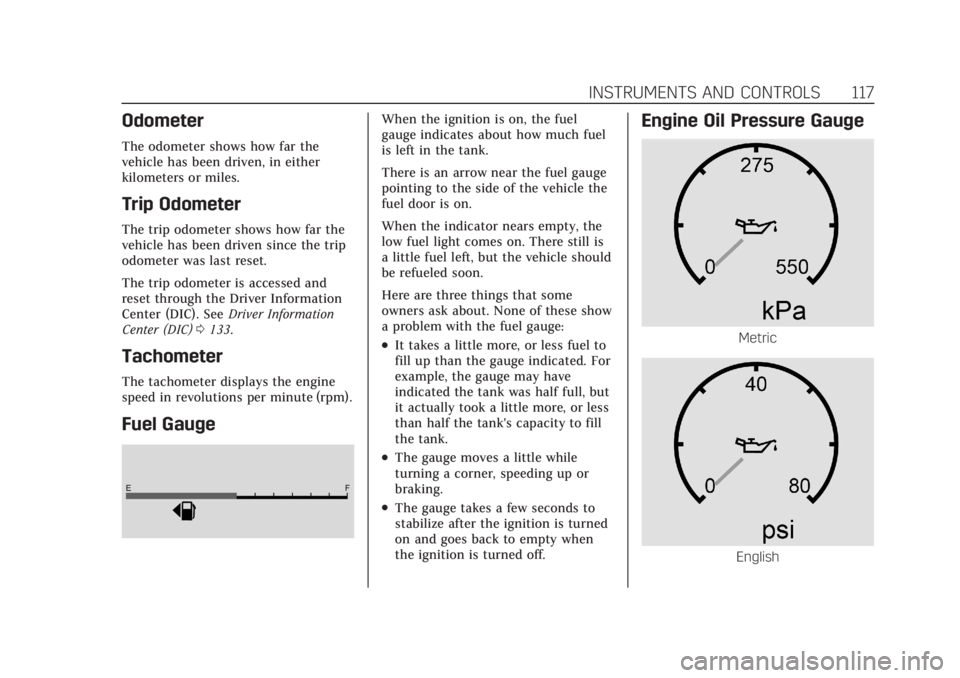
Fuel Gauge
When the ignition is on, the fuel
gauge indicates about how much fuel
is left in the tank.
There is an arrow near the fuel gauge
pointing to the side of the vehicle the
fuel door is on.
When the indicator nears empty, the
low fuel light comes on. There still is
a little fuel left, but the vehicle should
be refueled soon.
Here are three things that some
owners ask about. None of these show
a problem with the fuel gauge:
.It takes a little more, or less fuel to
fill up than the gauge indicated. For
example, the gauge may have
indicated the tank was half full, but
it actually took a little more, or less
than half the tank's capacity to fill
the tank.
.The gauge moves a little while
turning a corner, speeding up or
braking.
.The gauge takes a few seconds to
stabilize after the ignition is turned
on and goes back to empty when
the ignition is turned off.
Engine Oil Pressure Gauge
Metric
English
Page 132 of 508

Cadillac Escalade Owner Manual (GMNA-Localizing-U.S./Canada/Mexico-
15567102) - 2022 - CRC - 11/18/21
INSTRUMENTS AND CONTROLS 131
stack, below the infotainment screen.
It provides information about tire
pressures and the TPMS.
When the Light Is On Steady
This indicates that one or more of the
tires are significantly underinflated.
A Driver Information Center (DIC) tire
pressure message may also display.
Stop as soon as possible, and inflate
the tires to the pressure value shown
on the Tire and Loading Information
label. SeeTire Pressure 0409.
When the Light Flashes First and
Then Is On Steady
If the light flashes for about a minute
and then stays on, there may be a
problem with the TPMS. If the
problem is not corrected, the light will
come on every time the vehicle is
started. See Tire Pressure Monitor
Operation 0412.Engine Oil Pressure Light
Caution
Lack of proper engine oil
maintenance can damage the
engine. Driving with the engine oil
low can also damage the engine.
The repairs would not be covered
by the vehicle warranty. Check the
oil level as soon as possible. Add oil
if required, but if the oil level is
within the operating range and the
oil pressure is still low, have the
vehicle serviced. Always follow the
maintenance schedule for changing
engine oil.
This light should come on briefly as
the engine is started. If it does not
come on, have the vehicle serviced by
your dealer. If the light comes on and stays on, it
means that oil is not flowing through
the engine properly. The vehicle could
be low on oil and might have some
other system problem. See your dealer.
Low Fuel Warning Light
A Low Fuel Warning Light near the
fuel gauge comes on briefly when the
ignition is turned on as a check to
show it is working.
It also comes on when the fuel gauge
indicator nears empty. The light turns
off when fuel is added. If it does not,
have the vehicle serviced.
Page 136 of 508

Cadillac Escalade Owner Manual (GMNA-Localizing-U.S./Canada/Mexico-
15567102) - 2022 - CRC - 11/18/21
INSTRUMENTS AND CONTROLS 135
TRAILER GAIN shows the trailer gain
setting. This setting can be adjusted
from 0.0 to 10.0 with either a trailer
connected or disconnected.
TRAILER OUTPUT shows the power
output to the trailer any time a trailer
with electric brakes is connected.
Output is displayed as a bar graph.
Dotted lines may appear in the
OUTPUT display if a trailer is not
connected.
Oil Life :Shows an estimate of the
oil's remaining useful life.
If REMAINING OIL LIFE 99% is
displayed, that means 99% of the
current oil life remains.
When the remaining oil life is low, the
CHANGE ENGINE OIL SOON message
will appear on the display. The oil
should be changed as soon as
possible. See Engine Oil0373. In
addition to the engine oil life system
monitoring the oil life, additional
maintenance is recommended. See
Maintenance Schedule 0455.
The Oil Life display must be reset
after each oil change. It will not reset
itself. Do not reset the Oil Life display
accidentally at any time other than when the oil has just been changed.
It cannot be reset accurately until the
next oil change. To reset, see
Engine
Oil Life System 0375.
Fuel Economy : Displays information
about current and average fuel
economy.
Oil Pressure : Shows the engine oil
pressure in kPa (kilopascals)
or psi (pounds per square inch).
Engine Hours : Shows the total
number of hours the engine has run.
Coolant Temperature : Shows the
temperature of the coolant in either
degrees Celsius (°C) or degrees
Fahrenheit (°F).
Transmission Fluid Temperature :
Shows the temperature of the
automatic transmission fluid in either
degrees Celsius (°C) or degrees
Fahrenheit (°F).
Air Filter Life : Shows an estimate of
the engine air filter’s remaining useful
life and the state of the system.
Engine Air Filter Life 95% means 95%
of the current air filter life remains.
Messages will display based on the
engine air filter life and the state of the system. When the REPLACE AT
NEXT OIL CHANGE message displays,
the engine air filter should be replaced
at the time of the next oil change.
When the REPLACE SOON message
displays, the engine air filter should
be replaced at the earliest
convenience.
The Air Filter Life display must be
reset after the engine air filter
replacement. To reset, see
Engine Air
Filter Life System 0377.
Brake Pad Life : This displays an
estimate of the remaining life of the
front and rear brake pads. Messages
will display based on brake pad wear
and the state of the system. Reset the
Brake Pad Life display after replacing
the brake pads. See Brake Pad Life
System 0384.
Tire Pressure : Shows the
approximate pressures of all four tires.
Tire pressure is displayed in either
kilopascal (kPa) or in pounds per
square inch (psi). If the pressure is
low, the value for that tire is shown in
amber. See Tire Pressure Monitor
System 0411 and
Tire Pressure Monitor Operation 0412.
Page 137 of 508

Cadillac Escalade Owner Manual (GMNA-Localizing-U.S./Canada/Mexico-
15567102) - 2022 - CRC - 11/18/21
136 INSTRUMENTS AND CONTROLS
Off :Allows for no information to be
displayed in the cluster info display
areas.
Right Zone
Audio Now Playing : Displays the
actively playing audio.
Navigation : Displays a variety of
navigation information.
Audio and Navigation : Displays both
audio and navigation information
together.
Off : Allows for no information to be
displayed in the cluster info display
areas.
Vehicle Information
The following are all possible vehicle
information features.
To access the vehicle information
menu, press
Ton the Multi
Function Controller (MFC) or touch
Tfrom the list of home page icons
displayed on the left side of the
infotainment display.
The Vehicle Information App will
display 3 cards per page. The currently displayed page of cards
is remembered from the last ignition
cycle.
The menu may contain the following
cards:
.Notifications
.Oil Life
.Tire Pressure
.Fuel Economy
.Average Speed
.Timer
.Diesel Exhaust Fluid
.Fuel Filter Life
.Off-Road
.Engine Hours
.Battery Voltage
.Oil Pressure
.Trailer Brake
.Coolant Temperature
.Transmission Fluid Temp
.Air Filter Life
.Brake Pad Life
.Traction and Stability
.Time and Date
.Efficiency Gauge
Head-Up Display (HUD)
{Warning
If the HUD image is too bright or
too high in your field of view, it
may take you more time to see
things you need to see when it is
dark outside. Be sure to keep the
HUD image dim and placed low in
your field of view.
If equipped with HUD, some
information about the operation of
the vehicle is projected onto the
windshield. The image is projected
through the HUD lens on top of the
instrument panel. The information
appears as an image focused out
toward the front of the vehicle.
Caution
If you try to use the HUD image as
a parking aid, you may misjudge
the distance and damage your
vehicle. Do not use the HUD image
as a parking aid.
Page 236 of 508
Cadillac Escalade Owner Manual (GMNA-Localizing-U.S./Canada/Mexico-
15567102) - 2022 - CRC - 11/17/21
DRIVING AND OPERATING 235
Remember: Antilock brakes help avoid
only the braking skid.
Off-Road Driving
Four-wheel-drive vehicles can be used
for off-road driving. Vehicles without
four-wheel drive and vehicles not
equipped with All Terrain (AT) or
On-Off Road (OOR) tires must not be
driven off-road except on a level, solid
surface. For contact information about
the original equipment tires, see the
warranty manual.
One of the best ways for successful
off-road driving is to control the
speed.
{Warning
When driving off-road, bouncing
and quick changes in direction can
easily throw you out of position.
This could cause you to lose control
and crash. You and your passengers
should always wear seat belts.
Before Driving Off-Road
.Have all necessary maintenance and
service work completed.
.Fuel the vehicle, fill fluid levels, and
check inflation pressure in all tires,
including the spare, if equipped.
.Read all the information about
four-wheel-drive vehicles in this
manual.
.Know the local laws that apply to
off-road driving.
Loading the Vehicle for Off-Road
Driving
{Warning
.Unsecured cargo on the load
floor can be tossed about when
driving over rough terrain. You or
your passengers can be struck by
flying objects. Secure the cargo
properly.
.Keep cargo in the cargo area as
far forward and as low as
possible. The heaviest things
should be on the floor, forward
of the rear axle.
.Heavy loads on the roof raise the
vehicle's center of gravity,
making it more likely to roll over.
You can be seriously or fatally(Continued)
Warning (Continued)
injured if the vehicle rolls over.
Put heavy loads inside the cargo
area, not on the roof.
For more information about loading
the vehicle, see Vehicle Load Limits
0 241 and
Tires 0402.
Environmental Concerns
.Always use established trails, roads,
and areas that have been set aside
for public off-road recreational
driving and obey all posted
regulations.
.Do not damage shrubs, flowers,
trees, or grasses or disturb wildlife.
.Do not park over things that burn.
See Parking over Things That Burn
0 251.
Driving on Hills
Driving safely on hills requires good
judgment and an understanding of
what the vehicle can and cannot do.
Page 245 of 508

Cadillac Escalade Owner Manual (GMNA-Localizing-U.S./Canada/Mexico-
15567102) - 2022 - CRC - 11/17/21
244 DRIVING AND OPERATING
Example 3
1. Maximum Vehicle CapacityWeight for Example 3 = 453 kg
(1,000 lbs)
2. Subtract Occupant Weight @ 91 kg (200 lbs) × 5 = 453 kg
(1,000 lbs)
3. Available Cargo Weight = 0 kg (0 lbs)
Refer to the vehicle's Tire and
Loading Information label for
specific information about the
vehicle's capacity weight and
seating positions. The combined weight of the driver, passengers,
and cargo should never exceed the
vehicle's capacity weight.
Certification/Tire Label
Label Example
A vehicle specific Certification/
Tire label is attached to the
B-pillar. The label may show the
size of the vehicle's original tires
and the inflation pressures needed
to obtain the gross weight
capacity of the vehicle. This is
called Gross Vehicle Weight
Rating (GVWR). The GVWR
includes the weight of the vehicle,
all occupants, fuel, and cargo.
The Certification/Tire label may
also show the maximum weights
for the front and rear axles, called
Gross Axle Weight Rating (GAWR).
To find out the actual loads on
the front and rear axles, weigh the
vehicle at a weigh station. Your
dealer can help with this. Be sure
to spread the load equally on both
sides of the center line.
The warranty does not cover parts
or components that fail because of
overloading.
The label will help determine how
much cargo and installed
equipment the vehicle can carry.
Using heavier suspension
components to get added
durability might not change the
weight ratings. Ask your dealer to
help load the vehicle properly.
Page 362 of 508
Cadillac Escalade Owner Manual (GMNA-Localizing-U.S./Canada/Mexico-
15567102) - 2022 - CRC - 11/17/21
DRIVING AND OPERATING 361
Tire Pressure Monitoring System”, the
vehicle needs to be taken to a dealer
for service.
Maintenance
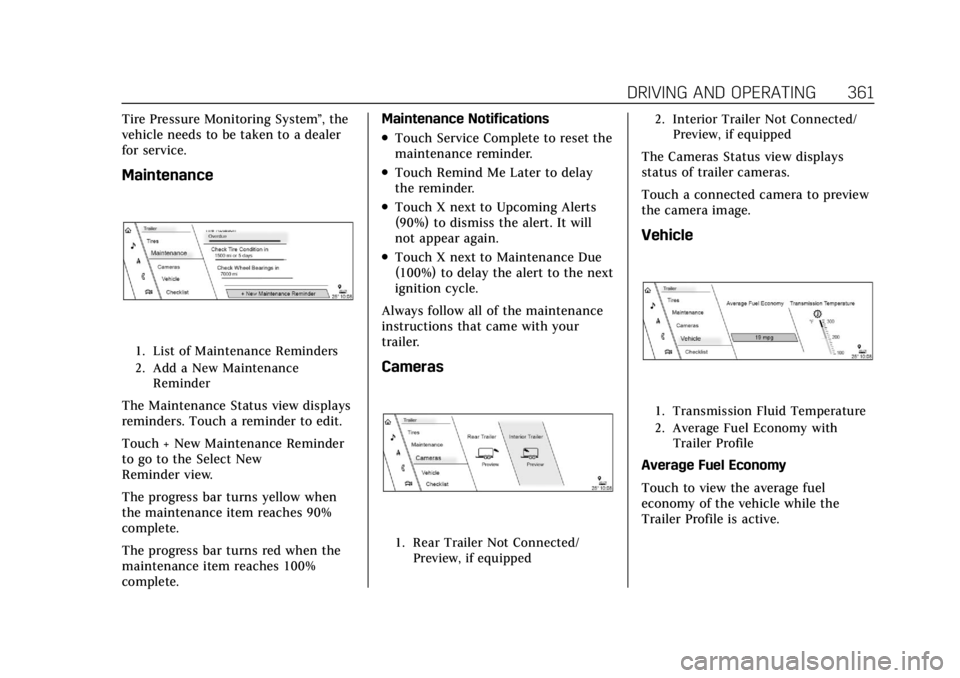
1. List of Maintenance Reminders
2. Add a New Maintenance Reminder
The Maintenance Status view displays
reminders. Touch a reminder to edit.
Touch + New Maintenance Reminder
to go to the Select New
Reminder view.
The progress bar turns yellow when
the maintenance item reaches 90%
complete.
The progress bar turns red when the
maintenance item reaches 100%
complete. Maintenance Notifications
.Touch Service Complete to reset the
maintenance reminder.
.Touch Remind Me Later to delay
the reminder.
.Touch X next to Upcoming Alerts
(90%) to dismiss the alert. It will
not appear again.
.Touch X next to Maintenance Due
(100%) to delay the alert to the next
ignition cycle.
Always follow all of the maintenance
instructions that came with your
trailer.
Cameras
1. Rear Trailer Not Connected/ Preview, if equipped 2. Interior Trailer Not Connected/
Preview, if equipped
The Cameras Status view displays
status of trailer cameras.
Touch a connected camera to preview
the camera image.
Vehicle
1. Transmission Fluid Temperature
2. Average Fuel Economy withTrailer Profile
Average Fuel Economy
Touch to view the average fuel
economy of the vehicle while the
Trailer Profile is active.
Page 364 of 508
Cadillac Escalade Owner Manual (GMNA-Localizing-U.S./Canada/Mexico-
15567102) - 2022 - CRC - 11/17/21
DRIVING AND OPERATING 363
All personalization features are based
on the settings for each driver in
vehicle personalization. The list of
Trailer Profiles is based on vehicle
personalization settings.
Guest Trailer
If the Guest Trailer Profile is the
active Trailer Profile, trailer detection,
connections status, theft, and the
Tow/Haul reminder alerts can be sent.
The system will not track total
mileage or fuel economy, but the
system will track trip mileage and fuel
economy if the Guest Trailer Profile is
active. The Trailer Tire Pressure
Monitoring System or maintenance
reminders cannot be set up for a
Guest Trailer Profile. The Guest Trailer
Profile cannot be edited.
Touch
pto learn more about the
Guest Trailer option.
Accessory/No Trailer
If the Accessory/No Trailer Profile is
active, alerts will not be sent and the
system will not track mileage or fuel
economy. The Trailer Tire Pressure
Monitoring System or maintenance
reminders cannot be set up for the Accessory/No Trailer Profile. The
Accessory/No Trailer profile cannot be
edited.
No Trailer Connected
When there is no trailer connected,
Trailer Profiles cannot be activated
but most options can be edited.
Trailer Brake Gain Memory
The system can memorize the brake
gain setting of a Trailer Profile or a
Guest Trailer Profile. When a Trailer
Profile or Guest Trailer Profile is
selected, and a brake gain setting is
set for that Trailer Profile, a quick
notice will appear to indicate that the
system has recalled that profile’s
brake gain setting.
If a Trailer Profile is already active
and the brake gain setting had been
set for that Trailer Profile, the quick
notice will trigger whenever the
ignition is turned on.
If there was an error in setting the
brake gain for a Trailer Profile, there
will be a notification. This pop-up will
not appear if the Guest Trailer Profile
is active or if there is no trailer
connected.Trailer brake gain should be set for a
specific trailering condition and must
be adjusted anytime vehicle loading,
trailer loading, or road surface
conditions change.
Editing a Trailer Profile
Trailer Profile View
Touch to edit any of the following
options in the Trailer Profile view:
.Trailer Name
.Towing Assistance Setup,
if equipped
.Tire Pressure Setup, if equipped
.Trailer Maintenance
.Edit Mileage
.Reset Average Fuel Economy
Touch Save to save the new value to
the Trailer Profile. Touching Back will
still save the previously entered
information.
Trailer Name
Touch to edit the Trailer Profile’s
name. Use at least one character and
no spaces. Touch Save.
Page 407 of 508

Cadillac Escalade Owner Manual (GMNA-Localizing-U.S./Canada/Mexico-
15567102) - 2022 - CRC - 11/17/21
406 VEHICLE CARE
(3) Aspect Ratio:A 2-digit
number that indicates the tire
height-to-width measurements.
For example, if the tire size aspect
ratio is 75, as shown in item (3) of
the illustration, it would mean
that the tire's sidewall is
75 percent as high as it is wide.
(4) Construction Code
:A letter
code is used to indicate the type
of ply construction in the tire. The
letter "R" means radial ply
construction; the letter "D" means
diagonal or bias ply construction.
(5) Rim Diameter
:Diameter of
the wheel in inches.
(6) Service Description
:These
characters represent the load
index and speed rating of the tire.
The load index represents the load
carrying capacity a tire is certified
to carry. The speed rating is the
maximum speed a tire is certified
to carry a load.
Tire Terminology and
Definitions
Air Pressure:The amount of air
inside the tire pressing outward
on each square inch of the tire.
Air pressure is expressed in kPa
(kilopascal) or psi (pounds per
square inch).
Accessory Weight
:The combined
weight of optional accessories.
Some examples of optional
accessories are automatic
transmission, power windows,
power seats, and air conditioning.
Aspect Ratio
:The relationship of
a tire's height to its width.
Belt
:A rubber coated layer of
cords between the plies and the
tread. Cords may be made from
steel or other reinforcing
materials. Bead
:The tire bead contains steel
wires wrapped by steel cords that
hold the tire onto the rim.
Bias Ply Tire
:A pneumatic tire in
which the plies are laid at
alternate angles less than
90 degrees to the centerline of the
tread.
Cold Tire Pressure
:The amount
of air pressure in a tire, measured
in kPa (kilopascal) or psi (pounds
per square inch) before a tire has
built up heat from driving. See
Tire Pressure 0409.
Curb Weight
:The weight of a
motor vehicle with standard and
optional equipment including the
maximum capacity of fuel, oil, and
coolant, but without passengers
and cargo.