center console CADILLAC ESCALADE 2023 User Guide
[x] Cancel search | Manufacturer: CADILLAC, Model Year: 2023, Model line: ESCALADE, Model: CADILLAC ESCALADE 2023Pages: 461, PDF Size: 7.99 MB
Page 97 of 461

Cadillac Escalade Owner Manual (GMNA-Localizing-U.S./Canada/Mexico-
16417396) - 2023 - CRC - 5/9/22
Storage 95
To turn off the refrigerator or freezer, press
the button until its lights are off. The bin
light can turn on when the refrigerator/
freezer is off.
The bottom mat is removable. Clean with
water and mild soap.
Clean the refrigerator/freezer bin while the
vehicle and the feature are turned off. Use a
damp, soft rag and wipe the bin carefully.
Do not scratch or puncture the bin surfaces.
Rear Console Storage
If equipped with storage in the back center
console, press the cover and release to
access. There may be two USB ports, two
HDMI ports, and a power outlet on the back
of the center console.
Additional Storage Features
Cargo Tie-Downs
There are two cargo tie-downs in the rear
cargo area. These can be used to strap cargo
down and keep it from moving inside the
vehicle.
Convenience Net
This vehicle may have a convenience net in
the rear of the vehicle. Attach it to the
cargo tie-downs for storing small loads.
Do not use the net to store heavy loads.
Roof Rack System
The vehicle may be equipped with side-rails
for a roof rack system. Cargo must be
secured with properly installed cross rails
and other accessories designed to carry
cargo. These can be purchased from your
dealer.
Page 104 of 461
Cadillac Escalade Owner Manual (GMNA-Localizing-U.S./Canada/Mexico-
16417396) - 2023 - CRC - 5/9/22
102 Instruments and Controls
satellites. When the compass display shows
CAL, drive the vehicle for a short distance in
an open area where it can receive a GPS
signal. The compass system will
automatically determine when a GPS signal
is restored and provide a heading again.
Clock
Set the time and date using the
infotainment system. See "Time/Date" under
Settings0184.
Power Outlets
Power Outlets 12-Volt Direct Current
Accessory power outlets can be used to plug
in electrical equipment, such as a cell phone
or MP3 player.
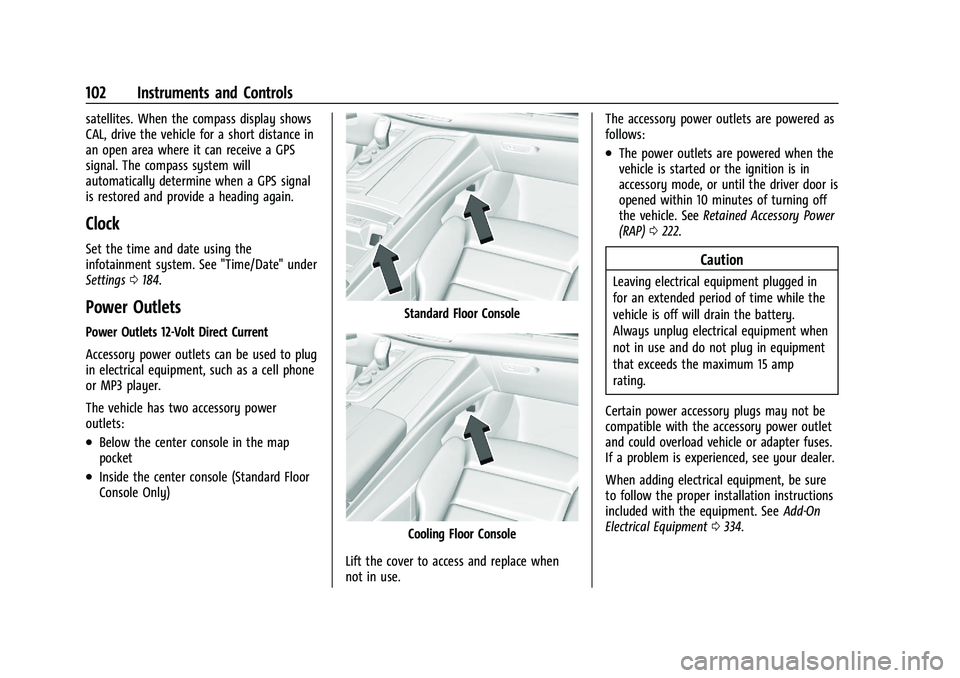
The vehicle has two accessory power
outlets:
.Below the center console in the map
pocket
.Inside the center console (Standard Floor
Console Only)
Standard Floor Console
Cooling Floor Console
Lift the cover to access and replace when
not in use. The accessory power outlets are powered as
follows:
.The power outlets are powered when the
vehicle is started or the ignition is in
accessory mode, or until the driver door is
opened within 10 minutes of turning off
the vehicle. See
Retained Accessory Power
(RAP) 0222.
Caution
Leaving electrical equipment plugged in
for an extended period of time while the
vehicle is off will drain the battery.
Always unplug electrical equipment when
not in use and do not plug in equipment
that exceeds the maximum 15 amp
rating.
Certain power accessory plugs may not be
compatible with the accessory power outlet
and could overload vehicle or adapter fuses.
If a problem is experienced, see your dealer.
When adding electrical equipment, be sure
to follow the proper installation instructions
included with the equipment. See Add-On
Electrical Equipment 0334.
Page 105 of 461

Cadillac Escalade Owner Manual (GMNA-Localizing-U.S./Canada/Mexico-
16417396) - 2023 - CRC - 5/9/22
Instruments and Controls 103
Caution
Hanging heavy equipment from the
power outlet can cause damage not
covered by the vehicle warranty. The
power outlets are designed for accessory
power plugs only, such as cell phone
charge cords.
Power Outlet 110/120 Volt Alternating
Current
If equipped, the vehicle has two alternating
current power outlets.
.Rear storage area
.Back of the center console
With Refrigerator/Freezer
Standard
When the ignition is on, power to the 110/
120 Volt outlet is enabled. 110 Volts is
supplied to the outlet when it is enabled
and electrical equipment is plugged into that
outlet. One power outlet can be used with
electrical equipment that uses a maximum
of 400 watts.
Ensure that all connected devices do not
exceed 400 watts.
An indicator light on the outlet illuminates
when the outlet is enabled and no system
fault is detected. The outlet will not provide
power when the ignition is off or the plug is
not fully seated into the outlet. The outlet
does not operate while the engine is starting. If a USB powered streaming device
is being used, it is suggested to use a USB
port for power. See
USB Port0154.
If uninterrupted power supply is required
while driving, disable the Auto Engine Stop/
Start System by pressing the Auto Stop
disable switch. See Stop/Start System0222.
If equipment is connected using more than
400 watts or a system fault is detected, a
protection circuit shuts off the power supply
and the indicator light will flash.
Do not use a power outlet with a missing or
damaged cover.
The power outlet is not designed for the
following, and may not work properly if
they are plugged in:
.Equipment with high initial peak wattage,
such as compressor-driven refrigerators
and electric power tools
.Other equipment requiring an extremely
stable power supply, such as
microcomputer-controlled electric blankets
and touch sensor lamps
.Medical equipment.
Page 106 of 461

Cadillac Escalade Owner Manual (GMNA-Localizing-U.S./Canada/Mexico-
16417396) - 2023 - CRC - 5/9/22
104 Instruments and Controls
Wireless Charging
If equipped and enabled, the vehicle has
wireless charging in the center console in
front of the storage bin. The system
operates at 145 kHz and wirelessly charges
one Qi compatible smartphone. The power
output of the system is capable of charging
at a rate up to 3 amp (15 W), as requested
by the compatible smartphone. SeeRadio
Frequency Statement 0435.
{Warning
Wireless charging may affect the
operation of an implanted pacemaker or
other medical devices. If you have one, it
is recommended to consult with your
doctor before using the wireless charging
system.
The vehicle must be on, in accessory mode,
or Retained Accessory Power (RAP) must be
active. The wireless charging feature may
not correctly indicate charging when the
vehicle is in RAP, during a Bluetooth phone
call, or when phone projection (e.g. Apple
CarPlay / Android Auto) is active. See
Retained Accessory Power (RAP) 0222. The operating temperature is
−40 °C (−40 °F)
to 85 °C (185 °F) for the charging system and
0 °C (32 °F) to 35 °C (95 °F) for the phone.
A charging stopped alert may be displayed
on the infotainment screen, if the wireless
charger or smartphone are outside of
normal operating temperature. Charging will
automatically resume when a normal
operating temperature is reached.
{Warning
Remove all objects from the charger
before charging your compatible
smartphone. Objects, such as coins, keys,
rings, paper clips, or cards, between the
smartphone and charger may become
very hot.
On the rare occasion that the charging
system does not detect an object, and
the object gets wedged between the
smartphone and charger, remove the
smartphone and allow the object to cool
before removing it from the charger, to
prevent burns.
To charge a compatible smartphone:
1. Confirm the smartphone is capable of wireless charging.
2. Remove all objects from the charging pocket. The system may not charge if
there are any objects between the
smartphone and charger.
3. Place the smartphone face up against the rear of the charger.
To maximize the charge rate, ensure the
smartphone is fully seated and centered
in the holder with nothing under it.
A thick smartphone case may prevent
the charger from working, or reduce the
charging performance. See your dealer
for additional information.
Page 115 of 461

Cadillac Escalade Owner Manual (GMNA-Localizing-U.S./Canada/Mexico-
16417396) - 2023 - CRC - 5/9/22
Instruments and Controls 113
Airbag Readiness Light
This light shows if there is an electrical
problem with the airbag system. It is
located on the center stack, below the
infotainment screen. The system check
includes the airbag sensor(s), the passenger
sensing system, the pretensioners, the
airbag modules, the wiring, and the crash
sensing and diagnostic module. For more
information on the airbag system, see
Airbag System063.
The airbag readiness light comes on for
several seconds when the vehicle is started.
If the light does not come on then, have it
fixed immediately.
{Warning
If the airbag readiness light stays on
after the vehicle is started or comes on
while driving, it means the airbag system
might not be working properly. The
(Continued)
Warning (Continued)
airbags in the vehicle might not inflate in
a crash, or they could even inflate
without a crash. To help avoid injury,
have the vehicle serviced right away.
If there is a problem with the airbag
system, a Driver Information Center (DIC)
message may also come on.
Passenger Airbag Status Indicator
The vehicle has a passenger sensing system.
See Passenger Sensing System 069 for
important safety information. The overhead
console has a passenger airbag status
indicator.
United States and Canada
When the vehicle is started, the passenger
airbag status indicator will light ON and OFF,
and the symbols for on and off, for several
seconds as a system check. Then, after several more seconds, the status indicator
will light either ON or OFF, and the symbol
for on or off, to let you know the status of
the front outboard passenger frontal airbag.
If the word ON, and the on symbol, are lit
on the passenger airbag status indicator, it
means that the front outboard passenger
frontal airbag is allowed to inflate.
If the word OFF, and the off symbol, are lit
on the passenger airbag status indicator, it
means that the passenger sensing system
has turned off the front outboard passenger
frontal airbag.
If, after several seconds, both status
indicator lights remain on, if there are no
lights at all, or if the airbag readiness light
is on, there may be a problem with the
lights or the passenger sensing system. See
your dealer for service right away.
{Warning
If the airbag readiness light ever comes
on and stays on, it means that
something may be wrong with the airbag
system. To help avoid injury to yourself
or others, have the vehicle serviced right
(Continued)
Page 147 of 461
Cadillac Escalade Owner Manual (GMNA-Localizing-U.S./Canada/Mexico-
16417396) - 2023 - CRC - 5/9/22
Infotainment System 145
.Set up the audio by presetting favorite
stations, setting the tone, and adjusting
the speakers.
.Set up phone numbers in advance so they
can be called easily by pressing a single
control or by using a single voice
command.
See Distracted Driving 0206.
Overview
Infotainment System
The infotainment system is controlled by
using the infotainment display, controls on
the center console, steering wheel controls,
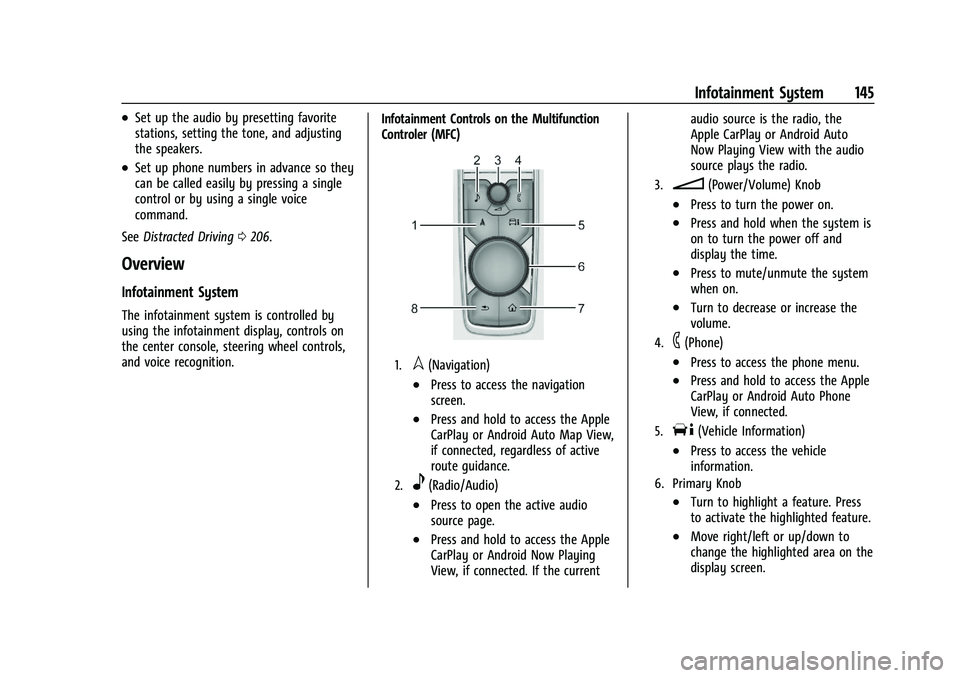
and voice recognition. Infotainment Controls on the Multifunction
Controler (MFC)
1.l(Navigation)
.Press to access the navigation
screen.
.Press and hold to access the Apple
CarPlay or Android Auto Map View,
if connected, regardless of active
route guidance.
2.e(Radio/Audio)
.Press to open the active audio
source page.
.Press and hold to access the Apple
CarPlay or Android Now Playing
View, if connected. If the currentaudio source is the radio, the
Apple CarPlay or Android Auto
Now Playing View with the audio
source plays the radio.
3.n(Power/Volume) Knob
.Press to turn the power on.
.Press and hold when the system is
on to turn the power off and
display the time.
.Press to mute/unmute the system
when on.
.Turn to decrease or increase the
volume.
4.6(Phone)
.Press to access the phone menu.
.Press and hold to access the Apple
CarPlay or Android Auto Phone
View, if connected.
5.T(Vehicle Information)
.Press to access the vehicle
information.
6. Primary Knob
.Turn to highlight a feature. Press
to activate the highlighted feature.
.Move right/left or up/down to
change the highlighted area on the
display screen.
Page 156 of 461
Cadillac Escalade Owner Manual (GMNA-Localizing-U.S./Canada/Mexico-
16417396) - 2023 - CRC - 5/9/22
154 Infotainment System
Listener Settings :Touch to hide explicit
language channels and content, start songs
at the beginning when tuning a music
channel, or reset the listening history.
Account Information
Select to show the XM account information.
Radio Reception
Unplug electronic devices from the accessory
power outlets if there is interference or
static in the radio.
FM
FM signals only reach about 16 to 65 km (10
to 40 mi). Although the radio has a built-in
electronic circuit that automatically works to
reduce interference, some static can occur,
especially around tall buildings or hills,
causing the sound to fade in and out.
AM
The range for most AM stations is greater
than for FM, especially at night. The longer
range can cause station frequencies to
interfere with each other. Static can also
occur when things like storms and power
lines interfere with radio reception. When
this happens, try reducing the treble on the
radio.
SiriusXM Satellite Radio Service
If equipped, SiriusXM Satellite Radio Service
provides digital radio reception. Tall
buildings or hills can interfere with satellite
radio signals, causing the sound to fade in
and out. In addition, traveling or standing
under heavy foliage, bridges, garages,
or tunnels may cause loss of the SiriusXM
signal for a period of time. Some cellular
services may interfere with SXM reception
causing loss of signal.
Mobile Device Usage
Mobile device usage, such as making or
receiving calls, charging, or just having the
mobile device on may cause static
interference in the radio. Unplug the mobile
device or turn it off if this happens.
Multi-Band Antenna
The roof antenna may be used for radio,
navigation, and OnStar, depending on the
equipped options. Keep clear of obstructions
for clear reception. If the vehicle has a
sunroof, and it is open, reception can also
be affected.
Audio Players
Avoiding Untrusted Media Devices
When using media devices such as USB and
mobile devices, consider the source.
Untrusted media devices could contain files
that affect system operation or performance
and should be avoided.
USB Port
Audio stored on a USB device may be
listened to.
The vehicle may be equipped with two USB
ports in the center console under the
armrest and another two on the center
stack. These ports are for data and charging.
There may also be two USB ports at the
rear of the center console and a USB port on
each side of the third row seats for
charging only.
Caution
To avoid vehicle damage, unplug all
accessories and disconnect all accessory
cables from the vehicle when not in use.
Accessory cables left plugged into the
vehicle, unconnected to a device, could be
(Continued)
Page 163 of 461
Cadillac Escalade Owner Manual (GMNA-Localizing-U.S./Canada/Mexico-
16417396) - 2023 - CRC - 5/9/22
Infotainment System 161
To turn Voice Over on or off, touch*,
touch the toggle, and then press OK to
confirm. Voice Over turns off every time the
vehicle is turned off.
Reset Rear Media
Select to reset the Apps and log out users.
Open Source License
Select to show the license information.
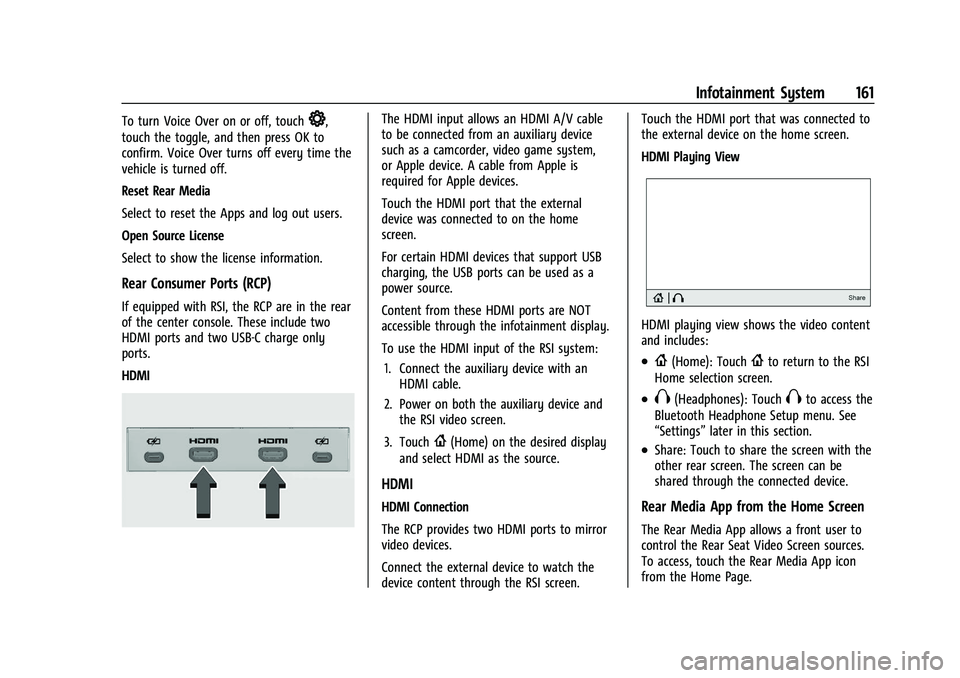
Rear Consumer Ports (RCP)
If equipped with RSI, the RCP are in the rear
of the center console. These include two
HDMI ports and two USB-C charge only
ports.
HDMI
The HDMI input allows an HDMI A/V cable
to be connected from an auxiliary device
such as a camcorder, video game system,
or Apple device. A cable from Apple is
required for Apple devices.
Touch the HDMI port that the external
device was connected to on the home
screen.
For certain HDMI devices that support USB
charging, the USB ports can be used as a
power source.
Content from these HDMI ports are NOT
accessible through the infotainment display.
To use the HDMI input of the RSI system:
1. Connect the auxiliary device with an HDMI cable.
2. Power on both the auxiliary device and the RSI video screen.
3. Touch
{(Home) on the desired display
and select HDMI as the source.
HDMI
HDMI Connection
The RCP provides two HDMI ports to mirror
video devices.
Connect the external device to watch the
device content through the RSI screen. Touch the HDMI port that was connected to
the external device on the home screen.
HDMI Playing View
HDMI playing view shows the video content
and includes:
.{(Home): Touch{to return to the RSI
Home selection screen.
.X(Headphones): TouchXto access the
Bluetooth Headphone Setup menu. See
“Settings” later in this section.
.Share: Touch to share the screen with the
other rear screen. The screen can be
shared through the connected device.
Rear Media App from the Home Screen
The Rear Media App allows a front user to
control the Rear Seat Video Screen sources.
To access, touch the Rear Media App icon
from the Home Page.
Page 202 of 461

Cadillac Escalade Owner Manual (GMNA-Localizing-U.S./Canada/Mexico-
16417396) - 2023 - CRC - 5/9/22
200 Climate Controls
PressJorzto heat the driver or
passenger seat cushion and seatback.
Press
Cor{to cool the driver or
passenger seat.
There are also auto heated and cooled seats,
for more information see Heated and
Ventilated Front Seats 047.
Remote Start Climate Control Operation :
The climate control system may run when
the vehicle is started remotely. The rear
defog may come on during remote start
based on cold ambient conditions. The rear
defog indicator light does not come on
during a remote start. If equipped with
heated or cooled seats, they may come on
during a remote start. See Remote Vehicle
Start 014 and
Heated and Ventilated Front Seats 047.
Sensor
The solar sensor, on top of the instrument
panel near the windshield, monitors the
solar heat.
The climate control system uses the sensor
information to adjust the temperature, fan
speed, recirculation, and air delivery mode
for best comfort.
If the sensor is covered, the automatic
climate control system may not work
properly. Afterblow Feature
If equipped, under certain conditions, the
fan may stay on or may turn on and off
several times after you turn off and lock the
vehicle. This is normal.
Rear Climate Control System
The rear climate control system is on the
rear of the center console. The settings can
be adjusted with the rear climate controls
and the rear climate display.
Page 204 of 461
Cadillac Escalade Owner Manual (GMNA-Localizing-U.S./Canada/Mexico-
16417396) - 2023 - CRC - 5/9/22
202 Climate Controls
display. When locked the rear climate
control system cannot be adjusted from the
rear climate controls on the rear of the
center console.
Automatic Operation
Rear AUTO :Touch to turn on or off. The air
delivery and fan speed are controlled
automatically. The AUTO indicator appears
on the display on the rear of the center
console. If the Mode or fan control buttons
are manually adjusted, this cancels the
automatic operation.
Manual Operation
A«/ªAª: Touch or press the fan
controls on the rear climate display or on
the rear of the center console to increase or
decrease the airflow. Pressing
A «when
the system is off will turn the system on.
The air delivery mode remains in its
previous setting.
«/ª: Touch or press and hold the rear
temperature controls on the rear climate
display or on the rear of the center console
to adjust the rear passenger temperature.
Press
«for warmer air and pressªfor
cooler air.
Y/\/Y: Touch the desired mode on
the rear climate display or the MODE button
on the rear of the center console to change
the direction of the airflow in the rear
seating area.
MorL: If equipped, pressMorLto
heat the left or right outboard seat cushion.
See Heated Rear Seats 052.
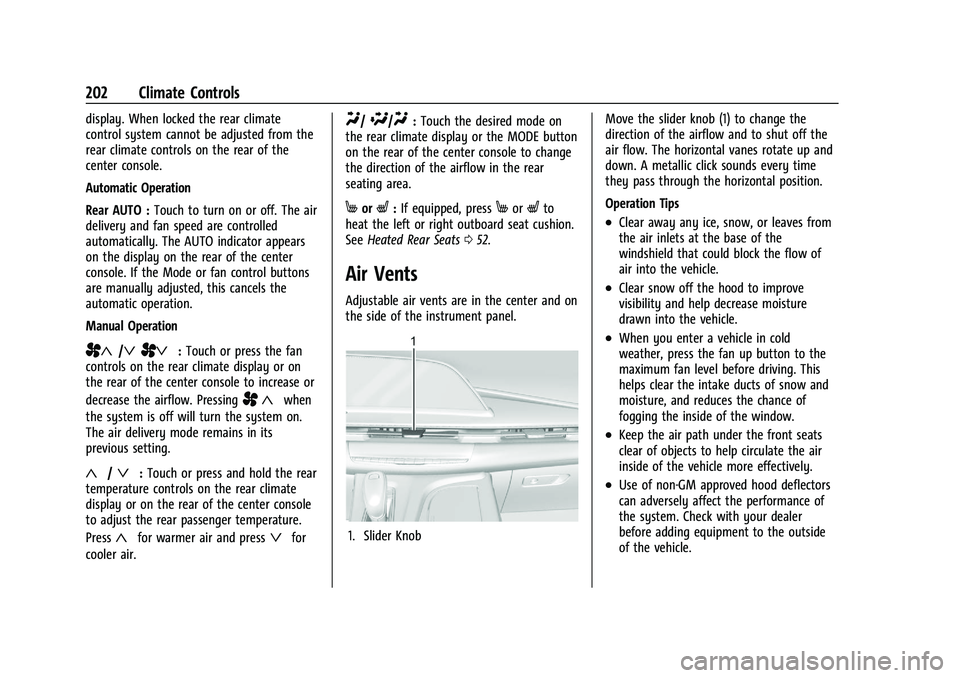
Air Vents
Adjustable air vents are in the center and on
the side of the instrument panel.
1. Slider Knob Move the slider knob (1) to change the
direction of the airflow and to shut off the
air flow. The horizontal vanes rotate up and
down. A metallic click sounds every time
they pass through the horizontal position.
Operation Tips
.Clear away any ice, snow, or leaves from
the air inlets at the base of the
windshield that could block the flow of
air into the vehicle.
.Clear snow off the hood to improve
visibility and help decrease moisture
drawn into the vehicle.
.When you enter a vehicle in cold
weather, press the fan up button to the
maximum fan level before driving. This
helps clear the intake ducts of snow and
moisture, and reduces the chance of
fogging the inside of the window.
.Keep the air path under the front seats
clear of objects to help circulate the air
inside of the vehicle more effectively.
.Use of non-GM approved hood deflectors
can adversely affect the performance of
the system. Check with your dealer
before adding equipment to the outside
of the vehicle.