height CADILLAC ESCALADE 2023 User Guide
[x] Cancel search | Manufacturer: CADILLAC, Model Year: 2023, Model line: ESCALADE, Model: CADILLAC ESCALADE 2023Pages: 461, PDF Size: 7.99 MB
Page 122 of 461

Cadillac Escalade Owner Manual (GMNA-Localizing-U.S./Canada/Mexico-
16417396) - 2023 - CRC - 5/9/22
120 Instruments and Controls
The engine coolant temperature warning
light comes on when the engine has
overheated.
If this happens, pull over and turn off the
engine as soon as possible. SeeEngine
Overheating 0350.
Driver Mode Control Light
This light comes on when Sport Mode is
selected.
This light comes on when Snow Mode is
selected.
This light comes on when Terrain Mode is
selected.
This light comes on when Off-Road Mode is
selected.
This light comes on when the Tow/Haul
Mode is selected.
This light comes on when V Mode is
selected.
This light comes on when My Mode is
selected. See Driver Mode Control 0240.
Four Corner Air Suspension Light
This light comes on when the air suspension
is raised to maximum ground clearance
height.
Page 123 of 461
Cadillac Escalade Owner Manual (GMNA-Localizing-U.S./Canada/Mexico-
16417396) - 2023 - CRC - 5/9/22
Instruments and Controls 121
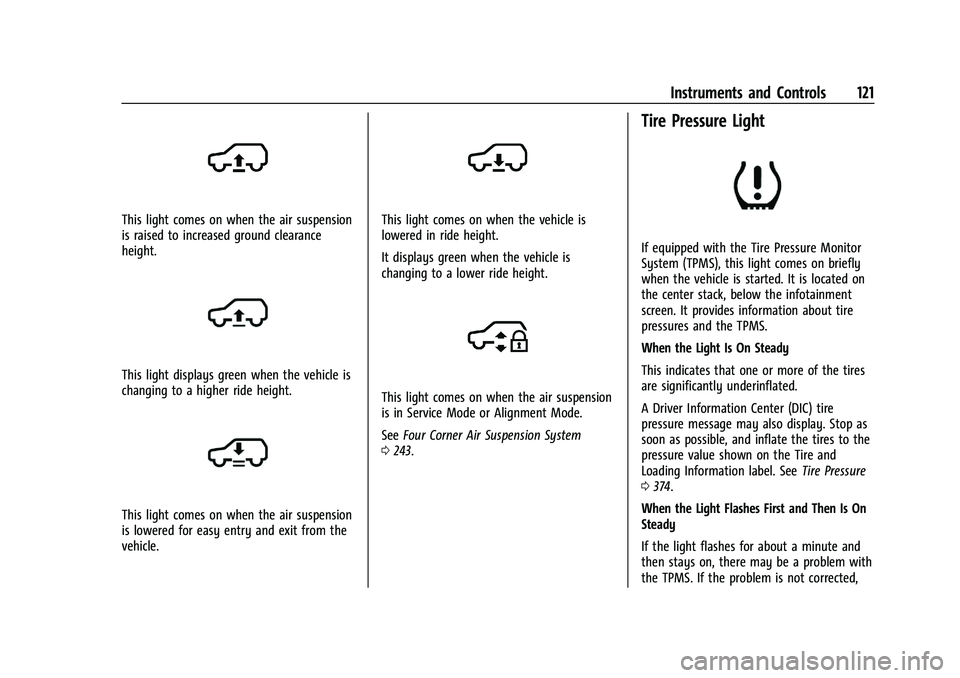
This light comes on when the air suspension
is raised to increased ground clearance
height.
This light displays green when the vehicle is
changing to a higher ride height.
This light comes on when the air suspension
is lowered for easy entry and exit from the
vehicle.
This light comes on when the vehicle is
lowered in ride height.
It displays green when the vehicle is
changing to a lower ride height.
This light comes on when the air suspension
is in Service Mode or Alignment Mode.
SeeFour Corner Air Suspension System
0 243.
Tire Pressure Light
If equipped with the Tire Pressure Monitor
System (TPMS), this light comes on briefly
when the vehicle is started. It is located on
the center stack, below the infotainment
screen. It provides information about tire
pressures and the TPMS.
When the Light Is On Steady
This indicates that one or more of the tires
are significantly underinflated.
A Driver Information Center (DIC) tire
pressure message may also display. Stop as
soon as possible, and inflate the tires to the
pressure value shown on the Tire and
Loading Information label. See Tire Pressure
0 374.
When the Light Flashes First and Then Is On
Steady
If the light flashes for about a minute and
then stays on, there may be a problem with
the TPMS. If the problem is not corrected,
Page 130 of 461

Cadillac Escalade Owner Manual (GMNA-Localizing-U.S./Canada/Mexico-
16417396) - 2023 - CRC - 5/9/22
128 Instruments and Controls
Caution
If you try to use the HUD image as a
parking aid, you may misjudge the
distance and damage your vehicle. Do not
use the HUD image as a parking aid.
The HUD information can be displayed in
various languages. The speedometer reading
and other numerical values can be displayed
in either English or metric units.
The language selection is changed through
the radio, and the units of measurement are
changed through the instrument cluster. See
Settings 0184.
HUD Display on the Windshield Depending on how the vehicle is equipped,
the HUD may display some of the following
vehicle information and vehicle messages or
alerts:
.Speed
.Audio
.Phone
.Navigation
.Driver Assistance Features
.Vehicle Messages
Some vehicle messages or alerts displayed in
the HUD may be cleared by using the
steering wheel controls.
The HUD control is on a touchscreen to the
left of the instrument cluster. HUD controls
are also available on the infotainment
screen. See Settings0184.
To adjust the HUD image: 1. Adjust the driver seat.
2. Start the engine.
3. Touch HUD on the touchscreen to the left of the instrument cluster.
4. Touch the icons above and below Height and Brightness to adjust the HUD.
The HUD image will automatically dim and
brighten to compensate for outside lighting.
Adjust as needed.
The HUD image can temporarily light up
depending on the angle and position of
sunlight on the HUD display. This is normal.
Polarized sunglasses could make the HUD
image harder to see.
Head-Up Display (HUD) Rotation Option
If equipped, this feature under the HUD
Options menu of the infotainment screen
allows for adjusting the angle of the HUD
image. See Settings0184.
Page 132 of 461

Cadillac Escalade Owner Manual (GMNA-Localizing-U.S./Canada/Mexico-
16417396) - 2023 - CRC - 5/9/22
130 Instruments and Controls
Care of the HUD
Clean the inside of the windshield to remove
any dirt or film that could reduce the
sharpness or clarity of the HUD image.
Clean the HUD lens with a soft cloth
sprayed with glass cleaner. Wipe the lens
gently, then dry it.
HUD Troubleshooting
Check that:
.Nothing is covering the HUD lens.
.The HUD brightness setting is not too
dim or too bright.
.The HUD is adjusted to the proper height.
.Polarized sunglasses are not worn.
.The windshield and HUD lens are clean.
If the HUD image is not correct, contact
your dealer.
The windshield is part of the HUD system.
See Windshield Replacement 0357.
Vehicle Messages
Messages displayed on the DIC indicate the
status of the vehicle or some action that
may be needed to correct a condition.
Multiple messages may appear one after
another.
The messages that do not require
immediate action can be acknowledged and
cleared by pressing the thumbwheel. The
messages that require immediate action
cannot be cleared until that action is
performed.
All messages should be taken seriously;
clearing the message does not correct the
problem.
If a SERVICE message appears, see your
dealer.
Follow the instructions given in the
messages. The system displays messages
regarding the following topics:
.Service Messages
.Fluid Levels
.Vehicle Security
.Brakes
.Ride Control Systems
.Driver Assistance Systems
.Cruise Control
.Lighting and Bulb Replacement
.Wiper/Washer Systems
.Doors and Windows
.Seat Belts
.Airbag Systems
.Engine and Transmission
.Tire Pressure
.Battery
Engine Power Messages
REDUCED ACCELERATION DRIVE
WITH CARE
This message displays when the vehicle's
propulsion power is reduced. A reduction in
propulsion power can affect the vehicle's
ability to accelerate. If this message is on,
but there is no observed reduction in
performance, proceed to your destination.
Under certain conditions the performance
may be reduced the next time the vehicle is
driven. The vehicle may be driven while this
message is on, but maximum acceleration
and speed may be reduced. Anytime this
message stays on, or displays repeatedly,
the vehicle should be taken to your dealer
for service as soon as possible.
Page 188 of 461
Cadillac Escalade Owner Manual (GMNA-Localizing-U.S./Canada/Mexico-
16417396) - 2023 - CRC - 5/9/22
186 Infotainment System
About
Shows the infotainment system software
information.
Display Optimization
Touch to adjust the screen for best quality.
Running Applications
Shows a complete list of applications that
are currently running on the infotainment
system.
Return to Factory Settings
Allows resetting the infotainment system
settings in the vehicle.
Vehicle
The menu may contain the following:
Valet Mode
This will lock the infotainment system and
steering wheel controls. It may also limit
access to vehicle storage locations,
if equipped.
To enable valet mode:1. Enter a four-digit code on the keypad.
2. Select Enter to go to the confirmation screen.
3. Re-enter the four-digit code. Touch Lock or Unlock to lock or unlock the
system. Touch Back to go back to the
previous menu.
Teen Driver
See
Teen Driver 0187.
Rear Seat Reminder
Allows for a chime and a message when the
rear door has been opened before or during
operation of the vehicle.
Buckle to Drive
This feature can prevent shifting out of Park
when the driver, and if applicable the front
passenger, seat belt is not buckled. See
Buckle To Drive 056.
Super Cruise Lane Change
See Super Cruise 0258.
Driver Mode Customization
See “Driver Mode Customization” inDriver
Mode Control 0240.
Climate
Adjusts different climate settings.
Collision/Detection Systems
Adjusts different driver assistance system
settings. Comfort and Convenience
Adjusts different comfort and convenience
settings.
Lighting
Adjusts different lighting settings.
Power Door Locks
Adjusts different door lock settings.
Remote Lock, Unlock, and Start
Adjusts different remote lock settings.
Ride Height
Adjusts different ride height settings.
Running Boards
Adjusts different running board settings.
Seating Position
Adjusts different seat settings.
Suspension
Adjusts different suspension settings.
Remote Key Relearn
This sets up a new or forgotten key for use
in the vehicle. Place the key in the
transmitter pocket. Make sure vehicle is
parked and touch Start.
Page 243 of 461

Cadillac Escalade Owner Manual (GMNA-Localizing-U.S./Canada/Mexico-
16417396) - 2023 - CRC - 5/11/22
Driving and Operating 241
In this mode, the vehicle also monitors
driving behaviors and automatically enables
Performance Shift Features when spirited
driving is detected. These features maintain
lower transmission gears to increase
available engine braking and improve
acceleration response. The vehicle resumes
normal operation after a short period when
no spirited driving is detected. The steering
changes to provide more precise control.
If the vehicle has Magnetic Ride Control, the
suspension changes to provide better
cornering performance.
6Snow/Ice Mode :Use this mode to
improve vehicle acceleration on snow and
ice covered roads. When active, Snow/Ice
Mode adjusts acceleration to optimize
traction on slippery surfaces. This can
compromise the acceleration on dry asphalt.
This feature is not intended for use when
the vehicle is stuck in sand, mud, ice, snow,
or gravel. If the vehicle becomes stuck, see If
the Vehicle Is Stuck 0215.
V-Series only: If traction control is disabled
when in Snow/Ice mode the transfer case
and the electronic limited slip differential
will operate in a more aggressive manner to
provide maximum traction.
7Off-Road Mode : Use this mode for
off-road recreational driving. Off-Road mode
should be used to improve driving at
moderate speeds, on grass, gravel, dirt,
unpaved roads, or snow-covered roads. The
accelerator pedal is tuned for off-road use.
If equipped with the following features,
Off-Road mode modifies pedal mapping, ride
height, and Traction Control System (TCS)
performance. For more information on
off-road driving, see Off-Road Driving0209.
_Tow/Haul Mode : Use this mode
when hauling heavy loads for increased
performance and vehicle control. Tow/Haul
Mode adjusts the transmission shift pattern,
steering, and Electronic Stability Control
(ESC) performance.
If the vehicle is turned off while in Tow/
Haul mode and then restarted within four
hours or less, it will remain active.
Otherwise, the vehicle will start in Tour
mode. Tow/Haul mode turns on trailer sway
control.
If equipped with a diesel engine, exhaust
braking is automatically activated when
Tow/Haul mode is selected. The system will
command down shifts to reduce vehicle
speed when the brake is applied. The normal
tow/haul shift pattern will return once the vehicle is on a low grade or when the
accelerator pedal is pressed. While in the
Electronic Range Select (ERS) Mode (see
Manual Mode
0229 or
Manual Mode (V-Series) 0230), grade
braking is deactivated, allowing the driver to
select a range, and limiting the highest gear
available.
For more information on trailer weight
specifications, see Towing Equipment 0313.gTerrain Mode : Use this mode when
traveling on very rough roads at very low
speeds, such as a two-track or heavily rutted
road. This mode can also be used for pulling
a boat out of the water on a trailer. When
in Terrain mode, the vehicle shifts
automatically, but will hold a lower gear
longer to maximize engine torque. This
mode has a unique pedal map and
transmission shift pattern for better control
at lower speeds and over rough terrain. This
mode modifies accelerator pedal mapping,
transmission shift pattern, ride height, and
Electronic Limited-Slip Differential (eSLD).
When the vehicle comes to a stop on an
upward grade, automatic vehicle hold is
engaged until the driver presses the
accelerator pedal. Stop/Start and cruise
control are disabled in Terrain mode.
Page 245 of 461

Cadillac Escalade Owner Manual (GMNA-Localizing-U.S./Canada/Mexico-
16417396) - 2023 - CRC - 5/11/22
Driving and Operating 243
After the first launch the system will learn
what traction is available and adjust for
repeated runs. Re-entering V mode will reset
launch control targets to 100%. Launch
Control is designed for a closed course race
track and not intended for public roads. The
system is not intended to compensate for
lack of driver experience or familiarity with
the race track.
Drive Mode Customization
The vehicle is equipped to modify the
following settings based on vehicle content.
Through the center radio display, select
Vehicle > Settings > Drive Mode
Customization to customize and personalize
My mode or V mode, or turn on or off
Visualization.
These settings will be retained over each
key cycle, and do not have to be reset each
time the vehicle is started. The following
settings may be available depending on
region, trim level, and optional features.
Engine Sound :Engine sound settings adjust
the volume of engine noise. Engine sound is
quieter at lower settings and louder at
higher settings. Steering :
Steering settings adjust the effort
required to turn the steering wheel. Steering
feel is less responsive at lower settings and
more responsive at higher settings.
Suspension : Suspension settings adjust the
stiffness of the shocks and / or springs. The
ride is more comfortable at lower settings
and stiffer at higher settings for better
control.
Engine Shift : Engine shift settings adjust
the throttle response, gear shifting, and
engine performance. Throttle response
increases at higher settings and gear shifting
is more aggressive.
Brake Response : Brake response settings
adjust the brake pedal response. Brake pedal
feel is less sensitive at lower settings and
more sensitive at higher settings.
All-Wheel Drive (AWD) : AWD settings
adjust the driveline system. Each setting is
tuned for optimal driving and handling
performance in different road conditions.
Magnetic Ride Control
This vehicle may have a semi-active damping
system called Magnetic Ride Control. With
this feature, improved vehicle ride and
handling is provided under a variety of
passenger and loading conditions.
Locking Rear Axle
Vehicles with a locking rear axle can give
more traction on snow, mud, ice, sand,
or gravel. It works like a standard axle most
of the time, but when traction is low, this
feature will allow the rear wheel with the
most traction to move the vehicle.
Four Corner Air Suspension
System
The Four Corner Air Suspension feature
provides full time load leveling capability
along with the benefit of adjusting ride
height for increased convenience and
capability.
Page 246 of 461

Cadillac Escalade Owner Manual (GMNA-Localizing-U.S./Canada/Mexico-
16417396) - 2023 - CRC - 5/11/22
244 Driving and Operating
{Warning
To help avoid personal injury or death,
make sure the area underneath the
vehicle and inside the wheel wells is clear
when lowering the vehicle.
{Warning
To help avoid personal injury or death,
always select the lowest ride height for
the current driving conditions. Higher ride
heights raise the vehicle's center of
gravity, increasing the chance of a
rollover during extreme maneuvers.
{Warning
Heavy loads on the roof rack will make
the vehicle's center of gravity higher,
increasing the possibility of a rollover. To
avoid losing control of the vehicle, always
select the normal height setting and
avoid high speeds, sudden starts, sharp
turns, sudden braking, or abrupt
maneuvers when carrying cargo on the
roof rack.Changing Ride Height
Press either
‘Up’or‘Down’ Ride Height
Button to open the Ride Height menu. Use
these buttons to select the desired ride
height in the menu. After a brief pause, the
menu will timeout and the selection will
finalize. Ride heights that are unavailable for
selection will be greyed out in the menu.
Ride Height Descriptions
Normal Height
Normal Height is the standard vehicle height
used for everyday driving. Entry/Exit Height
Entry/Exit Height is 50 mm (2 in) lower than
Normal Height. This ride height lowers the
vehicle for easy entry and exit from the
vehicle as well as providing a lower height
for loading and unloading cargo from any
door or the rear liftgate.
This ride height can be selected in the Ride
Height Menu at any vehicle speed. When
Entry/Exit Height is select at higher speeds,
the vehicle will wait to lower until the
vehicle slows to less than 12 km/h (7 mph).
The vehicle will automatically raise to
Normal Height from Entry/Exit Height when
speed increases above 8 km/h (5 mph). If no
door has been opened since lowering to
Entry/Exit Height, the vehicle will wait to
raise to Normal Height until 30 km/h
(19 mph). This gives the driver more
flexibility when lowering to Entry/Exit
Height for passenger pick up and drop off.
The driver can enable Automatic Entry/
Egress Mode to automatically lower to
Entry/Exit Height when the vehicle is shifted
to P (PARK). Automatic Entry/Egress Mode
may be enabled via the infotainment screen
under Settings/Vehicle/Ride Height. When
the vehicle is higher than Normal Height,
Automatic Entry/Egress Mode is disabled.
Page 247 of 461

Cadillac Escalade Owner Manual (GMNA-Localizing-U.S./Canada/Mexico-
16417396) - 2023 - CRC - 5/11/22
Driving and Operating 245
When the vehicle is in Tow/Haul Driver
Mode, Off-Road Driver Mode, or it senses a
trailer is connected, Automatic Entry/Egress
Mode is disabled.
Increased Height
Increased Height is 25 mm (1 in) higher than
Normal Height. This ride height raises the
vehicle for off-road use, allows for higher
speeds than Maximum Height, and is only
available with specific optional content.
Increased Height can be selected in the Ride
Height Menu while vehicle speed is less
than 80 km/h (50 mph). If vehicle speed
exceeds 80 km/h (50 mph), the vehicle will
automatically lower to Normal Height.
Off-Road Driver Mode and Terrain Driver
Mode will automatically set Increased
Height when vehicle speed is less than
80 km/h (50 mph). If vehicle speed exceeds
80 km/h (50 mph), the vehicle will lower to
Normal Height. Normal Height will be
maintained until vehicle speed is slowed to
less than 16 km/h (10 mph) and then the
vehicle will automatically raise back to
Increased Height.The vehicle will automatically lower from
Increased Height to Normal Height to
provide improved stability if aggressive
maneuvers are detected.
Maximum Height
Maximum Height is 50 mm (2 in) higher
than Normal Height. This ride height raises
the vehicle for off-road use and is only
available with specific optional content.
To raise the vehicle to Maximum Height,
first shift the transfer case to 4
n. Once the
transfer case is in 4
nand vehicle speed is
less than 48 km/hr (30 mph), select
Maximum Height in the Ride Height Menu.
If vehicle speed exceeds 48 km/h, the
vehicle will automatically lower to Increased
Height.
The vehicle will automatically lower from
Maximum Height to Normal Height to
provide improved stability if aggressive
maneuvers are detected.
Aerodynamic Height
Aerodynamic Height is 20 mm (0.75 in)
lower than Normal Height. This ride height
lowers the vehicle at higher vehicle speeds
to improve aerodynamics. The vehicle will lower to Aerodynamic
Height when vehicle speed exceeds
105 km/h (65 mph) for a period of time. The
vehicle will raise to Normal Height when the
vehicle slows to less than 48 km/h
(30 mph).
Aerodynamic Height is automatically
disabled when a trailer is connected to the
vehicle or Tow/Haul Driver Mode is active.
Lowered Height (V-Series Only)
Lowered Height is 20 mm (0.75 in) lower
than Normal Height. This ride height lowers
the vehicle to enhance handling and is only
available with specific optional content.
V Mode will automatically set Lowered
Height when enabled. See
Driver Mode
Control 0240.
Suspension Modes
The air suspension has two special modes,
Service Mode and Alignment Mode, located
in the infotainment screen under Settings/
Vehicle/Suspension.
Service Mode
Service Mode will disable all air suspension
operation including raising and lowering the
vehicle and operation of the air compressor.
Page 248 of 461
Cadillac Escalade Owner Manual (GMNA-Localizing-U.S./Canada/Mexico-
16417396) - 2023 - CRC - 5/11/22
246 Driving and Operating
This mode is useful when the vehicle is
being towed on a flat bed or when any
work under the vehicle is being performed.
Service Mode is automatically enabled when
the vehicle is put on a hoist or a floor jack
is used to raise a corner. Service Mode
automatically disables when vehicle speed
exceeds 16 km/h (10 mph).
Alignment Mode
Alignment Mode will optimize the vehicle
height to provide the most accurate wheel
alignment. This mode should be enabled
once the vehicle is driven onto the
alignment station.
To enable Alignment Mode, ensure the
vehicle is at Normal Height and shift the
vehicle to Neutral. Alignment Mode
automatically disables when vehicle speed
exceeds 16 km/h (10 mph).
Air Suspension Operation with Door(s) or
Hood Open
The air suspension will temporarily suspend
all height changes while the hood or any
door is open. The air suspension resumes
height changes once the hood and all doors
are closed. An open rear liftgate does not
suspend the air suspension operation.System Over-Temperature
If the air suspension is under heavy use, the
system may temporarily suspend all height
changes to allow compressor cooldown.
When this occurs and a height change is
requested, a
‘Leveling System Unavailable’
message will be displayed in the instrument
cluster.
Suspension Lowered for Stability
In the event of a loss of Electronic Stability
Control, the air suspension will lower the
vehicle at higher speeds to provide increased
stability. This will be accompanied by a
‘Vehicle Lowering for Stability’ message in
the instrument cluster.
Excessive Vehicle Loading
If the air suspension detects excessive
vehicle loading, it will not raise above
Normal Height.
Air Suspension Service
If a ‘Service Leveling System’ message is
displayed in the instrument cluster, see your
authorized dealer immediately.
Cruise Control
{
Warning
Cruise control can be dangerous where
you cannot drive safely at a steady
speed. Do not use cruise control on
winding roads or in heavy traffic.
Cruise control can be dangerous on
slippery roads. On such roads, fast
changes in tire traction can cause
excessive wheel slip, and you could lose
control. Do not use cruise control on
slippery roads.
If equipped with cruise control, a speed of
about 40 km/h (25 mph) or more can be
maintained without keeping your foot on
the accelerator. Cruise control does not work
at speeds below about 40 km/h (25 mph).
If the Traction Control/Electronic Stability
Control system begins to limit wheel spin
while using cruise control, the cruise control
automatically disengages. See Traction
Control/Electronic Stability Control 0238.
If a collision alert occurs when cruise control
is activated, cruise control is disengaged. See
Forward Collision Alert (FCA) System 0287.