seats CADILLAC ESCALADE 2023 Repair Manual
[x] Cancel search | Manufacturer: CADILLAC, Model Year: 2023, Model line: ESCALADE, Model: CADILLAC ESCALADE 2023Pages: 461, PDF Size: 7.99 MB
Page 100 of 461
Cadillac Escalade Owner Manual (GMNA-Localizing-U.S./Canada/Mexico-
16417396) - 2023 - CRC - 5/9/22
98 Instruments and Controls
Controls
Steering Wheel Adjustment
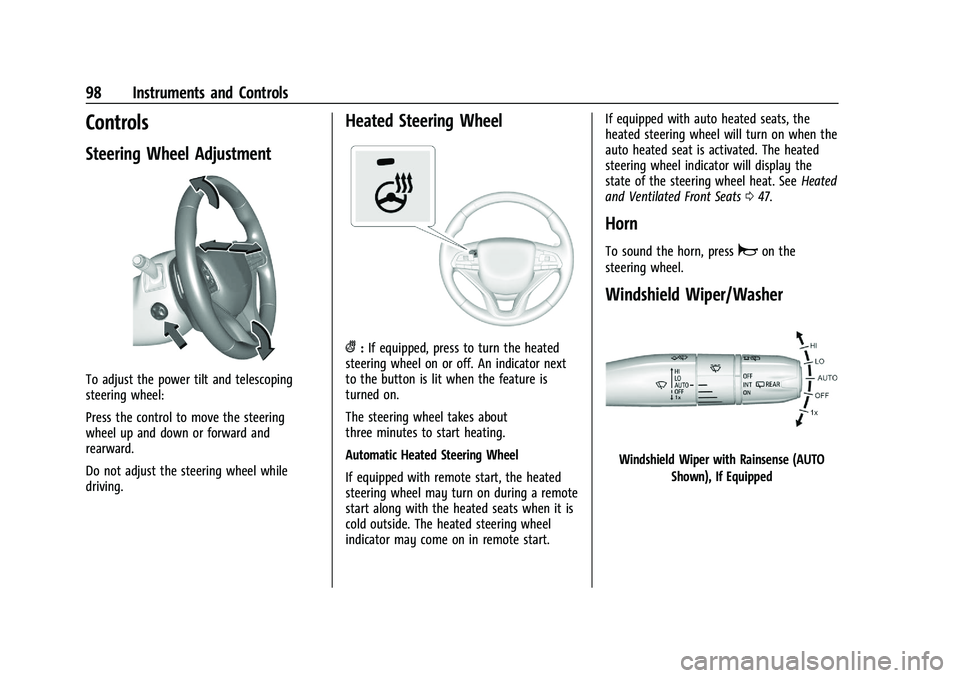
To adjust the power tilt and telescoping
steering wheel:
Press the control to move the steering
wheel up and down or forward and
rearward.
Do not adjust the steering wheel while
driving.
Heated Steering Wheel
(:If equipped, press to turn the heated
steering wheel on or off. An indicator next
to the button is lit when the feature is
turned on.
The steering wheel takes about
three minutes to start heating.
Automatic Heated Steering Wheel
If equipped with remote start, the heated
steering wheel may turn on during a remote
start along with the heated seats when it is
cold outside. The heated steering wheel
indicator may come on in remote start. If equipped with auto heated seats, the
heated steering wheel will turn on when the
auto heated seat is activated. The heated
steering wheel indicator will display the
state of the steering wheel heat. See
Heated
and Ventilated Front Seats 047.
Horn
To sound the horn, pressaon the
steering wheel.
Windshield Wiper/Washer
Windshield Wiper with Rainsense (AUTO
Shown), If Equipped
Page 143 of 461
Cadillac Escalade Owner Manual (GMNA-Localizing-U.S./Canada/Mexico-
16417396) - 2023 - CRC - 5/9/22
Lighting 141
To access, press{on the infotainment
controls, then touch AMBIENT LIGHTING to
display the settings screen.
Touch to select from the following:
OFF : Turns the feature off.
ON : Turns the feature on. Ambient lighting
provides the ability to customize the color
and intensity of the interior accent lighting.
Chose the color on the display screen to
make change to interior lighting color.
DEMO MODE : When the shift lever is in
P (Park), touch to turn the feature on in
colors chosen by the vehicle. When the shift
lever is not in P (Park) , the interior color
will default to the last active color selected.
LINK TO DRIVE MODE : The light color is
matched to the color being used for the
drive mode.Dome Lamps
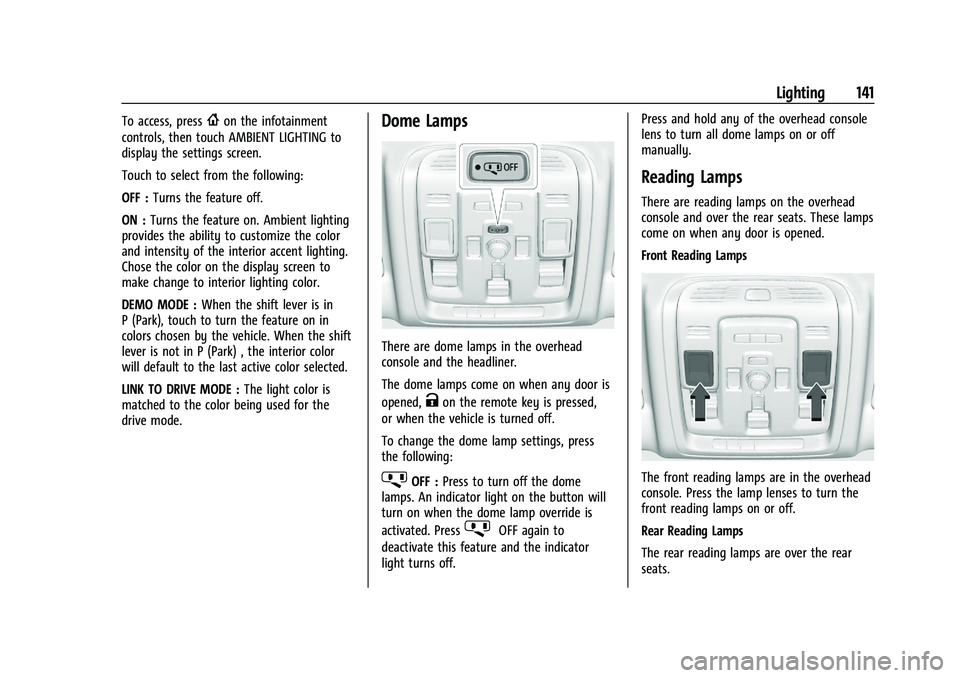
There are dome lamps in the overhead
console and the headliner.
The dome lamps come on when any door is
opened,
Kon the remote key is pressed,
or when the vehicle is turned off.
To change the dome lamp settings, press
the following:
jOFF : Press to turn off the dome
lamps. An indicator light on the button will
turn on when the dome lamp override is
activated. Press
jOFF again to
deactivate this feature and the indicator
light turns off. Press and hold any of the overhead console
lens to turn all dome lamps on or off
manually.
Reading Lamps
There are reading lamps on the overhead
console and over the rear seats. These lamps
come on when any door is opened.
Front Reading Lamps
The front reading lamps are in the overhead
console. Press the lamp lenses to turn the
front reading lamps on or off.
Rear Reading Lamps
The rear reading lamps are over the rear
seats.
Page 145 of 461
Cadillac Escalade Owner Manual (GMNA-Localizing-U.S./Canada/Mexico-
16417396) - 2023 - CRC - 5/9/22
Lighting 143
heated seats, engine cooling fans, trailer
loads, and loads plugged into accessory
power outlets.
EPM works to prevent excessive discharge of
the battery. It does this by balancing the
generator's output and the vehicle's
electrical needs. It can increase engine idle
speed to generate more power, whenever
needed. It can temporarily reduce the power
demands of some accessories.
Normally, these actions occur in steps or
levels, without being noticeable. In rare
cases at the highest levels of corrective
action, this action may be noticeable to
the driver. If so, a DIC message might be
displayed and it is recommended that the
driver reduce the electrical loads as much as
possible.
Battery Power Protection
This feature helps prevent the battery from
being drained, if the interior courtesy lamps
or reading lamps are accidentally left on.
If any of these lamps are left on, they
automatically turn off after 10 minutes,
if the ignition is off. The lamps will not
come back on again until one of the
following occurs:
.The ignition is turned on.
.The doors are closed and then re-opened.
Exterior Lighting Battery Saver
The exterior lamps turn off about 10 minutes
after the vehicle is turned off, if the parking
lamps or headlamps have been manually
left on. This protects against draining the
battery. To restart the 10-minute timer, turn
the exterior lamp control to the
Oposition
and then back to the
;or2position.
To keep the lamps on for more than
10 minutes, the vehicle must be on or in
accessory mode.
Page 156 of 461
Cadillac Escalade Owner Manual (GMNA-Localizing-U.S./Canada/Mexico-
16417396) - 2023 - CRC - 5/9/22
154 Infotainment System
Listener Settings :Touch to hide explicit
language channels and content, start songs
at the beginning when tuning a music
channel, or reset the listening history.
Account Information
Select to show the XM account information.
Radio Reception
Unplug electronic devices from the accessory
power outlets if there is interference or
static in the radio.
FM
FM signals only reach about 16 to 65 km (10
to 40 mi). Although the radio has a built-in
electronic circuit that automatically works to
reduce interference, some static can occur,
especially around tall buildings or hills,
causing the sound to fade in and out.
AM
The range for most AM stations is greater
than for FM, especially at night. The longer
range can cause station frequencies to
interfere with each other. Static can also
occur when things like storms and power
lines interfere with radio reception. When
this happens, try reducing the treble on the
radio.
SiriusXM Satellite Radio Service
If equipped, SiriusXM Satellite Radio Service
provides digital radio reception. Tall
buildings or hills can interfere with satellite
radio signals, causing the sound to fade in
and out. In addition, traveling or standing
under heavy foliage, bridges, garages,
or tunnels may cause loss of the SiriusXM
signal for a period of time. Some cellular
services may interfere with SXM reception
causing loss of signal.
Mobile Device Usage
Mobile device usage, such as making or
receiving calls, charging, or just having the
mobile device on may cause static
interference in the radio. Unplug the mobile
device or turn it off if this happens.
Multi-Band Antenna
The roof antenna may be used for radio,
navigation, and OnStar, depending on the
equipped options. Keep clear of obstructions
for clear reception. If the vehicle has a
sunroof, and it is open, reception can also
be affected.
Audio Players
Avoiding Untrusted Media Devices
When using media devices such as USB and
mobile devices, consider the source.
Untrusted media devices could contain files
that affect system operation or performance
and should be avoided.
USB Port
Audio stored on a USB device may be
listened to.
The vehicle may be equipped with two USB
ports in the center console under the
armrest and another two on the center
stack. These ports are for data and charging.
There may also be two USB ports at the
rear of the center console and a USB port on
each side of the third row seats for
charging only.
Caution
To avoid vehicle damage, unplug all
accessories and disconnect all accessory
cables from the vehicle when not in use.
Accessory cables left plugged into the
vehicle, unconnected to a device, could be
(Continued)
Page 159 of 461
Cadillac Escalade Owner Manual (GMNA-Localizing-U.S./Canada/Mexico-
16417396) - 2023 - CRC - 5/9/22
Infotainment System 157
Volume and song selection may be
controlled by using the infotainment
controls or the mobile device. If Bluetooth is
selected and no volume is present, check the
volume setting on the infotainment system.
Music can be launched by touching
Bluetooth from the recent sources list on
the left of the display or by touching the
More option and then touching the
Bluetooth device.
To play music via Bluetooth:1. Power on the device, and pair to connect the device.
2. Once paired, touch Audio from the Home Page, then touch Bluetooth from the
recent sources list on the left of the
display.
Bluetooth Sound Menu
See “Infotainment System Sound Menu”
under AM-FM Radio 0150.
Manage Bluetooth Devices
From the Home Page: 1. Touch Audio.
2. Touch Devices to add or delete devices. When touching Bluetooth, the radio may
not be able to launch the audio player on
the connected device to start playing. When
the vehicle is not moving, use the mobile
device to begin playback.
All devices launch audio differently. When
selecting Bluetooth as a source, the radio
may show as paused on the display. Press
play on the device or touch
pon the
vehicle display to begin playback.
Browse functionality will be provided where
supported by the Bluetooth device. This
media content will not be part of the
MyMedia source mode.
Some smartphones support sending
Bluetooth music information to display on
the radio. When the radio receives this
information, it will check to see if any is
available and display it. For more
information about supported Bluetooth
features, visit your brand website. See
Online Account 0429 for details.
See Radio Frequency Statement 0435.
Rear Seat Infotainment
Rear Seat Infotainment (RSI)
System
If equipped, the system includes two HDMI
ports, two Bluetooth headphones, and video
touchscreen displays in back of the driver
and passenger seats.
The RSI system may not operate properly
until the temperature is above −20 °C (−4 °F)
and below 55 °C (131 °F).
System Operation
To use:
1. Double-tap anywhere on either screen to power on and view the Home screen.
2. Touch
}on the status bar to turn the
screen off.
The screens can be turned on and off
through each individual touchscreen,
independently from the other, and through
front seat control.
Playback of any media playing through that
specific screen is paused when the screen is
turned off.
Page 201 of 461
Cadillac Escalade Owner Manual (GMNA-Localizing-U.S./Canada/Mexico-
16417396) - 2023 - CRC - 5/9/22
Climate Controls 199
Y:Air is directed to the instrument panel
outlets.
[: Air is primarily directed to the floor
outlets, with some air directed to the
windshield, outboard a/c outlets, and side
window outlets.
d: Clears the windshield of fog or frost
more quickly. Air is directed to the
windshield. Press
dto turn on or off.
Changing the air delivery mode also turns
the defrost off.
A/C : Touch AC on the climate control
display to turn the automatic air
conditioning on or off. If the fan is turned
off or the outside temperature falls below
freezing, the air conditioner will not run.
Press AUTO to return to automatic operation
and the air conditioner runs as needed.
Automatic Air Recirculation : When the
AUTO indicator light is on, the air is
automatically recirculated as needed to help
quickly cool the inside of the vehicle.
@: Press to alternate between
recirculating air inside the vehicle or pulling
in outside air. The indicator light on the
button is lit when recirculation mode is active. This helps to quickly cool the air
inside the vehicle and reduce the entry of
outside air and odors.
Pressing this button cancels automatic
recirculation. Press AUTO to return to
automatic operation; recirculation runs
automatically as needed.
Manual recirculation mode is not available
when in Defrost or some air distribution
modes with air to the windshield.
Auto Defog :
The climate control system
uses a sensor to automatically detect high
humidity inside the vehicle. When high
humidity is detected, the climate control
system may adjust to outside air supply,
turn on the air conditioner, and direct more
air to the windshield. If the climate control
system does not detect possible window
fogging, it returns to normal operation. To
turn Auto Defog off or on, select Settings >
Climate > Auto Defog > Select ON or OFF.
Rear Window Defogger
K: Press to turn the rear window defogger
on or off. An indicator light on the button
comes on to show that the rear window
defogger is on. The rear window defogger only works when
the vehicle is on. The defogger turns off if
the vehicle is turned off or to
accessory mode.
To turn Auto Rear Defog off or on, select
Settings > Climate > Auto Rear Defog >
Select ON or OFF. When Auto Rear Defog is
selected, the rear window defogger turns on
automatically when the vehicle is first
started in cold weather and turns off when
the vehicle is warmed.
The heated outside rearview mirrors turn on
when the rear window defogger button is
on and help to clear fog or frost from the
surface of the mirrors.
Caution
Do not try to clear frost or other material
from the inside of the front windshield
and rear window with a razor blade or
anything else that is sharp. This may
damage the rear window defogger grid
and affect the radio's ability to pick up
stations clearly. The repairs would not be
covered by the vehicle warranty.
Driver and Passenger Heated and Cooled
Seats : Press
Ior+to heat the driver or
passenger seatback only.
Page 202 of 461

Cadillac Escalade Owner Manual (GMNA-Localizing-U.S./Canada/Mexico-
16417396) - 2023 - CRC - 5/9/22
200 Climate Controls
PressJorzto heat the driver or
passenger seat cushion and seatback.
Press
Cor{to cool the driver or
passenger seat.
There are also auto heated and cooled seats,
for more information see Heated and
Ventilated Front Seats 047.
Remote Start Climate Control Operation :
The climate control system may run when
the vehicle is started remotely. The rear
defog may come on during remote start
based on cold ambient conditions. The rear
defog indicator light does not come on
during a remote start. If equipped with
heated or cooled seats, they may come on
during a remote start. See Remote Vehicle
Start 014 and
Heated and Ventilated Front Seats 047.
Sensor
The solar sensor, on top of the instrument
panel near the windshield, monitors the
solar heat.
The climate control system uses the sensor
information to adjust the temperature, fan
speed, recirculation, and air delivery mode
for best comfort.
If the sensor is covered, the automatic
climate control system may not work
properly. Afterblow Feature
If equipped, under certain conditions, the
fan may stay on or may turn on and off
several times after you turn off and lock the
vehicle. This is normal.
Rear Climate Control System
The rear climate control system is on the
rear of the center console. The settings can
be adjusted with the rear climate controls
and the rear climate display.
Page 203 of 461

Cadillac Escalade Owner Manual (GMNA-Localizing-U.S./Canada/Mexico-
16417396) - 2023 - CRC - 5/9/22
Climate Controls 201
Rear Climate Controls
1. Heated Rear Seats (if equipped)
2. Air Delivery Mode Control
3. Fan Control
4. Temperature Control
5. AUTO (Automatic Operation)
O(On/Off)
Rear Climate Display
1. Temperature Setting
2. Air Delivery Mode Control
3. Fan Control
4. SYNC (Synchronized Temperatures) 5. Rear Control Lockout
6. Rear AUTO (Automatic Operation)
7. REAR
O(On/Off)
8. Temperature Control
Rear : Touch to open the rear climate
control screen. The rear climate control
settings can now be adjusted from the front
passenger area.
O: PressOor REAROto turn the rear
climate control system on or off. If the rear
climate control system is turned off using
REAR
Oon the rear climate display, theO
button and the temperature or air delivery
mode buttons on the rear climate controls
must be pressed within five seconds to turn
it back on.
SYNC : Touch SYNC on the rear climate
display to match the rear climate control
temperature to the front climate control
driver temperature. The SYNC button will be
lit. Press the temperature, MODE, or AUTO
button to unlink the set driver and rear
temperatures. The SYNC button turns off.
Rear Control Lockout : Touch Rear Control
Lockout on the rear climate display to lock
or unlock control of the rear climate control
system from the front climate control
Page 204 of 461
Cadillac Escalade Owner Manual (GMNA-Localizing-U.S./Canada/Mexico-
16417396) - 2023 - CRC - 5/9/22
202 Climate Controls
display. When locked the rear climate
control system cannot be adjusted from the
rear climate controls on the rear of the
center console.
Automatic Operation
Rear AUTO :Touch to turn on or off. The air
delivery and fan speed are controlled
automatically. The AUTO indicator appears
on the display on the rear of the center
console. If the Mode or fan control buttons
are manually adjusted, this cancels the
automatic operation.
Manual Operation
A«/ªAª: Touch or press the fan
controls on the rear climate display or on
the rear of the center console to increase or
decrease the airflow. Pressing
A «when
the system is off will turn the system on.
The air delivery mode remains in its
previous setting.
«/ª: Touch or press and hold the rear
temperature controls on the rear climate
display or on the rear of the center console
to adjust the rear passenger temperature.
Press
«for warmer air and pressªfor
cooler air.
Y/\/Y: Touch the desired mode on
the rear climate display or the MODE button
on the rear of the center console to change
the direction of the airflow in the rear
seating area.
MorL: If equipped, pressMorLto
heat the left or right outboard seat cushion.
See Heated Rear Seats 052.
Air Vents
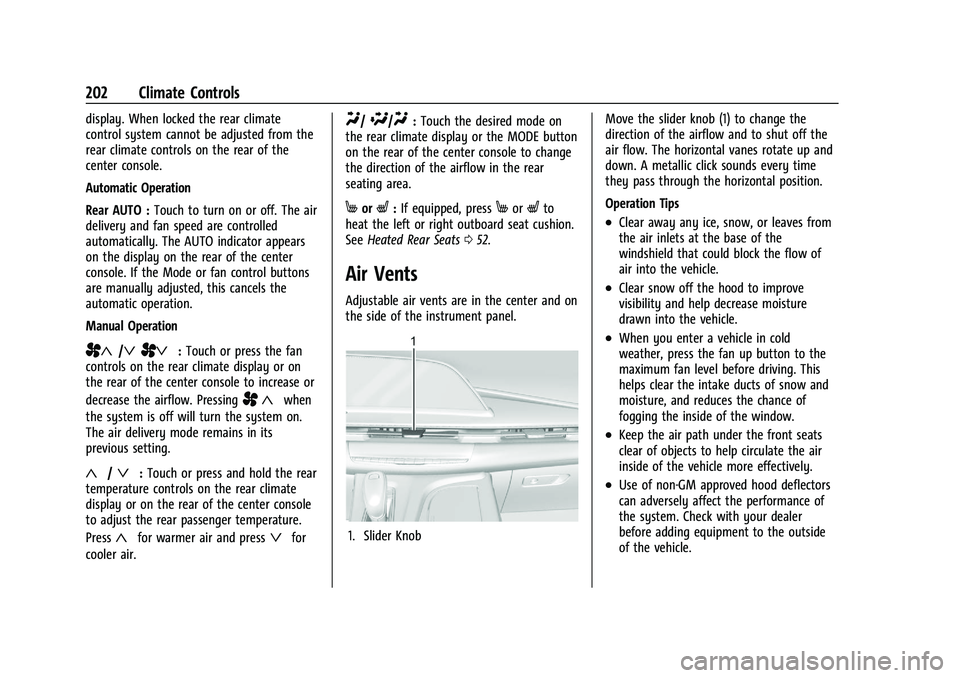
Adjustable air vents are in the center and on
the side of the instrument panel.
1. Slider Knob Move the slider knob (1) to change the
direction of the airflow and to shut off the
air flow. The horizontal vanes rotate up and
down. A metallic click sounds every time
they pass through the horizontal position.
Operation Tips
.Clear away any ice, snow, or leaves from
the air inlets at the base of the
windshield that could block the flow of
air into the vehicle.
.Clear snow off the hood to improve
visibility and help decrease moisture
drawn into the vehicle.
.When you enter a vehicle in cold
weather, press the fan up button to the
maximum fan level before driving. This
helps clear the intake ducts of snow and
moisture, and reduces the chance of
fogging the inside of the window.
.Keep the air path under the front seats
clear of objects to help circulate the air
inside of the vehicle more effectively.
.Use of non-GM approved hood deflectors
can adversely affect the performance of
the system. Check with your dealer
before adding equipment to the outside
of the vehicle.
Page 205 of 461
Cadillac Escalade Owner Manual (GMNA-Localizing-U.S./Canada/Mexico-
16417396) - 2023 - CRC - 5/9/22
Climate Controls 203
Rear System Air Vents
This vehicle has four round or rectangular
air vents in the headliner above the second
and third row seats.
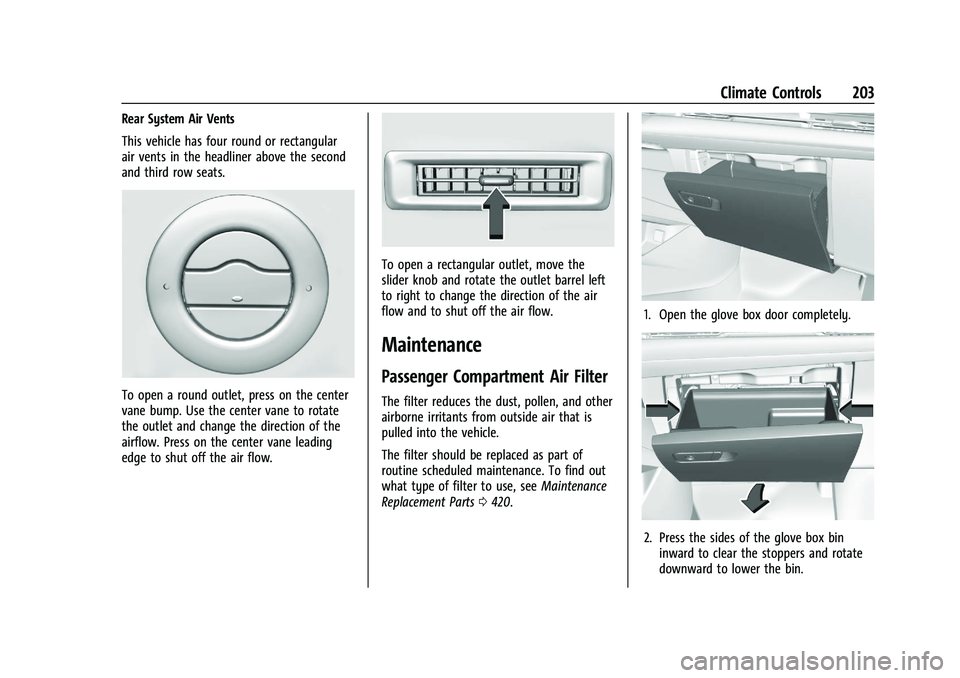
To open a round outlet, press on the center
vane bump. Use the center vane to rotate
the outlet and change the direction of the
airflow. Press on the center vane leading
edge to shut off the air flow.
To open a rectangular outlet, move the
slider knob and rotate the outlet barrel left
to right to change the direction of the air
flow and to shut off the air flow.
Maintenance
Passenger Compartment Air Filter
The filter reduces the dust, pollen, and other
airborne irritants from outside air that is
pulled into the vehicle.
The filter should be replaced as part of
routine scheduled maintenance. To find out
what type of filter to use, seeMaintenance
Replacement Parts 0420.
1. Open the glove box door completely.
2. Press the sides of the glove box bin
inward to clear the stoppers and rotate
downward to lower the bin.