suspension CADILLAC ESCALADE 2023 Owners Manual
[x] Cancel search | Manufacturer: CADILLAC, Model Year: 2023, Model line: ESCALADE, Model: CADILLAC ESCALADE 2023Pages: 461, PDF Size: 7.99 MB
Page 8 of 461
Cadillac Escalade Owner Manual (GMNA-Localizing-U.S./Canada/Mexico-
16417396) - 2023 - CRC - 5/24/22
6 Introduction
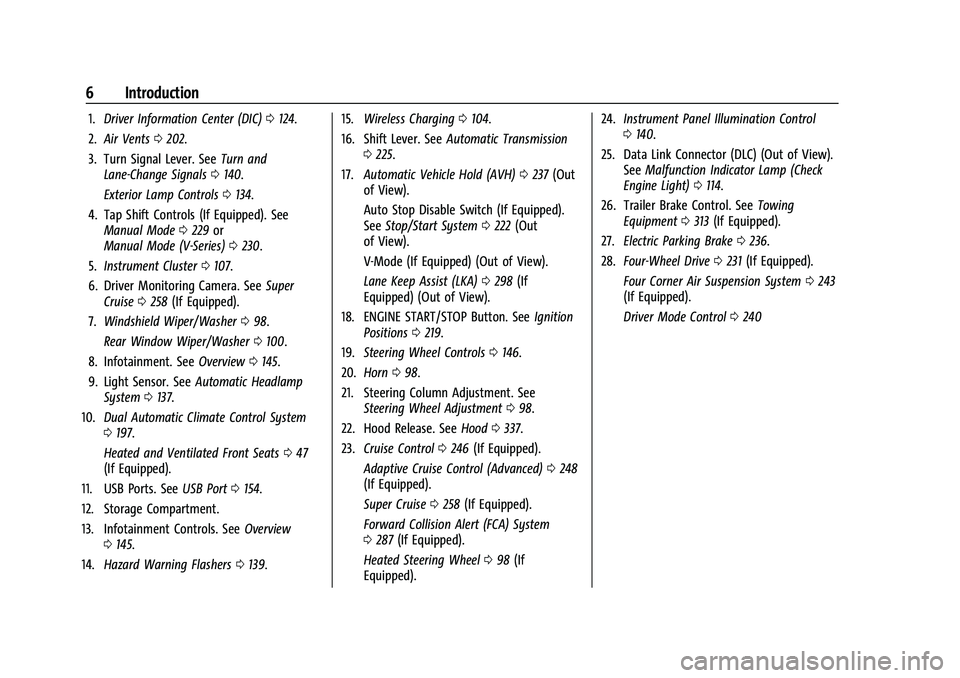
1.Driver Information Center (DIC) 0124.
2. Air Vents 0202.
3. Turn Signal Lever. See Turn and
Lane-Change Signals 0140.
Exterior Lamp Controls 0134.
4. Tap Shift Controls (If Equipped). See Manual Mode 0229 or
Manual Mode (V-Series) 0230.
5. Instrument Cluster 0107.
6. Driver Monitoring Camera. See Super
Cruise 0258 (If Equipped).
7. Windshield Wiper/Washer 098.
Rear Window Wiper/Washer 0100.
8. Infotainment. See Overview0145.
9. Light Sensor. See Automatic Headlamp
System 0137.
10. Dual Automatic Climate Control System
0197.
Heated and Ventilated Front Seats 047
(If Equipped).
11. USB Ports. See USB Port0154.
12. Storage Compartment.
13. Infotainment Controls. See Overview
0 145.
14. Hazard Warning Flashers 0139. 15.
Wireless Charging 0104.
16. Shift Lever. See Automatic Transmission
0 225.
17. Automatic Vehicle Hold (AVH) 0237 (Out
of View).
Auto Stop Disable Switch (If Equipped).
See Stop/Start System 0222 (Out
of View).
V-Mode (If Equipped) (Out of View).
Lane Keep Assist (LKA) 0298 (If
Equipped) (Out of View).
18. ENGINE START/STOP Button. See Ignition
Positions 0219.
19. Steering Wheel Controls 0146.
20. Horn 098.
21. Steering Column Adjustment. See Steering Wheel Adjustment 098.
22. Hood Release. See Hood0337.
23. Cruise Control 0246 (If Equipped).
Adaptive Cruise Control (Advanced) 0248
(If Equipped).
Super Cruise 0258 (If Equipped).
Forward Collision Alert (FCA) System
0 287 (If Equipped).
Heated Steering Wheel 098 (If
Equipped). 24.
Instrument Panel Illumination Control
0140.
25. Data Link Connector (DLC) (Out of View). SeeMalfunction Indicator Lamp (Check
Engine Light) 0114.
26. Trailer Brake Control. See Towing
Equipment 0313 (If Equipped).
27. Electric Parking Brake 0236.
28. Four-Wheel Drive 0231 (If Equipped).
Four Corner Air Suspension System 0243
(If Equipped).
Driver Mode Control 0240
Page 99 of 461
Cadillac Escalade Owner Manual (GMNA-Localizing-U.S./Canada/Mexico-
16417396) - 2023 - CRC - 5/9/22
Instruments and Controls 97
Instruments and Controls
Controls
Steering Wheel Adjustment . . . . . . . . . . . . 98
Heated Steering Wheel . . . . . . . . . . . . . . . . . 98
Horn . . . . . . . . . . . . . . . . . . . . . . . . . . . . . . . . . . . 98
Windshield Wiper/Washer . . . . . . . . . . . . . 98
Rear Window Wiper/Washer . . . . . . . . . . 100
Compass . . . . . . . . . . . . . . . . . . . . . . . . . . . . . . . 101
Clock . . . . . . . . . . . . . . . . . . . . . . . . . . . . . . . . . . 102
Power Outlets . . . . . . . . . . . . . . . . . . . . . . . . . 102
Wireless Charging . . . . . . . . . . . . . . . . . . . . . 104
Warning Lights, Gauges, and Indicators
Warning Lights, Gauges, andIndicators . . . . . . . . . . . . . . . . . . . . . . . . . . . . 106
Instrument Cluster . . . . . . . . . . . . . . . . . . . . . 107
Speedometer . . . . . . . . . . . . . . . . . . . . . . . . . . 108
Odometer . . . . . . . . . . . . . . . . . . . . . . . . . . . . . 108
Trip Odometer . . . . . . . . . . . . . . . . . . . . . . . . 108
Tachometer . . . . . . . . . . . . . . . . . . . . . . . . . . . 108
Fuel Gauge . . . . . . . . . . . . . . . . . . . . . . . . . . . . 108
Engine Oil Pressure Gauge . . . . . . . . . . . . 109
Engine Coolant Temperature Gauge . . . . 110
Transmission Temperature Gauge . . . . . . 110
Voltmeter Gauge . . . . . . . . . . . . . . . . . . . . . . . 111
Seat Belt Reminders . . . . . . . . . . . . . . . . . . . . 112
Airbag Readiness Light . . . . . . . . . . . . . . . . . 113
Passenger Airbag Status Indicator . . . . . . 113
Charging System Light . . . . . . . . . . . . . . . . . 114 Malfunction Indicator Lamp (Check
Engine Light) . . . . . . . . . . . . . . . . . . . . . . . . . 114
Brake System Warning Light . . . . . . . . . . . 115
Electric Parking Brake Light . . . . . . . . . . . . 116
Service Electric Parking Brake Light . . . . 116
Antilock Brake System (ABS) Warning Light . . . . . . . . . . . . . . . . . . . . . . . . . . . . . . . . . 117
Four-Wheel-Drive Light . . . . . . . . . . . . . . . . . 117
Automatic Vehicle Hold (AVH) Light . . . . 117
Lane Keep Assist (LKA) Light . . . . . . . . . . . 117
Automatic Emergency Braking (AEB) Disabled Light . . . . . . . . . . . . . . . . . . . . . . . . 118
Vehicle Ahead Indicator . . . . . . . . . . . . . . . . 118
Pedestrian Ahead Indicator . . . . . . . . . . . . . 118
Traction Off Light . . . . . . . . . . . . . . . . . . . . . . 118
StabiliTrak OFF Light . . . . . . . . . . . . . . . . . . . 119
Traction Control System (TCS)/ StabiliTrak Light . . . . . . . . . . . . . . . . . . . . . . 119
Engine Coolant Temperature Warning Light . . . . . . . . . . . . . . . . . . . . . . . . . . . . . . . . . 119
Driver Mode Control Light . . . . . . . . . . . . . 120
Four Corner Air Suspension Light . . . . . . 120
Tire Pressure Light . . . . . . . . . . . . . . . . . . . . . 121
Engine Oil Pressure Light . . . . . . . . . . . . . . 122
Low Fuel Warning Light . . . . . . . . . . . . . . . . 122
Security Light . . . . . . . . . . . . . . . . . . . . . . . . . . 122
High-Beam On Light . . . . . . . . . . . . . . . . . . . 123
Adaptive Forward Lighting (AFL) Light . . . . . . . . . . . . . . . . . . . . . . . . . . . . . . . . . 123
Lamps On Reminder . . . . . . . . . . . . . . . . . . . 123 Cruise Control Light . . . . . . . . . . . . . . . . . . . . 123
Door Ajar Light . . . . . . . . . . . . . . . . . . . . . . . . 124
Information Displays
Driver Information Center (DIC) . . . . . . . . 124
Vehicle Information . . . . . . . . . . . . . . . . . . . . 127
Head-Up Display (HUD) . . . . . . . . . . . . . . . . 127
Vehicle Messages
Vehicle Messages . . . . . . . . . . . . . . . . . . . . . . 130
Engine Power Messages . . . . . . . . . . . . . . . 130
Vehicle Speed Messages . . . . . . . . . . . . . . . 131
Universal Remote System
Universal Remote System . . . . . . . . . . . . . . 131
Universal Remote System
Programming . . . . . . . . . . . . . . . . . . . . . . . . . 131
Universal Remote System Operation . . . 133
Page 122 of 461

Cadillac Escalade Owner Manual (GMNA-Localizing-U.S./Canada/Mexico-
16417396) - 2023 - CRC - 5/9/22
120 Instruments and Controls
The engine coolant temperature warning
light comes on when the engine has
overheated.
If this happens, pull over and turn off the
engine as soon as possible. SeeEngine
Overheating 0350.
Driver Mode Control Light
This light comes on when Sport Mode is
selected.
This light comes on when Snow Mode is
selected.
This light comes on when Terrain Mode is
selected.
This light comes on when Off-Road Mode is
selected.
This light comes on when the Tow/Haul
Mode is selected.
This light comes on when V Mode is
selected.
This light comes on when My Mode is
selected. See Driver Mode Control 0240.
Four Corner Air Suspension Light
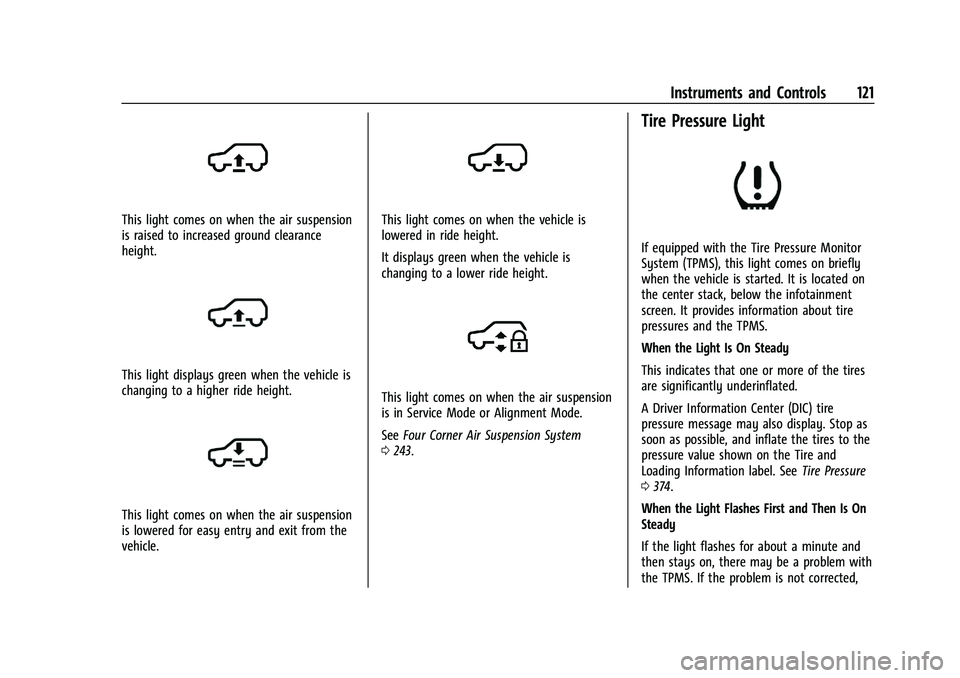
This light comes on when the air suspension
is raised to maximum ground clearance
height.
Page 123 of 461
Cadillac Escalade Owner Manual (GMNA-Localizing-U.S./Canada/Mexico-
16417396) - 2023 - CRC - 5/9/22
Instruments and Controls 121
This light comes on when the air suspension
is raised to increased ground clearance
height.
This light displays green when the vehicle is
changing to a higher ride height.
This light comes on when the air suspension
is lowered for easy entry and exit from the
vehicle.
This light comes on when the vehicle is
lowered in ride height.
It displays green when the vehicle is
changing to a lower ride height.
This light comes on when the air suspension
is in Service Mode or Alignment Mode.
SeeFour Corner Air Suspension System
0 243.
Tire Pressure Light
If equipped with the Tire Pressure Monitor
System (TPMS), this light comes on briefly
when the vehicle is started. It is located on
the center stack, below the infotainment
screen. It provides information about tire
pressures and the TPMS.
When the Light Is On Steady
This indicates that one or more of the tires
are significantly underinflated.
A Driver Information Center (DIC) tire
pressure message may also display. Stop as
soon as possible, and inflate the tires to the
pressure value shown on the Tire and
Loading Information label. See Tire Pressure
0 374.
When the Light Flashes First and Then Is On
Steady
If the light flashes for about a minute and
then stays on, there may be a problem with
the TPMS. If the problem is not corrected,
Page 133 of 461

Cadillac Escalade Owner Manual (GMNA-Localizing-U.S./Canada/Mexico-
16417396) - 2023 - CRC - 5/9/22
Instruments and Controls 131
Under certain operating conditions,
propulsion will be disabled. Try restarting
after the ignition has been off for
two minutes.
Vehicle Speed Messages
SPEED LIMITED TO XXX KM/H (MPH)
This message shows that the vehicle speed
has been limited to the speed displayed. The
limited speed is a protection for various
propulsion and vehicle systems, such as
lubrication, thermal, brakes, suspension,
Teen Driver if equipped, or tires.
(If equipped with a diesel engine, see the
Duramax Diesel supplement.)–For Diesel
Universal Remote System
See Radio Frequency Statement 0435.
Universal Remote System
Programming
If equipped, these buttons are in the
overhead console.
This system can replace up to three remote
control transmitters used to activate devices
such as garage door openers, security
systems, and home automation devices.
These instructions refer to a garage door
opener, but can be used for other devices.
Do not use the Universal Remote system
with any garage door opener that does not
have the stop and reverse feature. This
includes any garage door opener model
manufactured before April 1, 1982. Keep the original hand-held transmitter for
use in other vehicles as well as for future
programming. Erase the programming when
vehicle ownership is terminated. See
“Erasing Universal Remote System Buttons”
later in this section.
To program a garage door opener, park
outside directly in line with and facing the
garage door opener receiver. Clear all people
and objects near the garage door.
Make sure the hand-held transmitter has a
new battery for quick and accurate
transmission of the radio-frequency signal.
Programming the Universal Remote
System
The Universal Remote system is compatible
with radio-frequency devices operating
between 433-434 MHz.
Programming involves time-sensitive actions
and may time out, requiring the procedure
to be repeated. Read these instructions
completely before programming the
Universal Remote system. It may help to
have another person assist with the
programming process.
Page 188 of 461
Cadillac Escalade Owner Manual (GMNA-Localizing-U.S./Canada/Mexico-
16417396) - 2023 - CRC - 5/9/22
186 Infotainment System
About
Shows the infotainment system software
information.
Display Optimization
Touch to adjust the screen for best quality.
Running Applications
Shows a complete list of applications that
are currently running on the infotainment
system.
Return to Factory Settings
Allows resetting the infotainment system
settings in the vehicle.
Vehicle
The menu may contain the following:
Valet Mode
This will lock the infotainment system and
steering wheel controls. It may also limit
access to vehicle storage locations,
if equipped.
To enable valet mode:1. Enter a four-digit code on the keypad.
2. Select Enter to go to the confirmation screen.
3. Re-enter the four-digit code. Touch Lock or Unlock to lock or unlock the
system. Touch Back to go back to the
previous menu.
Teen Driver
See
Teen Driver 0187.
Rear Seat Reminder
Allows for a chime and a message when the
rear door has been opened before or during
operation of the vehicle.
Buckle to Drive
This feature can prevent shifting out of Park
when the driver, and if applicable the front
passenger, seat belt is not buckled. See
Buckle To Drive 056.
Super Cruise Lane Change
See Super Cruise 0258.
Driver Mode Customization
See “Driver Mode Customization” inDriver
Mode Control 0240.
Climate
Adjusts different climate settings.
Collision/Detection Systems
Adjusts different driver assistance system
settings. Comfort and Convenience
Adjusts different comfort and convenience
settings.
Lighting
Adjusts different lighting settings.
Power Door Locks
Adjusts different door lock settings.
Remote Lock, Unlock, and Start
Adjusts different remote lock settings.
Ride Height
Adjusts different ride height settings.
Running Boards
Adjusts different running board settings.
Seating Position
Adjusts different seat settings.
Suspension
Adjusts different suspension settings.
Remote Key Relearn
This sets up a new or forgotten key for use
in the vehicle. Place the key in the
transmitter pocket. Make sure vehicle is
parked and touch Start.
Page 207 of 461

Cadillac Escalade Owner Manual (GMNA-Localizing-U.S./Canada/Mexico-
16417396) - 2023 - CRC - 5/11/22
Driving and Operating 205
Driving and Operating
Driving Information
Driving for Better Fuel Economy . . . . . . 206
Distracted Driving . . . . . . . . . . . . . . . . . . . . . 206
Defensive Driving . . . . . . . . . . . . . . . . . . . . . 207
Impaired Driving . . . . . . . . . . . . . . . . . . . . . . 207
Control of a Vehicle . . . . . . . . . . . . . . . . . . . 207
Braking . . . . . . . . . . . . . . . . . . . . . . . . . . . . . . . . 207
Steering . . . . . . . . . . . . . . . . . . . . . . . . . . . . . . . 208
Off-Road Recovery . . . . . . . . . . . . . . . . . . . . 208
Loss of Control . . . . . . . . . . . . . . . . . . . . . . . . 209
Off-Road Driving . . . . . . . . . . . . . . . . . . . . . . 209
Driving on Wet Roads . . . . . . . . . . . . . . . . . 212
Hill and Mountain Roads . . . . . . . . . . . . . . 213
Winter Driving . . . . . . . . . . . . . . . . . . . . . . . . . 214
If the Vehicle Is Stuck . . . . . . . . . . . . . . . . . . 215
Vehicle Load Limits . . . . . . . . . . . . . . . . . . . . 215
Starting and Operating
New Vehicle Break-In . . . . . . . . . . . . . . . . . . 219
Ignition Positions . . . . . . . . . . . . . . . . . . . . . . 219
Starting the Engine . . . . . . . . . . . . . . . . . . . . 221
Stop/Start System . . . . . . . . . . . . . . . . . . . . . 222
Retained Accessory Power (RAP) . . . . . . . 222
Shifting Into Park . . . . . . . . . . . . . . . . . . . . . . 223
Shifting out of Park . . . . . . . . . . . . . . . . . . . 224
Parking over Things That Burn . . . . . . . . 224
Dynamic Fuel Management . . . . . . . . . . . 224
Extended Parking . . . . . . . . . . . . . . . . . . . . . . 224
Engine Exhaust
Engine Exhaust . . . . . . . . . . . . . . . . . . . . . . . . 225
Running the Vehicle While Parked . . . . . 225
Automatic Transmission
Automatic Transmission . . . . . . . . . . . . . . . 225
Manual Mode . . . . . . . . . . . . . . . . . . . . . . . . . 229
Manual Mode (V-Series) . . . . . . . . . . . . . . . 230
Drive Systems
Four-Wheel Drive . . . . . . . . . . . . . . . . . . . . . . 231
Brakes
Electric Brake Boost . . . . . . . . . . . . . . . . . . . . 235
Antilock Brake System (ABS) . . . . . . . . . . . 235
Electric Parking Brake . . . . . . . . . . . . . . . . . 236
Brake Assist . . . . . . . . . . . . . . . . . . . . . . . . . . . 237
Hill Start Assist (HSA) . . . . . . . . . . . . . . . . . . 237
Automatic Vehicle Hold (AVH) . . . . . . . . . 237
Ride Control Systems
Traction Control/Electronic StabilityControl . . . . . . . . . . . . . . . . . . . . . . . . . . . . . . 238
Driver Mode Control . . . . . . . . . . . . . . . . . . 240
Magnetic Ride Control . . . . . . . . . . . . . . . . . 243
Locking Rear Axle . . . . . . . . . . . . . . . . . . . . . 243
Four Corner Air Suspension System . . . 243
Cruise Control
Cruise Control . . . . . . . . . . . . . . . . . . . . . . . . . 246
Adaptive Cruise Control (Advanced) . . . 248
Super Cruise . . . . . . . . . . . . . . . . . . . . . . . . . . . 258
Driver Assistance Systems
Driver Assistance Systems . . . . . . . . . . . . . 272
Assistance Systems for Parking or Backing . . . . . . . . . . . . . . . . . . . . . . . . . . . . . . 274
Rear Vision Camera (RVC) . . . . . . . . . . . . . 274
Surround Vision System . . . . . . . . . . . . . . . 275
Park Assist . . . . . . . . . . . . . . . . . . . . . . . . . . . . 280
Automatic Parking Assist (APA) . . . . . . . . 282
Reverse Automatic Braking (RAB) . . . . . . 284
Rear Pedestrian Alert . . . . . . . . . . . . . . . . . . 285
Rear Cross Traffic Alert (RCTA) System . . . . . . . . . . . . . . . . . . . . . . . . . . . . . . 286
Assistance Systems for Driving . . . . . . . . 287
Forward Collision Alert (FCA) System . . . . . . . . . . . . . . . . . . . . . . . . . . . . . . 287
Automatic Emergency Braking (AEB) . . . . . . . . . . . . . . . . . . . . . . . . 289
Front Pedestrian Braking (FPB) System . . . . . . . . . . . . . . . . . . . . . . . . . . . . . . 290
Night Vision System . . . . . . . . . . . . . . . . . . . 292
Side Blind Zone Alert (SBZA) . . . . . . . . . . 294
Lane Change Alert (LCA) . . . . . . . . . . . . . . . 294
Traffic Sign Assistant . . . . . . . . . . . . . . . . . . 297
Lane Keep Assist (LKA) . . . . . . . . . . . . . . . . 298
Surround Vision Recorder . . . . . . . . . . . . . 300
Fuel
Top Tier Fuel . . . . . . . . . . . . . . . . . . . . . . . . . . 302
Recommended Fuel . . . . . . . . . . . . . . . . . . . 302
Prohibited Fuels . . . . . . . . . . . . . . . . . . . . . . . 302
Page 214 of 461

Cadillac Escalade Owner Manual (GMNA-Localizing-U.S./Canada/Mexico-
16417396) - 2023 - CRC - 5/11/22
212 Driving and Operating
Driving in Mud, Sand, Snow, or Ice
Use a low gear when driving in mud—the
deeper the mud, the lower the gear. Keep
the vehicle moving to avoid getting stuck.
Traction changes when driving on sand. On
loose sand, such as on beaches or sand
dunes, the tires tend to sink into the sand.
This affects steering, accelerating, and
braking. Drive at a reduced speed and avoid
sharp turns or abrupt maneuvers.
Traction is reduced on hard packed snow
and ice and it is easy to lose control. Reduce
vehicle speed when driving on hard packed
snow and ice.
{Warning
Driving on frozen lakes, ponds, or rivers
can be dangerous. Ice conditions vary
greatly and the vehicle could fall through
the ice; you and your passengers could
drown. Drive your vehicle on safe
surfaces only.
Driving in Water
{Warning
Driving through rushing water can be
dangerous. Deep water can sweep your
vehicle downstream and you and your
passengers could drown. If it is only
shallow water, it can still wash away the
ground from under your tires. Traction
could be lost, and the vehicle could roll
over. Do not drive through rushing water.
Caution
Do not drive through standing water if it
is deep enough to cover the wheel hubs,
axles, or exhaust pipe. Deep water can
damage the axle and other vehicle parts.
If the standing water is not too deep, drive
through it slowly. At faster speeds, water
can get into the engine and cause it to stall.
Stalling can occur if the exhaust pipe is
under water. Do not turn off the ignition
when driving through water. If the exhaust
pipe is under water, the engine will not
start. When going through water, the brakes
get wet and it may take longer to stop. See
“Driving on Wet Roads” later in this section.
After Off-Road Driving
Remove any brush or debris that has
collected on the underbody or chassis,
or under the hood. These accumulations can
be a fire hazard.
After operation in mud or sand, have the
brake linings cleaned and checked. These
substances can cause glazing and uneven
braking. Check the body structure, driveline,
steering, suspension, wheels, tires, and
exhaust system for damage and check the
fuel lines and cooling system for any
leakage.
More frequent maintenance service is
required. See theMaintenance Schedule
0 415.
Driving on Wet Roads
Rain and wet roads can reduce vehicle
traction and affect your ability to stop and
accelerate. Always drive slower in these
types of driving conditions and avoid driving
through large puddles and deep-standing or
flowing water.
Page 220 of 461
Cadillac Escalade Owner Manual (GMNA-Localizing-U.S./Canada/Mexico-
16417396) - 2023 - CRC - 5/11/22
218 Driving and Operating
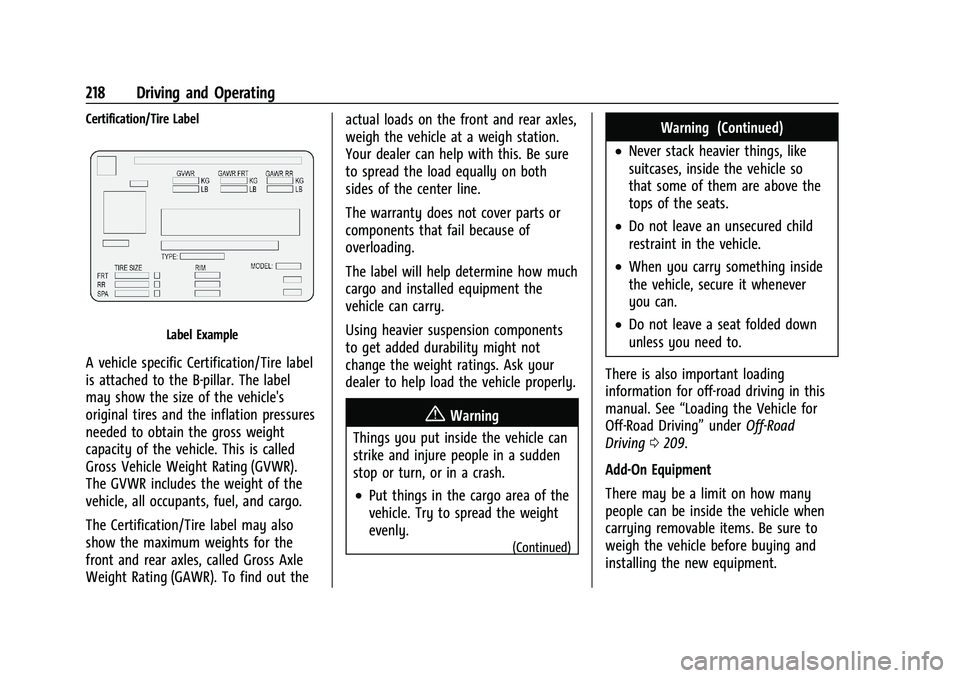
Certification/Tire Label
Label Example
A vehicle specific Certification/Tire label
is attached to the B-pillar. The label
may show the size of the vehicle's
original tires and the inflation pressures
needed to obtain the gross weight
capacity of the vehicle. This is called
Gross Vehicle Weight Rating (GVWR).
The GVWR includes the weight of the
vehicle, all occupants, fuel, and cargo.
The Certification/Tire label may also
show the maximum weights for the
front and rear axles, called Gross Axle
Weight Rating (GAWR). To find out theactual loads on the front and rear axles,
weigh the vehicle at a weigh station.
Your dealer can help with this. Be sure
to spread the load equally on both
sides of the center line.
The warranty does not cover parts or
components that fail because of
overloading.
The label will help determine how much
cargo and installed equipment the
vehicle can carry.
Using heavier suspension components
to get added durability might not
change the weight ratings. Ask your
dealer to help load the vehicle properly.
{Warning
Things you put inside the vehicle can
strike and injure people in a sudden
stop or turn, or in a crash.
.Put things in the cargo area of the
vehicle. Try to spread the weight
evenly.
(Continued)
Warning (Continued)
.Never stack heavier things, like
suitcases, inside the vehicle so
that some of them are above the
tops of the seats.
.Do not leave an unsecured child
restraint in the vehicle.
.When you carry something inside
the vehicle, secure it whenever
you can.
.Do not leave a seat folded down
unless you need to.
There is also important loading
information for off-road driving in this
manual. See “Loading the Vehicle for
Off-Road Driving” underOff-Road
Driving 0209.
Add-On Equipment
There may be a limit on how many
people can be inside the vehicle when
carrying removable items. Be sure to
weigh the vehicle before buying and
installing the new equipment.
Page 242 of 461

Cadillac Escalade Owner Manual (GMNA-Localizing-U.S./Canada/Mexico-
16417396) - 2023 - CRC - 5/11/22
240 Driving and Operating
To turn TCS back on, select or touch the
Traction virtual button on the screen. The
traction off light
idisplayed in the
instrument cluster will turn off.
To turn StabiliTrak/ESC off, first turn off TCS
to enable the Stability virtual button on the
screen, then select or touch the Stability
virtual button. The StabiliTrak/ESC off light
gwill display in the instrument cluster. See
StabiliTrak OFF Light 0119.
To turn StabiliTrak/ESC back on, select or
touch the Stability virtual button on the
screen. StabiliTrak/ESC will turn on, but TCS
will remain off.
TCS cannot be on when StabiliTrak/ESC is
off. If both systems are turned off, selecting
or touching the Traction virtual button will
turn both systems back on.
StabiliTrak/ESC will automatically turn on if
the vehicle exceeds 56 km/h (35 mph) and
cannot be turned off again until speed is
reduced. Traction control will remain off.
Vehicles equipped with the four corner air
suspension re-enable StabiliTrak/ESC at
32 km/h (20 mph). The vehicle has a Trailer Sway Control (TSC)
feature and a Hill Start Assist (HSA) feature.
See
Trailer Sway Control (TSC) 0322 or
Hill Start Assist (HSA) 0237.
Adding accessories can affect the vehicle
performance. See Accessories and
Modifications 0336.Driver Mode Control
Driver Mode Control (DMC) allows the driver
to adjust the overall driving experience to
better suit preference by adjusting multiple
subsystems simultaneously. Drive mode
availability and affected vehicle subsystems
are dependent upon vehicle trim level,
region, and optional features.
Tour will be the default mode at every
ignition cycle. A unique and persistent
indicator will be displayed in the instrument
cluster for each mode.
Depending on trim level, Tour mode, Sport
mode, Snow/Ice mode, Off-Road mode, Tow/
Haul mode, Terrain mode, My mode, and V
mode may be available.
To activate each mode, press the MODE
button on the instrument panel to the left
of the steering wheel. To activate Terrain
mode, press
gbutton located next to
the MODE button.
Tour Mode : Use this mode for normal city
and highway driving to provide a smooth
ride. This setting provides balance between
comfort and handling. This is the standard/
default mode. There is no persistent
indicator in the instrument cluster for
this mode.
8Sport Mode : Use this mode where road
conditions or personal preference demand a
more controlled response. When in Sport
mode the vehicle automatically down shifts.