trailer CADILLAC ESCALADE ESV 2009 User Guide
[x] Cancel search | Manufacturer: CADILLAC, Model Year: 2009, Model line: ESCALADE ESV, Model: CADILLAC ESCALADE ESV 2009Pages: 602, PDF Size: 5.18 MB
Page 149 of 602

SBZA does not operate when the left or right corners
of the rear bumper are covered with mud, dirt, snow,
ice, slush, or in heavy rainstorms. For cleaning
instructions, see Washing Your Vehicle on page 6-100 .
If the DIC still displays the SIDE BLIND ZONE SYSTEM
UNAVAILABLE message after cleaning the bumper, see
your dealer/retailer.
The SBZA displays may remain on if a trailer is attached
to the vehicle, or a bicycle or object is extending out
to either side of the vehicle.
When SBZA is disabled for any reason other than the
driver turning it off, the driver will not be able to turn SBZA
back on using the DIC. The SIDE BLIND ZONE ALERT
ON option will not be selectable if the conditions for
normal system operation are not met. Until normal
operating conditions for SBZA are met, you should not
rely upon SBZA while driving. SBZA Error Messages The following messages may appear in the DIC:
SIDE BLIND ZONE ALERT SYSTEM OFF: This
message indicates that the driver has turned the
system off.
SIDE BLIND ZONE SYSTEM UNAVAILABLE: This
message indicates that the SBZA system is disabled
either because the sensor is blocked and cannot detect
vehicles in your blind zone, or the vehicle is passing
through an open eld of view area, such as the desert,
where there is insufficient data for operation. The sensor
may be blocked by mud, dirt, snow, ice, slush, or even
heavy rainstorms. This message may also activate during
heavy rain or due to road spray. The vehicle does not
need service. For cleaning, see Washing Your Vehicle on
page 6-100 .
SERVICE SIDE BLIND ZONE ALERT SYSTEM: If this
message appears, both SBZA displays will remain on
indicating there is a problem with the SBZA system.
If these displays remain on after continued driving, the
system needs service. Take the vehicle to your
dealer/retailer.
2-47
Page 192 of 602
Reading Lamps If the vehicle has reading lamps, press the button
located next to the lamp to turn it on or off.
The vehicle may also have reading lamps in other
locations. The lamps cannot be adjusted.
Electric Power Management The vehicle has Electric Power Management (EPM) that
estimates the battery’s temperature and state of charge.
It then adjusts the voltage for best performance and
extended life of the battery.
When the battery’s state of charge is low, the voltage
is raised slightly to quickly bring the charge back up.
When the state of charge is high, the voltage is lowered
slightly to prevent overcharging. If the vehicle has a
voltmeter gage or a voltage display on the Driver
Information Center (DIC), you may see the voltage
move up or down. This is normal. If there is a problem,
an alert will be displayed.
The battery can be discharged at idle if the electrical
loads are very high. This is true for all vehicles.
This is because the generator (alternator) may not
be spinning fast enough at idle to produce all the
power that is needed for very high electrical loads. A high electrical load occurs when several of the
following are on, such as: headlamps, high beams,
fog lamps, rear window defogger, climate control fan at
high speed, heated seats, engine cooling fans, trailer
loads, and loads plugged into accessory power outlets.
EPM works to prevent excessive discharge of the
battery. It does this by balancing the generator’s output
and the vehicle’s electrical needs. It can increase engine
idle speed to generate more power, whenever needed.
It can temporarily reduce the power demands of some
accessories.
Normally, these actions occur in steps or levels, without
being noticeable. In rare cases at the highest levels of
corrective action, this action may be noticeable to the
driver. If so, a Driver Information Center (DIC) message
might be displayed, such as BATTERY SAVER ACTIVE,
BATTERY VOLTAGE LOW, or LOW BATTERY. If this
message is displayed, it is recommended that the driver
reduce the electrical loads as much as possible. See DIC
Warnings and Messages on page 3-56 .
3-24
Page 211 of 602

This light comes on during a malfunction in one of
two ways:
Light Flashing: A misre condition has been detected.
A misre increases vehicle emissions and could
damage the emission control system on the vehicle.
Diagnosis and service might be required.
To prevent more serious damage to the vehicle:
Reduce vehicle speed.
Avoid hard accelerations.
Avoid steep uphill grades.
If towing a trailer, reduce the amount of cargo being
hauled as soon as it is possible.
If the light continues to ash, when it is safe to do so,
stop the vehicle. Find a safe place to park the vehicle.
Turn the key off, wait at least 10 seconds, and restart
the engine. If the light is still ashing, follow the previous
steps and see your dealer/retailer for service as soon
as possible.
Light On Steady: An emission control system
malfunction has been detected on the vehicle.
Diagnosis and service might be required. An emission system malfunction might be corrected by
doing the following:
Make sure the fuel cap is fully installed. See Filling
the Tank on page 6-9 . The diagnostic system
can determine if the fuel cap has been left off or
improperly installed. A loose or missing fuel cap
allows fuel to evaporate into the atmosphere.
A few driving trips with the cap properly installed
should turn the light off.
If the vehicle has been driven through a deep puddle
of water, the vehicle’s electrical system might be wet.
The condition is usually corrected when the electrical
system dries out. A few driving trips should turn the
light off.
Make sure to fuel the vehicle with quality fuel. Poor
fuel quality causes the engine not to run as efficiently
as designed and can cause: stalling after start-up,
stalling when the vehicle is changed into gear,
misring, hesitation on acceleration, or stumbling
on acceleration. These conditions might go away
once the engine is warmed up.
If one or more of these conditions occurs, change the
fuel brand used. It will require at least one full tank of
the proper fuel to turn the light off.
See Gasoline Octane on page 6-5 .
If none of the above have made the light turn off, your
dealer/retailer can check the vehicle. The dealer/retailer
has the proper test equipment and diagnostic tools to
x any mechanical or electrical problems that might have
developed.
3-43
Page 377 of 602
Your Driving, the Road, and the Vehicle ........... .5-2
Driving for Better Fuel Economy ...................... .5-2
Defensive Driving .......................................... .5-2
Drunk Driving ................................................ .5-3
Control of a Vehicle ....................................... .5-3
Braking ........................................................ .5-4
Antilock Brake System (ABS) .......................... .5-5
Braking in Emergencies .................................. .5-6
StabiliTrak ®
System ....................................... .5-6
Magnetic Ride Control™ ................................. .5-9
Road Sensing Suspension .............................. .5-9
Locking Rear Axle ......................................... .5-9
All-Wheel Drive (AWD) System ........................ .5-9
Steering ..................................................... .5-10
Off-Road Recovery ...................................... .5-11
Passing ...................................................... .5-12
Loss of Control ............................................ .5-12
Off-Road Driving .......................................... .5-13 Driving at Night ........................................... .5-25
Driving in Rain and on Wet Roads ................. .5-26
Before Leaving on a Long Trip ...................... .5-27
Highway Hypnosis ....................................... .5-27
Hill and Mountain Roads ............................... .5-28
Winter Driving ............................................. .5-29
If Your Vehicle is Stuck in Sand, Mud,
Ice, or Snow ............................................ .5-31
Rocking Your Vehicle to Get It Out ................ .5-32
Recovery Hooks .......................................... .5-32
Loading the Vehicle ..................................... .5-33
Towing ......................................................... .5-40
Towing Your Vehicle .................................... .5-40
Recreational Vehicle Towing .......................... .5-40
Level Control .............................................. .5-43
Autoride ®
.................................................... .5-44
Towing a Trailer .......................................... .5-44
Trailer Recommendations .............................. .5-57Section 5 Driving Your Vehicle
5-1
Page 385 of 602

Magnetic Ride Control™ The vehicle may have the MagneRide control system.
MagneRide constantly checks speed, wheel position,
lift/dive and steering of the vehicle. The damping force for
each shock absorber and adjustment level is chosen for
the best ride and handling.
MagneRide also works with the tow/haul switch that,
when engaged, will provide more rmness from the shock
absorbers. This added control gives better ride and
handling when carrying heavy loads or towing a trailer.
See Tow/Haul Mode on page 2-33 for more information.
Road Sensing Suspension The Road Sensing Suspension (RSS) feature provides
superior vehicle ride and handling under a variety of
passenger and loading conditions.
The system is fully automatic and uses a computer
controller to continuously monitor vehicle speed, wheel
to body position, lift/dive and steering position of the
vehicle. The controller then sends signals to each shock
absorber to independently adjust the damping level to
provide the optimum vehicle ride. RSS also interacts with the tow/haul mode that, when
engaged, will provide additional control of the shock
absorbers. This additional control results in better
ride and handling characteristics when the vehicle is
loaded or towing a trailer. See “Tow/Haul Mode” under
Towing a Trailer on page 5-44 .
Locking Rear Axle Vehicles with a locking rear axle can give more traction
on snow, mud, ice, sand or gravel. It works like a
standard axle most of the time, but when traction is
low, this feature will allow the rear wheel with the
most traction to move the vehicle.
All-Wheel Drive (AWD) System If the vehicle has this feature, engine power is sent to all
four wheels when extra traction is needed. This is like
four-wheel drive, but there is no separate lever or switch
to engage or disengage the front axle. It is fully automatic,
and adjusts itself as needed for road conditions.
If the vehicle is a Two-mode Hybrid, see “Four-Wheel
Drive” in the Two-mode Hybrid Supplement.
5-9
Page 411 of 602
Steps for Determining Correct Load Limit 1.
Locate the statement “The combined weight of
occupants and cargo should never exceed
XXX kg or XXX lbs” on your vehicle’s placard.2.
Determine the combined weight of the driver
and passengers that will be riding in your
vehicle.3.
Subtract the combined weight of the driver
and passengers from XXX kg or XXX lbs.4.
The resulting gure equals the available
amount of cargo and luggage load capacity.
For example, if the “XXX” amount equals
1400 lbs and there will be ve 150 lb
passengers in your vehicle, the amount of
available cargo and luggage load capacity is
650 lbs (1400 − 750 (5 x 150) = 650 lbs). 5.
Determine the combined weight of luggage
and cargo being loaded on the vehicle. That
weight may not safely exceed the available
cargo and luggage load capacity calculated in
Step 4. 6.
If your vehicle will be towing a trailer, the load
from your trailer will be transferred to your
vehicle. Consult this manual to determine how
this reduces the available cargo and luggage
load capacity of your vehicle. See Towing a
Trailer on page 5-44 for important information
on towing a trailer, towing safety rules and
trailering tips.
5-35
Page 416 of 602

The system is activated when the ignition key is
turned to RUN and will automatically adjust vehicle
height thereafter. The system may exhaust (lower
vehicle height) for up to 10 minutes after the ignition
key has been turned to LOCK. You may hear the air
compressor operating when the height is being
adjusted.
If a weight-distributing hitch is being used, it is
recommended to allow the shocks to inate,
thereby leveling the vehicle prior to adjusting the
height. See “Weight distributing Hitches and Weight
Carrying Hitches” under Towing a Trailer on
page 5-44 .
Towing
Towing Your Vehicle To avoid damage, the disabled vehicle should be towed
with all four wheels off the ground. Consult your dealer/
retailer or a professional towing service if the disabled
vehicle must be towed. See Roadside Service on
page 8-7 .
To tow the vehicle behind another vehicle for
recreational purposes (such as behind a motorhome),
see “Recreational Vehicle Towing” following. Recreational Vehicle Towing Recreational vehicle towing means towing the vehicle
behind another vehicle – such as behind a motorhome.
The two most common types of recreational vehicle
towing are known as “dinghy towing” (towing the vehicle
with all four wheels on the ground) and “dolly towing”
(towing the vehicle with two wheels on the ground
and two wheels up on a device known as a “dolly”).
Here are some important things to consider before
recreational vehicle towing:
What is the towing capacity of the towing vehicle?
Be sure to read the tow vehicle manufacturer’s
recommendations.
What is the distance that will be travelled? Some
vehicles have restrictions on how far and how
long they can tow.
Is the proper towing equipment going to be used?
See your dealer/retailer or trailering professional
for additional advice and equipment
recommendations.
Is the vehicle ready to be towed? Just as preparing
the vehicle for a long trip, make sure the vehicle is
prepared to be towed. See Before Leaving on a
Long Trip on page 5-27 .
5-40
Page 420 of 602
Autoride ®
With this feature, improved vehicle ride and handling is
provided under a variety of passenger and loading
conditions.
The system is fully automatic and uses a computer
controller to continuously monitor vehicle speed, wheel
to body position, lift/dive and steering position of the
vehicle. The controller then sends signals to each shock
absorber to independently adjust the damping level to
provide the optimum vehicle ride.
Autoride also interacts with the tow/haul mode that, when
activated, will provide additional control of the shock
absorbers. This additional control results in better ride
and handling characteristics when the vehicle is loaded or
towing a trailer. See “Tow/Haul Mode” under Towing a
Trailer on page 5-44 for more information. Towing a Trailer Do not tow a trailer during break-in. See New Vehicle
Break-In on page 2-24 for more information.
{ CAUTION: The driver can lose control when pulling a trailer if
the correct equipment is not used or the vehicle is
not driven properly. For example, if the trailer is
too heavy, the brakes may not work well — or
even at all. The driver and passengers could be
seriously injured. The vehicle may also be
damaged; the resulting repairs would not be
covered by the vehicle warranty. Pull a trailer only
if all the steps in this section have been followed.
Ask your dealer/retailer for advice and information
about towing a trailer with the vehicle.
Notice: Pulling a trailer improperly can damage the
vehicle and result in costly repairs not covered by the
vehicle warranty. To pull a trailer correctly, follow the
advice in this section and see your dealer/retailer for
important information about towing a trailer with the
vehicle.
5-44
Page 421 of 602
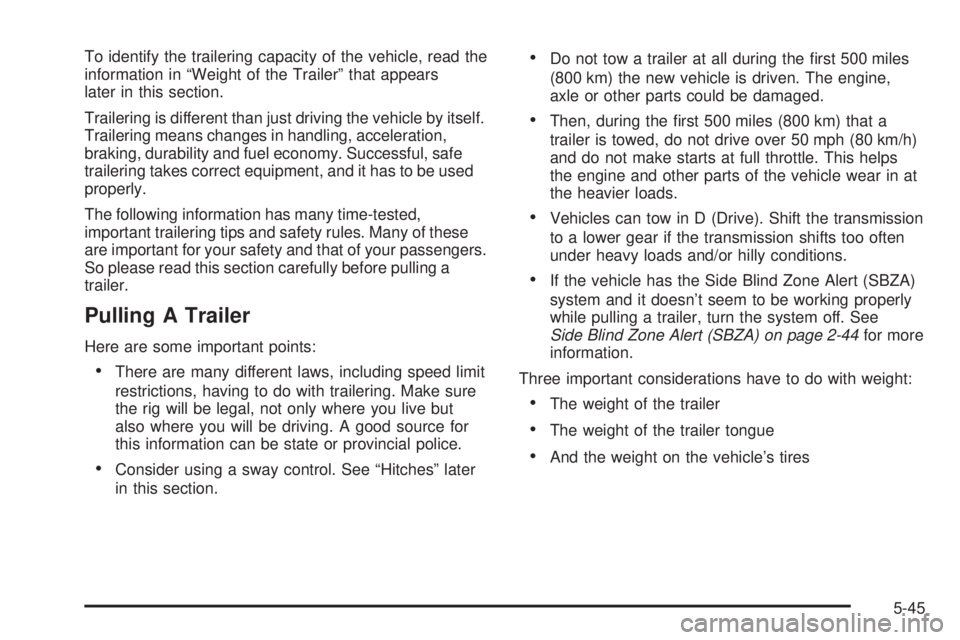
To identify the trailering capacity of the vehicle, read the
information in “Weight of the Trailer” that appears
later in this section.
Trailering is different than just driving the vehicle by itself.
Trailering means changes in handling, acceleration,
braking, durability and fuel economy. Successful, safe
trailering takes correct equipment, and it has to be used
properly.
The following information has many time-tested,
important trailering tips and safety rules. Many of these
are important for your safety and that of your passengers.
So please read this section carefully before pulling a
trailer.
Pulling A Trailer Here are some important points:
There are many different laws, including speed limit
restrictions, having to do with trailering. Make sure
the rig will be legal, not only where you live but
also where you will be driving. A good source for
this information can be state or provincial police.
Consider using a sway control. See “Hitches” later
in this section. Do not tow a trailer at all during the rst 500 miles
(800 km) the new vehicle is driven. The engine,
axle or other parts could be damaged.
Then, during the rst 500 miles (800 km) that a
trailer is towed, do not drive over 50 mph (80 km/h)
and do not make starts at full throttle. This helps
the engine and other parts of the vehicle wear in at
the heavier loads.
Vehicles can tow in D (Drive). Shift the transmission
to a lower gear if the transmission shifts too often
under heavy loads and/or hilly conditions.
If the vehicle has the Side Blind Zone Alert (SBZA)
system and it doesn’t seem to be working properly
while pulling a trailer, turn the system off. See
Side Blind Zone Alert (SBZA) on page 2-44 for more
information.
Three important considerations have to do with weight:
The weight of the trailer
The weight of the trailer tongue
And the weight on the vehicle’s tires
5-45
Page 422 of 602
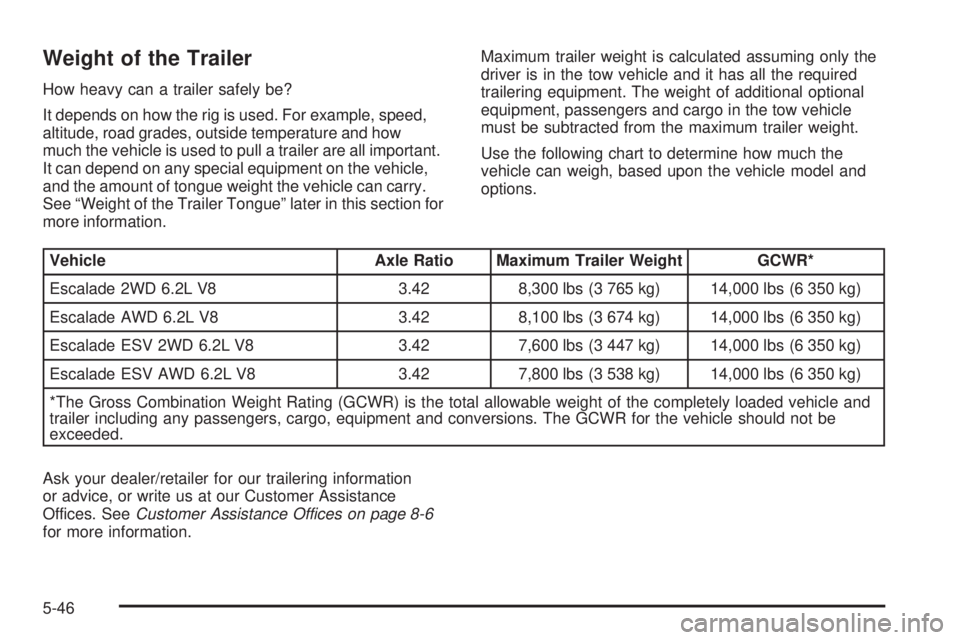
Weight of the Trailer How heavy can a trailer safely be?
It depends on how the rig is used. For example, speed,
altitude, road grades, outside temperature and how
much the vehicle is used to pull a trailer are all important.
It can depend on any special equipment on the vehicle,
and the amount of tongue weight the vehicle can carry.
See “Weight of the Trailer Tongue” later in this section for
more information. Maximum trailer weight is calculated assuming only the
driver is in the tow vehicle and it has all the required
trailering equipment. The weight of additional optional
equipment, passengers and cargo in the tow vehicle
must be subtracted from the maximum trailer weight.
Use the following chart to determine how much the
vehicle can weigh, based upon the vehicle model and
options.
Vehicle Axle Ratio Maximum Trailer Weight GCWR*
Escalade 2WD 6.2L V8 3.42 8,300 lbs (3 765 kg) 14,000 lbs (6 350 kg)
Escalade AWD 6.2L V8 3.42 8,100 lbs (3 674 kg) 14,000 lbs (6 350 kg)
Escalade ESV 2WD 6.2L V8 3.42 7,600 lbs (3 447 kg) 14,000 lbs (6 350 kg)
Escalade ESV AWD 6.2L V8 3.42 7,800 lbs (3 538 kg) 14,000 lbs (6 350 kg)
*The Gross Combination Weight Rating (GCWR) is the total allowable weight of the completely loaded vehicle and
trailer including any passengers, cargo, equipment and conversions. The GCWR for the vehicle should not be
exceeded.
Ask your dealer/retailer for our trailering information
or advice, or write us at our Customer Assistance
Offices. See Customer Assistance Offices on page 8-6
for more information.
5-46