turn signal CADILLAC ESCALADE ESV 2009 User Guide
[x] Cancel search | Manufacturer: CADILLAC, Model Year: 2009, Model line: ESCALADE ESV, Model: CADILLAC ESCALADE ESV 2009Pages: 602, PDF Size: 5.18 MB
Page 175 of 602
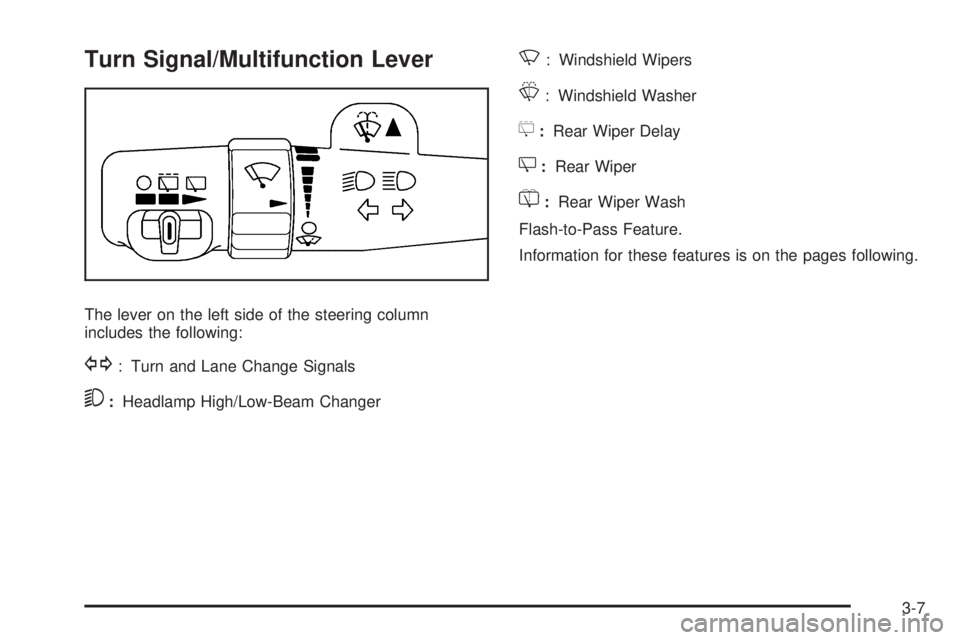
Turn Signal/Multifunction Lever
The lever on the left side of the steering column
includes the following:
G : Turn and Lane Change Signals
5 : Headlamp High/Low-Beam Changer N : Windshield Wipers
L : Windshield Washer
5 : Rear Wiper Delay
Z : Rear Wiper
= : Rear Wiper Wash
Flash-to-Pass Feature.
Information for these features is on the pages following.
3-7
Page 176 of 602
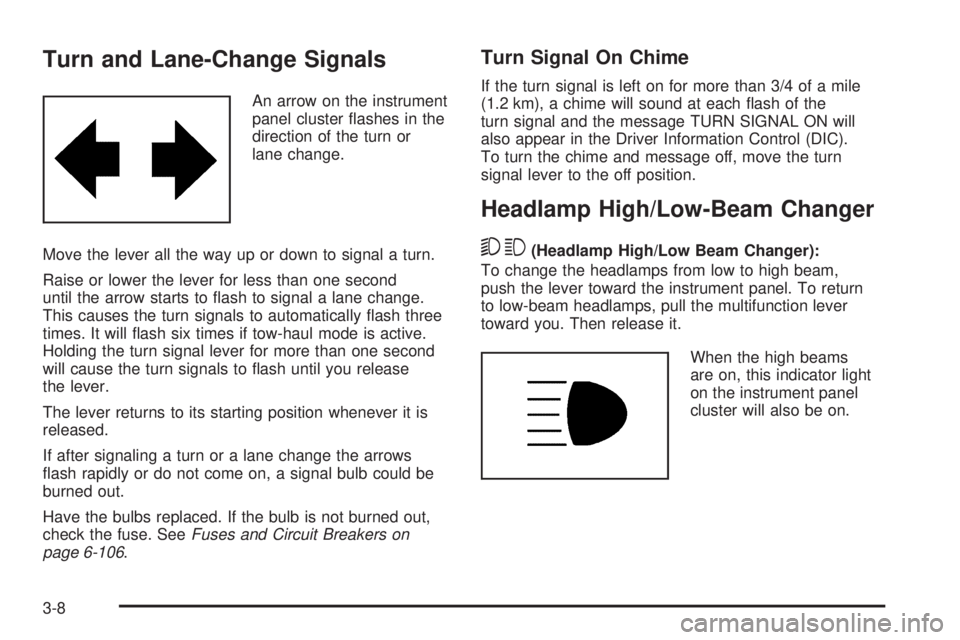
Turn and Lane-Change Signals An arrow on the instrument
panel cluster ashes in the
direction of the turn or
lane change.
Move the lever all the way up or down to signal a turn.
Raise or lower the lever for less than one second
until the arrow starts to ash to signal a lane change.
This causes the turn signals to automatically ash three
times. It will ash six times if tow-haul mode is active.
Holding the turn signal lever for more than one second
will cause the turn signals to ash until you release
the lever.
The lever returns to its starting position whenever it is
released.
If after signaling a turn or a lane change the arrows
ash rapidly or do not come on, a signal bulb could be
burned out.
Have the bulbs replaced. If the bulb is not burned out,
check the fuse. See Fuses and Circuit Breakers on
page 6-106 . Turn Signal On Chime If the turn signal is left on for more than 3/4 of a mile
(1.2 km), a chime will sound at each ash of the
turn signal and the message TURN SIGNAL ON will
also appear in the Driver Information Control (DIC).
To turn the chime and message off, move the turn
signal lever to the off position.
Headlamp High/Low-Beam Changer
53 (Headlamp High/Low Beam Changer):
To change the headlamps from low to high beam,
push the lever toward the instrument panel. To return
to low-beam headlamps, pull the multifunction lever
toward you. Then release it.
When the high beams
are on, this indicator light
on the instrument panel
cluster will also be on.
3-8
Page 177 of 602
Flash-to-Pass This feature lets you use the high-beam headlamps to
signal a driver in front of you that you want to pass.
It works even if the headlamps are in the automatic
position.
To use it, pull the turn signal lever toward you, then
release it.
If the headlamps are in the automatic position or on low
beam, the high-beam headlamps will turn on. They will
stay on as long as you hold the lever toward you. The
high-beam indicator on the instrument panel cluster will
come on. Release the lever to return to normal operation.
For vehicles with High Intensity Discharge (HID)
headlamps, the low-beam headlamps must be on
for the ash-to-pass feature to work.
Windshield Wipers Turn the band with the wiper symbol to control the
windshield wipers.
8 (Mist): Turn to mist for a single wiping cycle.
Hold it there until the wipers start. Then let go.
The wipers stop after one wipe. Hold the band
on mist longer, for more wipe cycles. 9 (Off): Turns the wipers off.
6 (Delay): Turn the band to adjust the delay time.
The delay between wiping cycles becomes shorter as
the band is moved to the top of the lever. This can
be very useful in light rain or snow.
6 (Low Speed): For steady wiping at low speed.
? (High Speed): For high-speed wiping.
Clear ice and snow from the wiper blades before using
them. If they are frozen to the windshield, gently loosen
or thaw them. Damaged wiper blades may not clear the
windshield well, making it harder to see and drive safely.
If the blades do become damaged, install new blades or
blade inserts. For more information, see Windshield
Wiper Blade Replacement on page 6-54 .
Heavy snow or ice can overload the wiper motor.
A circuit breaker will stop the motor until it cools down.
Clear away snow or ice to prevent an overload.
3-9
Page 180 of 602
Rear Window Wiper/Washer
{ CAUTION: In freezing weather, do not use your washer until
the windshield is warmed. Otherwise the washer
uid can form ice on the windshield, blocking your
vision.
The rear wiper control is located on the turn
signal/multifunction lever.
To turn the rear wiper on, slide the lever to a wiper
position. 9 (Off): Turns the wiper off.
5 (Rear Wiper Delay): Turns on the rear wiper delay.
Z (Rear Wiper): Turns on the rear wiper.
= (Rear Wiper Wash): To turn on the rear wiper
wash, push the button on the end of the turn signal/
multifunction lever to spray washer uid on the rear
window. The wipers will clear the rear window and
either stop or return to your preset speed. For more
washer cycles, press and hold the button.
The rear window wiper/washer will not operate if the
liftgate or liftglass is open or ajar. If the liftgate or liftglass
is opened while the rear wiper is on, the wiper will return
to the parked position and stop.
3-12
Page 186 of 602
IntelliBeam ®
Intelligent High-Beam
Headlamp Control System For vehicles with this feature, be sure to read this entire
section before using it.
IntelliBeam ®
is an enhancement to the vehicle’s
headlamp system. Using a digital light sensor on the
rearview mirror, this system will turn the vehicle’s
high-beam headlamps on and off according to
surrounding traffic conditions.
The IntelliBeam ®
system turns the high-beam
headlamps on when it is dark enough, there is no other
traffic present, and the IntelliBeam ®
system is enabled.
Turning On and Enabling IntelliBeam ®
Press and release the IntelliBeam ®
button on the inside
rear view mirror. The IntelliBeam ®
indicator on the mirror
will turn on to let you know the system has been turned
on. Once the system has been turned on, it will remain
on each time the vehicle is started. Additionally, the
IntelliBeam ®
system must be enabled.
To enable the IntelliBeam ®
system, turn the exterior
lamp control to AUTO, with the turn signal/multifunction
lever in its neutral position. The High-Beam On Light
will appear on the instrument panel cluster when
the high-beams are on. See Highbeam On Light
on page 3-46 . Driving with IntelliBeam ®
IntelliBeam ®
will only activate your high-beams when
driving over 20 mph (32 km/h).
The high-beam headlamps will remain on, under the
automatic control of IntelliBeam ®
, until any of the
following situations occur:
The system detects an approaching vehicle’s
headlamps.
The system detects a preceding vehicle’s taillamps.
The outside light is bright enough that high-beam
headlamps are not required.
The vehicle’s speed drops below 15 mph (24 km/h).
The headlamp stalk is moved forward to the
high-beam position. See Headlamp High/Low-Beam
Changer on page 3-8 .
When either of these conditions occur, the
IntelliBeam ®
feature will be disabled and the
IntelliBeam ®
light in the mirror will turn off until the
high-beam stalk is returned to the neutral position.
If IntelliBeam ®
was using low-beams prior to
this action, the IntelliBeam ®
feature will be
temporarily disabled until the stalk is returned
to the neutral position.
3-18
Page 201 of 602

Automatic Operation, If Equipped. AUTO: Press the air delivery mode button until this
setting is selected to control the inside temperature, air
delivery, and fan speed. AUTO appears in the display
when automatic operation is active.
+/ − (Increase/Decrease Temperature): Press the + or
− buttons to increase or decrease the cabin temperature.
The rear control temperature display will show the
temperature setting increasing or decreasing.
The display only indicates climate control functions
when the system is in rear independent mode.
Manual Operation
DC (Fan Control): Press these buttons on the rear
seat audio control panel to increase or decrease the
airow. Pressing the fan up button when the system is off
will turn the system on. The air delivery mode will remain
under automatic control.
+/ − (Temperature Control): Press these buttons
to adjust the temperature of the air owing into the
passenger area. Press the + button for warmer air
and press the − button for cooler air.
N (Air Delivery Mode Control): Press the mode
button to change the direction of the airow in the
vehicle. Repeatedly press the button until the desired
mode appears on the display. Multiple presses will cycle
through the delivery selections. Warning Lights, Gages, and
Indicators Warning lights and gages can signal that something
is wrong before it becomes serious enough to cause
an expensive repair or replacement. Paying attention
to the warning lights and gages could prevent injury.
Warning lights come on when there may be or is
a problem with one of the vehicle’s functions. Some
warning lights come on briey when the engine is
started to indicate they are working.
Gages can indicate when there may be or is a problem
with one of the vehicle’s functions. Often gages and
warning lights work together to indicate a problem with
the vehicle.
When one of the warning lights comes on and stays on
while driving, or when one of the gages shows there may
be a problem, check the section that explains what to do.
Follow this manual’s advice. Waiting to do repairs can be
costly and even dangerous.
3-33
Page 232 of 602

TIRE LEARNING ACTIVE On vehicles with the Tire Pressure Monitor
System (TPMS), this message displays when
the TPMS is re-learning the tire positions on your
vehicle. The tire positions must be re-learned after
rotating the tires or after replacing a tire or sensor.
See Tire Inspection and Rotation on page 6-69 ,
Tire Pressure Monitor System on page 6-64 , and
Inflation - Tire Pressure on page 6-62 for more
information.
TRACTION CONTROL OFF If your vehicle has StabiliTrak, this message displays
when the Traction Control System (TCS) is turned
off. Adjust your driving accordingly. See StabiliTrak ®
System on page 5-6 for more information.
TRANSMISSION HOT IDLE ENGINE Notice: If you drive your vehicle while the
transmission uid is overheating and the
transmission temperature warning is displayed
on the instrument panel cluster and/or DIC, you
can damage the transmission. This could lead
to costly repairs that would not be covered by your warranty. Do not drive your vehicle with
overheated transmission uid or while the
transmission temperature warning is displayed.
This message displays along with four chimes if
the transmission uid in the vehicle gets hot. Driving
with the transmission uid temperature high can cause
damage to the vehicle. Stop the vehicle and let it
idle to allow the transmission to cool. This message
clears and the chime stops when the uid temperature
reaches a safe level.
TURN SIGNAL ON This message displays and a chime sounds if a turn
signal is left on for 3/4 of a mile (1.2 km). Move the turn
signal/multifunction lever to the off position.
WASHER FLUID LOW ADD FLUID This message displays when the windshield washer
uid is low. Fill the windshield washer uid reservoir as
soon as possible. See Engine Compartment Overview
on page 6-14 for the location of the windshield washer
uid reservoir. Also, see Windshield Washer Fluid on
page 6-34 for more information.
3-64
Page 257 of 602

Push the power button to turn on the headphones.
An indicator light located on the headphones comes on.
If the light comes on but, there is intermittent sound
and/or static on the headphones, or if the indicator
light does not come on, the batteries might need to be
replaced. See “Battery Replacement” later in this section
for more information. Switch the headphones to Off when
not in use.
The infrared transmitters are located at the rear of
the RSE overhead console. The headphones shut off
automatically to save the battery power if the RSE system
and the RSA are shut off or if the headphones are out of
range of the transmitters for more than 3 minutes. If you
move too far forward or step out of the vehicle, the
headphones lose the audio signal.
The headphones automatically turn off after four hours
of continuous use.
To adjust the volume on the headphones, use the
volume control located on the right side.
For optimal audio performance, the headphones
must be worn correctly. Headphones should be worn
with headband over the top of the head for best audio
reception. The symbol L (Left) appears on the upper left
side, above the ear pad and should be positioned on the
left ear. The symbol R (Right) appears on the upper right
side, above the ear pad and should be positioned on the
right ear. Notice: Do not store the headphones in heat or
direct sunlight. This could damage the headphones
and repairs will not be covered by the warranty.
Storage in extreme cold can weaken the batteries.
Keep the headphones stored in a cool, dry place.
If the foam ear pads attached to the headphones
become worn or damaged, the pads can be replaced
separately from the headphone set. See your
dealer/retailer for more information.
Battery Replacement To change the batteries on the headphones:
1. Turn the screw to loosen the battery door located
on the left side of the headphones. Slide the
battery door open.
2. Replace the two batteries in the compartment.
Make sure that they are installed correctly, using the
diagram on the inside of the battery compartment.
3. Replace the battery door and tighten the door
screw.
If the headphones are to be stored for a long period of
time, remove the batteries and keep them in a cool,
dry place.
3-89
Page 258 of 602

Audio/Video (A/V) Jacks
The A/V jacks are located on the rear of the oor
console. The A/V jacks allow audio or video signals
to be connected from an auxiliary device such as a
camcorder or a video game unit to the RSE system.
Adapter connectors or cables (not included) may be
required to connect the auxiliary device to the A/V jacks.
Refer to the manufacturer’s instructions for proper usage.
The A/V jacks are color coded to match typical home
entertainment system equipment. The yellow jack (A)
is for the video input. The white jack (B) is for the
left audio input. The red jack (C) is for the right audio
input.
Power for auxiliary devices is not supplied by the radio
system. To use the auxiliary inputs of the RSE system, connect
an external auxiliary device to the color-coded A/V jacks
and turn both the auxiliary device and the video screen
power on. If the video screen is in the DVD player mode,
pressing the AUX (auxiliary) button on the remote control
switches the video screen from the DVD player mode
to the auxiliary device. The radio plays the audio of the
connected auxiliary device by sourcing to auxiliary.
See Navigation Audio System on page 4-62 for more
information.
For optimal sound quality, increase the portable audio
device’s volume to the loudest level. Higher levels
of volume decreases audio distortion.
It is always best to power a portable audio device
through its own battery while playing.
How to Change the RSE Video Screen
Settings The screen display mode (normal, full, and zoom),
screen brightness, and setup menu language can be
changed from the on screen setup menu. To change
any feature, perform the following:
1. Press the
z button on the remote control.
2. Use the remote control
Q ,
R ,
q ,
r navigation
arrows and the
r button to use the setup menu.
3. Press the
z button again to remove the setup
menu from the screen.
3-90
Page 259 of 602

Audio Output Audio from the DVD player or auxiliary inputs can be
heard through the following possible sources:
Wireless Headphones
Vehicle Speakers
Vehicle wired headphone jacks on the rear seat
audio system, if the vehicle has this feature.
The RSE system always transmits the audio signal to
the wireless headphones, if there is audio available.
See “Headphones” earlier in this section for more
information.
The DVD player is capable of outputting audio to the
wired headphone jacks on the RSA system, if the
vehicle has this feature. The DVD player can be
selected as an audio source on the RSA system.
See Rear Seat Audio (RSA) on page 3-113 for
more information.
When a device is connected to the A/V jacks, the
rear seat passengers are be able to hear audio from
the auxiliary device through the wireless or wired
headphones. The front seat passengers are able to
listen to playback from this device through the vehicle
speakers by selecting AUX as the source on the radio. Video Screen(s) The video screen(s) are located in the overhead
console.
To use the video screen(s):
1. Push the release button located on the overhead
console.
2. Move the screen to the desired position.
When the video screen is not in use, push it up into its
locked position.
If a DVD is playing and the screen is raised to its locked
position, the screen remains on, this is normal, and
the DVD continues to play through the previous audio
source. Use the remote control power button or eject the
disc to turn off the screen.
The overhead console contains the IR (infrared)
transmitters for the wireless headphones and the IR
receivers for the remote control. They are located at
the rear of the console.
Notice: Avoid directly touching the video screen,
as damage may occur. See “Cleaning the Video
Screen” later in this section for more information.
3-91