lights CADILLAC ESCALADE ESV 2009 Owner's Manual
[x] Cancel search | Manufacturer: CADILLAC, Model Year: 2009, Model line: ESCALADE ESV, Model: CADILLAC ESCALADE ESV 2009Pages: 602, PDF Size: 5.18 MB
Page 201 of 602

Automatic Operation, If Equipped. AUTO: Press the air delivery mode button until this
setting is selected to control the inside temperature, air
delivery, and fan speed. AUTO appears in the display
when automatic operation is active.
+/ − (Increase/Decrease Temperature): Press the + or
− buttons to increase or decrease the cabin temperature.
The rear control temperature display will show the
temperature setting increasing or decreasing.
The display only indicates climate control functions
when the system is in rear independent mode.
Manual Operation
DC (Fan Control): Press these buttons on the rear
seat audio control panel to increase or decrease the
airow. Pressing the fan up button when the system is off
will turn the system on. The air delivery mode will remain
under automatic control.
+/ − (Temperature Control): Press these buttons
to adjust the temperature of the air owing into the
passenger area. Press the + button for warmer air
and press the − button for cooler air.
N (Air Delivery Mode Control): Press the mode
button to change the direction of the airow in the
vehicle. Repeatedly press the button until the desired
mode appears on the display. Multiple presses will cycle
through the delivery selections. Warning Lights, Gages, and
Indicators Warning lights and gages can signal that something
is wrong before it becomes serious enough to cause
an expensive repair or replacement. Paying attention
to the warning lights and gages could prevent injury.
Warning lights come on when there may be or is
a problem with one of the vehicle’s functions. Some
warning lights come on briey when the engine is
started to indicate they are working.
Gages can indicate when there may be or is a problem
with one of the vehicle’s functions. Often gages and
warning lights work together to indicate a problem with
the vehicle.
When one of the warning lights comes on and stays on
while driving, or when one of the gages shows there may
be a problem, check the section that explains what to do.
Follow this manual’s advice. Waiting to do repairs can be
costly and even dangerous.
3-33
Page 206 of 602

If the word ON or the on symbol is lit on the passenger
airbag status indicator, it means that the right front
passenger frontal airbag is enabled (may inate).
If the word OFF or the off symbol is lit on the airbag
status indicator, it means that the passenger sensing
system has turned off the right front passenger
frontal airbag.
If, after several seconds, both status indicator lights
remain on, or if there are no lights at all, there may
be a problem with the lights or the passenger sensing
system. See your dealer/retailer for service.
{ CAUTION: If the airbag readiness light ever comes on and
stays on, it means that something may be wrong
with the airbag system. To help avoid injury to
yourself or others, have the vehicle serviced right
away. See Airbag Readiness Light on page 3-36
for more information, including important safety
information. Charging System Light This light comes on briey
when the ignition key is
turned to START, but
the engine is not running,
as a check to show it
is working.
If it does not, have the vehicle serviced by your
dealer/retailer.
The light should go out once the engine starts. If it stays
on, or comes on while driving, there could be a problem
with the charging system. A charging system message
in the Driver Information Center (DIC) can also appear.
See DIC Warnings and Messages on page 3-56 for
more information. This light could indicate that there
are problems with a generator drive belt, or that there
is an electrical problem. Have it checked right away.
If the vehicle must be driven a short distance with the
light on, turn off accessories, such as the radio and air
conditioner.
3-38
Page 213 of 602
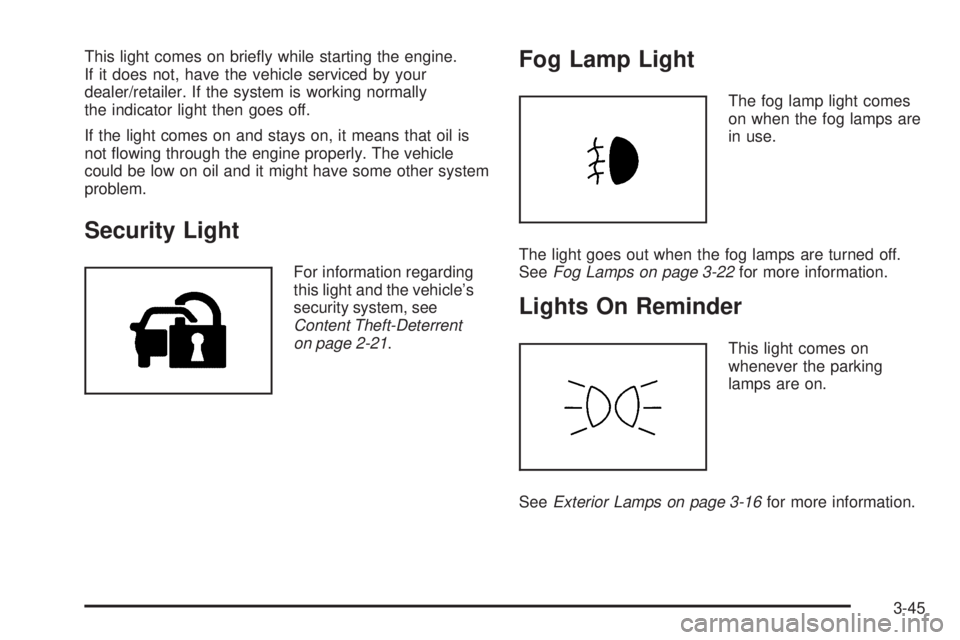
This light comes on briey while starting the engine.
If it does not, have the vehicle serviced by your
dealer/retailer. If the system is working normally
the indicator light then goes off.
If the light comes on and stays on, it means that oil is
not owing through the engine properly. The vehicle
could be low on oil and it might have some other system
problem.
Security Light For information regarding
this light and the vehicle’s
security system, see
Content Theft-Deterrent
on page 2-21 .Fog Lamp Light The fog lamp light comes
on when the fog lamps are
in use.
The light goes out when the fog lamps are turned off.
See Fog Lamps on page 3-22 for more information.
Lights On Reminder This light comes on
whenever the parking
lamps are on.
See Exterior Lamps on page 3-16 for more information.
3-45
Page 235 of 602

AUTO DOOR UNLOCK This feature allows you to select whether or not to
turn off the automatic door unlocking feature. It also
allows you to select which doors and when the doors
will automatically unlock. See Programmable Automatic
Door Locks on page 2-11 for more information.
Press the customization button until AUTO DOOR
UNLOCK appears on the DIC display. Press the
set/reset button once to access the settings for this
feature. Then press the customization button to scroll
through the following settings:
OFF: None of the doors will automatically unlock.
DRIVER AT KEY OUT: Only the driver’s door will
unlock when the key is taken out of the ignition.
DRIVER IN PARK: Only the driver’s door will unlock
when the vehicle is shifted into P (Park).
ALL AT KEY OUT: All of the doors will unlock when
the key is taken out of the ignition.
ALL IN PARK (default): All of the doors will unlock
when the vehicle is shifted into P (Park).
NO CHANGE: No change will be made to this feature.
The current setting will remain.
To select a setting, press the set/reset button while the
desired setting is displayed on the DIC. REMOTE DOOR LOCK This feature allows you to select the type of feedback
you will receive when locking the vehicle with the
Remote Keyless Entry (RKE) transmitter. You will not
receive feedback when locking the vehicle with the RKE
transmitter if the doors are open. See Remote Keyless
Entry (RKE) System Operation on page 2-5 for more
information.
Press the customization button until REMOTE DOOR
LOCK appears on the DIC display. Press the set/reset
button once to access the settings for this feature.
Then press the customization button to scroll through
the following settings:
OFF: There will be no feedback when you press the
lock button on the RKE transmitter.
LIGHTS ONLY: The exterior lamps will ash when you
press the lock button on the RKE transmitter.
HORN ONLY: The horn will sound on the second press
of the lock button on the RKE transmitter.
HORN & LIGHTS (default): The exterior lamps
will ash when you press the lock button on the RKE
transmitter, and the horn will sound when the lock button
is pressed again within ve seconds of the previous
command.
NO CHANGE: No change will be made to this feature.
The current setting will remain.
3-67
Page 236 of 602

To select a setting, press the set/reset button while the
desired setting is displayed on the DIC.
REMOTE DOOR UNLOCK This feature allows you to select the type of feedback
you will receive when unlocking the vehicle with the
Remote Keyless Entry (RKE) transmitter. You will not
receive feedback when unlocking the vehicle with the
RKE transmitter if the doors are open. See Remote
Keyless Entry (RKE) System Operation on page 2-5
for more information.
Press the customization button until REMOTE DOOR
UNLOCK appears on the DIC display. Press the
set/reset button once to access the settings for this
feature. Then press the customization button to scroll
through the following settings:
LIGHTS OFF: The exterior lamps will not ash when
you press the unlock button on the RKE transmitter.
LIGHTS ON (default): The exterior lamps will
ash when you press the unlock button on the
RKE transmitter.
NO CHANGE: No change will be made to this feature.
The current setting will remain.
To select a setting, press the set/reset button while the
desired setting is displayed on the DIC. DELAY DOOR LOCK This feature allows you to select whether or not the
locking of the vehicle’s doors and liftgate will be delayed.
When locking the doors and liftgate with the power door
lock switch and a door or the liftgate is open, this feature
will delay locking the doors and liftgate until ve seconds
after the last door is closed. You will hear three chimes
to signal that the delayed locking feature is in use.
The key must be out of the ignition for this feature to
work. You can temporarily override delayed locking by
pressing the power door lock switch twice or the lock
button on the RKE transmitter twice. See Delayed
Locking on page 2-10 for more information.
Press the customization button until DELAY DOOR
LOCK appears on the DIC display. Press the set/reset
button once to access the settings for this feature.
Then press the customization button to scroll through
the following settings:
OFF: There will be no delayed locking of the vehicle’s
doors.
ON (default): The doors will not lock until ve seconds
after the last door or the liftgate is closed.
NO CHANGE: No change will be made to this feature.
The current setting will remain.
To select a setting, press the set/reset button while the
desired setting is displayed on the DIC.
3-68
Page 237 of 602

EXIT LIGHTING This feature allows you to select the amount of time
you want the exterior lamps to remain on when it is dark
enough outside. This happens after the key is turned
from ON/RUN to LOCK/OFF.
Press the customization button until EXIT LIGHTING
appears on the DIC display. Press the set/reset
button once to access the settings for this feature.
Then press the customization button to scroll through
the following settings:
OFF: The exterior lamps will not turn on.
30 SECONDS (default): The exterior lamps will stay on
for 30 seconds.
1 MINUTE: The exterior lamps will stay on for
one minute.
2 MINUTES: The exterior lamps will stay on for
two minutes.
NO CHANGE: No change will be made to this feature.
The current setting will remain.
To select a setting, press the set/reset button while the
desired setting is displayed on the DIC. APPROACH LIGHTING This feature allows you to select whether or not to
have the exterior lights turn on briey during low light
periods after unlocking the vehicle using the Remote
Keyless Entry (RKE) transmitter.
Press the customization button until APPROACH
LIGHTING appears on the DIC display. Press the
set/reset button once to access the settings for
this feature. Then press the customization button
to scroll through the following settings:
OFF: The exterior lights will not turn on when you
unlock the vehicle with the RKE transmitter.
ON (default): If it is dark enough outside, the exterior
lights will turn on briey when you unlock the vehicle
with the RKE transmitter.
The lights will remain on for 20 seconds or until the
lock button on the RKE transmitter is pressed, or
the vehicle is no longer off. See Remote Keyless
Entry (RKE) System Operation on page 2-5 for
more information.
NO CHANGE: No change will be made to this feature.
The current setting will remain.
To select a setting, press the set/reset button while the
desired setting is displayed on the DIC.
3-69
Page 296 of 602

11. Select the Go screen button. A map screen, with
the destination marked appears.
12. Select the route preference (Fastest, Shortest, or
Other). The system calculates and highlights the
route.
13. Select the Start Guidance screen button. You are
now ready to start your route.
See “Address Entry ” under Destination on page 4-25
for more information.
Entering a Point of Interest (POI) To set a destination by entering a Point of
Interest (POI), do the following:
1. If the radio is already on with a map disc inserted,
skip to Step 5.
2. Press
O to turn the system on.
3. Insert the DVD map disc. See “Installing the
Map DVD” under Maps on page 4-15 for more
information.
4. A caution may appear. Touch the OK screen button
to proceed.
5. Press the DEST hard key. 6. Press the
i Point of Interest screen button.
7. Select the state/province screen button, if needed,
to change the current state or province. A list of
all of the available states and provinces appear.
Select the state or province.
8. Enter the specic title of the POI in the POI name
space (e.g. Washington Monument).
If ve or less names are available, a list displays.
If more than ve are available, the List screen button
displays a number. This button represents the
number of available POIs. Select this button to
view the list.
9. Select the Go screen button next to the POI. A map
screen, with the destination marked appears.
10. Select the route preference (Fastest, Shortest, or
Other). The system calculates and highlights the
route.
11. Select the Start Guidance screen button. The route
is now ready to be started.
See “Point of Interest (POI)” under Destination on
page 4-25 for more information.
4-10
Page 298 of 602

4. A caution may appear. Touch the OK screen button
to proceed.
5. Press the DEST hard key.
6. Select one of the available preset destination
screen buttons. A map screen, with the destination
marked appears.
7. Select the route preference (Fastest, Shortest, or
Other). The system calculates and highlights the
route.
8. Select the Start Guidance screen button. The route
is now ready to be started.
See “Preset Destination” under Destination on page 4-25
for more information.
Canceling Guidance Guidance is canceled once the nal destination is
reached. To cancel guidance prior to arrival at the
nal destination:
1. Press the DEST hard key.
2. Press the Cancel Guidance screen button.
3. Press OK to conrm. Guidance Volume Adjust the volume of voice guidance prompts:
1. Press the CONFIG hard key to enter the menu
options, then press the CONFIG key repeatedly
until Nav is selected or touch the Nav screen button.
2. Press the Voice Prompt screen button.
3. Press the + (plus) or – (minus) screen buttons to
increase or to decrease the volume of the voice
prompts. The system responds with the adjusted
voice level.
See “Voice Prompt ” under Configure Menu on
page 4-43 for more information.
Cleaning the Display Use a soft clean cotton cloth dampened with clean
water.
4-12
Page 301 of 602
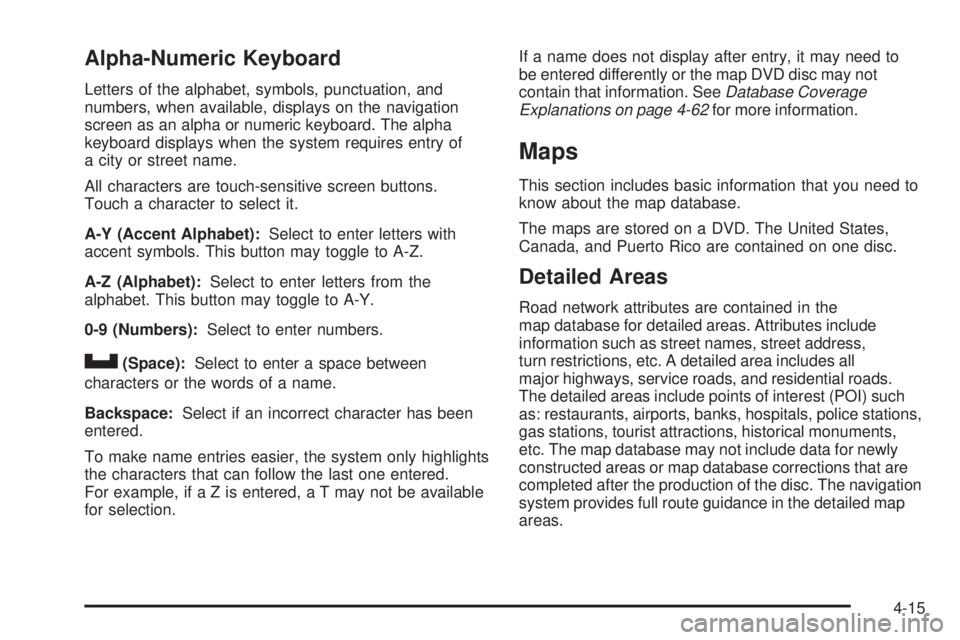
Alpha-Numeric Keyboard Letters of the alphabet, symbols, punctuation, and
numbers, when available, displays on the navigation
screen as an alpha or numeric keyboard. The alpha
keyboard displays when the system requires entry of
a city or street name.
All characters are touch-sensitive screen buttons.
Touch a character to select it.
A-Y (Accent Alphabet): Select to enter letters with
accent symbols. This button may toggle to A-Z.
A-Z (Alphabet): Select to enter letters from the
alphabet. This button may toggle to A-Y.
0-9 (Numbers): Select to enter numbers.
U (Space): Select to enter a space between
characters or the words of a name.
Backspace: Select if an incorrect character has been
entered.
To make name entries easier, the system only highlights
the characters that can follow the last one entered.
For example, if a Z is entered, a T may not be available
for selection. If a name does not display after entry, it may need to
be entered differently or the map DVD disc may not
contain that information. See Database Coverage
Explanations on page 4-62 for more information.
Maps This section includes basic information that you need to
know about the map database.
The maps are stored on a DVD. The United States,
Canada, and Puerto Rico are contained on one disc.
Detailed Areas Road network attributes are contained in the
map database for detailed areas. Attributes include
information such as street names, street address,
turn restrictions, etc. A detailed area includes all
major highways, service roads, and residential roads.
The detailed areas include points of interest (POI) such
as: restaurants, airports, banks, hospitals, police stations,
gas stations, tourist attractions, historical monuments,
etc. The map database may not include data for newly
constructed areas or map database corrections that are
completed after the production of the disc. The navigation
system provides full route guidance in the detailed map
areas.
4-15
Page 313 of 602

7. Select the Go screen button. The map screen, with
the destination marked displays.
8. Select the route preference (Fastest, Shortest,
or Other). The system calculates and highlights
the route.
9. Select the Start Guidance screen button. The route
is now ready to be started.
See “Getting Started on Your Route” later in this
section for more information.
To enter a destination by entering the street name rst:
1. Press the DEST hard key.
2. Select the
2 screen button.
3. Select the state/province screen button, if needed,
to change the current state or province. A list of
all of the available states and provinces appear.
Select the state or province.
4. Select the Street screen button and start entering
the street name or touch the Last 5 Streets screen
button.
If the street name is common, the city might need
to be entered rst.
The Last 5 Streets screen displays a list of the last
ve street names that had been entered. Select
a street from the list and it appears in the Street
name area. If using the alpha keyboard, nish entering the
street name. If ve or less names are available,
a list displays. If more than ve are available,
the List screen button displays a number.
This number represents the number of available
streets. Select this button to view the list and
select a street.
5. Once a street has been selected, select the
House # screen button to enter the house number.
The system displays the house number range
that is available for the street.
6. Once the house number is selected, the city name
automatically populates. If there is more than one
city available for selection, a list of cities display.
Select the city.
7. Select the Go screen button. The map screen, with
the destination marked displays.
8. Select the route preference (Fastest, Shortest,
or Other). The system calculates and highlights
the route.
9. Select the Start Guidance screen button. The route
is now ready to be started.
See “Getting Started on Your Route” later in this
section for more information.
4-27