reset CADILLAC ESCALADE ESV 2009 Owner's Manual
[x] Cancel search | Manufacturer: CADILLAC, Model Year: 2009, Model line: ESCALADE ESV, Model: CADILLAC ESCALADE ESV 2009Pages: 602, PDF Size: 5.18 MB
Page 236 of 602

To select a setting, press the set/reset button while the
desired setting is displayed on the DIC.
REMOTE DOOR UNLOCK This feature allows you to select the type of feedback
you will receive when unlocking the vehicle with the
Remote Keyless Entry (RKE) transmitter. You will not
receive feedback when unlocking the vehicle with the
RKE transmitter if the doors are open. See Remote
Keyless Entry (RKE) System Operation on page 2-5
for more information.
Press the customization button until REMOTE DOOR
UNLOCK appears on the DIC display. Press the
set/reset button once to access the settings for this
feature. Then press the customization button to scroll
through the following settings:
LIGHTS OFF: The exterior lamps will not ash when
you press the unlock button on the RKE transmitter.
LIGHTS ON (default): The exterior lamps will
ash when you press the unlock button on the
RKE transmitter.
NO CHANGE: No change will be made to this feature.
The current setting will remain.
To select a setting, press the set/reset button while the
desired setting is displayed on the DIC. DELAY DOOR LOCK This feature allows you to select whether or not the
locking of the vehicle’s doors and liftgate will be delayed.
When locking the doors and liftgate with the power door
lock switch and a door or the liftgate is open, this feature
will delay locking the doors and liftgate until ve seconds
after the last door is closed. You will hear three chimes
to signal that the delayed locking feature is in use.
The key must be out of the ignition for this feature to
work. You can temporarily override delayed locking by
pressing the power door lock switch twice or the lock
button on the RKE transmitter twice. See Delayed
Locking on page 2-10 for more information.
Press the customization button until DELAY DOOR
LOCK appears on the DIC display. Press the set/reset
button once to access the settings for this feature.
Then press the customization button to scroll through
the following settings:
OFF: There will be no delayed locking of the vehicle’s
doors.
ON (default): The doors will not lock until ve seconds
after the last door or the liftgate is closed.
NO CHANGE: No change will be made to this feature.
The current setting will remain.
To select a setting, press the set/reset button while the
desired setting is displayed on the DIC.
3-68
Page 237 of 602

EXIT LIGHTING This feature allows you to select the amount of time
you want the exterior lamps to remain on when it is dark
enough outside. This happens after the key is turned
from ON/RUN to LOCK/OFF.
Press the customization button until EXIT LIGHTING
appears on the DIC display. Press the set/reset
button once to access the settings for this feature.
Then press the customization button to scroll through
the following settings:
OFF: The exterior lamps will not turn on.
30 SECONDS (default): The exterior lamps will stay on
for 30 seconds.
1 MINUTE: The exterior lamps will stay on for
one minute.
2 MINUTES: The exterior lamps will stay on for
two minutes.
NO CHANGE: No change will be made to this feature.
The current setting will remain.
To select a setting, press the set/reset button while the
desired setting is displayed on the DIC. APPROACH LIGHTING This feature allows you to select whether or not to
have the exterior lights turn on briey during low light
periods after unlocking the vehicle using the Remote
Keyless Entry (RKE) transmitter.
Press the customization button until APPROACH
LIGHTING appears on the DIC display. Press the
set/reset button once to access the settings for
this feature. Then press the customization button
to scroll through the following settings:
OFF: The exterior lights will not turn on when you
unlock the vehicle with the RKE transmitter.
ON (default): If it is dark enough outside, the exterior
lights will turn on briey when you unlock the vehicle
with the RKE transmitter.
The lights will remain on for 20 seconds or until the
lock button on the RKE transmitter is pressed, or
the vehicle is no longer off. See Remote Keyless
Entry (RKE) System Operation on page 2-5 for
more information.
NO CHANGE: No change will be made to this feature.
The current setting will remain.
To select a setting, press the set/reset button while the
desired setting is displayed on the DIC.
3-69
Page 238 of 602
AUTO HIGH BEAMS If your vehicle has this feature, it allows you to select
to have the Intellibeam ®
system turned off or on.
See Exterior Lamps on page 3-16 for more information.
Press the customization button until AUTO HIGH
BEAMS appears on the DIC display. Press the set/reset
button once to access the settings for this feature.
Then press the customization button to scroll through
the following settings:
OFF (default): The Intellibeam ®
system will be
turned off.
ON: The Intellibeam ®
system will be turned on.
NO CHANGE: No change will be made to this feature.
The current setting will remain.
To select a setting, press the set/reset button while the
desired setting is displayed on the DIC. CHIME VOLUME This feature allows you to select the volume level of the
chime.
Press the customization button until CHIME VOLUME
appears on the DIC display. Press the set/reset
button once to access the settings for this feature.
Then press the customization button to scroll through
the following settings:
NORMAL: The chime volume will be set to a normal
level.
LOUD: The chime volume will be set to a loud level.
NO CHANGE: No change will be made to this feature.
The current setting will remain.
There is no default for chime volume. The volume will
stay at the last known setting.
To select a setting, press the set/reset button while the
desired setting is displayed on the DIC.
3-70
Page 239 of 602
PARK TILT MIRRORS This feature allows you to select whether or not the
outside mirror(s) will automatically tilt down when
the vehicle is shifted into R (Reverse). See Outside
Power Foldaway Mirrors on page 2-40 for more
information.
Press the customization button until PARK TILT
MIRRORS appears on the DIC display. Press the
set/reset button once to access the settings for this
feature. Then press the customization button to scroll
through the following settings:
OFF (default): Neither outside mirror will be tilted down
when the vehicle is shifted into R (Reverse).
DRIVER MIRROR: The driver’s outside mirror will be
tilted down when the vehicle is shifted into R (Reverse).
PASSENGER MIRROR: The passenger’s outside
mirror will be tilted down when the vehicle is shifted
into R (Reverse).
BOTH MIRRORS: The driver’s and passenger’s outside
mirrors will be tilted down when the vehicle is shifted
into R (Reverse).
NO CHANGE: No change will be made to this feature.
The current setting will remain.
To select a setting, press the set/reset button while the
desired setting is displayed on the DIC. EASY EXIT RECALL If your vehicle has this feature, it allows you to select
your preference for the automatic easy exit seat feature.
See Memory Features on page 1-7 for more information.
Press the customization button until EASY EXIT
RECALL appears on the DIC display. Press the set/
reset button once to access the settings for this feature.
Then press the customization button to scroll through
the following settings:
DOOR BUTTON ONLY: No automatic seat exit recall
will occur. The recall will only occur after pressing
the easy exit seat button.
BUTTON AND KEY OUT (default): If the features
are enabled through the EASY EXIT SETUP menu, the
driver’s seat will move back, and if the vehicle has the
power tilt wheel feature, the power steering column will
move up when the key is removed from the ignition or
after pressing the easy exit seat button.
The automatic easy exit seat movement will only occur
one time after the key is removed from the ignition. If the
automatic movement has already occurred, and you put
the key back in the ignition and remove it again, the seat
and steering column will stay in the original exit position,
unless a memory recall took place prior to removing the
key again.
NO CHANGE: No change will be made to this feature.
The current setting will remain.
3-71
Page 240 of 602
To select a setting, press the set/reset button while the
desired setting is displayed on the DIC.
EASY EXIT SETUP If your vehicle has this feature, it allows you to select
which areas will recall with the automatic easy exit
seat feature. It also allows you to turn off the automatic
easy exit feature. See Memory Features on page 1-7
and “EASY EXIT RECALL” earlier for more information.
Press the customization button until EASY EXIT SETUP
appears on the DIC display. Press the set/reset button
once to access the settings for this feature. Then press
the menu up/down button to scroll through the following
settings:
OFF: No automatic seat exit will recall.
SEAT ONLY: The driver’s seat will recall.
TILT ONLY: The steering wheel tilt feature will recall.
ALL (default): The driver’s seat and the steering wheel
tilt feature will recall.
NO CHANGE: No change will be made to this feature.
The current setting will remain.
To select a setting, press the set/reset button while the
desired setting is displayed on the DIC. MEMORY SEAT RECALL This feature allows you to select your preference for
the remote memory seat recall feature. See Memory
Features on page 1-7 for more information.
Press the customization button until MEMORY SEAT
RECALL appears on the DIC display. Press the set/
reset button once to access the settings for this feature.
Then press the customization button to scroll through the
following settings:
OFF (default): No remote memory seat recall will
occur.
ON: The driver’s seat, and on some vehicles, the
outside mirrors will automatically move to the stored
driving position when the unlock button on the Remote
Keyless Entry (RKE) transmitter is pressed. On some
vehicles with the adjustable throttle and brake pedal
feature, the pedals will also automatically move.
See “Relearn Remote Key” under DIC Operation and
Displays on page 3-48 for more information on matching
transmitters to driver ID numbers.
NO CHANGE: No change will be made to this feature.
The current setting will remain.
To select a setting, press the set/reset button while the
desired setting is displayed on the DIC.
3-72
Page 241 of 602
REMOTE START If your vehicle has this feature, it allows you to turn the
remote start off or on. The remote start feature allows you
to start the engine from outside of the vehicle using the
Remote Keyless Entry (RKE) transmitter. See Remote
Vehicle Start on page 2-8 for more information.
Press the customization button until REMOTE START
appears on the DIC display. Press the set/reset button
once to access the settings for this feature. Then press
the customization button to scroll through the following
settings:
OFF: The remote start feature will be disabled.
ON (default): The remote start feature will be enabled.
NO CHANGE: No change will be made to this
feature. The current setting will remain.
To select a setting, press the set/reset button while the
desired setting is displayed on the DIC. DISPLAY DIGITAL SPEED This feature allows you to enable or disable the digital
speedometer on the DIC.
Press the customization button until DISPLAY DIGITAL
SPEED appears on the DIC display. Press the set/reset
button once to access the settings for this feature.
Then press the customization button to scroll through
the following settings:
OFF: The digital speedometer will be disabled.
ON (default): The digital speedometer will be enabled.
NO CHANGE: No change will be made to this
feature. The current setting will remain.
To select a setting, press the set/reset button while the
desired setting is displayed on the DIC.
3-73
Page 242 of 602

FACTORY SETTINGS This feature allows you to set all of the customization
features back to their factory default settings.
Press the customization button until FACTORY
SETTINGS appears on the DIC display. Press the
set/reset button once to access the settings for
this feature. Then press the customization button
to scroll through the following settings:
RESTORE ALL (default): The customization features
will be set to their factory default settings.
DO NOT RESTORE: The customization features will
not be set to their factory default settings.
To select a setting, press the set/reset button while the
desired setting is displayed on the DIC. EXIT FEATURE SETTINGS This feature allows you to exit the feature
settings menu.
Press the customization button until PRESS
V TO EXIT
FEATURE SETTINGS appears in the DIC display.
Press the set/reset button once to exit the menu.
If you do not exit, pressing the customization button
again will return you to the beginning of the feature
settings menu.
Exiting the Feature Settings Menu The feature settings menu will be exited when any of
the following occurs:
The vehicle is no longer in ON/RUN.
The trip/fuel or vehicle information DIC buttons are
pressed.
The end of the feature settings menu is reached
and exited.
A 40 second time period has elapsed with no
selection made.
3-74
Page 243 of 602

Audio System(s) Determine which radio the vehicle has and read the
following pages to become familiar with its features.
{ CAUTION: Taking your eyes off the road for extended periods
could cause a crash resulting in injury or death to
you or others. Do not give extended attention to
entertainment tasks while driving.
This system provides access to many audio and non
audio listings.
To minimize taking your eyes off the road while driving,
do the following while the vehicle is parked:
Become familiar with the operation and controls of
the audio system.
Set up the tone, speaker adjustments, and preset
radio stations.
For more information, see Defensive Driving on
page 5-2 . Notice: Contact your dealer/retailer before adding
any equipment.
Adding audio or communication equipment could
interfere with the operation of the vehicle’s engine,
radio, or other systems, and could damage them.
Follow federal rules covering mobile radio and
telephone equipment.
The vehicle has Retained Accessory Power (RAP).
With RAP, the audio system can be played even after
the ignition is turned off. See Retained Accessory Power
(RAP) on page 2-26 for more information.
Bluetooth ®
Vehicles with a Bluetooth system can use a Bluetooth
capable cell phone with a Hands Free Prole to make and
receive phone calls. The system can be used while the
key is in ON/RUN or ACC/ACCESSORY position. The
range of the Bluetooth system can be up to 30 ft. (9.1 m).
Not all phones support all functions, and not all phones
are guaranteed to work with the in-vehicle Bluetooth
system. See gm.com/bluetooth for more information
on compatible phones.
3-75
Page 271 of 602
SOUND AROUND ON/OFF: Press to turn the FM
Transmitter power on or off.
MUTE
> (For DVD Only): Press to turn off the
headphone sound. Press again to turn the sound
on again.
PIX (Picture Selection): Press to adjust the picture’s
On Screen Display (OSD). Each time this button is
pressed, the picture adjustment OSD, cycles through
bars for BRIGHTNESS, CONTRAST, COLOR, and TINT.
Use the right/left navigation arrows to adjust the setting.
This feature automatically shuts off id another button is
pressed or adjustments are not made within six seconds.
SOUND AROUND SELECT: Press to select an FM
transmitter channel. The SOUND AROUND SELECT
lets the DVD audio play over the vehicle’s sound system
by tuning the radio to one of the six FM frequencies
listed below.
CH1: 88.3MHz
CH2: 88.7MHz
CH3: 89.1MHz
CH4: 89.5MHz
CH5: 89.9MHz
CH6: 90.3MHz
MENU: Press to enter the DVD disc menu while the
disc is playing. Q ,
R ,
q ,
r (Navigation Arrows): Press to navigate
through menus.
ENTER: Press to enter a selected function or to begin
playback of the disc.
REPEAT
7 : Press to repeat part or all of a chapter,
title, track, or the entire disc after using the A-B button to
setup repeat preset sections.
RETURN
8 : This button is not used with the system.
A-B: This button is used to setup repeat preset
sections. Press this button once while the disc is playing
to select the starting position. Press a second time to
select the end position. Press a third time to turn the
function off. To view the preset section, press
7 .
AUTO MEMORY: This button is not used with the
system.
SEARCH/SKIP: This button is not used with the
system.
ERASE/ADD: This button is not used with the system.
R-S: This button is not used with the system.
3-103
Page 275 of 602
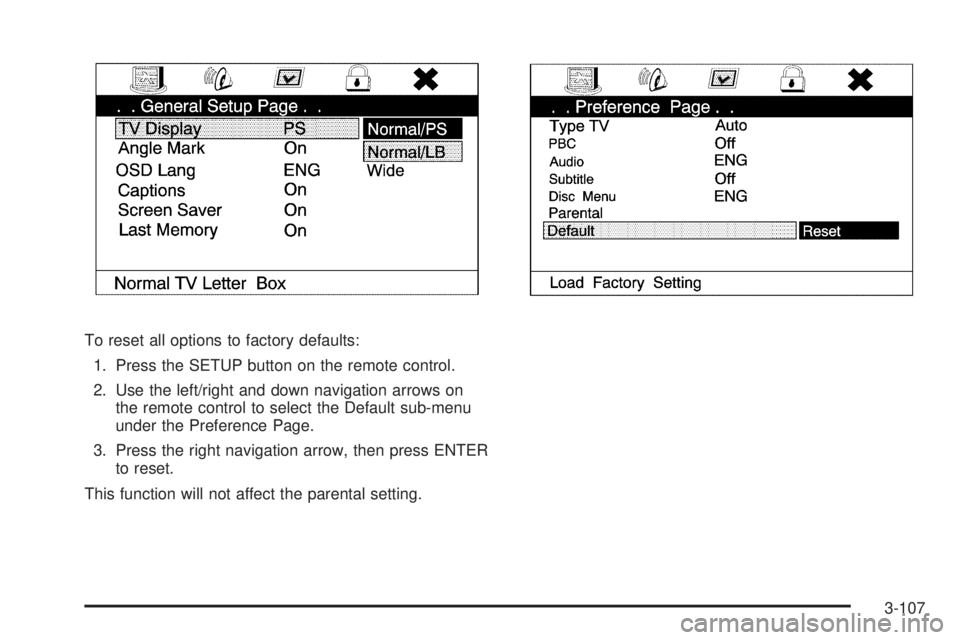
To reset all options to factory defaults:
1. Press the SETUP button on the remote control.
2. Use the left/right and down navigation arrows on
the remote control to select the Default sub-menu
under the Preference Page.
3. Press the right navigation arrow, then press ENTER
to reset.
This function will not affect the parental setting.
3-107