steering wheel CADILLAC ESCALADE ESV 2009 Owner's Manual
[x] Cancel search | Manufacturer: CADILLAC, Model Year: 2009, Model line: ESCALADE ESV, Model: CADILLAC ESCALADE ESV 2009Pages: 602, PDF Size: 5.18 MB
Page 283 of 602
PROG (Program): Press this button to go to the
next preset radio station or channel set on the main
radio. This function is inactive, with some radios, if the
front seat passengers are listening to the radio.
When a CD or DVD audio disc is playing, press this
button to go to the beginning of the CD or DVD audio.
This function is inactive, with some radios, if the
front seat passengers are listening to the disc.
When a disc is playing in the CD or DVD changer,
press this button to select the next disc, if multiple discs
are loaded. This function is inactive, with some radios,
if the front seat passengers are listening to the disc.
When a DVD video menu is being displayed, press the
PROG button to perform the menu function, enter.
Theft-Deterrent Feature THEFTLOCK ®
is designed to discourage theft of the
vehicle’s radio by learning a portion of the Vehicle
Identication Number (VIN). The radio does not operate
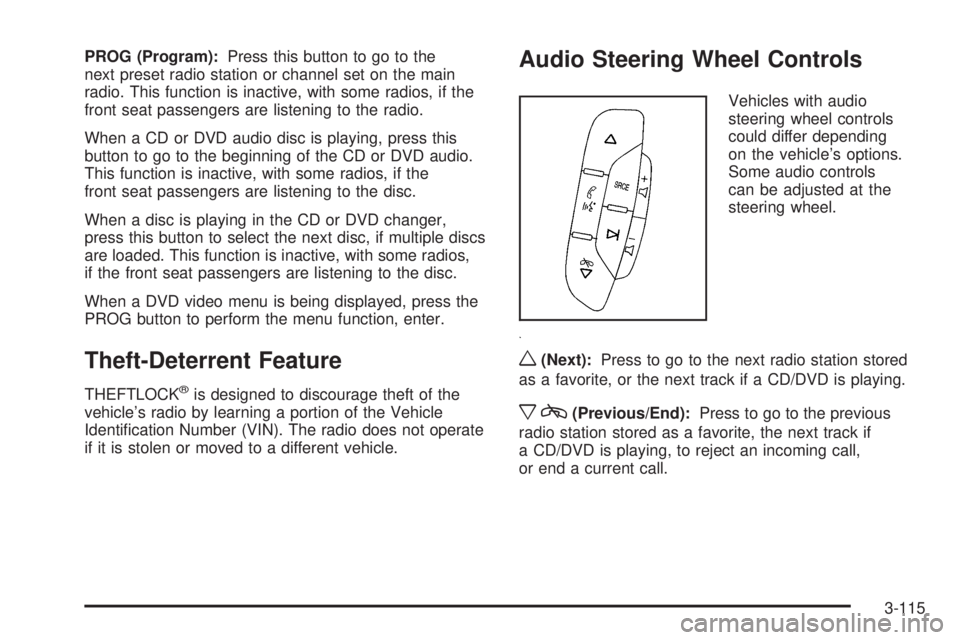
if it is stolen or moved to a different vehicle. Audio Steering Wheel Controls Vehicles with audio
steering wheel controls
could differ depending
on the vehicle’s options.
Some audio controls
can be adjusted at the
steering wheel.
w (Next): Press to go to the next radio station stored
as a favorite, or the next track if a CD/DVD is playing.
x c (Previous/End): Press to go to the previous
radio station stored as a favorite, the next track if
a CD/DVD is playing, to reject an incoming call,
or end a current call.
3-115
Page 372 of 602
3. For the second row display select the Rear AUX
screen button next to Rear Display 1 and for the
third row display select the Rear AUX screen
button next to Rear Display 2. Each screen
works independently of the other. The second
row screen can watch a DVD while the third row
screen can use the auxiliary device.
The rear seat passengers can also use the remote
control to change the functions of the RSE. See Rear
Seat Entertainment (RSE) System (Overhead) on
page 3-87 or Rear Seat Entertainment (RSE) System
(Headrest DVD) on page 3-97 for more information.
Voice Recognition The navigation system’s voice recognition allows for
hands-free operation of the navigation system, audio
system, and OnStar ®
features. The DVD map disc must
be installed in the navigation system for voice recognition
to work. See “Installing the DVD Map Disc” under Maps
on page 4-15 for more information. Voice recognition can be used when the ignition is on
or when Retained Accessory Power (RAP) is active.
See “Retained Accessory Power (RAP)” in the Index
of your vehicle’s owner manual for more information.
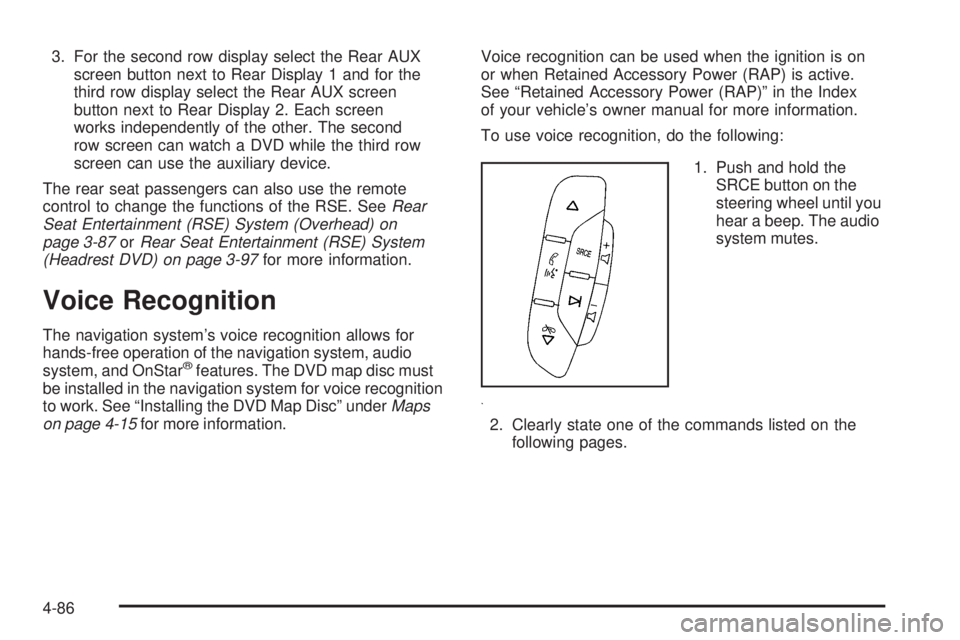
To use voice recognition, do the following:
1. Push and hold the
SRCE button on the
steering wheel until you
hear a beep. The audio
system mutes.
2. Clearly state one of the commands listed on the
following pages.
4-86
Page 377 of 602
Your Driving, the Road, and the Vehicle ........... .5-2
Driving for Better Fuel Economy ...................... .5-2
Defensive Driving .......................................... .5-2
Drunk Driving ................................................ .5-3
Control of a Vehicle ....................................... .5-3
Braking ........................................................ .5-4
Antilock Brake System (ABS) .......................... .5-5
Braking in Emergencies .................................. .5-6
StabiliTrak ®
System ....................................... .5-6
Magnetic Ride Control™ ................................. .5-9
Road Sensing Suspension .............................. .5-9
Locking Rear Axle ......................................... .5-9
All-Wheel Drive (AWD) System ........................ .5-9
Steering ..................................................... .5-10
Off-Road Recovery ...................................... .5-11
Passing ...................................................... .5-12
Loss of Control ............................................ .5-12
Off-Road Driving .......................................... .5-13 Driving at Night ........................................... .5-25
Driving in Rain and on Wet Roads ................. .5-26
Before Leaving on a Long Trip ...................... .5-27
Highway Hypnosis ....................................... .5-27
Hill and Mountain Roads ............................... .5-28
Winter Driving ............................................. .5-29
If Your Vehicle is Stuck in Sand, Mud,
Ice, or Snow ............................................ .5-31
Rocking Your Vehicle to Get It Out ................ .5-32
Recovery Hooks .......................................... .5-32
Loading the Vehicle ..................................... .5-33
Towing ......................................................... .5-40
Towing Your Vehicle .................................... .5-40
Recreational Vehicle Towing .......................... .5-40
Level Control .............................................. .5-43
Autoride ®
.................................................... .5-44
Towing a Trailer .......................................... .5-44
Trailer Recommendations .............................. .5-57Section 5 Driving Your Vehicle
5-1
Page 383 of 602

If the system fails to turn on or activate, the StabiliTrak
light along with one of the following messages will be
displayed on the Driver Information Center (DIC):
TRACTION CONTROL OFF, SERVICE TRACTION
CONTROL, STABILITRAK OFF, SERVICE
STABILITRAK. If these DIC messages appear, make
sure the StabiliTrak system has not been turned off
using the StabiliTrak on/off button. Then turn the steering
wheel clockwise from the nine o’clock position to the
three o’clock position. If this clears the message(s), the
vehicle does not need servicing. If this does not clear the
message(s), then turn the vehicle off, wait 15 seconds,
and then turn it back on again to reset the system. If any
of these messages still appear on the Driver Information
Center (DIC), the vehicle should be taken in for service.
For more information on the DIC messages, see Driver
Information Center (DIC) on page 3-47 .
The StabiliTrak light will
ash on the instrument
panel cluster when the
system is both on and
activated.
The system may be heard or felt while it is working; this
is normal. The traction control disable
button is located on the
instrument panel below the
climate controls.
The traction control part of StabiliTrak can be turned off
by pressing and releasing the StabiliTrak button if both
systems (traction control and StabiliTrak) were previously
on. To disable both traction control and StabiliTrak, press
and hold the button for ve seconds.
Traction control and StabiliTrak can be turned on by
pressing and releasing the StabiliTrak button if not
automatically shut off for any other reason.
When the TCS or StabiliTrak system is turned off,
the StabiliTrak light and the appropriate TCS off or
StabiliTrak off message will be displayed on the DIC to
warn the driver. The vehicle will still have brake-traction
control when traction control is off, but will not be able
to use the engine speed management system. See
“Traction Control Operation” next for more information.
When the traction control system has been turned off,
system noises may still be heard as a result of the
brake-traction control coming on.
5-7
Page 385 of 602

Magnetic Ride Control™ The vehicle may have the MagneRide control system.
MagneRide constantly checks speed, wheel position,
lift/dive and steering of the vehicle. The damping force for
each shock absorber and adjustment level is chosen for
the best ride and handling.
MagneRide also works with the tow/haul switch that,
when engaged, will provide more rmness from the shock
absorbers. This added control gives better ride and
handling when carrying heavy loads or towing a trailer.
See Tow/Haul Mode on page 2-33 for more information.
Road Sensing Suspension The Road Sensing Suspension (RSS) feature provides
superior vehicle ride and handling under a variety of
passenger and loading conditions.
The system is fully automatic and uses a computer
controller to continuously monitor vehicle speed, wheel
to body position, lift/dive and steering position of the
vehicle. The controller then sends signals to each shock
absorber to independently adjust the damping level to
provide the optimum vehicle ride. RSS also interacts with the tow/haul mode that, when
engaged, will provide additional control of the shock
absorbers. This additional control results in better
ride and handling characteristics when the vehicle is
loaded or towing a trailer. See “Tow/Haul Mode” under
Towing a Trailer on page 5-44 .
Locking Rear Axle Vehicles with a locking rear axle can give more traction
on snow, mud, ice, sand or gravel. It works like a
standard axle most of the time, but when traction is
low, this feature will allow the rear wheel with the
most traction to move the vehicle.
All-Wheel Drive (AWD) System If the vehicle has this feature, engine power is sent to all
four wheels when extra traction is needed. This is like
four-wheel drive, but there is no separate lever or switch
to engage or disengage the front axle. It is fully automatic,
and adjusts itself as needed for road conditions.
If the vehicle is a Two-mode Hybrid, see “Four-Wheel
Drive” in the Two-mode Hybrid Supplement.
5-9
Page 386 of 602
Steering Power Steering If the vehicle is a Two-mode Hybrid, see the Two-mode
Hybrid manual for more information.
If power steering assist is lost because the engine stops
or the system is not functioning, the vehicle can be
steered but it will take more effort.
Steering Tips It is important to take curves at a reasonable speed.
Traction in a curve depends on the condition of the tires
and the road surface, the angle at which the curve is
banked, and vehicle speed. While in a curve, speed is
the one factor that can be controlled.
If there is a need to reduce speed, do it before entering
the curve, while the front wheels are straight.
Try to adjust the speed so you can drive through
the curve. Maintain a reasonable, steady speed. Wait to
accelerate until out of the curve, and then accelerate
gently into the straightaway. Steering in Emergencies There are times when steering can be more effective than
braking. For example, you come over a hill and nd a
truck stopped in your lane, or a car suddenly pulls out
from nowhere, or a child darts out from between parked
cars and stops right in front of you. These problems can
be avoided by braking — if you can stop in time. But
sometimes you cannot stop in time because there is no
room. That is the time for evasive action — steering
around the problem.
The vehicle can perform very well in emergencies like
these. First, apply the brakes. See Braking on page 5-4 .
It is better to remove as much speed as possible
from a collision. Then steer around the problem,
to the left or right depending on the space available.
5-10
Page 387 of 602
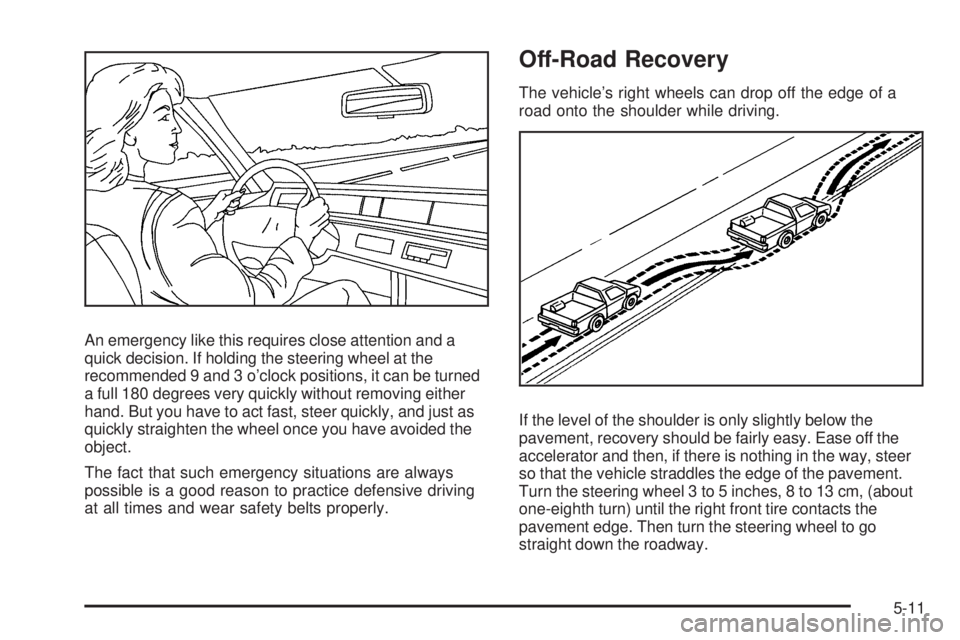
An emergency like this requires close attention and a
quick decision. If holding the steering wheel at the
recommended 9 and 3 o’clock positions, it can be turned
a full 180 degrees very quickly without removing either
hand. But you have to act fast, steer quickly, and just as
quickly straighten the wheel once you have avoided the
object.
The fact that such emergency situations are always
possible is a good reason to practice defensive driving
at all times and wear safety belts properly. Off-Road Recovery The vehicle’s right wheels can drop off the edge of a
road onto the shoulder while driving.
If the level of the shoulder is only slightly below the
pavement, recovery should be fairly easy. Ease off the
accelerator and then, if there is nothing in the way, steer
so that the vehicle straddles the edge of the pavement.
Turn the steering wheel 3 to 5 inches, 8 to 13 cm, (about
one-eighth turn) until the right front tire contacts the
pavement edge. Then turn the steering wheel to go
straight down the roadway.
5-11
Page 388 of 602

Passing Passing another vehicle on a two-lane road can be
dangerous. To reduce the risk of danger while passing:
Look down the road, to the sides, and to crossroads
for situations that might affect a successful pass.
If in doubt, wait.
Watch for traffic signs, pavement markings, and
lines that could indicate a turn or an intersection.
Never cross a solid or double-solid line on your side
of the lane.
Do not get too close to the vehicle you want to
pass. Doing so can reduce your visibility.
Wait your turn to pass a slow vehicle.
When you are being passed, ease to the right.
Loss of Control Let us review what driving experts say about what
happens when the three control systems — brakes,
steering, and acceleration — do not have enough friction
where the tires meet the road to do what the driver has
asked.
In any emergency, do not give up. Keep trying to steer
and constantly seek an escape route or area of less
danger. Skidding In a skid, a driver can lose control of the vehicle.
Defensive drivers avoid most skids by taking reasonable
care suited to existing conditions, and by not overdriving
those conditions. But skids are always possible.
The three types of skids correspond to the vehicle’s three
control systems. In the braking skid, the wheels are not
rolling. In the steering or cornering skid, too much speed
or steering in a curve causes tires to slip and lose
cornering force. And in the acceleration skid, too much
throttle causes the driving wheels to spin.
Remember: Any traction control system helps avoid only
the acceleration skid. If the traction control system is
off, then an acceleration skid is best handled by easing
your foot off the accelerator pedal.
If the vehicle starts to slide, ease your foot off the
accelerator pedal and quickly steer the way you want
the vehicle to go. If you start steering quickly enough,
the vehicle may straighten out. Always be ready for
a second skid if it occurs.
Of course, traction is reduced when water, snow, ice,
gravel, or other material is on the road. For safety, slow
down and adjust your driving to these conditions. It is
important to slow down on slippery surfaces because
stopping distance will be longer and vehicle control more
limited.
5-12
Page 389 of 602

While driving on a surface with reduced traction, try
your best to avoid sudden steering, acceleration, or
braking, including reducing vehicle speed by shifting to
a lower gear. Any sudden changes could cause the tires
to slide. You may not realize the surface is slippery until
the vehicle is skidding. Learn to recognize warning
clues — such as enough water, ice, or packed snow on
the road to make a mirrored surface — and slow down
when you have any doubt.
Remember: Any Antilock Brake System (ABS) helps
avoid only the braking skid.
Off-Road Driving Vehicles with all-wheel drive can be used for off-road
driving. Vehicles without all-wheel drive and vehicles
with 22-inch tire/wheel assemblies should not be driven
off-road except on a level, solid surface.
Many of the vehicle design features that help make the
vehicle more responsive on paved roads during poor
weather conditions also help make it better suited for
off-road use than conventional passenger vehicles.
The vehicle does not have features usually thought to
be necessary for extended or severe off-road use such
as special underbody shielding and transfer case low
gear range. The airbag system is designed to work properly under
a wide range of conditions, including off-road usage.
Always wear your safety belt and observe safe driving
speeds, especially on rough terrain.
Drinking and driving can be very dangerous on any road
and this is certainly true for off-road driving. At the very
time you need special alertness and driving skills, your
reexes, perceptions, and judgment can be affected
by even a small amount of alcohol. You could have a
serious — or even fatal — accident if you drink and drive
or ride with a driver who has been drinking.
Off-roading can be great fun but has some denite
hazards. The greatest of these is the terrain itself. When
off-road driving, traffic lanes are not marked, curves are
not banked, and there are no road signs. Surfaces can be
slippery, rough, uphill, or downhill.
Avoid sharp turns and abrupt maneuvers. Failure to
operate the vehicle correctly off-road could result in loss
of vehicle control or vehicle rollover.
Off-roading involves some new skills. That is why it is
very important that you read these driving tips and
suggestions to help make off-road driving safer
and more enjoyable.
5-13
Page 393 of 602

Controlling the vehicle is the key to successful off-road
driving. One of the best ways to control the vehicle
is to control the speed. At higher speeds:
You approach things faster and have less time to
react.
There is less time to scan the terrain for obstacles.
The vehicle has more bounce when driving over
obstacles.
More braking distance is needed, especially on an
unpaved surface.
{ CAUTION: When you are driving off-road, bouncing and quick
changes in direction can easily throw you out of
position. This could cause you to lose control and
crash. So, whether you are driving on or off the
road, you and your passengers should wear safety
belts. Scanning the Terrain Off-road driving can take you over many different kinds
of terrain. Be familiar with the terrain and its many
different features.
Surface Conditions: Off-roading surfaces can be
hard-packed dirt, gravel, rocks, grass, sand, mud, snow,
or ice. Each of these surfaces affects the vehicle’s
steering, acceleration, and braking in different ways.
Depending on the surface, slipping, sliding, wheel
spinning, delayed acceleration, poor traction, and longer
braking distances can occur.
Surface Obstacles: Unseen or hidden obstacles can
be hazardous. A rock, log, hole, rut, or bump can startle
you if you are not prepared for them. Often these
obstacles are hidden by grass, bushes, snow, or even
the rise and fall of the terrain itself.
Some things to consider:
Is the path ahead clear?
Will the surface texture change abruptly up ahead?
Does the travel take you uphill or downhill?
Will you have to stop suddenly or change direction
quickly?
5-17