transmission CADILLAC ESCALADE ESV 2009 Owner's Manual
[x] Cancel search | Manufacturer: CADILLAC, Model Year: 2009, Model line: ESCALADE ESV, Model: CADILLAC ESCALADE ESV 2009Pages: 602, PDF Size: 5.18 MB
Page 218 of 602
Average Economy Press the trip/fuel button until AVERAGE ECONOMY
displays. This display shows the approximate average
miles per gallon (mpg) or liters per 100 kilometers
(L/100 km). This number is calculated based on the
number of mpg (L/100 km) recorded since the last
time this menu item was reset. To reset AVERAGE
ECONOMY, press and hold the set/reset button.
Fuel Used Press the trip/fuel button until FUEL USED displays.
This display shows the number of gallons (gal) or
liters (L) of fuel used since the last reset of this menu
item. To reset the fuel used information, press and hold
the set/reset button while FUEL USED is displayed.
Timer Press the trip/fuel button until TIMER displays.
This display can be used as a timer.
To start the timer, press the set/reset button while
TIMER is displayed. The display will show the amount
of time that has passed since the timer was last reset,
not including time the ignition is off. Time will continue to be counted as long as the ignition is on, even if another
display is being shown on the DIC. The timer will record
up to 99 hours, 59 minutes and 59 seconds (99:59:59)
after which the display will return to zero.
To stop the timer, press the set/reset button briey while
TIMER is displayed.
To reset the timer to zero, press and hold the set/reset
button while TIMER is displayed.
Transmission Temperature Press the trip/fuel button until TRANS TEMP displays.
This display shows the temperature of the automatic
transmission uid in either degrees Fahrenheit (°F)
or degrees Celsius (°C).
Average Vehicle Speed Press the trip/fuel button until AVERAGE SPEED
displays. This display shows the average speed in
miles per hour (MPH) or kilometers per hour (km/h).
Blank Display This display shows no information.
3-50
Page 232 of 602

TIRE LEARNING ACTIVE On vehicles with the Tire Pressure Monitor
System (TPMS), this message displays when
the TPMS is re-learning the tire positions on your
vehicle. The tire positions must be re-learned after
rotating the tires or after replacing a tire or sensor.
See Tire Inspection and Rotation on page 6-69 ,
Tire Pressure Monitor System on page 6-64 , and
Inflation - Tire Pressure on page 6-62 for more
information.
TRACTION CONTROL OFF If your vehicle has StabiliTrak, this message displays
when the Traction Control System (TCS) is turned
off. Adjust your driving accordingly. See StabiliTrak ®
System on page 5-6 for more information.
TRANSMISSION HOT IDLE ENGINE Notice: If you drive your vehicle while the
transmission uid is overheating and the
transmission temperature warning is displayed
on the instrument panel cluster and/or DIC, you
can damage the transmission. This could lead
to costly repairs that would not be covered by your warranty. Do not drive your vehicle with
overheated transmission uid or while the
transmission temperature warning is displayed.
This message displays along with four chimes if
the transmission uid in the vehicle gets hot. Driving
with the transmission uid temperature high can cause
damage to the vehicle. Stop the vehicle and let it
idle to allow the transmission to cool. This message
clears and the chime stops when the uid temperature
reaches a safe level.
TURN SIGNAL ON This message displays and a chime sounds if a turn
signal is left on for 3/4 of a mile (1.2 km). Move the turn
signal/multifunction lever to the off position.
WASHER FLUID LOW ADD FLUID This message displays when the windshield washer
uid is low. Fill the windshield washer uid reservoir as
soon as possible. See Engine Compartment Overview
on page 6-14 for the location of the windshield washer
uid reservoir. Also, see Windshield Washer Fluid on
page 6-34 for more information.
3-64
Page 384 of 602

It is recommended to leave the system on for normal
driving conditions, but it may be necessary to turn the
system off if the vehicle is stuck in sand, mud, ice or
snow, and you want to “rock” the vehicle to attempt to
free it. It may also be necessary to turn off the system
when driving in extreme off-road conditions where high
wheel spin is required. See If Your Vehicle is Stuck in
Sand, Mud, Ice, or Snow on page 5-31 .
Traction Control Operation The traction control system is part of the StabiliTrak
system. Traction control limits wheel spin by reducing
engine power to the wheels (engine speed management)
and by applying brakes to each individual wheel
(brake-traction control) as necessary.
The traction control system is enabled automatically
when the vehicle is started. It will activate and the
StabiliTrak light will ash if it senses that any of the
wheels are spinning or beginning to lose traction
while driving. If traction control is turned off, only the
brake-traction control portion of traction control will work.
The engine speed management will be disabled. In this
mode, engine power is not reduced automatically and the
driven wheels can spin more freely. This can cause the
brake-traction control to activate constantly. Notice: If the wheel(s) of one axle is allowed
to spin excessively while the StabiliTrak, ABS and
brake warning lights and any relevant DIC messages
are displayed, the transfer case could be damaged.
The repairs would not be covered by the vehicle
warranty. Reduce engine power and do not spin
the wheel(s) excessively while these lights and
messages are displayed.
The traction control system may activate on dry or
rough roads or under conditions such as heavy
acceleration while turning or abrupt upshifts/downshifts
of the transmission. When this happens, a reduction in
acceleration may be noticed, or a noise or vibration may
be heard. This is normal.
If cruise control is being used when the system activates,
the StabiliTrak light will ash and cruise control will
automatically disengage. Cruise control may be
reengaged when road conditions allow. See Cruise
Control on page 3-13 .
StabiliTrak may also turn off automatically if it determines
that a problem exists with the system. If the problem does
not clear itself after restarting the vehicle, see your
dealer/retailer for service.
5-8
Page 396 of 602

Sound the horn as you approach the top of the hill
to let opposing traffic know you are there.
Use headlamps even during the day to make the
vehicle more visible to oncoming traffic.
{ CAUTION: Driving to the top (crest) of a hill at full speed can
cause an accident. There could be a drop-off,
embankment, cliff, or even another vehicle. You
could be seriously injured or killed. As you near
the top of a hill, slow down and stay alert.
If the vehicle stalls, or is about to stall, and you cannot
make it up the hill:
Push the brake pedal to stop the vehicle and keep
it from rolling backwards and apply the parking
brake.
If the engine is still running, shift the transmission to
R (Reverse), release the parking brake, and slowly
back down the hill in R (Reverse).
If the engine has stopped running, you need to
restart it. With the brake pedal pressed and the
parking brake still applied, shift the transmission to P (Park) and restart the engine. Then, shift to
R (Reverse), release the parking brake, and slowly
back down the hill as straight as possible in
R (Reverse).
While backing down the hill, put your left hand on the
steering wheel at the 12 o’clock position so you can
tell if the wheels are straight and can maneuver as
you back down. It is best to back down the hill with
the wheels straight rather than in the left or right
direction. Turning the wheel too far to the left or right
will increase the possibility of a rollover.
Things not to do if the vehicle stalls, or is about to stall,
when going up a hill:
Never attempt to prevent a stall by shifting into
N (Neutral) to rev-up the engine and regain forward
momentum. This will not work. The vehicle can roll
backward very quickly and could go out of control.
Never try to turn around if about to stall when going
up a hill. If the hill is steep enough to stall the vehicle,
it is steep enough to cause it to roll over. If you
cannot make it up the hill, back straight down the hill.
If, after stalling, you try to back down the hill and decide
you just cannot do it, set the parking brake, put your
transmission in P (Park), and turn off the engine. Leave
the vehicle and go get some help. Exit on the uphill side
and stay clear of the path the vehicle would take if it rolled
downhill.
5-20
Page 397 of 602

Driving Downhill When off-roading takes you downhill, consider:
How steep is the downhill? Will I be able to maintain
vehicle control?
What is the surface like? Smooth? Rough?
Slippery? Hard-packed dirt? Gravel?
Are there hidden surface obstacles? Ruts? Logs?
Boulders?
What is at the bottom of the hill? Is there a hidden
creek bank or even a river bottom with large rocks?
If you decide you can go down a hill safely, try to keep the
vehicle headed straight down. Use a low gear so engine
drag can help the brakes so they do not have to do all the
work. Descend slowly, keeping the vehicle under control
at all times.
{ CAUTION: Heavy braking when going down a hill can cause
your brakes to overheat and fade. This could cause
loss of control and a serious accident. Apply the
brakes lightly when descending a hill and use a low
gear to keep vehicle speed under control. Things not to do when driving down a hill:
When driving downhill, avoid turns that take you
across the incline of the hill. A hill that is not too
steep to drive down might be too steep to drive
across. The vehicle could roll over.
Never go downhill with the transmission in
N (Neutral), called free-wheeling. The brakes will
have to do all the work and could overheat
and fade.
Vehicles are much more likely to stall when going uphill,
but if it happens when going downhill:
1. Stop the vehicle by applying the regular brakes and
apply the parking brake.
2. Shift to P (Park) and, while still braking, restart the
engine.
3. Shift back to a low gear, release the parking brake,
and drive straight down.
4. If the engine will not start, get out and get help.
5-21
Page 404 of 602

Hill and Mountain Roads Driving on steep hills or through mountains is different
than driving on at or rolling terrain. Tips for driving
in these conditions include:
Keep the vehicle serviced and in good shape.
Check all uid levels and brakes, tires, cooling
system, and transmission.
Going down steep or long hills, shift to a
lower gear.
{ CAUTION: If you do not shift down, the brakes could get so
hot that they would not work well. You would then
have poor braking or even none going down a hill.
You could crash. Shift down to let the engine
assist the brakes on a steep downhill slope. { CAUTION: Coasting downhill in N (Neutral) or with the ignition
off is dangerous. The brakes will have to do all the
work of slowing down and they could get so hot
that they would not work well. You would then
have poor braking or even none going down a hill.
You could crash. Always have the engine running
and the vehicle in gear when going downhill.
Stay in your own lane. Do not swing wide or cut
across the center of the road. Drive at speeds
that let you stay in your own lane.
Top of hills: Be alert — something could be in your
lane (stalled car, accident).
Pay attention to special road signs (falling rocks
area, winding roads, long grades, passing or
no-passing zones) and take appropriate action.
See Off-Road Driving on page 5-13 for information
about driving off-road.
5-28
Page 408 of 602
Rocking Your Vehicle to Get It Out Turn the steering wheel left and right to clear the area
around the front wheels. Turn off any traction or stability
system. Shift back and forth between R (Reverse) and a
forward gear, spinning the wheels as little as possible.
To prevent transmission wear, wait until the wheels stop
spinning before shifting gears. Release the accelerator
pedal while shifting, and press lightly on the accelerator
pedal when the transmission is in gear. Slowly spinning
the wheels in the forward and reverse directions causes a
rocking motion that could free the vehicle. If that does not
get the vehicle out after a few tries, it might need to be
towed out. Recovery hooks can be used, if the vehicle
has them. If the vehicle does need to be towed out, see
Towing Your Vehicle on page 5-40 . Recovery Hooks
{ CAUTION: These hooks, when used, are under a lot of force.
Always pull the vehicle straight out. Never pull on
the hooks at a sideways angle. The hooks could
break off and you or others could be injured from
the chain or cable snapping back.
5-32
Page 418 of 602
Two-Wheel-Drive Vehicles Dinghy Towing
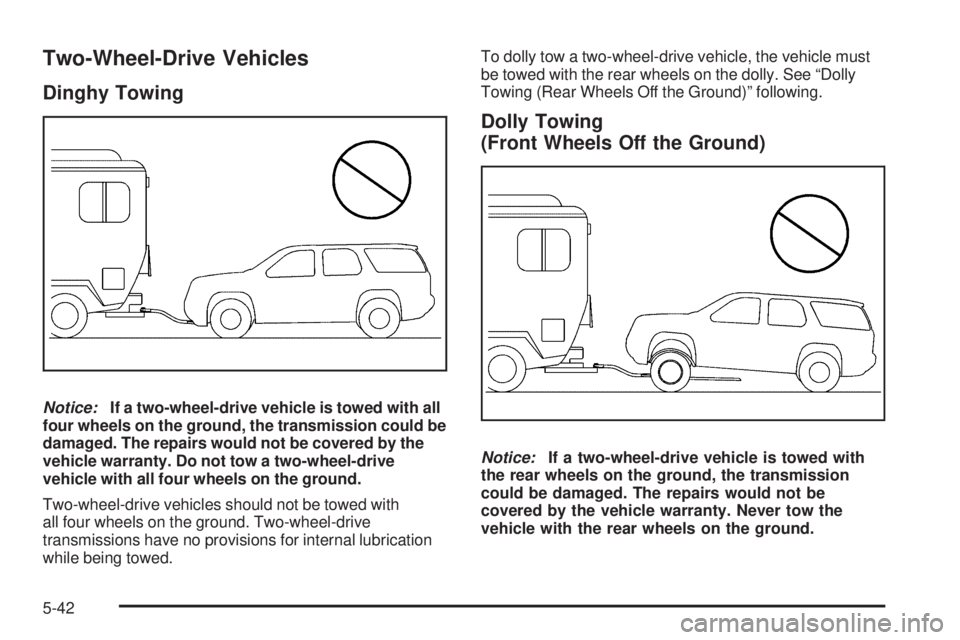
Notice: If a two-wheel-drive vehicle is towed with all
four wheels on the ground, the transmission could be
damaged. The repairs would not be covered by the
vehicle warranty. Do not tow a two-wheel-drive
vehicle with all four wheels on the ground.
Two-wheel-drive vehicles should not be towed with
all four wheels on the ground. Two-wheel-drive
transmissions have no provisions for internal lubrication
while being towed. To dolly tow a two-wheel-drive vehicle, the vehicle must
be towed with the rear wheels on the dolly. See “Dolly
Towing (Rear Wheels Off the Ground)” following.
Dolly Towing
(Front Wheels Off the Ground)
Notice: If a two-wheel-drive vehicle is towed with
the rear wheels on the ground, the transmission
could be damaged. The repairs would not be
covered by the vehicle warranty. Never tow the
vehicle with the rear wheels on the ground.
5-42
Page 419 of 602

Two-wheel-drive vehicles should not be towed with
the rear wheels on the ground. Two-wheel-drive
transmissions have no provisions for internal lubrication
while being towed.
Dolly Towing (Rear Wheels Off the Ground)
Use the following procedure to dinghy tow a
two-wheel-drive vehicle from the rear:
1. Attach the dolly to the tow vehicle following the
dolly manufacturer’s instructions.
2. Drive the rear wheels onto the dolly.
3. Firmly set the parking brake. See Parking Brake on
page 2-34 . 4. Put the transmission in P (Park).
5. Secure the vehicle to the dolly following the
manufacturer’s instructions.
6. Use an adequate clamping device designed for
towing to ensure that the front wheels are locked
into the straight position.
7. Turn the ignition to LOCK/OFF.
Level Control
Automatic Level Control The automatic level control rear suspension is available
on light-duty vehicles and comes as a part of the
Autoride ®
suspension, if equipped.
This type of level control is fully automatic and will provide
a better leveled riding position as well as better handling
under a variety of passenger and loading conditions. An
air compressor connected to the rear shocks will raise or
lower the rear of the vehicle to maintain proper vehicle
height. The system is activated when the ignition key is
turned to ON/RUN and will automatically adjust vehicle
height thereafter. The system may exhaust (lower vehicle
height) for up to ten minutes after the ignition key has
been turned off. You may hear the air compressor
operating when the height is being adjusted.
If a weight-distributing hitch is being used, it is
recommended to allow the shocks to inate, thereby
leveling the vehicle prior to adjusting the hitch.
5-43
Page 421 of 602
To identify the trailering capacity of the vehicle, read the
information in “Weight of the Trailer” that appears
later in this section.
Trailering is different than just driving the vehicle by itself.
Trailering means changes in handling, acceleration,
braking, durability and fuel economy. Successful, safe
trailering takes correct equipment, and it has to be used
properly.
The following information has many time-tested,
important trailering tips and safety rules. Many of these
are important for your safety and that of your passengers.
So please read this section carefully before pulling a
trailer.
Pulling A Trailer Here are some important points:
There are many different laws, including speed limit
restrictions, having to do with trailering. Make sure
the rig will be legal, not only where you live but
also where you will be driving. A good source for
this information can be state or provincial police.
Consider using a sway control. See “Hitches” later
in this section. Do not tow a trailer at all during the rst 500 miles
(800 km) the new vehicle is driven. The engine,
axle or other parts could be damaged.
Then, during the rst 500 miles (800 km) that a
trailer is towed, do not drive over 50 mph (80 km/h)
and do not make starts at full throttle. This helps
the engine and other parts of the vehicle wear in at
the heavier loads.
Vehicles can tow in D (Drive). Shift the transmission
to a lower gear if the transmission shifts too often
under heavy loads and/or hilly conditions.
If the vehicle has the Side Blind Zone Alert (SBZA)
system and it doesn’t seem to be working properly
while pulling a trailer, turn the system off. See
Side Blind Zone Alert (SBZA) on page 2-44 for more
information.
Three important considerations have to do with weight:
The weight of the trailer
The weight of the trailer tongue
And the weight on the vehicle’s tires
5-45