AUX CADILLAC ESCALADE ESV 2010 User Guide
[x] Cancel search | Manufacturer: CADILLAC, Model Year: 2010, Model line: ESCALADE ESV, Model: CADILLAC ESCALADE ESV 2010Pages: 620, PDF Size: 7.4 MB
Page 282 of 620
Black plate (90,1)Cadillac Escalade/Escalade ESV Owner Manual - 2010
STOP
c : Press once to stop playing a DVD.
There is a pre-stop feature for DVD and video CD only.
This feature resumes playback of the disc where it was
stopped. Press the stop button once during disc
playback and
c displays on the DVD startup screen.
This icon disappears after a few seconds. Press the
stop button a second time, or eject the disc, to cancel
the pre-stop feature and to clear the disc position
memory.
SOURCE: Press to select between Monitor 3,
Monitor 4, or the AV INPUT.
Each video display screen can be adjusted
independently, as well as display information from both
DVD players and both A/V inputs.
Infrared Remote Sensor: Located in the top center of
the video display screen. Do not block the signal from
the remote to the sensor.
Infrared Transmitters: Located in the top center of the
video display screen. Do not block the signal from the
headphones to the transmitter.
Video Display Screen: Located on the back of each
headrest. AV OUTPUT (Audio/Video Output Jack): Located on
the lower left side of the screen and is identified on the
video screen panel as the AV OUTPUT.
Headphone Jack : Wired headphones can be plugged
into the headphone jack with one-eighth inch stereo
plugs.
AV INPUT: (Audio/Video Input Jack): The audio/video
input jack is located below the video display screen and
allows viewing of auxiliary sources such as portable
DVD players, game stations, or video cameras, on each
screen. .
Video Input — The yellow connector is used for
video input. .
L Audio — The white connector is used for the left
side audio. .
R Audio — The red connector is used for the right
side audio.
Level Lock and Release Latch: The viewing angle of
the video screen can be adjusted by releasing the latch
and gently moving the screen. Then lock it into a secure
position.
4-90
Page 283 of 620
Black plate (91,1)Cadillac Escalade/Escalade ESV Owner Manual - 2010
Vehicle Speakers Audio from the DVD player or an auxiliary device can
be heard through the vehicle speakers or the wireless/
wired headphones, while the radio is tuned to one of the
six frequencies selected on the Sound Around portion
of the system ’ s remote control. See “ Remote Control ”
later in this supplement.
Only one audio source can be heard through the
vehicle ’ s speakers at a time. The audio source being
used is specified by the A/V (audio/video) source
selected on the driver side head restraint video display
screen.
To turn the RSE system audio output to the vehicle ’ s
speakers, press Sound Around ON, on the system ’ s
remote control. The audio from the RSE system can be
heard through the wireless/wired headphones and the
vehicle ’ s speakers at the same time. The volume on the
radio can vary when switching between the radio, CD,
DVD, MP3, or an auxiliary device.
Wireless Headphones The two wireless headphones included with the
Headrest DVD RSE system will only work with the
Headrest DVD RSE system and are marked for
channel 3 and 4. The wireless headphones must be
used within a line of sight of the transmitter that is
located above the video display screen. 3 ‐ 4 Channel Selector: This is located on the right
earpiece. Either Channel 3 or 4 can be selected with
the channel selector. The driver side monitor is
designated as Channel 3, and the passenger side as
Channel 4. Set the channel selector switch according to
the video display screen being viewed. The message,
“ To listen to this monitor tune your headphones to
Channel 3 (or 4) ” displays for five seconds then
disappears when the video display screen is turned on.
OFF/ON (Power): Turn the power switch located on the
earpiece to turn the wireless headphones on or off.
Each headphone has a light to indicate ON. If the light
does not come on, the batteries may need to be
replaced. See “ Battery Replacement ” under Rear Seat
Entertainment System in the vehicle ’ s owner manual.
The headphones shut off automatically if the RSE
system is turned off or if the headphones are out of
range of the transmitter for more than three minutes.
VOL
0 (Volume): Use to adjust the volume on the
headphones.
Notice: Do not store the headphones in heat or
direct sunlight. This could damage the headphones
and repairs will not be covered by the warranty.
Storage in extreme cold can weaken the batteries.
Keep the headphones stored in a cool, dry place.
4-91
Page 288 of 620
Black plate (96,1)Cadillac Escalade/Escalade ESV Owner Manual - 2010
Using the RSE On-Screen Display
(OSD) Menus Use the OSD setup display menus for: .
Initial setup .
Display setup .
Parental control setup .
Adjusting the picture quality .
Setting the various outputs .
On ‐ screen display language
To use the OSD menus while using the DVD player or
an auxiliary device:
1. Press the SETUP button on the remote control to
display the icons and pages on the display screen.
2. Select the desired page by using the left/right
navigation arrows to move the cursor.
3. Press the SETUP button again on the remote
control to cancel use of the setup display.
Not all DVDs support all of the feature defaults in the
setup menus. If a feature is not supported, the defaults
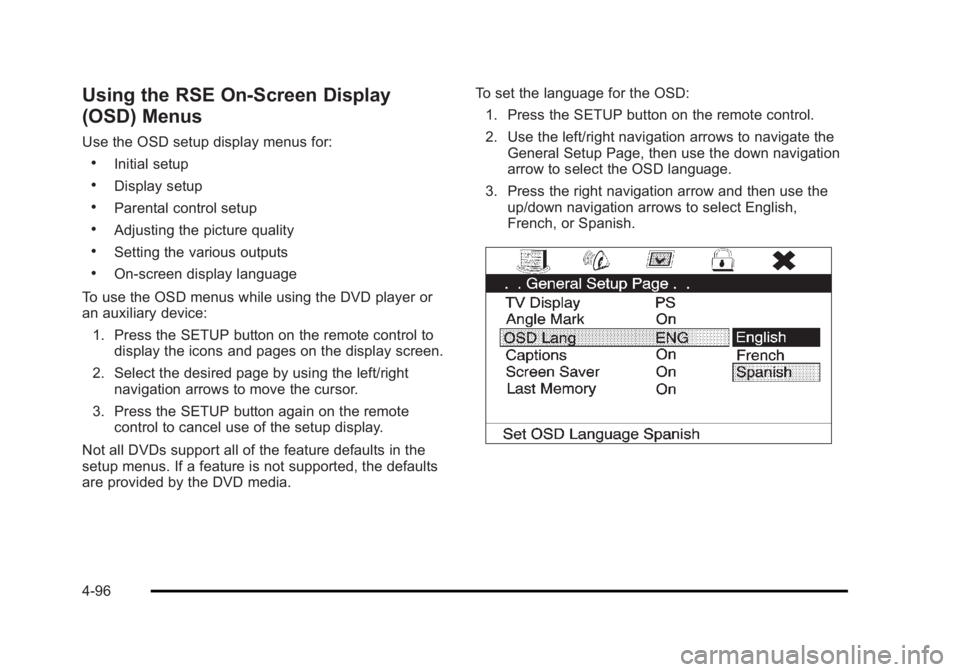
are provided by the DVD media. To set the language for the OSD:
1. Press the SETUP button on the remote control.
2. Use the left/right navigation arrows to navigate the
General Setup Page, then use the down navigation
arrow to select the OSD language.
3. Press the right navigation arrow and then use the
up/down navigation arrows to select English,
French, or Spanish.
4-96
Page 296 of 620
Black plate (104,1)Cadillac Escalade/Escalade ESV Owner Manual - 2010
Cleaning the Components Use care when touching or cleaning the components
such as the DVD player or the discs.
Do not use DVD lens cleaners for DVD players because
the lens of the DVD optics can become contaminated
by lubricants.
Handle CDs and DVDs carefully. Store them in their
original cases or other protective cases and away from
direct sunlight and dust. The DVD player scans the
bottom surface of the disc. If the surface of a CD or
DVD is damaged, such as cracked, broken,
or scratched, the CD or DVD may not play properly or
not at all. If the surface of a CD or DVD is soiled, take a
soft, lint free cloth or dampen a clean, soft cloth in a
mild, neutral detergent solution mixed with water, and
clean it. Make sure the wiping process starts from the
center to the edge.
Do not touch the bottom side of a CD or DVD while
handling it; this could damage the surface. Pick up CDs
or DVDs by grasping the outer edges or the edge of the
hole and the outer edge. Rear Seat Audio (RSA) Vehicles with this feature allow the rear seat
passengers to listen to and control any of the music
sources: radio, CDs, DVDs, or other auxiliary sources.
The rear seat passengers can control the same music
sources the front seat passengers are listening to (dual
control) or a different source. For example, rear seat
passengers can listen to and control a CD through the
headphones, while the driver listens to the radio through
the speakers. The rear seat passengers have control of
the volume for each set of headphones.
The radio functionality is controlled by both the RSA
and the front radio, only one band can be tuned to at
one time. Changing the band on the RSA or the front
radio will change band on the other system.
RSA functions can be operated even when the main
radio is off.
Audio can be heard through wired headphones (not
included) plugged into the jacks on the RSA. If the
vehicle has this feature, audio can also be heard on
Channel 2 of the wireless headphones.
The audio system allows the rear speakers to continue
playing even when the RSA audio is active through the
headphones.
4-104
Page 297 of 620

Black plate (105,1)Cadillac Escalade/Escalade ESV Owner Manual - 2010
To listen to an iPod or portable audio device through the
RSA, attach the iPod or portable audio device to the
auxiliary input (if available), located below the RSA.
Turn the iPod on, then choose the auxiliary input with
the RSA SRCE button.
P (Power): Press the
P button to turn RSA on
and off.
Volume: Turn this knob to increase or to decrease the
volume of the wired headphones. The left knob controls
the left headphones and the right knob controls the right
headphones. SRCE (Source): Press this button to switch between
the radio (AM/FM), XM ™ (if equipped), CD, and if the
vehicle has these features, DVD, and rear auxiliary.
© ¨ (Seek): When listening to FM, AM, or XM
(if equipped), press either the left
© or right
¨ seek
arrow to go to the previous or to the next station or
channels and stay there. This function is inactive, with
some radios, if the front seat passengers are listening
to the radio.
Press and hold either the left
© or right
¨ seek arrow
until the display flashes, to tune to an individual station.
The display stops flashing after the buttons have not
been pushed for more than two seconds. This function
is inactive, with some radios, if the front seat
passengers are listening to the radio.
While listening to a disc, press the right
¨ seek arrow to
go to the next track or chapter on the disc. Press the
left
© seek arrow to go back to the start of the current
track or chapter (if more than ten seconds have played).
This function is inactive, with some radios, if the front
seat passengers are listening to the disc.
When a DVD video menu is being displayed, press
either the left
© or right
¨ seek arrow to perform a cursor
up or down on the menu. Hold the left
© or right
¨ seek
arrow to perform a cursor left or right on the menu.
4-105
Page 299 of 620

Black plate (107,1)Cadillac Escalade/Escalade ESV Owner Manual - 2010
Radio To select preset or favorite radio stations:
Press and release
w or
x to go to the next or previous
radio station stored as a preset or favorite.
CD/DVD To select tracks/chapters on a CD/DVD:
Press and release
w or
x to go to the next or previous
track/chapter.
b g (Mute/Push to Talk): Press to silence the vehicle
speakers only. Press again to turn the sound on.
For vehicles with Bluetooth or OnStar ®
systems, press
and hold for longer than two seconds to interact with
those systems. See Bluetooth ®
on page 4 ‑ 68 and the
OnStar Owner's Guide for more information.
c (End): Press to reject an incoming call, or end a
current call.
SRCE (Source/Voice Recognition): Press to switch
between the radio, CD, DVD, and rear auxiliary,
if equipped.
Press and hold this button for longer than one second
to initiate voice recognition. See Voice Recognition on
page 5 ‑ 86 for more information.
¨ (Seek): Press to go to the next radio station while in
AM, FM, or XM ™ . To scan available radio stations:
1. Press and hold
¨ until a beep is heard, to place
the radio into SCAN mode, a station will play for
five seconds before moving to the next station.
2. To stop the SCAN function, press
¨ again.
While listening to a CD press and release
¨ to select
the next disc.
+
e −
e (Volume): Press to increase or to decrease
the volume.
Navigating an iPod or USB Device Audio steering wheel controls can be used to navigate
an iPod or USB device while on the main audio screen
or the music navigator screen.
Main Audio Screen Press and release
w or
x to select the next or
previous track.
Press and hold
w or
x to select the next or previous
category/folder, if available.
Press and release
¨ to enter the music navigator menu.
4-107
Page 303 of 620
Black plate (1,1)Cadillac Escalade/Escalade ESV Owner Manual - 2010
Section 5 Navigation SystemOverview . . . . . . . . . . . . . . . . . . . . . . . . . . . . . . . . . . . . . . . . . . . 5-2
Navigation System Overview . . . . . . . . . . . . . . . . . . . . 5-2
Getting Started . . . . . . . . . . . . . . . . . . . . . . . . . . . . . . . . . . 5-4
Cleaning the Display . . . . . . . . . . . . . . . . . . . . . . . . . . . 5-11
Features and Controls . . . . . . . . . . . . . . . . . . . . . . . . . . . 5-12
Using the Navigation System . . . . . . . . . . . . . . . . . . 5-12
Maps . . . . . . . . . . . . . . . . . . . . . . . . . . . . . . . . . . . . . . . . . . 5-14
Symbols . . . . . . . . . . . . . . . . . . . . . . . . . . . . . . . . . . . . . . . 5-17
Destination . . . . . . . . . . . . . . . . . . . . . . . . . . . . . . . . . . . . 5-24
Configure Menu . . . . . . . . . . . . . . . . . . . . . . . . . . . . . . . 5-42
Global Positioning System (GPS) . . . . . . . . . . . . . . 5-57 Vehicle Positioning . . . . . . . . . . . . . . . . . . . . . . . . . . . . 5-57
Problems with Route Guidance . . . . . . . . . . . . . . . . 5-58
If the System Needs Service . . . . . . . . . . . . . . . . . . . 5-59
Ordering Map DVDs . . . . . . . . . . . . . . . . . . . . . . . . . . . 5-59
Database Coverage Explanations . . . . . . . . . . . . . 5-59
Navigation Audio System . . . . . . . . . . . . . . . . . . . . . . . . 5-60
CD Player . . . . . . . . . . . . . . . . . . . . . . . . . . . . . . . . . . . . . 5-68
DVD Player . . . . . . . . . . . . . . . . . . . . . . . . . . . . . . . . . . . . 5-75
Care of Your CDs and DVDs . . . . . . . . . . . . . . . . . . . 5-84
Auxiliary Devices . . . . . . . . . . . . . . . . . . . . . . . . . . . . . . 5-85
Voice Recognition . . . . . . . . . . . . . . . . . . . . . . . . . . . . . . . . 5-86
5-1
Page 314 of 620
Black plate (12,1)Cadillac Escalade/Escalade ESV Owner Manual - 2010
Features and Controls Using the Navigation System This section presents basic information needed to
operate the navigation system.
Use the hard keys located on the navigation system
along with the available touch-sensitive screen buttons
on the navigation screen to operate the system. See
Navigation System Overview on page 5 ‑ 2 for more
information.
Once the vehicle is moving, various functions are
disabled to reduce driver distractions.
Hard Keys The following hard keys are located on the navigation
system:
O /
n (Power/Volume): Press to turn the system
on and off. Turn to increase or decrease the volume to
the audio system.
Press and hold for more than two seconds to turn off
the navigation system, the Rear Seat Entertainment
(RSE), and Rear Seat Audio (RSA). If the vehicle has
not been tuned off, the RSE and the RSA can be turned
back on by pressing this knob and continues play of the
last active source. w (Tune): Turn to go to the next or previous radio
station or disc track or chapter. See Navigation Audio
System on page 5 ‑ 60 , CD Player on page 5 ‑ 68 ,
or DVD Player
on page 5 ‑ 75 for more information.
Z (DVD Map Disc Eject): Press to eject the DVD
map disc. This button is located next to the upper disc
slot. See Maps on page 5 ‑ 14 for more information.
M (Load): Press to load CDs or audio/video DVDs. See
CD Player on page 5 ‑ 68 or DVD Player on page 5 ‑ 75
for more information.
Z (CD/DVD Eject): Press to eject CDs or audio/video
DVDs. This button is located under the load button. See
CD Player on page 5 ‑ 68 or DVD Player on page 5 ‑ 75
for more information.
M (Disc Up/Down): Press the up or down arrows to go
to the next or previous disc.
AUDIO: Press to access the full Audio screen to
change AM, FM, XM ™ Satellite Radio Service (if
equipped), CD/DVD, and auxiliary input. See “ Audio ”
under Navigation Audio System
on page 5 ‑ 60 for more
information.
FAV (Favorite): Press to access the preset stations.
See “ Storing Radio Station Presets ” under Navigation
Audio System on page 5 ‑ 60 for more information.
5-12
Page 362 of 620
Black plate (60,1)Cadillac Escalade/Escalade ESV Owner Manual - 2010
Navigation Audio System Notice: Before adding any sound equipment to the
vehicle, such as an audio system, CD player, CB
radio, mobile telephone, or two-way radio, make
sure that it can be added by checking with your
dealer. Also, check federal rules covering mobile
radio and telephone units. If sound equipment can
be added, it is very important to do it properly.
Added sound equipment can interfere with the
operation of the vehicle's engine, radio, or other
systems, and even damage them. The vehicle's
systems can interfere with the operation of sound
equipment that has been added.
Notice: The chime signals related to safety belts,
parking brake, and other functions of the vehicle
operate through the navigation system. If that
equipment is replaced or additional equipment is
added to the vehicle, the chimes may not work.
Make sure that replacement or additional equipment
is compatible with the vehicle before installing it.
See “ Accessories and Modifications ” in the
vehicle's owner manual. Playing the Radio
O /
n (Power/Volume): Press to turn the audio
system on and off. Turn to increase or to decrease the
volume.
Press and hold for more than two seconds to turn off
the navigation system, the Rear Seat Entertainment
(RSE) video screen, and Rear Seat Audio (RSA). If the
vehicle has not been turned off, press this knob to turn
RSE and RSA back on and to continue playback of the
last active source.
w (Tuning Knob): Turn to go to the next or previous
frequency or disc track or chapter. See CD Player
on
page 5 ‑ 68 or DVD Player on page 5 ‑ 75 for more
information.
AUDIO: Press to display the audio screen. Press to
switch between AM, FM, or XM, if equipped, DISC,
or AUX (Auxiliary), or touch the screen button. See CD
Player on page 5 ‑ 68 , DVD Player on page 5 ‑ 75 , and
Auxiliary Devices
on page 5 ‑ 85 for more information.
5-60
Page 365 of 620
Black plate (63,1)Cadillac Escalade/Escalade ESV Owner Manual - 2010
Storing Radio Station Presets This feature stores a mix of up to 30 AM, FM, and
XM (if equipped) preset stations. To store presets:
1. Press
O to turn the system on.
2. If viewing a map screen, touch the source screen
button, press the AUDIO key, or press the FAV
(favorite) key.
3. Select the band.
4. Seek, scan, or tune to the desired station, to select
the station.
5. Press and hold one of the preset screen buttons
for more than two seconds or until a beep is heard.
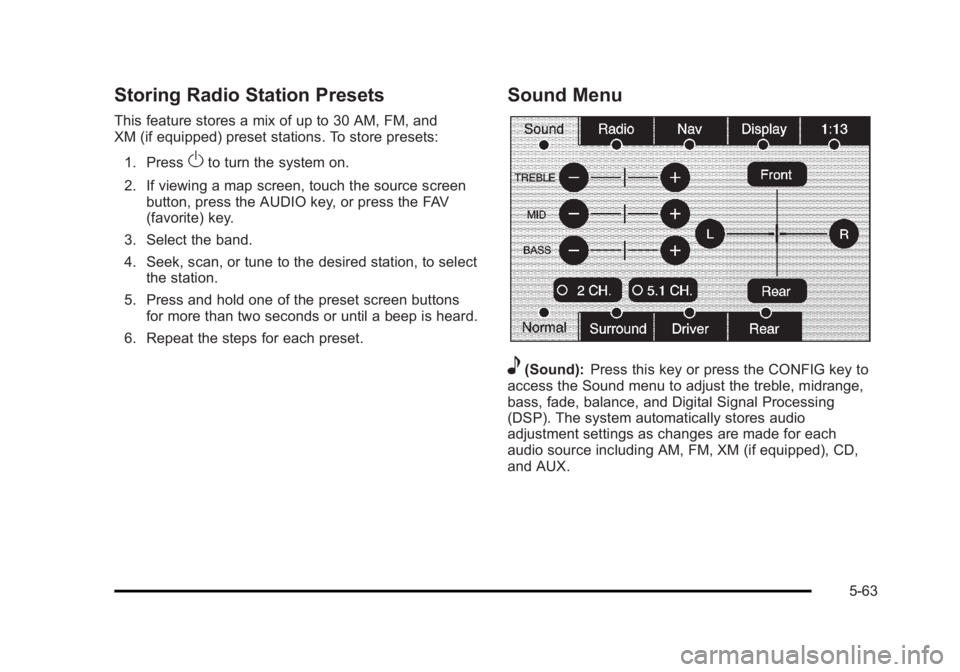
6. Repeat the steps for each preset. Sound Menu
e (Sound): Press this key or press the CONFIG key to
access the Sound menu to adjust the treble, midrange,
bass, fade, balance, and Digital Signal Processing
(DSP). The system automatically stores audio
adjustment settings as changes are made for each
audio source including AM, FM, XM (if equipped), CD,
and AUX.
5-63