battery CADILLAC ESCALADE ESV 2010 Owners Manual
[x] Cancel search | Manufacturer: CADILLAC, Model Year: 2010, Model line: ESCALADE ESV, Model: CADILLAC ESCALADE ESV 2010Pages: 620, PDF Size: 7.4 MB
Page 27 of 620
Black plate (21,1)Cadillac Escalade/Escalade ESV Owner Manual - 2010
Rear Vision Camera (RVC) The rear vision camera displays a view of the area
behind the vehicle on the navigation screen when the
vehicle is shifted into R (Reverse). Once shifted out of
R (Reverse), the navigation screen will go back to the
last screen that had been displayed, after a delay.
To clean the camera lens, located above the license
plate, rinse it with water and wipe it with a soft cloth.
Ultrasonic Parking Assist This feature uses sensors on the rear bumper to
detect objects while parking the vehicle. URPA comes
on automatically when the shift lever is moved into
R (Reverse) and operates at speeds less than 8 km/h
(5 mph). URPA uses audio beeps to provide distance
and system information.
Keep the sensors on the vehicle's rear bumper clean to
ensure proper operation.
The system can be disabled by pressing the rear park
aid disable button located next to the radio.
See Ultrasonic Rear Parking Assist (URPA)
on
page 3 ‑ 46 for more information.
Power Outlets The accessory power outlets let you plug in auxiliary
electrical equipment, such as a cellular telephone. The vehicle has three accessory power outlets located: .
Inside the floor console storage bin. .
On the rear of the floor console. .
In the rear cargo area on the passenger side.
The accessory power outlets are powered, even when
the ignition is in LOCK/OFF. Continuing to use power
outlets while the ignition is in LOCK/OFF may cause the
vehicle's battery to run down.
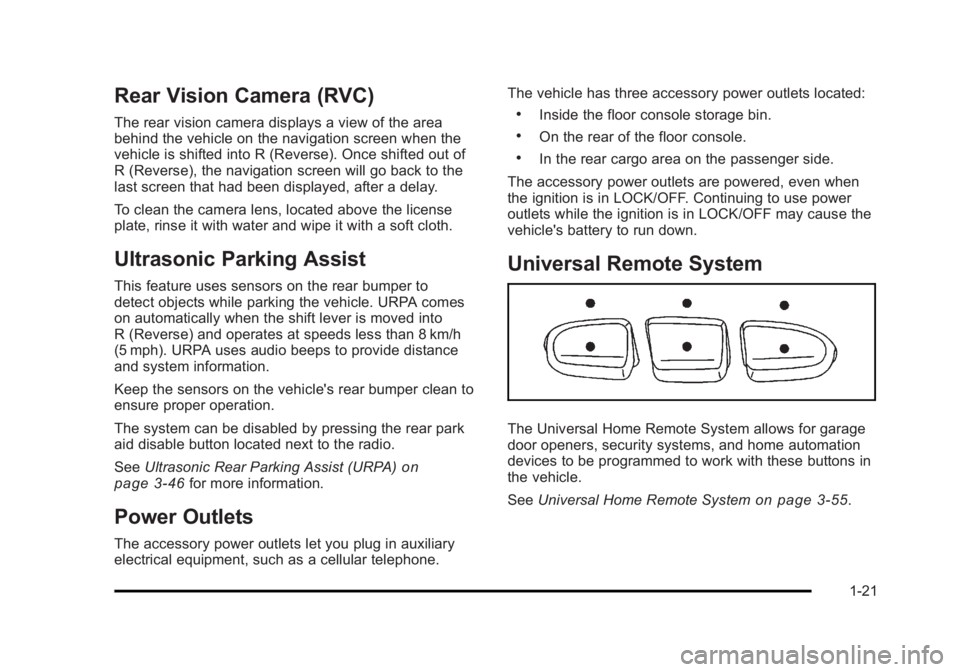
Universal Remote System
The Universal Home Remote System allows for garage
door openers, security systems, and home automation
devices to be programmed to work with these buttons in
the vehicle.
See Universal Home Remote System
on page 3 ‑ 55 .
1-21
Page 32 of 620
Black plate (26,1)Cadillac Escalade/Escalade ESV Owner Manual - 2010
The OnStar system can record and transmit vehicle
information. This information is automatically sent to an
OnStar call center when
Q is pressed,
] is pressed,
or if the airbags or ACR system deploy. This information
usually includes the vehicle's GPS location and, in the
event of a crash, additional information regarding the
crash that the vehicle was involved in (e.g. the direction
from which the vehicle was hit). When the virtual
advisor feature of OnStar hands-free calling is used, the
vehicle also sends OnStar the vehicle's GPS location
so they can provide services where it is located.
Location information about the vehicle is only available
if the GPS satellite signals are unobstructed and
available.
The vehicle must have a working electrical system,
including adequate battery power, for the OnStar
equipment to operate. There are other problems OnStar
cannot control that may prevent OnStar from providing
OnStar service at any particular time or place. Some
examples are damage to important parts of the vehicle
in a crash, hills, tall buildings, tunnels, weather or
wireless phone network congestion. OnStar Steering Wheel Controls This vehicle may have a Talk/Mute button that can be
used to interact with OnStar hands-free calling. See
Audio Steering Wheel Controls
on page 4 ‑ 106 for more
information.
On some vehicles, the mute button can be used to dial
numbers into voice mail systems, or to dial phone
extensions. See the OnStar Owner's Guide for more
information.
Your Responsibility Increase the volume of the radio if the OnStar advisor
cannot be heard.
If the light next to the OnStar buttons is red, the system
may not be functioning properly. Press
Q and request a
vehicle diagnostic. If the light appears clear (no light is
appearing), your OnStar subscription has expired and
all services have been deactivated. Press
Q to confirm
that the OnStar equipment is active.
1-26
Page 121 of 620

Black plate (89,1)Cadillac Escalade/Escalade ESV Owner Manual - 2010
We recommend that you not use seat covers or other
aftermarket equipment except when approved by GM
for your specific vehicle. See Adding Equipment to Your
Airbag-Equipped Vehicle
on page 2 ‑ 90 for more
information about modifications that can affect how the
system operates.
The on indicator may be lit if an object, such as a
briefcase, handbag, grocery bag, laptop or other
electronic device, is put on an unoccupied seat.
If this is not desired remove the object from the seat.
{ WARNING: Stowing of articles under the passenger seat or
between the passenger seat cushion and
seatback may interfere with the proper operation
of the passenger sensing system. Servicing Your Airbag-Equipped
Vehicle Airbags affect how the vehicle should be serviced.
There are parts of the airbag system in several places
around the vehicle. Your dealer and the service manual
have information about servicing the vehicle and the
airbag system. To purchase a service manual, see
Service Publications Ordering Information on
page 9 ‑ 18 .
{ WARNING: For up to 10 seconds after the ignition is turned off
and the battery is disconnected, an airbag can still
inflate during improper service. You can be injured
if you are close to an airbag when it inflates. Avoid
yellow connectors. They are probably part of the
airbag system. Be sure to follow proper service
procedures, and make sure the person performing
work for you is qualified to do so.
2-89
Page 128 of 620

Black plate (4,1)Cadillac Escalade/Escalade ESV Owner Manual - 2010
Remote Keyless Entry (RKE) System See Radio Frequency Statement on page 9 ‑ 21 for
information regarding Part 15 of the Federal
Communications Commission (FCC) rules and Industry
Canada Standards RSS-210/220/310.
If there is a decrease in the RKE operating range,
try this: .
Check the distance. The transmitter may be too far
from the vehicle. Stand closer during rainy or
snowy weather. .
Check the location. Other vehicles or objects may
be blocking the signal. Take a few steps to the left
or right, hold the transmitter higher, and try again. .
Check the transmitter's battery. See “ Battery
Replacement ” later in this section..
If the transmitter is still not working correctly, see
your dealer or a qualified technician for service. Remote Keyless Entry (RKE) System
Operation The Remote Keyless Entry (RKE) transmitter functions
work up to 195 feet (60 m) away from the vehicle.
There are other conditions which can affect the
performance of the transmitter. See Remote Keyless
Entry (RKE) System on page 3 ‑ 4 .
With Remote Start
and Power Liftgate
and Liftglass (Without
Remote Start Similar)
3-4
Page 130 of 620

Black plate (6,1)Cadillac Escalade/Escalade ESV Owner Manual - 2010
The vehicle comes with two transmitters. Each
transmitter will have a number on top of it, “ 1 ” or “ 2 ” .
These numbers correspond to the driver of the vehicle.
For example, the memory seat position for driver 1 will
be recalled when using the transmitter labeled “ 1 ” ,
if enabled through the DIC. See Memory Features
on
page 2 ‑ 6 and DIC Vehicle Customization on
page 4 ‑ 58 for more information.
Programming Transmitters to the
Vehicle Only RKE transmitters programmed to this vehicle will
work. If a transmitter is lost or stolen, a replacement can
be purchased and programmed through your dealer.
When the replacement transmitter is programmed to
this vehicle, all remaining transmitters must also be
reprogrammed. Any lost or stolen transmitters will no
longer work once the new transmitter is programmed.
Each vehicle can have up to eight transmitters
programmed to it. See “ Relearn Remote Key ” under
DIC Operation and Displays on page 4 ‑ 42 for
instructions on how to match RKE transmitters to the
vehicle. Battery Replacement Replace the battery if the REPLACE BATTERY IN
REMOTE KEY message displays in the DIC. See
“ REPLACE BATTERY IN REMOTE KEY ” under DIC
Warnings and Messages
on page 4 ‑ 49 for additional
information.
Notice: When replacing the battery, do not touch
any of the circuitry on the transmitter. Static from
your body could damage the transmitter.
3-6
Page 131 of 620

Black plate (7,1)Cadillac Escalade/Escalade ESV Owner Manual - 2010
To replace the battery:
1. Separate the transmitter with a flat, thin object
inserted into the notch, located above the
metal base.
2. Remove the old battery. Do not use a metal object.
3. Insert the new battery, positive side facing up.
Replace with a CR2032 or equivalent battery.
4. Snap the transmitter back together. Remote Vehicle Start This feature allows you to start the engine from outside
of the vehicle. It may also start up the vehicle's heating
or air conditioning systems and rear window defogger.
Normal operation of the system will return after the key
is turned to the ON/RUN position.
During a remote start, the climate control system will
default to a heating or cooling mode depending on the
outside temperatures.
During a remote start, if your vehicle has an automatic
climate control system and heated seats, the heated
seats will turn on during colder outside temperatures
and will shut off when the key is turned to ON/RUN.
If your vehicle does not have an automatic climate
control system, during remote start, you will need to
manually turn the heated seats on and off. See Heated
and Cooled Seats
on page 2 ‑ 5 for additional
information.
Laws in some communities may restrict the use of
remote starters. For example, some laws may require a
person using the remote start to have the vehicle in
view when doing so. Check local regulations for any
requirements on remote starting of vehicles.
Do not use the remote start feature if your vehicle is low
on fuel. Your vehicle may run out of fuel.
3-7
Page 137 of 620

Black plate (13,1)Cadillac Escalade/Escalade ESV Owner Manual - 2010
See Power Liftgate on page 3 ‑ 14 for more information
on how to use the power liftgate.
To unlock the liftgate, use the power door lock switch or
press the door unlock button on the Remote Keyless
Entry (RKE) transmitter twice. See Remote Keyless
Entry (RKE) System Operation
on page 3 ‑ 4 .
On vehicles with a liftglass, press the button on the
underside of the license pocket applique (A) to open it.
The liftglass can also be opened by pressing the
liftglass release button on the RKE. To open the entire liftgate, press the power liftgate
release button on the RKE or in the vehicle. See Power
Liftgate
on page 3 ‑ 14 . You can also press the
touchpad on the underside of the liftgate handle (B).
The liftgate will open after a slight delay. The vehicle
must be in P (Park) to open the liftgate. To close the
liftgate, use the pull cup or pull strap as an aid.
The liftgate or liftglass cannot be opened if the rear
wipers are in motion. Attempting to open the liftgate or
liftglass while the rear wipers are in motion will cause
the release of the liftglass or liftgate to delay until the
wipers are parked off the liftglass.
Both the liftglass and liftgate have an electric latch.
If the battery is disconnected or has low voltage, the
liftglass and liftgate will not open. The liftglass and
liftgate will resume operation when the battery is
reconnected and charged.
If the battery is properly connected and has adequate
voltage, and the liftgate or liftglass still will not function,
your vehicle should be taken to a dealership for service.
3-13
Page 140 of 620

Black plate (16,1)Cadillac Escalade/Escalade ESV Owner Manual - 2010
Pressing the buttons, or touchpad switch a second time
while the liftgate is moving reverses the direction.
l : The liftgate can also be closed by pressing the
power liftgate button next to the liftgate latch.
Press the button a second time during liftgate operation
to reverse that operation.
The power liftgate may be temporarily disabled under
extreme temperatures, or under low battery conditions.
If this occurs, the liftgate can still be operated manually.
If you shift the transmission out of P (Park) while the
power function is in progress, the liftgate power function
will continue to completion. If you shift the transmission
out of P (Park) and accelerate before the power liftgate
latches closed, the liftgate may reverse to the open
position. Cargo could fall out of the vehicle. Always
make sure the power liftgate is closed and latched
before you drive away.
If you power open the liftgate and the liftgate support
struts have lost pressure, the lights will flash and a
chime will sound. The liftgate will stay open temporarily,
then slowly close. See your dealer for service before
using the liftgate. Obstacle Detection Features If the liftgate encounters an obstacle during a power
open or close cycle, a warning chime will sound and the
liftgate will automatically reverse direction to the full
closed or open position. After removing the obstruction,
the power liftgate operation can be used again. If the
liftgate encounters multiple obstacles on the same
power cycle, the power function will deactivate, and you
must manually open or close the liftgate. The REAR
ACCESS OPEN warning message in the Driver
Information Center (DIC) will indicate that the liftgate is
open. After removing the obstructions, manually open
the liftgate to the full open position or close the liftgate
to the fully closed and latched position. The liftgate will
now resume normal power operation.
Your vehicle has pinch sensors located on the side
edges of the liftgate. If an object is caught between the
liftgate and the body and presses against this sensor,
the liftgate will reverse direction and open fully. The
liftgate will remain open until it is activated again or
closed manually. Do not force the liftgate open or closed
during a power cycle.
3-16
Page 141 of 620

Black plate (17,1)Cadillac Escalade/Escalade ESV Owner Manual - 2010
Manual Operation of Power Liftgate To change the liftgate to manual operation, press the
switch on the overhead console to the OFF position.
With the power liftgate disabled and all of the doors
unlocked, the liftgate can be manually opened and
closed.
To open the liftgate, press the touchpad on the handle
on the outside of the liftgate, and lift the gate open. To
close the liftgate, use the pull cup to lower the liftgate
and close. The liftgate latch will power close. Always
close the liftgate before driving.
If the RKE button or the power close button on the
liftgate is pressed while power operation is disabled, the
lights will flash three times, but the liftgate will not move.
It is not recommended that you drive with the liftgate
open, however, if you must drive with the liftgate open,
the liftgate should be set to manual operation by
pressing the OFF switch on the center console.
The liftgate has an electric latch. If the battery is
disconnected or has low voltage, the liftgate will not
open. The liftgate will resume operation when the
battery is reconnected and charged.
If the battery is properly connected with adequate
voltage, the switch is not disabled, and the liftgate still
will not function, your vehicle should be taken to a
dealer for service. Power Assist Steps Your vehicle may have power assist steps.
The power assist steps automatically extend from
beneath the vehicle on the side in which the door has
been opened. Once the door is closed, the assist steps
automatically move back under the vehicle after a brief
delay. The vehicle must not be moving for the assist
steps to extend or retract.
The switch used to
disable the power assist
steps is located on the
center console below the
climate control system.
The assist steps cannot be disabled in the extended
position.
3-17
Page 145 of 620

Black plate (21,1)Cadillac Escalade/Escalade ESV Owner Manual - 2010
Programming the Power Windows If the battery on the vehicle has been recharged,
disconnected, or is not working, you will need to
reprogram each front power window for the express-up
feature to work. Before reprogramming, replace or
recharge the vehicle's battery.
To program each front window, follow these steps:
1. With the ignition in ACC/ACCESSORY, ON/RUN,
or when Retained Accessory Power (RAP) is
active, close all doors.
2. Press and hold the power window switch until the
window is fully open.
3. Pull the power window switch up until the window
is fully closed.
4. Continue holding the switch up for approximately
two seconds after the window is completely closed.
The window is now reprogrammed. Repeat the process
for the other windows. Window Lockout o (Window Lockout): The rear window lockout button
is located on the driver door near the window switches.
Press the right side of the button to disable the rear
window controls. The light on the button will illuminate,
indicating the feature is in use. The rear windows still
can be raised or lowered using the driver window
switches when the lockout feature is active.
To restore power to the rear windows, press the button
again. The light on the button will go out.
Sun Visors Pull the sun visor down to block glare. Detach the sun
visor from the center mount and slide it along the rod
from side-to-side to cover the driver or passenger side
of the front window. Swing the sun visor to the side to
cover the side window. It can be moved along the rod
from side-to-side in this position also.
Lighted Visor Vanity Mirror Your vehicle has lighted visor vanity mirrors on both the
driver's and passenger's sun visors. Pull the sun visor
down and lift the mirror cover to turn the lamps on.
3-21