cooling CADILLAC ESCALADE ESV 2010 Owners Manual
[x] Cancel search | Manufacturer: CADILLAC, Model Year: 2010, Model line: ESCALADE ESV, Model: CADILLAC ESCALADE ESV 2010Pages: 620, PDF Size: 7.4 MB
Page 21 of 620

Black plate (15,1)Cadillac Escalade/Escalade ESV Owner Manual - 2010
Windshield Wiper/Washer
The lever is on the left side of the steering column.
8 : Single wipe, turn to
8 , then release. Several
wipes, hold the band on
8 longer.
9 : Turns the windshield wipers off.
6 : Turn the band up for more frequent wipes or down
for less frequent wipes.
] : Slow wipes.
? : Fast wipes.
L : Push the paddle at the top of the lever to spray
washer fluid on the windshield.
See Windshield Wipers on page 4 ‑ 6 and Windshield
Washer on page 4 ‑ 7 . Climate Controls The heating, cooling, and ventilation in the vehicle can
be controlled with this system.
Climate Control with Cooled
and Heated Seats shown
A. Driver and Passenger
Temperature Controls
B. AUTO
C. Defrost
D. Air Recirculation
E. Rear Window
Defogger F. Air Conditioning
G. Heated and
Cooled Seats
H. Fan Control
I. REAR
J. Air Delivery
Mode Control
1-15
Page 38 of 620

Black plate (6,1)Cadillac Escalade/Escalade ESV Owner Manual - 2010
This symbol will appear on the climate control display to
indicate that the feature is on. Press the button to cycle
through the temperature settings of high, medium, and
low and to turn the cooled seat off. Indicator bars next
to the symbol designate the level of cooling selected:
three for high, two for medium, and one for low.
+ (Heated Seatback): To heat only the seatback,
press the button with the heated seatback symbol.
This symbol will appear on the climate control display to
indicate that the feature is on. Press the button to cycle
through the temperature settings of high, medium, and
low and to turn the heated seatback off. Indicator bars
next to the symbol designate the level of heat selected:
three for high, two for medium, and one for low.
z (Heated Seat and Seatback): To heat the entire
seat, press the button with the heated seat and
seatback symbol.
This symbol will appear on the climate control display to
indicate that the feature is on. Press the button to cycle
through the temperature settings of high, medium, and
low and to turn the heated seat off. Indicator bars next
to the symbol designate the level of heat selected: three
for high, two for medium, and one for low. The heated and cooled seats will be canceled after the
ignition is turned off. If you want to use the heated and
cooled seat feature after you restart your vehicle, you
will need to press the appropriate seat button again.
Memory Features Your vehicle has the memory package.
The controls for this
feature are located on
the driver's door, and are
used to program and
recall memory settings for
the driver's seat, outside
mirrors, steering wheel
position, and the
adjustable throttle and
brake pedal feature,
if your vehicle has it.
2-6
Page 131 of 620

Black plate (7,1)Cadillac Escalade/Escalade ESV Owner Manual - 2010
To replace the battery:
1. Separate the transmitter with a flat, thin object
inserted into the notch, located above the
metal base.
2. Remove the old battery. Do not use a metal object.
3. Insert the new battery, positive side facing up.
Replace with a CR2032 or equivalent battery.
4. Snap the transmitter back together. Remote Vehicle Start This feature allows you to start the engine from outside
of the vehicle. It may also start up the vehicle's heating
or air conditioning systems and rear window defogger.
Normal operation of the system will return after the key
is turned to the ON/RUN position.
During a remote start, the climate control system will
default to a heating or cooling mode depending on the
outside temperatures.
During a remote start, if your vehicle has an automatic
climate control system and heated seats, the heated
seats will turn on during colder outside temperatures
and will shut off when the key is turned to ON/RUN.
If your vehicle does not have an automatic climate
control system, during remote start, you will need to
manually turn the heated seats on and off. See Heated
and Cooled Seats
on page 2 ‑ 5 for additional
information.
Laws in some communities may restrict the use of
remote starters. For example, some laws may require a
person using the remote start to have the vehicle in
view when doing so. Check local regulations for any
requirements on remote starting of vehicles.
Do not use the remote start feature if your vehicle is low
on fuel. Your vehicle may run out of fuel.
3-7
Page 136 of 620

Black plate (12,1)Cadillac Escalade/Escalade ESV Owner Manual - 2010
When you want to open a rear door when the security
lock is on, do the following:
1. Unlock the door by lifting the rear door manual
lock, using the power door lock switch, or the
Remote Keyless Entry (RKE) transmitter, if the
vehicle has one.
2. Open the door from the outside.
To cancel the rear door security lock, do the following:
1. Unlock the door and open it from the outside.
2. Insert the key into the security lock slot and turn it
so the slot is in the vertical position.
Lockout Protection This feature protects you from locking the key in the
vehicle when the key is in the ignition and a front door
is open.
If the driver's side power door lock switch is pressed
when the driver's door is open and the key is in the
ignition, all of the doors will lock and then the driver's
door will unlock.
If the passenger's side power door lock switch is
pressed when the front passenger's door is open and
the key is in the ignition, all of the doors will lock and
then the front passenger's door will unlock. Liftgate/Liftglass
{ WARNING: It can be dangerous to drive with the liftglass or
liftgate open because carbon monoxide (CO) gas
can come into your vehicle. You cannot see or
smell CO. It can cause unconsciousness and
even death.
If you must drive with the liftglass or liftgate open,
or if electrical wiring or other cable connections
must pass through the seal between the body and
the liftglass or liftgate: .
Make sure all other windows are shut. .
Turn the fan on your heating or cooling
system to its highest speed with the
recirculation mode off. That will force outside
air into your vehicle. See Dual Automatic
Climate Control System on page 4 ‑ 20 ..
If you have air outlets on or under the
instrument panel, open them all the way. .
If your vehicle is equipped with a power
liftgate, disable the power liftgate function.
See Engine Exhaust on page 3 ‑ 41 .
3-12
Page 160 of 620
Black plate (36,1)Cadillac Escalade/Escalade ESV Owner Manual - 2010
The DIC display will show the message MANUAL
SHIFT on the first line and the current gear will be
displayed on the second line. See Driver Information
Center (DIC)
on page 4 ‑ 41 and DIC Operation and
Displays on page 4 ‑ 42 for more information. The
number displayed in the DIC is the highest gear that
can be used. However, the vehicle can automatically
shift to lower gears as it adjusts to driving conditions.
This means that all gears below that number are
available. When 5 (Fifth ) is selected, 1 (First) through
5 (Fifth) gears are automatically shifted by the vehicle,
but 6 (Sixth) cannot be used until the plus/minus button
located on the steering column lever is used to change
to the gear.
Grade Braking is not available when the Driver Shift
Control is active. See Tow/Haul Mode
on page 3 ‑ 36 for
more information.
While using the DSC, cruise control and the tow/haul
mode can be used. Tow/Haul Mode
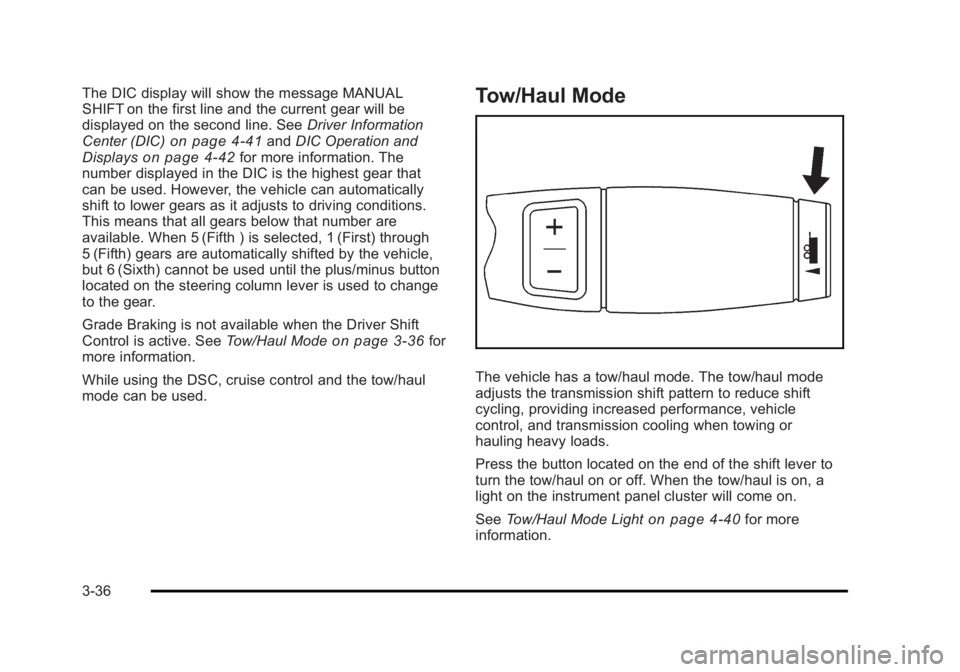
The vehicle has a tow/haul mode. The tow/haul mode
adjusts the transmission shift pattern to reduce shift
cycling, providing increased performance, vehicle
control, and transmission cooling when towing or
hauling heavy loads.
Press the button located on the end of the shift lever to
turn the tow/haul on or off. When the tow/haul is on, a
light on the instrument panel cluster will come on.
See Tow/Haul Mode Light
on page 4 ‑ 40 for more
information.
3-36
Page 210 of 620

Black plate (18,1)Cadillac Escalade/Escalade ESV Owner Manual - 2010
Electric Power Management The vehicle has Electric Power Management (EPM) that
estimates the battery's temperature and state of charge.
It then adjusts the voltage for best performance and
extended life of the battery.
When the battery's state of charge is low, the voltage is
raised slightly to quickly bring the charge back up.
When the state of charge is high, the voltage is lowered
slightly to prevent overcharging. If the vehicle has a
voltmeter gauge or a voltage display on the Driver
Information Center (DIC), you may see the voltage
move up or down. This is normal. If there is a problem,
an alert will be displayed.
The battery can be discharged at idle if the electrical
loads are very high. This is true for all vehicles. This is
because the generator (alternator) may not be spinning
fast enough at idle to produce all the power that is
needed for very high electrical loads.
A high electrical load occurs when several of the
following are on, such as: headlamps, high beams, fog
lamps, rear window defogger, climate control fan at high
speed, heated seats, engine cooling fans, trailer loads,
and loads plugged into accessory power outlets. EPM works to prevent excessive discharge of the
battery. It does this by balancing the generator's output
and the vehicle's electrical needs. It can increase
engine idle speed to generate more power, whenever
needed. It can temporarily reduce the power demands
of some accessories.
Normally, these actions occur in steps or levels, without
being noticeable. In rare cases at the highest levels of
corrective action, this action may be noticeable to the
driver. If so, a Driver Information Center (DIC) message
might be displayed, such as BATTERY SAVER
ACTIVE, BATTERY VOLTAGE LOW, or LOW
BATTERY. If this message is displayed, it is
recommended that the driver reduce the electrical loads
as much as possible. See DIC Warnings and Messages
on page 4 ‑ 49 .
Battery Run-Down Protection This feature shuts off the dome lamps if they are
left on for more than 10 minutes when the ignition is in
LOCK/OFF. This helps to prevent the battery from
running down.
4-18
Page 212 of 620

Black plate (20,1)Cadillac Escalade/Escalade ESV Owner Manual - 2010
Ashtray(s) and Cigarette Lighter The front ashtray and cigarette lighter are located in the
center console near the cupholders, if the vehicle has
them. Press on the access door to open it and use the
ashtray and lighter.
Notice: If papers, pins, or other flammable items are
put in the ashtray, hot cigarettes or other smoking
materials could ignite them and possibly damage
the vehicle. Never put flammable items in the
ashtray.
To remove the ashtray, pull it from the center console.
Slide it back in and push down to be sure it is secure.
To use the cigarette lighter, push it in all the way, and let
go. When it is ready, it will pop back out by itself.
Notice: Holding a cigarette lighter in while it is
heating does not let the lighter back away from the
heating element when it is hot. Damage from
overheating can occur to the lighter or heating
element, or a fuse could be blown. Do not hold a
cigarette lighter in while it is heating. Analog Clock The analog clock is not connected with any other
vehicle system and runs by itself.
To adjust the clock, do the following:
1. Locate the adjustment button, near the lower left
corner of the clock.
2. Push and hold the adjustment button to advance
the clock hands. Holding the button down will
cause the clock to advance faster. Release the
button before you get to the desired time.
3. Push and release the button to increase the time
by one minute increments until the desired time is
reached.
Climate Controls Dual Automatic Climate Control
System The heating, cooling, and ventilation in the vehicle can
be controlled with this system. The vehicle also has a
flow-through ventilation system described later in this
section.
4-20
Page 214 of 620

Black plate (22,1)Cadillac Escalade/Escalade ESV Owner Manual - 2010
Automatic Operation AUTO (Automatic): When automatic operation is active
the system will control the inside temperature, the air
delivery, and the fan speed.
Use the steps below to place the entire system in
automatic mode:
1. Press the AUTO button.
When AUTO is selected, the display will change to
show the current temperature(s) and AUTO come
on the display. The current delivery mode and fan
speed will also be displayed for approximately
five seconds.
When AUTO is selected, the air conditioning
operation and air inlet will be automatically
controlled. The air conditioning compressor will
run when the outside temperature is over about
4°C (40°F). The air inlet will normally be set to
outside air. If it is hot outside, the air inlet may
automatically switch to recirculate inside air to
help quickly cool down the vehicle. The light on
the button comes on in recirculation. 2. Set the driver's and passenger's temperature.
To find your comfort setting, start with a
23°C (74°F) temperature setting and allow
about 20 minutes for the system to regulate. Use
the driver or passenger temperature buttons to
adjust the temperature setting as necessary. If a
temperature setting of 15°C (60°F) is chosen, the
system remains at the maximum cooling setting.
If a temperature setting of 32°C (90°F) is chosen,
the system remains at the maximum heat setting.
Choosing either maximum setting will not cause
the vehicle to heat or cool any faster.
Be careful not to cover the sensor located on the top of
the instrument panel near the windshield. This sensor
regulates air temperature based on sun load and also
turns on the headlamps.
To avoid blowing cold air in cold weather, the system
will delay turning on the fan until warm air is available.
The length of delay depends on the engine coolant
temperature. Pressing the fan switch will override this
delay and change the fan to a selected speed.
4-22
Page 243 of 620

Black plate (51,1)Cadillac Escalade/Escalade ESV Owner Manual - 2010
ENGINE OVERHEATED IDLE ENGINE Notice: If you drive your vehicle while the engine is
overheating, severe engine damage may occur. If an
overheat warning appears on the instrument panel
cluster and/or DIC, stop the vehicle as soon as
possible. See Engine Overheating on page 7 ‑ 34 for
more information.
This message displays when the engine coolant
temperature is too hot. Stop and allow the vehicle to
idle until it cools down. See Engine Coolant
Temperature Gauge on page 4 ‑ 35 .
See Overheated Engine Protection Operating Mode on
page 7 ‑ 37 for information on driving to a safe place in
an emergency.
ENGINE OVERHEATED STOP ENGINE Notice: If you drive your vehicle while the engine is
overheating, severe engine damage may occur. If an
overheat warning appears on the instrument panel
cluster and/or DIC, stop the vehicle as soon as
possible. See Engine Overheating
on page 7 ‑ 34 for
more information.
This message displays and a chime sounds if the
engine cooling system reaches unsafe temperatures for
operation. Stop and turn off the vehicle as soon as it is
safe to do so to avoid severe damage. This message
clears when the engine has cooled to a safe operating
temperature. ENGINE POWER IS REDUCED This message displays and a chime sounds when the
cooling system temperature gets too hot and the engine
further enters the engine coolant protection mode. See
Engine Overheating
on page 7 ‑ 34 for further
information.
This message also displays when the vehicle's engine
power is reduced. Reduced engine power can affect the
vehicle's ability to accelerate. If this message is on, but
there is no reduction in performance, proceed to your
destination. The performance may be reduced the next
time the vehicle is driven. The vehicle may be driven at
a reduced speed while this message is on, but
acceleration and speed may be reduced. Anytime this
message stays on, the vehicle should be taken to your
dealer for service as soon as possible.
FUEL LEVEL LOW This message displays and a chime sounds if the fuel
level is low. Refuel as soon as possible. See Fuel
Gauge
on page 4 ‑ 41 and Fuel on page 7 ‑ 7 for more
information.
HOOD OPEN This message displays and a chime sounds if the hood
is not fully closed. Stop and turn off the vehicle, check
the hood for obstructions, and close the hood again.
Check to see if the message still appears on the DIC.
4-51
Page 416 of 620

Black plate (24,1)Cadillac Escalade/Escalade ESV Owner Manual - 2010
Driving in Water
{ WARNING: Driving through rushing water can be dangerous.
Deep water can sweep your vehicle downstream
and you and your passengers could drown. If it is
only shallow water, it can still wash away the
ground from under your tires, and you could lose
traction and roll the vehicle over. Do not drive
through rushing water.
Heavy rain can mean flash flooding, and flood waters
demand extreme caution.
Find out how deep the water is before driving through it.
Do not try it if it is deep enough to cover the wheel
hubs, axles, or exhaust pipe — you probably will not get
through. Deep water can damage the axle and other
vehicle parts.
If the water is not too deep, drive slowly through it. At
faster speeds, water splashes on the ignition system
and the vehicle can stall. Stalling can also occur if you
get the tailpipe under water. If the tailpipe is under
water, you will never be able to start the engine. When
going through water, remember that when the brakes
get wet, it might take longer to stop. See Driving in Rain
and on Wet Roads on page 6 ‑ 25 . After Off-Road Driving Remove any brush or debris that has collected
on the underbody, chassis, or under the hood.
These accumulations can be a fire hazard.
After operation in mud or sand, have the brake linings
cleaned and checked. These substances can cause
glazing and uneven braking. Check the body structure,
steering, suspension, wheels, tires, and exhaust system
for damage and check the fuel lines and cooling system
for any leakage.
The vehicle requires more frequent service due to
off-road use. Refer to the Maintenance Schedule for
additional information.
Driving at Night Night driving is more dangerous than day driving
because some drivers are likely to be impaired — by
alcohol or drugs, with night vision problems, or by
fatigue.
Night driving tips include: .
Drive defensively. .
Do not drink and drive. .
Reduce headlamp glare by adjusting the inside
rearview mirror.
6-24