ECO mode CADILLAC ESCALADE ESV 2011 User Guide
[x] Cancel search | Manufacturer: CADILLAC, Model Year: 2011, Model line: ESCALADE ESV, Model: CADILLAC ESCALADE ESV 2011Pages: 548, PDF Size: 8.45 MB
Page 162 of 548

Black plate (28,1)Cadillac Escalade/Escalade ESV Owner Manual - 2011
5-28 Instruments and Controls Average Economy
Press the trip/fuel button
until AVERAGE ECONOMY
displays. This display shows the
approximate average liters per
100 kilometers (L/100 km) or miles
per gallon (mpg). This number is
calculated based on the number of
L/100 km (mpg) recorded since the
last time this menu item was reset.
To reset AVERAGE ECONOMY,
press and hold the set/reset button.
Fuel Used
Press the trip/fuel button until
FUEL USED displays. This display
shows the number of liters (L) or
gallons (gal) of fuel used since the
last reset of this menu item. To reset
the fuel used information, press and
hold the set/reset button while FUEL
USED is displayed. Timer
Press the trip/fuel button until
TIMER displays. This display can
be used as a timer.
To start the timer, press the
set/reset button while TIMER is
displayed. The display will show
the amount of time that has passed
since the timer was last reset, not
including time the ignition is off.
Time will continue to be counted as
long as the ignition is on, even if
another display is being shown on
the DIC. The timer will record up
to 99 hours, 59 minutes and
59 seconds (99:59:59) after which
the display will return to zero.
To stop the timer, press the
set/reset button briefly while
TIMER is displayed.
To reset the timer to zero, press
and hold the set/reset button while
TIMER is displayed. Transmission Temperature
Press the trip/fuel button until
TRANS TEMP displays. This
display shows the temperature of
the automatic transmission fluid in
either degrees Celsius (°C) or
degrees Fahrenheit (°F).
Instantaneous Economy
If your vehicle has this display,
press the trip/fuel button until INST
ECON displays. This display shows
the current fuel economy at a
particular moment and will change
frequently as driving conditions
change. This display shows the
instantaneous fuel economy in liters
per 100 kilometers (L/100 km) or
miles per gallon (mpg). Unlike
average economy, this screen
cannot be reset.
The display may also show if the
vehicle is currently in V4, V6 or
V8 mode.
Page 167 of 548

Black plate (33,1)Cadillac Escalade/Escalade ESV Owner Manual - 2011
Instruments and Controls 5-33
Engine Cooling System
Messages ENGINE HOT A/C
(Air Conditioning)
TURNED OFF This message displays when the
engine coolant becomes hotter than
the normal operating temperature.
See Engine Coolant Temperature
Gauge on page 5 ‑ 14 . To avoid
added strain on a hot engine, the
air conditioning compressor
automatically turns off. When the
coolant temperature returns to
normal, the air conditioning
compressor turns back on. You
can continue to drive your vehicle.
If this message continues to appear,
have the system repaired by your
dealer as soon as possible to avoid
damage to the engine. ENGINE OVERHEATED
IDLE ENGINE Notice: If you drive the vehicle
while the engine is overheating,
severe engine damage may
occur. If an overheat warning
appears on the instrument panel
cluster and/or DIC, stop the
vehicle as soon as possible.
See Engine Overheating on
page 10 ‑ 20 for more information.
This message displays when the
engine coolant temperature is too
hot. Stop and allow the vehicle to
idle until it cools down. See Engine
Coolant Temperature Gauge on
page 5 ‑ 14 .
See Overheated Engine Protection
Operating Mode on page 10 ‑ 22 for
information on driving to a safe
place in an emergency. ENGINE OVERHEATED
STOP ENGINE Notice: If you drive the vehicle
while the engine is overheating,
severe engine damage may
occur. If an overheat warning
appears on the instrument panel
cluster and/or DIC, stop the
vehicle as soon as possible.
See Engine Overheating on
page 10 ‑ 20 for more information.
This message displays and a chime
sounds if the engine cooling system
reaches unsafe temperatures for
operation. Stop and turn off the
vehicle as soon as it is safe to do
so to avoid severe damage. This
message clears when the engine
has cooled to a safe operating
temperature.
Page 168 of 548
Black plate (34,1)Cadillac Escalade/Escalade ESV Owner Manual - 2011
5-34 Instruments and Controls
Engine Oil Messages CHANGE ENGINE OIL SOON This message displays when the
engine oil needs to be changed.
When you change the engine oil, be
sure to reset the CHANGE ENGINE
OIL SOON message. See Engine
Oil Life System on page 10 ‑ 10 for
information on how to reset the
message. See Engine Oil on
page 10 ‑ 7 and Scheduled
Maintenance on page 11 ‑ 2 for
more information.
ENGINE OIL HOT
IDLE ENGINE This message displays when the
engine oil becomes hotter than the
normal operating temperature. Stop
and allow the vehicle to idle until it
cools down. See Engine Coolant
Temperature Gauge on page 5 ‑ 14 . OIL PRESSURE LOW
STOP ENGINE Notice: If you drive the vehicle
while the engine oil pressure is
low, severe engine damage may
occur. If a low oil pressure
warning appears on the Driver
Information Center (DIC), stop the
vehicle as soon as possible. Do
not drive the vehicle until the
cause of the low oil pressure is
corrected. See Engine Oil on
page 10 ‑ 7 for more information.
This message displays if low oil
pressure levels occur. Stop the
vehicle as soon as safely possible
and do not operate it until the cause
of the low oil pressure has been
corrected. Check the oil as soon
as possible and have the vehicle
serviced by your dealer. See Engine
Oil on page 10 ‑ 7 .Engine Power Messages ENGINE POWER IS REDUCED This message displays and a chime
sounds when the cooling system
temperature gets too hot and the
engine further enters the engine
coolant protection mode. See
Engine Overheating on page 10 ‑ 20
for further information.
This message also displays when
the engine power is reduced.
Reduced engine power can affect
the vehicle's ability to accelerate.
If this message is on, but there is
no reduction in performance,
proceed to your destination. The
performance may be reduced the
next time the vehicle is driven. The
vehicle may be driven at a reduced
speed while this message is on, but
acceleration and speed may be
reduced. Anytime this message
stays on, the vehicle should be
taken to your dealer for service as
soon as possible.
Page 184 of 548
Black plate (50,1)Cadillac Escalade/Escalade ESV Owner Manual - 2011
5-50 Instruments and Controls Exiting the Feature
Settings Menu The feature settings menu will be
exited when any of the following
occurs: .
The vehicle is no longer in
ON/RUN. .
The trip/fuel or vehicle
information DIC buttons are
pressed. .
The end of the feature settings
menu is reached and exited. .
A 40 second time period has
elapsed with no selection made. Universal Remote
System See Radio Frequency Statement on
page 13 ‑ 19 for information
regarding Part 15 of the Federal
Communications Commission (FCC)
rules and Industry Canada
Standards RSS-210/220/310.
Universal Remote System
Programming
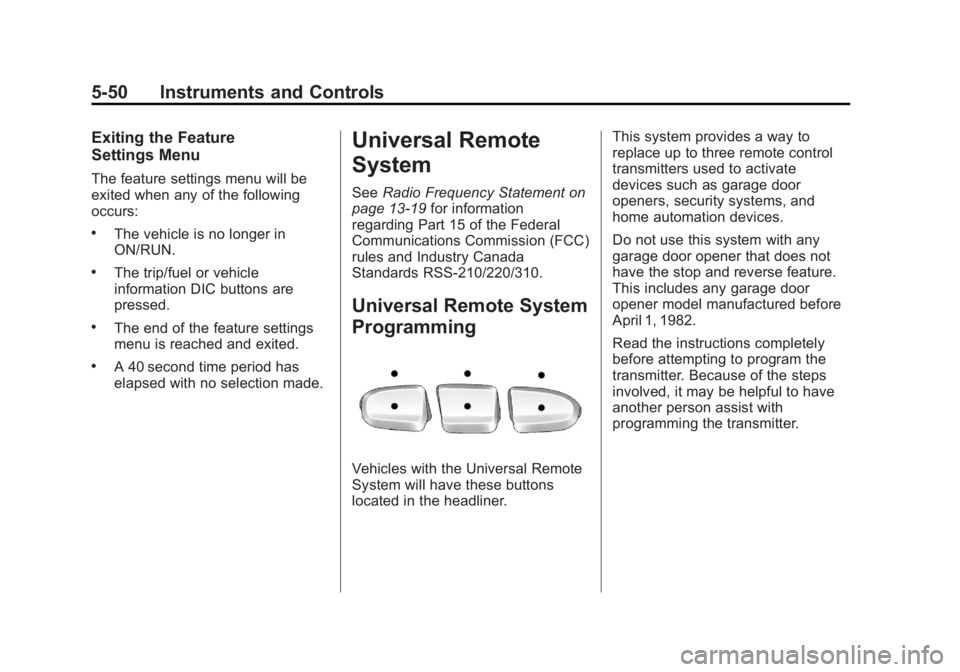
Vehicles with the Universal Remote
System will have these buttons
located in the headliner. This system provides a way to
replace up to three remote control
transmitters used to activate
devices such as garage door
openers, security systems, and
home automation devices.
Do not use this system with any
garage door opener that does not
have the stop and reverse feature.
This includes any garage door
opener model manufactured before
April 1, 1982.
Read the instructions completely
before attempting to program the
transmitter. Because of the steps
involved, it may be helpful to have
another person assist with
programming the transmitter.
Page 188 of 548
Black plate (54,1)Cadillac Escalade/Escalade ESV Owner Manual - 2011
5-54 Instruments and Controls .
If a switch is set between
the up and down position,
write “ Middle. ”
The switch settings written
down in Step 2 now
become the button strokes
to be entered into the
Universal Home Remote in
Step 4. Be sure to enter the
switch settings written down
in Step 2, in order from left
to right, into the Universal
Home Remote, when
completing Step 4.
3. From inside your vehicle, first
firmly press all three buttons
at the same time for about
three seconds. Release the
buttons to put the Universal
Home Remote into
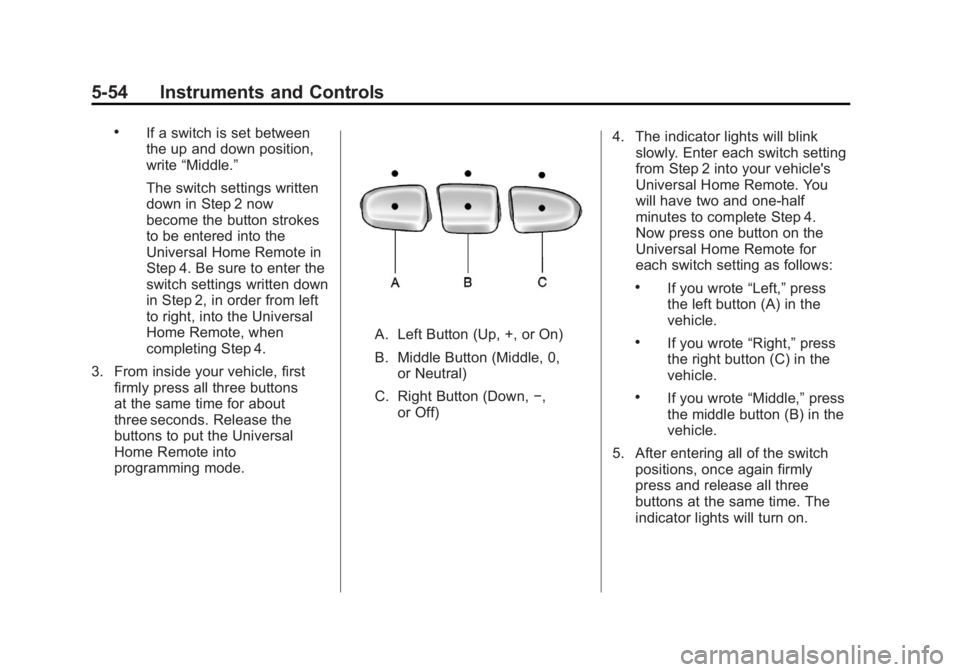
programming mode. A. Left Button (Up, +, or On)
B. Middle Button (Middle, 0,
or Neutral)
C. Right Button (Down, − ,
or Off) 4. The indicator lights will blink
slowly. Enter each switch setting
from Step 2 into your vehicle's
Universal Home Remote. You
will have two and one-half
minutes to complete Step 4.
Now press one button on the
Universal Home Remote for
each switch setting as follows: .
If you wrote “ Left, ” press
the left button (A) in the
vehicle. .
If you wrote “ Right, ” press
the right button (C) in the
vehicle. .
If you wrote “ Middle, ” press
the middle button (B) in the
vehicle.
5. After entering all of the switch
positions, once again firmly
press and release all three
buttons at the same time. The
indicator lights will turn on.
Page 195 of 548

Black plate (5,1)Cadillac Escalade/Escalade ESV Owner Manual - 2011
Lighting 6-5Disabling and Resetting
IntelliBeam at the Rearview Mirror
IntelliBeam can be disabled by
using the controls on the inside
rearview mirror.
AUTO
3 (On/Off): To disable
the system, press this button on
the inside rearview mirror. The
IntelliBeam indicator will turn off
and will not come back on until the
IntelliBeam button is pressed again.
(Stalk Disable): When IntelliBeam
has turned on the high-beams,
pull or push the high-beam stalk.
This will disable IntelliBeam.
The IntelliBeam indicator on the
mirror will turn off. To re-enable
IntelliBeam, press the IntelliBeam
button on the mirror.
A different sensitivity setting is
available for dealer diagnostics.
This is done by pushing and holding
this button for 20 seconds until the IntelliBeam indicator light flashes
three times. If you accidentally
activate this, the vehicle's setting
will automatically be reset each time
the ignition is turned off and then on
again.
Cleaning the IntelliBeam Light
Sensor
The light sensor is located on the
inside of the vehicle in front of the
inside rearview mirror. Clean the light sensor window,
periodically, using glass cleaner on
a soft cloth. Gently wipe the sensor
window. Do not spray glass cleaner
directly on the surface of the sensor
window.
Exterior Lamps Off
Reminder If a door is open, a reminder chime
sounds when the headlamps or
parking lamps are manually turned
on and the key is out of the ignition.
To turn off the chime, turn the
headlamp switch to off or AUTO
and then back on, or close and
re-open the door. In the AUTO
mode, the headlamps turn off once
the ignition is in LOCK/OFF or
remains on until the headlamp delay
ends (if enabled in the DIC). See
“ Exit Lighting ” under Vehicle
Personalization on page 5 ‑ 40 .
Page 199 of 548
Black plate (9,1)Cadillac Escalade/Escalade ESV Owner Manual - 2011
Lighting 6-9
Turn and Lane-Change
Signals
An arrow on the instrument panel
cluster flashes in the direction of the
turn or lane change.
Move the lever all the way up or
down to signal a turn.
Raise or lower the lever for less
than one second until the arrow
starts to flash to signal a lane
change. This causes the turn
signals to automatically flash three
times. It will flash six times if
tow-haul mode is active. Holding
the turn signal lever for more than
one second will cause the turn
signals to flash until you release
the lever. The lever returns to its starting
position whenever it is released.
If after signaling a turn or a lane
change the arrows flash rapidly or
do not come on, a signal bulb could
be burned out.
Have the bulbs replaced. If the bulb
is not burned out, check the fuse.
See Fuses and Circuit Breakers on
page 10 ‑ 39 .
Turn Signal On Chime
If the turn signal is left on for more
than 1.2 km (0.75 miles), a chime
will sound at each flash of the turn
signal and the message TURN
SIGNAL ON will also appear in the
Driver Information Control (DIC). To
turn the chime and message off,
move the turn signal lever to the off
position. Fog Lamps For vehicles with fog lamps, they
can be used for better vision in
foggy or misty conditions. The
parking lamps and/or low-beam
headlamps must be on for the fog
lamps to work.
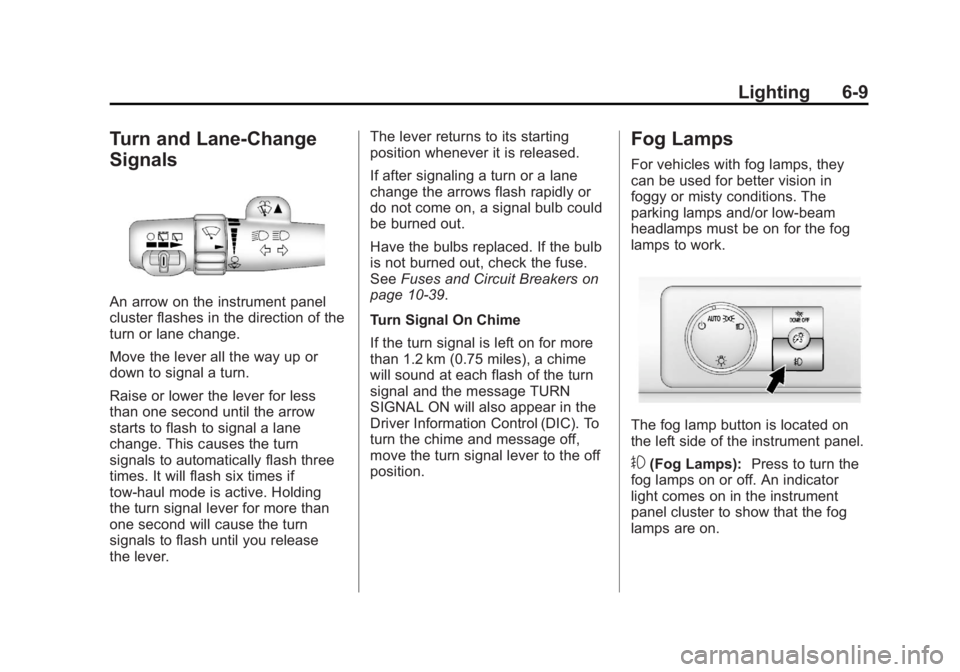
The fog lamp button is located on
the left side of the instrument panel.
# (Fog Lamps): Press to turn the
fog lamps on or off. An indicator
light comes on in the instrument
panel cluster to show that the fog
lamps are on.
Page 215 of 548
Black plate (13,1)Cadillac Escalade/Escalade ESV Owner Manual - 2011
Infotainment System 7-13Sound Menu
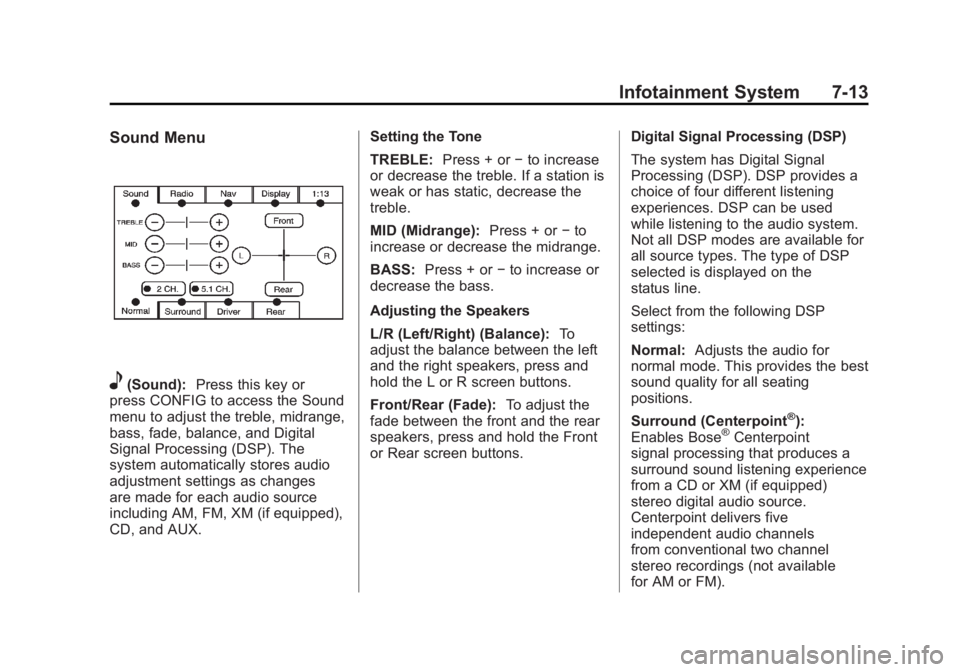
e (Sound): Press this key or
press CONFIG to access the Sound
menu to adjust the treble, midrange,
bass, fade, balance, and Digital
Signal Processing (DSP). The
system automatically stores audio
adjustment settings as changes
are made for each audio source
including AM, FM, XM (if equipped),
CD, and AUX. Setting the Tone
TREBLE: Press + or − to increase
or decrease the treble. If a station is
weak or has static, decrease the
treble.
MID (Midrange): Press + or − to
increase or decrease the midrange.
BASS: Press + or − to increase or
decrease the bass.
Adjusting the Speakers
L/R (Left/Right) (Balance): To
adjust the balance between the left
and the right speakers, press and
hold the L or R screen buttons.
Front/Rear (Fade): To adjust the
fade between the front and the rear
speakers, press and hold the Front
or Rear screen buttons. Digital Signal Processing (DSP)
The system has Digital Signal
Processing (DSP). DSP provides a
choice of four different listening
experiences. DSP can be used
while listening to the audio system.
Not all DSP modes are available for
all source types. The type of DSP
selected is displayed on the
status line.
Select from the following DSP
settings:
Normal: Adjusts the audio for
normal mode. This provides the best
sound quality for all seating
positions.
Surround (Centerpoint ®
):
Enables Bose ®
Centerpoint
signal processing that produces a
surround sound listening experience
from a CD or XM (if equipped)
stereo digital audio source.
Centerpoint delivers five
independent audio channels
from conventional two channel
stereo recordings (not available
for AM or FM).
Page 243 of 548

Black plate (41,1)Cadillac Escalade/Escalade ESV Owner Manual - 2011
Infotainment System 7-41Battery Replacement
To change the remote control
batteries:
1. Slide the rear cover back on the
remote control.
2. Replace the two batteries in the
compartment. Make sure they
are installed correctly using the
diagram on the inside of the
remote control.
3. Replace the battery cover.
If the remote control is to be stored
for a long period of time, remove the
batteries and keep them in a cool,
dry place. Tips and Troubleshooting Chart Problem Recommended Action
There is no power. The ignition might not be turned to
ON/RUN or ACC/ACCESSORY.
The picture does not fill the
screen. There are black borders
on the top and bottom or on
both sides, or the picture looks
stretched out. Check the display mode settings in the
setup menu by pressing the display
menu button on the remote control.
In auxiliary mode, the picture
moves or scrolls. Check the auxiliary input connections at
both devices.
The remote control does
not work. Check to make sure there is no
obstruction between the remote
control and the transmitter window.
Check the batteries to make sure
they are not dead or installed
incorrectly.
Page 244 of 548
Black plate (42,1)Cadillac Escalade/Escalade ESV Owner Manual - 2011
7-42 Infotainment System Tips and Troubleshooting Chart (cont.) Problem Recommended Action
After stopping the player, and
pushing Play, sometimes the
DVD starts where it left off and
sometimes at the beginning. If the stop button was pressed one time,
the DVD player resumes playing where
the DVD was stopped. If the stop button
was pressed two times, the DVD player
begins to play from the beginning of
the DVD.
The auxiliary source is running,
but there is no picture or sound. Check that the RSE video screen is in
the auxiliary source mode.
Check the auxiliary input connections at
both devices.
Sometimes the wireless
headphone audio cuts out or
buzzes. Check for obstructions, low batteries,
reception range, and interference
from cellular telephone towers, or
use a cellular telephone in the
vehicle.
Check that the headphones are on
correctly using the L (left) and R (right)
on the headphones.
The remote and/or the
headphones are lost. See your dealer for assistance.
The DVD is playing, but there is
no picture or sound. Check that the RSE video screen is
sourced to the DVD player. DVD Display Error Messages The DVD display error message
depends on the radio that is in the
vehicle. The video screen can
display one of the following:
Disc Load/Eject Error: This
message displays when there are
disc load or eject problems.
Disc Format Error: This message
displays if the disc is inserted with
the disc label wrong side up, or if
the disc is damaged.
Disc Region Error: This message
displays if the disc is not from a
correct region.
No Disc Inserted: This message
displays if no disc is present when
Z or DVD AUX is pressed on the
radio.