AUX CADILLAC ESCALADE ESV 2011 Owners Manual
[x] Cancel search | Manufacturer: CADILLAC, Model Year: 2011, Model line: ESCALADE ESV, Model: CADILLAC ESCALADE ESV 2011Pages: 548, PDF Size: 8.45 MB
Page 22 of 548

Black plate (16,1)Cadillac Escalade/Escalade ESV Owner Manual - 2011
1-16 In Brief The Driver Information Center
(DIC) display will show the message
MANUAL SHIFT on the first line and
the current gear will be displayed on
the second line. This is the highest
attainable range with all lower gears
accessible. As an example, when
5 (Fifth) gear is selected, 1 (First)
through 5 (Fifth) gears are available.
Press the plus/minus buttons,
located on the steering column shift
lever, to select the desired range of
gears for current driving conditions.
See Manual Mode on page 9 ‑ 43 .
While using DSC, cruise control and
the tow/haul mode can be used.
Grade Braking is not available when
DSC is active. See Tow/Haul Mode
on page 9 ‑ 43 . Vehicle Features Radio(s) This vehicle's radio is part of the
navigation system. See Infotainment
on page 7 ‑ 2 .
Satellite Radio XM is a satellite radio service
that is based in the 48 contiguous
United States and 10 Canadian
provinces. XM satellite radio has a
wide variety of programming and
commercial-free music, coast to
coast, and in digital-quality sound.
A fee is required to receive the
XM service.
For more information, refer to: .
www.xmradio.com or call
1-800-929-2100 (U.S.) .
www.xmradio.ca or call
1-877-438-9677 (Canada)
Also, see Satellite Radio on
page 7 ‑ 16 . Portable Audio Devices This vehicle has an auxiliary input,
located on the audio faceplate,
and a USB port located on the
instrument panel or in the center
console. External devices such
as iPod ®
, laptop computers,
MP3 players, CD changers, USB
storage device, etc. can be
connected to the auxiliary port
using a 3.5 mm (1/8 in) input jack
or the USB port depending on the
audio system.
See Auxiliary Devices on page 7 ‑ 31
for further information.
Page 23 of 548

Black plate (17,1)Cadillac Escalade/Escalade ESV Owner Manual - 2011
In Brief 1-17
Bluetooth ®
For vehicles with a Bluetooth
system, it allows users with a
Bluetooth ‐ enabled cell phone to
make and receive hands-free calls
using the vehicle ’ s audio system
and controls.
The Bluetooth ‐ enabled cell phone
must be paired with the Bluetooth
system before it can be used in the
vehicle. Not all phones will support
all functions. For more information,
visit www.gm.com/bluetooth.
For more information, see Bluetooth
on page 7 ‑ 103 . Steering Wheel Controls
If available, some audio controls
can be adjusted at the steering
wheel.
w /
c x : Press to select preset
or favorite radio stations, select
tracks on a CD/DVD, or to navigate
an iPod or USB device. b g : Press to silence the vehicle
speakers only. Press again to turn
the sound on. Press and hold longer
than two seconds to interact with
OnStar ®
or Bluetooth systems,
if equipped.
+
e −
e : Press to increase or
decrease volume.
c x : Press to reject an
incoming call, or to end a call.
SRCE: Press to switch between
the radio and CD, and for equipped
vehicles, the DVD, front auxiliary,
and rear auxiliary.
¨ : Press to seek the next radio
station, the next track or chapter
while sourced to the CD or DVD
slot, or to select tracks and folders
on an iPod or USB device.
For more information, see Steering
Wheel Controls on page 5 ‑ 3 .
Page 138 of 548

Black plate (4,1)Cadillac Escalade/Escalade ESV Owner Manual - 2011
5-4 Instruments and Controls Navigating an iPod or USB Device
on the Main Audio Screen
(Vehicles with a Navigation
System)
1. Press and release
w or
c xto select the next or previous
track within the selected
category.
2. Press and hold
w or
c x to
move quickly through the tracks.
3. Press and release
¨ to move up
one track within the selected
category. Navigating an iPod or USB Device
on the Music Navigator Screen
(Vehicles with a Navigation
System)
1. Press and release
w or
c xto select the next or previous
track within the selected
category.
2. Press and hold
w or
c x to
move quickly through the tracks
within the selected category.
3. Press and release
¨ to move up
one track within the selected
category.
b g (Mute/Push to Talk): Press to
silence the vehicle speakers only.
Press again to turn the sound on. For vehicles with Bluetooth or
OnStar systems, press and hold for
longer than two seconds to interact
with those systems. See Bluetooth
on page 7 ‑ 103 and the OnStar
Owner's Guide for more information.
c x (End): Press to reject an
incoming call, or end a current call.
SRCE (Source/Voice
Recognition): Press to switch
between the radio and CD, and for
equipped vehicles, the DVD, front
auxiliary, and rear auxiliary.
For vehicles with the navigation
system, press and hold this button
for longer than one second to
initiate voice recognition. See
“ Voice Recognition ” in the
Navigation System manual for
more information.
Page 203 of 548

Black plate (1,1)Cadillac Escalade/Escalade ESV Owner Manual - 2011
Infotainment System 7-1
Infotainment
System Introduction Infotainment . . . . . . . . . . . . . . . . . . . 7-2
Theft-Deterrent Feature . . . . . . . 7-3
Overview . . . . . . . . . . . . . . . . . . . . . . 7-3
Radio AM-FM Radio . . . . . . . . . . . . . . . . 7-10
Satellite Radio . . . . . . . . . . . . . . . 7-16
Radio Reception . . . . . . . . . . . . . 7-17
Rear Side Window
Antenna . . . . . . . . . . . . . . . . . . . . 7-18
Satellite Radio Antenna . . . . . . 7-18
Audio Players CD/DVD Player . . . . . . . . . . . . . . 7-19
MP3 . . . . . . . . . . . . . . . . . . . . . . . . . 7-28
Auxiliary Devices . . . . . . . . . . . . 7-31 Rear Seat Infotainment Rear Seat Entertainment
(RSE) System
(Overhead) . . . . . . . . . . . . . . . . . 7-33
Rear Seat Entertainment
(RSE) System
(Headrest DVD) . . . . . . . . . . . . 7-43
Rear Seat Audio (RSA)
System . . . . . . . . . . . . . . . . . . . . . 7-58
Navigation Using the Navigation
System . . . . . . . . . . . . . . . . . . . . . 7-60
Maps . . . . . . . . . . . . . . . . . . . . . . . . 7-62
Navigation Symbols . . . . . . . . . 7-64
Destination . . . . . . . . . . . . . . . . . . 7-69
Configure Menu . . . . . . . . . . . . . 7-83
Global Positioning
System (GPS) . . . . . . . . . . . . . . 7-96 Vehicle Positioning . . . . . . . . . . 7-97
Problems with Route
Guidance . . . . . . . . . . . . . . . . . . . 7-97
If the System Needs
Service . . . . . . . . . . . . . . . . . . . . . 7-98
Map Data Updates . . . . . . . . . . . 7-99
Database Coverage
Explanations . . . . . . . . . . . . . . . 7-99
Voice Recognition Voice Recognition . . . . . . . . . . 7-100
Phone Bluetooth . . . . . . . . . . . . . . . . . . . 7-103
Page 207 of 548

Black plate (5,1)Cadillac Escalade/Escalade ESV Owner Manual - 2011
Infotainment System 7-5M. Auxiliary Jack
N.
y © ¨ z (Seek) Key
(Previous/Next)
O.
w (Tune) Knob
P.
y z (Scan Up/Down)
Q. AUDIO
R. FAV (Favorite)
S.
5 (Phone)
T.
e (Sound)
U. CONFIG (Configure)
V. DEST (Destination)
W. RPT (Repeat)
X. NAV (Navigation) Language — English/MetricTo change the language of the
navigation screens or to change
the navigation screens from English
or metric, see Driver Information
Center (DIC) on page 5 ‑ 26 for
more information.
Deleting Personal Information This navigation system can record
and store personal information
such as names and addresses.
Delete this information when
selling your vehicle or returning a
leased vehicle. See “ Edit Address
Book — Edit/View ” under Configure
Menu on page 7 ‑ 83 for deleting
information from the address book. Limit Features While Driving The navigation system may have
this feature.
Touch the Limit Features While
Driving screen button to turn the
ability to limit functions on and off
while driving. When this screen
button is highlighted, the following
functions are limited while driving: .
Music Navigator Scrolling .
Radio Category Scrolling .
Navigation Menu Scrolling and
some functions
See “ Category ” under AM-FM Radio
on page 7 ‑ 10 for more information.
See “ From Map ” under Destination
on page 7 ‑ 69 for more information.
Some functions will remain limited
regardless of the setting.
Page 212 of 548
Black plate (10,1)Cadillac Escalade/Escalade ESV Owner Manual - 2011
7-10 Infotainment System
Radio AM-FM Radio Notice: Before adding any sound
equipment to the vehicle, such
as an audio system, CD player,
CB radio, mobile telephone,
or two-way radio, make sure that
it can be added by checking with
your dealer. Also, check federal
rules covering mobile radio
and telephone units. If sound
equipment can be added, it is
very important to do it properly.
Added sound equipment can
interfere with the operation of the
vehicle's engine, radio, or other
systems, and even damage them.
The vehicle's systems can
interfere with the operation of
sound equipment that has been
added. Notice: The chime signals related
to safety belts, parking brake, and
other functions of the vehicle
operate through the navigation
system. If that equipment is
replaced or additional equipment
is added to the vehicle, the
chimes may not work. Make sure
that replacement or additional
equipment is compatible with the
vehicle before installing it. See
“ Accessories and Modifications ”
in the vehicle's owner manual.
Playing the Radio
O /
n (Power/Volume):
1. Press to turn the audio system
on and off.
2. Turn to increase or to decrease
the volume. 3. Press and hold for more than
two seconds to turn off the
navigation system, the Rear
Seat Entertainment (RSE) video
screen, and Rear Seat Audio
(RSA). If the vehicle has not
been turned off, press this knob
to turn RSE and RSA back on
and to continue playback of the
last active source.
w (Tuning Knob): Turn to go to
the next or previous frequency or
disc track or chapter. See CD/DVD
Player on page 7 ‑ 19 or MP3 on
page 7 ‑ 28 for more information.
AUDIO: Press to display the audio
screen. Press to switch between
AM, FM, or XM, if equipped, Disc,
or AUX (Auxiliary), or press the
screen button. See CD/DVD Player
on page 7 ‑ 19 , MP3 on page 7 ‑ 28 ,
and Auxiliary Devices on page 7 ‑ 31
for more information.
Page 215 of 548
Black plate (13,1)Cadillac Escalade/Escalade ESV Owner Manual - 2011
Infotainment System 7-13Sound Menu
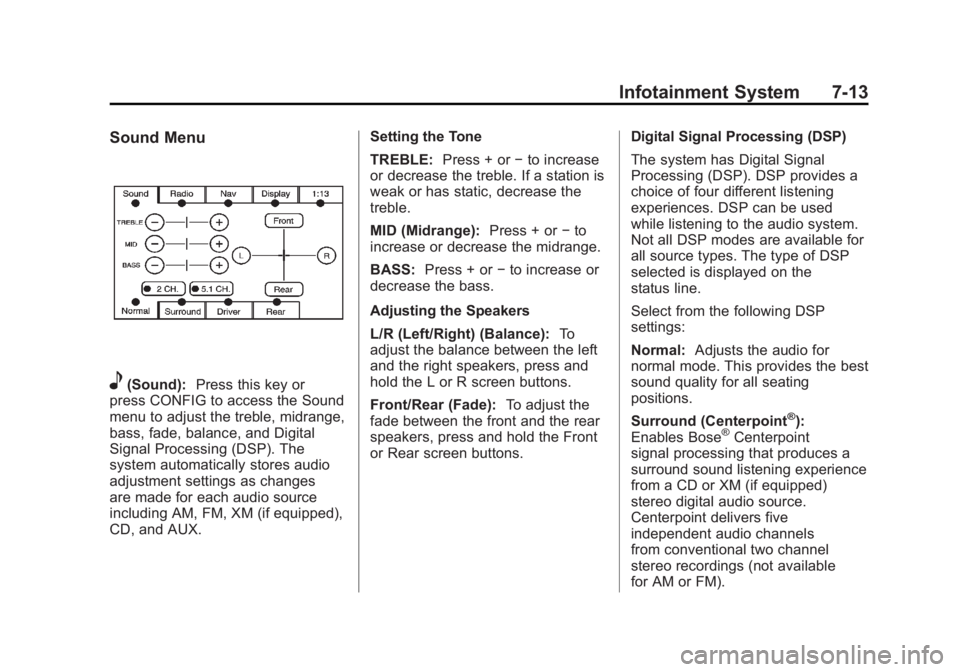
e (Sound): Press this key or
press CONFIG to access the Sound
menu to adjust the treble, midrange,
bass, fade, balance, and Digital
Signal Processing (DSP). The
system automatically stores audio
adjustment settings as changes
are made for each audio source
including AM, FM, XM (if equipped),
CD, and AUX. Setting the Tone
TREBLE: Press + or − to increase
or decrease the treble. If a station is
weak or has static, decrease the
treble.
MID (Midrange): Press + or − to
increase or decrease the midrange.
BASS: Press + or − to increase or
decrease the bass.
Adjusting the Speakers
L/R (Left/Right) (Balance): To
adjust the balance between the left
and the right speakers, press and
hold the L or R screen buttons.
Front/Rear (Fade): To adjust the
fade between the front and the rear
speakers, press and hold the Front
or Rear screen buttons. Digital Signal Processing (DSP)
The system has Digital Signal
Processing (DSP). DSP provides a
choice of four different listening
experiences. DSP can be used
while listening to the audio system.
Not all DSP modes are available for
all source types. The type of DSP
selected is displayed on the
status line.
Select from the following DSP
settings:
Normal: Adjusts the audio for
normal mode. This provides the best
sound quality for all seating
positions.
Surround (Centerpoint ®
):
Enables Bose ®
Centerpoint
signal processing that produces a
surround sound listening experience
from a CD or XM (if equipped)
stereo digital audio source.
Centerpoint delivers five
independent audio channels
from conventional two channel
stereo recordings (not available
for AM or FM).
Page 229 of 548

Black plate (27,1)Cadillac Escalade/Escalade ESV Owner Manual - 2011
Infotainment System 7-27Using the Navigation Audio
System to Control a USB
Storage Device or iPod ®
The navigation audio system can
control a USB storage device or
an iPod by using the radio touch
screens and steering wheel
controls.
1. Press AUX and then the USB
button.
2. Press the center screen button
to enter the music navigator
main screen. 3. Press or tap the left or right
arrow to select desired Category
such as: Artist, Album, Genre,
etc. A list of that category will
display.
4. Select an Artist, Album, or Track
from that list.
5. Press the up or down arrows
located on the side of the screen
to select one item at a time,
or press the top or bottom arrow
to jump 10 percent up or down
the list. 6. Press the Back button to go
back to the previous screen.
7. Press the Exit button to go back
to the main audio screen.
8. Press the left or right arrow to
select desired Category such as:
Artist, Album, Genre, etc. A list
of that category will display.
The iPod or USB storage device
should not be pulled out from the
USB dock. To safely remove it,
press Eject.
Page 233 of 548
Black plate (31,1)Cadillac Escalade/Escalade ESV Owner Manual - 2011
Infotainment System 7-31
q r (Folder/Artist/Album):
1. Select the left or right arrow to
go to the previous or next folder,
artist, or album on the disc.
2. Press the middle screen button,
with the folder, artist, or album
name, to sort the MP3 by folder,
artist, or album. It may take a
few minutes for the system to
sort the MP3.
y © ¨ z (Seek):
1. To seek tracks, press the up
arrow to go to the next track.
2. Press the down arrow to go to
the start of the current track,
if more than eight seconds
have played. 3. If either arrow is pressed more
than once, the player continues
moving backward or forward
through the CD. The sound
mutes while seeking.
w (Tuning Knob):
1. Turn counterclockwise one notch
to go to the start of the current
track, turn it again to go to the
previous track.
2. Turn clockwise to go to the next
track.
When playing an MP3 the rear seat
operator can power on the RSE
video screen and use the remote
control to navigate through the MP3. Auxiliary Devices Using the Auxiliary Input Jack The navigation system has an
auxiliary input jack located on the
right side of the faceplate. This is
not an audio output; do not plug
the headphone set into the front
auxiliary input jack. An external
audio device such as an iPod,
laptop computer, MP3 player, CD
player, or cassette tape player, etc.
can be connected to the auxiliary
input jack for use as another audio
source.
Drivers are encouraged to set up
any auxiliary device while the
vehicle is in P (Park). See Defensive
Driving on page 9 ‑ 2 for more
information on driver distraction.
Page 234 of 548
Black plate (32,1)Cadillac Escalade/Escalade ESV Owner Manual - 2011
7-32 Infotainment System To use a portable audio player,
connect a 1/8 in (3.5 mm) cable to
the radio's front auxiliary input jack.
When a device is connected, press
AUDIO, then press AUDIO again
until AUX is selected or press the
AUX screen button to begin playing
audio from the device over the
vehicle speakers.
For optimal sound quality, increase
the portable audio device's volume
to the loudest level.
It is always best to power the
portable audio device through its
own battery while playing.
The vehicle may have a rear
entertainment system (RSE) with a
second and third row screen. The
RSE has audio adapters to allow
you to connect auxiliary devices.
The audio can be heard through the
speakers or through the wireless or
wired headphones. See the Rear
Seat Infotainment user guide for
more information. Drivers are encouraged to set
up any auxiliary device while
the vehicle is in P (Park). See
Defensive Driving on page 9 ‑ 2 for
more information on driver
distraction.
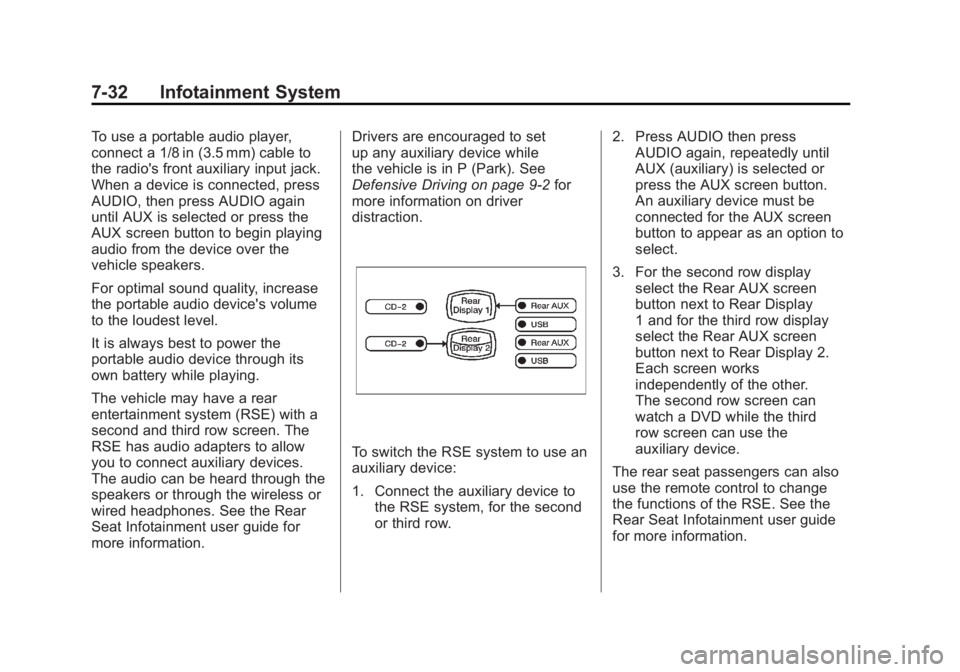
To switch the RSE system to use an
auxiliary device:
1. Connect the auxiliary device to
the RSE system, for the second
or third row. 2. Press AUDIO then press
AUDIO again, repeatedly until
AUX (auxiliary) is selected or
press the AUX screen button.
An auxiliary device must be
connected for the AUX screen
button to appear as an option to
select.
3. For the second row display
select the Rear AUX screen
button next to Rear Display
1 and for the third row display
select the Rear AUX screen
button next to Rear Display 2.
Each screen works
independently of the other.
The second row screen can
watch a DVD while the third
row screen can use the
auxiliary device.
The rear seat passengers can also
use the remote control to change
the functions of the RSE. See the
Rear Seat Infotainment user guide
for more information.