audio CADILLAC ESCALADE ESV 2011 Owners Manual
[x] Cancel search | Manufacturer: CADILLAC, Model Year: 2011, Model line: ESCALADE ESV, Model: CADILLAC ESCALADE ESV 2011Pages: 548, PDF Size: 8.45 MB
Page 1 of 548
Black plate (1,1)Cadillac Escalade/Escalade ESV Owner Manual - 2011
2011 Cadillac Escalade/Escalade ESV Owner Manual MIn Brief . . . . . . . . . . . . . . . . . . . . . . . . 1-1
Instrument Panel . . . . . . . . . . . . . . 1-2
Initial Drive Information . . . . . . . . 1-4
Vehicle Features . . . . . . . . . . . . . 1-16
Performance and
Maintenance . . . . . . . . . . . . . . . . 1-21
Keys, Doors and Windows . . . 2-1
Keys and Locks . . . . . . . . . . . . . . . 2-2
Doors . . . . . . . . . . . . . . . . . . . . . . . . . . 2-9
Vehicle Security . . . . . . . . . . . . . . 2-13
Exterior Mirrors . . . . . . . . . . . . . . . 2-16
Interior Mirrors . . . . . . . . . . . . . . . . 2-18
Windows . . . . . . . . . . . . . . . . . . . . . 2-19
Roof . . . . . . . . . . . . . . . . . . . . . . . . . . 2-22
Seats and Restraints . . . . . . . . . 3-1
Head Restraints . . . . . . . . . . . . . . . 3-2
Front Seats . . . . . . . . . . . . . . . . . . . . 3-3
Rear Seats . . . . . . . . . . . . . . . . . . . . 3-9
Safety Belts . . . . . . . . . . . . . . . . . . 3-18
Airbag System . . . . . . . . . . . . . . . . 3-35
Child Restraints . . . . . . . . . . . . . . 3-51 Storage . . . . . . . . . . . . . . . . . . . . . . . 4-1
Storage Compartments . . . . . . . . 4-1
Roof Rack System . . . . . . . . . . . . . 4-3
Instruments and Controls . . . . 5-1
Controls . . . . . . . . . . . . . . . . . . . . . . . 5-2
Warning Lights, Gauges, and
Indicators . . . . . . . . . . . . . . . . . . . 5-11
Information Displays . . . . . . . . . . 5-26
Vehicle Messages . . . . . . . . . . . . 5-31
Vehicle Personalization . . . . . . . 5-40
Universal Remote System . . . . 5-50
Lighting . . . . . . . . . . . . . . . . . . . . . . . 6-1
Exterior Lighting . . . . . . . . . . . . . . . 6-1
Interior Lighting . . . . . . . . . . . . . . . 6-10
Lighting Features . . . . . . . . . . . . . 6-11
Infotainment System . . . . . . . . . 7-1
Introduction . . . . . . . . . . . . . . . . . . . . 7-2
Radio . . . . . . . . . . . . . . . . . . . . . . . . . 7-10
Audio Players . . . . . . . . . . . . . . . . 7-19
Rear Seat Infotainment . . . . . . . 7-33
Navigation . . . . . . . . . . . . . . . . . . . . 7-60
Voice Recognition . . . . . . . . . . . 7-100
Phone . . . . . . . . . . . . . . . . . . . . . . . 7-103 Climate Controls . . . . . . . . . . . . . 8-1
Climate Control Systems . . . . . . 8-1
Air Vents . . . . . . . . . . . . . . . . . . . . . . . 8-8
Driving and Operating . . . . . . . . 9-1
Driving Information . . . . . . . . . . . . . 9-2
Starting and Operating . . . . . . . 9-30
Engine Exhaust . . . . . . . . . . . . . . 9-38
Automatic Transmission . . . . . . 9-40
Drive Systems . . . . . . . . . . . . . . . . 9-45
Brakes . . . . . . . . . . . . . . . . . . . . . . . 9-45
Ride Control Systems . . . . . . . . 9-47
Cruise Control . . . . . . . . . . . . . . . . 9-51
Object Detection Systems . . . . 9-54
Fuel . . . . . . . . . . . . . . . . . . . . . . . . . . 9-63
Towing . . . . . . . . . . . . . . . . . . . . . . . 9-70
Conversions and Add-Ons . . . 9-82
Vehicle Care . . . . . . . . . . . . . . . . . 10-1
General Information . . . . . . . . . . 10-2
Vehicle Checks . . . . . . . . . . . . . . . 10-4
Headlamp Aiming . . . . . . . . . . . 10-34
Bulb Replacement . . . . . . . . . . 10-36
Page 5 of 548
Black plate (5,1)Cadillac Escalade/Escalade ESV Owner Manual - 2011
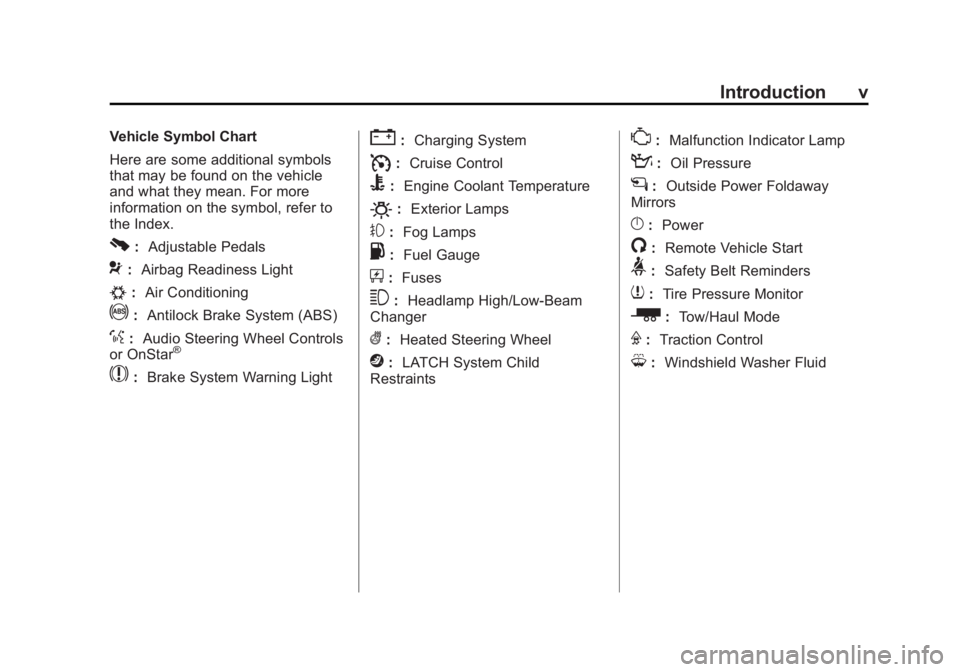
Introduction vVehicle Symbol Chart
Here are some additional symbols
that may be found on the vehicle
and what they mean. For more
information on the symbol, refer to
the Index.
0 : Adjustable Pedals
9 : Airbag Readiness Light
# : Air Conditioning
! : Antilock Brake System (ABS)
% : Audio Steering Wheel Controls
or OnStar ®
$ : Brake System Warning Light " : Charging System
I : Cruise Control
B : Engine Coolant Temperature
O : Exterior Lamps
# : Fog Lamps
. : Fuel Gauge
+ : Fuses
3 : Headlamp High/Low-Beam
Changer
( : Heated Steering Wheel
j : LATCH System Child
Restraints * : Malfunction Indicator Lamp
: : Oil Pressure
g : Outside Power Foldaway
Mirrors
} : Power
/ : Remote Vehicle Start
> : Safety Belt Reminders
7 : Tire Pressure Monitor
_ : Tow/Haul Mode
F : Traction Control
M : Windshield Washer Fluid
Page 7 of 548
Black plate (1,1)Cadillac Escalade/Escalade ESV Owner Manual - 2011
In Brief 1-1
In Brief Instrument Panel Instrument Panel . . . . . . . . . . . . . . 1-2
Initial Drive Information Initial Drive Information . . . . . . . . 1-4
Remote Keyless Entry (RKE)
System . . . . . . . . . . . . . . . . . . . . . . 1-4
Remote Vehicle Start . . . . . . . . . 1-5
Door Locks . . . . . . . . . . . . . . . . . . . 1-5
Liftgate . . . . . . . . . . . . . . . . . . . . . . . . 1-6
Windows . . . . . . . . . . . . . . . . . . . . . . 1-6
Seat Adjustment . . . . . . . . . . . . . . 1-7
Memory Features . . . . . . . . . . . . . 1-8
Second Row Seats . . . . . . . . . . . 1-9
Third Row Seats . . . . . . . . . . . . . . 1-9
Heated and Ventilated
Seats . . . . . . . . . . . . . . . . . . . . . . . . 1-9 Head Restraint
Adjustment . . . . . . . . . . . . . . . . . 1-10
Safety Belts . . . . . . . . . . . . . . . . . . 1-10
Sensing System for
Passenger Airbag . . . . . . . . . . 1-10
Mirror Adjustment . . . . . . . . . . . . 1-11
Steering Wheel
Adjustment . . . . . . . . . . . . . . . . . 1-12
Throttle and Brake Pedal
Adjustment . . . . . . . . . . . . . . . . . 1-12
Interior Lighting . . . . . . . . . . . . . . 1-12
Exterior Lighting . . . . . . . . . . . . . 1-13
Windshield Wiper/Washer . . . . 1-14
Climate Controls . . . . . . . . . . . . . 1-15
Transmission . . . . . . . . . . . . . . . . 1-15
Vehicle Features Radio(s) . . . . . . . . . . . . . . . . . . . . . 1-16
Satellite Radio . . . . . . . . . . . . . . . 1-16
Portable Audio Devices . . . . . . 1-16
Bluetooth ®
. . . . . . . . . . . . . . . . . . . 1-17
Steering Wheel Controls . . . . . 1-17 Cruise Control . . . . . . . . . . . . . . . 1-18
Navigation System . . . . . . . . . . . 1-18
Driver Information
Center (DIC) . . . . . . . . . . . . . . . 1-19
Side Blind Zone
Alert (SBZA) . . . . . . . . . . . . . . . 1-20
Rear Vision
Camera (RVC) . . . . . . . . . . . . . 1-20
Ultrasonic Parking Assist . . . . 1-20
Power Outlets . . . . . . . . . . . . . . . 1-21
Universal Remote System . . . 1-21
Performance and Maintenance StabiliTrak ®
System . . . . . . . . . 1-21
Tire Pressure Monitor . . . . . . . . 1-22
Engine Oil Life System . . . . . . 1-22
Fuel E85 (85% Ethanol) . . . . . 1-23
Driving for Better Fuel
Economy . . . . . . . . . . . . . . . . . . . 1-23
Roadside Service . . . . . . . . . . . . 1-23
OnStar ®
. . . . . . . . . . . . . . . . . . . . . 1-24
Page 15 of 548

Black plate (9,1)Cadillac Escalade/Escalade ESV Owner Manual - 2011
In Brief 1-9
Second Row Seats On vehicles with a 60/40 split bench
or buckets seats, the seatbacks can
be folded for additional cargo space,
or the seats can be folded and
tumbled for easy entry/exit to the
third row seats, if equipped. On
vehicles with bucket seats, the
seatbacks also recline.
See Second Row Seats on
page 3 ‑ 10 for more information.
Third Row Seats On vehicles with third row seats, the
seatbacks can be folded, and the
entire seat can be tumbled or
removed from the vehicle.
For detailed instructions, see Third
Row Seats on page 3 ‑ 14 . Heated and Ventilated
Seats
The buttons are on the climate
control panel.
{ : Press to cool the entire seat.
+ : Press to heat the
seatback only.
z : Press to heat the seat and
seatback.
Press the desired button once for
the highest setting. With each press
of the button, the seat will change to
the next lower setting, and then to
the off setting. Indicator bars next to
the symbol on the climate control display show the selected setting:
three for high, two for medium, and
one for low.
See Heated and Ventilated Front
Seats on page 3 ‑ 8 .
Heated Rear Seats
The buttons are on the Rear Sear
Audio (RSA) panel on the rear of the
center console.
Press
M or
L to heat the left
outboard or right outboard seat
cushion and to cycle through the
temperature settings.
See Heated Rear Seats on
page 3 ‑ 9 .
Page 21 of 548
Black plate (15,1)Cadillac Escalade/Escalade ESV Owner Manual - 2011
In Brief 1-15
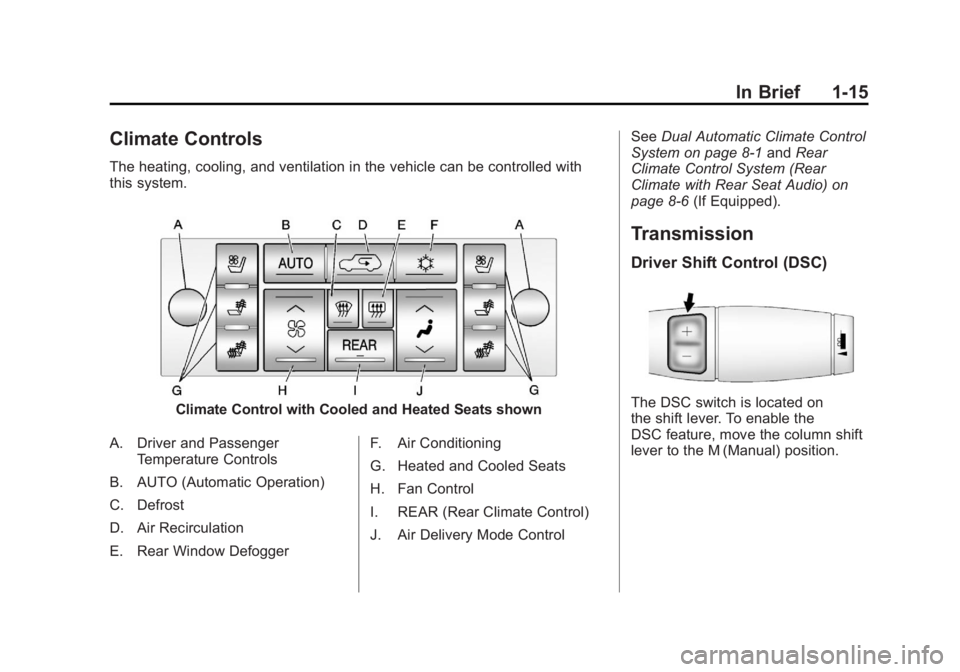
Climate Controls The heating, cooling, and ventilation in the vehicle can be controlled with
this system.
Climate Control with Cooled and Heated Seats shown
A. Driver and Passenger
Temperature Controls
B. AUTO (Automatic Operation)
C. Defrost
D. Air Recirculation
E. Rear Window Defogger F. Air Conditioning
G. Heated and Cooled Seats
H. Fan Control
I. REAR (Rear Climate Control)
J. Air Delivery Mode Control See Dual Automatic Climate Control
System on page 8 ‑ 1 and Rear
Climate Control System (Rear
Climate with Rear Seat Audio) on
page 8 ‑ 6 (If Equipped).
Transmission Driver Shift Control (DSC)
The DSC switch is located on
the shift lever. To enable the
DSC feature, move the column shift
lever to the M (Manual) position.
Page 22 of 548

Black plate (16,1)Cadillac Escalade/Escalade ESV Owner Manual - 2011
1-16 In Brief The Driver Information Center
(DIC) display will show the message
MANUAL SHIFT on the first line and
the current gear will be displayed on
the second line. This is the highest
attainable range with all lower gears
accessible. As an example, when
5 (Fifth) gear is selected, 1 (First)
through 5 (Fifth) gears are available.
Press the plus/minus buttons,
located on the steering column shift
lever, to select the desired range of
gears for current driving conditions.
See Manual Mode on page 9 ‑ 43 .
While using DSC, cruise control and
the tow/haul mode can be used.
Grade Braking is not available when
DSC is active. See Tow/Haul Mode
on page 9 ‑ 43 . Vehicle Features Radio(s) This vehicle's radio is part of the
navigation system. See Infotainment
on page 7 ‑ 2 .
Satellite Radio XM is a satellite radio service
that is based in the 48 contiguous
United States and 10 Canadian
provinces. XM satellite radio has a
wide variety of programming and
commercial-free music, coast to
coast, and in digital-quality sound.
A fee is required to receive the
XM service.
For more information, refer to: .
www.xmradio.com or call
1-800-929-2100 (U.S.) .
www.xmradio.ca or call
1-877-438-9677 (Canada)
Also, see Satellite Radio on
page 7 ‑ 16 . Portable Audio Devices This vehicle has an auxiliary input,
located on the audio faceplate,
and a USB port located on the
instrument panel or in the center
console. External devices such
as iPod ®
, laptop computers,
MP3 players, CD changers, USB
storage device, etc. can be
connected to the auxiliary port
using a 3.5 mm (1/8 in) input jack
or the USB port depending on the
audio system.
See Auxiliary Devices on page 7 ‑ 31
for further information.
Page 23 of 548

Black plate (17,1)Cadillac Escalade/Escalade ESV Owner Manual - 2011
In Brief 1-17
Bluetooth ®
For vehicles with a Bluetooth
system, it allows users with a
Bluetooth ‐ enabled cell phone to
make and receive hands-free calls
using the vehicle ’ s audio system
and controls.
The Bluetooth ‐ enabled cell phone
must be paired with the Bluetooth
system before it can be used in the
vehicle. Not all phones will support
all functions. For more information,
visit www.gm.com/bluetooth.
For more information, see Bluetooth
on page 7 ‑ 103 . Steering Wheel Controls
If available, some audio controls
can be adjusted at the steering
wheel.
w /
c x : Press to select preset
or favorite radio stations, select
tracks on a CD/DVD, or to navigate
an iPod or USB device. b g : Press to silence the vehicle
speakers only. Press again to turn
the sound on. Press and hold longer
than two seconds to interact with
OnStar ®
or Bluetooth systems,
if equipped.
+
e −
e : Press to increase or
decrease volume.
c x : Press to reject an
incoming call, or to end a call.
SRCE: Press to switch between
the radio and CD, and for equipped
vehicles, the DVD, front auxiliary,
and rear auxiliary.
¨ : Press to seek the next radio
station, the next track or chapter
while sourced to the CD or DVD
slot, or to select tracks and folders
on an iPod or USB device.
For more information, see Steering
Wheel Controls on page 5 ‑ 3 .
Page 26 of 548
Black plate (20,1)Cadillac Escalade/Escalade ESV Owner Manual - 2011
1-20 In Brief
Side Blind Zone
Alert (SBZA) If available, this feature will alert you
to vehicles located in the vehicle's
side blind zone. When the system
detects a vehicle in the side blind
zone, an amber SBZA display will
light up in the corresponding outside
side mirror.
The system is enabled at every
vehicle startup. It can be disabled
through the Driver Information
Center (DIC).
If the message SIDE BLIND ZONE
SYSTEM UNAVAILABLE appears
on the DIC, the system has been
disabled because the sensor is
blocked and cannot detect vehicles
in the blind zone. The sensor may
be blocked by mud, dirt, snow, ice,
slush, or even heavy rainstorms. This message may also activate
during heavy rain or due to road
spray. The vehicle does not need
service.
See Side Blind Zone Alert (SBZA)
on page 9 ‑ 56 for more information.
Rear Vision
Camera (RVC) If available, the rear vision camera
displays a view of the area behind
the vehicle on the navigation screen
when the vehicle is shifted into
R (Reverse). Once shifted out of
R (Reverse), the navigation screen
will go back to the last screen that
had been displayed, after a delay.
To clean the camera lens, located
above the license plate, rinse it with
water and wipe it with a soft cloth.
See Rear Vision Camera (RVC) on
page 9 ‑ 59 . Ultrasonic Parking Assist If available, Ultrasonic Rear Parking
Assist (URPA) uses sensors on the
rear bumper to detect objects while
parking the vehicle. URPA comes
on automatically when the shift lever
is moved into R (Reverse) and
operates at speeds less than 8 km/h
(5 mph). URPA uses audio beeps to
provide distance and system
information.
Keep the sensors on the vehicle's
rear bumper clean to ensure proper
operation.
The system can be disabled by
pressing the rear park aid disable
button located next to the radio.
See Ultrasonic Parking Assist on
page 9 ‑ 54 for more information.
Page 65 of 548

Black plate (9,1)Cadillac Escalade/Escalade ESV Owner Manual - 2011
Seats and Restraints 3-9
Rear Seats Heated Rear Seats
{ WARNINGIf you cannot feel temperature
change or pain to the skin, the
seat heater may cause burns
even at low temperatures. See
the Warning under Heated and
Ventilated Front Seats on
page 3 ‑ 8 . The buttons are on the Rear Seat
Audio (RSA) panel on the rear of the
center console.
Press
M or
L to heat the left
outboard or right outboard seat
cushion. An indicator on the RSA
display appears when this feature
is on. Press the button once for the
highest setting. With each press of
the button, the heated seat changes
to the next lower setting, and then
the off setting. Indicator bars next to
the symbol show the setting: three
for high, two for medium, and one
for low.
The heated seats are canceled
ten seconds after the ignition is
turned off. To use this feature after
the vehicle is restarted, press the
desired button.
Page 137 of 548

Black plate (3,1)Cadillac Escalade/Escalade ESV Owner Manual - 2011
Instruments and Controls 5-3
Steering Wheel Controls
If equipped, some audio controls
can be adjusted at the steering
wheel.
w /
c x (Next/Previous): Press
to select preset or favorite radio
stations, select tracks on a CD/
DVD, or navigate an iPod or USB
device. Radio
To select preset or favorite radio
stations:
Press and release
w or
c x to
go to the next or previous radio
station stored as a preset or
favorite.
CD/DVD
To select tracks on a CD/DVD:
Press and release
w or
c x to
go to the next or previous track.
Selecting Tracks on an iPod or
USB Device (Vehicles without a
Navigation System)
1. Press and hold
w or
c xwhile listening to a song until the
contents of the current folder
display on the radio display.
2. Press and release
w or
c xto scroll up or down the list, then
press and hold
w , or press
¨ to
play the highlighted track. Navigating Folders on an iPod or
USB Device (Vehicles without a
Navigation System):
1. Press and hold
w or
c x while listening to a song until the
contents of the current folder
display on the radio display.
2. Press and hold
c x to go
back to the previous folder list.
3. Press and release
w or
c x to scroll up or down the list. .
To select a folder, press
and hold
w , or press
¨ when the folder is
highlighted. .
To go back further in
the folder list, press
and hold
c x .