reset CADILLAC ESCALADE ESV 2015 4.G User Guide
[x] Cancel search | Manufacturer: CADILLAC, Model Year: 2015, Model line: ESCALADE ESV, Model: CADILLAC ESCALADE ESV 2015 4.GPages: 443, PDF Size: 4.69 MB
Page 159 of 443

Black plate (28,1)Cadillac 2015i Escalade Owner Manual (GMNA-Localizing-U.S./Canada/
Mexico-8431501) - 2015 - CRC - 2/10/15
5-28 Instruments and Controls
SorT:Press to move between
the interactive display zones in the
cluster. Press
Sto go back to the
previous menu.
SEL (Select): Press to open a
menu or select a menu item. Press
and hold to reset values on certain
screens.
DIC Information Display
Options
The info displays on the DIC can be
turned on or off through the
Settings menu.
1. Press SEL while viewing the Settings page in one of the
interactive display zones on the
cluster.
2. Scroll to Info Pages and press SEL.
3. Press
yorzto move through
the list of possible info displays. 4. Press SEL while an item is
highlighted to select or deselect
that item. When an item is
selected, a checkmark will
appear next to it.
DIC Information Displays
The following is the list of all
possible DIC information displays.
Some of the information displays
may not be available for your
particular vehicle.
Trip 1 or Trip 2 and Average Fuel
Economy: The Trip display shows
the current distance traveled, in
either kilometers (km) or miles (mi),
since the trip odometer was last
reset. The trip odometer can be
reset by pressing and holding SEL
while this display is active.
The Average Fuel Economy display
shows the approximate average
liters per 100 kilometers (L/100 km)
or miles per gallon (mpg). This
number is calculated based on the
number of L/100 km (mpg) recorded
since the last time this menu item
was reset. This number reflects only the approximate average fuel
economy that the vehicle has right
now, and will change as driving
conditions change. The Average
Fuel Economy can be reset along
with the trip odometer by pressing
and holding SEL while this display
is active.
Also shows if the Active Fuel
Management is active and in
V4 mode, or inactive and in
V8 mode. See
Active Fuel
Management
®on page 9-27.
Fuel Range: Shows the
approximate distance the vehicle
can be driven without refueling.
LOW will be displayed when the
vehicle is low on fuel. The fuel
range estimate is based on an
average of the vehicle's fuel
economy over recent driving history
and the amount of fuel remaining in
the fuel tank.
Instantaneous Fuel Economy:
Shows the current fuel economy in
either liters per 100 kilometers (L/
100 km) or miles per gallon (mpg).
Page 160 of 443
Black plate (29,1)Cadillac 2015i Escalade Owner Manual (GMNA-Localizing-U.S./Canada/
Mexico-8431501) - 2015 - CRC - 2/10/15
Instruments and Controls 5-29
This number reflects only the
approximate fuel economy that the
vehicle has right now and changes
frequently as driving conditions
change.
Average Speed:Shows the
average speed of the vehicle in
kilometers per hour (km/h) or miles
per hour (mph). This average is
calculated based on the various
vehicle speeds recorded since the
last reset of this value. The average
speed can be reset by pressing and
holding SEL while this display is
active.
Timer: This display can be used as
a timer. To start the timer, press SEL
while this display is active. The
display will show the amount of time
that has passed since the timer was
last reset. To stop the timer, press
SEL briefly while this display is
active and the timer is running. To
reset the timer to zero, press and
hold SEL while this display is active. Turn Arrow:
Shows the next
maneuver when using route
guidance.
Estimated Time to Arrival: Shows
the estimated time until arrival at
your destination.
Distance to Destination: Shows
the distance to the destination when
using route guidance.
Speed Limit: Shows the current
speed limit. The information for this
page comes from a roadway
database.
Speed Warning: Allows the driver
to set a speed that they do not want
to exceed. To set the Speed
Warning, press SEL when Speed
Warning is displayed. Press
yor
zto adjust the value. This feature
can be turned off by pressing and
holding SEL while viewing this
page. If the selected speed limit is
exceeded, a pop-up warning is
displayed and a chime may sound. Cruise Set Speed:
Shows the
speed the cruise control or Adaptive
Cruise Control is set to.
Follow Distance Indicator: When
Adaptive Cruise Control (ACC) is
not engaged, the current follow time
to the vehicle ahead is displayed as
a time value on this page. When
ACC has been engaged, the display
switches to the gap setting page.
This page shows the current gap
setting along with the vehicle ahead
indicator.
Battery Voltage: Shows the
current battery voltage.
Oil Life: Shows an estimate of
the oil's remaining useful life.
If REMAINING OIL LIFE 99% is
displayed, that means 99% of the
current oil life remains.
When the remaining oil life is low,
the CHANGE ENGINE OIL SOON
message will appear on the display.
See Engine Oil Messages on
page 5-37. The oil should be
changed as soon as possible. See
Engine Oil on page 10-6. In addition
Page 161 of 443
Black plate (30,1)Cadillac 2015i Escalade Owner Manual (GMNA-Localizing-U.S./Canada/
Mexico-8431501) - 2015 - CRC - 2/10/15
5-30 Instruments and Controls
to the engine oil life system
monitoring the oil life, additional
maintenance is recommended.
SeeMaintenance Schedule on
page 11-4.
The Oil Life display must be reset
after each oil change. It will not
reset itself. Do not reset the Oil Life
display accidentally at any time
other than when the oil has just
been changed. It cannot be reset
accurately until the next oil change.
To reset the engine oil life system,
press and hold SEL for several
seconds while the Oil Life display is
active. See Engine Oil Life System
on page 10-8.
Oil Pressure: Shows the engine oil
pressure in kPa (kilopascals)
or psi (pounds per square inch).
Engine Hours: Shows the total
number of hours the engine has run. Transmission Fluid
Temperature:
Shows the
temperature of the automatic
transmission fluid in either degrees
Celsius (°C) or degrees
Fahrenheit (°F).
Tire Pressure: Shows the
approximate pressures of all four
tires. Tire pressure is displayed in
either kilopascal (kPa) or in pounds
per square inch (psi). If the pressure
is low, the value for that tire is
shown in amber. See Tire Pressure
Monitor System on page 10-47 and
Tire Pressure Monitor Operation on
page 10-48.
Blank Page: Allows for no
information to be displayed in the
cluster info display areas.Head-Up Display (HUD)
{Warning
If the HUD image is too bright or
too high in your field of view, it
may take you more time to see
things you need to see when it is
dark outside. Be sure to keep the
HUD image dim and placed low in
your field of view.
If equipped with HUD, some
information concerning the
operation of the vehicle is projected
onto the windshield. The image is
projected through the HUD lens on
top of the instrument panel. The
information appears as an image
focused out toward the front of the
vehicle.
Page 168 of 443
Black plate (37,1)Cadillac 2015i Escalade Owner Manual (GMNA-Localizing-U.S./Canada/
Mexico-8431501) - 2015 - CRC - 2/10/15
Instruments and Controls 5-37
Engine Cooling System
Messages
A/C OFF DUE TO HIGH
ENGINE TEMP
This message displays when the
engine coolant becomes hotter than
the normal operating temperature.
SeeEngine Coolant Temperature
Gauge on page 5-15. To avoid
added strain on a hot engine, the
air conditioning compressor
automatically turns off. When the
coolant temperature returns to
normal, the air conditioning
compressor turns back on. You can
continue to drive your vehicle.
If this message continues to appear,
have the system repaired by your
dealer as soon as possible to avoid
damage to the engine.
ENGINE OVERHEATED IDLE
ENGINE
This message displays when the
engine coolant temperature is too
hot. Stop and allow the vehicle to idle until it cools down. See
Engine
Coolant Temperature Gauge on
page 5-15.
When towing, use Tow/Haul Mode
to prevent damage to the engine or
transmission. See Tow/Haul Mode
on page 9-33.
ENGINE OVERHEATED STOP
ENGINE
This message displays and a chime
may sound if the engine cooling
system reaches unsafe
temperatures for operation. Stop
and turn off the vehicle as soon as it
is safe to do so to avoid severe
damage. This message clears when
the engine has cooled to a safe
operating temperature.
Engine Oil Messages
CHANGE ENGINE OIL SOON
This message displays when the
engine oil needs to be changed.
When you change the engine oil, be
sure to reset the oil life system. See
Engine Oil Life System on page 10-8,
Driver Information
Center (DIC) on page 5-27, Engine
Oil on page 10-6, and Maintenance
Schedule on page 11-4.
ENGINE OIL HOT, IDLE
ENGINE
This message displays when the
engine oil temperature is too hot.
Stop and allow the vehicle to idle
until it cools down.
ENGINE OIL LOW —ADD OIL
On some vehicles, this message
displays when the engine oil level
may be too low. Check the oil level
before filling to the recommended
level. If the oil is not low and this
message remains on, take the
vehicle to your dealer for service.
See Engine Oil on page 10-6.
OIL PRESSURE LOW —STOP
ENGINE
This message displays if low oil
pressure levels occur. Stop the
vehicle as soon as safely possible
and do not operate it until the cause
Page 303 of 443
Black plate (8,1)Cadillac 2015i Escalade Owner Manual (GMNA-Localizing-U.S./Canada/
Mexico-8431501) - 2015 - CRC - 2/10/15
10-8 Vehicle Care
{Caution
Failure to use the recommended
engine oil can result in engine
damage not covered by the
vehicle warranty. Check with your
dealer or service provider on
whether the oil is approved to the
dexos1 specification.
Viscosity Grade
Use SAE 0W-20 viscosity grade
engine oil.
When selecting an oil of the
appropriate viscosity grade, always
select an oil of the correct
specification. See “Specification”
earlier in this section for more
information.
Engine Oil Additives/Engine
Oil Flushes
Do not add anything to the oil. The
recommended oils meeting the
dexos1 specification are all that is
needed for good performance and
engine protection.
Engine oil system flushes are not
recommended and could cause
engine damage not covered by the
vehicle warranty.
What to Do with Used Oil
Used engine oil contains certain
elements that can be unhealthy for
your skin and could even cause
cancer. Do not let used oil stay on
your skin for very long. Clean your
skin and nails with soap and water,
or a good hand cleaner. Wash or
properly dispose of clothing or rags
containing used engine oil. See the
manufacturer's warnings about the
use and disposal of oil products.
Used oil can be a threat to the
environment. If you change your
own oil, be sure to drain all the oil from the filter before disposal. Never
dispose of oil by putting it in the
trash or pouring it on the ground,
into sewers, or into streams or
bodies of water. Recycle it by taking
it to a place that collects used oil.
Engine Oil Life System
When to Change Engine Oil
This vehicle has a computer system
that indicates when to change the
engine oil and filter. This is based
on a combination of factors which
include engine revolutions, engine
temperature, and miles driven.
Based on driving conditions, the
mileage at which an oil change is
indicated can vary considerably. For
the oil life system to work properly,
the system must be reset every time
the oil is changed.
When the system has calculated
that oil life has been diminished, it
indicates that an oil change is
necessary. A CHANGE ENGINE
OIL SOON message comes on. See
Engine Oil Messages on page 5-37.
Page 304 of 443
Black plate (9,1)Cadillac 2015i Escalade Owner Manual (GMNA-Localizing-U.S./Canada/
Mexico-8431501) - 2015 - CRC - 2/10/15
Vehicle Care 10-9
Change the oil as soon as possible
within the next 1 000 km (600 mi).
It is possible that, if driving under
the best conditions, the oil life
system might indicate that an oil
change is not necessary for up to a
year. The engine oil and filter must
be changed at least once a year
and at this time the system must be
reset. Your dealer has trained
service people who will perform this
work and reset the system. It is also
important to check the oil regularly
over the course of an oil drain
interval and keep it at the proper
level.
If the system is ever reset
accidentally, the oil must be
changed at 5 000 km (3,000 mi)
since the last oil change.
Remember to reset the oil life
system whenever the oil is changed.How to Reset the Engine Oil
Life System
Reset the system whenever the
engine oil is changed so that the
system can calculate the next
engine oil change. To reset the
system:
1. Using the DIC controls on theright side of the steering wheel,
display OIL LIFE on the DIC.
See Driver Information Center
(DIC) on page 5-27. When
remaining oil life is low, the
CHANGE ENGINE OIL SOON
message will appear on the
display. See Engine Oil
Messages on page 5-37.
2. Press SEL on the DIC controls and hold SEL down for a few
seconds to clear the CHANGE
ENGINE OIL SOON message
and reset the oil life at 100%.
Be careful not to reset the oil life
display accidentally at any time
other than after the oil is changed. It cannot be reset
accurately until the next oil
change.
The oil life system can also be reset
as follows:
1. Turn the ignition on with the engine off.
2. Fully press and release the accelerator pedal three times
within five seconds.
If the CHANGE ENGINE OIL
SOON message is not on, the
system is reset.
The system is reset when the
CHANGE ENGINE OIL SOON
message is off.
If the CHANGE ENGINE OIL SOON
message comes back on when the
vehicle is started, the engine oil life
system has not been reset. Repeat
the procedure.
Page 321 of 443
Black plate (26,1)Cadillac 2015i Escalade Owner Manual (GMNA-Localizing-U.S./Canada/
Mexico-8431501) - 2015 - CRC - 2/10/15
10-26 Vehicle Care
Headlamp Aiming
Headlamp aim has been preset and
should need no further adjustment.
If the vehicle is damaged in a crash,
the headlamp aim may be affected.
If adjustment to the headlamps is
necessary, see your dealer.
Bulb Replacement
For the proper type of replacement
bulbs, seeReplacement Bulbs on
page 10-27.
For any bulb-changing procedure
not listed in this section, contact
your dealer.
LED Lighting
This vehicle has several LED lamps.
For replacement of any LED lighting
assembly, contact your dealer.
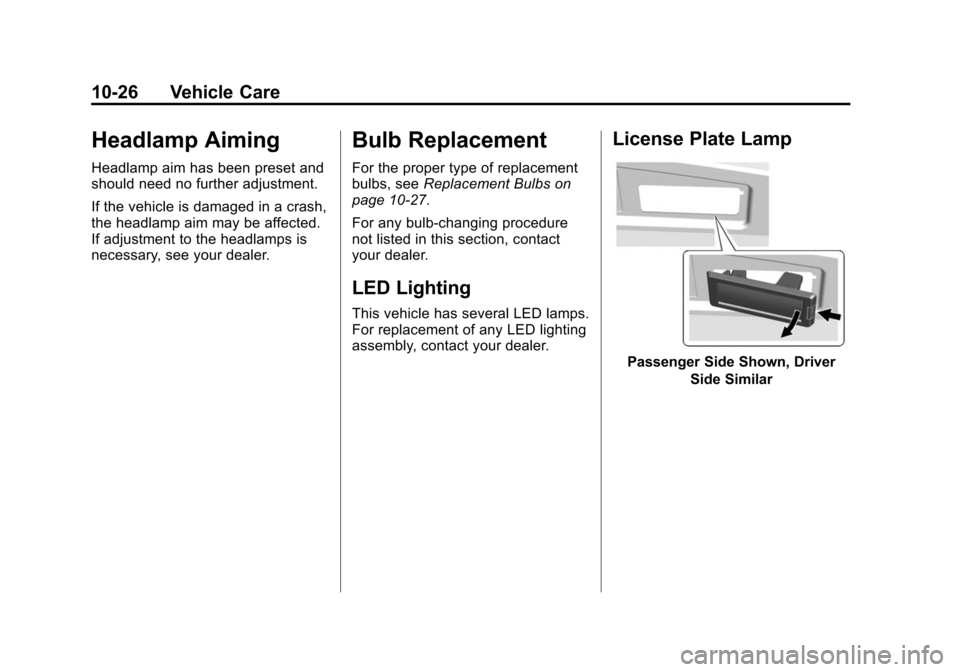
License Plate Lamp
Passenger Side Shown, Driver
Side Similar
Page 348 of 443
Black plate (53,1)Cadillac 2015i Escalade Owner Manual (GMNA-Localizing-U.S./Canada/
Mexico-8431501) - 2015 - CRC - 2/10/15
Vehicle Care 10-53
Reset the Tire Pressure Monitor
System. SeeTire Pressure
Monitor Operation on
page 10-48.
Check that all wheel nuts are
properly tightened. See “Wheel
Nut Torque” underCapacities
and Specifications on
page 12-2.
{Warning
Rust or dirt on a wheel, or on the
parts to which it is fastened, can
make wheel nuts become loose
after time. The wheel could come
off and cause an accident. When
changing a wheel, remove any
rust or dirt from places where the
wheel attaches to the vehicle. In
an emergency, a cloth or a paper
towel can be used; however, use
a scraper or wire brush later to
remove all rust or dirt.
Lightly coat the center of the
wheel hub with wheel bearing
grease after a wheel change or
tire rotation to prevent corrosion
or rust build-up. Do not get
grease on the flat wheel
mounting surface or on the
wheel nuts or bolts.
When It Is Time for New
Tires
Factors, such as maintenance,
temperatures, driving speeds,
vehicle loading, and road conditions
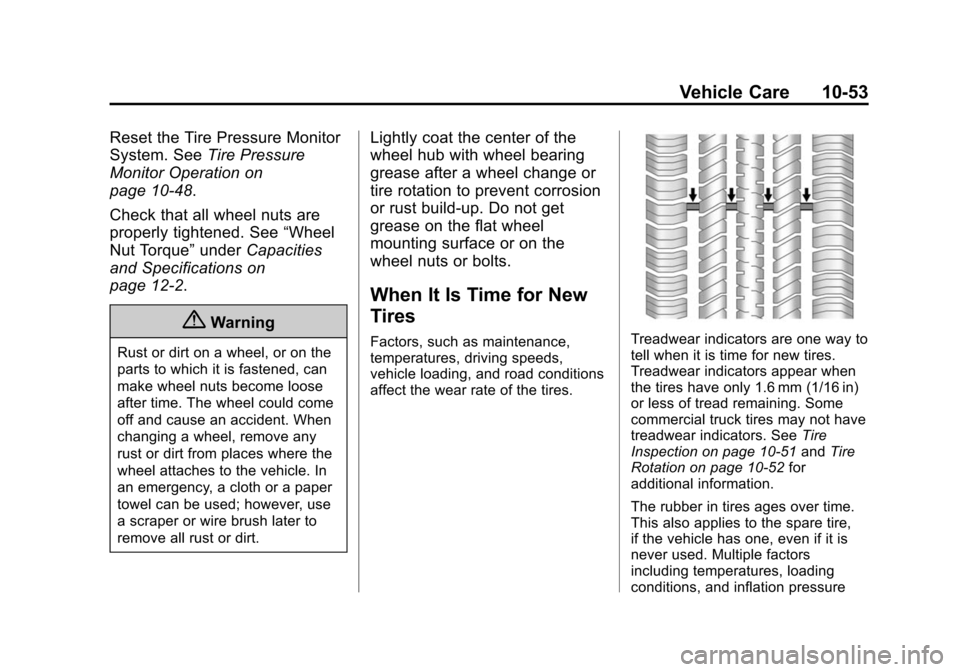
affect the wear rate of the tires.Treadwear indicators are one way to
tell when it is time for new tires.
Treadwear indicators appear when
the tires have only 1.6 mm (1/16 in)
or less of tread remaining. Some
commercial truck tires may not have
treadwear indicators. See Tire
Inspection on page 10-51 andTire
Rotation on page 10-52 for
additional information.
The rubber in tires ages over time.
This also applies to the spare tire,
if the vehicle has one, even if it is
never used. Multiple factors
including temperatures, loading
conditions, and inflation pressure
Page 372 of 443
Black plate (77,1)Cadillac 2015i Escalade Owner Manual (GMNA-Localizing-U.S./Canada/
Mexico-8431501) - 2015 - CRC - 2/10/15
Vehicle Care 10-77
8. Disconnect the negative batterycable at the battery and secure
the nut and bolt. Cover the
negative battery post with a
non-conductive material to
prevent any contact with the
negative battery terminal.
9. Shift the transmission to P (Park).
{Caution
If the steering column is locked,
vehicle damage may occur.
10. Move the steering wheel to make sure the steering column
is unlocked.
11. With a foot on the brake pedal, release the parking brake.
12. Vehicles with Keyless Access, keep the RKE transmitter
outside of the vehicle, and
manually lock the doors. Access the vehicle the same
as dead vehicle/transmitter
process (back up key in
door lock).
Disconnecting the Towed Vehicle
Before disconnecting the towed
vehicle:
1. Park on a level surface.
2. Set the parking brake, then shift the transmission to P (Park).
3. Connect the battery.
4. Apply the brake pedal.
5. Turn the ignition to ON/RUN with the engine off. Shift the transfer
case out of N (Neutral) to
Two-Wheel Drive High. See
“Shifting out of N (Neutral)”
under Four-Wheel Drive on
page 9-34. See your dealer if the
transfer case cannot be shifted
out of N (Neutral).
6. Check that the vehicle is in Two-Wheel Drive High by
shifting the transmission to
R (Reverse) and then to D (Drive). There should be
movement of the vehicle while
shifting.
7. Shift the transmission to P (Park) and turn off the ignition.
8. Disconnect the vehicle from the tow vehicle.
9. Release the parking brake.
10. Reset any lost presets. The outside temperature
display will default to 0 °C
(32 °F) but will reset with
normal usage.
Page 387 of 443
Black plate (4,1)Cadillac 2015i Escalade Owner Manual (GMNA-Localizing-U.S./Canada/
Mexico-8431501) - 2015 - CRC - 2/10/15
11-4 Service and Maintenance
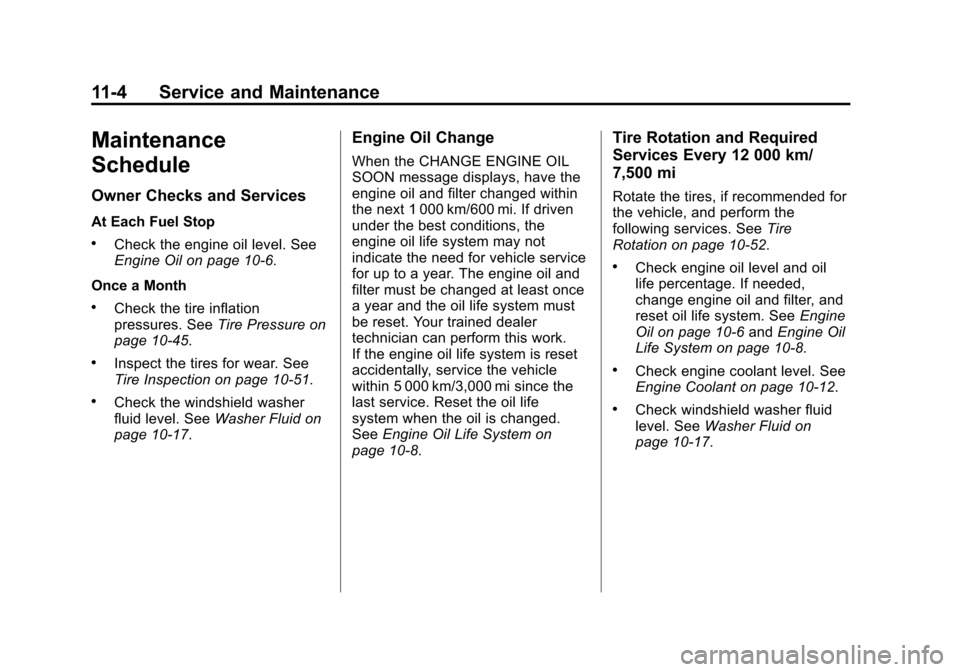
Maintenance
Schedule
Owner Checks and Services
At Each Fuel Stop
.Check the engine oil level. See
Engine Oil on page 10-6.
Once a Month
.Check the tire inflation
pressures. See Tire Pressure on
page 10-45.
.Inspect the tires for wear. See
Tire Inspection on page 10-51.
.Check the windshield washer
fluid level. See Washer Fluid on
page 10-17.
Engine Oil Change
When the CHANGE ENGINE OIL
SOON message displays, have the
engine oil and filter changed within
the next 1 000 km/600 mi. If driven
under the best conditions, the
engine oil life system may not
indicate the need for vehicle service
for up to a year. The engine oil and
filter must be changed at least once
a year and the oil life system must
be reset. Your trained dealer
technician can perform this work.
If the engine oil life system is reset
accidentally, service the vehicle
within 5 000 km/3,000 mi since the
last service. Reset the oil life
system when the oil is changed.
See Engine Oil Life System on
page 10-8.
Tire Rotation and Required
Services Every 12 000 km/
7,500 mi
Rotate the tires, if recommended for
the vehicle, and perform the
following services. See Tire
Rotation on page 10-52.
.Check engine oil level and oil
life percentage. If needed,
change engine oil and filter, and
reset oil life system. See Engine
Oil on page 10-6 andEngine Oil
Life System on page 10-8.
.Check engine coolant level. See
Engine Coolant on page 10-12.
.Check windshield washer fluid
level. See Washer Fluid on
page 10-17.