change time CADILLAC ESCALADE ESV 2015 4.G Owners Manual
[x] Cancel search | Manufacturer: CADILLAC, Model Year: 2015, Model line: ESCALADE ESV, Model: CADILLAC ESCALADE ESV 2015 4.GPages: 443, PDF Size: 4.69 MB
Page 21 of 443
Black plate (14,1)Cadillac 2015i Escalade Owner Manual (GMNA-Localizing-U.S./Canada/
Mexico-8431501) - 2015 - CRC - 2/10/15
1-14 In Brief
To change the dome lamp settings,
press the following:
OFF:Turns the lamps off, even
when a door is open.
DOOR: The lamps come on
automatically when a door is
opened.
ON: Turns all dome lamps on.
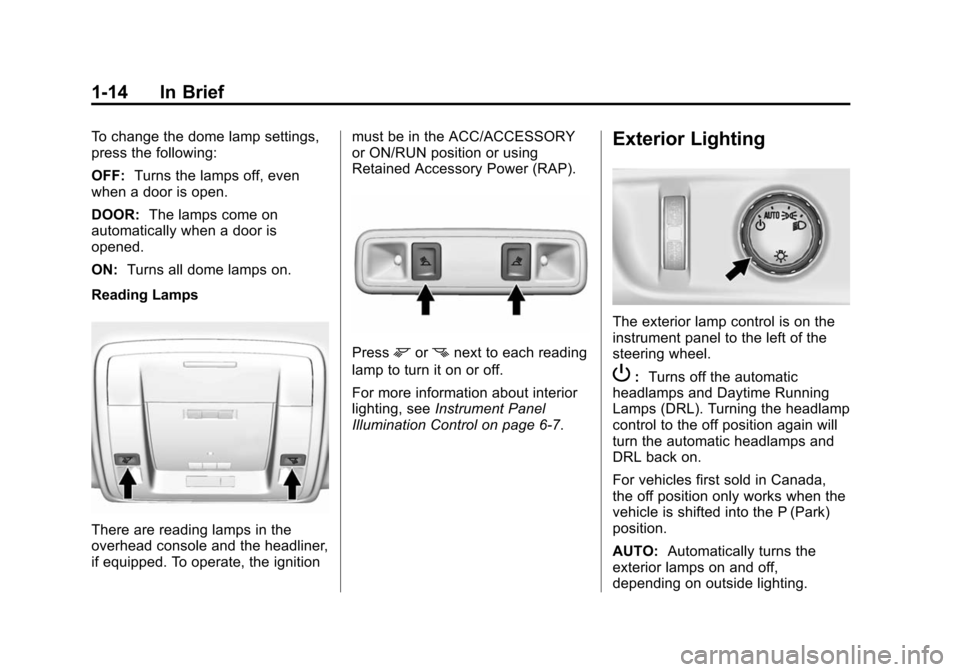
Reading Lamps
There are reading lamps in the
overhead console and the headliner,
if equipped. To operate, the ignition must be in the ACC/ACCESSORY
or ON/RUN position or using
Retained Accessory Power (RAP).
Pressmornnext to each reading
lamp to turn it on or off.
For more information about interior
lighting, see Instrument Panel
Illumination Control on page 6-7.
Exterior Lighting
The exterior lamp control is on the
instrument panel to the left of the
steering wheel.
P: Turns off the automatic
headlamps and Daytime Running
Lamps (DRL). Turning the headlamp
control to the off position again will
turn the automatic headlamps and
DRL back on.
For vehicles first sold in Canada,
the off position only works when the
vehicle is shifted into the P (Park)
position.
AUTO: Automatically turns the
exterior lamps on and off,
depending on outside lighting.
Page 31 of 443
Black plate (24,1)Cadillac 2015i Escalade Owner Manual (GMNA-Localizing-U.S./Canada/
Mexico-8431501) - 2015 - CRC - 2/10/15
1-24 In Brief
Engine Oil Life System
The engine oil life system calculates
engine oil life based on vehicle use
and displays the CHANGE ENGINE
OIL SOON message when it is time
to change the engine oil and filter.
The oil life system should be reset
to 100% only following an oil
change.
Resetting the Oil Life System
1. Using the DIC controls on theright side of the steering wheel,
display OIL LIFE on the DIC.
See Driver Information Center
(DIC) on page 5-27. When
remaining oil life is low, the
CHANGE ENGINE OIL SOON
message will appear on the
display. See Engine Oil
Messages on page 5-37. 2. Press SEL on the DIC controls
and hold SEL down for a few
seconds to clear the CHANGE
ENGINE OIL SOON message
and reset the oil life at 100%.
Be careful not to reset the oil life
display accidentally at any time
other than after the oil is
changed. It cannot be reset
accurately until the next oil
change.
The oil life system can also be reset
as follows:
1. Turn the ignition on with the engine off.
2. Fully press and release the accelerator pedal three times
within five seconds.
If the CHANGE ENGINE OIL
SOON message is not on, the
system is reset.
See Engine Oil Life System on
page 10-8.
Driving for Better Fuel
Economy
Driving habits can affect fuel
mileage. Here are some driving tips
to get the best fuel economy
possible.
.Avoid fast starts and accelerate
smoothly.
.Brake gradually and avoid
abrupt stops.
.Avoid idling the engine for long
periods of time.
.When road and weather
conditions are appropriate, use
cruise control.
.Always follow posted speed
limits or drive more slowly when
conditions require.
Page 71 of 443
Black plate (8,1)Cadillac 2015i Escalade Owner Manual (GMNA-Localizing-U.S./Canada/
Mexico-8431501) - 2015 - CRC - 2/10/15
3-8 Seats and Restraints
If the massage feature is off when
the memory recall is performed, the
previously stored type and intensity
will be recalled, but it will remain off
until activated with the On/Off
control.
Automatically Recalling Memory
Positions (Auto Memory Recall)
The Auto (Automatic) Memory
Recall feature automatically recalls
the current driver’s previously stored
“1” or“2” position and massage
settings (if equipped) when entering
the vehicle.
If the Auto Memory Recall feature is
enabled in the vehicle
personalization menu, then do one
of the following to recall the “1”or
“2” position:
.PressKon the RKE transmitter
and open the driver door.
.PressKon the RKE transmitter
when the driver door is
already open.
.Press the lock/unlock button on
the outside driver door handle
and open the driver door. The
RKE transmitter must be present
for the recall to activate.
RKE transmitters are not labeled
with a number. If your memory seat
position is stored to "1" or "2" but
this position is not automatically
recalling, then change the stored
position or switch RKE transmitters
with the other driver.
See Vehicle Personalization on
page 5-46.
To stop recall movement, press one
of the memory, power mirror,
or power seat controls; press the
power tilt and telescoping steering
column control; or press the
adjustable pedal control.
RKE transmitters are not labeled
with a number. If your memory seat
position is stored to “1”or“2” but
this position is not automatically
recalling, then change the stored
position or switch RKE transmitters
with the other driver. Easy Exit Recall
If programmed on in the vehicle
personalization menu, the easy exit
feature automatically moves the
driver seat, power tilt and
telescoping steering column,
adjustable pedals, and outside
mirrors to the memory positions and
settings stored to the
B(Exit)
button. See “Storing Memory
Positions” previously in this section.
See also Vehicle Personalization on
page 5-46.
Easy exit recall automatically
activates when one of the following
occurs:
.The vehicle is turned off and the
driver door is opened within a
short time.
.The vehicle is turned off with the
driver door open.
Page 72 of 443
Black plate (9,1)Cadillac 2015i Escalade Owner Manual (GMNA-Localizing-U.S./Canada/
Mexico-8431501) - 2015 - CRC - 2/10/15
Seats and Restraints 3-9
Obstructions
If something has blocked the driver
seat, power tilt and telescoping
steering column, and/or adjustable
pedals while recalling a memory
position, the recall may stop.
Remove the obstruction. Then do
one of the following:
.If automatically or manually
recalling the stored memory
position, press and hold the
appropriate manual control for
two seconds. Try recalling again
by pressing the appropriate
memory button.
.If recalling the exit position,
press and hold the appropriate
manual control for the exit
feature not recalling for
two seconds. Then try recalling
the exit position again.
If the memory position is still not
recalling, see your dealer for
service.
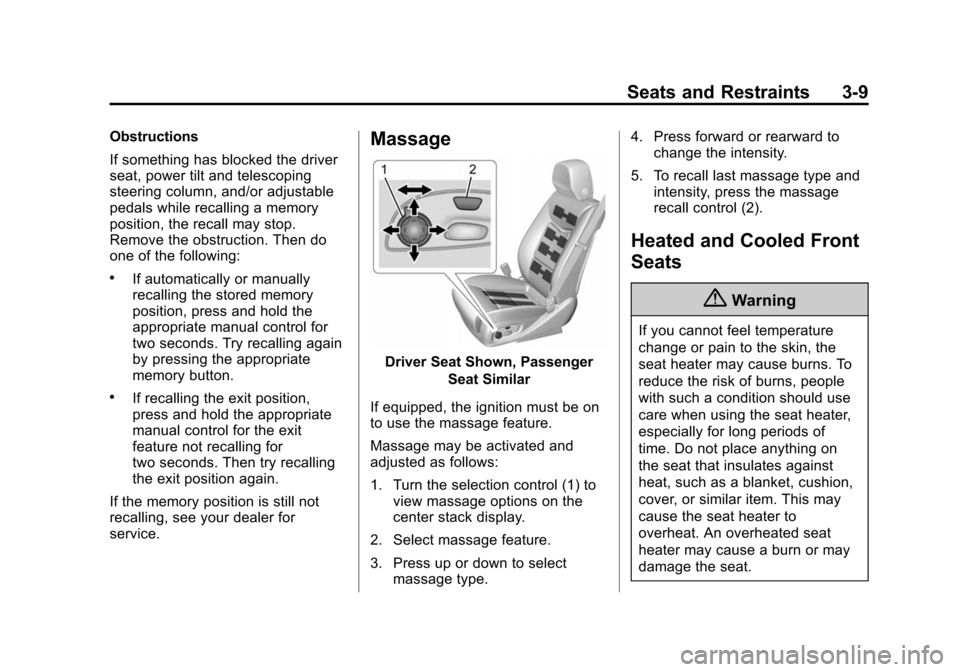
Massage
Driver Seat Shown, Passenger Seat Similar
If equipped, the ignition must be on
to use the massage feature.
Massage may be activated and
adjusted as follows:
1. Turn the selection control (1) to view massage options on the
center stack display.
2. Select massage feature.
3. Press up or down to select massage type. 4. Press forward or rearward to
change the intensity.
5. To recall last massage type and intensity, press the massage
recall control (2).
Heated and Cooled Front
Seats
{Warning
If you cannot feel temperature
change or pain to the skin, the
seat heater may cause burns. To
reduce the risk of burns, people
with such a condition should use
care when using the seat heater,
especially for long periods of
time. Do not place anything on
the seat that insulates against
heat, such as a blanket, cushion,
cover, or similar item. This may
cause the seat heater to
overheat. An overheated seat
heater may cause a burn or may
damage the seat.
Page 73 of 443
Black plate (10,1)Cadillac 2015i Escalade Owner Manual (GMNA-Localizing-U.S./Canada/
Mexico-8431501) - 2015 - CRC - 2/10/15
3-10 Seats and Restraints
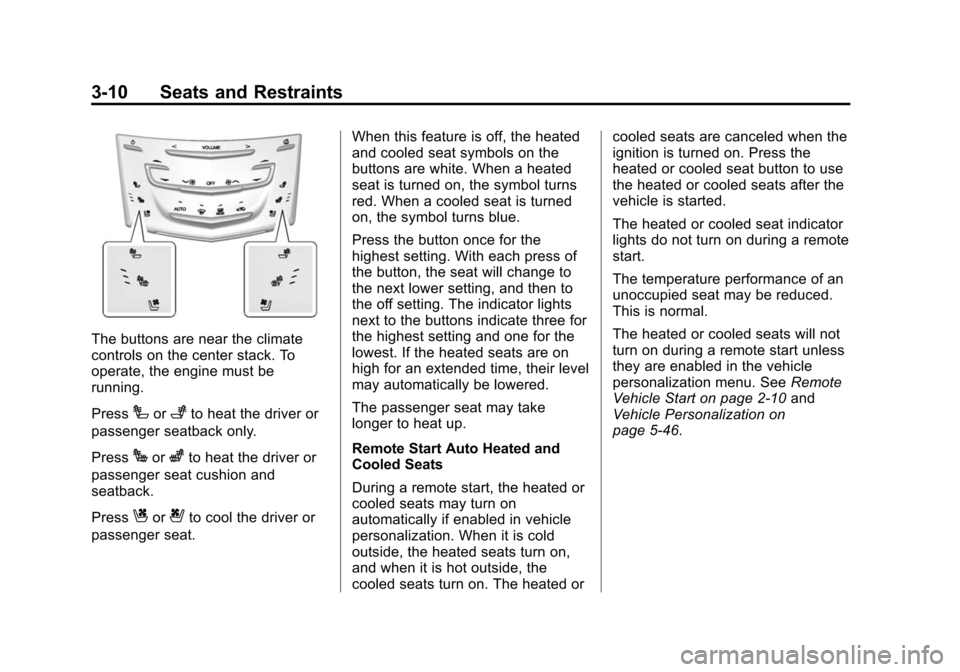
The buttons are near the climate
controls on the center stack. To
operate, the engine must be
running.
Press
Ior+to heat the driver or
passenger seatback only.
Press
Jorzto heat the driver or
passenger seat cushion and
seatback.
Press
Cor{to cool the driver or
passenger seat. When this feature is off, the heated
and cooled seat symbols on the
buttons are white. When a heated
seat is turned on, the symbol turns
red. When a cooled seat is turned
on, the symbol turns blue.
Press the button once for the
highest setting. With each press of
the button, the seat will change to
the next lower setting, and then to
the off setting. The indicator lights
next to the buttons indicate three for
the highest setting and one for the
lowest. If the heated seats are on
high for an extended time, their level
may automatically be lowered.
The passenger seat may take
longer to heat up.
Remote Start Auto Heated and
Cooled Seats
During a remote start, the heated or
cooled seats may turn on
automatically if enabled in vehicle
personalization. When it is cold
outside, the heated seats turn on,
and when it is hot outside, the
cooled seats turn on. The heated orcooled seats are canceled when the
ignition is turned on. Press the
heated or cooled seat button to use
the heated or cooled seats after the
vehicle is started.
The heated or cooled seat indicator
lights do not turn on during a remote
start.
The temperature performance of an
unoccupied seat may be reduced.
This is normal.
The heated or cooled seats will not
turn on during a remote start unless
they are enabled in the vehicle
personalization menu. See
Remote
Vehicle Start on page 2-10 and
Vehicle Personalization on
page 5-46.
Page 74 of 443
Black plate (11,1)Cadillac 2015i Escalade Owner Manual (GMNA-Localizing-U.S./Canada/
Mexico-8431501) - 2015 - CRC - 2/10/15
Seats and Restraints 3-11
Rear Seats
Heated Rear Seats
{Warning
If you cannot feel temperature
change or pain to the skin, the
seat heater may cause burns.
See the Warning underHeated
and Cooled Front Seats on
page 3-9.
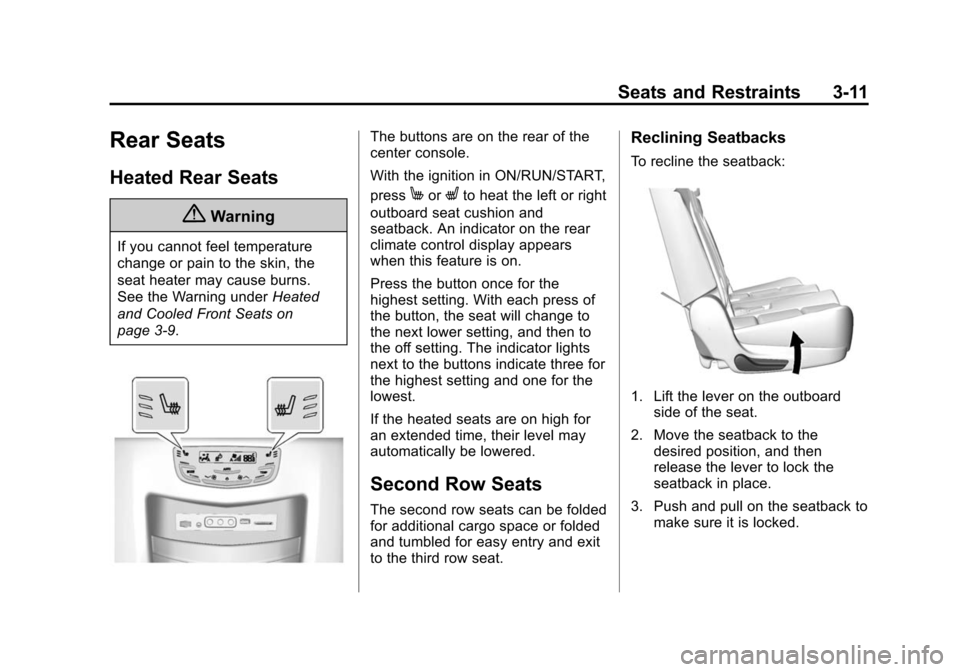
The buttons are on the rear of the
center console.
With the ignition in ON/RUN/START,
press
MorLto heat the left or right
outboard seat cushion and
seatback. An indicator on the rear
climate control display appears
when this feature is on.
Press the button once for the
highest setting. With each press of
the button, the seat will change to
the next lower setting, and then to
the off setting. The indicator lights
next to the buttons indicate three for
the highest setting and one for the
lowest.
If the heated seats are on high for
an extended time, their level may
automatically be lowered.
Second Row Seats
The second row seats can be folded
for additional cargo space or folded
and tumbled for easy entry and exit
to the third row seat.
Reclining Seatbacks
To recline the seatback:
1. Lift the lever on the outboard side of the seat.
2. Move the seatback to the desired position, and then
release the lever to lock the
seatback in place.
3. Push and pull on the seatback to make sure it is locked.
Page 106 of 443
Black plate (43,1)Cadillac 2015i Escalade Owner Manual (GMNA-Localizing-U.S./Canada/
Mexico-8431501) - 2015 - CRC - 2/10/15
Seats and Restraints 3-43
Infants and Young
Children
Everyone in a vehicle needs
protection! This includes infants and
all other children. Neither the
distance traveled nor the age and
size of the traveler changes the
need, for everyone, to use safety
restraints. In fact, the law in every
state in the United States and in
every Canadian province says
children up to some age must be
restrained while in a vehicle.
{Warning
Children can be seriously injured
or strangled if a shoulder belt is
wrapped around their neck. The
shoulder belt can tighten but
cannot be loosened if it is locked.
The shoulder belt locks when it is
pulled all the way out of the
retractor. It unlocks when the
shoulder belt is allowed to go all(Continued)
Warning (Continued)
the way back into the retractor,
but it cannot do this if it is
wrapped around a child’s neck.
If the shoulder belt is locked and
tightened around a child’s neck,
the only way to loosen the belt is
to cut it.
Never leave children unattended
in a vehicle and never allow
children to play with the safety
belts.
Every time infants and young
children ride in vehicles, they should
have the protection provided by
appropriate child restraints. Neither
the vehicle's safety belt system nor
its airbag system is designed
for them.
Children who are not restrained
properly can strike other people,
or can be thrown out of the vehicle.
{Warning
Never hold an infant or a child
while riding in a vehicle. Due to
crash forces, an infant or a child
will become so heavy it is not
possible to hold it during a crash.
For example, in a crash at only
40 km/h (25 mph), a 5.5 kg (12 lb)
infant will suddenly become a
110 kg (240 lb) force on a person's
arms. An infant should be
secured in an appropriate
restraint.
Page 137 of 443
Black plate (6,1)Cadillac 2015i Escalade Owner Manual (GMNA-Localizing-U.S./Canada/
Mexico-8431501) - 2015 - CRC - 2/10/15
5-6 Instruments and Controls
Compass
The vehicle may have a compass
display on the Driver Information
Center (DIC). The compass receives
its heading and other information
from the Global Positioning
System (GPS) antenna,
StabiliTrak
®, and vehicle speed
information.
The compass system is designed to
operate for a certain number of
miles or degrees of turn before
needing a signal from the GPS
satellites. When the compass
display shows CAL, drive the
vehicle for a short distance in an
open area where it can receive a
GPS signal. The compass system
will automatically determine when a
GPS signal is restored and provide
a heading again. See Compass
Messages on page 5-35 for the
messages that may be displayed for
the compass.
Clock
The infotainment system controls
are used to access the time and
date settings through the menu
system. See “Home Page” in the
infotainment manual for information
about how to use the menu system.
Setting the Clock
Time
To set the time:
1. From the Home Page, press the SETTINGS screen button, then
press Time and Date.
2. Press Set Time, then press + or −to increase or decrease hours
or minutes, and change AM
or PM.
3. Press 12-24Hr for a 12 or 24 hour clock.
4. Press
[Back to go back to the
previous menu. Date
To set the date:
1. Press the SETTINGS screen
button and press Time and Date.
2. Press Set Date and press + or −
to increase or decrease month,
day, or year.
3. Press
[Back to go back to the
previous menu.
Auto Set
When on, the time and date will
automatically update.
To set auto set:
1. Press the SETTINGS screen button, then press Time
and Date.
2. Press Set Time or Set Date.
3. Press Auto Set, then select On-Cell Network or Off-Manual
to manually set the time
and date.
4. Press
[Back to go back to the
previous menu.
Page 159 of 443

Black plate (28,1)Cadillac 2015i Escalade Owner Manual (GMNA-Localizing-U.S./Canada/
Mexico-8431501) - 2015 - CRC - 2/10/15
5-28 Instruments and Controls
SorT:Press to move between
the interactive display zones in the
cluster. Press
Sto go back to the
previous menu.
SEL (Select): Press to open a
menu or select a menu item. Press
and hold to reset values on certain
screens.
DIC Information Display
Options
The info displays on the DIC can be
turned on or off through the
Settings menu.
1. Press SEL while viewing the Settings page in one of the
interactive display zones on the
cluster.
2. Scroll to Info Pages and press SEL.
3. Press
yorzto move through
the list of possible info displays. 4. Press SEL while an item is
highlighted to select or deselect
that item. When an item is
selected, a checkmark will
appear next to it.
DIC Information Displays
The following is the list of all
possible DIC information displays.
Some of the information displays
may not be available for your
particular vehicle.
Trip 1 or Trip 2 and Average Fuel
Economy: The Trip display shows
the current distance traveled, in
either kilometers (km) or miles (mi),
since the trip odometer was last
reset. The trip odometer can be
reset by pressing and holding SEL
while this display is active.
The Average Fuel Economy display
shows the approximate average
liters per 100 kilometers (L/100 km)
or miles per gallon (mpg). This
number is calculated based on the
number of L/100 km (mpg) recorded
since the last time this menu item
was reset. This number reflects only the approximate average fuel
economy that the vehicle has right
now, and will change as driving
conditions change. The Average
Fuel Economy can be reset along
with the trip odometer by pressing
and holding SEL while this display
is active.
Also shows if the Active Fuel
Management is active and in
V4 mode, or inactive and in
V8 mode. See
Active Fuel
Management
®on page 9-27.
Fuel Range: Shows the
approximate distance the vehicle
can be driven without refueling.
LOW will be displayed when the
vehicle is low on fuel. The fuel
range estimate is based on an
average of the vehicle's fuel
economy over recent driving history
and the amount of fuel remaining in
the fuel tank.
Instantaneous Fuel Economy:
Shows the current fuel economy in
either liters per 100 kilometers (L/
100 km) or miles per gallon (mpg).
Page 160 of 443
Black plate (29,1)Cadillac 2015i Escalade Owner Manual (GMNA-Localizing-U.S./Canada/
Mexico-8431501) - 2015 - CRC - 2/10/15
Instruments and Controls 5-29
This number reflects only the
approximate fuel economy that the
vehicle has right now and changes
frequently as driving conditions
change.
Average Speed:Shows the
average speed of the vehicle in
kilometers per hour (km/h) or miles
per hour (mph). This average is
calculated based on the various
vehicle speeds recorded since the
last reset of this value. The average
speed can be reset by pressing and
holding SEL while this display is
active.
Timer: This display can be used as
a timer. To start the timer, press SEL
while this display is active. The
display will show the amount of time
that has passed since the timer was
last reset. To stop the timer, press
SEL briefly while this display is
active and the timer is running. To
reset the timer to zero, press and
hold SEL while this display is active. Turn Arrow:
Shows the next
maneuver when using route
guidance.
Estimated Time to Arrival: Shows
the estimated time until arrival at
your destination.
Distance to Destination: Shows
the distance to the destination when
using route guidance.
Speed Limit: Shows the current
speed limit. The information for this
page comes from a roadway
database.
Speed Warning: Allows the driver
to set a speed that they do not want
to exceed. To set the Speed
Warning, press SEL when Speed
Warning is displayed. Press
yor
zto adjust the value. This feature
can be turned off by pressing and
holding SEL while viewing this
page. If the selected speed limit is
exceeded, a pop-up warning is
displayed and a chime may sound. Cruise Set Speed:
Shows the
speed the cruise control or Adaptive
Cruise Control is set to.
Follow Distance Indicator: When
Adaptive Cruise Control (ACC) is
not engaged, the current follow time
to the vehicle ahead is displayed as
a time value on this page. When
ACC has been engaged, the display
switches to the gap setting page.
This page shows the current gap
setting along with the vehicle ahead
indicator.
Battery Voltage: Shows the
current battery voltage.
Oil Life: Shows an estimate of
the oil's remaining useful life.
If REMAINING OIL LIFE 99% is
displayed, that means 99% of the
current oil life remains.
When the remaining oil life is low,
the CHANGE ENGINE OIL SOON
message will appear on the display.
See Engine Oil Messages on
page 5-37. The oil should be
changed as soon as possible. See
Engine Oil on page 10-6. In addition