lock CADILLAC ESCALADE EXT 2004 2.G Owners Manual
[x] Cancel search | Manufacturer: CADILLAC, Model Year: 2004, Model line: ESCALADE EXT, Model: CADILLAC ESCALADE EXT 2004 2.GPages: 478, PDF Size: 3.43 MB
Page 325 of 478

When to Change Engine Oil
(GM Oil Life System)
Your vehicle has a computer system that lets you know
when to change the engine oil and ®lter. This is
based on engine revolutions and engine temperature,
and not on mileage. Based on driving conditions,
the mileage at which an oil change will be indicated can
vary considerably. For the oil life system to work
properly, you must reset the system every time the oil is
changed.
When the system has calculated that oil life has been
diminished, it will indicate that an oil change is
necessary. A CHANGE ENGINE OIL message will
come on. Change your oil as soon as possible within
the next two times you stop for fuel. It is possible that, if
you are driving under the best conditions, the oil life
system may not indicate that an oil change is necessary
for over a year. However, your engine oil and ®lter
must be changed at least once a year and at this time
the system must be reset. Your dealer has GM-trained
service people who will perform this work using
genuine GM parts and reset the system. It is also
important to check your oil regularly and keep it at the
proper level.
If the system is ever reset accidentally, you must
change your oil at 3,000 miles (5 000 km) since your
last oil change. Remember to reset the oil life system
whenever the oil is changed.
How to Reset the CHANGE ENGINE OIL
Message
The GM Oil Life System calculates when to change
your engine oil and ®lter based on vehicle use. Anytime
your oil is changed, reset the system so it can
calculate when the next oil change is required. If a
situation occurs where you change your oil prior to a
CHANGE ENGINE OIL message being turned on, reset
the system.
To reset the CHANGE ENGINE OIL message, see ªGM
Oil Life Systemº under
DIC Operation and Displays
on page 3-49for vehicles equipped with the DIC, or do
the following:
1. Turn the ignition key to RUN with the engine off.
2. Fully press and release the accelerator pedal slowly
three times within ®ve seconds.
If the OIL LIFE RESET message ¯ashes for
10 seconds, the system is resetting.
3. Turn the key to LOCK.
If the CHANGE ENGINE OIL message comes back on
when you start your vehicle, the engine oil life system
has not reset. Repeat the procedure. If it still does
not reset, see your dealer for service.
5-15
Page 331 of 478

3. Check both sides of the dipstick, and read the lower
level. The ¯uid level must be in the COLD area,
below the cross-hatched area, for a cold check or in
the HOT area or cross-hatched area for a hot
check. Be sure to keep the dipstick pointed down to
get an accurate reading.
4. If the ¯uid level is in the acceptable range, push the
dipstick back in all the way; then ¯ip the handle
down to lock the dipstick in place.
How to Add Fluid
Refer to the Maintenance Schedule to determine what
kind of transmission ¯uid to use. SeeRecommended
Fluids and Lubricants on page 6-13.
Add ¯uid only after checking the transmission ¯uid while
it is hot. (A cold check is used only as a reference.) If
the ¯uid level is low, add only enough of the proper ¯uid
to bring the level up to the HOT area for a hot check.
It doesn't take much ¯uid, generally less than one pint
(0.5 L).
Don't over®ll.
Notice:
We recommend you use only ¯uid labeled
DEXRONž-III, because ¯uid with that label is
made especially for your automatic transmission.
Damage caused by ¯uid other than DEXRON
ž-III is
not covered by your new vehicle warranty.
·After adding ¯uid, recheck the ¯uid level as
described under
How to Check.
·When the correct ¯uid level is obtained, push the
dipstick back in all the way; then ¯ip the handle
down to lock the dipstick in place.
5-21
Page 342 of 478

1. Park the vehicle on a level surface. You can
remove the coolant surge tank pressure cap
when the cooling system, including the coolant
surge tank pressure cap and upper radiator hose, is
no longer hot. Turn the pressure cap slowly
counterclockwise (left) about one full turn. If you
hear a hiss, wait for that to stop. A hiss means there
is still some pressure left.2. Then keep turning the pressure cap slowly, and
remove it.
5-32
Page 368 of 478
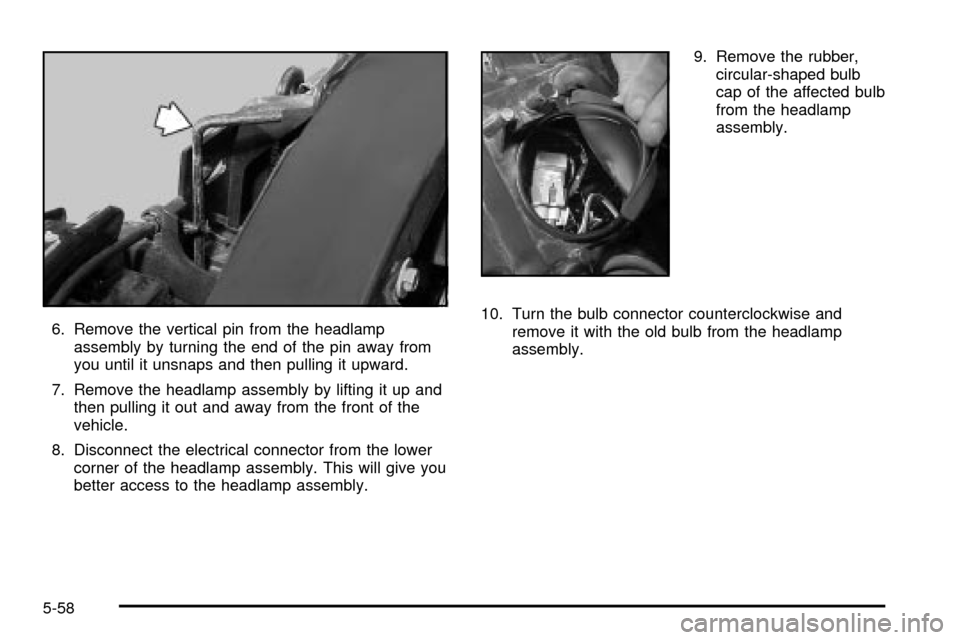
6. Remove the vertical pin from the headlamp
assembly by turning the end of the pin away from
you until it unsnaps and then pulling it upward.
7. Remove the headlamp assembly by lifting it up and
then pulling it out and away from the front of the
vehicle.
8. Disconnect the electrical connector from the lower
corner of the headlamp assembly. This will give you
better access to the headlamp assembly.9. Remove the rubber,
circular-shaped bulb
cap of the affected bulb
from the headlamp
assembly.
10. Turn the bulb connector counterclockwise and
remove it with the old bulb from the headlamp
assembly.
5-58
Page 369 of 478
11. Unplug the electrical connector from the old bulb.
12. Plug in the electrical connector to the new bulb,
using care not to touch the bulb with your hands,
®ngers or anything damp or oily.
13. Place the connector with the new bulb into the
headlamp assembly and turn it clockwise until it
is tight.
14. Reinstall the rubber, circular-shaped bulb cap onto
the headlamp assembly.
15. Reconnect the electrical connector to the lower
corner of the headlamp assembly.
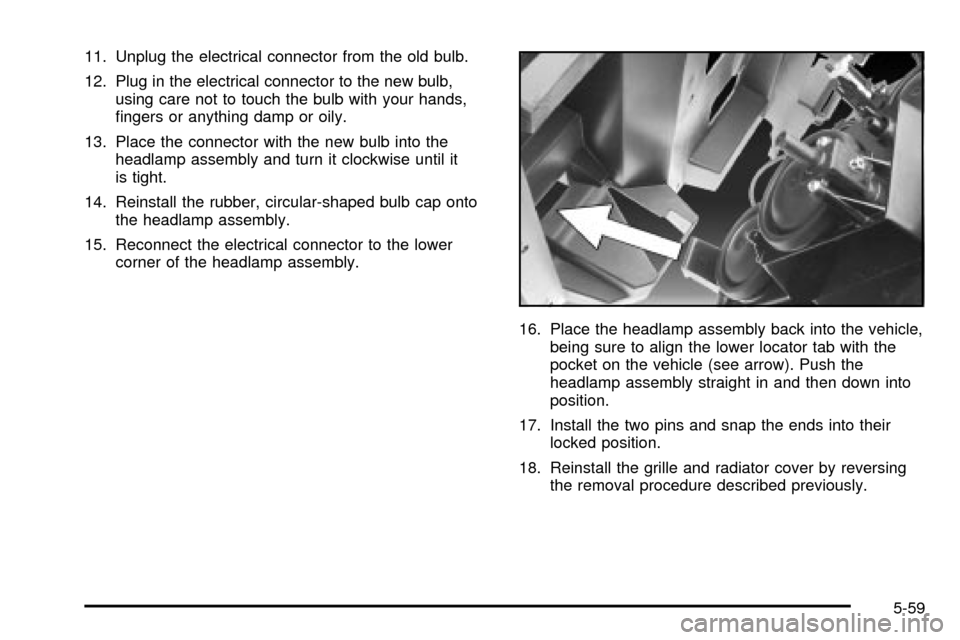
16. Place the headlamp assembly back into the vehicle,
being sure to align the lower locator tab with the
pocket on the vehicle (see arrow). Push the
headlamp assembly straight in and then down into
position.
17. Install the two pins and snap the ends into their
locked position.
18. Reinstall the grille and radiator cover by reversing
the removal procedure described previously.
5-59
Page 370 of 478
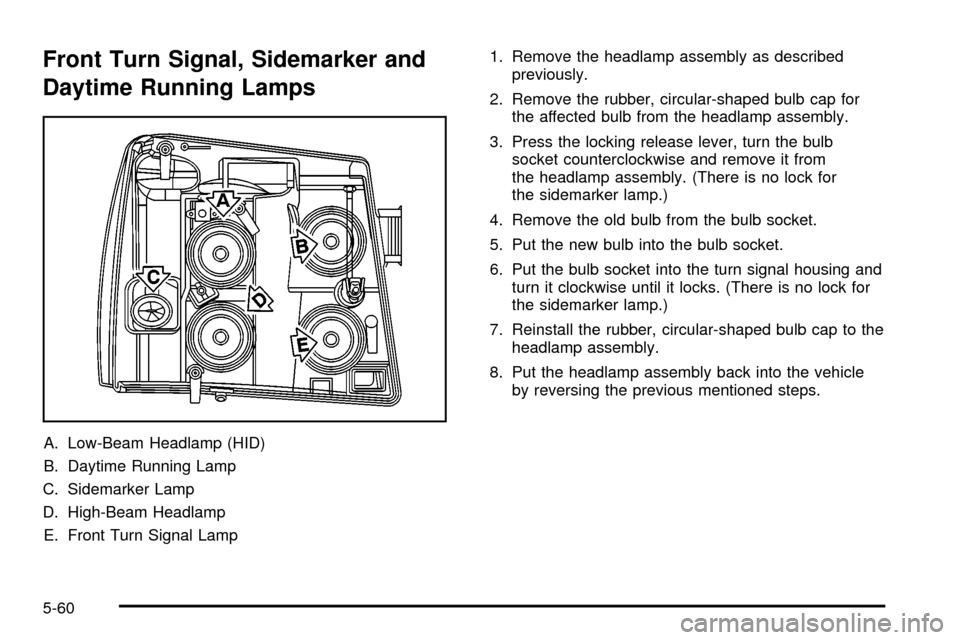
Front Turn Signal, Sidemarker and
Daytime Running Lamps
A. Low-Beam Headlamp (HID)
B. Daytime Running Lamp
C. Sidemarker Lamp
D. High-Beam Headlamp
E. Front Turn Signal Lamp1. Remove the headlamp assembly as described
previously.
2. Remove the rubber, circular-shaped bulb cap for
the affected bulb from the headlamp assembly.
3. Press the locking release lever, turn the bulb
socket counterclockwise and remove it from
the headlamp assembly. (There is no lock for
the sidemarker lamp.)
4. Remove the old bulb from the bulb socket.
5. Put the new bulb into the bulb socket.
6. Put the bulb socket into the turn signal housing and
turn it clockwise until it locks. (There is no lock for
the sidemarker lamp.)
7. Reinstall the rubber, circular-shaped bulb cap to the
headlamp assembly.
8. Put the headlamp assembly back into the vehicle
by reversing the previous mentioned steps.
5-60
Page 371 of 478
Center High-Mounted
Stoplamp (CHMSL)
It is recommended that this component be replaced as
a unit by your dealer.
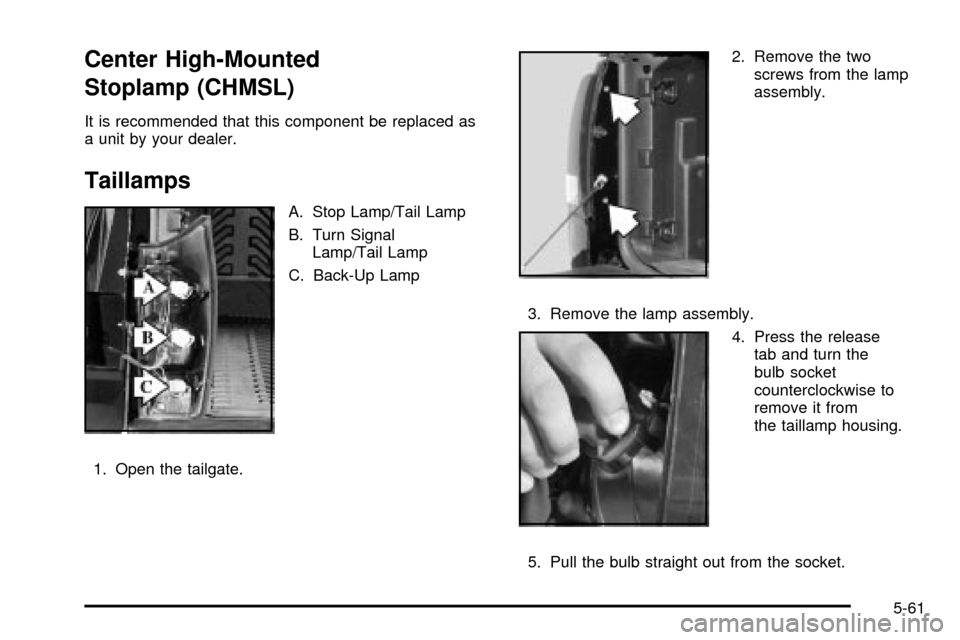
Taillamps
A. Stop Lamp/Tail Lamp
B. Turn Signal
Lamp/Tail Lamp
C. Back-Up Lamp
1. Open the tailgate.2. Remove the two
screws from the lamp
assembly.
3. Remove the lamp assembly.
4. Press the release
tab and turn the
bulb socket
counterclockwise to
remove it from
the taillamp housing.
5. Pull the bulb straight out from the socket.
5-61
Page 372 of 478
6. Press a new bulb into the socket, insert it into the
taillamp housing and turn the socket clockwise into
the taillamp housing until it clicks.
7. Reinstall the rear lamp assembly and tighten the
screws.
Replacement Bulbs
Exterior Lamp Bulb Number
Low-Beam Headlamps (HID) *
High-Beam Headlamps 9005 or 9005 LL
Daytime Running Lamps (DRL) 4114K
Front Sidemarker Lamp 194
Front Parking and Turn Lamp3157 or
3157K Long Life
Taillamp and Stop Lamp 3057
Rear Turn Signal Lamp and
Stop Lamp3057
Back-up Lamp 3157
*For replacement bulbs not listed here, please consult
your dealer.
Windshield Wiper Blade
Replacement
Windshield wiper blades should be inspected at least
twice a year for wear and cracking. SeeScheduled
Maintenance on page 6-4for more information.
Replacement blades come in different types and are
removed in different ways. For proper type and length,
see
Normal Maintenance Replacement Parts on
page 6-15.
5-62
Page 393 of 478

Changing a Flat Tire
If a tire goes ¯at, avoid further tire and wheel damage
by driving slowly to a level place. Turn on your
hazard warning ¯ashers.
{CAUTION:
Changing a tire can be dangerous. The vehicle
can slip off the jack and roll over or fall on you
or other people. You and they could be badly
injured or even killed. Find a level place to
change your tire. To help prevent the vehicle
from moving:
1. Set the parking brake ®rmly.
2. Put the shift lever in PARK (P).
3. Turn off the engine and do not restart
while the vehicle is raised.
4. Do not allow passengers to remain in the
vehicle.
CAUTION: (Continued)
CAUTION: (Continued)
5. Put the wheel blocks at the front and rear
of the tire farthest away from the one
being changed. That would be the tire on
the other side, at the opposite end of the
vehicle.
The following steps will tell you how to use the jack and
change a tire.
5-83
Page 394 of 478
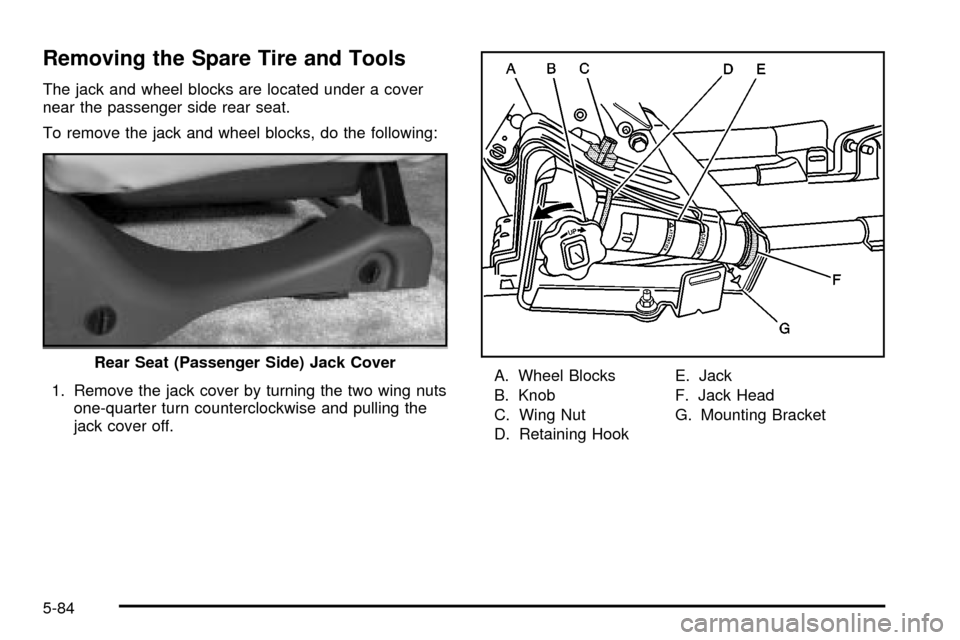
Removing the Spare Tire and Tools
The jack and wheel blocks are located under a cover
near the passenger side rear seat.
To remove the jack and wheel blocks, do the following:
1. Remove the jack cover by turning the two wing nuts
one-quarter turn counterclockwise and pulling the
jack cover off.A. Wheel Blocks
B. Knob
C. Wing Nut
D. Retaining HookE. Jack
F. Jack Head
G. Mounting Bracket Rear Seat (Passenger Side) Jack Cover
5-84