door lock CADILLAC ESCALADE EXT 2004 2.G User Guide
[x] Cancel search | Manufacturer: CADILLAC, Model Year: 2004, Model line: ESCALADE EXT, Model: CADILLAC ESCALADE EXT 2004 2.GPages: 478, PDF Size: 3.43 MB
Page 80 of 478

Rear Door Security Locks
With this feature, you can lock the rear doors so they
can't be opened from the inside by passengers.
This feature is located
on the inside edge of the
rear doors.To use the locks, do the following:
1. Open one of the rear doors.
2. Move the lever forward to engage the rear door
security lock.
3. Close the door.
4. Do the same thing to the other rear door.
The rear doors cannot be opened from the inside when
this feature is in use. If you want to open the rear
door while the security lock is engaged, unlock the door
and open the door from the outside. Move the lever
rearward to disengage the child security lock feature.
2-12
Page 81 of 478
Lockout Protection
This feature protects you from locking your key in the
vehicle when the key is in the ignition and a door
is open.
If the power lock switch is pressed when a door is open
and the key is in the ignition, all of the doors will lock
and then the driver's door will unlock.
Midgate
{CAUTION:
It can be dangerous to drive with the cargo
area covered and the tailgate and the midgate
open because carbon monoxide (CO) gas can
come into your vehicle. You can not see or
smell CO. It can cause unconsciousness and
even death. If you must drive with the cargo
covers on and the tailgate and midgate open
or if electrical wiring or other cable
connections must pass through the seal
between the body and the midgate:
·Make sure all windows are shut.
·Turn the fan on your heating or cooling
system to its highest speed with the
setting on OUTSIDE AIR. That will force
outside air into your vehicle. See
Automatic Climate Control System on
page 3-24.
·If you have air outlets on or under the
instrument panel, open them all the way.
See
Engine Exhaust on page 2-41.
2-13
Page 91 of 478

Raising the Midgate
To return the midgate to its normal position, raise the
midgate up with a ®rm swinging motion (this will help to
ensure that the midgate closes with enough force to
engage the latches) until it latches into place securely.
If the rear glass is removed and you would like to
put it back, do so using the instructions given previously.
Tailgate
Use the ignition/door key to unlock/lock the tailgate.
Open the tailgate by lifting up on its handle while pulling
the tailgate toward you.
To shut the tailgate, ®rmly push it upward until it
latches. Push and pull on the tailgate to be sure it is
latched securely.
2-23
Page 94 of 478
Power Windows
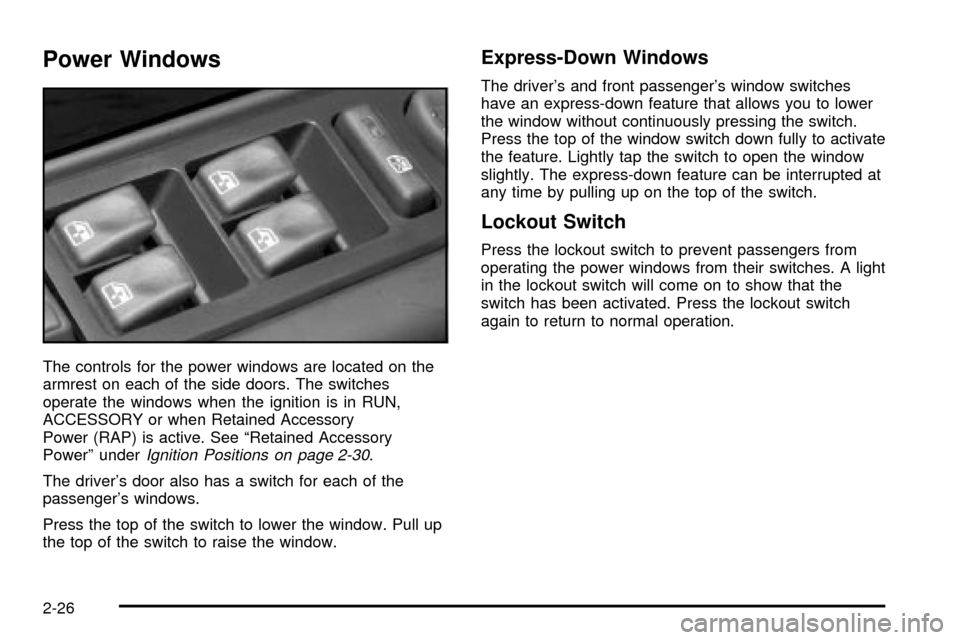
The controls for the power windows are located on the
armrest on each of the side doors. The switches
operate the windows when the ignition is in RUN,
ACCESSORY or when Retained Accessory
Power (RAP) is active. See ªRetained Accessory
Powerº under
Ignition Positions on page 2-30.
The driver's door also has a switch for each of the
passenger's windows.
Press the top of the switch to lower the window. Pull up
the top of the switch to raise the window.
Express-Down Windows
The driver's and front passenger's window switches
have an express-down feature that allows you to lower
the window without continuously pressing the switch.
Press the top of the window switch down fully to activate
the feature. Lightly tap the switch to open the window
slightly. The express-down feature can be interrupted at
any time by pulling up on the top of the switch.
Lockout Switch
Press the lockout switch to prevent passengers from
operating the power windows from their switches. A light
in the lockout switch will come on to show that the
switch has been activated. Press the lockout switch
again to return to normal operation.
2-26
Page 95 of 478

Sun Visors
To block out glare, you can swing down the visors. You
can also swing them out to help block glare at the
front and side windows.
Illuminated Visor Vanity Mirrors
Pull the sunvisor down and lift the mirror cover to turn
on the lamps.
Theft-Deterrent Systems
Vehicle theft is big business, especially in some cities.
Although your vehicle has a number of theft-deterrent
features, we know that nothing we put on it can make it
impossible to steal.
Content Theft-Deterrent
Your vehicle is equipped with a content theft-deterrent
alarm system.
With this system, the
security light in the
instrument panel cluster
will ¯ash as you open
the door if your ignition
is off.
This light reminds you to activate the theft-deterrent
system. Here's how to do it:
1. Open the door.
2. Lock the door with the power door lock switch or
the remote keyless entry transmitter. The security
light should come on and stay on.
3. Close all doors. The security light should go off
after about 30 seconds. The alarm is not armed
until the security light goes off.
2-27
Page 96 of 478

If a locked door is opened without the key or the remote
keyless entry transmitter, the alarm will go off. The
headlamps and parking lamps will ¯ash for two minutes,
and the horn will sound for 30 seconds, then will turn
off to save the battery power. You can choose different
feedback options for the alarm. See
Driver Information
Center (DIC) on page 3-49.
Remember, the theft-deterrent system won't activate if
you lock the doors with a key or use the manual
door lock. It activates only if you use a power door lock
switch with the door open, or with the remote keyless
entry transmitter. You should also remember that
you can start your vehicle with the correct ignition key if
the alarm has been set off.
Here's how to avoid setting off the alarm by accident:
·If you don't want to activate the theft-deterrent
system, the vehicle should be locked with the door
key
afterthe doors are closed.
·Always unlock a door with a key, or use the remote
keyless entry transmitter. Unlocking a door any
other way will set off the alarm.
If you set off the alarm by accident, unlock any door with
the key. You can also turn off the alarm by pressing
unlock on the remote keyless entry transmitter. The alarm
won't stop if you try to unlock a door any other way.
Testing the Alarm
The alarm can be tested by following these steps:
1. From inside the vehicle, lower the driver's window
and open the driver's door.
2. Activate the system by locking the doors with the
power door lock switch while the door is open, or
with the remote keyless entry transmitter.
3. Get out of the vehicle, close the door and wait for
the security light to go out.
4. Then reach in through the window, unlock the door
with the manual door lock and open the door. This
should set off the alarm.
While the alarm is set, the power door unlock switch is
not operational.
If the alarm does not sound when it should but the
headlamps ¯ash, check to see if the horn works. The
horn fuse may be blown. To replace the fuse, see
Fuses
and Circuit Breakers on page 5-111.
If the alarm does not sound or the headlamps do not
¯ash, the vehicle should be serviced by your dealer.
2-28
Page 116 of 478

OnStaržSystem
OnStaržuses global positioning system (GPS) satellite
technology, wireless communications, and state of
the art call centers to provide you with a wide range of
safety, security, information and convenience services.
A complete OnStar
žuser's guide and the terms
and conditions of the OnStaržSubscription Service
Agreement are included in your OnStarž-equipped
vehicle's glove box literature. For more information, visit
www.onstar.com, contact OnStar
žat 1-888-4-ONSTAR
(1-888-466-7827), or press the blue OnStaržbutton
to speak to an OnStaržadvisor 24 hours a day, 7 days
a week.
A completed Subscription Service Agreement is required
prior to delivery of OnStar
žservices and prepaid
calling minutes are also required for OnStaržPersonal
Calling and OnStaržVirtual Advisor use. Terms and
conditions of the Subscription Service Agreement can be
found at www.onstar.com.
OnStaržServices
One of the following plans is normally included for a
speci®c duration with each vehicle equipped with
OnStar
ž. You can upgrade or extend your OnStarž
service plan to meet your needs.
Safe and Sound Plan
·
Automatic Noti®cation of Air Bag Deployment
·Emergency Services
·Roadside Assistance
·Stolen Vehicle Assistance
·AccidentAssist
·Remote Door Unlock
·Remote Diagnostics
·Online Concierge
Directions and Connections Plan
·
All Safe and Sound Plan services
·Route Support
·RideAssist
·Information and Convenience Services
2-48
Page 118 of 478

HomeLinkžTransmitter
HomeLinkža combined universal transmitter and
receiver, provides a way to replace up to three
hand-held transmitters used to activate devices such as
gate operators, garage door openers, entry door
locks, security systems and home lighting. Additional
HomeLink
žinformation can be found on the internet at
www.homelink.com or by calling 1-800-355-3515.
If your vehicle is equipped with the HomeLink
ž
Transmitter, it complies with Part 15 of the FCC Rules.
Operation is subject to the following two conditions:
(1) this device may not cause harmful interference, and
(2) this device must accept any interference received,
including interference that may cause undesired
operation.This device complies with RSS-210 of Industry Canada.
Operation is subject to the following two conditions:
(1) this device may not cause interference, and (2) this
device must accept any interference, including
interference that may cause undesired operation of the
device.
Changes and modi®cations to this system by other than
an authorized service facility could void authorization
to use this equipment.
Programming the HomeLinkž
Transmitter
Do not use the HomeLinkžTransmitter with any garage
door opener that does not have the ªstop and reverseº
feature. This includes any garage door opener model
manufactured before April 1, 1982. If you have a newer
garage door opener with rolling codes, please be
sure to follow steps 6 through 8 to complete the
programming of your HomeLink
žTransmitter.
Read the instructions completely before attempting to
program the HomeLink
žTransmitter. Because of
the steps involved, it may be helpful to have another
person available to assist you in programming the
transmitter.
2-50
Page 124 of 478
Cargo Cover Panels
{CAUTION:
Improperly stored cargo cover panels could be
thrown about the vehicle during a collision or
sudden maneuver. You or others could be
injured. If you remove a panel, always store it
in the proper storage location. When you put it
back, always be sure that is securely
reattached.
Notice:Exceeding the weight limit of 250 lbs
(113 kg) can damage the cargo covers, and the
repairs would not be covered by your warranty. Do
not put anything on top of the cargo covers over
the weight limit.
Your vehicle is equipped with a three-piece cargo cover
system. The cargo panels can be removed and
stored in the cargo area of the vehicle with the cargo
panel storage bag.
To remove a cargo panel(s), do the following:1. Lower the tailgate. Use the ignition/door key to
unlock the tailgate if it is locked. See
Tailgate on
page 2-23for more information on the tailgate.
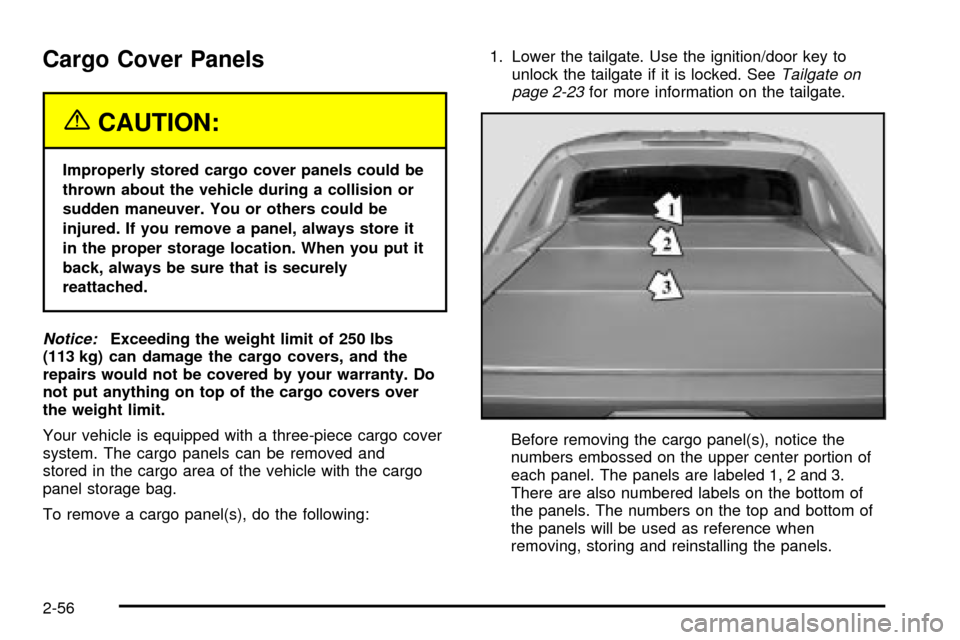
Before removing the cargo panel(s), notice the
numbers embossed on the upper center portion of
each panel. The panels are labeled 1, 2 and 3.
There are also numbered labels on the bottom of
the panels. The numbers on the top and bottom of
the panels will be used as reference when
removing, storing and reinstalling the panels.
2-56
Page 139 of 478

Cargo Area Floor Drains
Your vehicle also has four cargo-area ¯oor drains
located under the cargo mat near the sides of the cargo
area. These drains should be cleaned periodically to
allow water to exit the cargo area.
The cargo mat has cutouts for the drains. You can ¯ush
the drains through the cutouts, but if the cargo area
is extremely dirty you can lift up the edges of the cargo
¯oor mat or take the whole mat out and ¯ush the
drains with water.
Top-Box Storage
Your vehicle is equipped with top-box storage units
on both side of the vehicle. The passenger side top
box contains the tools you will need to change a
¯at tire.
Use the ignition/door key to unlock the top box if it is
locked. Press the key cylinder button and swing the lid
open. Turn on the cargo lamps (if equipped) if you
need more light inside the top boxes. See ªCargo
Lampsº under
Exterior Lamps on page 3-15for more
information on cargo lamps. Use the ignition/door key to
lock the top-box storage units.
2-71