AUX CADILLAC ESCALADE EXT 2008 3.G User Guide
[x] Cancel search | Manufacturer: CADILLAC, Model Year: 2008, Model line: ESCALADE EXT, Model: CADILLAC ESCALADE EXT 2008 3.GPages: 496, PDF Size: 7.02 MB
Page 266 of 496
DVD Display Error Messages
The DVD display error message depends on which
radio you have. The video screen might display
one of the following:
Disc Load/Eject Error:This message displays when
there are disc load or eject problems.
Disc Format Error:This message displays, if the
disc is inserted with the disc label wrong side up,
or if the disc is damaged.
Disc Region Error:This message displays, if the
disc is not from a correct region.
No Disc Inserted:This message displays, if no
disc is present when
Zor DVD AUX is pressed
on the radio.
DVD Distortion
Video distortion may occur when operating cellular
phones, scanners, CB radios, Global Position
Systems (GPS)*, two-way radios, mobile fax, or
walkie talkies.
It might be necessary to turn off the DVD player when
operating one of these devices in or near the vehicle.
*Excludes the OnStar
®System.
Cleaning the RSE Overhead Console
When cleaning the RSE overhead console surface,
use only a clean cloth dampened with clean water.
Cleaning the Video Screen
When cleaning the video screen, use only a clean cloth
dampened with clean water. Use care when directly
touching or cleaning the screen, as damage can result.
3-100
Page 267 of 496
Rear Seat Audio (RSA)
This feature lets rear seat passengers listen to and
control any of the music sources: radio, CDs, DVDs,
or other auxiliary sources. The rear seat passengers
can control the same music sources the front seat
passengers are listening to (dual control) or a different
source. For example, rear seat passengers can
control and listen to a CD through the headphones,
while the driver listens to the radio through the speakers.
The rear seat passengers have control of the volume
for each set of headphones.
The RSA functions can be used even when the main
radio is off. The front audio system will display the
headphone icon when the RSA is on, and will disappear
from the display when it is off.
Audio can be heard through wired headphones (not
included) plugged into the jacks on the RSA. If your
vehicle has this feature, audio can also be heard on
Channel 2 of the wireless headphones.
The front audio system allows the rear speakers to
continue playing even when the RSA audio is active
through the headphones.
To listen to an iPod or portable audio device through the
RSA, attach the iPod or portable audio device to the
front auxiliary input (if available), located on the front
audio system. Turn the iPod on, then choose the front
auxiliary input with the RSA SRCE button.
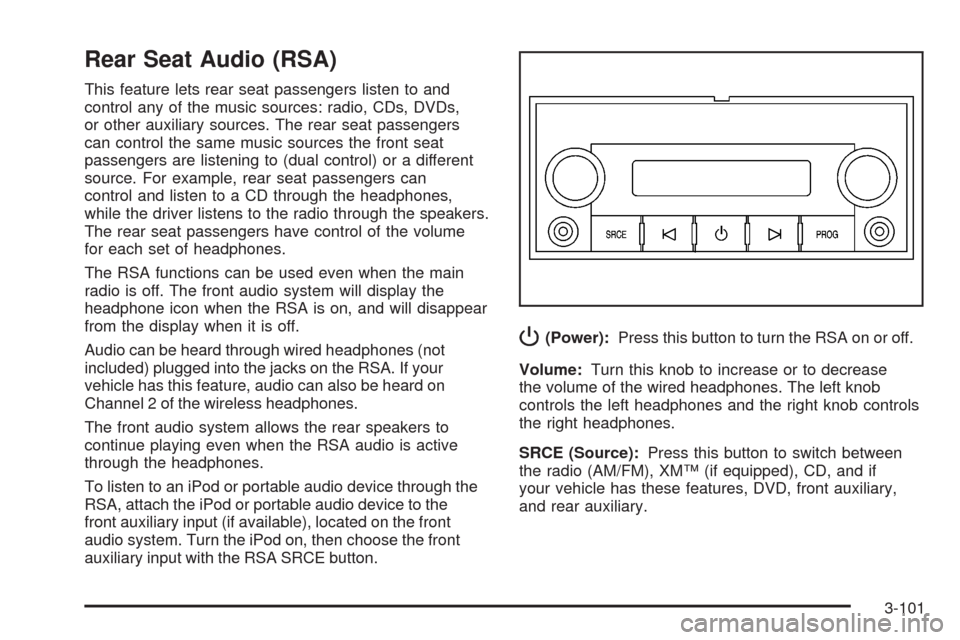
P(Power):Press this button to turn the RSA on or off.
Volume:Turn this knob to increase or to decrease
the volume of the wired headphones. The left knob
controls the left headphones and the right knob controls
the right headphones.
SRCE (Source):Press this button to switch between
the radio (AM/FM), XM™ (if equipped), CD, and if
your vehicle has these features, DVD, front auxiliary,
and rear auxiliary.
3-101
Page 270 of 496
SRCE (Source):Press this button to switch between
the radio (AM, FM), XM™ (if equipped), CD, and if
your vehicle has these features, DVD, front auxiliary,
and rear auxiliary.
+
e−e(Volume):Press the plus or minus volume
button to increase or to decrease the radio volume.
¨(Seek):Press the seek arrow to go to the next
radio station while in AM, FM, or XM™ (if equipped).
Press the seek arrow to go to the next track or chapter
while sourced to the CD or DVD slot. Press the seek
arrow to go to the next disc while sourced to a CD
or DVD changer, if multiple discs are loaded.
Radio Reception
Frequency interference and static can occur during
normal radio reception if items such as cell phone
chargers, vehicle convenience accessories, and
external electronic devices are plugged into the
accessory power outlet. If there is interference or static,
unplug the item from the accessory power outlet.
AM
The range for most AM stations is greater than for
FM, especially at night. The longer range can cause
station frequencies to interfere with each other.
For better radio reception, most AM radio stations
boost the power levels during the day, and then reduce
these levels during the night. Static can also occur
when things like storms and power lines interfere with
radio reception. When this happens, try reducing
the treble on your radio.
FM Stereo
FM stereo gives the best sound, but FM signals reach
only about 10 to 40 miles (16 to 65 km). Tall buildings
or hills can interfere with FM signals, causing the
sound to fade in and out.
3-104
Page 327 of 496
Electric Brake Control Wiring
Provisions
These wiring provisions are included with your vehicle
as part of the heavy-duty trailer wiring package.
These provisions are for an electric brake controller.
The red/black stripe power feed will not be connected
to the battery until the ring terminal is unstowed and
connected to the underhood electrical center. The
instrument panel contains blunt cut wires near the
data link connector for the trailer brake controller.
The harness contains the following wires:
Dark Blue: Auxiliary
Red/Black: Battery
Light Blue/White: Brake Switch
White: Ground
It should be installed by your dealer or a qualied
service center.
Trailer Recommendations
You must subtract your hitch loads from the Cargo
Weight Rating (CWR). CWR is the maximum weight of
the load your vehicle can carry. It doesn’t include the
weight of the people inside, but you can gure about
150 lbs. (68 kg) for each seat. The total cargo load must
not be more than your vehicles CWR.
Weigh your vehicle with your trailer attached, so that
you won’t go over the GVWR or GAWR. If you are using
a weight-distributing hitch, weigh the vehicle without the
spring bars in place.
You’ll get the best performance if you spread out the
weight of your load the right way, and if you choose the
correct hitch and trailer brakes.
For more information seeTowing a Trailer on page 4-43.
4-55
Page 441 of 496
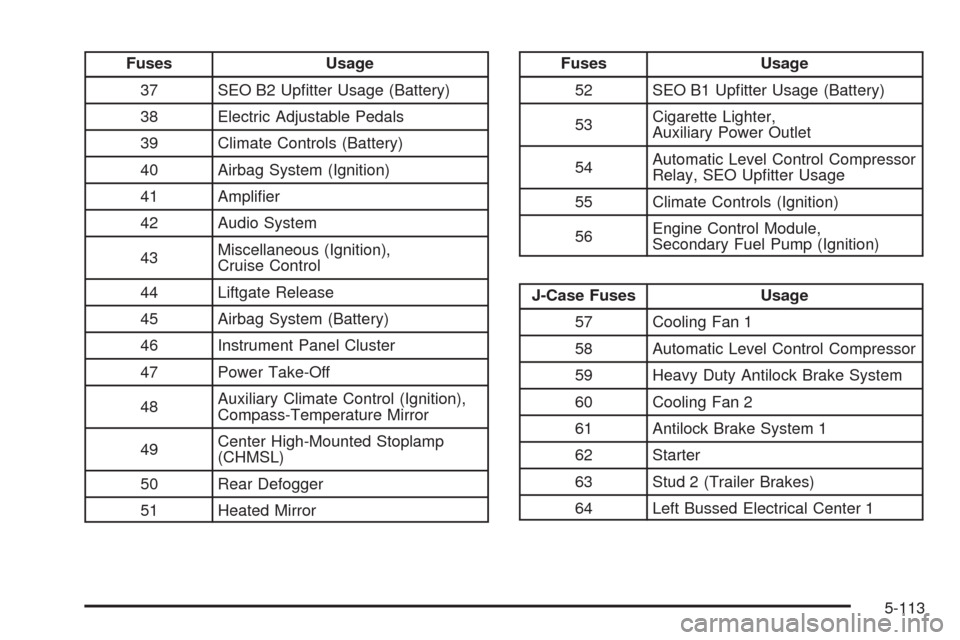
Fuses Usage
37 SEO B2 Uptter Usage (Battery)
38 Electric Adjustable Pedals
39 Climate Controls (Battery)
40 Airbag System (Ignition)
41 Amplier
42 Audio System
43Miscellaneous (Ignition),
Cruise Control
44 Liftgate Release
45 Airbag System (Battery)
46 Instrument Panel Cluster
47 Power Take-Off
48Auxiliary Climate Control (Ignition),
Compass-Temperature Mirror
49Center High-Mounted Stoplamp
(CHMSL)
50 Rear Defogger
51 Heated MirrorFuses Usage
52 SEO B1 Uptter Usage (Battery)
53Cigarette Lighter,
Auxiliary Power Outlet
54Automatic Level Control Compressor
Relay, SEO Uptter Usage
55 Climate Controls (Ignition)
56Engine Control Module,
Secondary Fuel Pump (Ignition)
J-Case Fuses Usage
57 Cooling Fan 1
58 Automatic Level Control Compressor
59 Heavy Duty Antilock Brake System
60 Cooling Fan 2
61 Antilock Brake System 1
62 Starter
63 Stud 2 (Trailer Brakes)
64 Left Bussed Electrical Center 1
5-113