park assist CADILLAC ESCALADE EXT 2008 3.G Owners Manual
[x] Cancel search | Manufacturer: CADILLAC, Model Year: 2008, Model line: ESCALADE EXT, Model: CADILLAC ESCALADE EXT 2008 3.GPages: 496, PDF Size: 7.02 MB
Page 80 of 496
Mirrors...........................................................2-46
Automatic Dimming Rearview Mirror
with Intellibeam
®, OnStar®, Compass,
and Temperature Display............................2-46
Automatic Dimming Rearview Mirror
with OnStar
®, Compass and
Temperature Display..................................2-48
Outside Power Foldaway Mirrors.....................2-52
Object Detection Systems...............................2-54
Ultrasonic Rear Parking Assist (URPA)............2-54
OnStar
®System.............................................2-56
Universal Home Remote System......................2-60
Universal Home Remote System Operation
(With Three Round LED)............................2-60Storage Areas................................................2-67
Glove Box...................................................2-67
Cupholder(s)................................................2-67
Instrument Panel Storage...............................2-67
Center Console Storage.................................2-67
Luggage Carrier...........................................2-68
Rear Seat Armrest........................................2-69
Cargo Cover Panels......................................2-69
All-Weather Cargo Area.................................2-82
Top-Box Storage..........................................2-86
Sunroof.........................................................2-87
Section 2 Features and Controls
2-2
Page 131 of 496
Curb View Assist
If your vehicle has the memory package, the outside
mirrors are able to perform the park tilt function. This
feature may be useful in allowing the driver to view the
curb when parallel parking. This feature will cause the
passenger’s and/or driver’s mirror to tilt to a preselected
position when the vehicle is in REVERSE (R).
The passenger’s and/or driver’s mirror will return to
its original position when the vehicle is shifted out
of REVERSE (R), or the ignition is turned off or to
OFF/LOCK.
This feature can be turned on or off through the Driver
Information Center (DIC). SeeDIC Vehicle Customization
on page 3-57.
Heated Mirrors
The button to turn the heated mirrors on or off is located
on the climate control panel. Press this button to warm
the driver’s and passenger’s outside rearview mirrors to
help clear them of ice, snow, and condensation.
See “Rear Window Defogger” underDual Automatic
Climate Control System on page 3-24for more
information.
Convex Mirror
{CAUTION:
A convex mirror can make things (like other
vehicles) look farther away than they really are.
If you cut too sharply into the right lane, you
could hit a vehicle on your right. Check your
inside mirror or glance over your shoulder
before changing lanes.
The passenger’s side mirror may have convex glass.
A convex mirror’s surface is curved so more can
be seen from the driver’s seat.
Your vehicle has a turn signal indicator on the mirror.
An arrow on the mirror will ash in the direction of
the turn or lane change.
2-53
Page 132 of 496
Object Detection Systems
Ultrasonic Rear Parking
Assist (URPA)
If your vehicle has the Ultrasonic Rear Parking Assist
(URPA) system, it helps you park easier and avoid
other vehicles while in REVERSE (R). It operates
at speeds less than 5 mph (8 km/h). It can determine
how close objects are to the rear bumper, up to
8 feet (2.5 m) behind your vehicle. The distance
sensors are located on the rear bumper.
{CAUTION:
The Ultrasonic Rear Parking Assist (URPA)
system does not replace driver vision.
It cannot detect:
objects that are below the bumper,
underneath the vehicle, or if they are
too close or far from the vehicle
children, pedestrians, bicyclists, or pets.
CAUTION: (Continued)
CAUTION: (Continued)
If you do not use proper care before and
while backing; vehicle damage, injury, or
death could occur. Even with URPA, always
check behind your vehicle before backing up.
While backing, be sure to look for objects
and check your vehicle’s mirrors.
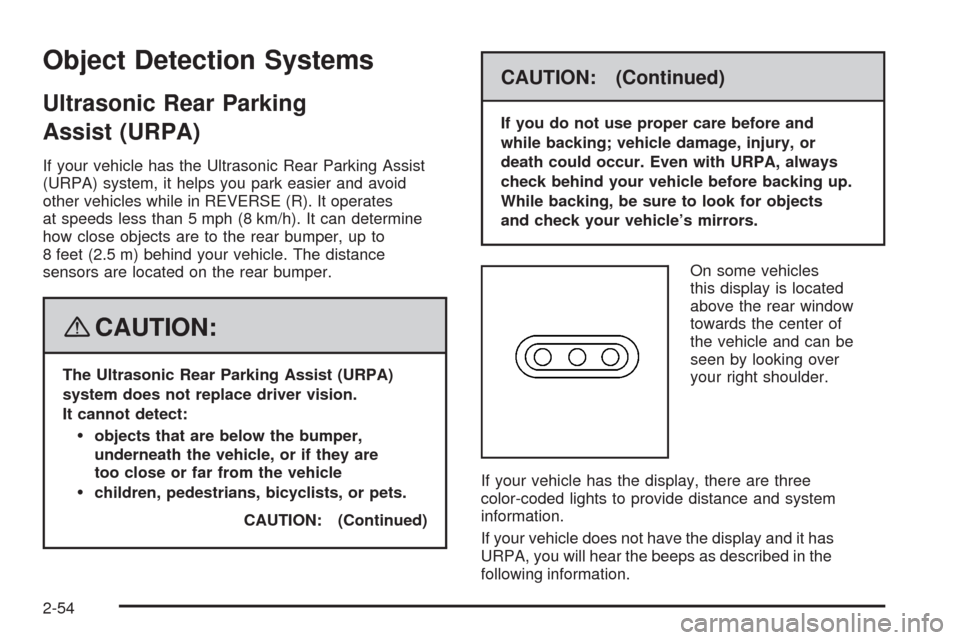
On some vehicles
this display is located
above the rear window
towards the center of
the vehicle and can be
seen by looking over
your right shoulder.
If your vehicle has the display, there are three
color-coded lights to provide distance and system
information.
If your vehicle does not have the display and it has
URPA, you will hear the beeps as described in the
following information.
2-54
Page 134 of 496
When the System Does Not Seem
to Work Properly
The driver disables the system.
The parking brake pedal is depressed.
The ultrasonic sensors are not clean. Keep your
vehicle’s rear bumper free of mud, dirt, snow,
ice and slush. For cleaning instructions, see
Washing Your Vehicle on page 5-101.
A trailer was attached to your vehicle, or a
bicycle or an object was hanging out of your
Midgate
®/tailgate during your last drive cycle,
the red light may illuminate in the rear display.
Once the attached object is removed, URPA
will return to normal operation.
A tow bar is attached to your vehicle.
The vehicle’s bumper is damaged. Take the
vehicle to your dealer/retailer to repair the system.
Other conditions may affect system performance,
such as vibrations from a jackhammer or the
compression of air brakes on a very large truck.
If the system is still disabled, after driving forward
at least 15 mph (25 km/h), take your vehicle to your
dealer/retailer.
OnStar®System
OnStar uses several innovative technologies and live
advisors to provide you with a wide range of safety,
security, information, and convenience services. If your
airbags deploy, the system is designed to make an
automatic call to OnStar Emergency advisors who can
request emergency services be sent to your location.
If you lock your keys in the vehicle, call OnStar at
1-888-4-ONSTAR and they can send a signal to
unlock your doors. If you need roadside assistance,
press the OnStar button and they can contact
Roadside Service for you.
2-56
Page 139 of 496
Read the instructions completely before attempting to
program the transmitter. Because of the steps involved,
it may be helpful to have another person available to
assist you in programming the transmitter.
Be sure to keep the original remote control transmitter
for use in other vehicles, as well as, for future
programming. You only need the original remote
control transmitter for Fixed Code programming.
It is also recommended that upon the sale or lease
termination of the vehicle, the programmed buttons
should be erased for security purposes. See “Erasing
Universal Home Remote Buttons” later in this section.
When programming a garage door, it is advised to
park outside of the garage. Be sure that people
and objects are clear of the garage door or security
device you are programming.Programming Universal Home
Remote — Rolling Code
If you have questions or need help programming the
Universal Home Remote System, call 1-866-572-2728
or go to www.learcar2u.com.
Most garage door openers sold after 1996 are
Rolling Code units.
Programming a garage door opener involves
time-sensitive actions, so read the entire procedure
before you begin. If you do not follow these actions,
the device will time out and you will have to repeat
the procedure.
To program up to three devices:
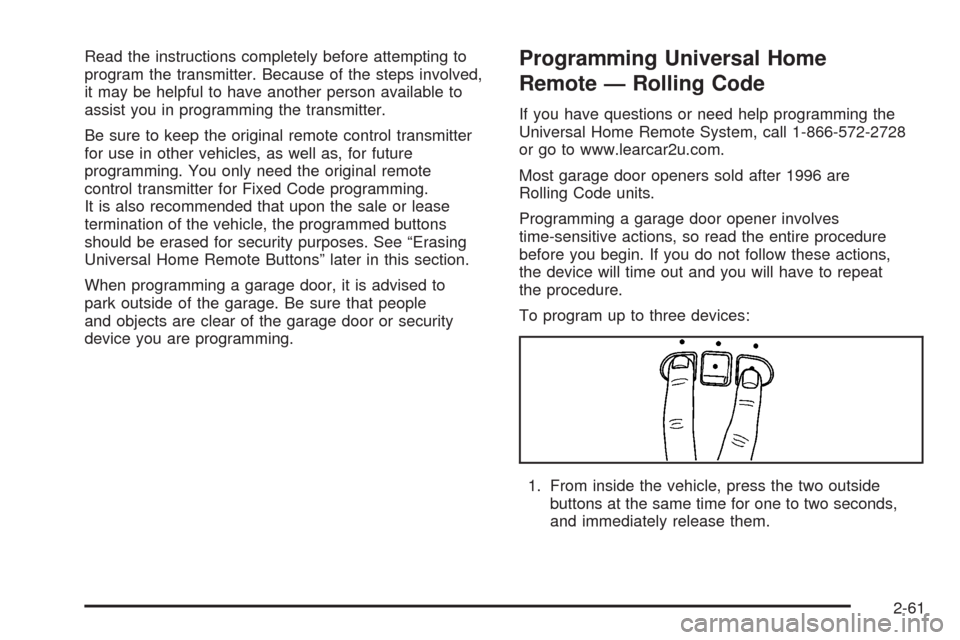
1. From inside the vehicle, press the two outside
buttons at the same time for one to two seconds,
and immediately release them.
2-61
Page 171 of 496
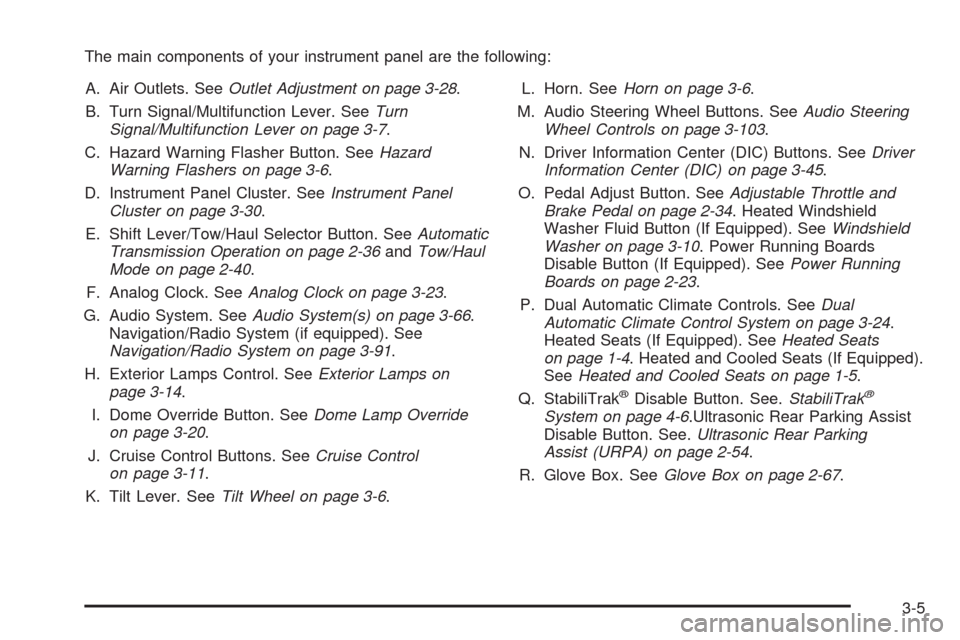
The main components of your instrument panel are the following:
A. Air Outlets. SeeOutlet Adjustment on page 3-28.
B. Turn Signal/Multifunction Lever. SeeTurn
Signal/Multifunction Lever on page 3-7.
C. Hazard Warning Flasher Button. SeeHazard
Warning Flashers on page 3-6.
D. Instrument Panel Cluster. SeeInstrument Panel
Cluster on page 3-30.
E. Shift Lever/Tow/Haul Selector Button. SeeAutomatic
Transmission Operation on page 2-36andTow/Haul
Mode on page 2-40.
F. Analog Clock. SeeAnalog Clock on page 3-23.
G. Audio System. SeeAudio System(s) on page 3-66.
Navigation/Radio System (if equipped). See
Navigation/Radio System on page 3-91.
H. Exterior Lamps Control. SeeExterior Lamps on
page 3-14.
I. Dome Override Button. SeeDome Lamp Override
on page 3-20.
J. Cruise Control Buttons. SeeCruise Control
on page 3-11.
K. Tilt Lever. SeeTilt Wheel on page 3-6.L. Horn. SeeHorn on page 3-6.
M. Audio Steering Wheel Buttons. SeeAudio Steering
Wheel Controls on page 3-103.
N. Driver Information Center (DIC) Buttons. SeeDriver
Information Center (DIC) on page 3-45.
O. Pedal Adjust Button. SeeAdjustable Throttle and
Brake Pedal on page 2-34. Heated Windshield
Washer Fluid Button (If Equipped). SeeWindshield
Washer on page 3-10. Power Running Boards
Disable Button (If Equipped). SeePower Running
Boards on page 2-23.
P. Dual Automatic Climate Controls. SeeDual
Automatic Climate Control System on page 3-24.
Heated Seats (If Equipped). SeeHeated Seats
on page 1-4. Heated and Cooled Seats (If Equipped).
SeeHeated and Cooled Seats on page 1-5.
Q. StabiliTrak
®Disable Button. See.StabiliTrak®
System on page 4-6.Ultrasonic Rear Parking Assist
Disable Button. See.Ultrasonic Rear Parking
Assist (URPA) on page 2-54.
R. Glove Box. SeeGlove Box on page 2-67.
3-5
Page 219 of 496
PARKING ASSIST OFF
After the vehicle has been started, this message
displays to remind the driver that the Ultrasonic Rear
Parking Assist (URPA) system has been turned
off. Press the set/reset button to acknowledge this
message and clear it from the DIC display. To turn the
URPA system back on, seeUltrasonic Rear Parking
Assist (URPA) on page 2-54.
PASSENGER DOOR OPEN
This message displays and a chime sounds if the
passenger door is not fully closed and the vehicle
is in a drive gear. Stop and turn off the vehicle, check
the door for obstructions, and close the door again.
Check to see if the message still appears on the DIC.
REMOTE KEY LEARNING ACTIVE
This message displays while you are matching a
Remote Keyless Entry (RKE) transmitter to your vehicle.
See “Matching Transmitter(s) to Your Vehicle” under
Remote Keyless Entry (RKE) System Operation
on page 2-5andDIC Operation and Displays on
page 3-45for more information.
REPLACE BATTERY IN REMOTE KEY
This message displays if a Remote Keyless Entry (RKE)
transmitter battery is low. The battery needs to be
replaced in the transmitter. See “Battery Replacement”
underRemote Keyless Entry (RKE) System Operation
on page 2-5.
RIGHT REAR DOOR OPEN
This message displays and a chime sounds if the
passenger side rear door is not fully closed and the
vehicle is in a drive gear. Stop and turn off the vehicle,
check the door for obstructions, and close the door again.
Check to see if the message still appears on the DIC.
SERVICE AIR BAG
This message displays if there is a problem with the
airbag system. Have your dealer/retailer inspect the
system for problems. SeeAirbag Readiness Light on
page 3-32andAirbag System on page 1-56for more
information.
3-53
Page 220 of 496
SERVICE BATTERY CHARGING
SYSTEM
On some vehicles, this message displays if there is a
problem with the battery charging system. Under certain
conditions, the charging system light may also turn
on in the instrument panel cluster. SeeCharging System
Light on page 3-35. Driving with this problem could
drain the battery. Turn off all unnecessary accessories.
Have the electrical system checked as soon as
possible. See your dealer/retailer.
SERVICE BRAKE SYSTEM
This message displays along with the brake system
warning light if there is a problem with the brake system.
SeeBrake System Warning Light on page 3-36. If this
message appears, stop as soon as possible and turn
off the vehicle. Restart the vehicle and check for
the message on the DIC display. If the message is still
displayed or appears again when you begin driving,
the brake system needs service as soon as possible.
See your dealer/retailer.
SERVICE BRAKES SOON
This message displays if there is a problem with the
brake system. If this message appears, stop as soon
as possible and turn off the vehicle. Restart the vehicle
and check for the message on the DIC display. If the
message is still displayed or appears again when
you begin driving, the brake system needs service.
See your dealer/retailer.
SERVICE PARKING ASSIST
This message displays if there is a problem with the
Ultrasonic Rear Parking Assist (URPA) system. Do not
use this system to help you park. SeeUltrasonic
Rear Parking Assist (URPA) on page 2-54for more
information. See your dealer/retailer for service.
SERVICE STABILITRAK
If your vehicle has StabiliTrak®and this message
displays, it means there may be a problem with the
StabiliTrak
®system. If you see this message, try to
reset the system. Stop; turn off the engine for at least
15 seconds; then start the engine again. If this message
still comes on, it means there is a problem. You should
see your dealer/retailer for service. The vehicle is
safe to drive, however, you do not have the benet of
StabiliTrak
®, so reduce your speed and drive accordingly.
3-54
Page 316 of 496

If You Do Decide To Pull A Trailer
If you do, here are some important points:
There are many different laws, including speed limit
restrictions, having to do with trailering. Make sure
your rig will be legal, not only where you live but
also where you’ll be driving. A good source for this
information can be state or provincial police.
Consider using a sway control. See “Hitches” later
in this section.
Don’t tow a trailer at all during the rst 500 miles
(800 km) your new vehicle is driven. Your engine,
axle or other parts could be damaged.
Then, during the rst 500 miles (800 km) that you tow
a trailer, don’t drive over 50 mph (80 km/h) and don’t
make starts at full throttle. This helps your engine
and other parts of your vehicle wear in at the
heavier loads.
You can tow in DRIVE (D). You may want to shift the
transmission to THIRD (3) or, if necessary, a lower
gear selection if the transmission shifts too often
(e.g., under heavy loads and/or hilly conditions).
See “Tow/Haul Mode” following.Three important considerations have to do with weight:
the weight of the trailer
the weight of the trailer tongue
and the weight on your vehicle’s tires
Tow/Haul Mode
Tow/Haul is designed to assist while your vehicle is
pulling a large or heavy load or trailer. Tow/Haul is most
useful while pulling such a load in rolling terrain, in
stop-and-go traffic, or when you need improved
low-speed control, such as when parking. The purpose
of the tow/haul mode is to do the following:
Reduce the frequency and improve the predictability
of transmission shifts when pulling a heavy trailer or
a large or heavy load.
Provide the same solid shift feel when pulling a
heavy trailer or a large or heavy load as when
the vehicle is unloaded.
Improve control of vehicle speed while requiring
less throttle pedal activity when pulling a heavy
trailer or a large or heavy load.
4-44
Page 437 of 496

Fuses Usage
7 Instrument Panel Back Lighting
8Passenger Side Turn Signal,
Stoplamp
9Passenger Door Module,
Universal Home Remote System
10 Power Door Lock 2 (Unlock Feature)
11 Power Door Lock 2 (Lock Feature)
12Stoplamps, Center-High
Mounted Stoplamp
13 Rear Climate Controls
14 Power Mirror
15 Body Control Module (BCM)
16 Accessory Power Outlets
17 Interior Lamps
18 Power Door Lock 1 (Unlock Feature)
19 Rear Seat Entertainment
20 Ultrasonic Rear Parking AssistFuses Usage
21 Power Door Lock 1 (Lock Feature)
22 Driver Information Center (DIC)
23 Not Used
24 Not Used
25Driver Seat Module,
Remote Keyless Entry System
26Driver Power Door Lock
(Unlock Feature)
Circuit Breaker Usage
LT DRDriver Side Power Window
Circuit Breaker
Harness
ConnectorUsage
LT DR Driver Door Harness Connection
BODY Harness Connector
BODY Harness Connector
5-109