climate control CADILLAC ESCALADE EXT 2009 3.G User Guide
[x] Cancel search | Manufacturer: CADILLAC, Model Year: 2009, Model line: ESCALADE EXT, Model: CADILLAC ESCALADE EXT 2009 3.GPages: 546, PDF Size: 4.43 MB
Page 180 of 546

A high electrical load occurs when several of the
following are on, such as: headlamps, high beams, fog
lamps, rear window defogger, climate control fan at
high speed, heated seats, engine cooling fans, trailer
loads, and loads plugged into accessory power outlets.
EPM works to prevent excessive discharge of the
battery. It does this by balancing the generator’s output
and the vehicle’s electrical needs. It can increase
engine idle speed to generate more power, whenever
needed. It can temporarily reduce the power demands of
some accessories.
Normally, these actions occur in steps or levels, without
being noticeable. In rare cases at the highest levels
of corrective action, this action may be noticeable to the
driver. If so, a Driver Information Center (DIC)
message might be displayed, such as BATTERY
SAVER ACTIVE, BATTERY VOLTAGE LOW, or LOW
BATTERY. If this message is displayed, it is
recommended that the driver reduce the electrical loads
as much as possible. SeeDIC Warnings and Messages
on page 3-48.
Battery Run-Down Protection
This feature shuts off the dome lamps if they are left
on for more than 10 minutes when the ignition is
in LOCK/OFF. This helps to prevent the battery from
running down.
Accessory Power Outlet(s)
Accessory power outlets can be used to connect
auxiliary electrical equipment, such as a cellular
telephone.
One accessory power outlet is located inside the center
oor console. Lift up on the lower latch located at the
front of the console lid to access the accessory
power outlet.
There may also be an accessory power outlet located
on the rear of the center oor console above the
cupholder.
Remove the protective cap to use the accessory power
outlet. When not in use, always cover the accessory
power outlet with the protective cap.
Do not try to put the cigarette lighter in any of the
accessory power outlets.
Notice:If electrical devices are left plugged into a
power outlet, the battery may drain causing the
vehicle not to start or damage to the battery. This
would not be covered by the warranty. Always unplug
all electrical devices when turning off the vehicle.
Certain electrical accessories may not be compatible
with the accessory power outlet and could result
in blown vehicle or adapter fuses. If you experience a
problem see your dealer/retailer for additional
information on accessory power outlets.
3-20
Page 182 of 546

Analog Clock
The analog clock is located on the instrument panel
above the radio. The clock is not connected with
any other vehicle system and runs by itself. To adjust
the clock:
1. The adjustment button is located in the lower left
corner of the clock.
2. Push and hold the adjustment button to advance
the clock hands. Holding the button down will
cause the clock to advance faster. Release the
button before reaching the desired time.
3. Push and release the button to increase the time
by one minute increments until the desired time is
reached.
Climate Controls
Dual Automatic Climate Control
System
The heating, cooling, and ventilation in the vehicle can
be controlled with this system. The vehicle also has
a ow-through ventilation system described later in this
section.A. Driver and Passenger
Temperature Controls
B. AUTO
C. Recirculation
D. Air Conditioning
E. Heated and
Cooled SeatsF. Fan Control
G. Defrost
H. Rear Window
Defogger
I. Air Delivery
Mode Control
O(Off):Press the driver side temperature knob to turn
the climate control system off. Outside air still enters the
vehicle, and is directed to the oor. This direction can be
changed by pressing the mode button. The temperature
can also be adjusted using either temperature knob.Climate Control with Heated and Cooled Seats
shown
3-22
Page 208 of 546

Compass Calibration
The compass can be manually calibrated. Only calibrate
the compass in a magnetically clean and safe location,
such as an open parking lot, where driving the vehicle in
circles is not a danger. It is suggested to calibrate
away from tall buildings, utility wires, manhole covers, or
other industrial structures, if possible.
If CAL should ever appear in the DIC display, the
compass should be calibrated.
If the DIC display does not show a heading, for example,
N for North, or the heading does not change after
making turns, there may be a strong magnetic eld
interfering with the compass. Such interference may be
caused by a magnetic CB or cell phone antenna
mount, a magnetic emergency light, magnetic note pad
holder, or any other magnetic item. Turn off the
vehicle, move the magnetic item, then turn on the
vehicle and calibrate the compass.
To calibrate the compass, use the following procedure:
Compass Calibration Procedure
1. Before calibrating the compass, make sure the
compass zone is set to the variance zone in
which the vehicle is located. See “Compass
Variance (Zone) Procedure” earlier in this section.Do not operate any switches such as window,
sunroof, climate controls, seats, etc. during
the calibration procedure.
2. Press the vehicle information button until PRESS
V
TO CALIBRATE COMPAS (Compass) displays.
3. Press the set/reset button to start the compass
calibration.
4. The DIC will display CALIBRATING: DRIVE IN
CIRCLES. Drive the vehicle in tight circles at
less than 5 mph (8 km/h) to complete the calibration.
The DIC will display CALIBRATION COMPLETE
for a few seconds when the calibration is complete.
The DIC display will then return to the
previous menu.
DIC Warnings and Messages
Messages are displayed on the DIC to notify the driver
that the status of the vehicle has changed and that
some action may be needed by the driver to correct the
condition. Multiple messages may appear one after
another.
Some messages may not require immediate action, but
you can press any of the DIC buttons on the instrument
panel to acknowledge that you received the messages
and to clear them from the display.
3-48
Page 339 of 546

If the system fails to turn on or activate, the StabiliTrak
light along with one of the following messages will
be displayed on the Driver Information Center (DIC):
TRACTION CONTROL OFF, SERVICE TRACTION
CONTROL, STABILITRAK OFF, SERVICE
STABILITRAK. If these DIC messages appear, make
sure the StabiliTrak system has not been turned
off using the StabiliTrak on/off button. Then turn the
steering wheel clockwise from the nine o’clock position
to the three o’clock position. If this clears the
message(s), the vehicle does not need servicing. If this
does not clear the message(s), then turn the vehicle
off, wait 15 seconds, and then turn it back on again to
reset the system. If any of these messages still
appear on the Driver Information Center (DIC), the
vehicle should be taken in for service. For more
information on the DIC messages, seeDriver
Information Center (DIC) on page 3-41.
The StabiliTrak light will
ash on the instrument
panel cluster when
the system is both on
and activated.
The system may be heard or felt while it is working; this
is normal.The traction control disable
button is located on the
instrument panel below the
climate controls.
The traction control part of StabiliTrak can be turned off
by pressing and releasing the StabiliTrak button if
both systems (traction control and StabiliTrak) were
previously on. To disable both traction control and
StabiliTrak, press and hold the button for ve seconds.
Traction control and StabiliTrak can be turned on by
pressing and releasing the StabiliTrak button if not
automatically shut off for any other reason.
When the TCS or StabiliTrak system is turned off, the
StabiliTrak light and the appropriate TCS off or
StabiliTrak off message will be displayed on the DIC to
warn the driver. The vehicle will still have brake-traction
control when traction control is off, but will not be
able to use the engine speed management system. See
“Traction Control Operation” next for more information.
When the traction control system has been turned
off, system noises may still be heard as a result of the
brake-traction control coming on.
5-7
Page 360 of 546

Allow greater following distance on any slippery road
and watch for slippery spots. Icy patches can occur on
otherwise clear roads in shaded areas. The surface
of a curve or an overpass can remain icy when
the surrounding roads are clear. Avoid sudden steering
maneuvers and braking while on ice.
Turn off cruise control, if equipped, on slippery surfaces.
Blizzard Conditions
Being stuck in snow can be in a serious situation. Stay
with the vehicle unless there is help nearby. If
possible, use theRoadside Service on page 8-7.Toget
help and keep everyone in the vehicle safe:
Turn on theHazard Warning Flashers on page 3-5.
Tie a red cloth to an outside mirror.
{CAUTION:
Snow can trap engine exhaust under the vehicle.
This may cause exhaust gases to get inside.
Engine exhaust contains carbon monoxide (CO)
which cannot be seen or smelled. It can cause
unconsciousness and even death.
CAUTION: (Continued)
CAUTION: (Continued)
If the vehicle is stuck in the snow:
Clear away snow from around the base of
your vehicle, especially any that is blocking
the exhaust pipe.
Check again from time to time to be sure
snow does not collect there.
Open a window about two inches (5 cm) on
the side of the vehicle that is away from the
wind to bring in fresh air.
Fully open the air outlets on or under the
instrument panel.
Adjust the Climate Control system to a setting
that circulates the air inside the vehicle and
set the fan speed to the highest setting. See
Climate Control System in the Index.
For more information about carbon monoxide, see
Engine Exhaust on page 2-45.
Snow can trap exhaust gases under your vehicle.
This can cause deadly CO (carbon monoxide) gas
to get inside. CO could overcome you and kill you.
You cannot see it or smell it, so you might not
know it is in your vehicle. Clear away snow from
around the base of your vehicle, especially any
that is blocking the exhaust.
5-28
Page 380 of 546

Driving with a Trailer
{CAUTION:
When towing a trailer, exhaust gases may collect
at the rear of the vehicle and enter if the liftgate,
trunk/hatch, or rear-most window is open.
Engine exhaust contains carbon monoxide (CO)
which cannot be seen or smelled. It can cause
unconsciousness and even death.
To maximize safety when towing a trailer:
Have the exhaust system inspected for leaks
and make necessary repairs before starting
a trip.
Never drive with the liftgate, trunk/hatch, or
rear-most window open.
Fully open the air outlets on or under the
instrument panel.
Adjust the Climate Control system to a setting
that brings in only outside air and set the fan
speed to the highest setting. See Climate
Control System in the Index.
For more information about carbon monoxide, see
Engine Exhaust on page 2-45.Towing a trailer requires a certain amount of experience.
Get to know the rig before setting out for the open
road. Get acquainted with the feel of handling and
braking with the added weight of the trailer. And always
keep in mind that the vehicle you are driving is now
longer and not as responsive as the vehicle is by itself.
Before starting, check all trailer hitch parts and
attachments, safety chains, electrical connectors, lamps,
tires and mirror adjustments. If the trailer has electric
brakes, start the vehicle and trailer moving and
then apply the trailer brake controller by hand to be sure
the brakes are working. This checks the electrical
connection at the same time.
During the trip, check occasionally to be sure that the
load is secure, and that the lamps and any trailer brakes
are still working.
Following Distance
Stay at least twice as far behind the vehicle ahead as
you would when driving the vehicle without a trailer. This
can help to avoid situations that require heavy braking
and sudden turns.
Passing
More passing distance is needed when towing a trailer.
Because the rig is longer, it is necessary to go much
farther beyond the passed vehicle before returning to
the lane.
5-48
Page 456 of 546

Uniform Tire Quality Grading
Quality grades can be found where applicable on
the tire sidewall between tread shoulder and
maximum section width. For example:
Treadwear 200 Traction AA
Temperature A
The following information relates to the system
developed by the United States National Highway
Traffic Safety Administration (NHTSA), which
grades tires by treadwear, traction, and
temperature performance. This applies only to
vehicles sold in the United States. The grades are
molded on the sidewalls of most passenger car
tires. The Uniform Tire Quality Grading (UTQG)
system does not apply to deep tread, winter-type
snow tires, space-saver, or temporary use
spare tires, tires with nominal rim diameters of
10 to 12 inches (25 to 30 cm), or to some
limited-production tires.While the tires available on General Motors
passenger cars and light trucks may vary with
respect to these grades, they must also conform
to federal safety requirements and additional
General Motors Tire Performance Criteria (TPC)
standards.
Treadwear
The treadwear grade is a comparative rating
based on the wear rate of the tire when tested
under controlled conditions on a specied
government test course. For example, a tire
graded 150 would wear one and a half (1.5) times
as well on the government course as a tire
graded 100. The relative performance of tires
depends upon the actual conditions of their use,
however, and may depart signicantly from
the norm due to variations in driving habits, service
practices, and differences in road characteristics
and climate.
6-72
Page 489 of 546
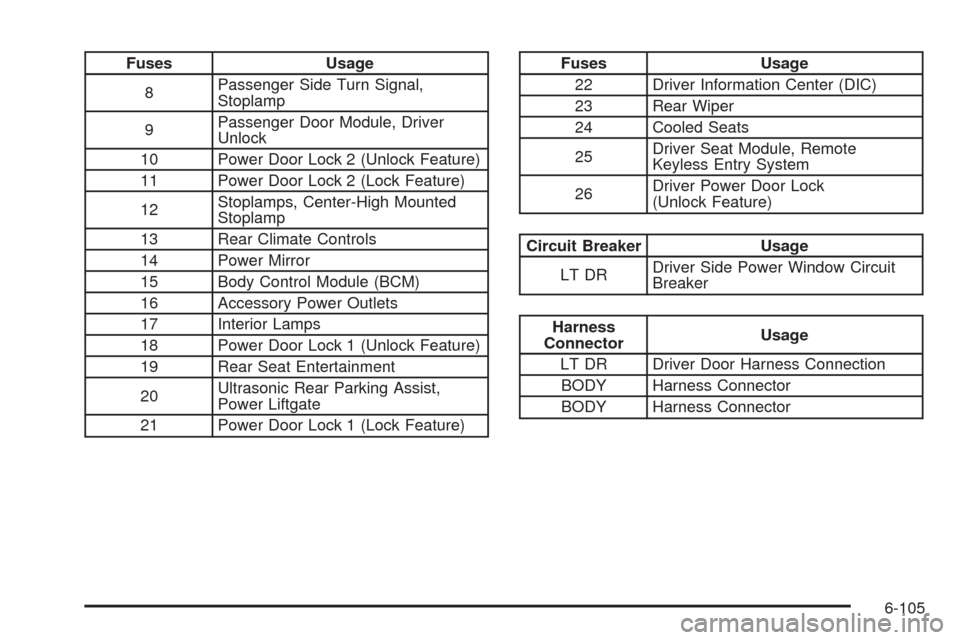
Fuses Usage
8Passenger Side Turn Signal,
Stoplamp
9Passenger Door Module, Driver
Unlock
10 Power Door Lock 2 (Unlock Feature)
11 Power Door Lock 2 (Lock Feature)
12Stoplamps, Center-High Mounted
Stoplamp
13 Rear Climate Controls
14 Power Mirror
15 Body Control Module (BCM)
16 Accessory Power Outlets
17 Interior Lamps
18 Power Door Lock 1 (Unlock Feature)
19 Rear Seat Entertainment
20Ultrasonic Rear Parking Assist,
Power Liftgate
21 Power Door Lock 1 (Lock Feature)Fuses Usage
22 Driver Information Center (DIC)
23 Rear Wiper
24 Cooled Seats
25Driver Seat Module, Remote
Keyless Entry System
26Driver Power Door Lock
(Unlock Feature)
Circuit Breaker Usage
LT DRDriver Side Power Window Circuit
Breaker
Harness
ConnectorUsage
LT DR Driver Door Harness Connection
BODY Harness Connector
BODY Harness Connector
6-105
Page 492 of 546

Fuses Usage
6 Trailer Brake Controller
7 Front Washer
8 Oxygen Sensors
9 Antilock Brakes System 2
10 Trailer Back-up Lamps
11 Driver Side Low-Beam Headlamp
12 Engine Control Module (Battery)
13Fuel Injectors, Ignition Coils
(Right Side)
14Transmission Control Module
(Battery)
15 Vehicle Back-up Lamps
16Passenger Side Low-Beam
Headlamp
17 Air Conditioning Compressor
18 Oxygen Sensors
19 Transmission Controls (Ignition)
20 Fuel Pump
21 Fuel System Control Module
22 Headlamp Washers
23 Rear Windshield Washer
24Fuel Injectors, Ignition Coils
(Left Side)
25 Trailer Park LampsFuses Usage
26 Driver Side Park Lamps
27 Passenger Side Park Lamps
28 Fog Lamps
29 Horn
30Passenger Side High-Beam
Headlamp
31 Daytime Running Lamps
32 Driver Side High-Beam Headlamp
33 Daytime Running Lights 2
34 Sunroof
35Key Ignition System, Theft Deterrent
System
36 Windshield Wiper
37 SEO B2 Uptter Usage (Battery)
38 Electric Adjustable Pedals
39 Climate Controls (Battery)
40 Airbag System (Ignition)
41 Amplier
42 Audio System
43Miscellaneous (Ignition), Cruise
Control
44 Liftgate Release
45 Airbag System (Battery)
46 Instrument Panel Cluster
6-108
Page 493 of 546

Fuses Usage
47 Not Used
48 Auxiliary Climate Control (Ignition)
49Center High-Mounted Stoplamp
(CHMSL)
50 Rear Defogger
51 Heated Mirror
52 SEO B1 Uptter Usage (Battery)
53Cigarette Lighter, Auxiliary Power
Outlet
54Automatic Level Control Compressor
Relay, SEO Uptter Usage
55 Climate Controls (Ignition)
56Engine Control Module, Secondary
Fuel Pump (Ignition)
J-Case Fuses Usage
57 Cooling Fan 1
58 Automatic Level Control Compressor
59 Heavy Duty Antilock Brake System
60 Cooling Fan 2
61 Antilock Brake System 1
62 Starter
63 Stud 2 (Trailer Brakes)
64 Left Bussed Electrical Center 1
J-Case Fuses Usage
65 Electric Running Boards
66 Heated Windshield Washer System
67 Four-Wheel Drive System
68Stud 1 (Trailer Connector Battery
Power)
69 Mid-Bussed Electrical Center 1
70 Climate Control Blower
71 Power Liftgate Module
72 Left Bussed Electrical Center 2
Relays Usage
FAN HI Cooling Fan High Speed
FAN LO Cooling Fan Low Speed
FAN CNTRL Cooling Fan Control
HDLP LO/HID Hi Intensity Discharge Headlamp
FOG LAMP Front Fog Lamps
A/C CMPRSR Air Conditioning Compressor
STRTR Starter
PWR/TRN Powertrain
FUEL PMP Fuel Pump
PRK LAMP Parking Lamps
REAR DEFOG Rear Defogger
RUN/CRANK Switched Power
6-109