ECU CADILLAC ESCALADE EXT 2009 3.G Workshop Manual
[x] Cancel search | Manufacturer: CADILLAC, Model Year: 2009, Model line: ESCALADE EXT, Model: CADILLAC ESCALADE EXT 2009 3.GPages: 546, PDF Size: 4.43 MB
Page 314 of 546

No Artist Info:No artist information is available. The
system is working properly.
No Title Info:No song title information is available.
The system is working properly.
No CAT Info:No category information is available. The
system is working properly.
CAT Not Found:There are no channels available for
the selected category. The system is working properly.
No Information:No text or informational messages
are available. The system is working properly.
XM Theftlocked:The XM™ receiver may have
previously been in another vehicle. For security
purposes, XM™ receivers cannot be swapped between
vehicles. If this message is received after having
your vehicle serviced, check with your dealer/retailer.
XM Radio ID:If tuned to channel 0, this message
will alternate with the XM™ Radio eight digit radio ID
label. This label is needed to activate the service.
Unknown:If this message is received when tuned to
channel 0, there may be a receiver fault. Consult
with your dealer/retailer.
Check XM Receiver:If this message does not clear
within a short period of time, the receiver may have
a fault. Consult with your dealer/retailer.CD Player
The player can be used for CD, MP3, DVD audio, and
as a DVD video player. SeeDVD Player on page 4-71
for more information about DVD audio and video.
Six-Disc CD Player
While playing a CD, the navigation system is available.
When you insert a CD, the CD tab displays. If a
DSP setting is selected for the CD, it activates each
time you play a CD.
If the ignition or radio is turned off with a CD in the
player, it stays in the player. When the ignition or radio
is turned on, the CD starts playing where it stopped,
if it was the last selected audio source.
As each new track starts to play, the track number
displays.
If an error appears on the display, see “CD Messages”
later in this section.
If viewing a map screen, touch the CD screen button.
The display will split between the audio screen and
the map screen. If you do not want to view a split screen
or you are not on a map screen, press the AUDIO
key then press the AUDIO key repeatedly until CD is
selected or touch the CD screen button.
4-64
Page 346 of 546
If you think you will need some more ground clearance
at the front of your vehicle, you can remove the front
fascia lower air dam. The air dam is held in place by
two bolts and 10 snaps accessible from underneath the
front fascia.
To remove the air dam:
1. Remove the two outboard air dam bolts.
2. With a at-blade tool, disengage the snaps.
3. After the bolts are removed and the snaps are
disengaged, push forward on the air dam until it
is free.
Notice:Operating your vehicle for extended
periods without the front fascia lower air dam
installed can cause improper air ow to the engine.
Always be sure to replace the front fascia air
dam when you are nished off-road driving.
After off-roading, be sure to reinstall the air dam:
1. Line up the snaps and push the air dam rearward
to engage the snaps.
2. Install the two outboard bolts.Loading Your Vehicle for Off-Road
Driving
{CAUTION:
Cargo on the load oor piled higher than the
seatbacks can be thrown forward during a
sudden stop. You or your passengers could
be injured. Keep cargo below the top of the
seatbacks.
Unsecured cargo on the load oor can be
tossed about when driving over rough terrain.
You or your passengers can be struck by
ying objects. Secure the cargo properly.
Heavy loads on the roof raise the vehicle’s
center of gravity, making it more likely to roll
over. You can be seriously or fatally injured if
the vehicle rolls over. Put heavy loads inside
the cargo area, not on the roof. Keep cargo in
the cargo area as far forward and low as
possible.
5-14
Page 347 of 546

There are some important things to remember about
how to load your vehicle.
The heaviest things should be on the oor, forward
of the rear axle. Put heavier items as far forward
as you can.
Be sure the load is properly secured, so things are
not tossed around.
You will nd other important information underLoading
the Vehicle on page 5-31andTires on page 6-54.
Environmental Concerns
Off-road driving can provide wholesome and satisfying
recreation. However, it also raises environmental
concerns. We recognize these concerns and urge every
off-roader to follow these basic rules for protecting
the environment:
Always use established trails, roads, and areas that
have been specially set aside for public off-road
recreational driving and obey all posted regulations.
Avoid any driving practice that could damage
shrubs, owers, trees, or grasses or disturb wildlife.
This includes wheel-spinning, breaking down
trees, or unnecessary driving through streams or
over soft ground.
Always carry a litter bag and make sure all refuse is
removed from any campsite before leaving.
Take extreme care with open res (where
permitted), camp stoves, and lanterns.
Never park your vehicle over dry grass or other
combustible materials that could catch re from
the heat of the vehicle’s exhaust system.
Traveling to Remote Areas
It makes sense to plan your trip, especially when going
to a remote area. Know the terrain and plan your
route. Get accurate maps of trails and terrain. Check to
see if there are any blocked or closed roads.
It is also a good idea to travel with at least one other
vehicle in case something happens to one of them.
For vehicles with a winch, be sure to read the winch
instructions. In a remote area, a winch can be handy if
you get stuck but you will want to know how to use
it properly.
Getting Familiar with Off-Road Driving
It is a good idea to practice in an area that is safe
and close to home before you go into the wilderness.
Off-roading requires some new and different skills.
Tune your senses to different kinds of signals. Your eyes
need to constantly sweep the terrain for unexpected
obstacles. Your ears need to listen for unusual tire
or engine sounds. Use your arms, hands, feet, and body
to respond to vibrations and vehicle bounce.
5-15
Page 367 of 546
The Certication/Tire label also tells you the
maximum weights for the front and rear axles,
called Gross Axle Weight Rating (GAWR). To nd
out the actual loads on the front and rear axles,
you need to go to a weigh station and weigh
the vehicle. Your dealer/retailer can help you with
this. Be sure to spread out the load equally on
both sides of the center line.
Never exceed the GVWR for the vehicle, or the
GAWR for either the front or rear axle.
And, if you do have a heavy load, it should be
spread out.
{CAUTION:
In the case of a sudden stop or collision,
things carried in the bed of your truck could
shift forward and come into the passenger
area, injuring you and others. If you put
things in the bed of your truck, you should
make sure they are properly secured.
{CAUTION:
Do not load the vehicle any heavier than the
Gross Vehicle Weight Rating (GVWR), or
either the maximum front or rear Gross Axle
Weight Rating (GAWR). If you do, parts on
the vehicle can break, and it can change the
way your vehicle handles. These could cause
you to lose control and crash. Also,
overloading can shorten the life of the
vehicle.
The vehicle warranty does not cover parts or
components that fail because of overloading.
The label will help you decide how much cargo
and installed equipment the truck can carry.
Using heavier suspension components to get
added durability might not change your weight
ratings. Ask your dealer/retailer to help you load
the vehicle the right way.
5-35
Page 368 of 546
If you put things inside the vehicle — like suitcases,
tools, packages, or anything else — they go as fast
as the vehicle goes. If you have to stop or turn
quickly, or if there is a crash, they will keep going.
{CAUTION:
Things you put inside your vehicle can strike
and injure people in a sudden stop or turn, or
in a crash.
Put things in the cargo area of your
vehicle. Try to spread the weight evenly.
Never stack heavier things, like
suitcases, inside the vehicle so that some
of them are above the tops of the seats.
Do not leave an unsecured child restraint
in your vehicle.
When you carry something inside the
vehicle, secure it whenever you can.
Do not leave a seat folded down unless
you need to.
There is also important loading information for
off-road driving in this manual. See “Loading Your
Vehicle for Off-Road Driving” underOff-Road
Driving on page 5-12.Add-On Equipment
When you carry removable items, you may need
to put a limit on how many people you can
carry inside the vehicle. Be sure to weigh the
vehicle before you buy and install the new
equipment.
Notice
:Overloading your vehicle may cause
damage. Repairs would not be covered by your
warranty. Do not overload your vehicle.
Remember not to exceed the Gross Axle Weight
Rating (GAWR) of the front or rear axle.
The Cargo Weight Rating (CWR) is the maximum
weight of the load the vehicle can carry. It
does not include the weight of the people inside.
But you can gure about 150 lbs (68 kg) for
each seat.
The total cargo load must not be more than the
vehicle’s CWR.
Automatic Level Control
The automatic level control rear suspension
comes as a part of the Road Sensing Suspension.
SeeRoad Sensing Suspension on page 5-9.
This type of level control is fully automatic and will
provide a better leveled riding position as well
as better handling under a variety of passenger
and loading conditions. An air compressor
5-36
Page 380 of 546

Driving with a Trailer
{CAUTION:
When towing a trailer, exhaust gases may collect
at the rear of the vehicle and enter if the liftgate,
trunk/hatch, or rear-most window is open.
Engine exhaust contains carbon monoxide (CO)
which cannot be seen or smelled. It can cause
unconsciousness and even death.
To maximize safety when towing a trailer:
Have the exhaust system inspected for leaks
and make necessary repairs before starting
a trip.
Never drive with the liftgate, trunk/hatch, or
rear-most window open.
Fully open the air outlets on or under the
instrument panel.
Adjust the Climate Control system to a setting
that brings in only outside air and set the fan
speed to the highest setting. See Climate
Control System in the Index.
For more information about carbon monoxide, see
Engine Exhaust on page 2-45.Towing a trailer requires a certain amount of experience.
Get to know the rig before setting out for the open
road. Get acquainted with the feel of handling and
braking with the added weight of the trailer. And always
keep in mind that the vehicle you are driving is now
longer and not as responsive as the vehicle is by itself.
Before starting, check all trailer hitch parts and
attachments, safety chains, electrical connectors, lamps,
tires and mirror adjustments. If the trailer has electric
brakes, start the vehicle and trailer moving and
then apply the trailer brake controller by hand to be sure
the brakes are working. This checks the electrical
connection at the same time.
During the trip, check occasionally to be sure that the
load is secure, and that the lamps and any trailer brakes
are still working.
Following Distance
Stay at least twice as far behind the vehicle ahead as
you would when driving the vehicle without a trailer. This
can help to avoid situations that require heavy braking
and sudden turns.
Passing
More passing distance is needed when towing a trailer.
Because the rig is longer, it is necessary to go much
farther beyond the passed vehicle before returning to
the lane.
5-48
Page 414 of 546

4. With the coolant surge tank pressure cap off, start
the engine and let it run until you can feel the upper
radiator hose getting hot. Watch out for the
engine cooling fan.
By this time, the coolant level inside the coolant
surge tank may be lower. If the level is lower, add
more of the proper mixture to the coolant surge tank
until the level reaches the FULL COLD mark.5. Replace the pressure cap. Be sure the pressure
cap is hand-tight and fully seated.
6. Verify coolant level after engine is shut off and the
coolant is cold. If necessary, repeat coolant ll
procedure Steps 1 through 6.
Notice:If the pressure cap is not tightly installed,
coolant loss and possible engine damage may
occur. Be sure the cap is properly and tightly
secured.
Engine Overheating
The vehicle has several indicators to warn of engine
overheating.
There is a coolant temperature gage on your vehicle’s
instrument panel. SeeEngine Coolant Temperature
Gage on page 3-35.
In addition, ENGINE OVERHEATED STOP ENGINE,
ENGINE OVERHEATED IDLE ENGINE, and a ENGINE
POWER IS REDUCED message comes on in the
Driver Information Center (DIC) on the instrument panel.
SeeDIC Warnings and Messages on page 3-48.
6-30
Page 452 of 546

Reset the Tire Pressure Monitor System. SeeTire
Pressure Monitor Operation on page 6-63.
Make certain that all wheel nuts are properly
tightened. See “Wheel Nut Torque” under
Capacities and Specications on page 6-110.
{CAUTION:
Rust or dirt on a wheel, or on the parts to
which it is fastened, can make wheel nuts
become loose after time. The wheel could
come off and cause an accident. When you
change a wheel, remove any rust or dirt from
places where the wheel attaches to the
vehicle. In an emergency, you can use a
cloth or a paper towel to do this; but be sure
to use a scraper or wire brush later, if
needed, to get all the rust or dirt off. See
Changing a Flat Tire on page 6-77.
Make sure the spare tire is stored securely. Push,
pull, and then try to rotate or turn the tire. If it
moves, tighten the cable. SeeStoring a Flat or
Spare Tire and Tools on page 6-90.
When It Is Time for New Tires
Various factors, such as maintenance, temperatures,
driving speeds, vehicle loading, and road conditions,
inuence when you need new tires.
One way to tell when it is
time for new tires is to
check the treadwear
indicators, which appear
when your tires have
only 1/16 inch (1.6 mm) or
less of tread remaining.
Some commercial
truck tires may not have
treadwear indicators.
6-68
Page 472 of 546
2. If it is visible, rst try to tighten the cable by turning
the wheel wrench clockwise until you hear two
clicks or feel it skip twice. You cannot overtighten
the cable.
3. Loosen the cable by turning the wrench
counterclockwise three or four turns.
4. Repeat this procedure at least two times. If the
spare tire lowers to the ground, continue with
Step 5 ofRemoving the Spare Tire and Tools on
page 6-78.
5. If the spare does not lower, turn the wrench
counterclockwise until approximately 6 inches
(15 cm) of cable is exposed.
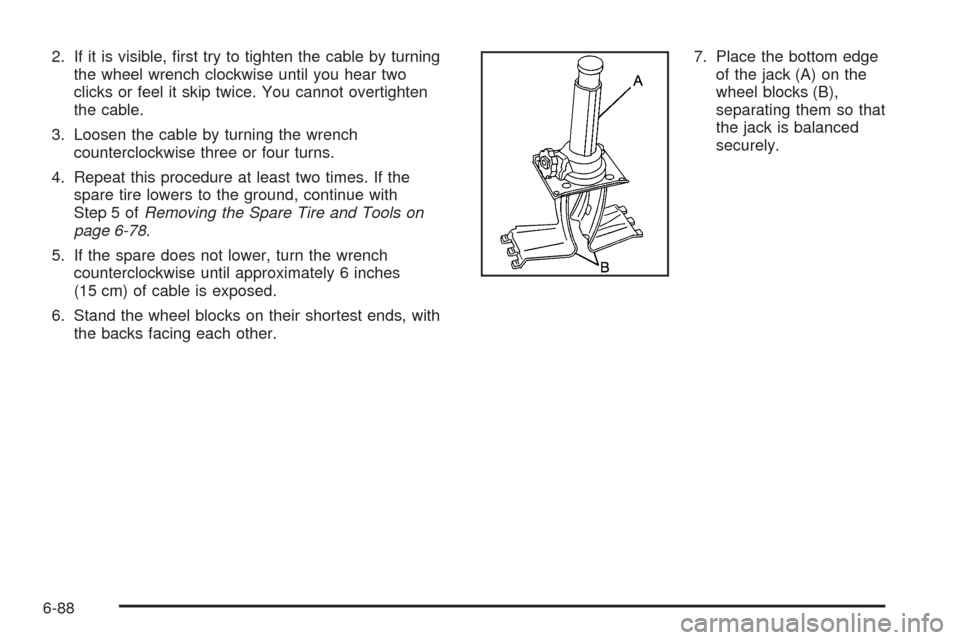
6. Stand the wheel blocks on their shortest ends, with
the backs facing each other.7. Place the bottom edge
of the jack (A) on the
wheel blocks (B),
separating them so that
the jack is balanced
securely.
6-88
Page 477 of 546
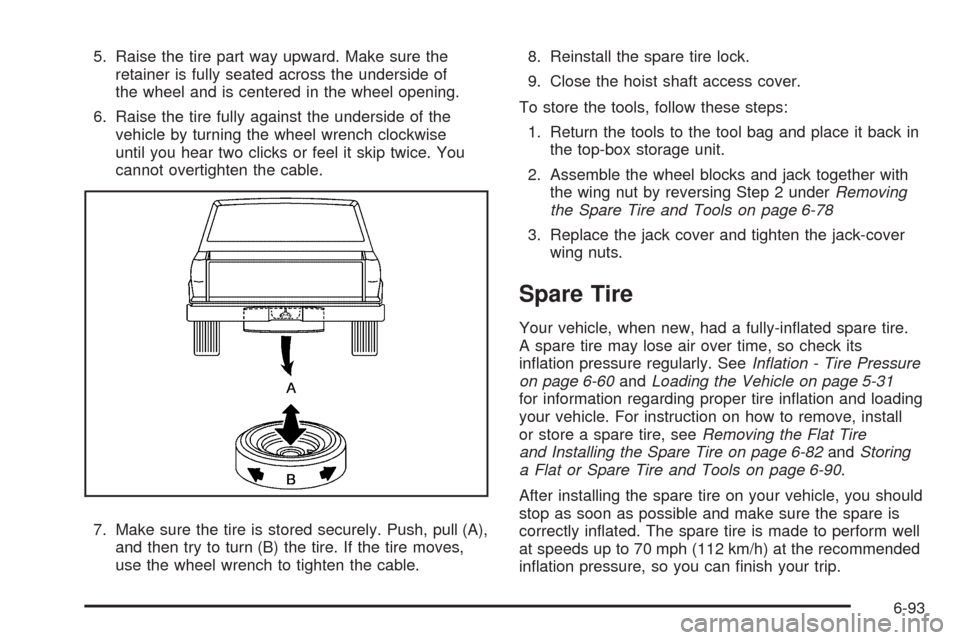
5. Raise the tire part way upward. Make sure the
retainer is fully seated across the underside of
the wheel and is centered in the wheel opening.
6. Raise the tire fully against the underside of the
vehicle by turning the wheel wrench clockwise
until you hear two clicks or feel it skip twice. You
cannot overtighten the cable.
7. Make sure the tire is stored securely. Push, pull (A),
and then try to turn (B) the tire. If the tire moves,
use the wheel wrench to tighten the cable.8. Reinstall the spare tire lock.
9. Close the hoist shaft access cover.
To store the tools, follow these steps:
1. Return the tools to the tool bag and place it back in
the top-box storage unit.
2. Assemble the wheel blocks and jack together with
the wing nut by reversing Step 2 underRemoving
the Spare Tire and Tools on page 6-78
3. Replace the jack cover and tighten the jack-cover
wing nuts.
Spare Tire
Your vehicle, when new, had a fully-inated spare tire.
A spare tire may lose air over time, so check its
ination pressure regularly. SeeInation - Tire Pressure
on page 6-60andLoading the Vehicle on page 5-31
for information regarding proper tire ination and loading
your vehicle. For instruction on how to remove, install
or store a spare tire, seeRemoving the Flat Tire
and Installing the Spare Tire on page 6-82andStoring
a Flat or Spare Tire and Tools on page 6-90.
After installing the spare tire on your vehicle, you should
stop as soon as possible and make sure the spare is
correctly inated. The spare tire is made to perform well
at speeds up to 70 mph (112 km/h) at the recommended
ination pressure, so you can nish your trip.
6-93