door lock CADILLAC ESCALADE EXT 2010 3.G Owners Manual
[x] Cancel search | Manufacturer: CADILLAC, Model Year: 2010, Model line: ESCALADE EXT, Model: CADILLAC ESCALADE EXT 2010 3.GPages: 580, PDF Size: 6.23 MB
Page 1 of 580

2010 Cadillac Escalade EXT Owner ManualM
In Brief. . . . . . . . . . . . . . . . . . . . . . . . . . . . . . . . . . . . . . . . . . . . 1-1
Instrument Panel . . . . . . . . . . . . . . . . . . . . . . . . . . . . . . . . . 1-2
Initial Drive Information . . . . . . . . . . . . . . . . . . . . . . . . . . . 1-4
Vehicle Features . . . . . . . . . . . . . . . . . . . . . . . . . . . . . . . . 1-17
Performance and Maintenance . . . . . . . . . . . . . . . . . . 1-23
Seats and Restraint System . . . . . . . . . . . . . . . . . . . . . . 2-1
Head Restraints . . . . . . . . . . . . . . . . . . . . . . . . . . . . . . . . . . 2-2
Front Seats . . . . . . . . . . . . . . . . . . . . . . . . . . . . . . . . . . . . . . . 2-3
Rear Seats . . . . . . . . . . . . . . . . . . . . . . . . . . . . . . . . . . . . . . . 2-9
Safety Belts . . . . . . . . . . . . . . . . . . . . . . . . . . . . . . . . . . . . . 2-10
Child Restraints . . . . . . . . . . . . . . . . . . . . . . . . . . . . . . . . . 2-30
Airbag System . . . . . . . . . . . . . . . . . . . . . . . . . . . . . . . . . . 2-51
Restraint System Check . . . . . . . . . . . . . . . . . . . . . . . . . 2-66
Features and Controls . . . . . . . . . . . . . . . . . . . . . . . . . . . . 3-1
Keys . . . . . . . . . . . . . . . . . . . . . . . . . . . . . . . . . . . . . . . . . . . . . 3-3
Doors and Locks . . . . . . . . . . . . . . . . . . . . . . . . . . . . . . . . . 3-9
Windows . . . . . . . . . . . . . . . . . . . . . . . . . . . . . . . . . . . . . . . . 3-22
Theft-Deterrent Systems . . . . . . . . . . . . . . . . . . . . . . . . 3-26
Starting and Operating Your Vehicle . . . . . . . . . . . . . 3-30 Mirrors . . . . . . . . . . . . . . . . . . . . . . . . . . . . . . . . . . . . . . . . . . 3-45
Object Detection Systems . . . . . . . . . . . . . . . . . . . . . . . 3-48
Universal Home Remote System . . . . . . . . . . . . . . . . 3-54
Storage Areas . . . . . . . . . . . . . . . . . . . . . . . . . . . . . . . . . . . 3-60
Sunroof . . . . . . . . . . . . . . . . . . . . . . . . . . . . . . . . . . . . . . . . . 3-77
Instrument Panel . . . . . . . . . . . . . . . . . . . . . . . . . . . . . . . . . 4-1
Instrument Panel Overview . . . . . . . . . . . . . . . . . . . . . . . 4-3
Climate Controls . . . . . . . . . . . . . . . . . . . . . . . . . . . . . . . . 4-20
Warning Lights, Gages, and Indicators . . . . . . . . . . 4-25
Driver Information Center (DIC) . . . . . . . . . . . . . . . . . 4-39
Audio System(s) . . . . . . . . . . . . . . . . . . . . . . . . . . . . . . . . 4-66
Navigation System . . . . . . . . . . . . . . . . . . . . . . . . . . . . . . . 5-1
Overview . . . . . . . . . . . . . . . . . . . . . . . . . . . . . . . . . . . . . . . . . 5-2
Features and Controls . . . . . . . . . . . . . . . . . . . . . . . . . . 5-12
Navigation Audio System . . . . . . . . . . . . . . . . . . . . . . . 5-59
Voice Recognition . . . . . . . . . . . . . . . . . . . . . . . . . . . . . . . 5-87
Driving Your Vehicle . . . . . . . . . . . . . . . . . . . . . . . . . . . . . . 6-1
Your Driving, the Road, and the Vehicle . . . . . . . . . . 6-2
Towing . . . . . . . . . . . . . . . . . . . . . . . . . . . . . . . . . . . . . . . . . . 6-39
Page 7 of 580
Section 1 In Brief
Instrument Panel. . . . . . . . . . . . . . . . . . . . . . . . . . . . . . . . . . . 1-2
Initial Drive Information . . . . . . . . . . . . . . . . . . . . . . . . . . . 1-4
Remote Keyless Entry (RKE) System . . . . . . . . . . . 1-4
Remote Vehicle Start . . . . . . . . . . . . . . . . . . . . . . . . . . . 1-5
Door Locks . . . . . . . . . . . . . . . . . . . . . . . . . . . . . . . . . . . . . 1-5
Midgate
®. . . . . . . . . . . . . . . . . . . . . . . . . . . . . . . . . . . . . . . . 1-6
Tailgate . . . . . . . . . . . . . . . . . . . . . . . . . . . . . . . . . . . . . . . . . 1-6
Windows . . . . . . . . . . . . . . . . . . . . . . . . . . . . . . . . . . . . . . . . 1-6
Seat Adjustment . . . . . . . . . . . . . . . . . . . . . . . . . . . . . . . . 1-7
Second Row Seats . . . . . . . . . . . . . . . . . . . . . . . . . . . . . 1-8
Heated Seats . . . . . . . . . . . . . . . . . . . . . . . . . . . . . . . . . . . 1-9
Head Restraint Adjustment . . . . . . . . . . . . . . . . . . . . . . 1-9
Safety Belt . . . . . . . . . . . . . . . . . . . . . . . . . . . . . . . . . . . . . 1-10
Sensing System for Passenger Airbag . . . . . . . . . 1-10
Mirror Adjustment . . . . . . . . . . . . . . . . . . . . . . . . . . . . . . 1-11
Steering Wheel Adjustment . . . . . . . . . . . . . . . . . . . . 1-12
Interior Lighting . . . . . . . . . . . . . . . . . . . . . . . . . . . . . . . . 1-13
Exterior Lighting . . . . . . . . . . . . . . . . . . . . . . . . . . . . . . . 1-14
Windshield Wiper/Washer . . . . . . . . . . . . . . . . . . . . . . 1-15
Climate Controls . . . . . . . . . . . . . . . . . . . . . . . . . . . . . . . 1-16
Transmission . . . . . . . . . . . . . . . . . . . . . . . . . . . . . . . . . . 1-16 Vehicle Features
. . . . . . . . . . . . . . . . . . . . . . . . . . . . . . . . . . 1-17
Satellite Radio . . . . . . . . . . . . . . . . . . . . . . . . . . . . . . . . . 1-17
Portable Audio Devices . . . . . . . . . . . . . . . . . . . . . . . . 1-17
Steering Wheel Controls . . . . . . . . . . . . . . . . . . . . . . . 1-18
Bluetooth
®. . . . . . . . . . . . . . . . . . . . . . . . . . . . . . . . . . . . . 1-19
Navigation System . . . . . . . . . . . . . . . . . . . . . . . . . . . . . 1-19
Driver Information Center (DIC) . . . . . . . . . . . . . . . . 1-19
Cruise Control . . . . . . . . . . . . . . . . . . . . . . . . . . . . . . . . . 1-21
Rear Vision Camera (RVC) . . . . . . . . . . . . . . . . . . . . 1-21
Ultrasonic Parking Assist . . . . . . . . . . . . . . . . . . . . . . 1-22
Power Outlets . . . . . . . . . . . . . . . . . . . . . . . . . . . . . . . . . 1-22
Universal Remote System . . . . . . . . . . . . . . . . . . . . . 1-22
Performance and Maintenance . . . . . . . . . . . . . . . . . .1-23
StabiliTrak
®. . . . . . . . . . . . . . . . . . . . . . . . . . . . . . . . . . . . 1-23
Tire Pressure Monitor . . . . . . . . . . . . . . . . . . . . . . . . . . 1-23
Engine Oil Life System . . . . . . . . . . . . . . . . . . . . . . . . 1-24
Fuel E85 (85% Ethanol) . . . . . . . . . . . . . . . . . . . . . . . 1-24
Driving for Better Fuel Economy . . . . . . . . . . . . . . . 1-24
Roadside Service . . . . . . . . . . . . . . . . . . . . . . . . . . . . . . 1-25
OnStar
®. . . . . . . . . . . . . . . . . . . . . . . . . . . . . . . . . . . . . . . 1-25
1-1
Page 10 of 580
Initial Drive Information
This section provides a brief overview about some of
the important features that may or may not be on your
specific vehicle.
For more detailed information, refer to each of the
features which can be found later in this owner manual.
Remote Keyless Entry (RKE) System
The RKE transmitter is used to remotely lock and
unlock the doors from up to 60 m (195 feet) away from
the vehicle.
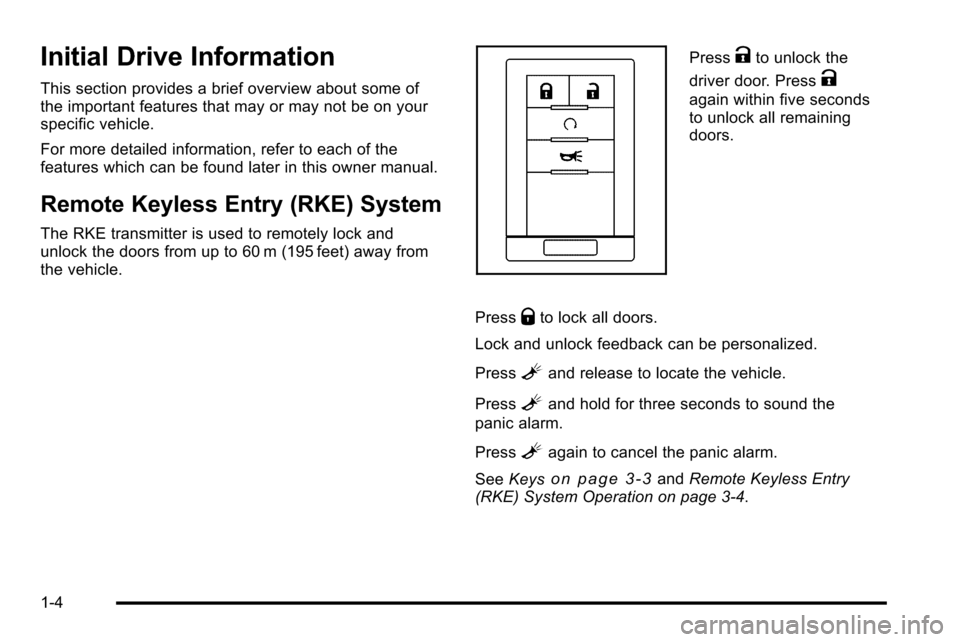
PressKto unlock the
driver door. Press
K
again within five seconds
to unlock all remaining
doors.
Press
Qto lock all doors.
Lock and unlock feedback can be personalized.
Press
Land release to locate the vehicle.
Press
Land hold for three seconds to sound the
panic alarm.
Press
Lagain to cancel the panic alarm.
See Keys
on page 3‑3andRemote Keyless Entry
(RKE) System Operation on page 3‑4.
1-4
Page 11 of 580
Remote Vehicle Start
With this feature the engine can be started from outside
of the vehicle.
Starting the Vehicle
1. Aim the RKE transmitter at the vehicle.
2. Press
Q.
3. Immediately after completing Step 2, press and hold
/until the turn signal lamps flash.
When the vehicle starts, the parking lamps will turn
on and remain on as long as the engine is running.
The doors will be locked and the climate control system
may come on.
The engine will continue to run for 10 minutes. Repeat
the steps for a 10-minute time extension. Remote start
can be extended only once.
Canceling a Remote Start
To cancel a remote start:
.Aim the RKE transmitter at the vehicle and press
and hold
/until the parking lamps turn off.
.Turn on the hazard warning flashers.
.Turn the ignition on and then back off.
See Remote Vehicle Start on page 3‑7.
Door Locks
There are several ways to lock and unlock the vehicle.
From outside, use the Remote Keyless Entry (RKE)
transmitter or the key in the driver door. From inside,
use the power door locks or the manual door locks.
To lock or unlock the door with the manual locks,
push down or pull up on the manual lock knob.
Power Door Locks
If available, these switches are located on the front
doors.
K:Press to unlock the doors.
Q:Remove the key from the ignition and press to lock
the doors.
For more information, see:
.Programmable Automatic Door Lockson
page 3‑10.
.Rear Door Security Locks on page 3‑10.
1-5
Page 12 of 580
Midgate®
This vehicle is equipped with a Midgate®and a
removable rear glass panel. The Midgate allows you to
extend the length of the vehicle's cargo area.
For more information see Midgate
®on page 3‑12.
Tailgate
Use the Remote Keyless Entry (RKE) transmitter or
power door lock switch to lock and unlock the tailgate.
Open the tailgate by lifting up on its handle while pulling
the tailgate toward you.
To close the tailgate, push it firmly upward until it
latches. Push and pull on the tailgate to be sure it is
latched securely.
Tailgate Removal
The tailgate is not to be removed. This may cause
damage to the electrical connector resulting in a loss of
lock/unlock and rear vision camera function.
SeeTailgate on page 3‑21.
Windows
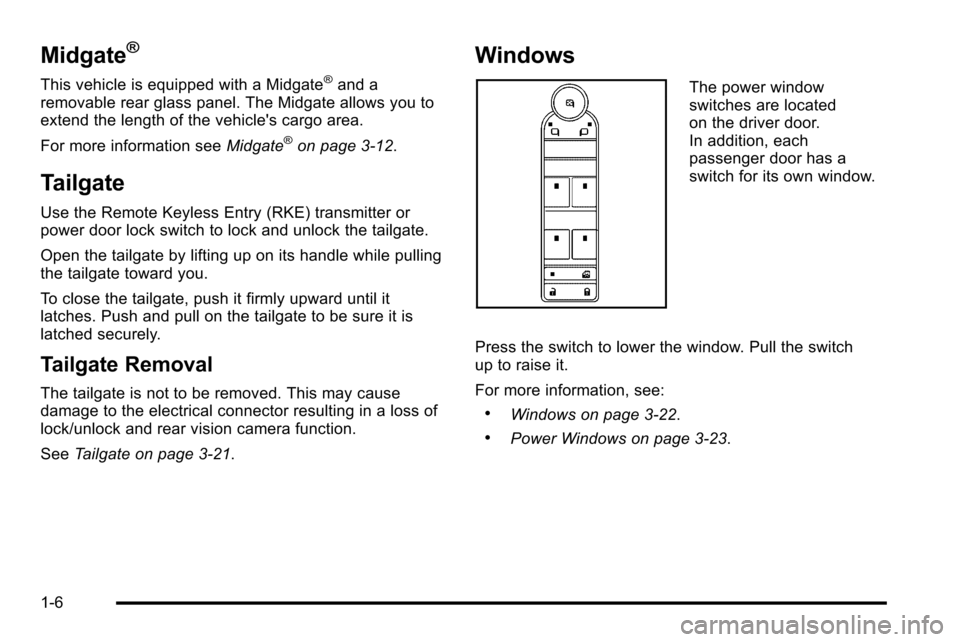
The power window
switches are located
on the driver door.
In addition, each
passenger door has a
switch for its own window.
Press the switch to lower the window. Pull the switch
up to raise it.
For more information, see:
.Windows on page 3‑22.
.Power Windows on page 3‑23.
1-6
Page 19 of 580
Interior Lighting
Dome Lamps
The dome lamps come on when any door is opened.
They turn off after all the doors are closed.
The dome lamps can also be turned on by turning the
instrument panel brightness knob, located on the
instrument panel to the left of the steering column,
clockwise to the farthest position. In this position, the
dome lamps remain on whether a door is opened or
closed.
k:The dome lamp override button is located next to
the exterior lamps control.
Press the button in and the dome lamps remain off
when a door is opened. Press the button again to return
it to the extended position so that the dome lamps come
on when a door is opened.
Reading Lamps
For vehicles with reading lamps in the overhead
console, press the button located next to the lamp to
turn it on or off.
The vehicle may also have reading lamps in other
locations. The lamps cannot be adjusted.
For more information about interior lamps, see:
.Dome Lamps on page 4‑17.
.Reading Lamps on page 4‑17.
.Instrument Panel Brightness on page 4‑16.
1-13
Page 26 of 580
T(Vehicle Information):Press this button to display
the oil life, units, tire pressure readings for vehicles with
the Tire Pressure Monitor System (TPMS), Remote
Keyless Entry (RKE) transmitter programming, compass
zone setting, and compass recalibration.
U(Customization): Press this button to customize the
feature settings on your vehicle. See DIC Vehicle
Customization
on page 4‑56for more information.
V(Set/Reset) : Press this button to set or reset certain
functions and to turn off or acknowledge messages on
the DIC.
For more information, see Driver Information Center
(DIC) on page 4‑39.
Vehicle Customization
Some vehicle features can be programmed by using the
DIC buttons next to the steering wheel. These features
include:
.Language
.Door Lock and Unlock Settings
.RKE Lock and Unlock Feedback
.Lighting
.Chime Volume
.Memory Features
.Remote Start
.Digital Speedometer Display
See DIC Vehicle Customization on page 4‑56.
1-20
Page 28 of 580
Ultrasonic Parking Assist
This feature uses sensors on the rear bumper to detect
objects while parking the vehicle. It operates at speeds
less than 8 km/h (5 mph). URPA uses audio beeps to
provide distance and system information.
Keep the sensors on the vehicle's rear bumper clean to
ensure proper operation.
The system can be disabled by pressing the rear park
aid disable button located next to the radio.
SeeUltrasonic Rear Parking Assist (URPA)
on
page 3‑48for more information.
Power Outlets
Accessory power outlets can be used to connect
auxiliary electrical equipment, such as a cellular
telephone.
One accessory power outlet is located inside the center
floor console. Lift up on the lower latch located at the
front of the console lid to access the accessory power
outlet.
There may also be an accessory power outlet located
on the rear of the center floor console above the
cupholder. The accessory power outlets are powered, even when
the ignition is in LOCK/OFF. Continuing to use power
outlets while the ignition is in LOCK/OFF may cause the
vehicle's battery to run down.
See
Accessory Power Outlet(s) on page 4‑18.
Universal Remote System
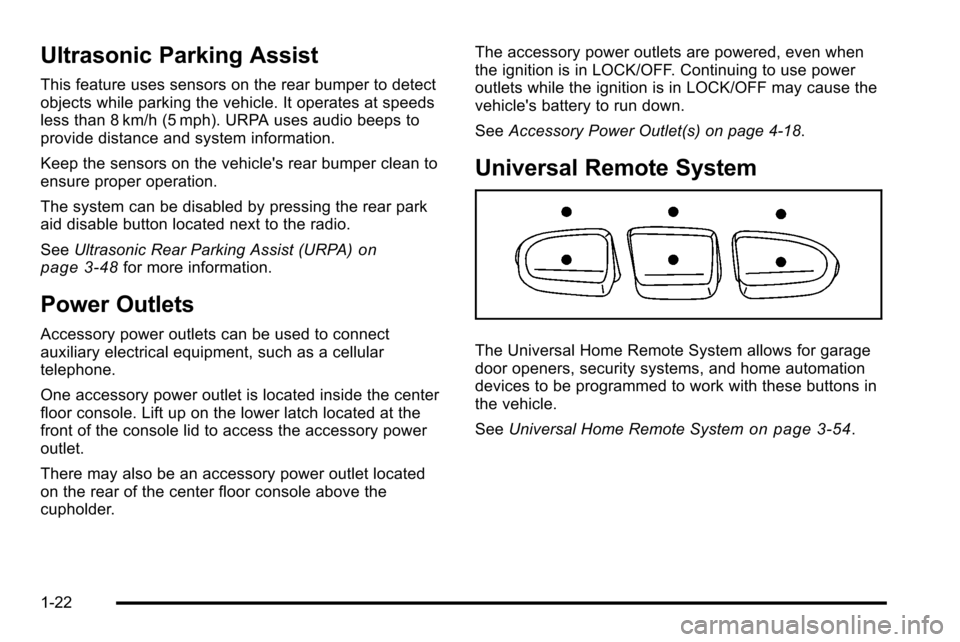
The Universal Home Remote System allows for garage
door openers, security systems, and home automation
devices to be programmed to work with these buttons in
the vehicle.
SeeUniversal Home Remote System
on page 3‑54.
1-22
Page 32 of 580
![CADILLAC ESCALADE EXT 2010 3.G Owners Manual How OnStar Service Works
Q
:This blue button connects you to a specially
trained OnStar advisor to verify your account
information and to answer questions.
]: Push this red emergency button to get pri](/img/23/7932/w960_7932-31.png "CADILLAC ESCALADE EXT 2010 3.G Owners Manual How OnStar Service Works
Q
:This blue button connects you to a specially
trained OnStar advisor to verify your account
information and to answer questions.
]: Push this red emergency button to get pri")
How OnStar Service Works
Q
:This blue button connects you to a specially
trained OnStar advisor to verify your account
information and to answer questions.
]: Push this red emergency button to get priority help
from specially trained OnStar emergency advisors.
X: Push this button for hands‐free, voice‐activated
calling and to give voice commands for turn‐by‐turn
navigation.
Crisis Assist, Stolen Vehicle Assistance, Vehicle
Diagnostics, Remote Door Unlock, Roadside
Assistance, Turn‐by‐Turn Navigation and Hands‐Free
Calling are available on most vehicles. Not all OnStar
services are available on all vehicles. For more
information see the OnStar Owner's Guide or visit
www.onstar.com (U.S.) or www.onstar.ca (Canada),
contact OnStar at 1-888-4-ONSTAR (1‐888‐466‐7827)
or TTY 1‐877‐248‐2080, or press
Qto speak with an
OnStar advisor 24 hours a day, 7 days a week.
For a full description of OnStar services and system
limitations, see the OnStar Owner's Guide in the
glove box.
OnStar service is subject to the OnStar terms and
conditions included in the OnStar Subscriber
Information. OnStar service cannot work unless the vehicle is in a
place where OnStar has an agreement with a wireless
service provider for service in that area. OnStar service
also cannot work unless the vehicle is in a place where
the wireless service provider OnStar has hired for that
area has coverage, network capacity and reception
when the service is needed, and technology that is
compatible with the OnStar service. Not all services are
available everywhere, particularly in remote or enclosed
areas, or at all times.
The OnStar system can record and transmit vehicle
information. This information is automatically sent to an
OnStar call center when
Qis pressed,]is pressed,
or if the airbags or ACR system deploy. This information
usually includes the vehicle's GPS location and, in the
event of a crash, additional information regarding the
crash that the vehicle was involved in (e.g. the direction
from which the vehicle was hit). When the virtual
advisor feature of OnStar hands-free calling is used, the
vehicle also sends OnStar the vehicle's GPS location
so they can provide services where it is located.
Location information about the vehicle is only available
if the GPS satellite signals are unobstructed and
available.
1-26
Page 40 of 580
Memory Features
Your vehicle has the memory package.
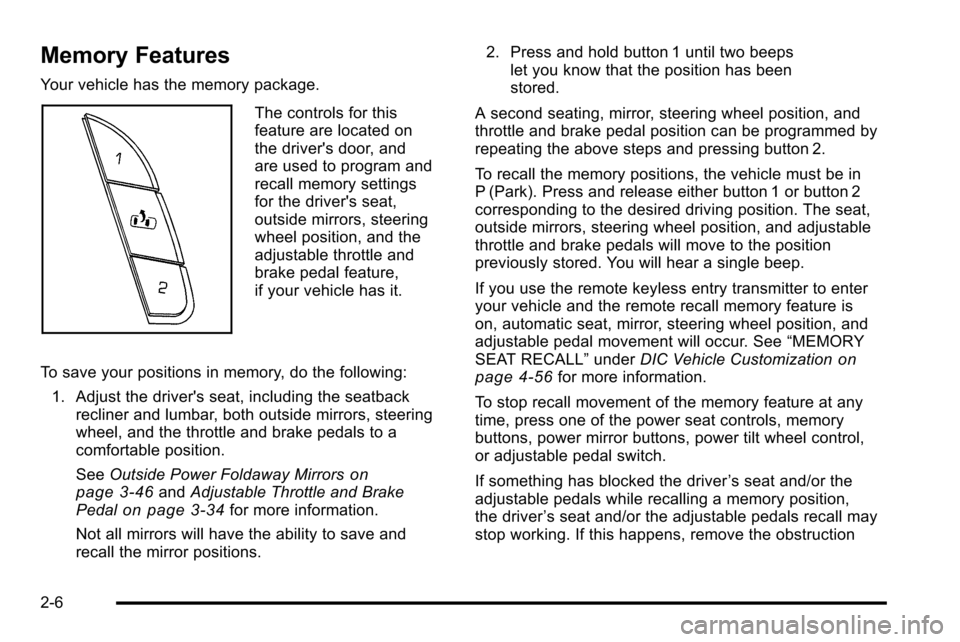
The controls for this
feature are located on
the driver's door, and
are used to program and
recall memory settings
for the driver's seat,
outside mirrors, steering
wheel position, and the
adjustable throttle and
brake pedal feature,
if your vehicle has it.
To save your positions in memory, do the following: 1. Adjust the driver's seat, including the seatback recliner and lumbar, both outside mirrors, steering
wheel, and the throttle and brake pedals to a
comfortable position.
See Outside Power Foldaway Mirrors
on
page 3‑46and Adjustable Throttle and Brake
Pedalon page 3‑34for more information.
Not all mirrors will have the ability to save and
recall the mirror positions. 2. Press and hold button 1 until two beeps
let you know that the position has been
stored.
A second seating, mirror, steering wheel position, and
throttle and brake pedal position can be programmed by
repeating the above steps and pressing button 2.
To recall the memory positions, the vehicle must be in
P (Park). Press and release either button 1 or button 2
corresponding to the desired driving position. The seat,
outside mirrors, steering wheel position, and adjustable
throttle and brake pedals will move to the position
previously stored. You will hear a single beep.
If you use the remote keyless entry transmitter to enter
your vehicle and the remote recall memory feature is
on, automatic seat, mirror, steering wheel position, and
adjustable pedal movement will occur. See “MEMORY
SEAT RECALL” underDIC Vehicle Customization
on
page 4‑56for more information.
To stop recall movement of the memory feature at any
time, press one of the power seat controls, memory
buttons, power mirror buttons, power tilt wheel control,
or adjustable pedal switch.
If something has blocked the driver ’s seat and/or the
adjustable pedals while recalling a memory position,
the driver ’s seat and/or the adjustable pedals recall may
stop working. If this happens, remove the obstruction
2-6