transmission CADILLAC ESCALADE EXT 2010 3.G Owners Manual
[x] Cancel search | Manufacturer: CADILLAC, Model Year: 2010, Model line: ESCALADE EXT, Model: CADILLAC ESCALADE EXT 2010 3.GPages: 580, PDF Size: 6.23 MB
Page 7 of 580
Section 1 In Brief
Instrument Panel. . . . . . . . . . . . . . . . . . . . . . . . . . . . . . . . . . . 1-2
Initial Drive Information . . . . . . . . . . . . . . . . . . . . . . . . . . . 1-4
Remote Keyless Entry (RKE) System . . . . . . . . . . . 1-4
Remote Vehicle Start . . . . . . . . . . . . . . . . . . . . . . . . . . . 1-5
Door Locks . . . . . . . . . . . . . . . . . . . . . . . . . . . . . . . . . . . . . 1-5
Midgate
®. . . . . . . . . . . . . . . . . . . . . . . . . . . . . . . . . . . . . . . . 1-6
Tailgate . . . . . . . . . . . . . . . . . . . . . . . . . . . . . . . . . . . . . . . . . 1-6
Windows . . . . . . . . . . . . . . . . . . . . . . . . . . . . . . . . . . . . . . . . 1-6
Seat Adjustment . . . . . . . . . . . . . . . . . . . . . . . . . . . . . . . . 1-7
Second Row Seats . . . . . . . . . . . . . . . . . . . . . . . . . . . . . 1-8
Heated Seats . . . . . . . . . . . . . . . . . . . . . . . . . . . . . . . . . . . 1-9
Head Restraint Adjustment . . . . . . . . . . . . . . . . . . . . . . 1-9
Safety Belt . . . . . . . . . . . . . . . . . . . . . . . . . . . . . . . . . . . . . 1-10
Sensing System for Passenger Airbag . . . . . . . . . 1-10
Mirror Adjustment . . . . . . . . . . . . . . . . . . . . . . . . . . . . . . 1-11
Steering Wheel Adjustment . . . . . . . . . . . . . . . . . . . . 1-12
Interior Lighting . . . . . . . . . . . . . . . . . . . . . . . . . . . . . . . . 1-13
Exterior Lighting . . . . . . . . . . . . . . . . . . . . . . . . . . . . . . . 1-14
Windshield Wiper/Washer . . . . . . . . . . . . . . . . . . . . . . 1-15
Climate Controls . . . . . . . . . . . . . . . . . . . . . . . . . . . . . . . 1-16
Transmission . . . . . . . . . . . . . . . . . . . . . . . . . . . . . . . . . . 1-16 Vehicle Features
. . . . . . . . . . . . . . . . . . . . . . . . . . . . . . . . . . 1-17
Satellite Radio . . . . . . . . . . . . . . . . . . . . . . . . . . . . . . . . . 1-17
Portable Audio Devices . . . . . . . . . . . . . . . . . . . . . . . . 1-17
Steering Wheel Controls . . . . . . . . . . . . . . . . . . . . . . . 1-18
Bluetooth
®. . . . . . . . . . . . . . . . . . . . . . . . . . . . . . . . . . . . . 1-19
Navigation System . . . . . . . . . . . . . . . . . . . . . . . . . . . . . 1-19
Driver Information Center (DIC) . . . . . . . . . . . . . . . . 1-19
Cruise Control . . . . . . . . . . . . . . . . . . . . . . . . . . . . . . . . . 1-21
Rear Vision Camera (RVC) . . . . . . . . . . . . . . . . . . . . 1-21
Ultrasonic Parking Assist . . . . . . . . . . . . . . . . . . . . . . 1-22
Power Outlets . . . . . . . . . . . . . . . . . . . . . . . . . . . . . . . . . 1-22
Universal Remote System . . . . . . . . . . . . . . . . . . . . . 1-22
Performance and Maintenance . . . . . . . . . . . . . . . . . .1-23
StabiliTrak
®. . . . . . . . . . . . . . . . . . . . . . . . . . . . . . . . . . . . 1-23
Tire Pressure Monitor . . . . . . . . . . . . . . . . . . . . . . . . . . 1-23
Engine Oil Life System . . . . . . . . . . . . . . . . . . . . . . . . 1-24
Fuel E85 (85% Ethanol) . . . . . . . . . . . . . . . . . . . . . . . 1-24
Driving for Better Fuel Economy . . . . . . . . . . . . . . . 1-24
Roadside Service . . . . . . . . . . . . . . . . . . . . . . . . . . . . . . 1-25
OnStar
®. . . . . . . . . . . . . . . . . . . . . . . . . . . . . . . . . . . . . . . 1-25
1-1
Page 9 of 580

A.Outlet Adjustment on page 4‑24.
B. Turn Signal/Multifunction Lever on page 4‑4.
C. Hazard Warning Flashers on page 4‑3.
D. Instrument Panel Cluster on page 4‑26.
E. Shift Lever/Tow/Haul Selector Button. See Automatic Transmission Operation
on page 3‑35and Tow/Haul Mode on page 3‑39.
F. Analog Clock on page 4‑20.
G. Audio System(s)
on page 4‑66.Navigation Audio
Systemon page 5‑59(If Equipped).
H. Exterior Lamps on page 4‑10.
I. Dome Lamp Override on page 4‑17.
J. Cruise Control on page 4‑7.
K. Tilt Wheel on page 4‑3.
L. Horn on page 4‑3. M.
Audio Steering Wheel Controls on page 4‑88.
N. Driver Information Center (DIC) Buttons. See Driver Information Center (DIC) on page 4‑39.
O. Pedal Adjust Button. See Adjustable Throttle and
Brake Pedal
on page 3‑34. Heated Windshield
Washer Fluid Button (If Equipped). See Windshield
Washer
on page 4‑6. Power Running Boards
Disable Button (If Equipped). See Power Assist
Steps on page 3‑21.
P. Dual Automatic Climate Control System
on
page 4‑20. Heated and Cooled Seatson
page 2‑5(If Equipped).
Q. StabiliTrak®Systemon page 6‑6.Ultrasonic
Rear Parking Assist (URPA) on page 3‑48.
R. Glove Box on page 3‑60.
1-3
Page 22 of 580
Climate Controls
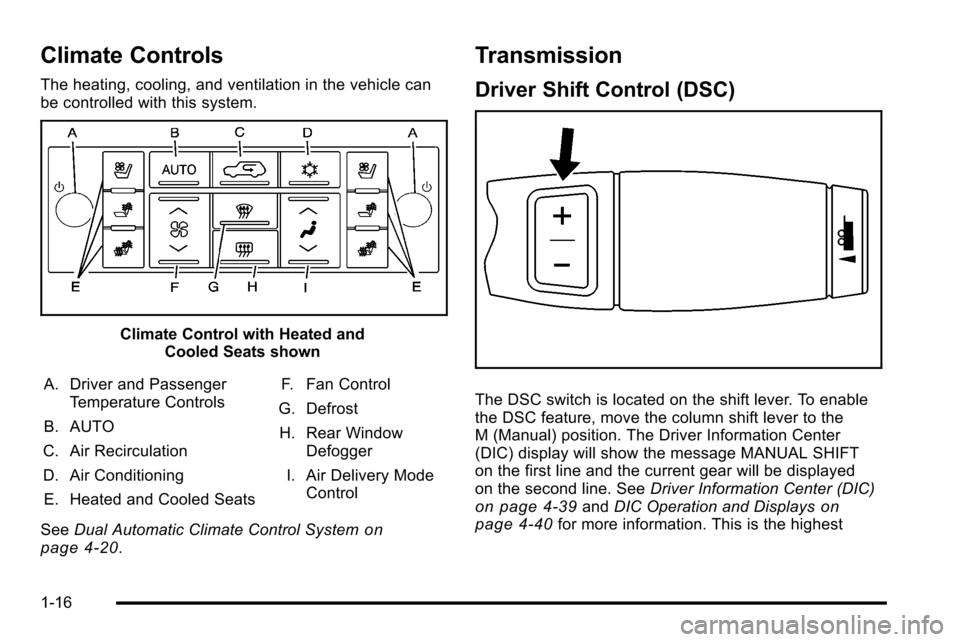
The heating, cooling, and ventilation in the vehicle can
be controlled with this system.
Climate Control with Heated andCooled Seats shown
A. Driver and Passenger Temperature Controls
B. AUTO
C. Air Recirculation
D. Air Conditioning E. Heated and Cooled Seats F. Fan Control
G. Defrost H. Rear Window Defogger
I. Air Delivery Mode Control
See Dual Automatic Climate Control System
on
page 4‑20.
Transmission
Driver Shift Control (DSC)
The DSC switch is located on the shift lever. To enable
the DSC feature, move the column shift lever to the
M (Manual) position. The Driver Information Center
(DIC) display will show the message MANUAL SHIFT
on the first line and the current gear will be displayed
on the second line. See Driver Information Center (DIC)
on page 4‑39andDIC Operation and Displayson
page 4‑40for more information. This is the highest
1-16
Page 23 of 580
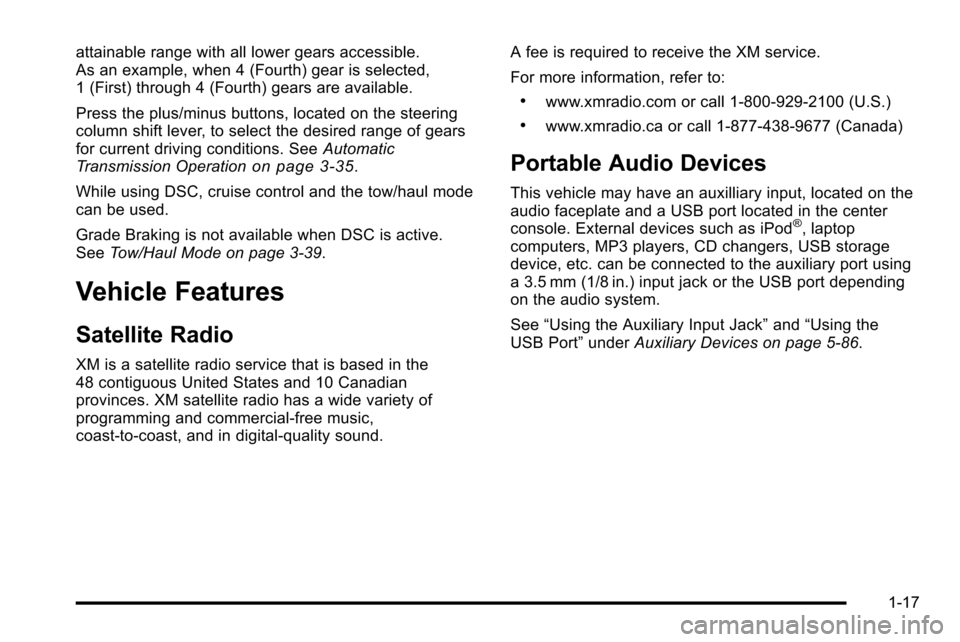
attainable range with all lower gears accessible.
As an example, when 4 (Fourth) gear is selected,
1 (First) through 4 (Fourth) gears are available.
Press the plus/minus buttons, located on the steering
column shift lever, to select the desired range of gears
for current driving conditions. SeeAutomatic
Transmission Operation
on page 3‑35.
While using DSC, cruise control and the tow/haul mode
can be used.
Grade Braking is not available when DSC is active.
See Tow/Haul Mode on page 3‑39.
Vehicle Features
Satellite Radio
XM is a satellite radio service that is based in the
48 contiguous United States and 10 Canadian
provinces. XM satellite radio has a wide variety of
programming and commercial-free music,
coast-to-coast, and in digital-quality sound. A fee is required to receive the XM service.
For more information, refer to:
.www.xmradio.com or call 1-800-929-2100 (U.S.)
.www.xmradio.ca or call 1-877-438-9677 (Canada)
Portable Audio Devices
This vehicle may have an auxilliary input, located on the
audio faceplate and a USB port located in the center
console. External devices such as iPod
®, laptop
computers, MP3 players, CD changers, USB storage
device, etc. can be connected to the auxiliary port using
a 3.5 mm (1/8 in.) input jack or the USB port depending
on the audio system.
See “Using the Auxiliary Input Jack” and“Using the
USB Port” underAuxiliary Devices on page 5‑86.
1-17
Page 25 of 580
Bluetooth®
For vehicles with an in-vehicle Bluetooth system, it
allows users with a Bluetooth enabled cell phone to
make and receive hands-free calls using the vehicle’s
audio system and controls.
The Bluetooth enabled cell phone must be paired with
the in-vehicle Bluetooth system before it can be used in
the vehicle. Not all phones will support all functions.
For more information visit www.gm.com/bluetooth.
For more information, seeBluetooth
®on page 4‑66.
Navigation System
The vehicle's navigation system provides detailed maps
of most major freeways and roads throughout the
United States and Canada. After a destination has been
set, the system provides turn-by-turn instructions for
reaching the destination. In addition, the system can
help locate a variety of points of interest (POI), such as
banks, airports, restaurants, and more.
See Navigation System in the owner's manual for more
information.
Driver Information Center (DIC)
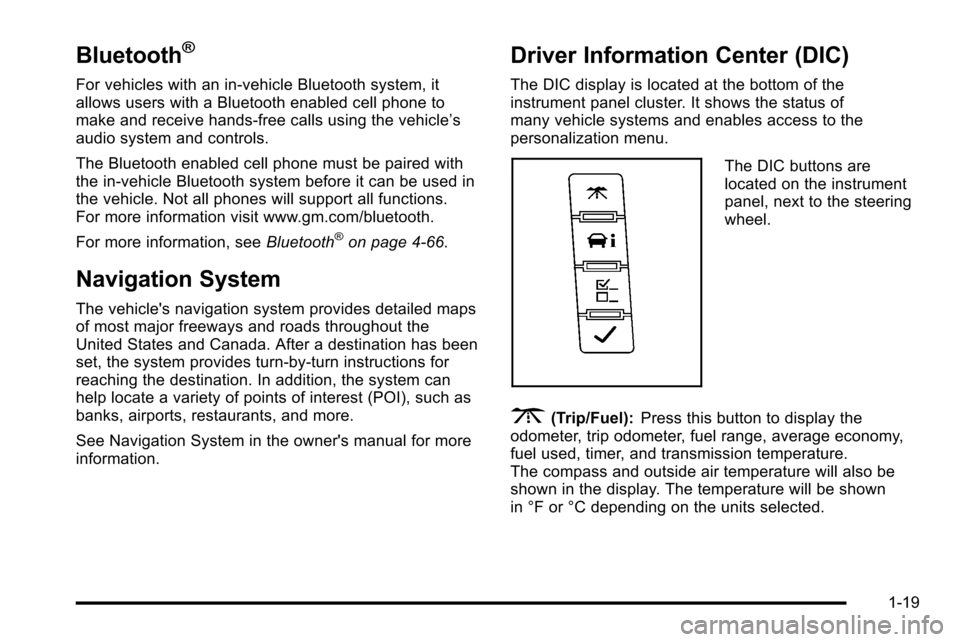
The DIC display is located at the bottom of the
instrument panel cluster. It shows the status of
many vehicle systems and enables access to the
personalization menu.
The DIC buttons are
located on the instrument
panel, next to the steering
wheel.
3(Trip/Fuel):Press this button to display the
odometer, trip odometer, fuel range, average economy,
fuel used, timer, and transmission temperature.
The compass and outside air temperature will also be
shown in the display. The temperature will be shown
in °F or °C depending on the units selected.
1-19
Page 103 of 580
Section 3 Features and Controls
Keys. . . . . . . . . . . . . . . . . . . . . . . . . . . . . . . . . . . . . . . . . . . . . . . . 3-3
Remote Keyless Entry (RKE) System . . . . . . . . . . . 3-4
Remote Keyless Entry (RKE) System Operation . . . . . . . . . . . . . . . . . . . . . . . . . . . . . . . . . . . . . 3-4
Remote Vehicle Start . . . . . . . . . . . . . . . . . . . . . . . . . . . 3-7
Doors and Locks . . . . . . . . . . . . . . . . . . . . . . . . . . . . . . . . . . 3-9
Door Locks . . . . . . . . . . . . . . . . . . . . . . . . . . . . . . . . . . . . . 3-9
Power Door Locks . . . . . . . . . . . . . . . . . . . . . . . . . . . . . 3-10
Delayed Locking . . . . . . . . . . . . . . . . . . . . . . . . . . . . . . . 3-10
Programmable Automatic Door Locks . . . . . . . . . . 3-10
Rear Door Security Locks . . . . . . . . . . . . . . . . . . . . . 3-10
Lockout Protection . . . . . . . . . . . . . . . . . . . . . . . . . . . . . 3-11
Midgate
®. . . . . . . . . . . . . . . . . . . . . . . . . . . . . . . . . . . . . . 3-12
Tailgate . . . . . . . . . . . . . . . . . . . . . . . . . . . . . . . . . . . . . . . . 3-21
Power Assist Steps . . . . . . . . . . . . . . . . . . . . . . . . . . . . 3-21
Windows . . . . . . . . . . . . . . . . . . . . . . . . . . . . . . . . . . . . . . . . . . 3-22
Power Windows . . . . . . . . . . . . . . . . . . . . . . . . . . . . . . . 3-23
Sun Visors . . . . . . . . . . . . . . . . . . . . . . . . . . . . . . . . . . . . . 3-25
Theft-Deterrent Systems . . . . . . . . . . . . . . . . . . . . . . . . .3-26
Content Theft-Deterrent . . . . . . . . . . . . . . . . . . . . . . . . 3-26
PASS-Key
®III+ Electronic Immobilizer . . . . . . . . . 3-28
PASS-Key®III+ Electronic Immobilizer
Operation . . . . . . . . . . . . . . . . . . . . . . . . . . . . . . . . . . . . 3-28 Starting and Operating Your Vehicle
. . . . . . . . . . . .3-30
New Vehicle Break-In . . . . . . . . . . . . . . . . . . . . . . . . . . 3-30
Ignition Positions . . . . . . . . . . . . . . . . . . . . . . . . . . . . . . 3-31
Retained Accessory Power (RAP) . . . . . . . . . . . . . 3-32
Starting the Engine . . . . . . . . . . . . . . . . . . . . . . . . . . . . 3-32
Adjustable Throttle and Brake Pedal . . . . . . . . . . . 3-34
Engine Coolant Heater . . . . . . . . . . . . . . . . . . . . . . . . . 3-34
Active Fuel Management™ . . . . . . . . . . . . . . . . . . . . 3-35
Automatic Transmission Operation . . . . . . . . . . . . . 3-35
Tow/Haul Mode . . . . . . . . . . . . . . . . . . . . . . . . . . . . . . . . 3-39
Parking Brake . . . . . . . . . . . . . . . . . . . . . . . . . . . . . . . . . 3-40
Shifting Into Park . . . . . . . . . . . . . . . . . . . . . . . . . . . . . . 3-41
Shifting Out of Park . . . . . . . . . . . . . . . . . . . . . . . . . . . . 3-43
Parking Over Things That Burn . . . . . . . . . . . . . . . . 3-43
Engine Exhaust . . . . . . . . . . . . . . . . . . . . . . . . . . . . . . . . 3-44
Running the Vehicle While Parked . . . . . . . . . . . . . 3-44
Mirrors . . . . . . . . . . . . . . . . . . . . . . . . . . . . . . . . . . . . . . . . . . . . 3-45
Manual Rearview Mirror . . . . . . . . . . . . . . . . . . . . . . . . 3-45
Automatic Dimming Rearview Mirror . . . . . . . . . . . 3-45
Outside Power Foldaway Mirrors . . . . . . . . . . . . . . 3-46
Park Tilt Mirrors . . . . . . . . . . . . . . . . . . . . . . . . . . . . . . . . 3-47
Outside Convex Mirror . . . . . . . . . . . . . . . . . . . . . . . . . 3-47
Outside Heated Mirrors . . . . . . . . . . . . . . . . . . . . . . . . 3-47
3-1
Page 133 of 580

Ignition Positions
The ignition switch has
four different positions.
To shift out of P (Park), the ignition must be in ON/RUN
or ACC/ACCESSORY and the regular brake pedal must
be applied.
A (LOCK/OFF) : This position locks the ignition.
It may also lock the steering wheel and automatic
transmission. The key can be removed in LOCK/OFF.
On vehicles with an automatic transmission, the shift
lever must be in P (Park) to turn the ignition switch to
LOCK/OFF. The steering may bind with the wheels turned off center.
If this happens, move the steering wheel from right to
left while turning the key to ACC/ACCESSORY. If this
doesn't work, then the vehicle needs service.
Notice:
Using a tool to force the key to turn in the
ignition could cause damage to the switch or break
the key. Use the correct key, make sure it is all the
way in, and turn it only with your hand. If the key
cannot be turned by hand, see your dealer/retailer.
B (ACC/ACCESSORY) : This position lets things like
the radio and the windshield wipers operate while the
engine is off. Use this position if the vehicle must be
pushed or towed.
C (ON/RUN) : This position can be used to operate the
electrical accessories and to display some instrument
panel cluster warning and indicator lights. The switch
stays in this position when the engine is running. The
transmission is also unlocked in this position on
automatic transmission vehicles.
If you leave the key in the ACC/ACCESSORY or
ON/RUN position with the engine off, the battery could
be drained. You may not be able to start the vehicle if
the battery is allowed to drain for an extended period
of time.
3-31
Page 134 of 580
D (START) :This is the position that starts the engine.
When the engine starts, release the key. The ignition
switch returns to ON/RUN for driving.
A warning tone will sound when the driver door is
opened, the ignition is in ACC/ACCESSORY or
LOCK/OFF and the key is in the ignition.
Retained Accessory Power (RAP)
The following vehicle accessories can be used for up to
10 minutes after the engine is turned off:
.Audio System
.Power Windows
.OnStar®System (if equipped)
.Sunroof (if equipped)
These features work when the key is in ON/RUN or
ACC/ACCESSORY. Once the key is turned from
ON/RUN to LOCK/OFF, the windows and sunroof
continue to work up to 10 minutes until any door is
opened. The radio continues to work for up to
10 minutes or until the driver door is opened.
Starting the Engine
Move the shift lever to P (Park) or N (Neutral). The
engine will not start in any other position. To restart
the engine when the vehicle is already moving, use
N (Neutral) only.
Notice: Do not try to shift to P (Park) if the vehicle
is moving. If you do, you could damage the
transmission. Shift to P (Park) only when the vehicle
is stopped.
Starting Procedure
1. With your foot off the accelerator pedal, turn the ignition to START. When the engine starts, let
go of the key. The idle speed will slow down
as the engine warms. Do not race the engine
immediately after starting it. Operate the engine
and transmission gently to allow the oil to warm
up and lubricate all moving parts.
3-32
Page 135 of 580
The vehicle has a Computer-Controlled Cranking
System. This feature assists in starting the engine
and protects components. If the ignition key is
turned to the START position, and then released
when the engine begins cranking, the engine will
continue cranking for a few seconds or until the
vehicle starts. If the engine does not start and the
key is held in START, cranking will be stopped
after 15 seconds to prevent cranking motor
damage. To prevent gear damage, this system also
prevents cranking if the engine is already running.
Engine cranking can be stopped by turning the
ignition switch to the ACC/ACCESSORY or
LOCK/OFF position.
Notice: Cranking the engine for long periods of
time, by returning the key to the START position
immediately after cranking has ended, can overheat
and damage the cranking motor, and drain the
battery. Wait at least 15 seconds between each try,
to let the cranking motor cool down. 2. If the engine does not start after 5‐10 seconds,
especially in very cold weather (below 0°F or
−18°C), it could be flooded with too much
gasoline. Try pushing the accelerator pedal all
the way to the floor and holding it there as you
hold the key in START for up to a maximum of
15 seconds. Wait at least 15 seconds between
each try, to allow the cranking motor to cool down.
When the engine starts, let go of the key and
accelerator. If the vehicle starts briefly but then
stops again, repeat these steps. This clears the
extra gasoline from the engine. Do not race the
engine immediately after starting it. Operate the
engine and transmission gently until the oil warms
up and lubricates all moving parts.
Notice: The engine is designed to work with the
electronics in the vehicle. If you add electrical
parts or accessories, you could change the way
the engine operates. Before adding electrical
equipment, check with your dealer/retailer. If you
do not, the engine might not perform properly.
Any resulting damage would not be covered by the
vehicle warranty.
3-33
Page 137 of 580

WARNING: (Continued)
You could be seriously injured. Plug the cord into
a properly grounded three-prong 110-volt AC
outlet. If the cord will not reach, use a heavy-duty
three-prong extension cord rated for at least
15 amps.
4. Before starting the engine, be sure to unplug and store the cord as it was before to keep it away from
moving engine parts. If you do not, it could be
damaged.
The length of time the heater should remain plugged in
depends on several factors. Ask a dealer/retailer in the
area where you will be parking the vehicle for the best
advice on this.
Active Fuel Management™
Vehicles with V8 engines may have Active Fuel
Management™. This system allows the engine to
operate on either all or half of its cylinders, depending
on the driving conditions.
When less power is required, such as cruising at a
constant vehicle speed, the system will operate in the
half cylinder mode, allowing the vehicle to achieve
better fuel economy. When greater power demands are required, such as accelerating from a stop, passing,
or merging onto a freeway, the system will maintain
full-cylinder operation.
If the vehicle has an Active Fuel Management™
indicator, see
DIC Operation and Displays
on
page 4‑40for more information on using this display .
Automatic Transmission Operation
The vehicle has a Hydra-Matic®6L80 automatic
transmission, and has an electronic shift position
indicator within the instrument panel cluster. The
electronic shift position indicator displays when the
shift lever is moved out of P (Park).
There are several different positions for the shift lever.
P (Park) : This position locks the rear wheels. It is the
best position to use when you start the engine because
the vehicle cannot move easily.
3-35