ESP CADILLAC ESCALADE EXT 2011 3.G User Guide
[x] Cancel search | Manufacturer: CADILLAC, Model Year: 2011, Model line: ESCALADE EXT, Model: CADILLAC ESCALADE EXT 2011 3.GPages: 508, PDF Size: 7.6 MB
Page 199 of 508
Black plate (9,1)Cadillac Escalade EXT Owner Manual - 2011
Infotainment System 7-9
Guidance Volume
Adjust the volume of voice guidance
prompts:
1. Press the CONFIG controlbutton to enter the menu
options, then press CONFIG
again, repeatedly until Nav is
selected or press the Nav
screen button.
2. Press Voice Prompt.
3. Press + or –screen buttons to
increase or to decrease the
volume of the voice prompts.
The system responds with the
adjusted voice level.
See “Voice Prompt ”under
Configure Menu on page 7‑64 for
more information.
Cleaning the Display Screen
Use a soft clean cotton cloth
dampened with clean water.
Radio
AM-FM Radio
Notice: Before adding any
sound equipment to the vehicle,
such as an audio system, CD
player, CB radio, mobile
telephone, or two-way radio,
make sure that it can be added
by checking with your dealer.
Also, check federal rules
covering mobile radio and
telephone units. If sound
equipment can be added, it is
very important to do it properly.
Added sound equipment can
interfere with the operation of the
vehicle's engine, radio, or other
systems, and even damage
them. The vehicle's systems can
interfere with the operation of
sound equipment that has been
added. Notice:
The chime signals related
to safety belts, parking brake, and
other functions of the vehicle
operate through the navigation
system. If that equipment is
replaced or additional equipment
is added to the vehicle, the
chimes may not work. Make sure
that replacement or additional
equipment is compatible with the
vehicle before installing it. See
“Accessories and Modifications”
in the vehicle's owner manual.
Playing the Radio
O/n(Power/Volume):
1. Press to turn the audio system on and off.
2. Turn to increase or to decrease the volume.
Page 206 of 508
Black plate (16,1)Cadillac Escalade EXT Owner Manual - 2011
7-16 Infotainment System
XM Theftlocked:The XM™
receiver may have previously been
in another vehicle. For security
purposes, XM™ receivers cannot be
swapped between vehicles. If this
message is received after having
your vehicle serviced, check with
your dealer.
XM Radio ID: If tuned to channel 0,
this message will alternate with the
XM™ Radio eight digit radio ID
label. This label is needed to
activate the service.
Unknown: If this message is
received when tuned to channel 0,
there may be a receiver fault.
Consult with your dealer.
Check XM Receiver: If this
message does not clear within a
short period of time, the receiver
may have a fault. Consult with your
dealer.
No Subscription Please Renew:
The XM subscription needs to
be reactivated. Contact XM at
www.xmradio.com or call
1-800-929-2100.Radio Reception
Frequency interference and static
can occur during normal radio
reception if items such as cell phone
chargers, vehicle convenience
accessories, and external electronic
devices are plugged into the
accessory power outlet. If there is
interference or static, unplug the
item from the accessory power
outlet.
AM
The range for most AM stations is
greater than for FM, especially at
night. The longer range can cause
station frequencies to interfere
with each other. For better radio
reception, most AM radio stations
boost the power levels during the
day, and then reduce these levels
during the night. Static can also
occur when things like storms and
power lines interfere with radio
reception. When this happens, try
reducing the treble on the radio.
FM Stereo
FM signals only reach
about 16 to 65 km (10 to 40 miles).
Although the radio has a built-in
electronic circuit that automatically
works to reduce interference, some
static can occur, especially around
tall buildings or hills, causing the
sound to fade in and out.
XM™ Satellite Radio Service
XM Satellite Radio Service gives
digital radio reception from coast to
coast in the 48 contiguous United
States, and in Canada. Just as
with FM, tall buildings or hills can
interfere with satellite radio signals,
causing the sound to fade in and
out. In addition, traveling or standing
under heavy foliage, bridges,
garages, or tunnels may cause loss
of the XM signal for a period of time.
Page 212 of 508
Black plate (22,1)Cadillac Escalade EXT Owner Manual - 2011
7-22 Infotainment System
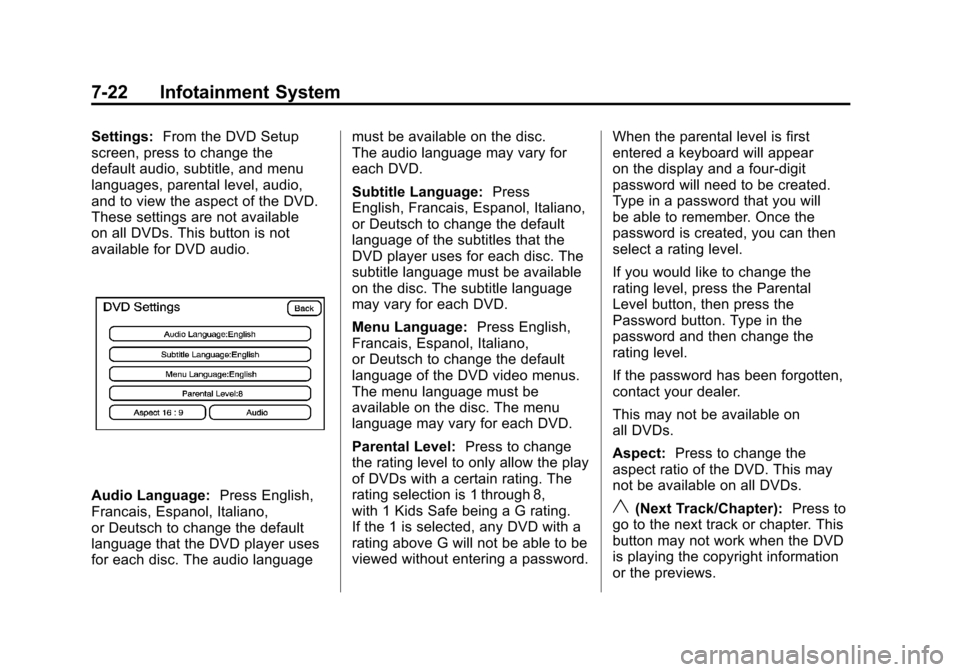
Settings:From the DVD Setup
screen, press to change the
default audio, subtitle, and menu
languages, parental level, audio,
and to view the aspect of the DVD.
These settings are not available
on all DVDs. This button is not
available for DVD audio.
Audio Language: Press English,
Francais, Espanol, Italiano,
or Deutsch to change the default
language that the DVD player uses
for each disc. The audio language must be available on the disc.
The audio language may vary for
each DVD.
Subtitle Language:
Press
English, Francais, Espanol, Italiano,
or Deutsch to change the default
language of the subtitles that the
DVD player uses for each disc. The
subtitle language must be available
on the disc. The subtitle language
may vary for each DVD.
Menu Language: Press English,
Francais, Espanol, Italiano,
or Deutsch to change the default
language of the DVD video menus.
The menu language must be
available on the disc. The menu
language may vary for each DVD.
Parental Level: Press to change
the rating level to only allow the play
of DVDs with a certain rating. The
rating selection is 1 through 8,
with 1 Kids Safe being a G rating.
If the 1 is selected, any DVD with a
rating above G will not be able to be
viewed without entering a password. When the parental level is first
entered a keyboard will appear
on the display and a four-digit
password will need to be created.
Type in a password that you will
be able to remember. Once the
password is created, you can then
select a rating level.
If you would like to change the
rating level, press the Parental
Level button, then press the
Password button. Type in the
password and then change the
rating level.
If the password has been forgotten,
contact your dealer.
This may not be available on
all DVDs.
Aspect:
Press to change the
aspect ratio of the DVD. This may
not be available on all DVDs.y(Next Track/Chapter): Press to
go to the next track or chapter. This
button may not work when the DVD
is playing the copyright information
or the previews.
Page 255 of 508

Black plate (65,1)Cadillac Escalade EXT Owner Manual - 2011
Infotainment System 7-65
Sound
Press the CONFIG control button
to enter the configure menu
options, then press CONFIG again,
repeatedly until Sound is selected or
press the Sound screen button to
make speaker and DSP (Digital
Signal Processing) adjustments.
See“Sound Menu” under,Using the
Navigation System on page 7‑42 for
more information.
Radio
Press the CONFIG control button to
enter the configure menu options,
then press CONFIG again,
repeatedly until Radio is selected or
press the Radio screen button to
make changes for radio information
displayed, preset pages, XM™
(if equipped) categories, and Bose
®
AudioPilot®. See “Radio Menu”
under, Using the Navigation System
on page 7‑42 for more information.
Nav (Navigation)
Press the CONFIG control button to
enter the configure menu options,
then press CONFIG again,
repeatedly until Nav is selected or
press the Nav screen button.
Voice Prompt
Voice Prompt: Press the Voice
Prompt screen button to change the
volume of the voice prompts or to
turn voice guidance on and off. Volume:
Press + (plus) or −(minus)
to increase or to decrease the
volume of the voice prompts. The
system will respond with the
adjusted voice level.
Voice Guidance: Press On or Off
to turn voice instructions on and off
while traveling on a planned route.
Route Preference
Press the Route Preference screen
button to change route options
when the system calculates a route.
Allow Major Roads: This feature
allows the system to use major
roads when calculating a planned
route.
Allow toll road: This feature allows
the system to use toll roads when
calculating a planned route.
Allow ferry: This feature allows
the system to use ferries when
calculating a planned route.
Page 257 of 508
Black plate (67,1)Cadillac Escalade EXT Owner Manual - 2011
Infotainment System 7-67
To change the map icon of an
address book entry:
1. Select the CONFIG controlbutton.
2. Select the Nav screen button.
3. Select Edit/View Address Book.
4. Select the address book entry to change.
5. Select the Icon screen button.
6. Select an icon from the list.
To add a voice tag to an address
book entry:
1. Select the CONFIG control button.
2. Select the Nav screen button.
3. Select Edit/View Address Book. 4. Select Add Voice Tag.
5. The system will ask for you to
state the name. You will have
four seconds to state the name.
The system will respond back
with the name and prompt
you to repeat the name for
confirmation.
To delete an address book entry:
1. Select the CONFIG control button.
2. Select the Nav screen button.
3. Select Edit/View Address Book.
4. Select the address book entry to delete. 5. Press Delete to delete the
address book entry.
6. A confirmation pop-up will display. Select OK to delete;
select Cancel to cancel the
operation.
To delete the entire address book:
1. Select the CONFIG control button.
2. Select the Nav screen button.
3. Select Edit/View Address Book.
4. A list of all the address book entries will display. Press and
hold Clear All.
5. A confirmation pop-up will display. Select OK to delete;
select Cancel to cancel the
operation.
Page 271 of 508

Black plate (81,1)Cadillac Escalade EXT Owner Manual - 2011
Infotainment System 7-81
.If you experience difficulty
with the system recognizing
a command, try saying it
more softly, and wait for a
few seconds after the beep,
or repeat the command.
.Background noise may cause
voice commands to be
misunderstood, including
airflow noise from wind.
.To use the voice recognition
system, the map DVD must be
loaded and the navigation
system must be on.
This system is able to recognize
commands in three different
languages. The system only
recognizes commands based on
the language selected from the
Driver Information Center (DIC).
See Driver Information Center (DIC)
on page 5‑23 for more information.
Voice Recognition Commands
The following list shows all of the
voice commands available for the
navigation system with a brief
description of each. The commands
are listed with the optional words
in brackets. To use the voice
commands, refer to the instructions
listed previously.
Voice Tag Commands
The following are voice tag
commands that can be accessed
by clearly stating the commands
exactly as they are written. There
are up to 40 voice tag entries for
destinations.
Navigation go to [destination],
navigation select: These
commands instruct the system to
select a destination saved under
the voice tag you have stored. The
system prompts for a destination
name then waits for you to state
the name. If not currently driving on a route,
the system automatically creates the
voice tag destination as the final
destination. If driving on a route, the
system automatically creates the
voice tag destination as a stopover.
Up to three stopovers can be
created.
Storing Voice Tags
From the address book entry
information page, press the Add
Voice tag screen button. The
system responds
“Name Please?”
and you will have four seconds to
record a name. The system asks for
confirmation of the name before
saving it as a voice tag.
Navigation Help
Navigation Help: This command
instructs the system to assist with
navigation commands.
Page 273 of 508

Black plate (83,1)Cadillac Escalade EXT Owner Manual - 2011
Infotainment System 7-83
Phone
Bluetooth
Vehicles with a Bluetooth system
can use a Bluetooth‐capable cell
phone with a Hands‐Free Profile
to make and receive phone calls.
The system can be used while
the key is in the ON/RUN or
ACC/ACCESSORY position. The
range of the Bluetooth system can
be up to 9.1 m (30 ft). Not all phones
support all functions, and not all
phones are guaranteed to work with
the in-vehicle Bluetooth system.
See www.gm.com/bluetooth for
more information on compatible
phones.
Voice Recognition
The Bluetooth system uses voice
recognition to interpret voice
commands to dial phone numbers
and name tags.
For additional information, say
“Help”while you are in a voice
recognition menu. Noise:
Keep interior noise levels to
a minimum. The system may not
recognize voice commands if there
is too much background noise.
When to Speak: A short tone
sounds after the system responds
indicating when it is waiting for a
voice command. Wait until the tone
and then speak.
How to Speak: Speak clearly in a
calm and natural voice.
Audio System
When using the in‐vehicle Bluetooth
system, sound comes through the
vehicle's front audio system
speakers and overrides the audio
system. Use the audio system
volume knob, during a call, to
change the volume level. The
adjusted volume level remains in
memory for later calls. To prevent
missed calls, a minimum volume
level is used if the volume is turned
down too low.
Bluetooth Controls
Use the buttons located on the
steering wheel to operate the
in‐vehicle Bluetooth system. See
Steering Wheel Controls on
page 5‑2 for more information.
bg(Push To Talk): Press to
answer incoming calls, confirm
system information, and start
speech recognition.
c x(Phone On Hook): Press to
end a call, reject a call, or cancel an
operation.
Pairing
A Bluetooth cell phone must be
paired to the Bluetooth system and
then connected to the vehicle before
it can be used. See your cell phone
manufacturer's user guide for
Bluetooth functions before pairing
the cell phone. If a Bluetooth phone
is not connected, calls will be made
using OnStar Hands‐Free Calling,
if equipped. Refer to the OnStar
Owner's Guide for more information.
Page 274 of 508

Black plate (84,1)Cadillac Escalade EXT Owner Manual - 2011
7-84 Infotainment System
Pairing Information
.Up to five cell phones can be
paired to the Bluetooth system.
.The pairing process is disabled
when the vehicle is moving.
.Pairing only needs to be
completed once, unless the
pairing information on the cell
phone changes or the cell phone
is deleted from the system.
.Only one paired cell phone can
be connected to the Bluetooth
system at a time.
.If multiple paired cell phones are
within range of the system, the
system connects to the first
available paired cell phone in the
order that they were first paired
to the system. To connect to a
different paired phone, see
“Connecting to a Different
Phone”later in this section. Pairing a Phone
1. Press and hold
b
gfor
two seconds.
2. Say “Bluetooth.”
3. Say “Pair.”The system responds
with instructions and a four‐digit
Personal Identification Number
(PIN). The PIN is used in Step 5.
4. Start the pairing process on the cell phone that you want to pair.
For help with this process, see
your cell phone manufacturer's
user guide.
5. Locate the device named “Your
Vehicle” in the list on the cell
phone. Follow the instructions
on the cell phone to enter the
PIN that was provided in Step 3. After the PIN is successfully
entered, the system prompts you
to provide a name for the paired
cell phone. This name will be
used to indicate which phones
are paired and connected to the
vehicle. See
“Listing All Paired
and Connected Phones” later in
this section for more information.
6. Repeat Steps 1 through 5 to pair additional phones.
Listing All Paired and Connected
Phones
The system can list all cell phones
paired to it. If a paired cell phone is
also connected to the vehicle, the
system responds with “is connected”
after that phone name.
1. Press and hold
b gfor
two seconds.
2. Say “Bluetooth.”
3. Say “List.”
Page 275 of 508

Black plate (85,1)Cadillac Escalade EXT Owner Manual - 2011
Infotainment System 7-85
Deleting a Paired Phone
If the phone name you want to
delete is unknown, see“Listing All
Paired and Connected Phones.”
1. Press and hold
b gfor
two seconds.
2. Say “Bluetooth.”
3. Say “Delete.” The system asks
which phone to delete.
4. Say the name of the phone you want to delete.
Connecting to a Different Phone
To connect to a different cell phone,
the Bluetooth system looks for the
next available cell phone in the
order in which all the available cell
phones were paired. Depending on
which cell phone you want to
connect to, you may have to use
this command several times.
1. Press and hold
b gfor
two seconds.
2. Say “Bluetooth.” 3. Say
“Change phone.”
.If another cell phone is
found, the response will be
“
connected.”
.If another cell phone is not
found, the original phone
remains connected.
Storing and Deleting Phone
Numbers
The system can store up to
30 phone numbers as name tags in
the Hands‐Free Directory that is
shared between the Bluetooth and
OnStar systems, if equipped.
The following commands are used
to delete and store phone numbers.
Store:This command will store a
phone number, or a group of
numbers as a name tag. Digit Store:
This command allows
a phone number to be stored as a
name tag by entering the digits
one at a time.
Delete: This command is used to
delete individual name tags.
Delete All Name Tags: This
command deletes all stored
name tags in the Hands‐Free
Calling Directory and the OnStar
Turn‐by‐Turn Destinations Directory,
if equipped.
Using the “Store”Command
1. Press and hold
b gfor
two seconds.
2. Say “Store.”
3. Say the phone number or group of numbers you want to store all
at once with no pauses, then
follow the directions given by the
system to save a name tag for
this number.
Page 279 of 508

Black plate (89,1)Cadillac Escalade EXT Owner Manual - 2011
Infotainment System 7-89
Voice Pass-Thru
Voice pass‐thru allows access to the
voice recognition commands on the
cell phone. See your cell phone
manufacturer's user guide to see if
the cell phone supports this feature.
To access contacts stored in the cell
phone:
1. Press and hold
bgfor
two seconds.
2. Say “Bluetooth.” The system
responds “Bluetooth ready,”
followed by a tone.
3. Say “Voice.” The system
responds “OK, accessing
The cell phone's normal prompt
messages will go through their cycle
according to the phone's operating
instructions.
Dual Tone Multi-Frequency
(DTMF) Tones
The Bluetooth system can send
numbers and the numbers stored as
name tags during a call. You can
use this feature when calling a
menu‐driven phone system.
Account numbers can also be
stored for use.
Sending a Number or Name Tag
During a Call
1. Press
b g. The system
responds “Ready,”followed by
a tone.
2. Say “Dial.”
3. Say the number or name tag to send.
Clearing the System
Unless information is deleted out of
the in‐vehicle Bluetooth system, it
will be retained indefinitely. This
includes all saved name tags in
the phone book and phone pairing
information. For information on how
to delete this information, see the
previous section “Deleting a Paired
Phone” and the previous sections
on deleting name tags.
Other Information
The Bluetooth®word mark and
logos are owned by the Bluetooth®
SIG, Inc. and any use of such marks
by General Motors is under license.
Other trademarks and trade names
are those of their respective owners.