audio CADILLAC ESCALADE EXT 2011 3.G User Guide
[x] Cancel search | Manufacturer: CADILLAC, Model Year: 2011, Model line: ESCALADE EXT, Model: CADILLAC ESCALADE EXT 2011 3.GPages: 508, PDF Size: 7.6 MB
Page 192 of 508

Black plate (2,1)Cadillac Escalade EXT Owner Manual - 2011
7-2 Infotainment System
All functions are available when the
vehicle is parked. Do the following
before driving:
.Become familiar with the
navigation system operation,
control buttons on the faceplate,
and touch-sensitive screen
buttons of the navigation
system.
.Set up the audio by presetting
favorite stations, setting the
tone, and adjusting the
speakers.
.Set up the navigation features
before beginning driving, such
as entering an address or a
preset destination.
.Set up your phone numbers
in advance so they can be
called easily with the press of a
single button or a single voice
command (for navigation
systems equipped with phone
capability).
{WARNING
Taking your eyes off the road too
long or too often while using the
navigation system could cause a
crash resulting in injury or death
to you or others. Focus your
attention on driving.
{WARNING
Avoid looking too long or too
often at the moving map on the
navigation screen. This could
cause a crash and you or others
can be injured or killed. Use the
turn-by-turn voice guidance
directions whenever possible.Use the navigation system to:
.Plan a route.
.Select a destination using
various methods and choices.
.Follow turn-by-turn route and
map guidance with voice
prompts, only if permitted by
traffic laws, controls, and
conditions.
Always be alert and obey traffic
and roadway laws and instructions,
regardless of the guidance from the
navigation system. Because the
navigation system uses street map
information that does not include all
traffic restrictions or the latest road
changes, it may suggest using a
road that is now closed for
construction or a turn that is
prohibited by signs at the
intersection. Because the system
uses limited information, you must
always evaluate whether following
the system's directions is safe and
legal for the current conditions.
Page 194 of 508

Black plate (4,1)Cadillac Escalade EXT Owner Manual - 2011
7-4 Infotainment System
A. Full map Touch Screen Button
B. No GPS Symbol
C. North Up/Heading Up Symbol
D. Map Scale
E.
0(Zoom In) Touch Screen
Button
F. Mark Touch Screen Button
G.
Z(Eject)
H.
O/n(Power/Volume)
I.
y z(Scan Up/Down)
J. AUDIO
K. FAV (Favorite)
L.
5(Phone)
M.
e(Sound)
N. Source (AM, FM, XM, CD, etc.)
O. Clock Touch Screen Button
P. POI (Point of Interest) Touch Screen Button
Q.
1(Zoom Out) Touch Screen
Button
Page 195 of 508

Black plate (5,1)Cadillac Escalade EXT Owner Manual - 2011
Infotainment System 7-5
R. Auxiliary Jack
S.
y © ¨ z(Seek) Key
(Previous/Next)
T.
w(Tune) Knob
U. NAV (Navigation)
V. RPT (Repeat)
W. DEST (Destination)
X. CONFIG (Configure)
Language —English/Metric
To change the language of the
navigation screens or to change
the navigation screens from English
or metric, see Driver Information
Center (DIC) on page 5‑23 for more
information.
Deleting Personal Information
This navigation system can record
and store personal information
such as names and addresses.
Delete this information when
selling your vehicle or returning a leased vehicle. See
“Edit Address
Book —Edit/View” underConfigure
Menu on page 7‑64 for deleting
information from the address book.
Limit Features While Driving
The navigation system may have
this feature.
Touch the Limit Features While
Driving screen button to turn the
ability to limit functions on and off
while driving. When this screen
button is highlighted, the following
functions are limited while driving:
.Music Navigator Scrolling
.Radio Category Scrolling
.Navigation Menu Scrolling and
some functions
See “Category” underAM-FM Radio
on page 7‑9 for more information.
See “From Map” underDestination
on page 7‑51 for more information.
Some functions will remain limited
regardless of the setting.
Storing Radio Station Presets
To set preset radio stations, do the
following:
1. Press
Oto turn the system on.
2. Press the AUDIO control button and select the desired band
(AM, FM, or XM (if equipped)).
3. Use the
w(tuning) knob or the
SEEK arrows to tune to the
desired station.
4. Press and hold one of the five preset screen buttons,
at the bottom of the screen,
until a beep is heard.
5. Repeat the steps for each preset.
See “Storing Radio Station Presets”
under AM-FM Radio on page 7‑9 for
more information.
Page 199 of 508
Black plate (9,1)Cadillac Escalade EXT Owner Manual - 2011
Infotainment System 7-9
Guidance Volume
Adjust the volume of voice guidance
prompts:
1. Press the CONFIG controlbutton to enter the menu
options, then press CONFIG
again, repeatedly until Nav is
selected or press the Nav
screen button.
2. Press Voice Prompt.
3. Press + or –screen buttons to
increase or to decrease the
volume of the voice prompts.
The system responds with the
adjusted voice level.
See “Voice Prompt ”under
Configure Menu on page 7‑64 for
more information.
Cleaning the Display Screen
Use a soft clean cotton cloth
dampened with clean water.
Radio
AM-FM Radio
Notice: Before adding any
sound equipment to the vehicle,
such as an audio system, CD
player, CB radio, mobile
telephone, or two-way radio,
make sure that it can be added
by checking with your dealer.
Also, check federal rules
covering mobile radio and
telephone units. If sound
equipment can be added, it is
very important to do it properly.
Added sound equipment can
interfere with the operation of the
vehicle's engine, radio, or other
systems, and even damage
them. The vehicle's systems can
interfere with the operation of
sound equipment that has been
added. Notice:
The chime signals related
to safety belts, parking brake, and
other functions of the vehicle
operate through the navigation
system. If that equipment is
replaced or additional equipment
is added to the vehicle, the
chimes may not work. Make sure
that replacement or additional
equipment is compatible with the
vehicle before installing it. See
“Accessories and Modifications”
in the vehicle's owner manual.
Playing the Radio
O/n(Power/Volume):
1. Press to turn the audio system on and off.
2. Turn to increase or to decrease the volume.
Page 200 of 508
Black plate (10,1)Cadillac Escalade EXT Owner Manual - 2011
7-10 Infotainment System
3. Press and hold for more thantwo seconds to turn off the
navigation system, the Rear
Seat Entertainment (RSE) video
screen, and Rear Seat Audio
(RSA). If the vehicle has not
been turned off, press this knob
to turn RSE and RSA back on
and to continue playback of the
last active source.
w(Tuning Knob): Turn to go to
the next or previous frequency or
disc track or chapter. See CD/DVD
Player on page 7‑17 orMP3 on
page 7‑26 for more information.
AUDIO: Press to display the audio
screen. Press to switch between
AM, FM, or XM, if equipped, Disc,
or AUX (Auxiliary), or touch the
screen button. See CD/DVD Player
on page 7‑17, MP3 on page 7‑26,
and Auxiliary Devices on page 7‑29
for more information.
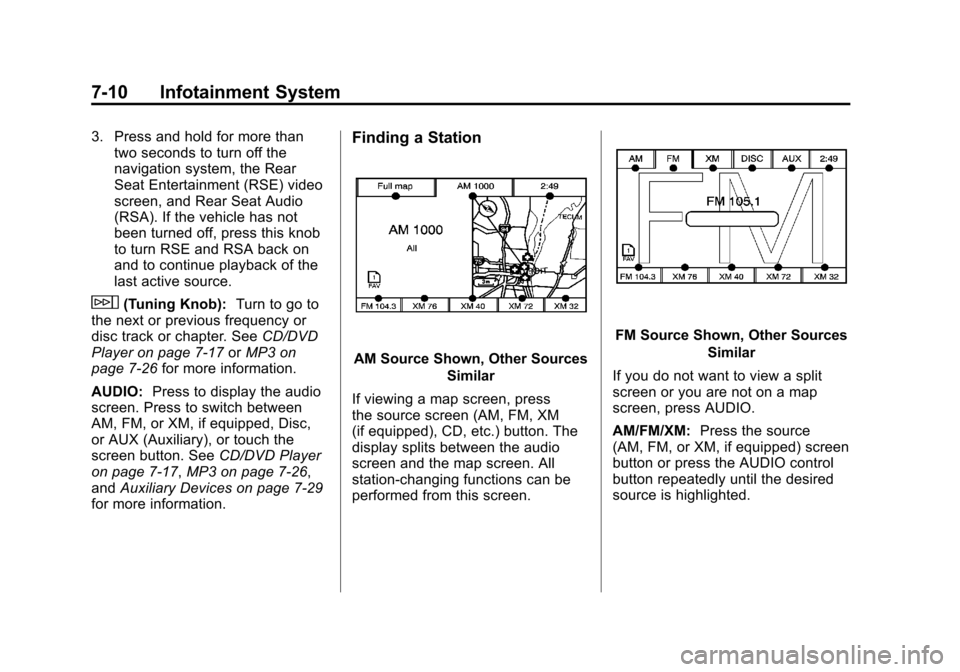
Finding a Station
AM Source Shown, Other Sources
Similar
If viewing a map screen, press
the source screen (AM, FM, XM
(if equipped), CD, etc.) button. The
display splits between the audio
screen and the map screen. All
station-changing functions can be
performed from this screen.
FM Source Shown, Other Sources Similar
If you do not want to view a split
screen or you are not on a map
screen, press AUDIO.
AM/FM/XM: Press the source
(AM, FM, or XM, if equipped) screen
button or press the AUDIO control
button repeatedly until the desired
source is highlighted.
Page 201 of 508

Black plate (11,1)Cadillac Escalade EXT Owner Manual - 2011
Infotainment System 7-11
FM Source Shown, Other SourcesSimilar
Category: Press the screen button,
located in the middle of the screen,
to get a list of all the selected band
stations in the area. Use the up
and down arrows to scroll the
frequencies. Press the desired
frequency. XM (if equipped) lists also contain a
category to select and the stations
or channels that have broadcasts
that relate to that category. For XM
(if equipped), press the left and right
arrow screen buttons to change
categories. The station information
appears on the display. See
“Radio
Menu” in this section to add and
remove XM categories from the
category list. Removed categories
do not appear on the category list
screen or when the right and left
arrow category screen buttons
are used.
FM lists may also contain a
category to select if stations in the
broadcast area support Radio Data
Systems (RDS).
2Refresh List: Press to refresh
the list of AM or FM stations.
When viewing a map screen, the
name of the station or channel
displays.
y © ¨ z(Seek):
1. To seek stations, press the up or down arrows to go to the next or
previous station.
2. To scan stations, press and hold either arrow for more than
two seconds. The radio goes
to a station, plays for a few
seconds, then goes to the next
station.
3. To stop scanning, press either arrow again.
Storing Radio Station Presets
This feature stores a mix of up
to 30 AM, FM, and XM (if equipped)
preset stations. To store presets:
1. Press
Oto turn the system on.
2. If viewing a map screen, press the source screen button, press
the AUDIO control button,
or press the FAV (favorite)
control button.
3. Select the band.
Page 202 of 508

Black plate (12,1)Cadillac Escalade EXT Owner Manual - 2011
7-12 Infotainment System
4. Seek, scan, or tune to thedesired station, to select the
station.
5. Press and hold one of the preset screen buttons for more than
two seconds or until a beep is
heard.
6. Repeat the steps for each preset.
Sound Menu
e(Sound): Press this key or
press the CONFIG control button to
access the Sound menu to adjust the treble, midrange, bass, fade,
balance, and Digital Signal
Processing (DSP). The system
automatically stores audio
adjustment settings as changes
are made for each audio source
including AM, FM, XM (if equipped),
CD, and AUX.
Setting the Tone
TREBLE:
Press + or−to increase
or decrease the treble. If a station is
weak or has static, decrease the
treble.
MID (Midrange): Press + or−to
increase or decrease the midrange.
BASS: Press + or −to increase or
decrease the bass.
Adjusting the Speakers
L/R (Left/Right) (Balance): To
adjust the balance between the left
and the right speakers, press and
hold the L or R screen buttons. Front/Rear (Fade):
To adjust the
fade between the front and the rear
speakers, press and hold the Front
or Rear screen buttons.
Digital Signal Processing (DSP)
The system has Digital Signal
Processing (DSP). DSP provides
a choice of four different listening
experiences. DSP can be used
while listening to the audio system.
Not all DSP modes are available for
all source types. The type of DSP
selected is displayed on the
status line.
Select from the following DSP
settings:
Normal: Adjusts the audio for
normal mode. This provides the
best sound quality for all seating
positions.
Page 203 of 508

Black plate (13,1)Cadillac Escalade EXT Owner Manual - 2011
Infotainment System 7-13
Surround (Centerpoint®):Enables
Bose Centerpoint signal processing
that produces a surround sound
listening experience from a CD or
XM (if equipped) stereo digital
audio source. Centerpoint delivers
five independent audio channels
from conventional two channel
stereo recordings (not available for
AM or FM).
Driver: Adjusts the audio to give
the driver the best possible sound
quality.
Rear: Adjusts the audio to give
the rear seat occupants the best
possible sound quality.
2 CH. (Channel): Enhances
surround sound.
5.1 CH. (Channel): Gives a full
affect of surround sound listening.
This button is only available when
playing DVD video discs that
support 5.1 audio and if the RSA
is off.Radio Menu
Press the CONFIG control button to
enter the configure menu screen,
then press CONFIG repeatedly until
Radio is selected or press the Radio
screen button to make changes for
radio information displayed or to
limit features while driving, number
of preset pages, XM (if equipped)
categories, and Bose
®AudioPilot®. Limit Features While Driving
Press the Limit Features While
Driving screen button to turn on and
off the ability to limit functions while
driving. When this screen button is
highlighted, the following functions
are limited while driving:
.Music Navigator Scrolling
.Radio Category Scrolling
.Navigation Menu Scrolling and
some functions
Number of Preset Pages
Press the Number of Preset Pages
screen button to change the number
of preset pages, 1 through 6. Each
preset page can contain five preset
stations. Press the desired
numbered screen button.
Page 204 of 508
Black plate (14,1)Cadillac Escalade EXT Owner Manual - 2011
7-14 Infotainment System
Bose®AudioPilot®
AudioPilot:The Bose AudioPilot
noise compensation technology.
To use AudioPilot
®:
1. Press the CONFIG control button to enter the menu screen,
then press CONFIG repeatedly
until Radio is selected or press
the Radio screen button
2. Press Automatic Volume Control to access the AudioPilot menu.
3. Press ON.
To turn it off, press OFF. When on,
AudioPilot
®continuously adjusts
the audio system equalization,
to compensate for background
noise, so that the music sound is
consistent at the set volume level.
This feature is most effective at
lower volume settings where
background noise can affect how
well the music being played is heard through the vehicle's audio
system. At higher volume settings,
where the music is much louder
than the background noise, there
may be little or no adjustments
by AudioPilot
®. For more
information on AudioPilot®,
visit www.bose.com/audiopilot.
Remove/Add XM Categories
(US and Canada)
Press the Remove/Add XM
Categories screen button to
remove or add XM categories when
selecting XM categories from the
category list screen. The list of XM
categories appear on the screen.
Use the arrow screen buttons
to scroll through the list. The
categories to remove are highlighted
and the categories to add are dark
in color. Press the category to be
added or removed. Press the
Restore All Categories screen
button to add all categories that
have been removed.
Radio Data System (RDS)
The audio system has a Radio
Data System (RDS). RDS features
are available for use only on FM
stations that broadcast RDS
information. With RDS, the radio
can do the following:
.Receive announcements
concerning local and national
emergencies
.Display messages from radio
stations
This system relies on receiving
specific information from these
stations and only works when the
information is available. In rare
cases, a radio station may
broadcast incorrect information that
causes the radio features to work
improperly. If this happens, contact
the radio station.
The RDS system is always on.
When information is broadcast from
the FM station that is playing, the
station name or call letters displays
on the audio screen.
Page 205 of 508
Black plate (15,1)Cadillac Escalade EXT Owner Manual - 2011
Infotainment System 7-15
Satellite Radio
XM™Satellite Radio Service
XM™ is a satellite radio service
that is based in the 48 contiguous
United States and 10 Canadian
provinces. XM Satellite Radio
has a wide variety of programming
and commercial-free music,
coast-to-coast, and in digital-quality
sound. A service fee is required to
receive the XM service. If the
service needs to be reactivated, the
radio will display “No Subscription
Please Renew on channel XM1.”
For more information, contact XM
at www.xmradio.com or call
1-800-929-2100 in the U.S. and
www.xmradio.ca or call
1-877-438-9677 in Canada.
When XM™ is active, the channel
name and number, song title, and
artist displays on the screen. XM™
Radio Messages
XL (Explicit Language
Channels): XL on the radio display,
after the channel name, indicates
content with explicit language.
These channels, or any others, can
be blocked at a customer's request
by calling 1‐800‐929-2100.
XM Updating: The encryption code
in the receiver is being updated and
no action is required.
No XM signal: The vehicle is in a
location that is blocking the XM™
signal. When the vehicle is moved
into an open area, the signal should
return.
Loading XM: The audio system is
processing audio and text data
received. No action is needed.
Channel Off Air: This channel is
not currently in service.
Channel Unauth: This channel is
blocked or cannot be received with
your XM Subscription package. Channel Unavail:
This previously
assigned channel is no longer
assigned.
No Artist Info: No artist
information is available. The system
is working properly.
No Title Info: No song title
information is available. The system
is working properly.
No CAT Info: No category
information is available. The system
is working properly.
CAT Not Found: There are no
channels available for the selected
category. The system is working
properly.
No Information: No text or
informational messages are
available. The system is working
properly.