key CADILLAC ESCALADE EXT 2011 3.G Workshop Manual
[x] Cancel search | Manufacturer: CADILLAC, Model Year: 2011, Model line: ESCALADE EXT, Model: CADILLAC ESCALADE EXT 2011 3.GPages: 508, PDF Size: 7.6 MB
Page 211 of 508

Black plate (21,1)Cadillac Escalade EXT Owner Manual - 2011
Infotainment System 7-21
Top Menu:Press to display the
first menu of the DVD. This is not
available on all DVDs.
Menu: Press to display the DVD
menu of the current area of the DVD
that is playing. This button is not
available for DVD audio.
Audio: Press to display the audio
options. Select the audio options
that best improve sound quality.
This is not available on all DVDs
or when the DVD is stopped. This
button is not available for DVD
audio.
Subtitle: Press to playback the
video with subtitles. This is not
available on all DVDs or when the
DVD is stopped. This button is not
available for DVD audio.
Angle: Press to adjust the viewing
angle of the DVD. Repeatedly press
this button to toggle through the
angles. This is not available on all
DVDs or when the DVD is stopped.
This button is not available for DVD
audio. Search:
Press to display the
search screen. Select Title or
Chapter Search for DVD video and
Group or Track for DVD audio. The
keyboard allows you to type in the
title/chapter/group/track number that
you would like to watch or listen to.
This button does not work when the
DVD is stopped.
Setup: Press to display the
DVD Setup screen. This button
is only available when the DVD
is not playing. The DVD Setup
screen allows you to change the
brightness, contrast, and mode,
change the viewing on the monitor
and to change the initial settings;
language, parental level, and
aspect.
!(Brightness): Press the up or
down screen arrows to increase
or decrease the brightness of the
navigation screen.
_(Contrast): Press the up or
down screen arrows to increase
or decrease the contrast of the
navigation screen. Auto (Automatic):
Press so the
system can automatically adjust
the navigation screen background
depending on exterior lighting
conditions.
Night: Press to make the
navigation screen background
brighten.
Day: Press to make the navigation
screen background darken.
Monitor: From the DVD Setup
screen, press to adjust the viewing
angle of the DVD on the navigation
screen. This is not available on all
DVDs. This button is not available
for DVD audio
Press
eto close the screen in from
the left and right sides.
Press
Jto fill the screen on the
left and right sides.
Press
dto fill the screen on the
top and bottom.
Page 212 of 508
Black plate (22,1)Cadillac Escalade EXT Owner Manual - 2011
7-22 Infotainment System
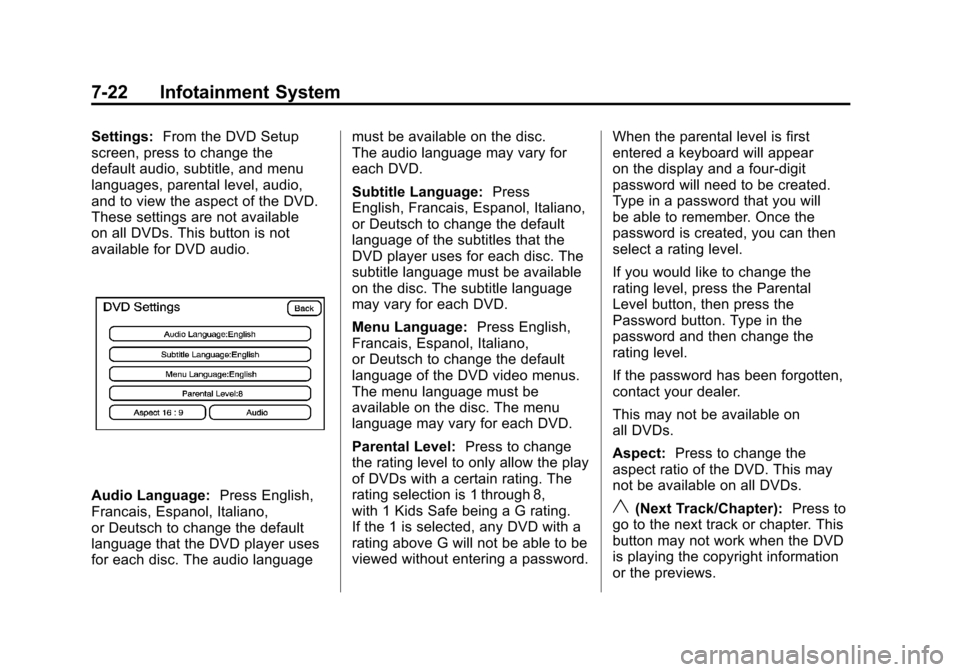
Settings:From the DVD Setup
screen, press to change the
default audio, subtitle, and menu
languages, parental level, audio,
and to view the aspect of the DVD.
These settings are not available
on all DVDs. This button is not
available for DVD audio.
Audio Language: Press English,
Francais, Espanol, Italiano,
or Deutsch to change the default
language that the DVD player uses
for each disc. The audio language must be available on the disc.
The audio language may vary for
each DVD.
Subtitle Language:
Press
English, Francais, Espanol, Italiano,
or Deutsch to change the default
language of the subtitles that the
DVD player uses for each disc. The
subtitle language must be available
on the disc. The subtitle language
may vary for each DVD.
Menu Language: Press English,
Francais, Espanol, Italiano,
or Deutsch to change the default
language of the DVD video menus.
The menu language must be
available on the disc. The menu
language may vary for each DVD.
Parental Level: Press to change
the rating level to only allow the play
of DVDs with a certain rating. The
rating selection is 1 through 8,
with 1 Kids Safe being a G rating.
If the 1 is selected, any DVD with a
rating above G will not be able to be
viewed without entering a password. When the parental level is first
entered a keyboard will appear
on the display and a four-digit
password will need to be created.
Type in a password that you will
be able to remember. Once the
password is created, you can then
select a rating level.
If you would like to change the
rating level, press the Parental
Level button, then press the
Password button. Type in the
password and then change the
rating level.
If the password has been forgotten,
contact your dealer.
This may not be available on
all DVDs.
Aspect:
Press to change the
aspect ratio of the DVD. This may
not be available on all DVDs.y(Next Track/Chapter): Press to
go to the next track or chapter. This
button may not work when the DVD
is playing the copyright information
or the previews.
Page 227 of 508

Black plate (37,1)Cadillac Escalade EXT Owner Manual - 2011
Infotainment System 7-37
u(Next Track/Chapter):Press
this button to go to the beginning
of the next chapter or track. This
button might not work while the
DVD is playing the copyright
information or the previews.
r(Fast Reverse): Press this
button to quickly reverse the DVD or
CD. To stop fast reversing a DVD
video, press the play/pause button.
To stop fast reversing a DVD audio
or CD, release the fast reverse
button. This button might not work
when the DVD is playing the
copyright information or the
previews.
[(Fast Forward): Press this
button to fast forward the DVD or
CD. To stop fast forwarding a DVD
video, press the play/pause button.
To stop fast forwarding a DVD audio
or CD, release the fast forward
button. This button might not work
while the DVD is playing the
copyright information or the
previews.
e(Audio): Press this button to
change audio tracks on DVDs that
have this feature when the DVD is
playing. The format and content of
this function vary for each disc.
{(Subtitles): Press this button to
turn on or off subtitles and to move
through subtitle options when a
DVD is playing. The format and
content of this function vary for
each disc.
AUX (Auxiliary): Press this button
to switch the system between the
DVD player and an auxiliary source.
When the front auxiliary or USB port
is the source, the remote control
does not control this source. The
rear seat audio controls must
be used.
d(Camera): Press this button to
change camera angles on DVDs
that have this feature while a DVD is
playing. The format and content of
this function vary for each disc.
1 through 0 (Numeric Keypad):
The numeric keypad provides the
capability of direct chapter or track
number selection.
\(Clear): Press this button within
three seconds after entering a
numeric selection, to clear all
numerical inputs.
}10 (Double Digit Entries): Press
this button to select chapter or track
numbers greater than nine. Press
this button before entering the
number.
Page 233 of 508

Black plate (43,1)Cadillac Escalade EXT Owner Manual - 2011
Infotainment System 7-43
FAV (Favorite):Press to access
the preset stations. See “Storing
Radio Station Presets” under,
Overview on page 7‑3.
5(Phone): See the OnStar
(if equipped) owner guide and
Bluetooth (if equipped) for more
information.
e(Sound): Press to access the
Sound menu to adjust the treble,
midrange, bass, fade, balance, and
Digital Signal Processing (DSP).
y z(Scan Up/Down): Press to
scan the tracks/chapters up or down
on a disc.
y © ¨ z(Seek) Key (Previous/
Next): Press the up or down arrows
to go to the next or previous station.
Press and hold either arrow for
more than two seconds. The radio
goes to a station, plays for a few
seconds, then goes to the next
station. NAV (Navigation):
Press to view
the vehicle's current position on the
map screen. Each press of this
button cycles through Full Map
and the tab that displays the
current audio source (AM, FM, XM
(if equipped), CD, etc.). Full Map
displays the screen in full map view.
Selecting the audio tab splits the
screen between the map screen
and the current audio source
screen menu.
RPT (Repeat): Press to repeat the
last voice guidance prompt.
DEST (Destination): Press to
access the Destination Entry
screen. From this screen, you can
select from several options to plan a
route by entering destination points.
CONFIG (Configure): Press to
adjust several of the system's
features and preferences.
Touch-Sensitive Screen
Buttons
Touch-sensitive screen buttons are
located on the screen. When a
screen button has been selected, a
beep sounds. Screen buttons are
highlighted when a feature is
available.
Alpha-Numeric Keyboard
Letters of the alphabet, symbols,
punctuation, and numbers, when
available, displays on the navigation
screen as an alpha or numeric
keyboard. The alpha keyboard
displays when the system requires
entry of a city or street name.
All characters are touch-sensitive
screen buttons. Press a character to
select it.
A-Y (Accent Alphabet): Select to
enter letters with accent symbols.
This button may toggle to A-Z.
A-Z (Alphabet): Select to enter
letters from the alphabet. This
button may toggle to A-Y.
Page 242 of 508

Black plate (52,1)Cadillac Escalade EXT Owner Manual - 2011
7-52 Infotainment System
4. Once a state or province hasbeen selected the City name
category is automatically
selected for entry.
Enter the City Name or press the
Last 5 Cities screen button.
The Last 5 Cities screen
displays a list of the last five city
names that had been entered.
Select a city from the list and it
appears in the City name area.
If using the alpha keyboard,
finish entering the city name.
If five or less names are
available, a list displays. If more
than five are available, the
List screen button displays a
number. This number represents
the number of available cities.
Select this button to view the list
and select a city.
5. Once a city has been selected the Street name category is
automatically selected for entry. Start entering the street name.
If five or less names are
available, a list displays. If more
than five are available, the
List screen button displays a
number. This number represents
the number of available streets.
Select this button to view the list.
6. Once a street has been selected, press House to enter
the house number. The system
displays the house number
range that is available for the
street.
7. Select GO. The map screen, with the destination marked
displays.
8. Select the route preference (Fastest, Shortest, or Other).
The system calculates and
highlights the route.
9. Select Start Guidance. The route is now ready to be started.
See “Getting Started on Your
Route” in this section for more
information. To enter a destination by entering
the street name first:
1. Press the DEST control button.
2. Select
2.
3. Select the state/province screen button, if needed, to change the
current state or province. A list
of all of the available states and
provinces appear. Select the
state or province.
4. Select Street and start entering the street name or press the
Last 5 Streets screen button.
If the street name is common,
the city might need to be entered
first.
The Last 5 Streets screen
displays a list of the last
five street names that had
been entered. Select a street
from the list and it appears in
the Street name area.
Page 243 of 508

Black plate (53,1)Cadillac Escalade EXT Owner Manual - 2011
Infotainment System 7-53
If using the alpha keyboard,
finish entering the street name.
If five or less names are
available, a list displays. If more
than five are available, the
List screen button displays a
number. This number represents
the number of available streets.
Select this button to view the list
and select a street.
5. Once a street has been selected, select House to enter
the house number. The system
displays the house number
range that is available for the
street.
6. Once the house number is selected, the city name
automatically populates. If there
is more than one city available
for selection, a list of cities
display. Select the city.
7. Select GO. The map screen, with the destination marked
displays. 8. Select the route preference
(Fastest, Shortest, or Other).
The system calculates and
highlights the route.
9. Select Start Guidance. The route is now ready to be started.
See “Getting Started on Your
Route” in this section for more
information.
To enter a destination by entering a
cross street:
1. Press the DEST control button.
2. Select
2.
3. Select the state/province screen button, if needed, to change the
current state or province. A list
of all of the available states and
provinces appear. Select the
state or province.
4. Select Street and start entering the street name or press the
Last 5 Streets screen button.
If the street name is common,
the city might need to be
entered first. The Last 5 Streets screen
displays a list of the last
five street names that had
been entered. Select a street
from the list and it appears in
the Street name area.
If using the alpha keyboard,
finish entering the street name.
If five or less names are
available, a list displays. If more
than five are available, the
List screen button displays a
number. This number represents
the number of available streets.
Select this button to view the list
and select a street.
5. Once a street has been selected, select Cross Street
and start entering the cross
street name. If five or less
names are available, a list
displays. If more than five are
available, the List screen button
displays a number. This number
represents the number of
available streets. Select this
button to view the list and select
a street.
Page 244 of 508

Black plate (54,1)Cadillac Escalade EXT Owner Manual - 2011
7-54 Infotainment System
6. Select GO. The map screen,with the destination marked
displays.
7. Select the route preference (Fastest, Shortest, or Other).
The system calculates and
highlights the route.
8. Select Start Guidance. The route is now ready to be started.
See “Getting Started on Your
Route” in this section for more
information.
Point of Interest (POI)
The Point of Interest (POI)
destination entry method lets you
select a destination from the
POI list.
iPoint of Interest: Press to
access the POI (Point of Interest)
screen. From this screen you have
two options to select/enter a
destination. Enter the name using
the alpha keyboard or select a
category from the category list.
To use the point of interest
destination entry method by entering
the name:
1. Press the DEST control button.
2. Select
i. 3. Select the state/province screen
button, if needed, to change the
current state or province. A list
of all of the available states and
provinces appear. Select the
state or province.
4. Enter the POI name. If five or less names are
available, a list displays. If more
than five are available, the
List screen button displays a
number. This number represents
the number of available POIs.
Select this button to view the list.
5. Select GO, located next to the POI. The map screen, with the
destination marked displays.
6. Select the route preference (Fastest, Shortest, or Other).
The system calculates and
highlights the route.
7. Select Start Guidance. The route is now ready to be started.
See “Getting Started on Your
Route” in this section for more
information.
Page 254 of 508

Black plate (64,1)Cadillac Escalade EXT Owner Manual - 2011
7-64 Infotainment System
To store the current vehicle position
as a preset destination:
1. Select Mark from the mapscreen to add the current vehicle
position to the address book.
The Address Book screen
appears.
2. Select Name. An alpha-keyboard displays.
Enter the name. Press OK
then Back to return to the
address book information
screen.
3. Press and hold one of the buttons at the bottom of the
screen until the name appears
in that preset destination screen
button. It is now available to
select from the Destination Entry
screen. To store an address book entry as a
preset destination:
1. Select the CONFIG control
button.
2. Select the Nav screen button or press the CONFIG control button
until Nav is selected or press the
Nav screen button.
3. Select Edit/View.
4. Select the address book entry to be stored as the preset
destination. Select Name to add
a name, if needed.
5. Press and hold one of the buttons at the bottom of the
screen until the name appears in
that preset destination screen
button. It is now available to
select from the Destination Entry
screen.Configure Menu
Press the CONFIG (Configure)
control button to adjust several
of the system's features and
preferences. The last selected
CONFIG screen is the screen that
displays: Sound, Radio, Nav
(navigation), Display, or Time.
Page 256 of 508
Black plate (66,1)Cadillac Escalade EXT Owner Manual - 2011
7-66 Infotainment System
Allow time and seasonal
restricted road:This feature
allows the system to use time
restricted and seasonal roads when
calculating a planned route.
Edit Address Book —How to Add
To add an address to the address
book, see “Adding Destinations
to the Address Book” under
Destination on page 7‑51.
Edit Address Book —Edit/View
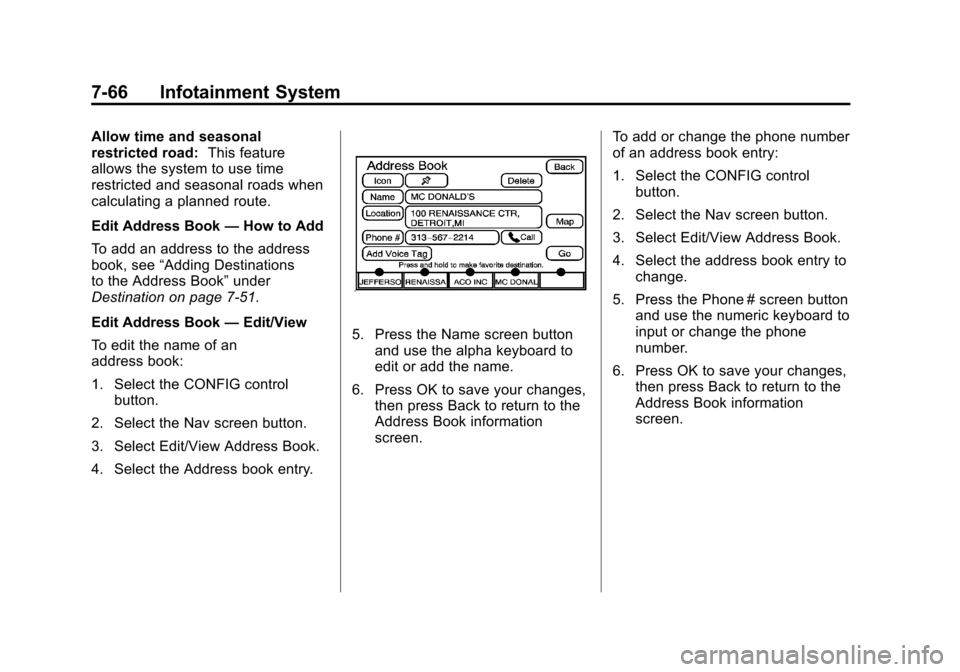
To edit the name of an
address book:
1. Select the CONFIG control button.
2. Select the Nav screen button.
3. Select Edit/View Address Book.
4. Select the Address book entry.
5. Press the Name screen button and use the alpha keyboard to
edit or add the name.
6. Press OK to save your changes, then press Back to return to the
Address Book information
screen. To add or change the phone number
of an address book entry:
1. Select the CONFIG control
button.
2. Select the Nav screen button.
3. Select Edit/View Address Book.
4. Select the address book entry to change.
5. Press the Phone # screen button and use the numeric keyboard to
input or change the phone
number.
6. Press OK to save your changes, then press Back to return to the
Address Book information
screen.
Page 273 of 508

Black plate (83,1)Cadillac Escalade EXT Owner Manual - 2011
Infotainment System 7-83
Phone
Bluetooth
Vehicles with a Bluetooth system
can use a Bluetooth‐capable cell
phone with a Hands‐Free Profile
to make and receive phone calls.
The system can be used while
the key is in the ON/RUN or
ACC/ACCESSORY position. The
range of the Bluetooth system can
be up to 9.1 m (30 ft). Not all phones
support all functions, and not all
phones are guaranteed to work with
the in-vehicle Bluetooth system.
See www.gm.com/bluetooth for
more information on compatible
phones.
Voice Recognition
The Bluetooth system uses voice
recognition to interpret voice
commands to dial phone numbers
and name tags.
For additional information, say
“Help”while you are in a voice
recognition menu. Noise:
Keep interior noise levels to
a minimum. The system may not
recognize voice commands if there
is too much background noise.
When to Speak: A short tone
sounds after the system responds
indicating when it is waiting for a
voice command. Wait until the tone
and then speak.
How to Speak: Speak clearly in a
calm and natural voice.
Audio System
When using the in‐vehicle Bluetooth
system, sound comes through the
vehicle's front audio system
speakers and overrides the audio
system. Use the audio system
volume knob, during a call, to
change the volume level. The
adjusted volume level remains in
memory for later calls. To prevent
missed calls, a minimum volume
level is used if the volume is turned
down too low.
Bluetooth Controls
Use the buttons located on the
steering wheel to operate the
in‐vehicle Bluetooth system. See
Steering Wheel Controls on
page 5‑2 for more information.
bg(Push To Talk): Press to
answer incoming calls, confirm
system information, and start
speech recognition.
c x(Phone On Hook): Press to
end a call, reject a call, or cancel an
operation.
Pairing
A Bluetooth cell phone must be
paired to the Bluetooth system and
then connected to the vehicle before
it can be used. See your cell phone
manufacturer's user guide for
Bluetooth functions before pairing
the cell phone. If a Bluetooth phone
is not connected, calls will be made
using OnStar Hands‐Free Calling,
if equipped. Refer to the OnStar
Owner's Guide for more information.