change wheel CADILLAC ESCALADE EXT 2011 3.G Owners Manual
[x] Cancel search | Manufacturer: CADILLAC, Model Year: 2011, Model line: ESCALADE EXT, Model: CADILLAC ESCALADE EXT 2011 3.GPages: 508, PDF Size: 7.6 MB
Page 5 of 508

Black plate (5,1)Cadillac Escalade EXT Owner Manual - 2011
Introduction v
Vehicle Symbol Chart
Here are some additional symbols
that may be found on the vehicle
and what they mean. For more
information on the symbol, refer to
the Index.
0:Adjustable Pedals
9:Airbag Readiness Light
#:Air Conditioning
!:Antilock Brake System (ABS)
g:Audio Steering Wheel Controls
or OnStar®
$: Brake System Warning Light
":Charging System
I:Cruise Control
B: Engine Coolant Temperature
O:Exterior Lamps
#:Fog Lamps
.: Fuel Gauge
+:Fuses
3: Headlamp High/Low-Beam
Changer
(: Heated Steering Wheel
j:LATCH System Child
Restraints
*: Malfunction Indicator Lamp
::Oil Pressure
g:Outside Power Foldaway
Mirrors
}: Power
/:Remote Vehicle Start
>:Safety Belt Reminders
7:Tire Pressure Monitor
_: Tow/Haul Mode
F:Traction Control
M:Windshield Washer Fluid
Page 9 of 508

Black plate (3,1)Cadillac Escalade EXT Owner Manual - 2011
In Brief 1-3
A.Air Vents on page 8‑6.
B. Turn and Lane-Change Signals
on page 6‑7.
Windshield Wiper/Washer on
page 5‑5.
C. Hazard Warning Flashers on
page 6‑7.
D. Instrument Cluster on
page 5‑10.
E. Shift Lever/Tow/Haul Selector Button. See Automatic
Transmission on page 9‑38 and
Tow/Haul Mode on page 9‑42.
F. Clock on page 5‑7.
G. AM-FM Radio on page 7‑9. H.
Exterior Lamp Controls on
page 6‑1.
I. Dome Lamp Override. See Dome Lamps on page 6‑9.
J. Data Link Connector (DLC). See Malfunction Indicator Lamp
on page 5‑15.
K. Cruise Control on page 9‑49.
L. Steering Wheel Adjustment on
page 5‑2.
M. Horn on page 5‑4.
N. Steering Wheel Controls on
page 5‑2.
O. Driver Information Center (DIC) Buttons. See Driver Information
Center (DIC) on page 5‑23. P. Pedal Adjust Button. See
Adjustable Throttle and Brake
Pedal on page 9‑30.
Power Running Boards Disable
Button (If Equipped). See
Power Assist Steps on
page 2‑15.
Q. Dual Automatic Climate Control
System on page 8‑1.
Heated and Ventilated Front
Seats on page 3‑7
(If Equipped).
R. StabiliTrak
®System on
page 9‑45.
Ultrasonic Parking Assist on
page 9‑52.
S. Glove Box on page 4‑1.
Page 17 of 508
Black plate (11,1)Cadillac Escalade EXT Owner Manual - 2011
In Brief 1-11
Power Foldaway Mirrors
To fold the mirrors:
1. Press (C) to fold the mirrors outto the driving position.
2. Press (D) to fold the mirrors in to the folded position.
See Power Mirrors on page 2‑19.
Interior Mirror
The automatic dimming rearview
mirror reduces the glare of lights
from behind the vehicle. The
dimming feature comes on and the
indicator light illuminates each time
the vehicle is started.
O:Press to turn the dimming
feature on or off.
See Automatic Dimming Rearview
Mirror on page 2‑21 for more
information.
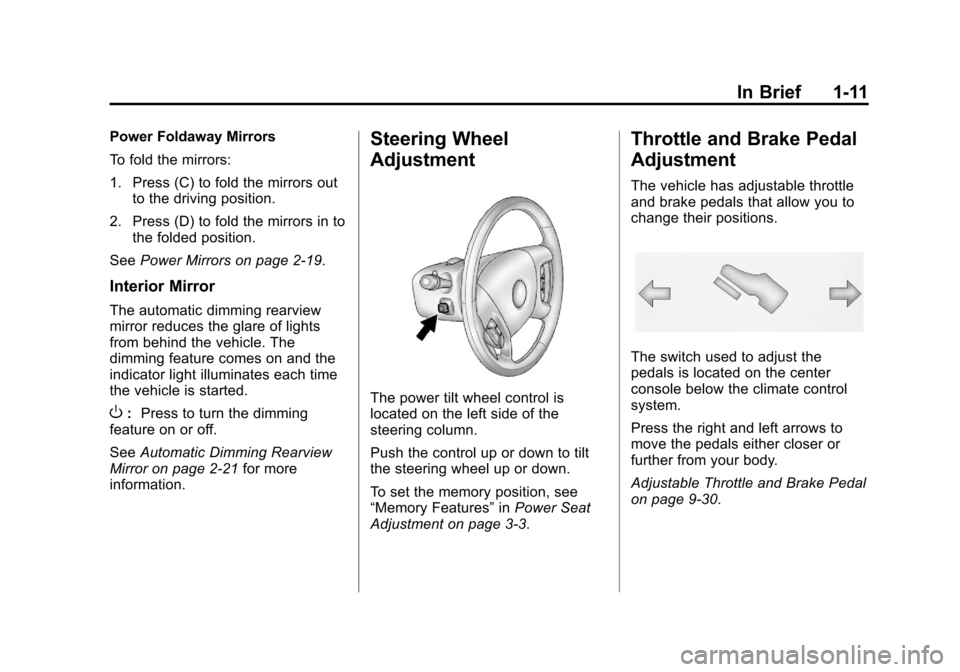
Steering Wheel
Adjustment
The power tilt wheel control is
located on the left side of the
steering column.
Push the control up or down to tilt
the steering wheel up or down.
To set the memory position, see
“Memory Features” inPower Seat
Adjustment on page 3‑3.
Throttle and Brake Pedal
Adjustment
The vehicle has adjustable throttle
and brake pedals that allow you to
change their positions.
The switch used to adjust the
pedals is located on the center
console below the climate control
system.
Press the right and left arrows to
move the pedals either closer or
further from your body.
Adjustable Throttle and Brake Pedal
on page 9‑30.
Page 22 of 508
Black plate (16,1)Cadillac Escalade EXT Owner Manual - 2011
1-16 In Brief
Bluetooth®
For vehicles with a Bluetooth
system, it allows users with a
Bluetooth‐enabled cell phone to
make and receive hands-free calls
using the vehicle’s audio system
and controls.
The Bluetooth‐enabled cell phone
must be paired with the Bluetooth
system before it can be used in the
vehicle. Not all phones will support
all functions. For more information,
visit www.gm.com/bluetooth.
For more information, see Bluetooth
on page 7‑83.
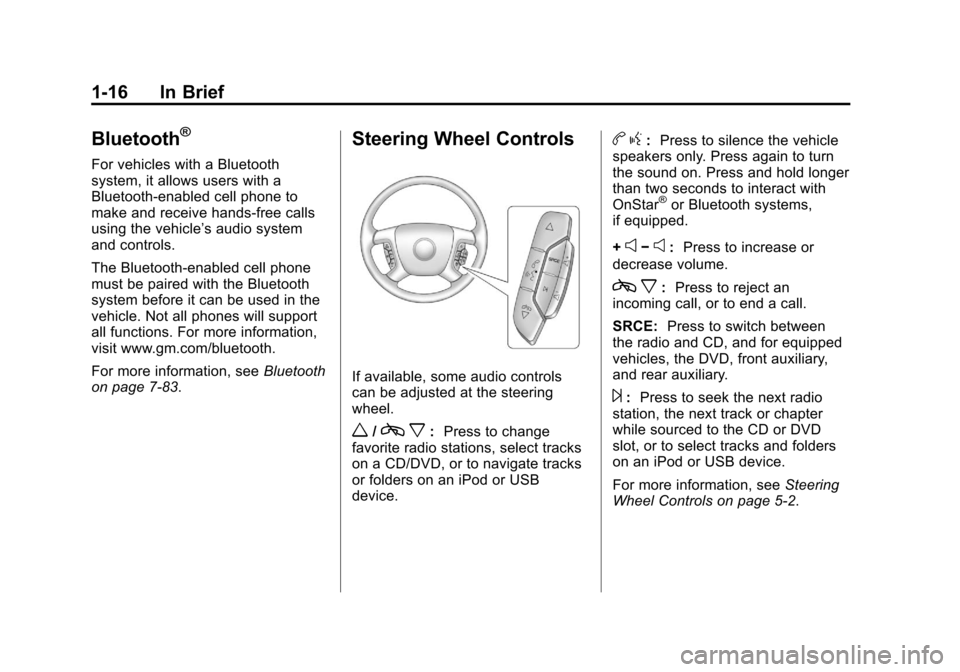
Steering Wheel Controls
If available, some audio controls
can be adjusted at the steering
wheel.
w/c x:Press to change
favorite radio stations, select tracks
on a CD/DVD, or to navigate tracks
or folders on an iPod or USB
device.
b g: Press to silence the vehicle
speakers only. Press again to turn
the sound on. Press and hold longer
than two seconds to interact with
OnStar
®or Bluetooth systems,
if equipped.
+
e−e: Press to increase or
decrease volume.
c x:Press to reject an
incoming call, or to end a call.
SRCE: Press to switch between
the radio and CD, and for equipped
vehicles, the DVD, front auxiliary,
and rear auxiliary.
¨: Press to seek the next radio
station, the next track or chapter
while sourced to the CD or DVD
slot, or to select tracks and folders
on an iPod or USB device.
For more information, see Steering
Wheel Controls on page 5‑2.
Page 94 of 508
Black plate (38,1)Cadillac Escalade EXT Owner Manual - 2011
3-38 Seats and Restraints
Adding Equipment to the
Airbag-Equipped Vehicle
Q: Is there anything I might addto or change about the vehicle
that could keep the airbags
from working properly?
A: Yes. If you add things that
change the vehicle's frame,
bumper system, height, front end
or side sheet metal, they may
keep the airbag system from
working properly. Changing or
moving any parts of the front
seats, safety belts, the airbag
sensing and diagnostic module,
steering wheel, instrument
panel, roof-rail airbag modules,
ceiling headliner or pillar garnish
trim, overhead console, front
sensors, side impact sensors,
or airbag wiring can affect the
operation of the airbag system. In addition, the vehicle may
have a passenger sensing
system for the right front
passenger position, which
includes sensors that are part
of the passenger seat. The
passenger sensing system
may not operate properly if the
original seat trim is replaced
with non-GM covers, upholstery
or trim, or with GM covers,
upholstery or trim designed for
a different vehicle. Any object,
such as an aftermarket seat
heater or a comfort enhancing
pad or device, installed under or
on top of the seat fabric, could
also interfere with the operation
of the passenger sensing
system. This could either
prevent proper deployment of
the passenger airbag(s) or
prevent the passenger sensing
system from properly turning off
the passenger airbag(s). See
Passenger Sensing System on
page 3‑32.If you have any questions,
call Customer Assistance. The
phone numbers and addresses
for Customer Assistance are
in Step Two of the Customer
Satisfaction Procedure in
this manual. See
Customer
Satisfaction Procedure (U.S.
and Canada) on page 13‑1 or
Customer Satisfaction
Procedure (Mexico) on
page 13‑3.
If the vehicle has rollover
roof-rail airbags, see Different
Size Tires and Wheels on
page 10‑65 for additional
important information.
Q: Because I have a disability, I have to get my vehicle
modified. How can I find out
whether this will affect my
airbag system?
A: If you have questions, call
Customer Assistance. The
phone numbers and addresses
for Customer Assistance are
in Step Two of the Customer
Page 147 of 508
Black plate (17,1)Cadillac Escalade EXT Owner Manual - 2011
Instruments and Controls 5-17
An emission system malfunction
might be corrected:
.Make sure the fuel cap is fully
installed. SeeFilling the Tank on
page 9‑62. The diagnostic
system can determine if the
fuel cap has been left off or
improperly installed. A loose or
missing fuel cap allows fuel to
evaporate into the atmosphere.
A few driving trips with the cap
properly installed should turn the
light off.
.If the vehicle has been driven
through a deep puddle of water,
the vehicle's electrical system
might be wet. The condition is
usually corrected when the
electrical system dries out. A few
driving trips should turn the
light off.
.Make sure to fuel the vehicle
with quality fuel. Poor fuel quality
causes the engine not to run as
efficiently as designed and can
cause: stalling after start-up,
stalling when the vehicle is
changed into gear, misfiring,
hesitation on acceleration,
or stumbling on acceleration.
These conditions might go away
once the engine is warmed up.
If one or more of these
conditions occurs, change the
fuel brand used. It will require at
least one full tank of the proper
fuel to turn the light off.
See Recommended Fuel on
page 9‑58.
If none of the above have made
the light turn off, your dealer can
check the vehicle. The dealer
has the proper test equipment
and diagnostic tools to fix any
mechanical or electrical problems
that might have developed.Emissions Inspection and
Maintenance Programs
Some state/provincial and local
governments may have programs
to inspect the on-vehicle emission
control equipment. For the
inspection, the emission system
test equipment is connected to the
vehicle’s Data Link
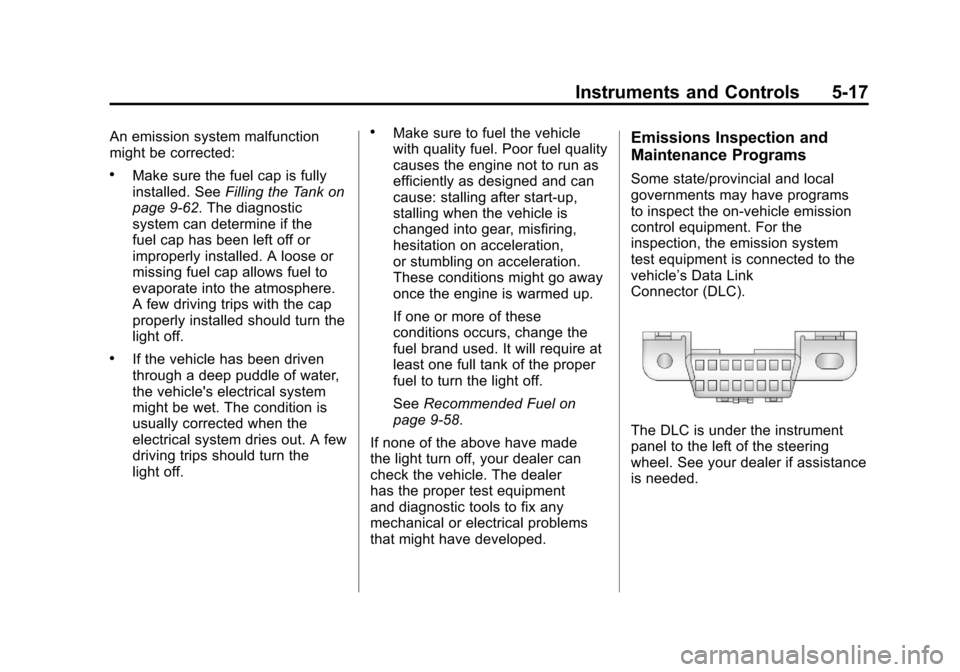
Connector (DLC).
The DLC is under the instrument
panel to the left of the steering
wheel. See your dealer if assistance
is needed.
Page 172 of 508
Black plate (42,1)Cadillac Escalade EXT Owner Manual - 2011
5-42 Instruments and Controls
The automatic easy exit seat
movement will only occur one time
after the key is removed from the
ignition. If the automatic movement
has already occurred, and you put
the key back in the ignition and
remove it again, the seat and
steering column will stay in the
original exit position, unless a
memory recall took place prior to
removing the key again.
NO CHANGE:No change will be
made to this feature. The current
setting will remain.
To select a setting, press the
set/reset button while the desired
setting is displayed on the DIC.
EASY EXIT SETUP
If your vehicle has this feature, it
allows you to select which areas will
recall with the automatic easy exit
seat feature. It also allows you to
turn off the automatic easy exit
feature. See “Memory Features”
under Power Seat Adjustment on
page 3‑3 and“EASY EXIT RECALL”
earlier for more information. Press the customization button until
EASY EXIT SETUP appears on the
DIC display. Press the set/reset
button once to access the settings
for this feature. Then press the
menu up/down button to scroll
through the following settings:
OFF:
No automatic seat exit will
recall.
SEAT ONLY: The driver seat will
recall.
TILT ONLY: The steering wheel tilt
feature will recall.
SEAT & TILT (default): The driver
seat and the steering wheel tilt will
recall.
NO CHANGE: No change will be
made to this feature. The current
setting will remain.
To select a setting, press the
set/reset button while the desired
setting is displayed on the DIC. MEMORY SEAT RECALL
This feature allows you to select
your preference for the remote
memory seat recall feature. See
“Memory Features”
underPower
Seat Adjustment on page 3‑3 for
more information.
Press the customization button
until MEMORY SEAT RECALL
appears on the DIC display. Press
the set/reset button once to access
the settings for this feature. Then
press the customization button to
scroll through the following settings:
OFF (default): No remote memory
seat recall will occur.
ON: The driver seat, and on some
vehicles, the outside mirrors will
automatically move to the stored
driving position when the unlock
button on the Remote Keyless Entry
(RKE) transmitter is pressed. On
some vehicles with the adjustable
throttle and brake pedal feature, the
pedals will also automatically move.
Page 181 of 508

Black plate (1,1)Cadillac Escalade EXT Owner Manual - 2011
Lighting 6-1
Lighting
Exterior Lighting
Exterior Lamp Controls . . . . . . . . 6-1
Exterior Lamps OffReminder . . . . . . . . . . . . . . . . . . . . 6-5
Headlamp High/Low-Beam Changer . . . . . . . . . . . . . . . . . . . . . 6-5
Flash-to-Pass . . . . . . . . . . . . . . . . . 6-5
Daytime Running Lamps (DRL) . . . . . . . . . . . . . . . . 6-6
Automatic Headlamp System . . . . . . . . . . . . . . . . . . . . . . 6-6
Hazard Warning Flashers . . . . . 6-7
Turn and Lane-Change Signals . . . . . . . . . . . . . . . . . . . . . . 6-7
Fog Lamps . . . . . . . . . . . . . . . . . . . . 6-8
Exterior Cargo Lamps . . . . . . . . . 6-8
Interior Lighting
Instrument Panel Illumination Control . . . . . . . . . . . . . . . . . . . . . . 6-8
Dome Lamps . . . . . . . . . . . . . . . . . 6-9
Reading Lamps . . . . . . . . . . . . . . . 6-9
Lighting Features
Entry/Exit Lighting . . . . . . . . . . . 6-10
Battery Load Management . . . 6-10
Battery Power Protection . . . . 6-10
Exterior Lighting
Exterior Lamp Controls
The exterior lamps control is located
on the instrument panel to the left of
the steering wheel.
It controls the following systems:
.Headlamps
.Taillamps
.Parking Lamps
Page 273 of 508

Black plate (83,1)Cadillac Escalade EXT Owner Manual - 2011
Infotainment System 7-83
Phone
Bluetooth
Vehicles with a Bluetooth system
can use a Bluetooth‐capable cell
phone with a Hands‐Free Profile
to make and receive phone calls.
The system can be used while
the key is in the ON/RUN or
ACC/ACCESSORY position. The
range of the Bluetooth system can
be up to 9.1 m (30 ft). Not all phones
support all functions, and not all
phones are guaranteed to work with
the in-vehicle Bluetooth system.
See www.gm.com/bluetooth for
more information on compatible
phones.
Voice Recognition
The Bluetooth system uses voice
recognition to interpret voice
commands to dial phone numbers
and name tags.
For additional information, say
“Help”while you are in a voice
recognition menu. Noise:
Keep interior noise levels to
a minimum. The system may not
recognize voice commands if there
is too much background noise.
When to Speak: A short tone
sounds after the system responds
indicating when it is waiting for a
voice command. Wait until the tone
and then speak.
How to Speak: Speak clearly in a
calm and natural voice.
Audio System
When using the in‐vehicle Bluetooth
system, sound comes through the
vehicle's front audio system
speakers and overrides the audio
system. Use the audio system
volume knob, during a call, to
change the volume level. The
adjusted volume level remains in
memory for later calls. To prevent
missed calls, a minimum volume
level is used if the volume is turned
down too low.
Bluetooth Controls
Use the buttons located on the
steering wheel to operate the
in‐vehicle Bluetooth system. See
Steering Wheel Controls on
page 5‑2 for more information.
bg(Push To Talk): Press to
answer incoming calls, confirm
system information, and start
speech recognition.
c x(Phone On Hook): Press to
end a call, reject a call, or cancel an
operation.
Pairing
A Bluetooth cell phone must be
paired to the Bluetooth system and
then connected to the vehicle before
it can be used. See your cell phone
manufacturer's user guide for
Bluetooth functions before pairing
the cell phone. If a Bluetooth phone
is not connected, calls will be made
using OnStar Hands‐Free Calling,
if equipped. Refer to the OnStar
Owner's Guide for more information.
Page 292 of 508

Black plate (6,1)Cadillac Escalade EXT Owner Manual - 2011
9-6 Driving and Operating
Turn the steering wheel 8 to 13 cm
(3 to 5 inches), about one-eighth
turn, until the right front tire contacts
the pavement edge. Then turn the
steering wheel to go straight down
the roadway.
Loss of Control
Let us review what driving experts
say about what happens when the
three control systems—brakes,
steering, and acceleration —do not
have enough friction where the tires
meet the road to do what the driver
has asked.
In any emergency, do not give up.
Keep trying to steer and constantly
seek an escape route or area of
less danger.
Skidding
In a skid, a driver can lose control of
the vehicle. Defensive drivers avoid
most skids by taking reasonable
care suited to existing conditions,
and by not overdriving those
conditions. But skids are always
possible.
The three types of skids correspond
to the vehicle's three control
systems. In the braking skid, the
wheels are not rolling. In the
steering or cornering skid, too much
speed or steering in a curve causes
tires to slip and lose cornering force.
And in the acceleration skid, too
much throttle causes the driving
wheels to spin.
If the vehicle starts to slide, ease
your foot off the accelerator pedal
and quickly steer the way you
want the vehicle to go. If you start
steering quickly enough, the vehicle
may straighten out. Always be ready
for a second skid if it occurs. Of course, traction is reduced when
water, snow, ice, gravel, or other
material is on the road. For safety,
slow down and adjust your driving to
these conditions. It is important to
slow down on slippery surfaces
because stopping distance is longer
and vehicle control more limited.
While driving on a surface with
reduced traction, try to avoid
sudden steering, acceleration,
or braking, including reducing
vehicle speed by shifting to a lower
gear. Any sudden changes could
cause the tires to slide. You might
not realize the surface is slippery
until the vehicle is skidding. Learn to
recognize warning clues
—such as
enough water, ice, or packed snow
on the road to make a mirrored
surface —and slow down when you
have any doubt.
Remember: Antilock brakes help
avoid only the braking skid.